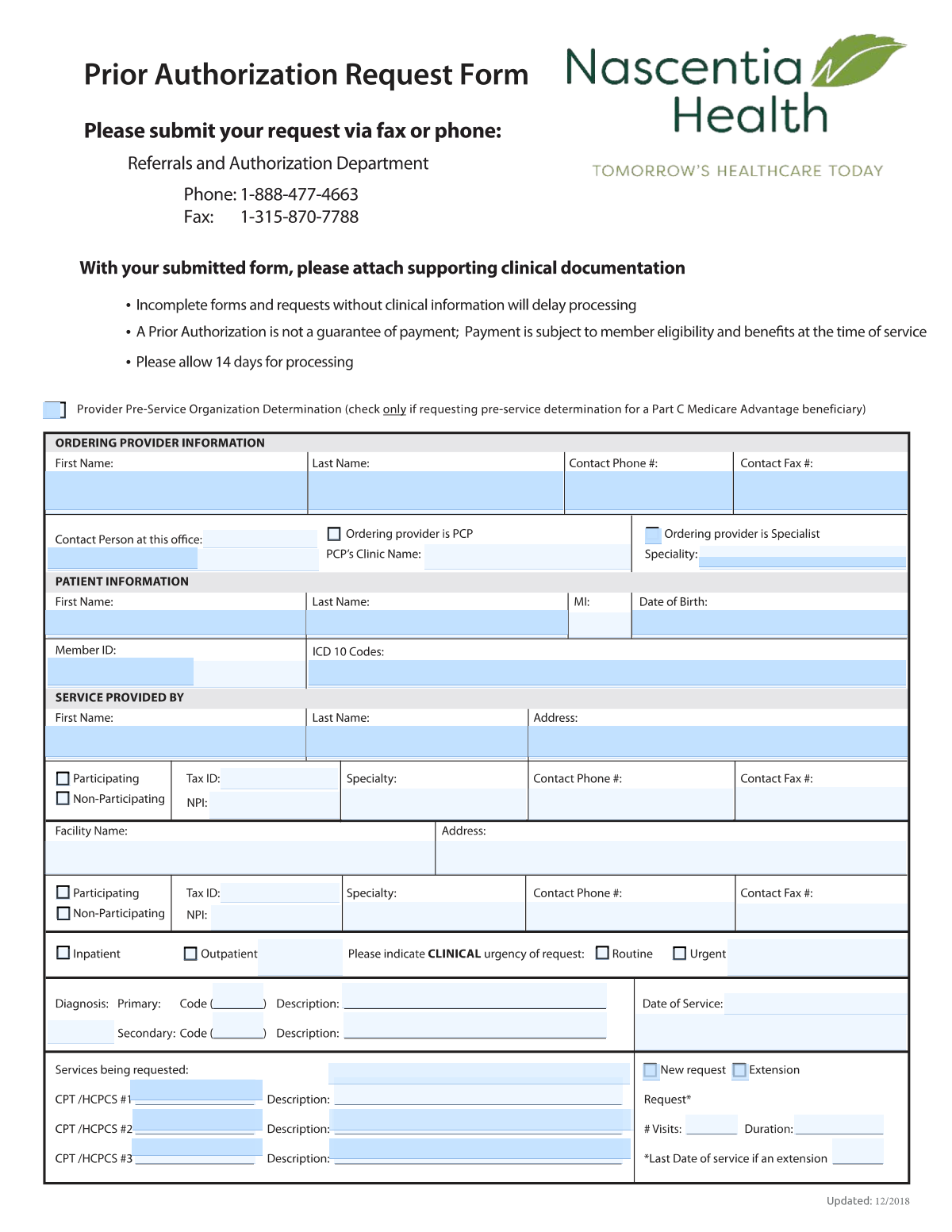
Yes! You can use AI to fill out Provider Pre-Service Organization Determination Request Form
This form is a formal request submitted by a healthcare provider to a patient's insurance plan to obtain pre-approval for specific medical services, procedures, or medications. It is crucial for ensuring that the proposed treatment is deemed medically necessary and will be covered by the insurance plan, which helps prevent unexpected costs for the patient and claim denials for the provider. Today this form can be filled out quickly and accurately using AI-powered services like Instafill.ai, which can also convert non-fillable PDF versions into interactive fillable forms.
Our AI automatically handles information lookup, data retrieval, formatting, and form filling.
It takes less than a minute to fill out Prior Authorization Request using our AI form filling.
Securely upload your data. Information is encrypted in transit and deleted immediately after the form is filled out.
Form specifications
| Form name: | Provider Pre-Service Organization Determination Request Form |
| Number of pages: | 1 |
| Language: | English |
Instafill Demo: How to fill out PDF forms in seconds with AI
How to Fill Out Prior Authorization Request Online for Free in 2026
Are you looking to fill out a PRIOR AUTHORIZATION REQUEST form online quickly and accurately? Instafill.ai offers the #1 AI-powered PDF filling software of 2026, allowing you to complete your PRIOR AUTHORIZATION REQUEST form in just 37 seconds or less.
Follow these steps to fill out your PRIOR AUTHORIZATION REQUEST form online using Instafill.ai:
- 1 Navigate to Instafill.ai and upload or select the Prior Authorization Request form.
- 2 Provide the patient's information, including their name, date of birth, and insurance member ID.
- 3 Enter details for the ordering provider and the servicing provider or facility, including names, NPIs, and contact information.
- 4 Input the relevant diagnosis codes (ICD-10) and the specific procedure codes (CPT/HCPCS) for the services being requested.
- 5 Specify the request details, such as the service setting, clinical urgency, number of visits, and duration of the request.
- 6 Use the AI assistant to review all entered information for accuracy and completeness, ensuring all required fields are filled correctly.
- 7 Securely submit the completed form to the insurance payer and download a copy for your records.
Our AI-powered system ensures each field is filled out correctly, reducing errors and saving you time.
Why Choose Instafill.ai for Your Fillable Prior Authorization Request Form?
Speed
Complete your Prior Authorization Request in as little as 37 seconds.
Up-to-Date
Always use the latest 2026 Prior Authorization Request form version.
Cost-effective
No need to hire expensive lawyers.
Accuracy
Our AI performs 10 compliance checks to ensure your form is error-free.
Security
Your personal information is protected with bank-level encryption.
Frequently Asked Questions About Form Prior Authorization Request
This form is used by healthcare providers to request prior authorization for medical services. It ensures that the proposed treatment is reviewed for medical necessity and approved for coverage by the patient's insurance plan before the service is performed.
The form should be completed by the healthcare provider's office. This could be the ordering provider who prescribed the service, the individual service provider, or the administrative staff at the facility where the service will take place.
The 'Ordering Provider' is the clinician who requests or prescribes the service for the patient. The 'Service Provider' is the individual practitioner or facility that will actually perform the requested medical service.
Select 'New request' if you are seeking authorization for a service for the first time. Choose 'Extension' if you are requesting to continue a service that has a current or recently expired prior authorization.
You should only mark a request as 'Urgent' if a delay in receiving the service could seriously jeopardize the patient's life, health, or ability to regain maximum function. Be prepared to provide specific clinical details to justify the urgency.
These codes are part of standardized medical coding systems. The appropriate ICD-10 (diagnosis) and CPT/HCPCS (procedure) codes should be provided by the ordering clinician or your office's medical billing and coding staff.
You will need the provider's or facility's full name, address, specialty, and contact information. You must also provide their National Provider Identifier (NPI) and Tax ID number.
A 'Participating' provider is in-network with the patient's insurance plan, while a 'Non-Participating' provider is out-of-network. This status can affect the patient's coverage and out-of-pocket costs.
This form allows you to request up to three distinct services or procedures. Each service requires its own CPT/HCPCS code and description in the designated rows.
The NPI is a unique 10-digit identification number for healthcare providers required by HIPAA for all administrative and financial transactions. It is essential for correctly identifying the provider and processing the authorization request.
Yes, services like Instafill.ai use AI to accurately auto-fill form fields, which saves time and helps prevent errors. This is especially useful for entering repetitive information like provider and patient details.
You can use a service like Instafill.ai to fill the form online. Simply upload a scan or PDF of the form, and the platform will allow you to type directly into the fields or use AI to auto-fill them.
If your PDF is not fillable, you can use a tool like Instafill.ai to make it interactive. Upload the flat PDF, and the service will automatically convert it into a fillable form you can complete on your computer.
Compliance Prior Authorization Request
Validation Checks by Instafill.ai
1
NPI Number Format and Validity
This check ensures that both the individual and facility National Provider Identifier (NPI) fields contain a valid 10-digit number. The NPI is a critical unique identifier for healthcare providers, and an incorrect or improperly formatted number will prevent claim processing and provider verification. If the NPI is invalid, the submission should be rejected with an error prompting the user to enter a valid 10-digit NPI.
2
Mutually Exclusive Provider Network Status
Validates that for both the individual provider and the facility, only one of the 'Participating' or 'Non-Participating' checkboxes is selected. Selecting both or neither is an invalid state that creates ambiguity about the provider's network status, which is crucial for determining benefits and coverage. A validation failure should require the user to select exactly one option for each provider type.
3
Conditional Requirement for Extension Request
This check enforces a logical rule: if the 'Extension' checkbox is selected, the 'Last Date of Service (if extension)' field must be populated with a valid date. This date is essential for continuity of care and for verifying that the new request is a valid continuation of a previous authorization. If 'Extension' is checked and the date is missing, the form cannot be submitted.
4
Patient Date of Birth Plausibility
Ensures the 'Date of Birth' field contains a valid date that is in the past and represents a plausible age for a patient (e.g., not more than 120 years ago). This prevents data entry errors like future dates or typos that would lead to patient identification failures. An invalid or implausible date would trigger an error message asking for correction.
5
CPT/HCPCS Code and Description Pairing
For each service row (1, 2, and 3), this validation ensures that if a CPT/HCPCS code is entered, its corresponding description field is also filled out, and vice-versa. Submitting a code without a description or a description without a code creates an incomplete and unprocessable service line. The check ensures each requested service is fully defined.
6
Primary Diagnosis Code Consistency
This validation cross-references the 'Primary Diagnosis Code' against the list of codes entered in the 'ICD-10 Codes' field. The primary diagnosis must be one of the diagnoses listed for the patient on this request. This maintains logical consistency and ensures the main reason for the service is properly documented among the patient's conditions.
7
Mutually Exclusive Urgency Status
Verifies that either the 'Routine' checkbox or the 'Urgent (Clinical Urgency)' checkbox is selected, but not both. The urgency status dictates the review timeline and is a critical processing instruction. An ambiguous or dual status would halt the review process, so the system must enforce a single, clear choice.
8
Conditional Requirement for Urgent Request Details
If the 'Urgent (Clinical Urgency)' checkbox is selected, this check ensures the 'Clinical Urgency Details' text field is not empty. This justification is required by payers to process a request on an expedited basis. Failure to provide this detail when claiming urgency will result in a validation error, preventing submission until the justification is provided.
9
Standard Phone and Fax Number Format
This check validates that all telephone and fax number fields are entered in a recognizable format (e.g., 10 digits with or without parentheses, spaces, or dashes). Correctly formatted contact numbers are essential for communication regarding the authorization request. An invalid format would trigger an error and require the user to re-enter the number.
10
Tax ID (TIN/EIN) Format Validation
Ensures that the 'Tax ID' for the individual provider and the 'Facility Tax ID' both adhere to the standard 9-digit format of a US federal Tax Identification Number. This ID is crucial for financial processing, billing, and provider identity verification. An incorrectly formatted Tax ID would cause payment and processing failures downstream.
11
Mutually Exclusive Ordering Provider Type
This check ensures that the user selects either 'Ordering provider is PCP' or 'Ordering provider is Specialist', but not both. This distinction is important for routing, applying plan rules, and understanding the care context. The system should prevent submission if neither or both options are checked.
12
Primary Service Request Completeness
Validates that at a minimum, 'Row 1 CPT/HCPCS Code' and its corresponding 'Row 1 Service Description' are filled out. A prior authorization request is meaningless without at least one service being requested. This check prevents the submission of empty or incomplete forms.
13
Patient Name Completeness
This validation ensures that the 'Patient First Name' and 'Patient Last Name' fields are not left blank. These fields are the most fundamental pieces of information for identifying the correct member and linking the authorization to their health record. A submission without a complete patient name is invalid and must be rejected.
14
Number of Visits Data Type
This check verifies that the value entered in the 'Number of Visits Requested' field is a positive integer. Requesting a negative, zero, or fractional number of visits is illogical and would cause processing errors. The validation ensures the requested quantity is a valid, whole number appropriate for scheduling and authorization.
Common Mistakes in Completing Prior Authorization Request
This error occurs when the 5-character CPT/HCPCS code entered does not match its corresponding written description on the same line. This is often a copy-paste or manual data entry error that creates ambiguity and signals a mistake to the reviewer. A mismatch will almost certainly lead to a request for clarification or an outright denial, delaying patient care. To avoid this, always double-check that the code and its description are an exact match for each service line before submitting.
Users sometimes list a secondary condition in the 'Primary Diagnosis Code' field or fail to list the most relevant diagnosis first. The primary diagnosis must be the main condition that establishes the medical necessity for the requested service(s). An incorrect primary diagnosis can lead to a denial because the payer's system will not see a valid clinical reason for the procedure. Always ensure the ICD-10 code that directly supports the requested service is entered as the primary diagnosis.
Simple typographical errors, such as transposing digits in the National Provider Identifier (NPI) or Tax ID, are very common. Users may also mistakenly enter an individual provider's NPI in the facility NPI field. These identifiers are critical for verifying the provider and processing payments, so an error will cause the request to be rejected or misrouted. Carefully verify each digit and ensure the correct ID type (individual vs. facility) is entered in the appropriate field.
This form contains several fields that are only required if a specific box is checked, such as providing 'Clinical Urgency Details' for an 'Urgent' request or the 'Last Date of Service' for an 'Extension'. Users often check the box but forget to fill in the corresponding detail field. This omission results in an incomplete submission, causing processing delays while the payer requests the missing information. To prevent this, review all checked boxes and confirm that any dependent fields are filled out completely.
Entering a patient's nickname instead of their legal name, misspelling the name, or making a typo in the 'Member ID' are frequent mistakes. These identifiers are the primary way the insurance plan locates the patient's file and benefits information. Any mismatch between the form and the insurer's records will result in an immediate failure to find the member, halting the authorization process. Always copy the patient's full legal name and Member ID exactly as they appear on the insurance card.
Staff may be unsure of a provider's or facility's network status and incorrectly check the 'Participating' or 'Non-Participating' box. This has significant financial implications, as it determines the patient's cost-sharing and whether the service is covered at in-network or out-of-network rates. An error can lead to incorrect benefit application and unexpected bills for the patient. Always verify the provider's and facility's current network status with the specific insurance plan before submitting.
This form distinguishes between the 'Ordering Provider' and the 'Service Provider'. It's common for users to enter the same provider in both sections when they are different, or to mix up their NPIs, addresses, and contact details. This confusion can lead to processing errors, as the payer needs to verify the roles and credentials of each entity. Carefully distinguish between the provider ordering the service and the one performing it, entering their unique details in the correct sections.
Medical billing codes (ICD-10 for diagnoses, CPT/HCPCS for procedures) are updated annually, and using a deleted or invalid code is a common reason for automatic denial. This often happens when staff rely on memory or outdated lists instead of current coding resources. A submission with an invalid code cannot be processed and will be immediately rejected. Using an AI-powered tool like Instafill.ai can help prevent this by validating codes against current databases.
Users may forget to enter the 'Date(s) of Service' or provide a vague 'Duration of Request' like 'ongoing'. Payers require specific timeframes to authorize services and determine eligibility for a given period. Leaving these fields blank or ambiguous will lead to a request for more information, delaying approval. Always provide a specific start and end date, or a clear number of visits and duration (e.g., '6 visits over 3 months').
If this form is only available as a flat, non-fillable PDF, users must print it and fill it out by hand, leading to illegible handwriting and alignment errors. This makes it difficult for the payer to accurately read the data, causing significant delays and transcription mistakes. To avoid this, use a tool like Instafill.ai, which can convert non-fillable PDFs into interactive, fillable forms, ensuring all entries are clean, legible, and correctly placed.
Saved over 80 hours a year
“I was never sure if my IRS forms like W-9 were filled correctly. Now, I can complete the forms accurately without any external help.”
Kevin Martin Green
Your data stays secure with advanced protection from Instafill and our subprocessors

Robust compliance program
Transparent business model
You’re not the product. You always know where your data is and what it is processed for.
ISO 27001, HIPAA, and GDPR
Our subprocesses adhere to multiple compliance standards, including but not limited to ISO 27001, HIPAA, and GDPR.
Security & privacy by design
We consider security and privacy from the initial design phase of any new service or functionality. It’s not an afterthought, it’s built-in, including support for two-factor authentication (2FA) to further protect your account.
Fill out Prior Authorization Request with Instafill.ai
Worried about filling PDFs wrong? Instafill securely fills provider-pre-service-organization-determination-request-form forms, ensuring each field is accurate.