
Yes! You can use AI to fill out Form SS-8, Determination of Worker Status
Don't type 312 fields by hand. Tell our AI about yourself, or upload a document you already have, and it fills every field in seconds. You check it, then download, print or sign.
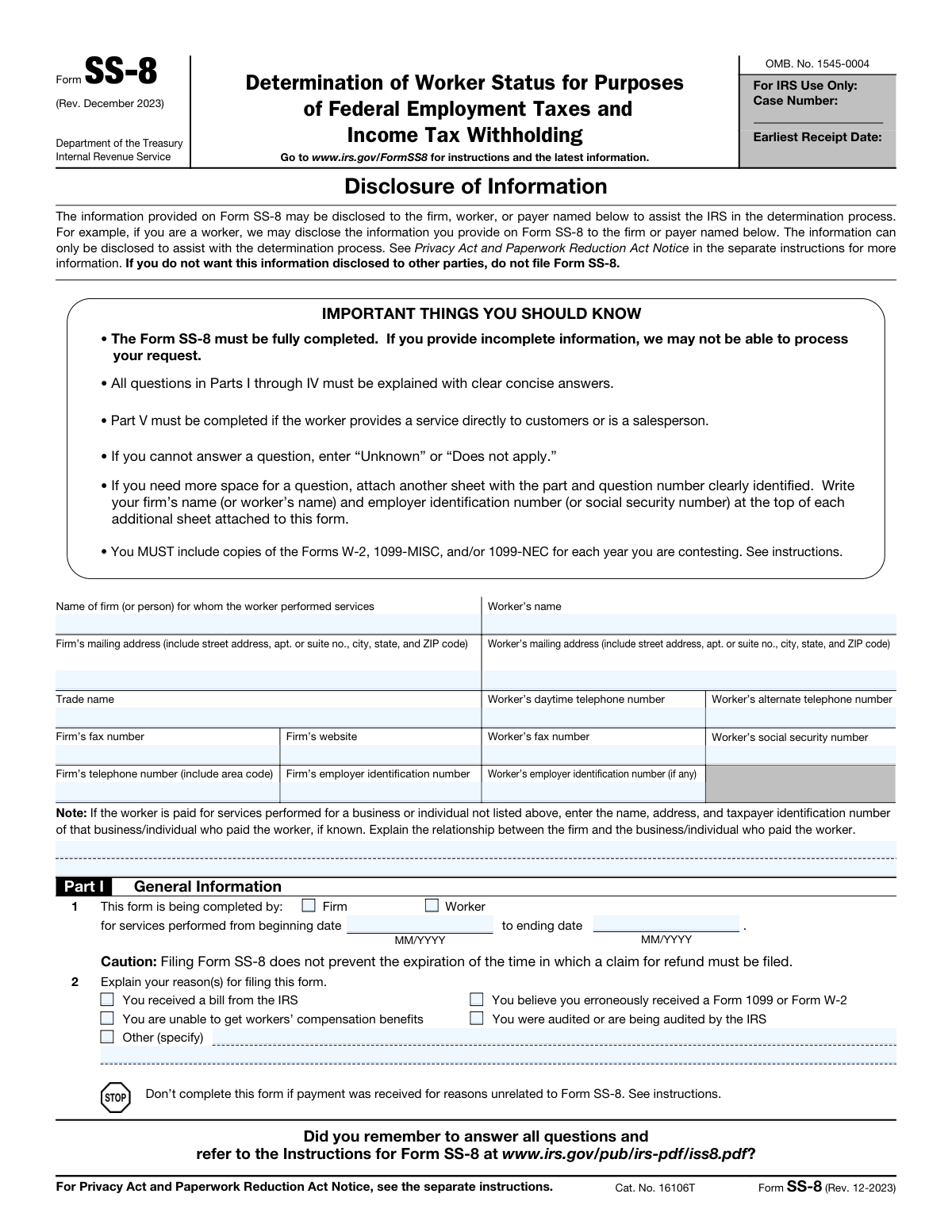
The AI does the filling. You just check it.
No typing into boxes, nothing to install.
What this form asks for
The AI fills all of it, from your answers or your documents.
The AI checks your answers before you download
15 checks built for this form, so a wrong date or a missing answer is caught before anyone else sees it.
The AI ensures that all questions in Parts I through IV, and Part V if applicable, are completed. It meticulously scans each section to confirm no items are left unanswered, providing prompts or alerts if any required information is missing. The AI cross-references responses with known data to maintain consistency across the form. It also checks for logical progression between parts to ensure that the information flows correctly and is coherent.
The AI confirms that 'Does not apply' or 'Unknown' is entered for any question that is not applicable or is unknown. It intelligently identifies questions that may not pertain to every situation and allows for these specific responses. The system is designed to recognize various ways in which a user might indicate a non-applicable or unknown response and standardizes them to the required format. This ensures clarity and prevents any potential confusion during the review process.
The AI verifies that additional sheets used for extra information are clearly identifying the part and question number. It checks for the presence of identifiers on supplementary pages and ensures they correspond accurately to the relevant sections of the form. The AI also reviews the layout and organization of the additional information to confirm that it is easily navigable and understandable in the context of the main form.
The AI checks that copies of Forms 1099-MISC, 1099-NEC, W-2, or other relevant documents are attached for the years in question. It scans for the presence of these documents and verifies their relevance to the form's content. The AI also examines the documents for completeness and legibility, ensuring that all necessary information is present and can be clearly discerned.
The AI validates that the years services were provided to the firm are clearly stated in Part I. It reviews the dates for accuracy and relevance, confirming that they align with the information provided throughout the form. The AI also checks for consistency in date formatting and flags any discrepancies or ambiguities related to the service years.
The AI ensures that in the absence of standard tax documents such as Forms 1099 or W-2, alternative documentation of earnings is attached. It checks for the presence of supplementary evidence that substantiates the worker's income. This validation is crucial for establishing the financial aspect of the worker's status. The AI prompts the user to provide this information if it is missing, ensuring the form's completeness.
And 9 more checks
- Verifies that any significant changes in the work relationship over the service term are indicated in Part IV.
- Ensures that Part V is completed if the worker provided a service directly to customers or is a salesperson.
- Checks that the form is signed and dated by the taxpayer with an original handwritten or electronic signature.
- Confirms that the form is not filed if the taxpayer does not want the information disclosed to other parties.
- Verifies that the form is used to request a determination of the status of a worker under common law rules.
- Ensures that the form and attachments are mailed or faxed to the specified IRS address or fax number.
- Checks that a separate Form SS-8 is filed for each firm if requesting a determination for more than one firm.
- Validates that the firm completes a Form SS-8 if a worker has requested a determination or if the firm is requesting a determination.
- Confirms that the information provided on Form SS-8 is used to determine employment status and is required by law.
Let AI fill out your Form SS-8
No typing. Every field filled in seconds, checked, ready to sign.
How to Fill Out Form SS-8 Online for Free in 2026
What the AI walks you through.
- Visit instafill.ai site and select Form SS-8.
- Enter firm and worker's information.
- Provide details about the worker's job and duties.
- Complete all parts of the form accurately.
- Sign and date the form electronically.
- Check for accuracy and submit the form.
Common Mistakes in Completing Form SS-8
The ones the AI is built to catch.
Neglecting to sign and date the form
Omitting required information in Parts I through IV
Neglecting to attach relevant documents
Unnecessarily filing Form SS-8
Failing to indicate significant changes in the work relationship in Part IV
Expired Statute of Limitations for Filing a Claim for Refund
Incorrect Address or Fax Number
Ignoring Instructions for Workers or Firms
Missing or Improper Signature
Neglecting to Complete Part V
Filing Form SS-8 for multiple firms without indicating so
Not understanding the limitations of Form SS-8 and its inability to provide relief from employment taxes
Frequently Asked Questions About Form SS-8
Is it really free for 7 days?
Can I fill other forms too?
How do I cancel?
How does the AI fill out Form SS-8?
What happens to my information?
How complex is Form SS-8 to fill out?
What is the purpose of Form SS-8, Determination of Worker Status?
Who should complete Form SS-8?
What information is required in Part I of Form SS-8?
Why should Form SS-8 be filed?
What documents should be attached to Form SS-8?
What is the difference between an employee and an independent contractor?
What is the role of Part II in Form SS-8?
What is the role of Part III in Form SS-8?
What is the role of Part IV in Form SS-8?
What is the purpose of Part V in Form SS-8?
What is the significance of the signature and date at the end of Form SS-8?
How long does it take for the IRS to make a determination on Form SS-8?
Can Form SS-8 be filed electronically?
What happens if the IRS determines that the worker was misclassified?
Get your Form SS-8 filled out by AI
$0 today. Cancel before Nov 2 and you pay nothing.
Other forms like this one
employment forms: Form I-765, Application for Employment Authorization, Form CMS L564, Request for Employment Info, Form OF-306, Declaration for Federal Employment, Form NYS DHR, Employment Complaint Form, Form AO 78, Application for Employment, Illinois State Board of Education (ISBE) Application for Employment (ISBE 61-08), Prudential Group Disability Insurance – Education and Employment History Form (GL.2009.009, Ed. 06/2017), HR-Pol-Rec&Res-04 Employment Application Form (Recruitment of Permanent Employees), City of Carlinville Application for Employment (An Equal Opportunity Employer), U.S. Equal Employment Opportunity Commission (EEOC) Form 453, Recommendation for Recognition, The Prudential Insurance Company of America Group Disability Insurance – Education and Employment History Form (GL.2009.009, Ed. 06/2017), St. Paul’s Hospital Application for Employment (職位申請表) – SPHF-HRD-035, U.S. Equal Employment Opportunity Commission (EEOC) Form 453, Recommendation for Recognition, Prudential Group Disability Insurance – Education and Employment History Form (GL.2009.009, Ed. 06/2017), Claim for Special Employment Advance (SU514), New York State Employment Application: Part 1 – Pre-Interview (Form #S1000), New York State Employment Application Form, Sidney Sussex College Cambridge, Application for Employment, Z83, Application for Employment in the Republic of South Africa Government Department, ENVIRONMENTAL MONITORING LABORATORY, LLC Employment Application
employment tax forms: P87: Tax relief for expenses of employment
federal forms: Form CA-1, Federal Employee's Notice of Traumatic Injury, Form 720, Quarterly Federal Excise Tax Return, Form OF-306, Declaration for Federal Employment, Form 945, Annual Return of Withheld Federal Income Tax, Form 941, Employer’s Quarterly Federal Tax Return, Form 941-X (Rev. April 2023), Adjusted Employer’s QUARTERLY Federal Tax Return or Claim for Refund, Personal Financial Statement (REV 06/2018) – Northwest Federal Credit Union, Income-Driven Repayment (IDR) Plan Request (PAYE, IBR, and ICR) — William D. Ford Federal Direct Loan (Direct Loan) Program and Federal Family Education Loan (FFEL) Programs (OMB No. 1845-0102), Direct Consolidation Loan Request to Add Loans (William D. Ford Federal Direct Loan Program) (OMB No. 1845-0007), Form 941, Employer's QUARTERLY Federal Tax Return (Rev. March 2025), Loan Rehabilitation: Income and Expense Information, William D. Ford Federal Direct Loan (Direct Loan) Program/Federal Family Education Loan (FFEL) Program, 2026–27 FAFSA® Form, Free Application for Federal Student Aid, Form OF-612, Optional Application for Federal Employment, Navy Federal Voluntary Removal of Joint Owner Request, FS Form 5179, Legacy Treasury Direct Security Transfer Request, Formato de Inscripción al Registro Federal De Contribuyentes a Través de Oficina Virtual, Free Application for Federal Student Aid (FAFSA), Navy Federal Change of Information/Add Joint Owner (for primary account holders 18 and over), Form 941-X, Adjusted Employer’s QUARTERLY Federal Tax Return or Claim for Refund, Optional Form 306, Declaration for Federal Employment
federal employment forms: Form OF-306, Declaration for Federal Employment, Form OF-612, Optional Application for Federal Employment, Optional Form 306, Declaration for Federal Employment
Work and Income forms: Commonwealth Seniors Health Card (CSHC) Income Test and Dependent Child Worksheet
income forms: Form SSA-44, Medicare Income-Related Monthly Adjustment Amount - Life-Changing Event, Form 1040-X, Amended U.S. Individual Income Tax Return, Form 1040-C, U.S. Departing Alien Income Tax Return, Form 4137, Social Security and Medicare Tax on Unreported Tip Income, Form 8960, Net Investment Income Tax, Form 1042-S, Foreign Person’s U.S. Income, Form 990-T, Exempt Org Business Income Tax Return, Form 945, Annual Return of Withheld Federal Income Tax, Form 568, LLC Income Return, Form FTB 3514, California Earned Income Tax Credit, Form 1099-INT, Interest Income, Form 1120-S, U.S. Income Tax Return for an S Corporation, Form 1065, U.S. Return of Partnership Income, Form 1040, U.S. Individual Income Tax Return, Form FL-150, Income and Expense Declaration, Form 122A-1, Chapter 7 Statement of Current Monthly Income, Arizona Form 285-I, Individual Income Tax Disclosure/Representation Authorization Form, Form SSA-8000-BK, Application for Supplemental Security Income (SSI), Judicial Council of California Form FL-150, Income and Expense Declaration, Form 1120-S (2025), U.S. Income Tax Return for an S Corporation
income tax forms: Form 1040-X, Amended U.S. Individual Income Tax Return, Form 1040-C, U.S. Departing Alien Income Tax Return, Form 4137, Social Security and Medicare Tax on Unreported Tip Income, Form 8960, Net Investment Income Tax, Form 990-T, Exempt Org Business Income Tax Return, Form 945, Annual Return of Withheld Federal Income Tax, Form FTB 3514, California Earned Income Tax Credit, Form 1120-S, U.S. Income Tax Return for an S Corporation, Form 1040, U.S. Individual Income Tax Return, Arizona Form 285-I, Individual Income Tax Disclosure/Representation Authorization Form, Form 1120-S (2025), U.S. Income Tax Return for an S Corporation, Form 1120 (2025), U.S. Corporation Income Tax Return, 2023 Schedule IL-E/EIC, Illinois Exemption and Earned Income Tax Credit (Illinois Department of Revenue), 2023 Form IL-1040-X, Amended Individual Income Tax Return (Illinois Department of Revenue), Form APL-505, Taxpayer’s Earned Income Tax Credit Protest, Form 1120-H, U.S. Income Tax Return for Homeowners Associations, Form 1040, U.S. Individual Income Tax Return (2025), T2 Corporation Income Tax Return, Form 1040-X, Amended U.S. Individual Income Tax Return, Form TC-40, Utah Individual Income Tax Return
federal tax forms: Form 720, Quarterly Federal Excise Tax Return, Form 945, Annual Return of Withheld Federal Income Tax, Form 941, Employer’s Quarterly Federal Tax Return, Form 941-X (Rev. April 2023), Adjusted Employer’s QUARTERLY Federal Tax Return or Claim for Refund, Form 941, Employer's QUARTERLY Federal Tax Return (Rev. March 2025), Form 911, Request for Taxpayer Advocate Service Assistance (And Application for Taxpayer Assistance Order), Form 941-X, Adjusted Employer’s QUARTERLY Federal Tax Return or Claim for Refund, Form 2290, Heavy Highway Vehicle Use Tax Return
tax withholding forms: Form W-8BEN-E, Certificate of Status of Beneficial Owner for United States Tax Withholding and Reporting (Entities), Form 8288, U.S. Withholding Tax Return, Form W-8IMY (Rev. October 2021), Certificate of Foreign Intermediary, Foreign Flow-Through Entity, or Certain U.S. Branches for United States Tax Withholding and Reporting, Form W-4P (2026), Withholding Certificate for Periodic Pension or Annuity Payments, Form 8288, U.S. Withholding Tax Return for Certain Dispositions by Foreign Persons, Arizona Form A1-QRT, Arizona Quarterly Withholding Tax Return, Form W-8BEN-E, Certificate of Status of Beneficial Owner, Form 4506-W, Request for Copy of Withholding Tax Forms
withholding forms: Excess Withdrawal Request and Form W-4R, Withholding Certificate for Nonperiodic Payments and Eligible Rollover Distributions, Form W-4, Employee's Withholding Certificate, Form 593, Real Estate Withholding, Form 8288, U.S. Withholding Tax Return, Form I-589, Application for Asylum and for Withholding of Removal, Form W-4P, Withholding Certificate, Form W-8IMY (Rev. October 2021), Certificate of Foreign Intermediary, Foreign Flow-Through Entity, or Certain U.S. Branches for United States Tax Withholding and Reporting, Form W-8BEN-E, Certificate of Status of Beneficial Owner for United States Tax Withholding and Reporting (Entities), Form W-4P (2026), Withholding Certificate for Periodic Pension or Annuity Payments, Form 8288, U.S. Withholding Tax Return for Certain Dispositions by Foreign Persons, Form W-4V, Voluntary Withholding Request, Arizona Form A1-QRT, Arizona Quarterly Withholding Tax Return, Form DE 4, Employee's Withholding Allowance Certificate, Form DE 4, Employee’s Withholding Allowance Certificate (Rev. 53), Form DE 4, Employee’s Withholding Allowance Certificate (Rev. 56), Form W-8BEN-E, Certificate of Status of Beneficial Owner
employment income forms: Form 204B, Statement of Self-Employment Income
ERM forms: REQUEST FOR OWNERSHIP INFORMATION—ERM-14 FORM, Form I-90, Application to Replace Permanent Resident Card, Form I-485, Application to Register Permanent Residence, Form CMS-1763, Request for Termination of Medicare Coverage, Form I-212, Application for Permission to Reapply, Form I-192, Application for Advance Permission to Enter as a Nonimmigrant, Form W-8IMY (Rev. October 2021), Certificate of Foreign Intermediary, Foreign Flow-Through Entity, or Certain U.S. Branches for United States Tax Withholding and Reporting, County of Louisa Department of Community Development – New Non-Residential Building Permit Package, Application Schedule 1: Designer Information (City of Toronto Building Permit Application), HR-Pol-Rec&Res-04 Employment Application Form (Recruitment of Permanent Employees), Fauquier County Department of Community Development – Building Trades Permit or Amendment to Existing Permit Application (Residential or Commercial), Belastingdienst VPB 075 – Verzoek fiscale eenheid Vennootschapsbelasting (Deel A – Gegevens moedermaatschappij), ROTC Cadet Academic Plan / Degree and Credit Hour Worksheet (Student Identification, Term-by-Term Courses, GPA Summary, and Completion Certification), Health Assessment – Ontario Health atHome (Fixing Long-Term Care Act, 2021) (Form 4768-69E), Health Assessment - Ontario Health atHome (Fixing Long-Term Care Act, 2021) — Form 4768-69E, Washington Single-Family Property Term Lease & Security Deposit Receipt (WA Single-Family Lease) | Revised 10/08/2025, Application for Mechanical Permit, Pennsylvania Department of State — Certificate of Termination (Domestic Limited Liability Company) (15 Pa.C.S. § 8872(f)) (DSCB:15-8872(f)), Document Checklist for a Study Permit (IMM 5483), City of Raleigh Residential Permit Application (Revision 08-20-2025)
Let AI fill out your Form SS-8
Your trial starts once a card is added. You pay nothing before Nov 2.
Our AI already knows this form, all 312 fields of it. Skip the typing: tell it about yourself, or upload what you have, and it fills the whole form in seconds.
- AI fills every field on all 5 pages, checkboxes included
- No typing into boxes: answer a few questions, or upload a document you already have, an old copy of this form, a photo of a document
- The AI checks the answers; you review and change anything before you download
- Download the finished PDF, print it, or sign it online
- Encrypted, and never used to train AI
Cancel before Nov 2 and you pay nothing.
A card is needed to start the trial. Cancel in two clicks from your account.
Terms · Privacy