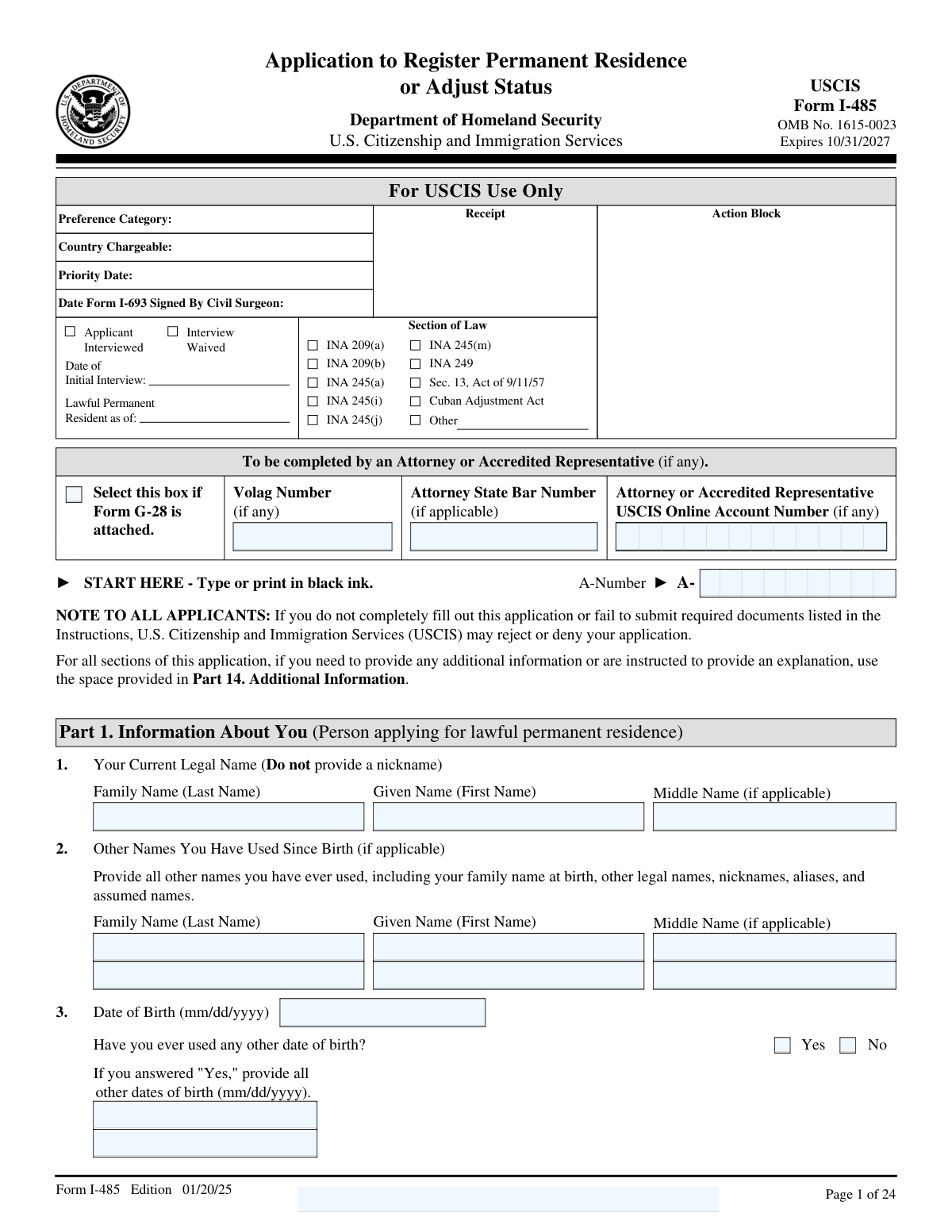
Yes! You can use AI to fill out Form I-485, Application to Register Permanent Residence or Adjust Status
Form I-485 is the official USCIS application to register permanent residence or adjust status to lawful permanent resident (LPR) while you are in the United States. It is a central “green card” filing that ties your eligibility category (family, employment, humanitarian, special programs, etc.) to detailed personal history, immigration history, and inadmissibility/public-charge screening. USCIS uses the form and supporting evidence to decide whether you qualify to adjust status under the Immigration and Nationality Act and whether any bars or grounds of inadmissibility apply. Completing it accurately is important because inconsistencies or missing evidence can lead to rejection, delays, requests for evidence, or denial.
Our AI automatically handles information lookup, data retrieval, formatting, and form filling.
It takes less than a minute to fill out I-485 using our AI form filling.
Securely upload your data. Information is encrypted in transit and deleted immediately after the form is filled out.
Form specifications
| Form name: | Form I-485, Application to Register Permanent Residence or Adjust Status |
| Number of pages: | 24 |
| Language: | English |
Instafill Demo: filling out a legal form in seconds
How to Fill Out I-485 Online for Free in 2026
Are you looking to fill out a I-485 form online quickly and accurately? Instafill.ai offers the #1 AI-powered PDF filling software of 2026, allowing you to complete your I-485 form in just 37 seconds or less.
Follow these steps to fill out your I-485 form online using Instafill.ai:
- 1 Select your filing basis and category (Part 2) and confirm whether you are a principal or derivative applicant; gather underlying petition details (receipt number, priority date) if applicable.
- 2 Enter your identity and immigration history (Part 1), including legal name(s), A-Number/USCIS online account number, passport/I-94 details, last entry information, and current immigration status.
- 3 Provide address history and Social Security card requests/consents (Part 1), including current physical and mailing addresses and prior addresses as required.
- 4 Complete eligibility-related sections: affidavit of support exemption request if applicable (Part 3), prior immigrant visa/permanent residence history, and 5-year employment/education history (Part 4), plus parents, marital history, and children (Parts 5–7).
- 5 Fill in biographic information (Part 8) and answer all inadmissibility/eligibility questions (Part 9), adding clear explanations in Part 14 for any “Yes” answers or uncertain responses.
- 6 Review, certify, and sign (Part 10), and if used, complete interpreter and preparer sections (Parts 11–12); attach required supporting documents (and any additional sheets labeled per Part 14 instructions) before final submission.
Our AI-powered system ensures each field is filled out correctly, reducing errors and saving you time.
Why Choose Instafill.ai for Your Fillable I-485 Form?
Speed
Complete your I-485 in as little as 37 seconds.
Up-to-Date
Always use the latest 2026 I-485 form version.
Cost-effective
No need to hire expensive lawyers.
Accuracy
Our AI performs 10 compliance checks to ensure your form is error-free.
Security
Your personal information is protected with bank-level encryption.
Frequently Asked Questions About Form I-485
Form I-485 is the application to register for lawful permanent residence (get a Green Card) or to adjust status to permanent resident while you are in the United States. USCIS uses it to determine whether you are eligible under a specific immigration category and whether any inadmissibility issues apply.
You file Form I-485 if you are physically in the United States and eligible to become a lawful permanent resident under a category listed in Part 2 (for example, family-based, employment-based, asylee/refugee adjustment, special immigrant, or other programs). Derivative applicants (certain spouses/children) may also file based on the principal applicant’s category.
A principal applicant is the main person qualifying for the immigrant category (for example, the worker on an I-140 or the relative on an I-130). A derivative applicant is a qualifying family member applying through the principal applicant and must provide the principal applicant’s identifying information in Part 2.
Yes. Part 2 instructs you to select ONLY ONE category as the basis for your adjustment application, even if you may have more than one possible basis.
The receipt number is the USCIS case number for the immigrant petition or application that supports your I-485 (if any). The priority date is the date used for visa availability in many categories and is typically shown on the underlying petition approval/receipt notice.
Your A-Number (Alien Registration Number) is usually on USCIS notices, an Employment Authorization Document, or other immigration documents. Your USCIS Online Account Number (if any) appears on USCIS notices if you created/used an online account; if you don’t have one, you can leave it blank.
Use the information from your most recent entry to the United States, including the date of last arrival, class of admission or parole, and the I-94 number and expiration (or “D/S” if shown). If you entered without admission or parole, select the option stating you came in without admission or parole.
In Part 1 (Addresses), answer whether your physical address is also your mailing address. If it is not, provide your current mailing address in the separate mailing address section (this can be a safe or alternate mailing address).
Yes, if you have not lived at your current address for at least 5 years, you must provide prior addresses covering the last 5 years. If you need more space, you should continue in Part 14 (Additional Information).
If SSA has ever issued you a Social Security card, answer “Yes” and provide your SSN. If you want SSA to issue you a card, you must answer “Yes” to the consent for disclosure authorizing USCIS to share information with SSA for SSN/card issuance.
Many family-based applicants must submit Form I-864 unless they qualify for an exemption. Part 3 is where you request an exemption (for example, 40 qualifying quarters, certain children who will automatically become U.S. citizens, widows/widowers, or VAWA self-petitioners) or indicate that no exemption applies.
You must provide ALL employment and educational history for the last 5 years, starting with your current or most recent activity. Include self-employment, unemployment, or retirement, and for unemployment/retirement list your source of financial support; use Part 14 if you need extra space.
Yes. Part 7 defines “children” broadly and requires you to list ALL living children anywhere in the world (including adult children, stepchildren, adopted children, and children not living with you), whether or not they are applying.
You should still answer truthfully and then provide a detailed explanation in Part 14, including dates, locations, what happened, and the outcome/disposition. The form notes that you must disclose incidents even if records were sealed, expunged, or you were told you no longer have a record.
Only if you are subject to the public charge ground of inadmissibility and you do not qualify for one of the listed exemptions in Item 56. If you are exempt (for example, asylee, refugee, VAWA, SIJ, certain T/U-related categories, registry, and other listed groups), select the exemption and skip Items 57–66.
You (the applicant) must sign and date in Part 10; USCIS can reject or deny an unsigned form. If you used an interpreter, the interpreter must complete and sign Part 11, and if someone else prepared the form, the preparer must complete and sign Part 12.
No. The form states not to complete Part 13 until a USCIS officer instructs you to do so at the interview.
Compliance I-485
Validation Checks by Instafill.ai
1
Validates applicant legal name fields are complete and not nicknames
Checks that Part 1 Item 1 includes a non-empty Family Name and Given Name, and that the entry does not contain obvious nickname indicators (e.g., quotes, parentheses like "(Mike)", or prefixes such as "aka"). This matters because USCIS requires the current legal name and uses it for identity matching across records. If validation fails, flag the submission for correction and require the applicant to move alternate names to “Other Names You Have Used.”
2
Enforces conditional completion for “Other Names You Have Used”
If the applicant indicates they have used other names (or provides any data in Part 1 Item 2), validate that each listed name has at least a Family Name and Given Name, and that blank placeholder rows are not partially filled. This is important for background checks and record linkage (aliases, maiden names, assumed names). If the rule fails, reject the row as incomplete and require either full completion or removal of the partial entry.
3
Validates Date of Birth format and plausibility, including alternate DOB logic
Validates that all DOB fields use mm/dd/yyyy, represent a real calendar date, and are not in the future; also checks for reasonable age bounds (e.g., 0–120 years). If “Have you ever used any other date of birth?” is answered “Yes,” then at least one additional DOB must be provided and must differ from the primary DOB. If validation fails, block submission until corrected because DOB is a primary identifier used for eligibility and security screening.
4
Validates A-Number format and cross-field consistency
Checks that any A-Number provided matches USCIS formatting rules (typically 7–9 digits, optionally with an “A-” prefix; no letters other than the prefix; no all-zero values). If the applicant answers “Do you have an A-Number?” = “No,” then the A-Number field must be blank; if “Yes,” it must be present. If “Have you ever used any other A-Number?” = “Yes,” then at least one additional A-Number must be provided and must not duplicate the primary A-Number; failures should trigger a hard error due to identity mismatch risk.
5
Validates passport/travel document fields and expiration logic
If the applicant provides a Passport/Travel Document Number for last arrival, require the issuing country and an expiration date in mm/dd/yyyy. The expiration date must be a valid date and should not precede the date of last arrival (unless the system allows historical expired documents with an explanation). If validation fails, require correction because travel document details are used to verify lawful entry and match arrival records.
6
Validates last arrival information and enforces mutually exclusive entry type selection
Ensures exactly one of the “admitted,” “paroled,” or “entered without admission or parole” options is selected for the most recent arrival, and that the corresponding class/description field is completed when admitted or paroled. Also validates that Date of Last Arrival is present and in mm/dd/yyyy, and that City/Town and State are provided for the place of last arrival. If validation fails, stop submission because entry classification affects eligibility and inadmissibility analysis.
7
Validates Form I-94 fields including D/S handling and status consistency
If an I-94 number is provided, validate it is numeric (and within expected length constraints) and that the name fields on the I-94 are not blank. For “Expiration Date of Authorized Stay,” enforce either a valid mm/dd/yyyy date or the exact value “D/S” (case-insensitive), and disallow other text. If validation fails, require correction because I-94 data is central to determining lawful status and authorized stay.
8
Validates address completeness and mailing/physical address dependency
Requires Current U.S. Physical Address to include street, city, state, and ZIP code (5 digits or ZIP+4), and a “Date You First Resided at This Address” in mm/dd/yyyy that is not in the future. If “Is this your current mailing address?” = “No,” then the Current Mailing Address must be fully completed; if “Yes,” the mailing address section should be blank or auto-copied to prevent conflicting addresses. If validation fails, flag as a blocking error because USCIS notices depend on accurate addresses.
9
Validates 5-year address history coverage and date range logic
If the applicant answers “Have you resided at your current address for at least 5 years?” = “No,” require prior address entries that collectively cover the last 5 years without gaps, with each “From” date earlier than the corresponding “To” date. Also validate the “Most Recent Address Outside the United States” is provided if applicable (lived outside the U.S. for more than one year) and includes country/province/postal code where relevant. If validation fails, require additional address history because incomplete residence history can delay background checks.
10
Validates Social Security Number format and SSA consent logic
If the applicant indicates SSA has issued a Social Security card, require an SSN in a valid 9-digit format (allowing hyphens) and disallow known invalid patterns (e.g., all zeros in any group). If the applicant requests SSA to issue a card, require “Consent for Disclosure” = “Yes”; if consent is “No,” the SSA card request must be “No.” If validation fails, block submission because SSA integration requires explicit consent and correct SSN formatting.
11
Validates application type/category selection is singular and internally consistent
Enforces that the applicant selects exactly one filing category in Part 2 Item 3 (one and only one of 3.a–3.g and the specific subcategory where applicable). If “Derivative Applicant” is selected, require principal applicant identifiers (name, DOB, and A-Number if any) and ensure the principal applicant fields are not filled when “Principal Applicant” is selected. If validation fails, reject because category drives eligibility rules, fees, and required evidence.
12
Validates EOIR/removal proceedings indicator and related fields consistency
If the applicant answers “Yes” to filing with EOIR while in proceedings (Part 2 Item 1), require supporting proceeding-related identifiers where the form expects them (e.g., underlying receipt number if applicable) and ensure the submission is routed to the correct processing workflow. Also cross-check with Part 9 removal proceeding questions (e.g., Item 14) for consistency; contradictory answers should be flagged. If validation fails, mark for manual review or block submission due to jurisdiction and procedural implications.
13
Validates Affidavit of Support exemption selection and required attachments logic
Requires exactly one checkbox selection in Part 3 (1.a–1.f). If 1.a (40 qualifying quarters) is selected, require an attachment indicator or upload for SSA earnings statements; if 1.b is selected, validate the applicant’s age derived from DOB is under 18 and marital status is not married. If validation fails, block submission because incorrect I-864 handling is a common rejection reason and affects statutory eligibility.
14
Validates employment/education history completeness for the last 5 years
Checks that Part 4 employment/education entries include employer/school name, occupation, address, and date ranges in mm/dd/yyyy with From ≤ To, and that the combined entries cover the last 5 years without unexplained gaps. If an entry indicates unemployed/retired, require “source of financial support” to be populated. If validation fails, require additional entries or explanations because USCIS uses this history for admissibility and public charge-related review.
15
Validates marital history logic including spouse fields and prior marriage termination
If current marital status is “Married” or “Legally Separated,” require current spouse name, DOB, place/date of marriage, and spouse address; if status is not married, these fields should be blank to avoid conflicting data. If “How many times have you been married” is greater than 1, require at least one prior marriage record, and for each prior marriage require a legal end date, end place, and an end reason; the end date must be after the prior marriage date and before any current marriage date. If validation fails, block submission because marital history affects eligibility categories and fraud screening.
16
Validates applicant, interpreter, and preparer signature/date requirements and dependencies
Requires the applicant signature and signature date (mm/dd/yyyy) in Part 10; the date cannot be in the future. If interpreter fields in Part 11 are populated (or an “interpreter used” indicator is present in the system), require interpreter signature and date; similarly, if a preparer is listed in Part 12, require preparer signature and date. If validation fails, reject as incomplete because missing signatures are a standard USCIS rejection trigger.
Common Mistakes in Completing I-485
Applicants often enter a preferred name (nickname, shortened name, or married name) in Part 1 instead of their current legal name, or they spell the name differently than on the passport/birth certificate. This creates identity-matching problems with USCIS systems and can trigger Requests for Evidence (RFEs) or delays. Use your exact current legal name as shown on your government identity documents, and list every other name ever used (including nicknames/aliases/maiden names) in the “Other Names You Have Used Since Birth” section.
Many people skip “Other Names You Have Used Since Birth” because they think it only applies to formal legal name changes. USCIS uses prior names to run background checks and match prior immigration records; missing names can look like concealment and cause delays or additional questioning. Include maiden names, prior married names, name order variations, transliterations, and any aliases used on school/work/immigration documents.
A very common error is writing dates in non-U.S. format (dd/mm/yyyy), using text like “present” in date boxes, or leaving I-94 expiration blank when it should be “D/S.” USCIS may reject the form for improper completion or issue an RFE if key dates are unclear. Always use mm/dd/yyyy exactly where requested, and for I-94 duration-of-status cases, type/print “D/S” exactly as instructed.
Applicants frequently enter the wrong identifier in the wrong field (for example, putting the USCIS Online Account Number where the A-Number goes, or using the visa foil number as the I-94 number). This can prevent USCIS from correctly linking your application to your immigration history and may cause processing delays or biometrics/interview issues. Carefully copy each number from the correct source document (I-94 record, prior USCIS notices, visa, passport) and double-check the label of each field before entering it.
People often select the wrong “When I last arrived” option or provide a generic status (e.g., “visa”) instead of the class of admission/parole category. The last entry classification is central to eligibility and can affect admissibility and adjustment rules; errors can lead to RFEs, denials, or credibility concerns. Use your most recent I-94 and entry stamp/CBP record to identify whether you were admitted, paroled, or entered without inspection, and list the specific class (e.g., B-2, F-1, H-1B, parole type).
Applicants commonly list only a current address, forget prior addresses for the last 5 years, or mix a safe mailing address into the physical address field. Gaps or mismatches can complicate background checks and cause USCIS to send notices to the wrong place, risking missed deadlines. Provide a complete 5-year physical residence history (no gaps), use the mailing address section only if different, and include “In Care Of” when mail is received through another person or organization.
A frequent mistake is answering “Yes” to requesting an SSN/card but not checking the required “Consent for Disclosure,” or providing an SSN when the applicant has never been issued one. This can delay SSA processing or create confusion about identity and work authorization history. If you want SSA to issue a card, ensure the consent box is also “Yes,” and only provide an SSN if it was officially issued to you by SSA.
Applicants sometimes check more than one eligibility category, choose a category that doesn’t match the underlying petition (I-130/I-140/I-360/I-526/DV), or forget to indicate principal vs derivative correctly. USCIS may reject the filing, issue an RFE, or adjudicate under the wrong basis, causing major delays. Select only one category, confirm it matches the approved/pending underlying petition and priority date, and if filing as a derivative, complete the principal applicant information exactly as it appears on their records.
Many applicants mistakenly claim an I-864 exemption (such as 40 qualifying quarters) without attaching the required SSA earnings statements, or they select an exemption when they actually must submit Form I-864/I-864EZ. This often results in an RFE and can stall the case for months. Only select an exemption if you clearly qualify, attach the specific evidence requested (e.g., SSA statements), and if you are required to submit an Affidavit of Support, do not mark an exemption—submit the correct I-864 package instead.
Applicants frequently list only jobs and schools and leave out unemployment, self-employment, or retirement periods, or they provide date ranges that don’t connect (creating gaps). USCIS expects a continuous 5-year timeline and may question credibility or issue an RFE if the history is incomplete. List every period in order with exact from/to dates, include self-employment and unemployment, and for unemployment/retirement, state the source of financial support as instructed.
People often omit a parent’s name-at-birth, fail to list all prior marriages (including annulments or marriages abroad), or exclude children who are adults, live abroad, are stepchildren, or were born outside marriage. USCIS uses these details for identity verification and fraud screening; omissions can lead to RFEs, interview issues, or allegations of misrepresentation. Provide complete parent information, list every marriage and how/when it ended, and include all living children worldwide with the correct relationship type.
Applicants sometimes answer “No” because they believe an arrest was expunged, a record was sealed, or an incident was “minor,” or they check “Yes” but don’t provide the required explanation and documentation. Part 9 explicitly requires disclosure even if records were cleared, and missing explanations can trigger RFEs, delays, or denials for lack of evidence. Answer each question literally, and for every “Yes” (or any uncertainty), provide a clear Part 14 explanation with dates, locations, outcomes, and supporting records where applicable.
Saved over 80 hours a year
“I was never sure if my IRS forms like W-9 were filled correctly. Now, I can complete the forms accurately without any external help.”
Kevin Martin Green
Your data stays secure with advanced protection from Instafill and our subprocessors

Robust compliance program
Transparent business model
You’re not the product. You always know where your data is and what it is processed for.
ISO 27001, HIPAA, and GDPR
Our subprocesses adhere to multiple compliance standards, including but not limited to ISO 27001, HIPAA, and GDPR.
Security & privacy by design
We consider security and privacy from the initial design phase of any new service or functionality. It’s not an afterthought, it’s built-in, including support for two-factor authentication (2FA) to further protect your account.
Fill out I-485 with Instafill.ai
Worried about filling PDFs wrong? Instafill securely fills form-i-485-application-to-register-permanent-resid forms, ensuring each field is accurate.