Yes! You can use AI to fill out Retrospective Review Authorization Form
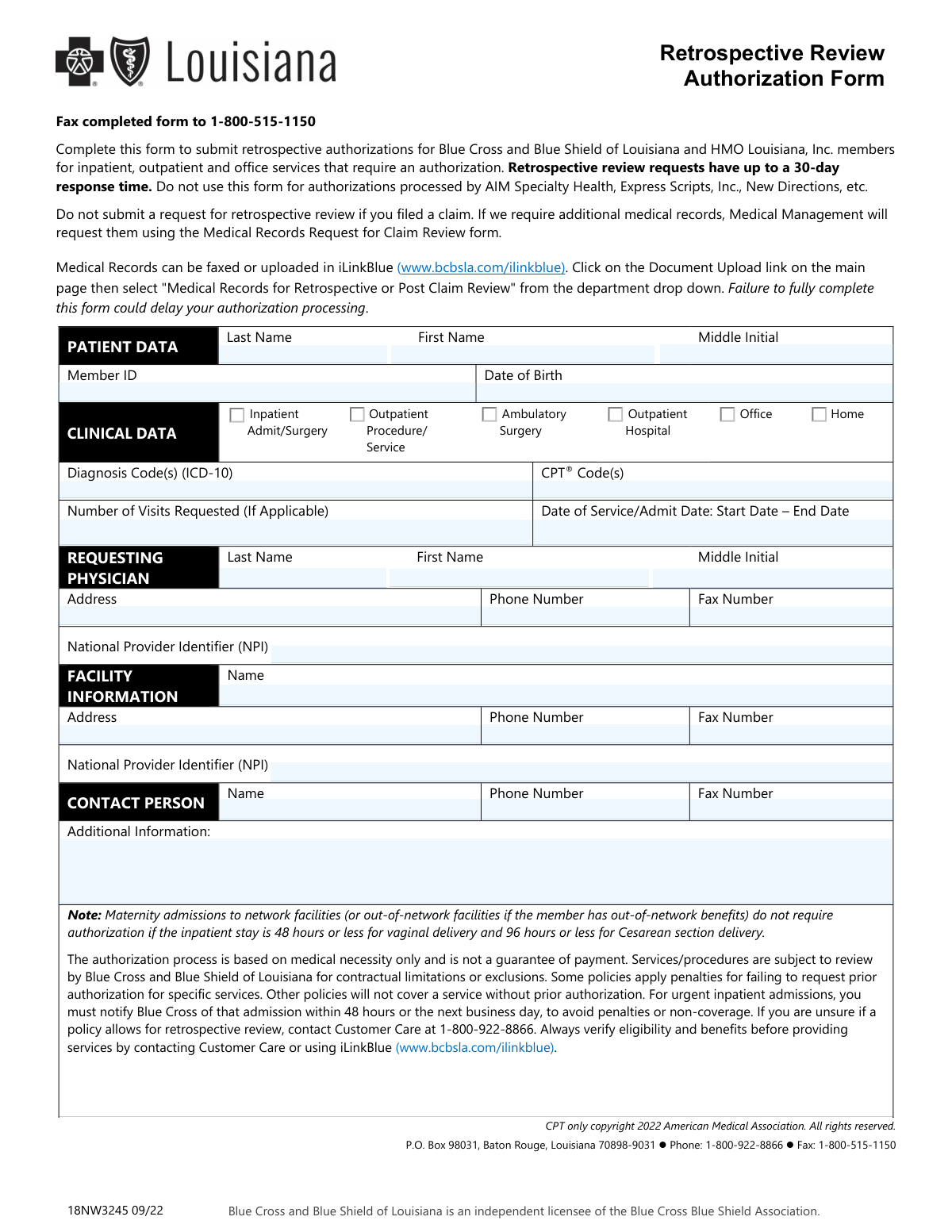
This form is a request submitted by healthcare providers to Blue Cross and Blue Shield of Louisiana for retrospective authorization of inpatient, outpatient, and office services that have already been rendered to a member. It is crucial for securing payment for services that required prior authorization but were performed without it. Today, this form can be filled out quickly and accurately using AI-powered services like Instafill.ai, which can also convert non-fillable PDF versions into interactive fillable forms.
Our AI automatically handles information lookup, data retrieval, formatting, and form filling.
It takes less than a minute to fill out 18NW3245 using our AI form filling.
Securely upload your data. Information is encrypted in transit and deleted immediately after the form is filled out.
Form specifications
| Form name: | Retrospective Review Authorization Form |
| Number of pages: | 1 |
| Language: | English |
| Categories: | authorization forms |
Instafill Demo: How to fill out PDF forms in seconds with AI
How to Fill Out 18NW3245 Online for Free in 2026
Are you looking to fill out a 18NW3245 form online quickly and accurately? Instafill.ai offers the #1 AI-powered PDF filling software of 2026, allowing you to complete your 18NW3245 form in just 37 seconds or less.
Follow these steps to fill out your 18NW3245 form online using Instafill.ai:
- 1 Navigate to Instafill.ai and upload the Retrospective Review Authorization Form or select it from the template library.
- 2 Use the AI assistant to accurately input the patient's data, including their full name, member ID, and date of birth.
- 3 Enter the specific clinical data, such as diagnosis codes (ICD-10), CPT codes, and the dates of service for the retrospective review.
- 4 Provide the complete details for the requesting physician, including their name, address, and National Provider Identifier (NPI).
- 5 Fill in the information for the facility where the services were rendered, including its name, address, and NPI.
- 6 Enter the name and contact details of the designated contact person for any follow-up questions from the insurance provider.
- 7 Review all the auto-filled information for accuracy, then download the completed form to fax to Blue Cross and Blue Shield of Louisiana as instructed.
Our AI-powered system ensures each field is filled out correctly, reducing errors and saving you time.
Why Choose Instafill.ai for Your Fillable 18NW3245 Form?
Speed
Complete your 18NW3245 in as little as 37 seconds.
Up-to-Date
Always use the latest 2026 18NW3245 form version.
Cost-effective
No need to hire expensive lawyers.
Accuracy
Our AI performs 10 compliance checks to ensure your form is error-free.
Security
Your personal information is protected with bank-level encryption.
Frequently Asked Questions About Form 18NW3245
This form is used to request authorization for medical services that have already been provided to a Blue Cross and Blue Shield of Louisiana member but required pre-authorization. It is for services that were not authorized in advance.
Healthcare providers, such as physicians' offices or facilities, should complete this form when they have rendered a service that required authorization but did not obtain it beforehand.
The response time for a retrospective review request can be up to 30 days. Ensure the form is filled out completely to avoid processing delays.
You should not submit this form if you have already filed a claim. The claim review process will handle the authorization assessment.
You must submit the completed form by faxing it to 1-800-515-1150. Medical records, if requested separately, can be uploaded via iLinkBlue.
No, do not attach medical records initially. If Medical Management requires additional records, they will send a separate 'Medical Records Request for Claim Review' form.
Yes, do not use this form for services where authorizations are managed by third parties like AIM Specialty Health, Express Scripts, Inc., or New Directions.
No, an authorization confirms medical necessity only and is not a guarantee of payment. Services are still subject to review for contractual limitations, exclusions, and member eligibility.
Authorization is not required for routine maternity stays within standard timeframes (48 hours for vaginal, 96 hours for C-section). This form may be needed for stays exceeding these times or other complications.
Some policies apply penalties for failing to request prior authorization, while other policies will not cover the service at all. It is best to verify requirements before providing services.
To confirm if a member's policy allows for retrospective review, contact Customer Care at 1-800-922-8866 or check eligibility and benefits on iLinkBlue.
Yes, services like Instafill.ai use AI to accurately auto-fill form fields from your records, which can save you significant time and help prevent errors.
Simply upload the Retrospective Review Authorization Form to the Instafill.ai platform. The AI will identify the fields, allowing you to quickly fill them out online or have the system auto-fill them from your saved data.
You can use a service like Instafill.ai, which can convert flat, non-fillable PDFs into interactive, fillable forms. This allows you to easily type your information directly into the fields before submission.
Compliance 18NW3245
Validation Checks by Instafill.ai
1
Ensures Complete Patient Identification
Checks that the Member ID, Patient Last Name, First Name, and Date of Birth fields are all filled out. This information is fundamental for correctly identifying the patient and locating their policy information. A failure to provide this complete set of data will prevent the system from processing the request, as the specific member cannot be uniquely identified.
2
Validates Member ID Format
Verifies that the entered Member ID conforms to the expected format, such as a specific length and alphanumeric pattern, used by Blue Cross and Blue Shield of Louisiana. An incorrectly formatted ID can lead to processing errors or failure to find the member's record. If the validation fails, the form submission will be rejected, prompting the user to correct the ID.
3
Verifies Patient Date of Birth is a Valid Past Date
This check ensures the Date of Birth is entered in a valid format (e.g., MM/DD/YYYY) and represents a date that has already occurred. This prevents data entry errors like future dates or impossible dates, such as February 30th. An invalid DOB would cause the request to be rejected as it compromises the core identity verification of the patient.
4
Requires At Least One Service Type Selection
Confirms that at least one of the clinical service type checkboxes (Inpatient, Outpatient, Ambulatory Surgery, etc.) has been selected. This information is critical for categorizing the review and applying the correct authorization rules. Without a selected service type, the context of the request is unknown, and the form submission will be considered incomplete.
5
Validates ICD-10 Diagnosis Code Format
This validation checks that all entered Diagnosis Codes adhere to the standard ICD-10 format, which typically involves 3 to 7 alphanumeric characters. Using valid codes is essential for determining medical necessity and processing the authorization correctly. Submissions with improperly formatted codes will be flagged for correction, as they cannot be processed by the clinical review system.
6
Validates CPT Code Format
Ensures that the entered CPT® Code(s) are in the correct 5-character format (typically numeric, but can be alphanumeric). Accurate CPT codes are required to identify the specific services rendered and are a cornerstone of the authorization process. If the codes are malformed, the system cannot determine the procedure, leading to processing delays or rejection.
7
Ensures Date of Service is in the Past
This check verifies that both the Start Date and End Date for the Date of Service/Admit Date are prior to the current submission date. This is a critical validation for a 'Retrospective Review' form, which is exclusively for services that have already occurred. If future dates are entered, the submission will be rejected and the user will be instructed to use a prior authorization process instead.
8
Validates Date of Service Range Consistency
Confirms that the 'End Date' in the 'Date of Service/Admit Date' range is on or after the 'Start Date'. An end date that precedes the start date is a logical impossibility and indicates a data entry error. This validation prevents nonsensical data from entering the system, and a failure would require the user to correct the dates before submission.
9
Validates Requesting Physician's NPI Format
This check verifies that the Requesting Physician's National Provider Identifier (NPI) is a 10-digit number. The NPI is a unique identifier essential for verifying the provider's credentials and eligibility to request authorizations. An invalid NPI format will halt the process, as the requesting provider cannot be authenticated within the healthcare system.
10
Ensures Mandatory Requesting Physician Details
Verifies that the Requesting Physician's Last Name, First Name, and National Provider Identifier (NPI) are all completed. This information is non-negotiable for processing a review, as it identifies the provider responsible for the service. Missing any of these key fields will result in an incomplete submission and prevent the authorization from being processed.
11
Validates Facility's NPI Format
This validation ensures the Facility's National Provider Identifier (NPI) is entered as a 10-digit number. The facility NPI is crucial for identifying where the service was performed and for routing payment correctly if the authorization is approved. A malformed NPI will cause the submission to fail, as the facility cannot be properly identified.
12
Ensures Contact Person Name and Phone Number are Provided
This check confirms that the Name and Phone Number fields under the 'CONTACT PERSON' section are filled out. This information is vital for Medical Management to follow up with any questions or requests for additional records. A submission without this contact information could lead to significant delays or denial if clarification is needed but cannot be obtained.
13
Standardizes Phone and Fax Number Formats
This validation checks that all phone and fax number fields are entered in a consistent, valid format (e.g., 10 digits, possibly with parentheses and hyphens). Standardized formats ensure the data is usable and that communication attempts will be successful. An invalid format would trigger an error, prompting the user to correct the entry to ensure contact can be made if necessary.
14
Validates 'Number of Visits' is a Positive Integer
Checks if the value entered in the 'Number of Visits Requested' field is a positive whole number. This field is only applicable for certain services, but when used, it must be a valid quantity. Entering text, decimals, or negative numbers would be invalid and could cause calculation or processing errors, so the submission would be rejected pending correction.
Common Mistakes in Completing 18NW3245
This form is exclusively for retrospective reviews, meaning services that have already been rendered. A common error is using it to request pre-authorization for future services or submitting it after a claim has already been filed. This leads to immediate rejection, forcing the provider's office to restart the correct process, which wastes valuable time and delays payment decisions.
Simple typos, transposing digits, or omitting characters in the Member ID field are frequent mistakes. This error prevents the system from identifying the patient, bringing the entire review process to a halt. To avoid this, always double-check the ID against the patient's insurance card. AI-powered tools like Instafill.ai can help by validating number formats and reducing manual data entry errors.
The form requires current ICD-10 codes. Staff may accidentally enter outdated ICD-9 codes or use codes that are not specific enough to justify the medical necessity of the procedure performed. This can result in a denial of the authorization. Always verify that the codes are current, accurate, and directly support the services listed.
Since this is a retrospective form, all dates of service must be in the past. A critical error is entering a future date or providing only a start date for a service that occurred over a range of dates. This signals a misunderstanding of the form's purpose and will cause processing delays or rejection. Ensure both start and end dates are provided and are prior to the submission date.
The form requires separate NPIs for both the requesting physician and the facility. A common oversight is leaving one or both of these fields blank, or mistakenly entering a Tax ID Number (TIN) instead. An incorrect or missing NPI makes it impossible to verify the provider, leading to significant processing delays. Ensure the correct 10-digit NPI is entered in both sections.
The form includes several checkboxes to specify the type of service (e.g., Inpatient, Outpatient, Office). Staff often overlook this section, failing to check the appropriate box. This missing information forces the reviewer to guess the context of the service, which can delay the review or lead to it being routed to the wrong department.
The instructions explicitly state not to use this form for services managed by entities like AIM Specialty Health, Express Scripts, or New Directions. Providers' offices may not be aware of these carve-outs and submit the form incorrectly. This results in a wasted submission, as the request will be rejected and must be re-filed with the correct vendor, delaying reimbursement.
The 'CONTACT PERSON' section is crucial for resolving issues quickly. If this section is left blank or incomplete, the insurance company has no one to call if there are questions about the submission. This can turn a minor, easily-fixable issue into a reason for delay or denial. Always provide the name and direct phone number of a knowledgeable staff member.
As this form is often printed, filled by hand, and faxed, poor handwriting can make critical data like names, codes, and phone numbers unreadable. Smudges or low-quality fax transmissions can also obscure information. This forces the reviewer to request a new form, significantly delaying the 30-day review timeline. Using a fillable PDF version, which can be created from a flat PDF by tools like Instafill.ai, ensures all information is clear and legible.
While the form states that medical records will be requested if needed, relying on this can slow down the process. For any non-routine service, it is a mistake not to proactively submit the relevant clinical documentation along with the form via fax or the iLinkBlue portal. Failing to do so often results in the review being paused while the insurer sends a separate request for records, extending the overall decision time.
Saved over 80 hours a year
“I was never sure if my IRS forms like W-9 were filled correctly. Now, I can complete the forms accurately without any external help.”
Kevin Martin Green
Your data stays secure with advanced protection from Instafill and our subprocessors

Robust compliance program
Transparent business model
You’re not the product. You always know where your data is and what it is processed for.
ISO 27001, HIPAA, and GDPR
Our subprocesses adhere to multiple compliance standards, including but not limited to ISO 27001, HIPAA, and GDPR.
Security & privacy by design
We consider security and privacy from the initial design phase of any new service or functionality. It’s not an afterthought, it’s built-in, including support for two-factor authentication (2FA) to further protect your account.
Fill out 18NW3245 with Instafill.ai
Worried about filling PDFs wrong? Instafill securely fills retrospective-review-authorization-form forms, ensuring each field is accurate.