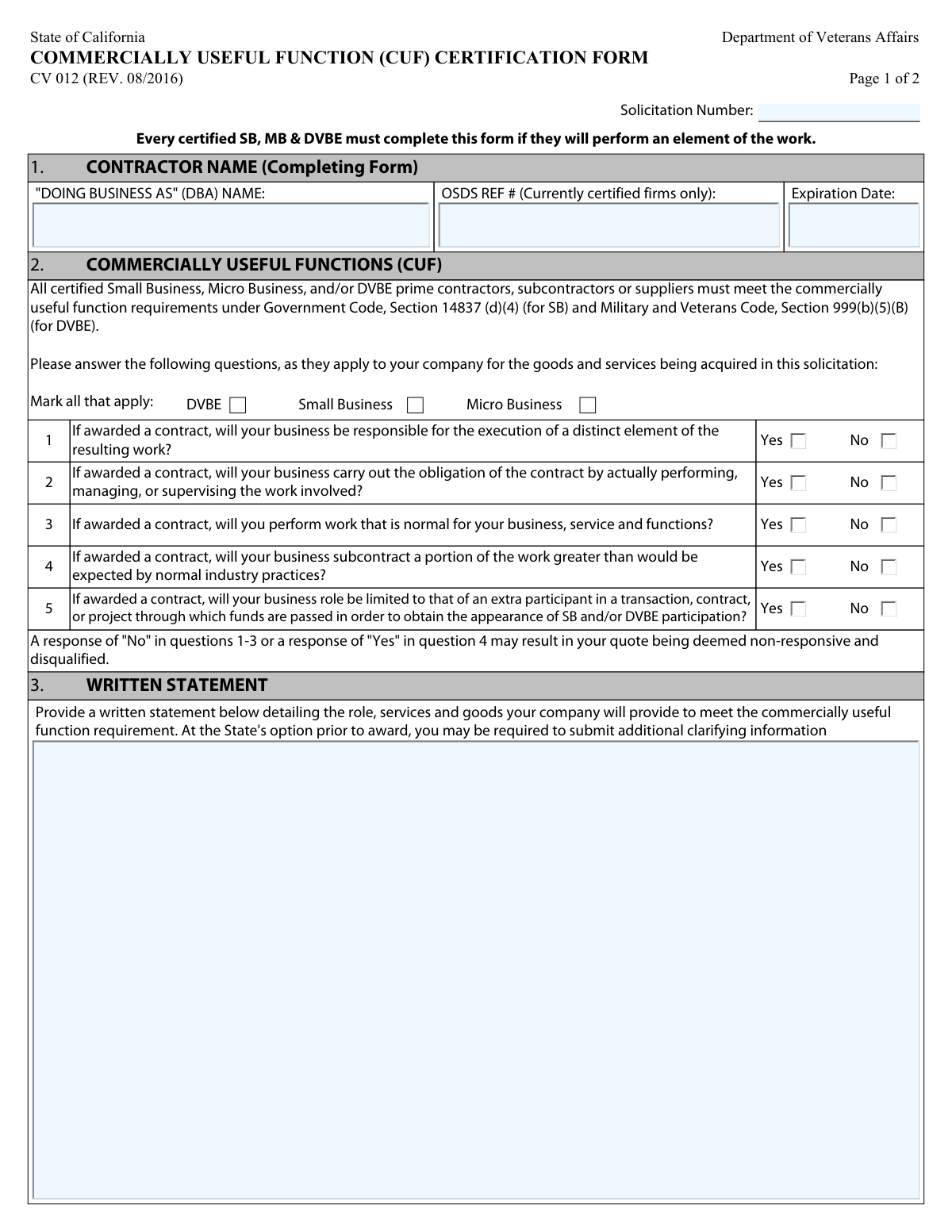
Yes! You can use AI to fill out State of California Department of Veterans Affairs COMMERCIALLY USEFUL FUNCTION (CUF) CERTIFICATION FORM
Form CV 012, the Commercially Useful Function (CUF) Certification Form, is a required document for certified Small Business (SB), Micro Business (MB), and Disabled Veteran Business Enterprise (DVBE) contractors participating in California state solicitations. It serves to verify that the certified business will perform a distinct and valuable role in the contract, rather than acting as a mere pass-through to obtain participation credit. This ensures the integrity of state programs designed to support these businesses. Today, this form can be filled out quickly and accurately using AI-powered services like Instafill.ai, which can also convert non-fillable PDF versions into interactive fillable forms.
CV 012 is part of the
California state forms, certification forms, commercial forms, IRS forms, NJ state forms, PA state forms, state ID forms, Department of State forms, veteran forms, veterans affairs forms and veterans forms categories on Instafill.
Our AI automatically handles information lookup, data retrieval, formatting, and form filling.
It takes less than a minute to fill out CV 012 using our AI form filling.
Securely upload your data. Information is encrypted in transit and deleted immediately after the form is filled out.
Form specifications
| Form name: | State of California Department of Veterans Affairs COMMERCIALLY USEFUL FUNCTION (CUF) CERTIFICATION FORM |
| Number of fields: | 22 |
| Number of pages: | 2 |
| Language: | English |
Instafill Demo: How to fill out PDF forms in seconds with AI
How to Fill Out CV 012 Online for Free in 2026
Are you looking to fill out a CV 012 form online quickly and accurately? Instafill.ai offers the #1 AI-powered PDF filling software of 2026, allowing you to complete your CV 012 form in just 37 seconds or less.
Follow these steps to fill out your CV 012 form online using Instafill.ai:
- 1 Navigate to Instafill.ai and upload or select the CV 012 Commercially Useful Function Certification Form.
- 2 Enter the Solicitation Number and your business's information, including Contractor Name, DBA, OSDS Reference Number, and certification expiration date.
- 3 Check the boxes that apply to your business certification: DVBE, Small Business, or Micro Business.
- 4 Carefully answer the five 'Yes/No' questions to certify that your business meets the Commercially Useful Function requirements.
- 5 Provide a detailed written statement describing the specific role, services, and goods your company will provide for the contract.
- 6 Review all entered information for accuracy before the authorized representative provides their signature, printed name, title, and the date.
- 7 Download, save, or print the completed and signed CV 012 form to submit with your solicitation response.
Our AI-powered system ensures each field is filled out correctly, reducing errors and saving you time.
Why Choose Instafill.ai for Your Fillable CV 012 Form?
Speed
Complete your CV 012 in as little as 37 seconds.
Up-to-Date
Always use the latest 2026 CV 012 form version.
Cost-effective
No need to hire expensive lawyers.
Accuracy
Our AI performs 10 compliance checks to ensure your form is error-free.
Security
Your personal information is protected with bank-level encryption.
Frequently Asked Questions About Form CV 012
This form is used to certify that your certified Small Business (SB), Micro Business (MB), or Disabled Veteran Business Enterprise (DVBE) will perform a "Commercially Useful Function" (CUF) on a specific state contract. It ensures your business is genuinely participating and not just being used to meet participation goals.
Every certified Small Business, Micro Business, and Disabled Veteran Business Enterprise that will perform any element of work on a state contract must complete and submit this form with their bid or proposal.
The OSDS Reference Number is your certification ID assigned by the Office of Small Business and DVBE Services (OSDS). You can find this number on your official OSDS certification documents. Only currently certified firms should fill this in.
In this section, you must provide a detailed description of the specific role, services, and goods your company will provide for the contract. Clearly explain how your business will execute its portion of the work to demonstrate you are meeting the CUF requirement.
A "No" response to questions 1, 2, or 3, or a "Yes" to question 4, indicates you may not be performing a Commercially Useful Function. This can result in your bid or quote being deemed non-responsive and disqualified from the contract award.
Yes, but you must not subcontract a portion of the work that is greater than what is considered normal industry practice. Your business must still be responsible for performing, managing, or supervising a distinct element of the work.
This refers to a situation where a certified firm is included in a contract just to meet SB/DVBE goals without actually performing meaningful work. Your business must have a genuine and active role in the contract to meet CUF requirements.
The form must be signed by the certified business owner or an authorized representative of the company, such as a corporate officer. The signatory certifies under penalty of perjury that all information provided is true and accurate.
The Solicitation Number is a unique identifier for the specific contract opportunity you are bidding on. It will be clearly stated on the solicitation or bid documents provided by the State of California.
This form is typically submitted as part of your response package for a specific state solicitation. Follow the submission instructions detailed in the solicitation documents provided by the state.
Yes, services like Instafill.ai use AI to help you accurately auto-fill form fields, which can save time and reduce errors. You are still responsible for ensuring the accuracy of the information and providing a detailed written statement.
Simply upload the CUF Certification Form to the Instafill.ai platform. The AI will identify the fields, allowing you to provide your information and have the form filled out automatically and ready for you to review, sign, and download.
If you have a non-fillable or "flat" PDF, you can use a service like Instafill.ai. It can convert the non-fillable PDF into an interactive, fillable form that you can complete easily on your computer.
Compliance CV 012
Validation Checks by Instafill.ai
1
Solicitation Number Presence
This check verifies that the 'Solicitation Number' field is not empty. This number is critical for associating the form with the correct procurement event. A missing solicitation number would make it impossible to process the form correctly, leading to rejection of the submission.
2
OSDS Certification Data Consistency
This validation ensures that if the 'OSDS REF #' field is filled, the 'Expiration Date' field must also be filled. This is important because a certification number is meaningless without its expiration date to prove it is current. If the reference number is present but the date is missing, the form is incomplete and the certification status cannot be verified.
3
OSDS Expiration Date Validity
This check confirms that the 'Expiration Date' for the OSDS certification is a valid date in the future. This is crucial for verifying that the firm's certification (SB, MB, or DVBE) is active at the time of submission. An expired or invalid date would mean the firm does not meet the certification requirements, potentially leading to disqualification.
4
Certification Type Selection
This validation ensures that at least one of the certification type checkboxes (DVBE, Small Business, or Micro Business) has been selected. The purpose of the form is to certify a firm's function under one of these programs. Failure to select a certification type makes the form's purpose unclear and will result in the submission being considered incomplete.
5
CUF Question 1-3 Negative Response Flag
This check flags the submission for review if the response to any of CUF questions 1, 2, or 3 is 'No'. The form explicitly states that a 'No' answer to these questions may result in the quote being deemed non-responsive. This validation is a critical business rule that helps identify submissions that are likely to be disqualified for failing to meet the core CUF requirements.
6
CUF Question 4 Positive Response Flag
This check flags the submission for review if the response to CUF question 4 is 'Yes'. A 'Yes' indicates the business will subcontract a portion of work greater than normal industry practice, which may violate CUF rules. This validation identifies potentially non-compliant submissions that require further scrutiny and may be disqualified.
7
CUF Question 5 'Extra Participant' Warning
This validation flags the submission if the response to CUF question 5 is 'Yes'. A 'Yes' answer suggests the firm may be acting as a pass-through entity rather than performing a commercially useful function. This is a major red flag for program abuse, and such a response will trigger a review and likely lead to disqualification.
8
CUF Questions Completeness
This check verifies that a response ('Yes' or 'No') has been provided for all five of the CUF questions. Each question is mandatory for determining if the firm meets the CUF requirements. An incomplete set of answers prevents a full evaluation and will cause the form to be rejected.
9
Written Statement Completeness
This validation ensures that the 'Written Statement' field contains text and is not empty. This narrative is required to provide specific details about the work the firm will perform, which is essential for the State to evaluate whether the CUF requirement is met. A missing statement makes the certification unverifiable and will result in the form being deemed incomplete.
10
OSDS Reference Number Format
This check validates that the 'OSDS REF #' field, if filled, contains only numeric characters. The instructions specify a numeric reference number without spaces or dashes. This ensures data integrity and compatibility with the state's certification database, preventing lookup errors.
11
Signature Block Completeness
This validation verifies that the 'PRINTED NAME', 'TITLE', and 'DATE' fields in the signature block are all filled out. These fields are required to legally attest to the accuracy of the information provided. Missing any of this information invalidates the signature and renders the entire form non-compliant.
12
Signature Date Format and Validity
This check ensures the 'DATE' in the signature block is in the correct MM/DD/YYYY format and represents a valid, non-future date. This confirms the form was signed on a specific, plausible day, which is a standard requirement for legal documents. An incorrectly formatted or future date can call the document's validity into question and lead to rejection.
Common Mistakes in Completing CV 012
A critical mistake is answering the CUF questions in a way that triggers automatic disqualification. The form explicitly warns that a 'No' to questions 1-3 or a 'Yes' to question 4 may result in the quote being deemed non-responsive. This often happens when applicants answer honestly but fail to understand the legal definition of a 'Commercially Useful Function' and the implications of their answers. To avoid this, carefully review your role in the project to ensure it aligns with the requirements for a 'Yes' on questions 1-3 and a 'No' on question 4.
Applicants frequently provide a generic or overly brief description in the 'Written Statement' section, such as 'providing services as required.' This is a required field that demands a detailed narrative of the specific role, services, and goods your company will provide for this particular solicitation. A weak statement can lead to the procurement officer being unable to determine if a CUF is being met, resulting in delays for clarification or outright rejection of the form.
Certified firms often make errors when entering their OSDS Reference Number and Expiration Date, such as transposing digits, leaving a field blank, or entering an expired date. This forces the reviewing agency to manually look up the certification, causing processing delays. To prevent this, have your official OSDS certification notice on hand and carefully transcribe the reference number and valid expiration date exactly as they appear.
A simple but common oversight is forgetting to check the box for the firm's certification type (DVBE, Small Business, or Micro Business). This leaves ambiguity as to which program's participation goals are being met and certified. This omission can cause the form to be returned for correction or be considered incomplete, potentially jeopardizing the bid's timeliness and acceptance.
An applicant might provide answers in the Yes/No section that conflict with the details in the Written Statement. For example, checking 'No' for question 4 (indicating the business will not subcontract excessively) but then describing a plan to subcontract a majority of the work in the narrative. These contradictions erode the credibility of the submission and can lead to a finding of non-compliance with CUF requirements.
The signature block requires the signature of the certified business owner or an authorized corporate representative, under penalty of perjury. A frequent mistake is having a project manager or administrative assistant who lacks this legal authority sign the form. An invalid signature can nullify the entire certification, rendering the bid non-responsive and leading to disqualification.
Failing to enter the correct Solicitation Number is a critical error that can prevent your form from being associated with your bid. This number is the primary identifier linking the document to a specific procurement. If the form is a non-fillable PDF, this can be even more challenging; tools like Instafill.ai can convert flat PDFs into fillable forms to make entering such crucial data easier and more accurate.
The form specifies the MM/DD/YYYY format for dates, but applicants often use different conventions (e.g., DD/MM/YYYY) or write out the month. This inconsistency can cause data entry issues for the agency and may require manual correction, slowing down the review process. To avoid this, strictly adhere to the specified format. AI-powered form-filling tools like Instafill.ai can help by automatically validating and formatting dates correctly.
Answering 'Yes' to question 5 ('will your business role be limited to that of an extra participant...') is a direct admission of acting as a 'pass-through' entity. This means the firm is not performing a Commercially Useful Function and is only included to give the appearance of SB/DVBE participation. This is a fatal error that leads to immediate disqualification and can result in further investigation or penalties.
A common data entry mistake is entering the DBA name in the 'CONTRACTOR NAME' field, which should contain the legal business name registered with the state and OSDS. This creates confusion and can complicate the verification of the firm's certification status. Ensure the legal name is used in the primary field and the DBA is only entered in the specific 'DBA' field if applicable.
Saved over 80 hours a year
“I was never sure if my IRS forms like W-9 were filled correctly. Now, I can complete the forms accurately without any external help.”
Kevin Martin Green
Your data stays secure with advanced protection from Instafill and our subprocessors

Robust compliance program
Transparent business model
You’re not the product. You always know where your data is and what it is processed for.
ISO 27001, HIPAA, and GDPR
Our subprocesses adhere to multiple compliance standards, including but not limited to ISO 27001, HIPAA, and GDPR.
Security & privacy by design
We consider security and privacy from the initial design phase of any new service or functionality. It’s not an afterthought, it’s built-in, including support for two-factor authentication (2FA) to further protect your account.
Fill out CV 012 with Instafill.ai
Worried about filling PDFs wrong? Instafill securely fills state-of-california-department-of-veterans-affairs-commercially-useful-function-cuf-certification-form forms, ensuring each field is accurate.