Yes! You can use AI to fill out Commercial Lease Agreement (C.A.R. Form CL, Revised 10/01)
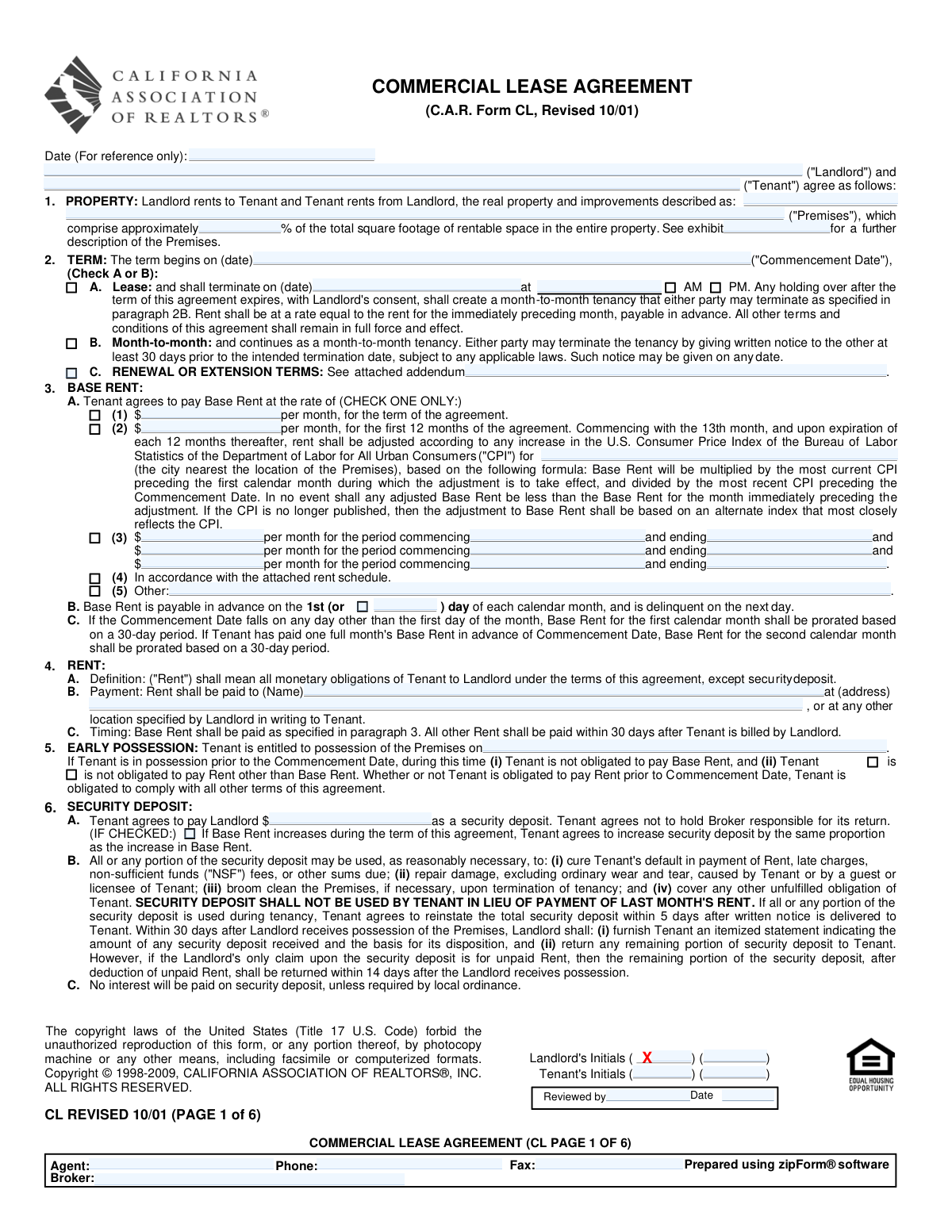
The Commercial Lease Agreement (C.A.R. Form CL, Revised 10/01) is a standardized contract used to set out the legal and financial terms under which a landlord leases commercial real property to a tenant. It covers essential deal points such as the premises description, lease term (fixed or month-to-month), base rent structure (fixed, CPI-adjusted, tiered, or per schedule), security deposit, parking/storage, maintenance responsibilities, insurance, default remedies, and dispute resolution. Because it is a binding agreement, accuracy and completeness are important to avoid future disputes over rent, expenses, possession, repairs, and termination rights. Today, this form can be filled out quickly and accurately using AI-powered services like Instafill.ai, which can also convert non-fillable PDF versions into interactive fillable forms.
Our AI automatically handles information lookup, data retrieval, formatting, and form filling.
It takes less than a minute to fill out C.A.R. Form CL using our AI form filling.
Securely upload your data. Information is encrypted in transit and deleted immediately after the form is filled out.
Form specifications
| Form name: | Commercial Lease Agreement (C.A.R. Form CL, Revised 10/01) |
| Number of pages: | 6 |
| Filled form examples: | Form C.A.R. Form CL Examples |
| Language: | English |
| Categories: | insurance forms, CAR forms, California real estate forms, commercial lease forms |
Instafill Demo: filling out a legal form in seconds
How to Fill Out C.A.R. Form CL Online for Free in 2026
Are you looking to fill out a C.A.R. FORM CL form online quickly and accurately? Instafill.ai offers the #1 AI-powered PDF filling software of 2026, allowing you to complete your C.A.R. FORM CL form in just 37 seconds or less.
Follow these steps to fill out your C.A.R. FORM CL form online using Instafill.ai:
- 1 Go to Instafill.ai and upload the Commercial Lease Agreement (C.A.R. Form CL) PDF (or select it from the form library if available).
- 2 Enter or import the party details (Landlord and Tenant legal names, notice addresses, and any broker/agent information) and confirm the agreement date.
- 3 Provide the premises information (property address/legal description, exhibit reference, and the premises’ approximate percentage of total rentable square footage).
- 4 Complete the term section by selecting fixed-term lease or month-to-month, then enter the commencement date and (if applicable) termination date/time and any renewal/extension addendum details.
- 5 Fill in the rent and payment terms: choose the base rent method (fixed, CPI-adjusted, tiered periods, attached schedule, or other), set the due day, add payee name/address, and complete any early possession details.
- 6 Enter financial and operational items such as security deposit, parking and storage terms/fees, late charge/NSF amounts, utilities responsibility, and any property operating expense (CAM/taxes/insurance) share or the paragraph 14B exclusion.
- 7 Review all remaining clauses (use, maintenance/repairs, alterations, insurance limits, possession/vacating obligations, dispute resolution/arbitration initials, and other terms/exhibits), then generate signature-ready copies for landlord, tenant, and brokers.
Our AI-powered system ensures each field is filled out correctly, reducing errors and saving you time.
Why Choose Instafill.ai for Your Fillable C.A.R. Form CL Form?
Speed
Complete your C.A.R. Form CL in as little as 37 seconds.
Up-to-Date
Always use the latest 2026 C.A.R. Form CL form version.
Cost-effective
No need to hire expensive lawyers.
Accuracy
Our AI performs 10 compliance checks to ensure your form is error-free.
Security
Your personal information is protected with bank-level encryption.
Frequently Asked Questions About Form C.A.R. Form CL
This form is a written contract used to document the key terms of a commercial tenancy, including the premises, lease term, rent, deposits, and responsibilities. Itâs typically used when a landlord rents business/retail/office/industrial space to a tenant in California.
Both the Landlord (or the Landlordâs authorized agent) and the Tenant(s) complete the deal terms and sign. If there are multiple tenants or landlords, each should be listed and sign where indicated.
Have the legal names of the parties, the premises address/legal description (and any exhibit reference), the commencement date, rent structure, security deposit amount, and notice addresses ready. You may also need parking/storage details, insurance limits, and any addenda (e.g., renewal terms or rent schedule).
Enter the premises address or legal description and, if applicable, reference an exhibit that further describes the space (suite/unit, floor plan, etc.). The percentage is the premisesâ approximate share of the total rentable square footage of the entire propertyâuse the buildingâs rentable area figures if available.
Choose Option A if you want a defined start and end date (and include the termination date/time with AM/PM). Choose Option B if the tenancy is month-to-month and either party can terminate with at least 30 daysâ written notice, subject to applicable laws.
You must check only one Base Rent method: fixed rent, CPI-adjusted after 12 months, tiered rent periods, attached rent schedule, or âOther.â If CPI adjustment or tiered/scheduled rent is selected, rent can increase based on the method stated, and the form notes adjusted rent cannot be less than the prior monthâs rent under the CPI option.
The first monthâs Base Rent is prorated using a 30-day period. If a full month was paid in advance before the Commencement Date, the second month is prorated instead (also based on a 30-day period).
Use the 'RENT: Payment' section to list the rent payee name and payment address. Base Rent is due in advance on the 1st (or the alternate day you enter), and other Rent items are generally due within 30 days after the landlord bills the tenant.
Early possession is when the tenant is allowed to occupy the premises before the official Commencement Date. The form lets the parties indicate whether the tenant owes rent other than Base Rent during that period, but the tenant must still comply with all other lease terms.
The security deposit amount is stated in the Security Deposit section and can be used for specified items like unpaid rent, damage beyond ordinary wear and tear, or cleaning. The landlord must provide an itemized statement and return any remaining deposit generally within 30 days after regaining possession (or within 14 days if the only claim is unpaid rent).
If rent is not received within 5 calendar days after it is due, the tenant owes the stated late charge plus 10% annual interest on the delinquent amount. If a check is returned NSF, the tenant owes the stated late charge (if applicable) and a $25 NSF fee, treated as additional rent.
The form specifies the number of unreserved and reserved parking spaces and whether parking is included in Base Rent; if not, a monthly parking fee is added. Storage is handled similarlyâdescribe what storage is permitted, indicate whether itâs included in Base Rent, and list any additional monthly storage fee if not included.
Tenant operating expenses include utilities/services directly billed to the tenant (listed in the utilities section). Property operating expenses (like CAM, consolidated utilities, insurance, and real estate taxes) may be charged as the tenantâs proportionate share unless Paragraph 14 is checked as not applicable.
YesâAI tools can help you extract key details (names, dates, rent amounts, addresses) and place them into the correct fields to reduce errors and save time. Services like Instafill.ai use AI to auto-fill form fields accurately based on the information you provide.
Upload the lease PDF to Instafill.ai, provide the deal details (parties, premises, term, rent option, deposit, notices, etc.), and let the AI map and auto-fill the fields for you to review. If the PDF is flat/non-fillable, Instafill.ai can convert it into an interactive fillable form first, then you can complete and export the finished document for signatures.
Compliance C.A.R. Form CL
Validation Checks by Instafill.ai
1
Agreement Date is present and in a valid date format
Validates that the Agreement Date field is completed and matches an accepted date format (e.g., MM/DD/YYYY) and represents a real calendar date. This is important because the agreement date is used to establish when the contract was executed and can affect enforceability and timelines. If validation fails, the submission should be rejected or routed for correction because downstream calculations and legal references may be incorrect.
2
Landlord and Tenant legal names are complete and not blank
Ensures Landlord Name and Tenant Name are provided and contain plausible full legal names (not placeholders like "N/A" or single initials only). Correct party identification is essential for contract validity and for notices, enforcement, and payment processing. If validation fails, the form should be flagged as incomplete and prevented from finalization until corrected.
3
Premises address/description completeness and minimum structure
Checks that the Property Address Description (and/or Premises Address/Details) includes sufficient identifying information (e.g., street address, city, state, and ZIP or a legally sufficient description). This prevents ambiguity about what property is being leased and reduces disputes. If validation fails, require the user to add missing address components or attach/identify the exhibit that contains the legal description.
4
Property Percentage is numeric and within 0–100%
Validates that Property Percentage is a number (allowing decimals) and falls strictly between 0 and 100 inclusive, and is stored consistently as a percentage (not 0.25 when 25% is intended unless explicitly supported). This value is used for operating expense allocations and must be mathematically valid. If validation fails, block submission and prompt for a corrected percentage.
5
Lease term option selection is mutually exclusive and complete
Ensures exactly one term type is selected: either Option A (fixed term lease) or Month-to-month, but not both and not neither. This is critical because many other fields (termination date/time, notice rules) depend on the selected term structure. If validation fails, require the user to select one option and clear conflicting fields.
6
Commencement Date is valid and consistent with Agreement Date
Checks that Term Start Date (Commencement Date) is a valid date and is not unreasonably inconsistent with the Agreement Date (e.g., far in the past relative to execution, unless explicitly allowed). This helps prevent data entry errors that can misstate the lease start and rent proration. If validation fails, flag for review or require confirmation/correction depending on business rules.
7
Fixed-term termination date/time required and logically after commencement
If Option A (fixed term) is selected, validates that the Lease Option A Termination Date is present, is a valid date, and occurs after the Commencement Date. Also validates that a termination time is provided and that exactly one of AM or PM is selected. If validation fails, prevent completion because the lease end is undefined or contradictory.
8
Base Rent option selection is exactly one and required fields match the option
Validates that exactly one Base Rent option (1â5) is selected and that only the fields relevant to that option are populated (or that conflicting option fields are empty). This prevents contradictory rent terms (e.g., both fixed rent and tiered rent filled out). If validation fails, require the user to choose one option and correct/clear inconsistent entries.
9
Base Rent amounts are valid currency and non-negative
Checks that all rent amount fields (fixed rent, CPI first-12-month amount, tiered amounts, parking/storage fees, late charge amount) are valid currency values (e.g., max two decimals) and are not negative. Monetary fields must be machine-calculable and legally meaningful. If validation fails, reject the entry and prompt for a properly formatted amount.
10
Tiered rent periods are complete, ordered, and non-overlapping
If Base Rent Option 3 (tiered periods) is selected, validates that each tier has an amount, a commencing date, and an ending date, and that each tierâs start is on/before its end. It also checks that tier periods are sequential (no overlaps or gaps unless explicitly allowed) and that the first tier does not start before the Commencement Date. If validation fails, flag the schedule as invalid and require correction to avoid billing disputes.
11
CPI-adjusted rent requires CPI location/reference fields
If Base Rent Option 2 (CPI adjusted) is selected, validates that the CPI city/area reference and any CPI Index Reference identifier are provided in a usable format (not blank or placeholder text). This is important because the adjustment formula cannot be applied without a defined CPI series/location. If validation fails, require completion of CPI reference details before acceptance.
12
Base Rent due day is a valid day-of-month when 'Other' is selected
If Other Base Rent Due Day is checked, validates that Alternate Base Rent Due Day is an integer between 1 and 28/29/30/31 per policy (many systems restrict to 1â28 to avoid invalid dates). This prevents impossible due dates (e.g., 31st in shorter months) and billing errors. If validation fails, prompt the user to enter a valid due day or revert to the 1st.
13
Rent payee name and payment address are complete
Validates that Rent Payee Name and Rent Payee Address are present and contain sufficient deliverability information (e.g., street, city, state, ZIP or equivalent). This is essential for correct payment routing and notice compliance. If validation fails, the form should be marked incomplete and not eligible for execution.
14
Early possession date is valid and consistent with commencement date
If an Early Possession Date is provided, checks that it is a valid date and is on or before the Commencement Date (early possession should not begin after the lease starts). It also validates that the early possession rent obligation checkboxes are not contradictory (e.g., both obligated and not obligated for the same category). If validation fails, flag for correction to avoid incorrect rent charges and occupancy disputes.
15
Security deposit amount is valid and payment ledger balances reconcile
Validates that Security Deposit Amount is a valid non-negative currency value and that the PAYMENTS section reconciles: Balance Due = Total Due â Payment Received for rent, security deposit, and other categories, and totals equal the sum of line items. This prevents accounting errors and disputes about amounts owed. If validation fails, reject or route for correction and require recalculation before acceptance.
16
Parking and storage inclusion flags align with required fees and counts
Checks that Parking is Included vs Parking is Not Included is mutually exclusive, and if not included then Parking Rental Fee is provided and valid currency; also validates parking space counts are non-negative integers. Similarly, validates Additional Storage inclusion flags are mutually exclusive, and if not included then Additional Storage Monthly Fee is provided. If validation fails, require correction to prevent missing recurring charges or contradictory lease terms.
Common Mistakes in Completing C.A.R. Form CL
People often enter a nickname, a DBA, or a shortened company name instead of the full legal entity name (e.g., leaving off âLLC/Inc.â or not listing all individual tenants). This can create enforceability issues, signature authority problems, and delays when banks, insurers, or attorneys review the lease. Always use the exact legal name as shown on formation documents/ID and match it consistently everywhere the name appears (party line, signature blocks, notices). AI-powered form filling tools like Instafill.ai can help by standardizing entity names across fields and flagging mismatches before submission.
A common error is entering only a street address without suite/unit number, floor, or other identifiers, or referencing an exhibit that isnât actually attached or is labeled differently. This leads to disputes about what space is included (e.g., storage rooms, patios, common areas) and can derail escrow or lender review. Include the full address plus unit/suite, and ensure the âExhibitâ reference matches the attached document name/letter exactly. Instafill.ai can prompt for missing sub-address details and ensure exhibit references are consistent with the attachments you list.
Tenants frequently guess the âapproximately % of total rentable spaceâ or confuse it with usable square footage, resulting in an incorrect proportionate share for operating expenses (CAM, taxes, insurance). The consequence is billing disputes and unexpected monthly charges that can become a default issue if not paid. Verify the buildingâs total rentable square footage and calculate the ratio using the same measurement standard the landlord uses, then enter the percentage/ratio consistently in Paragraph 1 and Paragraph 14. Instafill.ai can reduce errors by validating numeric formats and helping ensure the percentage aligns with the ratio you provide.
Because Paragraph 2 requires choosing A or B, people sometimes check both boxes, leave both blank, or fill dates that conflict with the selected option. This creates ambiguity about termination rights, notice requirements, and whether the lease is fixed-term or periodic. Check only one option and complete only the fields that apply (termination date/time for Option A; notice language for month-to-month). Instafill.ai can enforce âcheck one onlyâ logic and prevent incompatible fields from being completed.
For fixed-term leases, users often enter a termination date but forget the time, or they enter a time and fail to check AM/PM (or check the wrong one). This can cause confusion about the exact end of the term, especially for move-out logistics, holdover rent, and possession turnover. Always provide a specific time and select exactly one of AM or PM, and confirm it aligns with any building access rules. Instafill.ai can format time entries and require an AM/PM selection when a time is present.
Paragraph 3 requires selecting one rent structure, but people sometimes check multiple options (fixed + CPI + tiered) or choose CPI adjustment without specifying the CPI city/series reference. This can make rent escalation unenforceable or lead to disputes about the correct rent after month 12. Check only one rent option and fully complete its required fields (amounts, dates, CPI reference/city, or attach the rent schedule if using Option 4). Instafill.ai can detect mutually exclusive selections and flag missing CPI reference details or missing rent schedule attachments.
Users often overlook the â1st (or ___) dayâ field and accidentally set an unintended due day, or they misunderstand that rent becomes delinquent the next day. This can trigger late charges and interest unexpectedly and create recurring payment disputes. Confirm the intended due day in writing, enter a numeric day (e.g., â5thâ), and ensure it matches any autopay or invoicing schedule. Instafill.ai can validate that the due day is a valid calendar day (1â31) and keep it consistent with payment schedule entries.
In the PAYMENTS table, people frequently enter a âRent From/Toâ period that doesnât match the commencement date, miscalculate prorations, or enter totals that donât equal received + balance due. These inconsistencies cause accounting confusion, can delay execution, and may lead to claims that rent was misapplied. Double-check date ranges, prorations (noting the formâs 30-day proration rule), and ensure each line and the grand total reconcile mathematically. Instafill.ai can automatically compute and validate totals/balances and flag date-range inconsistencies.
Tenants often forget to fill the early possession date or they check the wrong box about whether rent other than base rent is owed during early access. This can lead to surprise charges for operating expenses, utilities, or other rent components, or disputes about insurance/maintenance obligations during early entry. If early possession is allowed, enter the exact date and clearly indicate which rent components apply, remembering the tenant must still comply with other lease terms. Instafill.ai can prompt completion of dependent fields when early possession is indicated and reduce checkbox selection errors.
A common mistake is leaving the security deposit blank, entering a number without currency clarity, or checking the âincrease proportionally with Base Rentâ box without understanding it applies during rent escalations. This can create disputes at renewal/escalation time and complicate move-out accounting. Enter a specific dollar amount and only check the increase option if both parties intend automatic deposit increases tied to rent adjustments. Instafill.ai can enforce currency formatting and highlight when the deposit-increase option may conflict with the chosen rent escalation method.
This form requires initials on multiple pages and specific initial blocks for dispute resolution/arbitration; people often sign the last page but miss page initials or the arbitration acknowledgment initials. Missing initials can make sections unenforceable, delay acceptance, or require re-executionâespecially problematic when parties are remote. Before finalizing, review every page for required initials and ensure each party initials in the correct corresponding spaces. Instafill.ai can guide users through a completion checklist and ensure all required initials/signature fields are captured before the document is sent.
Saved over 80 hours a year
âI was never sure if my IRS forms like W-9 were filled correctly. Now, I can complete the forms accurately without any external help.â
Kevin Martin Green
Your data stays secure with advanced protection from Instafill and our subprocessors

Robust compliance program
Transparent business model
Youâre not the product. You always know where your data is and what it is processed for.
ISO 27001, HIPAA, and GDPR
Our subprocesses adhere to multiple compliance standards, including but not limited to ISO 27001, HIPAA, and GDPR.
Security & privacy by design
We consider security and privacy from the initial design phase of any new service or functionality. Itâs not an afterthought, itâs built-in, including support for two-factor authentication (2FA) to further protect your account.
Fill out C.A.R. Form CL with Instafill.ai
Worried about filling PDFs wrong? Instafill securely fills commercial-lease-agreement-car-form-cl-revised-1001 forms, ensuring each field is accurate.



