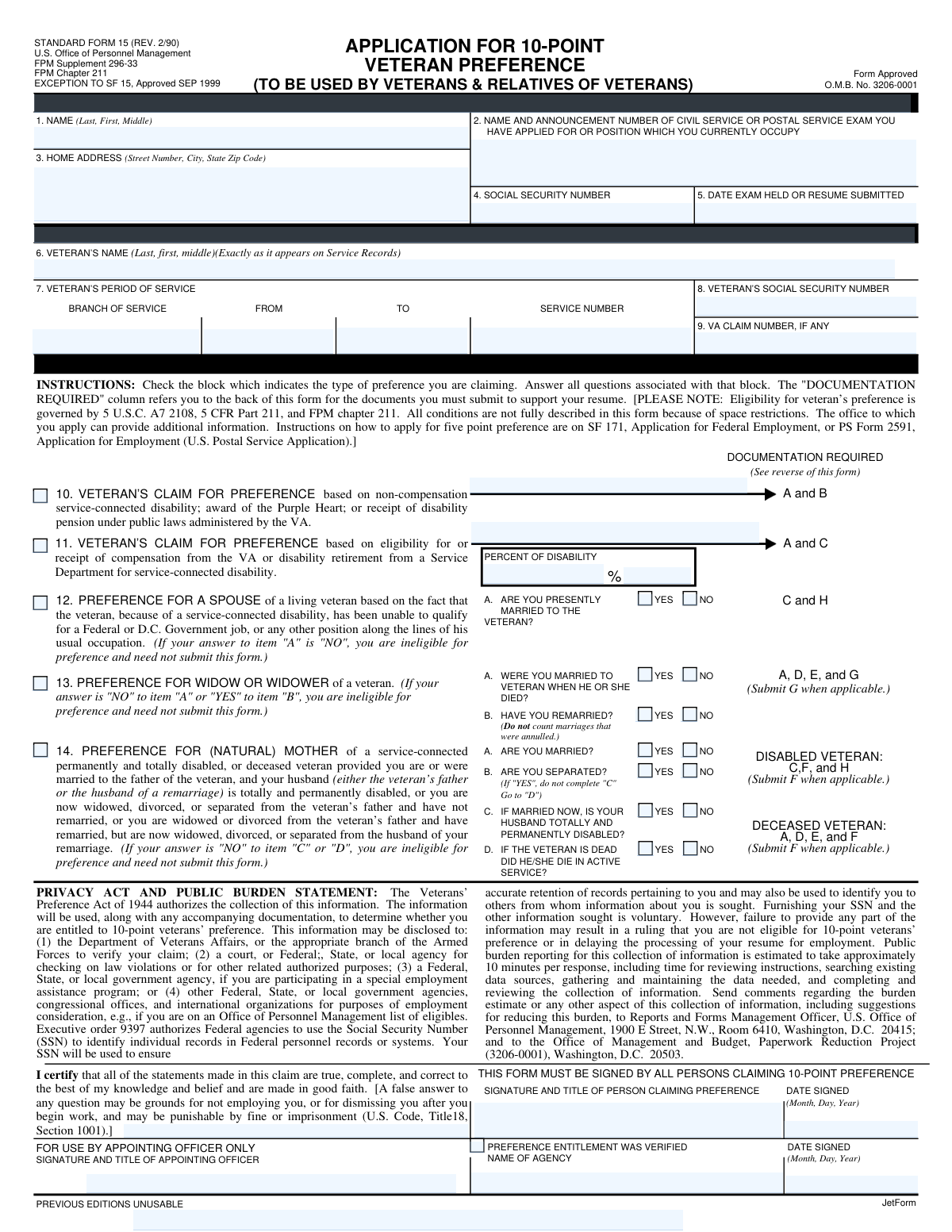
Yes! You can use AI to fill out Standard Form 15 (SF 15), Application for 10-Point Veteran Preference

Standard Form 15 (SF 15) is an Office of Personnel Management (OPM) form used to request 10-point veterans’ preference when applying for federal (and certain D.C. government) jobs. It collects identifying information about the applicant and the veteran, the type of preference being claimed (e.g., service-connected disability, Purple Heart, spouse, widow/widower, or mother), and requires specific proof documents. The form is important because agencies use it to verify entitlement to preference points that can affect hiring and selection. Submitting incomplete answers or missing documentation can delay processing or result in a finding of ineligibility.
Our AI automatically handles information lookup, data retrieval, formatting, and form filling.
It takes less than a minute to fill out SF 15 using our AI form filling.
Securely upload your data. Information is encrypted in transit and deleted immediately after the form is filled out.

Form specifications

Form name: Standard Form 15 (SF 15), Application for 10-Point Veteran Preference
Number of pages: 2
Filled form examples: Form SF 15 Examples
Language: English
main-image

Instafill Demo: filling out a legal form in seconds

How to Fill Out SF 15 Online for Free in 2026

Are you looking to fill out a SF 15 form online quickly and accurately? Instafill.ai offers the #1 AI-powered PDF filling software of 2026, allowing you to complete your SF 15 form in just 37 seconds or less.
Follow these steps to fill out your SF 15 form online using Instafill.ai:
  1. 1 Enter the applicant’s personal information (name, home address, Social Security number) and the exam/announcement/position information being applied for, including date of exam or resume submission.
  2. 2 Provide the veteran’s identifying and service information (veteran’s name as on service records, SSN, VA claim number if any, service number, branch of service, and period of service).
  3. 3 Select the correct 10-point preference category (e.g., disability/Purple Heart/pension; compensable service-connected disability; spouse; widow/widower; mother) and complete all questions within that section (yes/no items and any required details such as percent of disability).
  4. 4 Gather and upload the required supporting documentation listed on the reverse of the form (e.g., DD-214 or other honorable separation proof; VA disability letter dated within the last 12 months; Purple Heart citation; death certificate; physician statement; annulment decree, as applicable).
  5. 5 Review the Privacy Act statement and certification, then sign and date the form (all persons claiming 10-point preference must sign).
  6. 6 Submit the completed SF 15 and attachments with your federal job application package (or to the requesting agency/appointing office) and retain copies for your records.

Our AI-powered system ensures each field is filled out correctly, reducing errors and saving you time.

Why Choose Instafill.ai for Your Fillable SF 15 Form?

Speed

Complete your SF 15 in as little as 37 seconds.

Up-to-Date

Always use the latest 2026 SF 15 form version.

Cost-effective

No need to hire expensive lawyers.

Accuracy

Our AI performs 10 compliance checks to ensure your form is error-free.

Security

Your personal information is protected with bank-level encryption.

Frequently Asked Questions About Form SF 15

SF-15 is used to apply for 10-point veterans’ preference for Federal employment. Agencies use it (with supporting documents) to verify whether you qualify for 10-point preference.

You should complete SF-15 if you are claiming 10-point preference as a veteran with a qualifying disability/Purple Heart/pension, or as an eligible relative (spouse, widow/widower, or mother) of a veteran. If you are only claiming 5-point preference, SF-15 is generally not the correct form.

The form includes claims based on a service-connected disability (compensable or non-compensable), award of the Purple Heart, receipt of a VA disability pension, and certain claims by spouses, widows/widowers, and mothers of disabled or deceased veterans. You must check the block that matches your situation and answer the questions tied to that block.

You must provide your name, home address, Social Security Number, and the exam/announcement number or position you applied for (or currently occupy), plus the date the exam was held or your resume was submitted. You also provide the veteran’s identifying information (name as on service records, SSN, VA claim number if any, service number, branch, and dates of service).

Providing your SSN is described as voluntary, but the form warns that not providing requested information may lead to a finding that you are not eligible or may delay processing. Agencies use SSNs to help identify and maintain accurate personnel records.

You must submit photocopies (they will not be returned) of documents that prove honorable service/separation and the specific basis for your 10-point claim (such as VA disability letters, Purple Heart documentation, death certificate, or marriage-related documents). The “Documentation Required” references (A, B, C, etc.) point you to the reverse side list of acceptable evidence.

Acceptable proof includes documents dated on or after separation, such as an honorable/general discharge certificate, a Report of Separation, orders transferring to retired status, a certificate of service/release from active duty showing honorable separation, or an official statement from the service or records center confirming honorable separation.

For compensable disabilities (10% or more), submit a VA or service department statement dated within the last 12 months showing compensation/disability retired pay or confirming a 10%+ service-connected disability. For non-compensable disability (less than 10%), Purple Heart, or VA disability pension, submit the specific VA/service statement or Purple Heart citation/discharge documentation listed on the form.

If you are claiming preference based on disability, the form asks for the “Percent of Disability.” If you are unsure, use your most recent VA rating decision/benefits letter or request an official VA statement (dated within the last 12 months) that lists the percentage.

A spouse claim generally requires that you are currently married to the veteran and that the veteran, due to a service-connected disability, is unable to qualify for a Federal or D.C. Government job (or similar work in their usual occupation). If you answer “NO” to being presently married to the veteran, you are not eligible under the spouse category and do not need to submit the form.

You are ineligible if you were not married to the veteran when they died, or if you have remarried (except in limited situations involving annulment documentation as described on the form). The form instructs that if you answer “NO” to being married at the time of death or “YES” to remarriage, you generally should not submit SF-15 for this category.

Possibly. The form allows submission of documentation showing entitlement was restored due to annulment (such as VA certification) or a certified court decree of annulment.

Mother’s preference has specific marital and dependency-related conditions described in item 14, including requirements related to your marital status and whether a husband is totally and permanently disabled (or whether you are widowed/divorced/separated and not remarried, with some exceptions). If you answer “NO” to the key eligibility questions in that section, you are not eligible and need not submit the form.

If the veteran died on active duty, submit an official notice of death from the military showing death under honorable conditions. If the death occurred when not on active duty, submit a death certificate.

Submit photocopies only because documents will not be returned. SF-15 is typically submitted to the agency or office where you are applying for the job (or as instructed in the job announcement), along with the required supporting documentation.

Yes—everyone claiming 10-point preference must sign and date the form and certify the information is true. The “For Use by Appointing Officer Only” section is completed by the hiring/appointing official, not the applicant.

Compliance SF 15
Validation Checks by Instafill.ai

1
Applicant Name Completeness and Character Validation
Validates that Item 1 (person applying) includes at least a last name and first name, with middle name/initial optional, and that the entry contains only reasonable name characters (letters, spaces, hyphens, apostrophes). This is important to uniquely identify the claimant and prevent downstream matching failures with supporting documents. If validation fails, the submission should be flagged as incomplete and returned for correction before eligibility review.
2
Home Address Completeness (Street/City/State/ZIP) and ZIP Format
Checks that Item 3 includes street address, city, state, and ZIP code, and that the ZIP is either 5 digits or ZIP+4 (e.g., 12345 or 12345-6789). A complete, correctly formatted address is required for correspondence and record integrity. If any component is missing or the ZIP format is invalid, the form should be rejected or routed to a correction workflow.
3
Exam/Position Identification Required (Announcement/Exam/Position Field)
Validates that Item 2 (name and announcement number of exam applied for, or position currently occupied) is present and not blank. This ties the preference claim to a specific hiring action and prevents orphaned preference determinations. If missing, the claim cannot be applied to a vacancy and should be held until the applicant provides the required exam/announcement/position details.
4
Date Fields Must Be Valid and Use Month-Day-Year
Validates that all dates provided (e.g., Item 5 exam date/resume submitted, veteran period of service FROM/TO, employment dates, date signed) are real calendar dates and follow the expected Month-Day-Year convention where specified. Correct date parsing is essential for eligibility determinations and auditability. If a date is malformed, impossible (e.g., 02/30), or ambiguous, the submission should be flagged for manual review or returned for correction.
5
Applicant SSN Format and Disallowed Values
Checks that Item 4 (Social Security Number) is exactly 9 digits (optionally allowing hyphens) and is not an obvious invalid value (e.g., 000000000, 123456789). SSN is used for identity matching and record retention; invalid SSNs cause verification failures and duplicate records. If invalid, the system should block submission or require correction before processing.
6
Veteran SSN Format and Relationship Consistency
Validates that Item 8 (Veteran’s SSN) is 9 digits and, when the applicant is the veteran, matches the applicant SSN (Item 4). This prevents mismatched identity data when the claimant is filing on their own behalf versus as a relative. If the applicant indicates they are the veteran but the SSNs differ, the submission should be flagged as inconsistent and routed for clarification.
7
VA Claim Number Format (If Provided)
If Item 9 (VA claim number) is entered, validates it meets expected length/character constraints (commonly numeric; allow hyphens/spaces only if policy permits) and is not a placeholder (e.g., all zeros). This supports verification with VA records and reduces failed lookups. If the value is present but invalid, the system should request correction or ignore the field and flag for follow-up depending on agency policy.
8
Veteran Name Must Match Service Records Requirement
Validates that Item 6 (Veteran’s name) is provided and includes last/first (middle optional), and that it is not identical to the applicant name unless the applicant is the veteran. The form explicitly requires the veteran name “exactly as it appears on Service Records,” which is critical for document matching. If missing or clearly inconsistent with the claimant type, the submission should be stopped for correction to avoid verification failure.
9
Veteran Period of Service Logical Date Order and Required Subfields
Checks that Item 7 includes FROM date, TO date, and branch of service, and that FROM is not after TO. Service period is central to preference eligibility and documentation requirements. If any subfield is missing or the date order is invalid, the claim should be marked incomplete and not adjudicated until corrected.
10
Single Preference Category Selection and Required Follow-up Questions
Validates that the applicant selects the applicable 10-point preference basis (Items 10–14) and does not select mutually incompatible categories without explanation. Each category triggers different required questions and documentation; selecting none or multiple conflicting categories prevents correct adjudication. If the selection is missing or conflicting, the system should require the applicant to correct the selection or route to manual review.
11
Disability Percentage Required and Range Validation (When Applicable)
If the claim is based on compensable disability (Item 11) or other disability-based preference requiring a percentage, validates that “Percent of Disability” is provided as a number between 0 and 100 (allow decimals only if policy allows). The percentage determines eligibility and documentation type (e.g., <10% vs ≄10%). If missing or out of range, the submission should be flagged and the applicant prompted to provide a valid percentage.
12
Spouse Preference Eligibility Gate (Item 12A Married to Veteran)
For Item 12 (spouse of living veteran), validates that Item 12A is answered and that the claim is rejected if the answer is “NO,” per the form instruction. This prevents ineligible spouse claims from being processed and reduces unnecessary document collection. If 12 is selected but 12A is missing or “NO,” the system should mark the claim ineligible and prompt the applicant to revise the preference type.
13
Widow/Widower Preference Logical Consistency (Items 13A and 13B)
For Item 13 (widow/widower), validates that 13A (married at time of death) is “YES” and 13B (remarried) is “NO,” as the form states ineligibility otherwise. This ensures statutory eligibility rules are applied consistently. If 13 is selected but the answers indicate ineligibility or are missing, the system should block the preference claim and request correction or alternate category selection.
14
Mother Preference Conditional Flow and Required Answers (Item 14 A–C and Separation Logic)
For Item 14 (mother), validates that required questions are answered and that the conditional instruction is followed: if 14B (separated) is “YES,” then 14C should be skipped; otherwise 14C must be answered. This prevents contradictory marital/disability assertions that affect eligibility. If the conditional flow is violated or required answers are missing, the submission should be flagged for correction before adjudication.
15
Veteran Death in Active Service Question Required When Deceased Claim Is Indicated
If the claim involves a deceased veteran (e.g., widow/widower or mother of deceased veteran), validates that the question “Did he/she die in active service?” is answered (YES/NO). This drives which death documentation is required (active duty notice vs death certificate). If missing, the system should not finalize documentation requirements and should request the missing response.
16
Signature and Date Signed Required for Claimant Certification
Validates that the claimant’s signature/title field and the claimant “Date Signed” are present and that the date is valid. The form states it must be signed by all persons claiming 10-point preference, and unsigned claims are not legally certifiable. If missing or invalid, the submission should be rejected as non-executable and returned for signature/date completion.

Common Mistakes in Completing SF 15

Checking the wrong 10-point preference category (Items 10–14)

Applicants often select a preference block that sounds close to their situation (e.g., disability vs. Purple Heart vs. spouse/widow/mother) without matching the exact eligibility rules. This leads to an immediate finding of ineligibility or a request for corrected paperwork and supporting evidence. To avoid this, read the eligibility notes under each block (including the “If your answer is
” disqualifiers) and only complete the questions tied to the single category you truly qualify for.

Leaving the exam/announcement/position information incomplete (Item 2) or mismatched

People frequently omit the announcement number, list the wrong vacancy, or provide a job title that doesn’t match the application they’re submitting with the SF-15. This can prevent HR from associating the preference claim with the correct hiring action, delaying or nullifying the preference review. Always copy the exact announcement number and position title from the vacancy posting (or the exam name/number) and ensure it matches the resume package you’re submitting.

Using the wrong Social Security Number field (Item 4 vs. Item 8)

This form collects both the applicant’s SSN and the veteran’s SSN, and applicants commonly enter their own SSN in both places or swap them. That can cause verification failures with VA/service records and slow down adjudication. Double-check that Item 4 is the person claiming preference and Item 8 is the veteran (if different), and ensure both are complete and legible.

Not entering the veteran’s name exactly as it appears on service records (Item 6)

Applicants often use nicknames, married names, or omit middle names/initials even though the form explicitly requires the veteran’s name “exactly as it appears on Service Records.” Small differences can prevent record matching and trigger requests for clarification. Use the name exactly as shown on DD-214 or official service documents, including suffixes (Jr., Sr.) and middle name/initial.

Incomplete or inconsistent period of service details (Item 7: service number, branch, dates)

A common error is leaving “TO/FROM” dates blank, using approximate dates, or listing a branch that doesn’t match the documentation submitted. Inconsistencies can cause HR to question eligibility periods and request additional proof, delaying processing. Enter full month/day/year where possible, ensure the branch and service number align with the DD-214 or equivalent, and verify the dates match separation documents.

Missing or outdated disability documentation (especially the “dated within the last 12 months” requirement)

Many applicants submit old VA letters, screenshots, or non-official summaries that don’t meet the form’s requirement for an official statement dated within the last 12 months. This often results in the claim being treated as unsupported and the 10-point preference not being applied. Submit an official VA or service-branch letter that is current, clearly states the service-connected status, and includes the percentage (and any required notes like unemployable/permanent and total when applicable).

Confusing compensable vs. non-compensable disability categories (Items 10–11) and omitting the percentage

Applicants frequently check a disability-based preference but fail to indicate the percent of disability or select the wrong block for “less than 10%” vs. “10% or more.” This can lead to the wrong documentation being requested or the preference being applied incorrectly. Confirm your VA rating category, enter the percentage in the “PERCENT OF DISABILITY” field, and submit the documentation listed for the specific block you checked.

Ignoring disqualifying logic in spouse/widow/mother sections (Items 12–14) and answering inconsistently

These sections contain eligibility “stop rules” (e.g., spouse ineligible if Item A is “NO”; widow/widower ineligible if remarried; mother claim depends on marital/separation/disability conditions). People often answer “YES/NO” without following the instructions like “If YES, do not complete C; go to D,” creating contradictions that make the claim unverifiable. Follow the branching instructions exactly, and re-check that your answers do not trigger an ineligibility condition stated on the form.

Submitting originals instead of photocopies (despite the ‘will not be returned’ warning)

Applicants sometimes mail original discharge papers, death certificates, or VA letters, not noticing the instruction to submit photocopies because documents will not be returned. This can result in permanent loss of critical personal records. Provide clear photocopies (or certified copies when specifically required, such as annulment decrees) and keep originals secured.

Failing to sign and date the form (or signing in the wrong section)

Because the form includes areas “for use by appointing officer only,” applicants sometimes sign in the wrong place or forget to sign/date entirely. An unsigned SF-15 is typically treated as incomplete and can delay or prevent preference adjudication. Sign and date only in the applicant certification area (“SIGNATURE AND TITLE OF PERSON CLAIMING PREFERENCE” and “DATE SIGNED”) and leave appointing-officer fields blank.

Not providing required death-related documentation for widow/widower or mother claims

For deceased veteran-based claims, applicants often submit only a narrative explanation or an obituary rather than the specific acceptable documents (official notice of death on active duty or a death certificate if not on active duty). Without the correct proof, HR cannot validate the basis for preference. Submit the exact document type required for the veteran’s death circumstance and ensure names/dates match the service records and the claimant’s relationship documents.
Saved over 80 hours a year

“I was never sure if my IRS forms like W-9 were filled correctly. Now, I can complete the forms accurately without any external help.”

Kevin Martin Green

Your data stays secure with advanced protection from Instafill and our subprocessors

Robust compliance program

Transparent business model

You’re not the product. You always know where your data is and what it is processed for.

ISO 27001, HIPAA, and GDPR

Our subprocesses adhere to multiple compliance standards, including but not limited to ISO 27001, HIPAA, and GDPR.

Security & privacy by design

We consider security and privacy from the initial design phase of any new service or functionality. It’s not an afterthought, it’s built-in, including support for two-factor authentication (2FA) to further protect your account.

Fill out SF 15 with Instafill.ai

Worried about filling PDFs wrong? Instafill securely fills standard-form-15-sf-15-application-for-10-point-ve forms, ensuring each field is accurate.