Yes! You can use AI to fill out Commercial and Lease Application (Commercial Credit Application) (Rev. 02/2023)

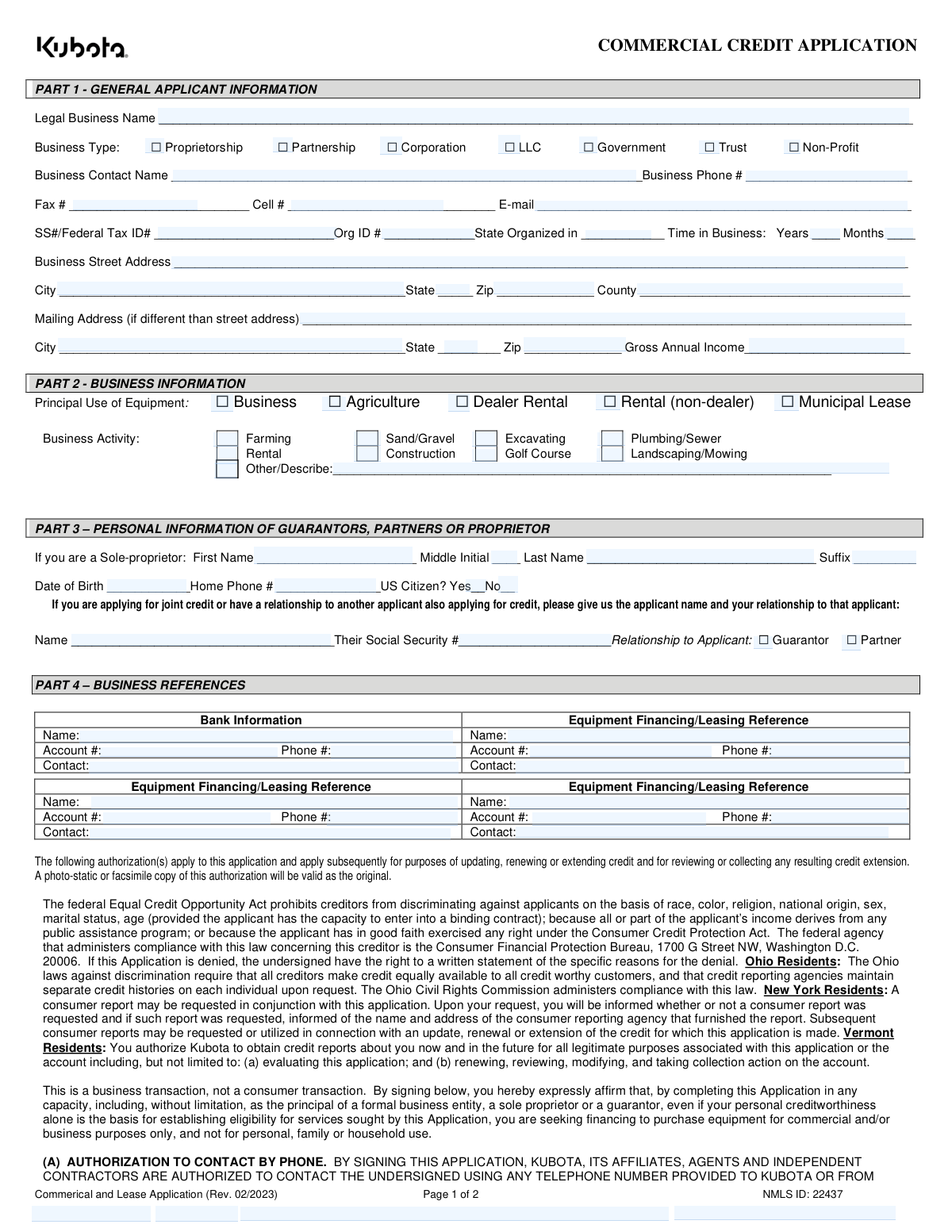
The Commercial and Lease Application (Rev. 02/2023) is a two-page business credit/lease application (NMLS ID: 22437) that collects general applicant information, business details, guarantor/proprietor information, and business references. It also includes required authorizations and disclosures, such as permission to obtain credit reports, share information with affiliates/partners, and contact the applicant by phone, text, email, mail, or fax, plus Equal Credit Opportunity Act notices and state-specific provisions. This form is important because it supports underwriting decisions for commercial equipment financing and documents the applicant’s certifications and signatures. Today, this form can be filled out quickly and accurately using AI-powered services like Instafill.ai, which can also convert non-fillable PDF versions into interactive fillable forms.
Our AI automatically handles information lookup, data retrieval, formatting, and form filling.
It takes less than a minute to fill out Commercial and Lease Application (Rev. 02/2023) using our AI form filling.
Securely upload your data. Information is encrypted in transit and deleted immediately after the form is filled out.

Form specifications

Form name: Commercial and Lease Application (Commercial Credit Application) (Rev. 02/2023)
Number of pages: 2
Language: English
main-image

Instafill Demo: filling out a legal form in seconds

How to Fill Out Commercial and Lease Application (Rev. 02/2023) Online for Free in 2026

Are you looking to fill out a COMMERCIAL AND LEASE APPLICATION (REV. 02/2023) form online quickly and accurately? Instafill.ai offers the #1 AI-powered PDF filling software of 2026, allowing you to complete your COMMERCIAL AND LEASE APPLICATION (REV. 02/2023) form in just 37 seconds or less.
Follow these steps to fill out your COMMERCIAL AND LEASE APPLICATION (REV. 02/2023) form online using Instafill.ai:
  1. 1 Go to Instafill.ai and upload the Commercial and Lease Application (Rev. 02/2023) PDF (or select it from the form library if available).
  2. 2 Let the AI detect and map the form fields, then enter or import the business’s legal name, business type, contact details, tax/organization IDs, time in business, and physical/mailing addresses.
  3. 3 Complete the Business Information section by selecting the principal use of equipment and business activity (or describing the “Other” activity if applicable).
  4. 4 Add personal information for the sole proprietor/guarantor/partner (name, DOB, phone, citizenship status) and, if applicable, joint credit/relationship details and related SSN.
  5. 5 Enter business references, including bank information and equipment financing/leasing references (names, account numbers, phone numbers, and contacts).
  6. 6 Review the authorizations and disclosures (credit report authorization, contact permissions, information sharing, and state notices), then use Instafill.ai to place signatures, printed names, titles, and dates in the correct signature blocks.
  7. 7 Run Instafill.ai’s validation checks for missing fields and formatting, then download the completed PDF and submit it to the lender/dealer as instructed.

Our AI-powered system ensures each field is filled out correctly, reducing errors and saving you time.

Why Choose Instafill.ai for Your Fillable Commercial and Lease Application (Rev. 02/2023) Form?

Speed

Complete your Commercial and Lease Application (Rev. 02/2023) in as little as 37 seconds.

Up-to-Date

Always use the latest 2026 Commercial and Lease Application (Rev. 02/2023) form version.

Cost-effective

No need to hire expensive lawyers.

Accuracy

Our AI performs 10 compliance checks to ensure your form is error-free.

Security

Your personal information is protected with bank-level encryption.

Frequently Asked Questions About Form Commercial and Lease Application (Rev. 02/2023)

This form is used to apply for commercial credit/financing or a lease (e.g., for equipment) through Kubota. It collects business, owner/guarantor, and reference information so Kubota can evaluate the application.

Any business entity seeking Kubota commercial financing/lease should complete it, including sole proprietorships, partnerships, corporations, LLCs, government entities, trusts, and non-profits. If required, owners/partners/guarantors must also provide personal information and sign.

No—this application states it is a business transaction, not a consumer transaction. By signing, you confirm the financing is for commercial/business purposes only, not personal, family, or household use.

You’ll provide the legal business name, business type, contact details, SSN/Federal Tax ID, organization ID and state of organization, time in business, physical and mailing addresses, and gross annual income (annual sales).

Enter the identifier that applies to the applicant business. Many businesses use a Federal Tax ID (EIN), while some sole proprietors may use an SSN depending on how the business is set up.

Select the option that matches your legal business structure as registered/organized. If you’re unsure, use the structure shown on your formation documents or tax filings.

Enter how long the business has been operating under the current business entity or ownership. If the business is new, enter 0 years and the number of months since start.

Part 2 identifies how the equipment will be used (e.g., Business, Agriculture, Rental, Municipal Lease) and your primary business activity (e.g., Construction, Farming, Landscaping). If none fit, select “Other” and describe your activity.

Complete Part 3 if you are a sole proprietor, a partner, or a personal guarantor for the business credit. It requests personal details such as name, date of birth, phone number, and citizenship status.

If you are applying together with another applicant or your credit is linked to another applicant (for example, you are a guarantor or partner), list that applicant’s name, their Social Security number, and your relationship.

You should list your bank information and up to three equipment financing/leasing references, including the name, account number, phone number, and a contact person. Providing complete references can help speed up verification.

By signing, you authorize Kubota (or its designee) to obtain and use credit information from credit reporting agencies and the references you list to evaluate, service, renew, and collect on the account. You also acknowledge Kubota may report account performance (including late payments) to credit bureaus.

Yes, the form authorizes Kubota and its affiliates/agents to contact you by phone (including texts and automated/prerecorded messages) and by other means like email, mail, and fax, as permitted by law. Opting out is not a condition of financing; you can change contact preferences by calling 1-800-624-7082 or writing to PO Box 2046, Grapevine, TX 76099.

Send a written notice of dispute to the Servicing Center at PO Box 2046, Grapevine, TX 76099. Include the account number, the specific information disputed, the basis for the dispute, and supporting documentation; disputes sent elsewhere may not be investigated.

Yes—AI tools can help, and services like Instafill.ai use AI to auto-fill form fields accurately and save time. You typically upload the PDF to Instafill.ai, answer a guided set of questions (or connect your business details), and the system maps your answers into the correct fields for review before you download and sign.

If the PDF isn’t fillable, Instafill.ai can convert flat non-fillable PDFs into interactive fillable forms so you can type directly into the fields. After conversion, you can auto-fill, review, and export the completed document for signature and submission.

Compliance Commercial and Lease Application (Rev. 02/2023)
Validation Checks by Instafill.ai

1
Legal Business Name is present and not placeholder text
Validates that BUYER_BUSINESS_NAME is provided, contains meaningful characters (not blank, not only punctuation/underscores), and meets a minimum length threshold. This is critical to identify the applicant entity and to match against tax/registration records. If validation fails, the submission should be rejected and the user prompted to enter the full legal business name as registered.
2
Business Type selection is exactly one option
Checks that exactly one of BT1–BT7 is selected (Proprietorship, Partnership, Corporation, LLC, Government, Trust, Non-Profit). Multiple selections create ambiguity for underwriting, required documentation, and guarantor requirements. If none or more than one is selected, the form should error and require a single business type choice.
3
Business contact and primary phone completeness and phone format
Ensures BUS_CONTACT_NAME and BTELEPHONE2 are completed and that the phone number is in a valid format (e.g., 10-digit NANP with optional country code, allowing common separators). A reachable contact and valid phone are necessary for verification and follow-up. If invalid or missing, block submission or flag as incomplete and request correction.
4
Fax and cell phone number format validation (if provided)
Validates BUSFAX and CELLTELEPHONE only when populated, enforcing valid phone number patterns and rejecting alphabetic characters or too-short/too-long values. This prevents unusable contact data and downstream dialing failures. If validation fails, the system should prompt to correct the number or clear the field.
5
Email address format and deliverability sanity checks
Checks EMAILADDRESS for RFC-like structure (local@domain), disallows spaces, and validates a plausible domain (e.g., contains a dot and valid TLD length). Email is used for notices and communication preferences; malformed emails cause delivery failures and compliance issues. If invalid, require correction before submission or mark as incomplete depending on business rules.
6
Tax ID / SSN field format and required presence based on business type
Validates B_TAX_ID is present and matches either SSN (9 digits) or EIN (9 digits) formats, allowing hyphens but storing normalized digits. For certain business types (e.g., Corporation/LLC/Non-Profit), an EIN is typically expected; for sole proprietors, SSN may be acceptable—this rule should be configurable. If missing or malformed, fail validation and request a correct SSN/Federal Tax ID.
7
Organization ID and State of Organization consistency
Ensures ORGSTATE is a valid US state/territory abbreviation and that ORG_ID_NO is provided when the selected business type implies formal registration (e.g., Corporation/LLC/Non-Profit/Trust/Government). This supports entity verification and lien/filing accuracy. If ORGSTATE is invalid or ORG_ID_NO is missing when required, the submission should be rejected with a targeted message.
8
Time in Business numeric range and logical constraints
Validates YRSBUS and YRSMOS are integers within reasonable ranges (e.g., years 0–200, months 0–11) and not negative. Time-in-business is a key underwriting factor and must be interpretable; months outside 0–11 indicate data entry errors. If invalid, require correction; if both are blank, treat as incomplete and prompt for at least one value.
9
Business physical address completeness and ZIP/state format
Checks BADDRESS, BCITY, BSTATE, and BZIP are present and valid; BSTATE must be a valid 2-letter code and BZIP must be 5 digits (optionally ZIP+4). A complete physical address is required for identity verification, jurisdictional rules, and collateral/servicing. If any required component is missing or malformed, block submission and highlight the specific field(s).
10
Mailing address conditional completeness and difference handling
If any mailing address field (BMADDRESS/BMCITY/BMSTATE/BMZIP) is provided, validates that all mailing components are completed and formatted correctly (state/ZIP rules as above). Partial mailing addresses cause returned mail and compliance notice failures. If incomplete, require completion of all mailing fields or instruct the user to leave all mailing fields blank if same as street address.
11
Gross Annual Income / Annual Sales numeric validation
Validates ANNL_SALES is numeric, non-negative, and within a reasonable upper bound (to catch misplaced decimals or extra zeros), and optionally enforces currency formatting rules. This value is used in credit decisioning and must be machine-readable for scoring and reporting. If invalid (non-numeric, negative, or implausible), reject or flag for manual review depending on thresholds.
12
Principal Use of Equipment selection is exactly one
Ensures exactly one of U2–U6 is selected (Business, Agriculture, Dealer Rental, Rental (non-dealer), Municipal Lease). This affects product eligibility, pricing, and regulatory treatment; multiple selections create conflicting classifications. If none or multiple are selected, require a single selection before submission.
13
Business Activity selection and 'Other' description requirement
Validates that at least one business activity checkbox BA1–BA10 is selected, and if the 'Other/Describe' option is selected, a non-empty description is provided (and not just whitespace). Business activity is used for risk assessment and may drive documentation requirements. If missing or 'Other' lacks detail, fail validation and prompt for a selection/description.
14
Guarantor/sole proprietor personal identity completeness and DOB validity
When the applicant is a sole proprietorship (BT1) or when a personal guarantor is indicated/required, validates BUYER_FIRST_NAME and BUYER_LAST_NAME are present, BMI is at most one character (if provided), and B_DOB is a valid date not in the future and indicates an adult (e.g., at least 18 years old). Accurate personal identity data is required for credit pulls and legal enforceability. If invalid or missing, block submission and request corrected personal information.
15
US citizenship selection is mutually exclusive and required when personal info is provided
Checks that exactly one of USYES or USN is selected when personal guarantor/sole proprietor information is present. Mutually exclusive selection prevents contradictory demographic data and supports compliance workflows. If both or neither are selected, the system should error and require a single choice.
16
Joint credit/related applicant section consistency (name, SSN, relationship)
If any of BUYER_NAME, BUYER_TAX_ID, RG, or RP is provided/selected, validates that the related applicant name (BUYER_NAME) is present, BUYER_TAX_ID is a valid SSN format (9 digits, normalized), and exactly one relationship checkbox is selected (RG=Guarantor or RP=Partner). This prevents incomplete relationship records that can invalidate credit evaluation and documentation. If inconsistent, reject submission and prompt to complete all related fields or clear the section.
17
Business references completeness and phone/account format
Validates that at least one reference set is complete (e.g., BUS_REF_NAME_01 with BUS_REF_ACCOUNT_01 and BUS_REF_TELEPHONE_01, plus BUS_REF_CONTACT_01 if required), and that each provided reference phone is valid and each account number meets basic constraints (non-empty, reasonable length, allowed characters). References are used for verification; partial entries reduce utility and can delay underwriting. If no complete reference exists or formats are invalid, require correction or flag as incomplete per policy.

Common Mistakes in Completing Commercial and Lease Application (Rev. 02/2023)

Using a DBA/trade name instead of the Legal Business Name

Applicants often enter a storefront name or “doing business as” name rather than the exact legal entity name registered with the state/IRS. This can cause underwriting delays because the lender can’t match the application to tax records, Secretary of State filings, or credit bureau data. Always enter the full legal name exactly as it appears on formation documents and tax filings; if you operate under a DBA, include it only where the form allows (or attach documentation). AI-powered tools like Instafill.ai can help by pulling the correct legal name from your business records and keeping it consistent across fields.

Selecting the wrong Business Type (or checking multiple boxes)

People frequently confuse LLC vs. Corporation, or check more than one option (e.g., LLC and Partnership) when ownership/filing status is unclear. The business type affects required guarantors, documentation, and how the lender evaluates liability and credit. Confirm your entity type from your formation documents and select exactly one box (Proprietorship/Partnership/Corporation/LLC/Government/Trust/Non-Profit). Instafill.ai can reduce this error by prompting for the correct entity type and validating it against common entity structures.

Entering SSN/Federal Tax ID in the wrong field or with the wrong format

This form requests “SS#/Federal Tax ID#” for the business and also collects Social Security numbers for related applicants/relationships; applicants often swap EIN and SSN, omit digits, or include dashes inconsistently. Incorrect IDs can prevent credit pulls, trigger identity verification issues, and delay approval. Use the business EIN for the business tax ID field (unless you are truly a sole proprietor using an SSN) and enter all 9 digits exactly as issued. Instafill.ai can automatically format and validate 9-digit IDs and flag mismatches (e.g., EIN used where SSN is expected).

Leaving Time in Business incomplete (years without months, or blanks)

Applicants commonly fill in only years or leave months blank, especially for newer businesses, which makes the lender’s risk assessment harder. Missing or inconsistent time-in-business data can lead to follow-up requests or a conservative credit decision. Provide both years and months (use 0 where applicable) and ensure it aligns with your formation date and first revenue activity. Instafill.ai can calculate years/months from a start date and prevent partial entries.

Address inconsistencies between Street Address and Mailing Address

Many submissions mix PO Boxes into the street address, omit county, or accidentally repeat the same address while indicating it is “different,” creating confusion for lien filings and correspondence. Inconsistent addresses can delay document delivery, UCC filings, and verification. Enter the physical street address in the Business Street Address field, and only complete the Mailing Address section if it truly differs; include City/State/ZIP and County accurately. Instafill.ai can standardize addresses (USPS-style), auto-fill city/state from ZIP, and flag PO Box usage in street fields.

Gross Annual Income/Annual Sales entered in the wrong units or with formatting issues

Applicants often enter monthly revenue instead of annual, forget to include commas, include currency symbols when the system expects numbers, or leave the field blank because they’re unsure whether it’s revenue or profit. This can distort debt-to-income analysis and cause underwriting to request financials again. Enter a yearly gross figure (typically gross revenue/sales, not net profit) and use plain numbers (e.g., 250000, not $250k) unless instructed otherwise. Instafill.ai can enforce numeric formatting and prompt you to confirm annual vs. monthly amounts.

Not selecting the correct Principal Use of Equipment

People skip this section or choose a generic option (e.g., “Business”) when the actual use is agriculture, rental, or municipal leasing, which can affect program eligibility and pricing. Misclassification may lead to rework, compliance questions, or a revised offer. Select the single option that best matches how the equipment will primarily be used and ensure it aligns with the Business Activity selection. Instafill.ai can cross-check your business activity against the principal use and flag likely mismatches.

Business Activity left blank or “Other” not described

Applicants frequently forget to check a business activity box or select “Other” without providing a description, leaving underwriting without a clear industry classification. This can slow credit review and may trigger additional documentation requests. Choose the closest activity (Farming, Construction, Landscaping/Mowing, etc.) and if “Other” is selected, provide a specific description (e.g., “commercial snow removal and salting”). Instafill.ai can require a description when “Other” is chosen and help standardize industry wording.

Guarantor/sole proprietor personal information incomplete or inconsistent

Common issues include missing middle initial, incomplete date of birth, leaving citizenship unanswered, or entering a business phone where a home phone is requested. Incomplete personal data can prevent identity verification and delay the credit decision, especially when a personal guaranty is required. Provide full legal first/last name, DOB in a consistent date format, and answer US Citizen Yes/No; use the correct phone type for each field. Instafill.ai can validate required personal fields and normalize date/phone formats.

Joint credit/relationship section filled incorrectly (wrong person’s SSN or relationship)

Applicants sometimes enter the guarantor’s SSN in the “Their Social Security #” field, omit the related applicant’s name, or fail to select whether they are a Guarantor or Partner. This creates confusion about who is being evaluated and can lead to incorrect credit pulls or missing required signatures. Enter the other applicant’s legal name and SSN (the person you are related to), then clearly select the relationship checkbox. Instafill.ai can guide step-by-step to ensure the SSN belongs to the named person and that a relationship is selected.

Business references incomplete (missing account numbers, phone numbers, or contacts)

Reference sections are often submitted with only a bank name and no account number, phone, or contact person, making verification difficult. Missing reference details can slow approval because the lender can’t confirm payment history or banking relationships. Provide complete reference information for each line: name, account number, phone number, and a specific contact person. Instafill.ai can enforce completeness rules and format phone numbers consistently to reduce back-and-forth.

Signature/title section errors (wrong signer, missing title, or missing printed name)

A frequent problem is having someone sign who is not an authorized representative, leaving the title unchecked, or forgetting to print the signer’s name—especially when multiple “An Individual” signature lines exist. This can invalidate the application or require re-signing, delaying funding. Ensure the authorized business representative signs and dates, selects the correct title/role (e.g., CEO/Pres/Vice Pres/Secretary-Treasurer or Other), and prints their name; add individual signatures where required for partners/guarantors. If the form is provided as a flat non-fillable PDF, Instafill.ai can convert it into a fillable version and help ensure all signature/print-name fields are completed correctly.
Saved over 80 hours a year

“I was never sure if my IRS forms like W-9 were filled correctly. Now, I can complete the forms accurately without any external help.”

Kevin Martin Green

Your data stays secure with advanced protection from Instafill and our subprocessors

Robust compliance program

Transparent business model

You’re not the product. You always know where your data is and what it is processed for.

ISO 27001, HIPAA, and GDPR

Our subprocesses adhere to multiple compliance standards, including but not limited to ISO 27001, HIPAA, and GDPR.

Security & privacy by design

We consider security and privacy from the initial design phase of any new service or functionality. It’s not an afterthought, it’s built-in, including support for two-factor authentication (2FA) to further protect your account.

Fill out Commercial and Lease Application (Rev. 02/2023) with Instafill.ai

Worried about filling PDFs wrong? Instafill securely fills commercial-and-lease-application-commercial-credit-application-rev-022023 forms, ensuring each field is accurate.