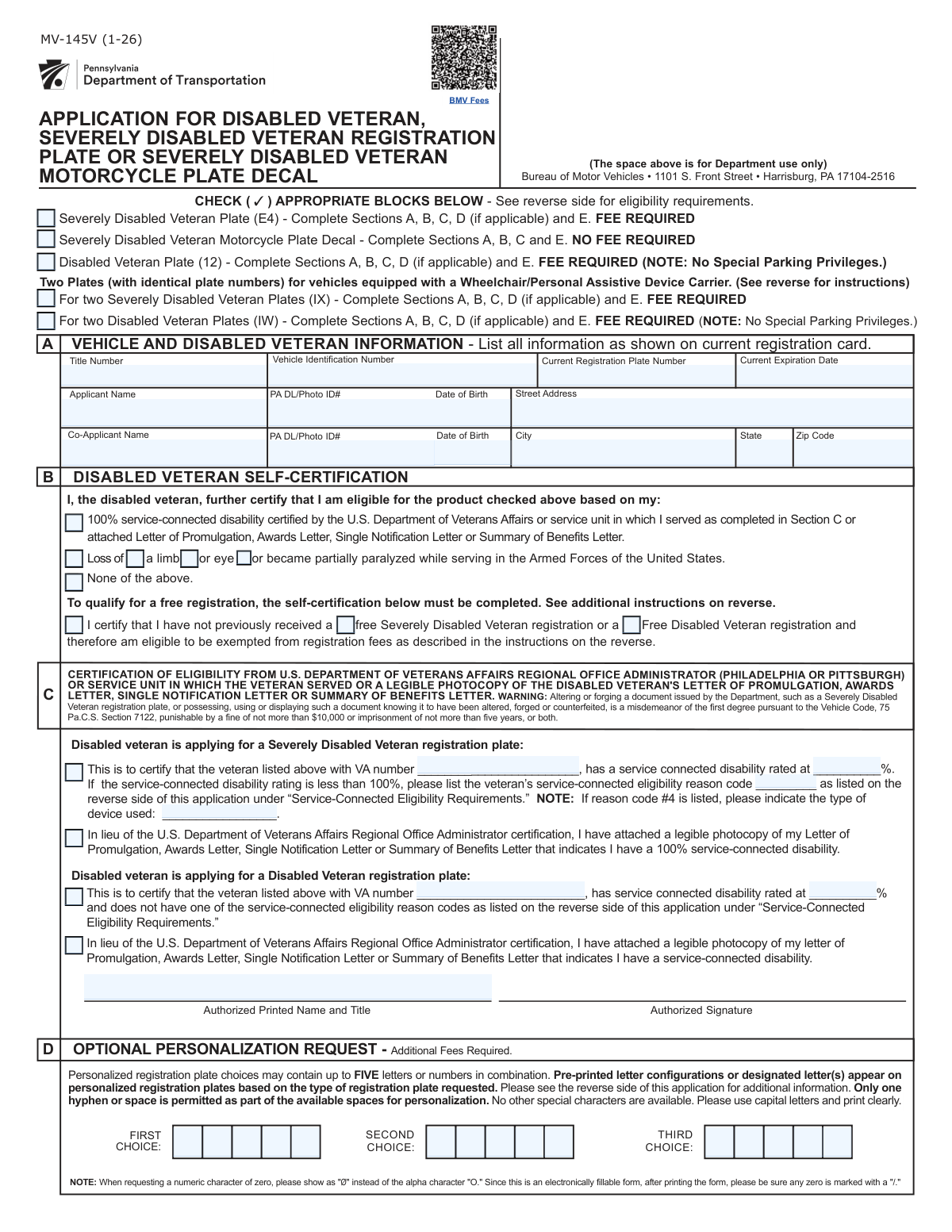
Yes! You can use AI to fill out Form MV-145V, Application for Severely Disabled Veteran, Severely Disabled Veteran Motorcycle Plate Decal or Disabled Veteran Registration Plate
Form MV-145V is an official application from the Pennsylvania Department of Transportation (PennDOT) for veterans with qualifying service-connected disabilities to obtain special license plates. This form allows eligible veterans to receive plates that may grant special parking privileges or fee exemptions, depending on the type of plate and the veteran's disability status. Today, this form can be filled out quickly and accurately using AI-powered services like Instafill.ai, which can also convert non-fillable PDF versions into interactive fillable forms.
Our AI automatically handles information lookup, data retrieval, formatting, and form filling.
It takes less than a minute to fill out MV-145V using our AI form filling.
Securely upload your data. Information is encrypted in transit and deleted immediately after the form is filled out.
Form specifications
| Form name: | Form MV-145V, Application for Severely Disabled Veteran, Severely Disabled Veteran Motorcycle Plate Decal or Disabled Veteran Registration Plate |
| Number of fields: | 66 |
| Number of pages: | 3 |
| Filled form examples: | Form MV-145V Examples |
| Language: | English |
More forms in Registration forms
Instafill Demo: How to fill out PDF forms in seconds with AI
How to Fill Out MV-145V Online for Free in 2026
Are you looking to fill out a MV-145V form online quickly and accurately? Instafill.ai offers the #1 AI-powered PDF filling software of 2026, allowing you to complete your MV-145V form in just 37 seconds or less.
Follow these steps to fill out your MV-145V form online using Instafill.ai:
- 1 Navigate to Instafill.ai and upload or select PennDOT Form MV-145V.
- 2 Use the AI assistant to fill in your personal details, co-applicant information (if any), and vehicle information like VIN and current plate number.
- 3 Select the type of veteran plate you are applying for and check the boxes that correspond to your eligibility status.
- 4 Complete the disability certification section with your VA file number and disability rating, or indicate that you are attaching required VA documentation.
- 5 If requesting a personalized plate, fill out the optional section with your preferred character choices.
- 6 Review all sections for accuracy, then electronically sign and date the declaration to certify the information.
- 7 Download the completed form and submit it to PennDOT with any necessary fees and supporting documents as per the form's instructions.
Our AI-powered system ensures each field is filled out correctly, reducing errors and saving you time.
Why Choose Instafill.ai for Your Fillable MV-145V Form?
Speed
Complete your MV-145V in as little as 37 seconds.
Up-to-Date
Always use the latest 2026 MV-145V form version.
Cost-effective
No need to hire expensive lawyers.
Accuracy
Our AI performs 10 compliance checks to ensure your form is error-free.
Security
Your personal information is protected with bank-level encryption.
Frequently Asked Questions About Form MV-145V
This form is used by eligible Pennsylvania veterans to apply for various types of special license plates, such as the Severely Disabled Veteran Plate, Disabled Veteran Plate, or a Severely Disabled Veteran Motorcycle Plate Decal.
The Severely Disabled Veteran Plate is for veterans with specific, severe disabilities and may grant special parking privileges. The Disabled Veteran Plate is for veterans with a service-connected disability but explicitly does not grant any special parking privileges.
Eligibility is for veterans with a service-connected disability certified by the U.S. Department of Veterans Affairs. Specific requirements, such as a 100% disability rating or loss of a limb, apply depending on the plate type you are requesting.
You need to provide proof of your service-connected disability. You can either have the VA regional office certify the form or attach a legible photocopy of your VA Letter of Promulgation, Awards Letter, or Summary of Benefits Letter.
Fees are required for most plates, including the Severely Disabled and Disabled Veteran plates. However, the Severely Disabled Veteran Motorcycle Plate Decal has no fee, and you may be exempt from registration fees if you certify you have not previously received a free veteran registration.
Yes, the form includes sections to add a co-applicant's full name, PA Driver's License/ID number, and other personal information to the vehicle registration.
Yes, Section D of the form allows you to request a personalized plate for an additional fee. You can provide up to three choices for your desired combination of up to five letters or numbers.
The form allows you to apply for two identical plates for a vehicle equipped with a wheelchair or personal assistive device carrier. This ensures your plate number is always visible from the rear of the vehicle.
This code is required if you are applying for a Severely Disabled Veteran plate and your disability rating is less than 100%. You must enter the specific code from the form's instructions that corresponds to your qualifying condition.
To claim the fee exemption, you must check the box in Section B certifying that you have not previously received a free Severely Disabled Veteran or Free Disabled Veteran registration. This is a one-time benefit for eligible veterans.
Yes, services like Instafill.ai use AI to accurately auto-fill form fields with your information, which can save you time and help prevent errors.
You can use a service like Instafill.ai to upload the form and fill it out on your computer. This allows you to easily type your information into the correct fields and then download the completed form for printing and submission.
If you have a flat, non-fillable PDF, you can upload it to a service like Instafill.ai. The tool can convert the document into an interactive, fillable form that you can complete on your computer.
You will need to enter your vehicle's Title Number, Vehicle Identification Number (VIN), current registration plate number, and the registration's expiration date. This information should be copied exactly from your current title and registration card.
Compliance MV-145V
Validation Checks by Instafill.ai
1
Plate Type Selection Requirement
Ensures that at least one of the five plate type checkboxes is selected at the top of the form. This is the primary purpose of the application, and without a selection, the form cannot be processed. If no plate type is selected, the submission should be rejected with an error message prompting the user to choose the plate they are applying for.
2
VIN Format and Structure Validation
Validates that the Vehicle Identification Number (VIN) is exactly 17 characters long and contains only valid characters (alphanumeric, excluding I, O, and Q). This check is critical for correctly identifying the vehicle in state and national databases. An invalid VIN will prevent the registration from being processed and must be corrected by the user.
3
PA Driver's License/ID Number Format
Verifies that the Applicant and Co-Applicant 'PA DL/Photo ID Number' fields conform to the standard 8-digit format for Pennsylvania licenses and IDs. This ensures the identity of the applicant(s) can be accurately verified within the PennDOT system. A failed validation would require the user to re-enter the number exactly as it appears on their ID card.
4
Conditional Section Completion Logic
Checks that all required sections (A, B, C, D, E) are completed based on the specific plate type selected. For example, applying for a 'Severely Disabled Veteran Plate (E4)' requires Sections A, B, C, D (if applicable), and E. This rule prevents incomplete submissions by guiding the user to fill out all necessary information for their chosen plate, reducing processing delays.
5
Mutually Exclusive Eligibility Status
Ensures that if the 'None of the above' checkbox is selected in the eligibility section, no other eligibility checkboxes (e.g., '100% service‑connected disability', 'Loss of limb') can be selected. This prevents contradictory information regarding the veteran's eligibility status. If a conflict is detected, the user must correct their selections to reflect a single, consistent status.
6
Mutually Exclusive Fee Exemption Claim
Validates that the checkbox 'Certify that you have not previously received a free... registration' is mutually exclusive with the checkboxes acknowledging prior receipt of a free registration. An applicant cannot both certify they have never received a free registration and acknowledge they have. This check prevents logical impossibilities and ensures accurate fee assessment.
7
Conditional VA Certification Field Requirement
This rule ensures that if an applicant checks 'Severely Disabled Veteran plate — VA certification', the fields for 'VA file number' and 'Service-connected disability rating (%)' become mandatory. These fields are essential for verifying eligibility for this specific plate type. If the certification box is checked but the details are missing, the form is incomplete and cannot be processed.
8
Disability Rating Percentage Range
Validates that the 'Service-connected disability rating (%)' is a numerical value between 0 and 100, inclusive. This maintains data integrity and ensures the rating is a valid percentage as provided by the VA. Any input outside this range, or non-numeric input, would be flagged as an error for the user to correct.
9
Conditional Eligibility Reason Code Logic
This check makes the 'Service-connected eligibility reason code' field mandatory only if the 'Severely Disabled Veteran plate — VA certification' is checked AND the disability rating is less than 100%. This specific code is required to justify eligibility for severely disabled plates when the disability is not 100%. The validation ensures this crucial piece of information is captured when required.
10
Personalized Plate Character Validation
Verifies that any entry in the 'First Choice', 'Second Choice', or 'Third Choice' personalized plate fields contains only letters and numbers and does not exceed the five-character limit. This ensures the requested personalization conforms to the allowed format before submission. It prevents users from requesting invalid plate combinations that would be rejected.
11
Date of Birth Age Verification
Checks that the 'Applicant Date of Birth' and 'Co-Applicant Date of Birth' are valid dates in the past and correspond to an age that is legally permitted to be a registered owner of a vehicle (e.g., 16 or 18 years old, depending on state law). This prevents data entry errors and ensures the applicant meets the minimum age requirements. A date in the future or one indicating the applicant is too young would be rejected.
12
Co-Applicant Information Completeness
If a 'Co-Applicant Name' is provided, this validation ensures that the corresponding 'Co-Applicant PA DL / Photo ID #', 'Co-Applicant Date of Birth', and address fields are also filled out. A co-applicant cannot be added to the registration without their complete identifying information. This rule enforces the submission of a complete data set for all listed individuals.
13
Documentation Attachment Cross-Reference
If the user checks a box to 'Attach VA letter' or 'Attach photocopy of Letter of Promulgation', the system should verify that a corresponding file has been uploaded or is included with the submission. This check ensures that the physical or digital documentation promised by the applicant is actually present. A missing document would halt processing until it is provided.
14
Declaration Date Validity
Validates that the combination of 'Day of Month', 'Month', and 'Year' in the declaration section forms a valid calendar date that is not in the future. This ensures the signature date is logical and accurate. This check prevents impossible dates (e.g., April 31) or future dates, which would invalidate the declaration.
Common Mistakes in Completing MV-145V
Applicants often confuse 'Severely Disabled Veteran' plates, which may offer special parking privileges, with 'Disabled Veteran' plates, which do not. This mistake happens due to the similar naming and can lead to the application being processed for the wrong plate, incorrect fees being assessed, and disappointment when the expected parking privileges are not granted. To avoid this, carefully read the description, fee requirements, and privileges for each plate type at the top of the form before making a selection.
The Vehicle Identification Number (VIN) and Title Number are long strings of characters that are easy to mistype. A single incorrect digit or letter will cause a mismatch with state records, leading to immediate rejection of the application and significant delays. To prevent this, meticulously double-check the VIN and title number against the official vehicle registration and title documents. AI-powered form filling tools like Instafill.ai can help by validating the format of these numbers and reducing transcription errors.
Section C requires specific details from VA documentation, such as the VA file number, disability percentage, and a specific reason code if the rating is below 100%. Applicants frequently leave these fields blank or enter incorrect information because they don't have the documents handy or don't understand where to find the codes. An incomplete or incorrect certification section will halt the application until the proper information and supporting documents are provided. Always have your VA benefits letter or other official documentation in front of you when completing this section.
The form provides an option to attach a VA benefits letter in lieu of having a VA office certify the form, and applicants often check this box but forget to include a copy of the letter with their submission. This is a very common oversight that results in an incomplete application and an automatic request for more information, delaying the process by weeks. If you check a box indicating an attachment is included, create a checklist and physically verify that all required documents are attached before mailing the form.
The section regarding previous free registrations is confusingly worded, leading applicants to either incorrectly claim a fee exemption they are not entitled to or fail to claim one they are. For example, an applicant might mistakenly certify they have not received a free registration before when they have, or vice-versa. This error can lead to either an overpayment or an underpayment and subsequent rejection. Carefully read the certification statements to determine if you have previously been issued a free disabled veteran registration for any vehicle.
The applicant's full name, address, and driver's license number must exactly match the information on the current vehicle registration and PA driver's license. People sometimes use nicknames, enter a new address not yet updated on their registration, or make a typo in their ID number. Any discrepancy will cause a processing failure, as the system cannot verify the applicant's identity or vehicle ownership. Ensure all personal information is entered precisely as it appears on your official documents.
If a vehicle is registered to more than one person, the co-applicant's information (name, DL#, date of birth) is required on the application. Applicants often forget to include this information or obtain the co-applicant's signature, especially if that person is not the disabled veteran. This omission will cause the application to be returned, as the state requires consent and information from all registered owners. Always verify the vehicle's registration to see if there is a co-owner and ensure their information is fully provided.
The instructions at the top of the form specify which sections (A, B, C, D, E) must be completed based on the plate type selected. Applicants often focus on one section and overlook others, such as forgetting to complete the vehicle information in Section A or the eligibility certification in Section B. This results in an incomplete application that cannot be processed. Before submitting, review the instructions for your chosen plate type and ensure every single required section has been filled out.
The final declaration section is where the applicant legally certifies the information is true, but it is frequently left unsigned, undated, or missing the location where it was signed. An unsigned form is legally invalid and will be immediately rejected without being processed. This simple oversight is one of the most common reasons for rejection. Always perform a final review of the form, paying special attention to the signature and date fields before submission.
When requesting a personalized plate in Section D, applicants may request more than the allowed five characters, use special symbols, or only provide one choice which may already be taken. This part of the application will be rejected, and the applicant will either receive a standard-issue plate or face delays while new choices are requested. To avoid this, ensure your choices are five characters or less (letters/numbers only) and provide three distinct options to increase the likelihood of approval.
Saved over 80 hours a year
“I was never sure if my IRS forms like W-9 were filled correctly. Now, I can complete the forms accurately without any external help.”
Kevin Martin Green
Your data stays secure with advanced protection from Instafill and our subprocessors

Robust compliance program
Transparent business model
You’re not the product. You always know where your data is and what it is processed for.
ISO 27001, HIPAA, and GDPR
Our subprocesses adhere to multiple compliance standards, including but not limited to ISO 27001, HIPAA, and GDPR.
Security & privacy by design
We consider security and privacy from the initial design phase of any new service or functionality. It’s not an afterthought, it’s built-in, including support for two-factor authentication (2FA) to further protect your account.
Fill out MV-145V with Instafill.ai
Worried about filling PDFs wrong? Instafill securely fills form-mv-145v-application-for-severely-disabled-veteran-severely-disabled-veteran-motorcycle-plate-decal-or-disabled forms, ensuring each field is accurate.



