
Yes! You can use AI to fill out Anmeldung zum R+V-Firmenportal Vorsorge (Registration for the R+V Company Portal for Pensions)
Don't type 147 fields by hand. Tell our AI about yourself, or upload your driver's license, and it fills every field in seconds. You check it, then download, print or sign.
The AI does the filling. You just check it.
No typing into boxes, nothing to install.
What this form asks for
The AI fills all of it, from your answers or your documents.
The AI checks your answers before you download
14 checks built for this form, so a wrong date or a missing answer is caught before anyone else sees it.
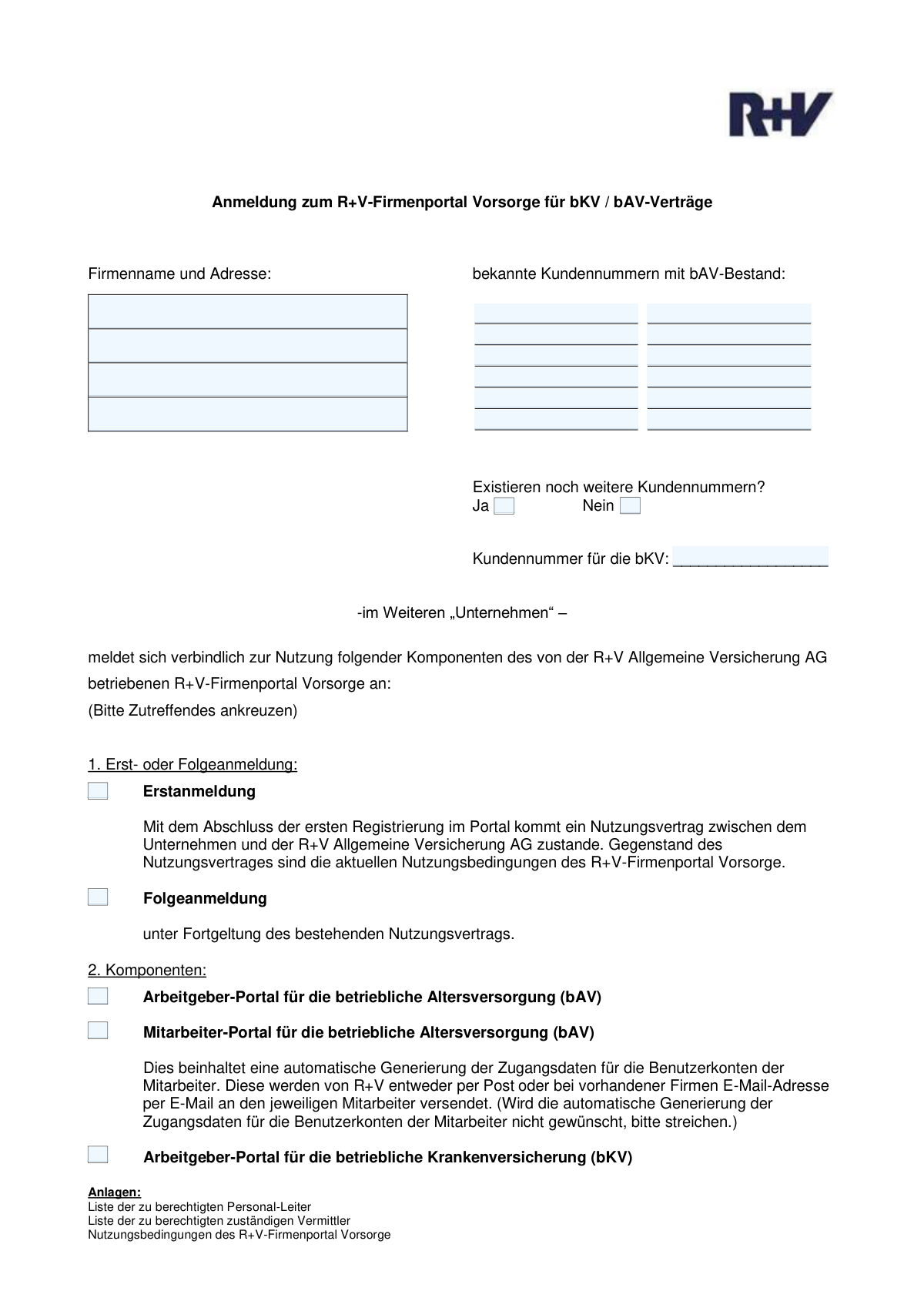
This check ensures that the 'Company name', 'Company address (street and number)', and 'Company address (postal code and city)' fields are all filled out. These fields are essential for correctly identifying the company and processing the registration. A failure would prevent the form submission until all required address components are provided.
Validates that exactly one of the registration type options, 'Erstanmeldung' (Initial Registration) or 'Folgeanmeldung' (Follow-up Registration), is selected. These options are mutually exclusive and determine the contractual basis of the registration. If neither or both are selected, the user will be prompted to make a single, valid choice.
Verifies that at least one of the portal components ('Arbeitgeber-Portal für die bAV', 'Mitarbeiter-Portal für die bAV', or 'Arbeitgeber-Portal für die bKV') has been selected. The form's purpose is to register for these services, so selecting at least one is mandatory. If no selection is made, the submission is blocked as it would have no effect.
Ensures that if the 'Mitarbeiter-Portal für die betriebliche Altersversorgung (bAV)' is selected, the 'Arbeitgeber-Portal für die betriebliche Altersversorgung (bAV)' must also be selected. The employee portal is an extension of the employer portal and cannot be activated independently. A validation failure would require the user to select the employer portal or deselect the employee portal.
Checks that if the 'Arbeitgeber-Portal für die bAV' is selected, at least one of the twelve 'Customer number' fields for bAV is filled. This is crucial for linking the new portal access to an existing company pension plan (bAV) contract. Without a customer number, the registration cannot be associated with the correct account.
Validates that if the 'Arbeitgeber-Portal für die bKV' is selected, the 'Customer number for bKV' field must be filled. This number is necessary to identify the company's occupational health insurance (bKV) contract. Failure to provide this number while requesting the bKV portal will halt submission until the information is entered.
And 8 more checks
- Signature Date Format and Logic
- User Information Row Completeness
- User Email Address Format
- User Role Assignment Requirement
- User Role Consistency with Company Selection
- Signature and Location Completeness
- Postal Code Format Validation
- Additional Customer Numbers Exclusivity
Let AI fill out your R+V Firmenportal Anmeldung
No typing. Every field filled in seconds, checked, ready to sign.
How to Fill Out R+V Firmenportal Anmeldung Online for Free in 2026
What the AI walks you through.
- Navigate to Instafill.ai and upload or select the 'Anmeldung zum R+V-Firmenportal Vorsorge' form.
- Use the AI assistant to automatically fill in your company's name, address, and any known customer numbers.
- Indicate whether this is an initial registration (Erstanmeldung) or a follow-up registration (Folgeanmeldung).
- Select the specific portal components your company requires, such as employer access for the pension scheme (bAV) or health insurance (bKV).
- Enter the personal details (name, email, function) for each employee who will be granted administrative access to the portal.
- Review all entered information for accuracy, then provide the location, date, and an authorized signature with a company stamp.
- Download the completed registration form and submit it to R+V Versicherung to activate your portal access.
Common Mistakes in Completing R+V Firmenportal Anmeldung
The ones the AI is built to catch.
Using an Incorrect or Incomplete Company Name
Splitting Address Information Incorrectly Across Fields
Inaccurate or Improperly Formatted Customer Numbers
Mishandling Conditional Logic for the bKV Customer Number
Selecting the Wrong Registration Type (Erstanmeldung vs. Folgeanmeldung)
Forgetting to Assign Portal Access Rights to Users
Using Personal or Incorrect Company Email Addresses
Missing Signature from an Authorized Person or Company Stamp
Incomplete Administrator Authorization Details
Failing to Indicate if More Than 12 Customer Numbers Exist
Frequently Asked Questions About R+V Firmenportal Anmeldung
Is it really free for 7 days?
Can I fill other forms too?
How do I cancel?
How does the AI fill out R+V Firmenportal Anmeldung?
What happens to my information?
How complex is R+V Firmenportal Anmeldung to fill out?
What is the purpose of this form?
Who needs to fill out this form?
What is the difference between 'Erstanmeldung' and 'Folgeanmeldung'?
Where can I find my customer numbers?
What should I do if I have more than 12 bAV customer numbers?
What are the different portal components I can select?
How do I register multiple users for the portal?
What do 'Funktion' and 'Auftrags recht' mean for the user registration?
My company doesn't have a company stamp. What should I do?
How do I submit the completed form?
How long will it take to get portal access after submitting the form?
Can AI tools help me fill out this form?
How can I use Instafill.ai to fill this form online?
What can I do if my PDF version of this form is not fillable?
Get your R+V Firmenportal Anmeldung filled out by AI
$0 today. Cancel before Nov 1 and you pay nothing.
Other forms like this one
pension forms: Form 1099-R, Distributions From Pensions etc., Form N245, Application for suspension of a warrant and/or variation of an order, The Principal Pension Plan Summary Plan Description: Cash Balance Formula for Employees and Individual Field, The Principal Pension Plan Summary Plan Description: Traditional and Cash Balance Formulas for Employees and Individual Field, Form SC ISP-1300, Canada Pension Plan Survivor's Pension and Surviving Child's Benefit Application, Form SC ISP-1300, Application for CPP Survivor's Pension and Surviving Child's Benefit, United Kingdom (UK) State Pension claim form, Form W-4P (2026), Withholding Certificate for Periodic Pension or Annuity Payments, Bakery and Confectionery Pension Fund Pension Application, ABA Retirement Funds Program Distribution Request Form, Beneficiary Designation Form for Plans Subject to QJSA (Form F11607), Form F6776, Authorization of Interest-Only Payments (ERISA), Form F7381, Authorization of Interest-Only Payments (Non ERISA), New York State Comptroller Form RS 5127, Designation of Beneficiary with Contingent Beneficiaries, Qualified Retirement Plan Designation of Beneficiary, VA Form 21P-0969, Income and Asset Statement in Support of Claim for Pension or Parents' Dependency and Indemnity Compensation (D.I.C.), VA Form 21P-534EZ, Application for D.I.C., Survivors Pension, and/or Accrued Benefits, VA Form 21-0966, Intent to File a Claim for Compensation and/or Pension, or Survivors Pension and/or DIC, Form SA474, Claim for an Australian Survivor Pension for a person living outside Australia, Form SY029 - Claim for Pensioner Education Supplement
registration forms: Form DE 1, Commercial Employer Account Registration, Form 69-001, Industrial Hemp Registration, Form VTR-60, Application for Replacement License Plate(s) and/or Registration Sticker, Food (Registration of Premises) (Jersey) Order 2001 — Schedule 1 (Article 4(1)) — Form of Application for Registration of Food Premises, Discovery Health Practice Registration Form 2026 (DHHPR2001), Course Roster and Location Registration Form, Fidelity Change of Account Registration: Changing to an Individual, Joint, or Custodial Brokerage Account, Fidelity Change of Account Registration — Changing to a Trust, Estate, Guardian, or Conservator Brokerage Account, Fidelity Change of Account Registration — Cash Management Account, MS(R) 21A, Application for the Registration of a Ship under the (Malta) Merchant Shipping Act, 1973, Form 130-U, Application for Texas Title and/or Registration, Form SSA-1694, Entity Registration and Taxpayer Information, Form IIGAREG, Institutional Account Registration Form, Form 2, Application for Licensure and First Registration, Licensed Clinical Social Worker, BIR Form No. 1901, Application for Registration For Self-Employed (Single Proprietor/Professional), Mixed Income Individuals, Non-Resident Alien Engaged in Trade/Business, Estate and Trust, California Voter Registration Cancellation Request Form, Form MV-82, Vehicle Registration/Title Application, Form 1-S, Full Requirement Initial Charity Registration Application, New York Vehicle Registration/Title Application, Form MV-145V, Application for Severely Disabled Veteran, Severely Disabled Veteran Motorcycle Plate Decal or Disabled Veteran Registration Plate
company forms: Form S-1, Surety Company Annual Report, National Integrity Life Insurance Company Ownership Change Request Form (NI-77-0039-2505), QBCC Licence Application Form – Company (Application made under section 33, Queensland Building and Construction Commission Act 1991), California Form 568 (2024), Limited Liability Company Return of Income, Continental American Insurance Company (CAIC) / Aflac Group Critical Illness Claim Form (with Attending Physician’s Statement, HIPAA Authorization to Obtain Information, and Electronic Funds Transaction Authorization), Brotherhood Mutual Insurance Company Ministry Driver Screening Form (A99), Assurity Life Insurance Company Disability Claim Form — Attending Physician’s Statement, Due Diligence Form (Australian Company) – The Perth Mint, The Prudential Insurance Company of America Group Disability Insurance – Education and Employment History Form (GL.2009.009, Ed. 06/2017), Pennsylvania Department of State — Certificate of Termination (Domestic Limited Liability Company) (15 Pa.C.S. § 8872(f)) (DSCB:15-8872(f)), Louisiana Secretary of State – Notice of Change of Registered Office and/or Change of Registered Agent (Domestic Limited Liability Company) (R.S. 12:1308) (Form SS983, Rev. 01/24), Form LLC1050, Articles of Cancellation of a Virginia Limited Liability Company, HDFC ERGO General Insurance Company Limited – Request for Cashless Hospitalisation for Health Insurance (Policy Part – C), Beneficiary Designation/Change - Principal Life Insurance Company, Principal Life Insurance Company UCTIE INTERNATIONAL UNION 401(K) SAVINGS PLAN Enrollment Form, Principal Life Insurance Company Death Notification Form, Principal Life Insurance Company Form PG4701, In-Plan Roth Conversion – No Spousal Consent Needed, Principal Life Insurance Company Administration Guide, Principal Life Insurance Company Small Amounts Benefit Election, SEC Application for an Order under Section 17(b) of the Investment Company Act of 1940 (File No. 812-11000)
Let AI fill out your R+V Firmenportal Anmeldung
Your trial starts once a card is added. You pay nothing before Nov 1.
Our AI already knows this form, all 147 fields of it. Skip the typing: tell it about yourself, or upload what you have, and it fills the whole form in seconds.
- AI fills every field on all 4 pages, tables and checkboxes included
- No typing into boxes: answer a few questions, or upload your driver's license, an old copy of this form, a photo of a document
- The AI checks the answers; you review and change anything before you download
- Download the finished PDF, print it, or sign it online
- Encrypted, and never used to train AI
Cancel before Nov 1 and you pay nothing.
A card is needed to start the trial. Cancel in two clicks from your account.
Terms · Privacy