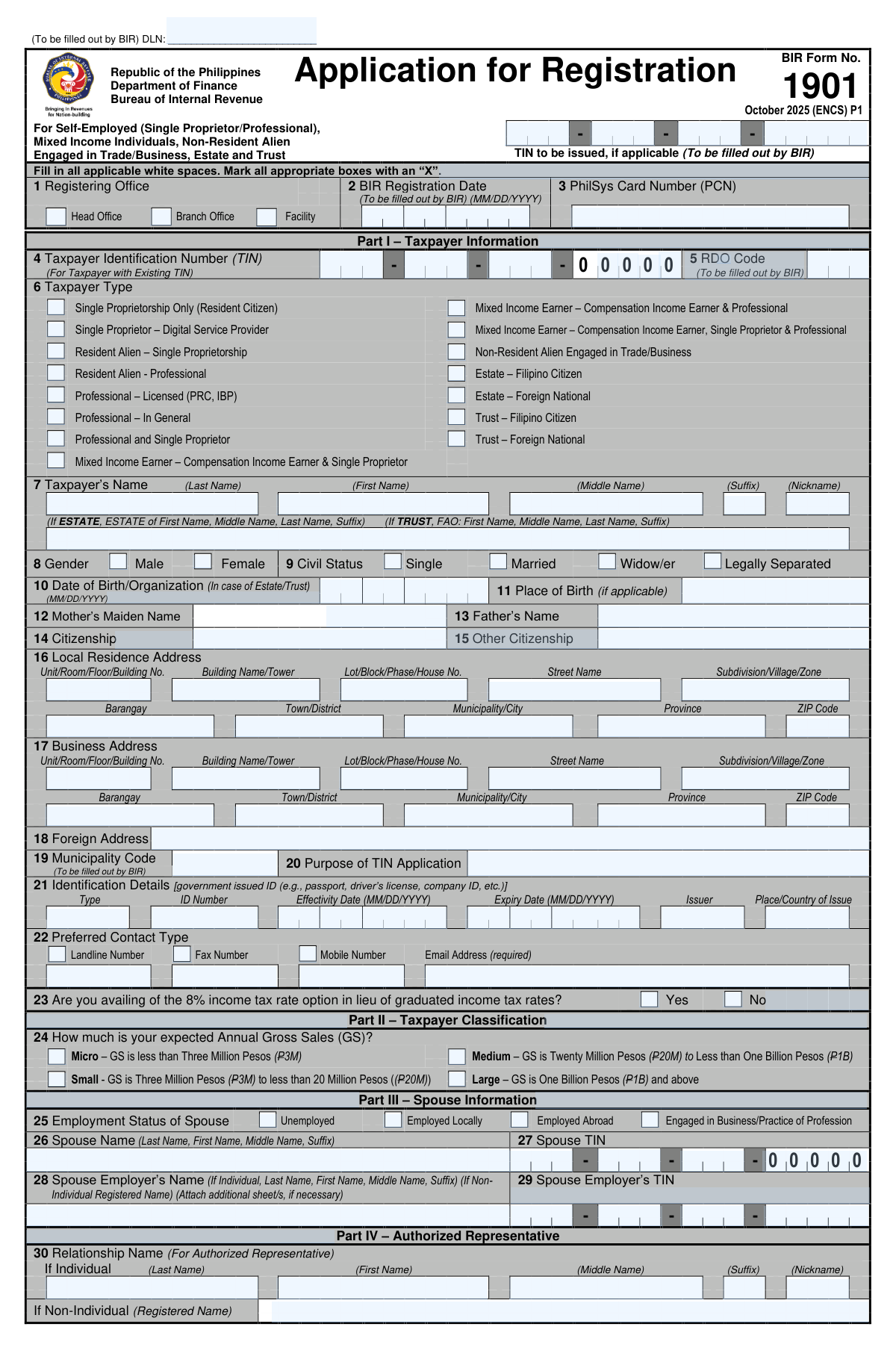
Yes! You can use AI to fill out BIR Form No. 1901, Application for Registration For Self-Employed (Single Proprietor/Professional), Mixed Income Individuals, Non-Resident Alien Engaged in Trade/Business, Estate and Trust
BIR Form 1901 is a tax registration document issued by the Philippine Bureau of Internal Revenue (BIR). It is used by self-employed individuals, single proprietors, professionals, mixed-income earners, and administrators of estates or trusts to register with the BIR and obtain a Taxpayer Identification Number (TIN). Proper registration is a crucial first step for tax compliance, enabling individuals and entities to legally operate a business, practice a profession, and file tax returns. Today, this form can be filled out quickly and accurately using AI-powered services like Instafill.ai, which can also convert non-fillable PDF versions into interactive fillable forms.
BIR Form 1901 is part of the
business forms, business registration forms, estate forms, trust forms, self-employed forms, income forms, PA state forms, registration forms, NJ state forms, state ID forms, individual application forms and trust and estate forms categories on Instafill.
Rather not fill this in by hand? Instafill is an online form filler that completes PDF forms automatically — upload the blank form, answer a few questions, and the AI fills every field.
Form specifications
| Form name: | BIR Form No. 1901, Application for Registration For Self-Employed (Single Proprietor/Professional), Mixed Income Individuals, Non-Resident Alien Engaged in Trade/Business, Estate and Trust |
| Number of pages: | 1 |
| Language: | English |
Our AI automatically handles information lookup, data retrieval, formatting, and form filling.
It takes less than a minute to fill out BIR Form 1901 using our AI form filling.
Securely upload your data. Information is encrypted in transit and deleted immediately after the form is filled out.
Instafill Demo: How to fill out PDF forms in seconds with AI
How to Fill Out BIR Form 1901 Online for Free in 2026
Are you looking to fill out a BIR FORM 1901 form online quickly and accurately? Instafill.ai offers the #1 AI-powered PDF filling software of 2026, allowing you to complete your BIR FORM 1901 form in just 37 seconds or less.
Follow these steps to fill out your BIR FORM 1901 form online using Instafill.ai:
- 1 Navigate to Instafill.ai and upload your BIR Form 1901.
- 2 Provide your personal details in Part I, including your name, address, date of birth, and contact information.
- 3 Complete Part II by classifying your taxpayer type and expected annual gross sales.
- 4 Enter spouse information in Part III and business details in Part V, such as trade name, industry, and any investment incentives.
- 5 If applicable, provide information for any authorized representatives (Part IV) or business facilities like warehouses or storage places (Part VI).
- 6 Carefully review all the information pre-filled by the AI for accuracy, paying close attention to personal identifiers, addresses, and business classifications.
- 7 Sign the declaration in Part IX and prepare the required supporting documents listed on the form for submission to the BIR.
Our AI-powered system ensures each field is filled out correctly, reducing errors and saving you time.
Why Choose Instafill.ai for Your Fillable BIR Form 1901 Form?
Speed
Complete your BIR Form 1901 in as little as 37 seconds.
Up-to-Date
Always use the latest 2026 BIR Form 1901 form version.
Cost-effective
No need to hire expensive lawyers.
Accuracy
Our AI performs 10 compliance checks to ensure your form is error-free.
Security
Your personal information is protected with bank-level encryption.
Frequently Asked Questions About BIR Form 1901
BIR Form 1901 is an application for registration with the Bureau of Internal Revenue (BIR). It is intended for self-employed individuals, single proprietors, professionals, mixed-income earners, as well as for the registration of estates and trusts.
You will typically need a government-issued ID (like a PhilID, Passport, or Driver's License) and proof of your business address. Depending on your business, you might also need a DTI Certificate of Registration, a professional license (PRC ID), or other specific permits.
No, you must use your existing Taxpayer Identification Number (TIN), as possessing more than one TIN is illegal. You should file BIR Form 1905 to update your registration details to reflect your new status as self-employed or a mixed-income earner.
This is an optional tax regime for self-employed individuals and professionals with gross sales or receipts under the P3 million VAT threshold. Opting for this means you pay a flat 8% tax on gross sales in lieu of graduated income tax rates and percentage tax.
In Part V, you need to provide your registered trade name (if any), describe your primary business activities, and list any business registrations you have. If you don't have a registered trade name, you can use your personal name.
BIR Printed Invoices are generic, ready-to-use receipts you can purchase from the BIR. An 'Authority to Print' is a permit you secure from the BIR to have your own customized invoices printed by a BIR-accredited printer.
Submit the completed form to the Revenue District Office (RDO) that has jurisdiction over your business address. You will need to pay a P30.00 Documentary Stamp Tax (DST) for the Certificate of Registration and pay for the printing of your invoices or receipts.
No, this section is marked 'To be filled out by BIR'. A BIR officer will determine and indicate the specific taxes you are liable for based on the information you provide in your application.
Yes, services like Instafill.ai use AI to help you accurately fill out forms like BIR Form 1901. These tools can auto-fill fields based on your data, which saves time and helps prevent common errors.
You can use a platform like Instafill.ai to fill out the form online. Simply upload the PDF, and the tool will make it interactive, allowing you to type in your information, save your progress, and print the completed form.
If you have a non-fillable or 'flat' PDF, you can use Instafill.ai to instantly convert it into an interactive, fillable form. This allows you to easily type your information directly onto the form before printing it for submission.
Yes, this form is applicable for Resident and Non-Resident Aliens engaged in trade or business in the Philippines. You will need to provide additional documents, such as your Work Visa (9g), along with the standard requirements.
This section is for designating a person who can legally transact with the BIR on your behalf for this registration. If you are filing the form yourself, you can leave it blank; otherwise, your representative will need a Special Power of Attorney (SPA).
Part X, which is a portion of BIR Form 0605, is for paying the registration fees at the BIR. The BIR Revenue Collection Officer will fill out the payment details when you pay the required fees at the RDO.
Compliance BIR Form 1901
Validation Checks by Instafill.ai
1
Validates Taxpayer Identification Number (TIN) Format
This check ensures that any Taxpayer Identification Number (TIN) entered in fields like 4, 27, 29, 42B, or 43B follows the standard 12-digit format (e.g., 123-456-789-00000). The TIN is a critical unique identifier for all tax-related transactions, and an incorrect format would lead to data mismatches and processing failures. If the format is invalid, the submission should be rejected with an error message indicating the correct structure.
2
Ensures Taxpayer Name is Complete
This validation confirms that the 'Last Name' and 'First Name' fields (Field 7) in the Taxpayer Information section are not left blank. A complete legal name is essential for accurate identification and for generating the Certificate of Registration. Failure to provide this basic information would make the application invalid and prevent its processing.
3
Validates Date of Birth Format and Plausibility
This check verifies that the 'Date of Birth' (Field 10) is a valid date in MM/DD/YYYY format and represents a date in the past. It should also check if the date indicates the applicant is of legal age (e.g., 18 years or older), as registration is typically for adults. An invalid or future date would be a data entry error, and an underage applicant may not be eligible, so the form would be flagged for correction.
4
Conditional Requirement for Spouse Information
This is a logical check that links 'Civil Status' (Field 9) to the 'Spouse Information' section (Part III). If the applicant selects 'Married', then the 'Spouse Name' (Field 26) and 'Spouse TIN' (Field 27) become mandatory fields. This ensures data completeness for tax computation purposes, such as for consolidated filing or relief claims. If the status is 'Married' but spouse details are missing, the form submission should be halted until the information is provided.
5
Validates Required Email Address
This check ensures the 'Email Address' in the Preferred Contact Type section (Field 22) is present and correctly formatted (e.g., [email protected]), as the form explicitly marks it as 'required'. The email address is a primary channel for official BIR communications, notifications, and updates. An invalid or missing email address would hinder communication and delay important tax-related processes.
6
Logical Consistency of Citizenship
This validation cross-references the 'Taxpayer Type' (Field 6) with the 'Citizenship' (Field 14). If a taxpayer type such as 'Resident Alien' or 'Non-Resident Alien' is selected, the 'Citizenship' field cannot be 'Filipino'. This ensures the data is logical and consistent, which is crucial for determining the correct tax obligations and regulations applicable to the registrant. An inconsistency would require the user to correct either the taxpayer type or the citizenship.
7
Completeness of Local Residence Address
This check verifies that essential components of the 'Local Residence Address' (Field 16), such as Barangay, Municipality/City, Province, and ZIP Code, are filled out. A complete and accurate address is legally required for establishing the taxpayer's home RDO (Revenue District Office) and for mailing official correspondence. Incomplete address information would prevent the successful registration and processing of the application.
8
Chronological Validation of ID Dates
This check ensures that for the 'Identification Details' (Field 21), the 'Expiry Date' is on or after the 'Effectivity Date'. It also confirms both are valid dates. This prevents logical errors in data entry and ensures the ID provided was valid at the time of application. Submitting an ID with an expiry date before its effective date is impossible and indicates a clear error that must be corrected.
9
Conditional Requirement for Business Address
This validation ensures that if a 'Taxpayer Type' (Field 6) indicating business activity (e.g., 'Single Proprietorship', 'Professional and Single Proprietor') is chosen, the 'Business Address' (Field 17) must be provided. The business address is distinct from the residence address and is critical for jurisdiction, tax mapping, and business-related notices. Omitting this information for a business registrant would make the application incomplete.
10
Chronological Validation of Incentive Dates
This check verifies that the 'Incentive End Date' (Field 37F) is not earlier than the 'Incentive Start Date' (Field 37E). This ensures the data entered for tax incentives is logical and reflects a valid period of effectivity. An end date preceding a start date is a data entry error that would cause issues in calculating tax liabilities and must be corrected.
11
Mandatory Selection of Taxpayer Type
This validation confirms that the user has selected at least one option from the 'Taxpayer Type' checkboxes (Field 6). This selection is fundamental as it defines the primary reason for registration and determines which tax obligations apply to the individual. Without this information, the BIR cannot classify the taxpayer or process the application correctly.
12
Logical Validation of Invoice Serial Numbers
This check ensures that for any invoice range specified in Part VIII (Fields 41D or 42I), the 'End' serial number is greater than or equal to the 'Start' serial number. This simple logic check prevents data entry errors when recording invoice details. An invalid range would cause problems with invoice tracking and authorization, so the system should flag it for correction.
13
Conditional Requirement for Printer's Information
This validation rule is triggered based on the answer to 'Do you intend to use BIR Printed Invoices?' (Field 41A). If the user selects 'No', it becomes mandatory to provide the 'Printer’s Name' (Field 42A) and 'Printer’s TIN' (Field 42B). This is required for the BIR to authorize and track the printing of official invoices by accredited third-party printers. Failure to provide this information would prevent the approval of the Authority to Print (ATP).
14
Foreign Address Requirement for Non-Resident Aliens
This check ensures that if the 'Taxpayer Type' (Field 6) is selected as 'Non-Resident Alien Engaged in Trade/Business', the 'Foreign Address' field (Field 18) must be completed. This address is the primary legal residence for non-residents and is essential for international tax treaty considerations and official correspondence. An application from a non-resident without a foreign address would be considered incomplete and illogical.
Common Mistakes in Completing BIR Form 1901
Applicants often get confused by the numerous options in Item 6, especially the distinctions between 'Single Proprietor,' 'Professional,' and various 'Mixed Income' categories. Choosing the wrong type can lead to incorrect tax obligations, penalties, and the need to file for an update of registration. To avoid this, carefully read each description and match it to all your income sources before marking a box.
The form requires addresses in Items 16 and 17 to be broken down into specific fields like Unit No., Building Name, Barangay, and ZIP Code. Many applicants write the entire address in one field or omit crucial details. This can cause official notices to be misdelivered, leading to missed deadlines. Always fill each address component in its designated box for accuracy.
Applicants who previously had a TIN (e.g., from a former job) may forget it, enter it incorrectly in Item 4, or attempt to apply for a new one, which is illegal. This causes significant processing delays and potential penalties for possessing multiple TINs. Always verify if you have an existing TIN before applying; if you do, ensure it is entered accurately.
The choice in Item 23 is a critical tax decision, not just a simple checkbox. Applicants may choose 'Yes' or 'No' without fully understanding the eligibility requirements or how it compares to the graduated income tax rates. An incorrect choice can result in higher tax payments or compliance issues, and the decision is generally irrevocable for the taxable year, so it is vital to understand the implications first.
If the applicant is married, Part III is mandatory, but it is frequently left blank or filled with incorrect data like a wrong TIN for the spouse. Incomplete information will halt the registration process until the correct details are provided, causing unnecessary delays. Married applicants should prepare this information, including their spouse's exact TIN and employer details, beforehand.
In the Business Information section (Item 36), applicants must enter their 'Trade/Business Name' as registered with the DTI. Many sole proprietors mistakenly enter their own personal name again in this field. This inconsistency with official DTI records can cause confusion and require correction, delaying the issuance of the Certificate of Registration.
Several sections, such as Item 5 (RDO Code), Item 40 (Tax Types), and the payment details in Part X, are explicitly marked '(To be filled out by BIR)'. Applicants sometimes fill these in, which can invalidate the form or require the BIR officer to manually correct it. To avoid this, read all instructions carefully and leave any fields designated for the BIR completely blank.
An application will be immediately rejected if the required documents listed at the end of the form are incomplete, expired, or incorrect. Common errors include bringing a photocopy of an ID without the original for verification, forgetting the Special Power of Attorney (SPA) for representatives, or not having a valid proof of address. This is the most frequent cause of delay, forcing applicants to return another day.
Part IX is crucial for applicants with 'Mixed Income' who have multiple employers within the calendar year. People often forget to list a previous employer from earlier in the year, which is essential for the BIR to consolidate income and compute the correct annual income tax. Omitting this information can lead to tax deficiencies and penalties during year-end adjustments.
In Part VIII, applicants must decide between using BIR Printed Invoices (BPI) or getting an Authority to Print (ATP) their own. If choosing ATP, they often fail to provide the complete and accurate details of their accredited printer, such as the printer's TIN and accreditation number. Missing information will prevent the approval of the ATP, stalling business operations that require the issuance of official receipts.
Saved over 80 hours a year
“I was never sure if my IRS forms like W-9 were filled correctly. Now, I can complete the forms accurately without any external help.”
Kevin Martin Green
Your data stays secure with advanced protection from Instafill and our subprocessors




Robust compliance program
Transparent business model
You’re not the product. You always know where your data is and what it is processed for.
ISO 27001, HIPAA, and GDPR
Our subprocesses adhere to multiple compliance standards, including but not limited to ISO 27001, HIPAA, and GDPR.
Security & privacy by design
We consider security and privacy from the initial design phase of any new service or functionality. It’s not an afterthought, it’s built-in, including support for two-factor authentication (2FA) to further protect your account.
Fill out BIR Form 1901 with Instafill.ai
Worried about filling PDFs wrong? Instafill securely fills bir-form-no-1901-application-for-registration-for-self-employed-single-proprietorprofessional-mixed-income-individuals forms, ensuring each field is accurate.
