Yes! You can use AI to fill out VA Form 10-320, Veteran Reimbursement Claim Form
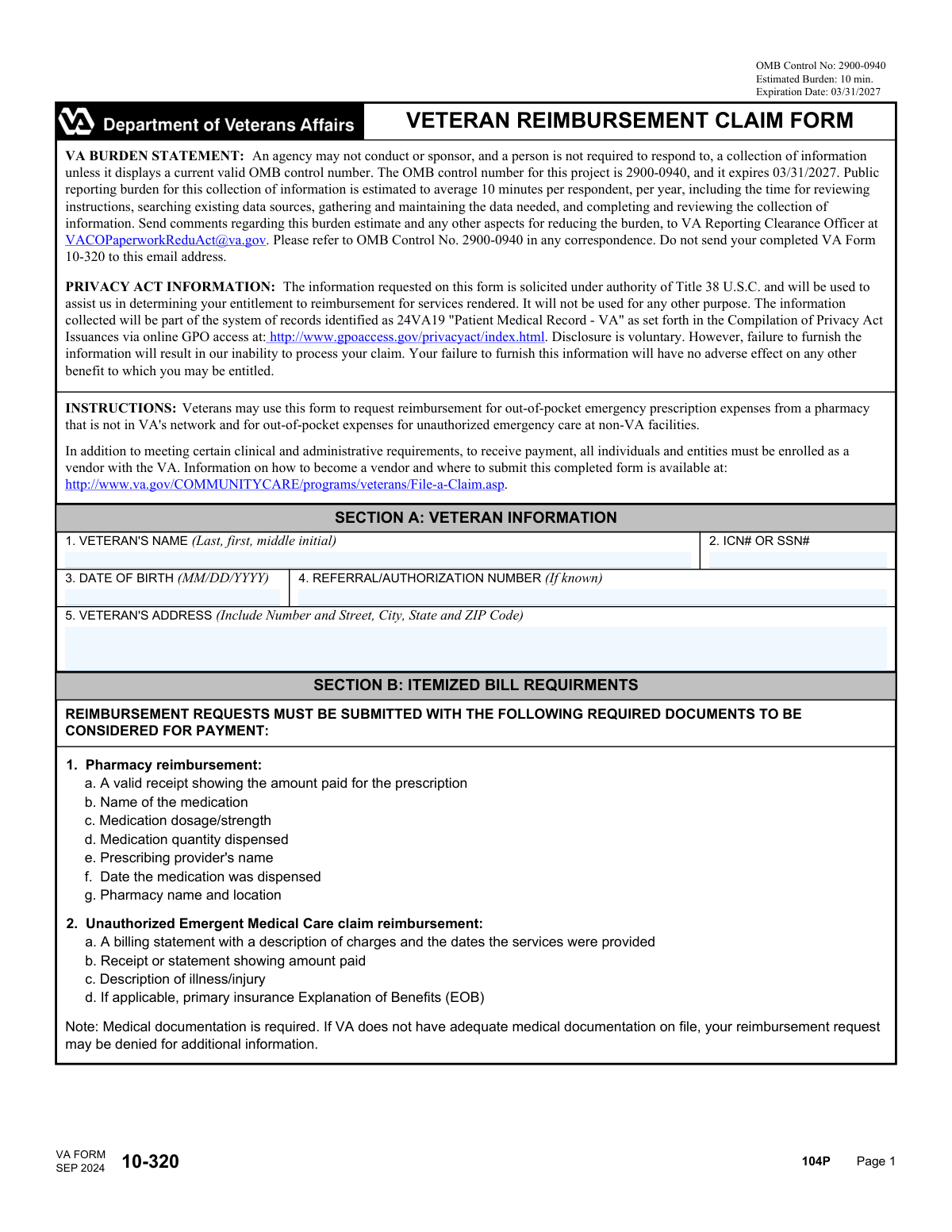
VA Form 10-320 is a Department of Veterans Affairs document that allows veterans to file a claim for reimbursement for unauthorized emergency care or for emergency prescriptions filled at a non-VA network pharmacy. This form is crucial for veterans seeking to recover out-of-pocket costs for necessary medical services obtained outside the VA system. Today, this form can be filled out quickly and accurately using AI-powered services like Instafill.ai, which can also convert non-fillable PDF versions into interactive fillable forms.
Our AI automatically handles information lookup, data retrieval, formatting, and form filling.
It takes less than a minute to fill out VA Form 10-320 using our AI form filling.
Securely upload your data. Information is encrypted in transit and deleted immediately after the form is filled out.
Form specifications
| Form name: | VA Form 10-320, Veteran Reimbursement Claim Form |
| Number of pages: | 2 |
| Language: | English |
| Categories: | veteran forms, VA claim forms |
Instafill Demo: How to fill out PDF forms in seconds with AI
How to Fill Out VA Form 10-320 Online for Free in 2026
Are you looking to fill out a VA FORM 10-320 form online quickly and accurately? Instafill.ai offers the #1 AI-powered PDF filling software of 2026, allowing you to complete your VA FORM 10-320 form in just 37 seconds or less.
Follow these steps to fill out your VA FORM 10-320 form online using Instafill.ai:
- 1 Navigate to Instafill.ai and upload or select the VA Form 10-320.
- 2 Use the AI assistant to accurately fill in your personal details in Section A, including your name, SSN or ICN, and address.
- 3 Gather the required supporting documents as specified in Section B, such as itemized bills, receipts, and Explanation of Benefits (EOB) from your primary insurance.
- 4 In Section C, provide a detailed written explanation for why the medical services or prescriptions were not obtained through the VA.
- 5 Review all the information entered by you and the AI for accuracy and completeness.
- 6 Digitally sign and date the form in Section C to declare that the information provided is true and accurate.
- 7 Download the completed form and submit it with all necessary attachments according to the VA's filing instructions.
Our AI-powered system ensures each field is filled out correctly, reducing errors and saving you time.
Why Choose Instafill.ai for Your Fillable VA Form 10-320 Form?
Speed
Complete your VA Form 10-320 in as little as 37 seconds.
Up-to-Date
Always use the latest 2026 VA Form 10-320 form version.
Cost-effective
No need to hire expensive lawyers.
Accuracy
Our AI performs 10 compliance checks to ensure your form is error-free.
Security
Your personal information is protected with bank-level encryption.
Frequently Asked Questions About Form VA Form 10-320
This form is used by veterans to request reimbursement for out-of-pocket expenses for emergency prescriptions from non-VA pharmacies or for unauthorized emergency medical care received at non-VA facilities.
Veterans who have personally paid for emergency medical care or prescriptions at a non-VA facility and are seeking reimbursement from the VA should use this form.
You can claim reimbursement for urgent or emergent prescriptions filled at a pharmacy not in the VA's network, and for costs associated with unauthorized emergency medical care at non-VA facilities.
You must submit a valid receipt showing the amount paid, along with details like the medication name, dosage, quantity, prescribing provider, and the pharmacy's name and location.
You need to provide an itemized billing statement, a receipt showing the amount you paid, a description of your illness or injury, and your primary insurance's Explanation of Benefits (EOB), if applicable. Note that adequate medical documentation is also required.
In this section, you must provide a clear, signed explanation detailing the circumstances of your emergency and why you were unable to receive care at a VA facility.
Submission instructions, including the correct mailing address, can be found on the VA's community care website. Do not send the form to the email address listed in the form's burden statement.
Failure to furnish all required information, including supporting documents and medical records, will result in the VA's inability to process your claim and may lead to a denial.
You must provide either your SSN or your ICN (Internal Control Number) in Section A. This information is necessary for the VA to identify you and process your claim.
An EOB is a statement from your primary health insurance plan describing what costs it will cover. It is required, if you have other insurance, so the VA can determine its payment responsibility after your primary insurance has paid its share.
Yes, you can still submit the form. The Referral/Authorization Number is only required if one was issued for your care; if you don't have one, you can leave that field blank.
Yes, services like Instafill.ai use AI to accurately auto-fill form fields from your saved profile, which can help you complete the form faster and with fewer errors.
You can use a service like Instafill.ai to fill out the form online. Simply upload the form, and the tool will make it fillable, allowing you to type your information and sign electronically.
If you have a flat or non-fillable PDF, you can use a tool like Instafill.ai to convert it into an interactive, fillable form. This allows you to easily type your answers directly into the fields.
Compliance VA Form 10-320
Validation Checks by Instafill.ai
1
Ensures Veteran's Name is Complete
This check verifies that the 'VETERAN'S NAME' field is not empty and contains at least a last and first name. This information is crucial for correctly identifying the claimant in VA systems. A failure to provide a complete name will prevent the form from being processed and linked to the correct veteran's record.
2
Validates the Format of the SSN or ICN
This validation ensures the number entered in the 'ICN# OR SSN#' field conforms to a valid format, such as 9 digits for a Social Security Number. Correct formatting is essential for database lookups and identity verification. An incorrectly formatted number will trigger an error and require correction before submission, preventing processing delays.
3
Verifies Date of Birth is a Valid Past Date
This check confirms that the 'DATE OF BIRTH' is a real calendar date entered in MM/DD/YYYY format and that the date is not in the future. This is a fundamental identity verification step and ensures data integrity. An invalid or future date will result in a validation error, as it is a logical impossibility.
4
Checks for a Logically Plausible Veteran Age
Based on the 'DATE OF BIRTH' provided, this validation calculates the veteran's age to ensure it is within a reasonable range (e.g., over 17 years old). This helps catch significant data entry errors that could lead to incorrect identity matching. If the calculated age is outside the plausible range, the user will be prompted to review and correct the date of birth.
5
Ensures All Components of the Veteran's Address are Provided
This validation checks that the street, city, state, and ZIP code fields for the 'VETERAN'S ADDRESS' are all filled in. A complete address is mandatory for mailing correspondence, explanation of benefits, and reimbursement checks. Missing address components will halt the submission process until the information is provided.
6
Validates the Veteran's ZIP Code Format
This check ensures the ZIP code in the veteran's address is a valid 5-digit or 9-digit (ZIP+4) format. A correctly formatted ZIP code is critical for mail delivery and location-based service verification. An invalid format will prompt the user for correction to avoid returned mail and payment delays.
7
Ensures State is a Valid Two-Letter Abbreviation
This validation verifies that the 'State' portion of the address is a recognized two-letter postal abbreviation (e.g., CA, TX, FL). Using standard abbreviations ensures data consistency and successful address validation against postal service databases. An unrecognized entry will cause an error, requiring the user to select a valid state.
8
Confirms an Explanation for Non-VA Services is Provided
This check ensures that the 'EXPLANATION' text field in Section C is not left blank. This justification is a mandatory part of the claim, as it explains why the veteran sought care outside the VA system. A missing explanation will result in an incomplete claim and prevent submission, as it is required for eligibility determination.
9
Verifies the Form has been Digitally Signed
This validation confirms that the 'SIGNATURE' field has been successfully completed. The signature serves as a legal declaration that the provided information is true and accurate under penalty of perjury. A submission without a signature is legally invalid and will be rejected.
10
Validates the Signature Date is Present and Logically Correct
This check ensures the 'DATE' of signature is provided in MM/DD/YYYY format and is not a future date. The signature date legally attests to when the declaration was made. An invalid, future, or missing date will cause a validation failure, as it compromises the legal standing of the document.
11
Checks for Confirmation of Required Document Attachment
This validation ensures the user has confirmed that all required documents listed in Section B (e.g., receipts, billing statements) are being submitted with the form. This check, often a mandatory checkbox, prevents the submission of incomplete claims that lack the necessary evidence for reimbursement. Failure to confirm will block submission and remind the user to attach the required files.
12
Cross-System Identity Verification
This advanced validation checks the combination of the Veteran's Name, SSN/ICN, and Date of Birth against the central VA database. This is the most critical step to confirm the claimant's identity and eligibility for benefits. A mismatch will result in an error, preventing claim submission for an incorrect or non-existent veteran record and protecting against fraud.
Common Mistakes in Completing VA Form 10-320
Veterans often enter their name as 'First Last' instead of the required 'Last, First, Middle Initial' format specified in Field 1. This happens due to habit or not reading the field label carefully, causing a data mismatch that can delay processing while the record is manually located. To avoid this, always follow the exact format shown in the field's instructions. AI-powered form fillers can automatically parse and format names correctly based on field requirements.
Leaving the Social Security Number or ICN field blank, or entering it with a typo, is a critical error that prevents claim processing. This number is the primary identifier used to locate the veteran's records in the VA system. This mistake often happens due to a simple typo or privacy concerns, but without a correct identifier, the VA cannot verify eligibility or process the reimbursement. Always double-check the number for accuracy before submitting.
A primary reason for denial is submitting the form without the supporting documents listed in Section B. Veterans may forget to attach receipts, billing statements, or medical documentation, assuming the form itself is sufficient. A claim without this evidence cannot be verified or paid. To prevent this, use Section B as a checklist and ensure every required document for your specific claim type (pharmacy or medical) is included with your submission.
The form is for reimbursement of 'out-of-pocket' expenses, meaning the veteran must prove they have already paid. A common mistake is submitting only an itemized bill that shows a balance due, rather than a receipt or statement showing the amount paid. This will lead to the claim being denied for lack of payment proof. Always ensure your documentation clearly shows that payment has been made.
When a veteran has other health insurance, the VA often acts as a secondary payer for unauthorized emergency care. Filers frequently forget to include the Explanation of Benefits (EOB) from their primary insurance carrier. Without the EOB, the VA cannot determine the remaining balance it may be responsible for, leading to claim denial or significant delays. If another policy covered any part of the care, you must submit the corresponding EOB.
In Section C, simply writing 'it was an emergency' is insufficient. The VA requires a detailed written explanation of why services could not be obtained from a VA facility. This mistake occurs when filers don't provide specific context, such as the nature of the emergency, their location, and the circumstances that made a non-VA facility the only viable option. A weak explanation can lead to the claim being denied, so be as detailed as possible.
An unsigned form is legally invalid and will be returned without processing. This simple oversight is one of the most frequent and easily avoidable mistakes, often happening when filers are in a hurry. Always remember to complete the signature field in Section C and enter the current date in the correct MM/DD/YYYY format. If the form is a non-fillable PDF, tools like Instafill.ai can make it fillable and add a digital signature.
For pharmacy reimbursement, a simple cash register receipt is not enough. The claim requires specific details like the medication name, dosage, quantity, and prescribing provider, which are often on a separate, detailed pharmacy printout. Submitting an incomplete receipt will result in the claim being denied for more information. Always ask the pharmacy for a full, itemized printout that includes all the details listed in Section B.1.
The form's header includes an email address for feedback on the form itself, explicitly stating 'Do not send your completed VA Form 10-320 to this email address.' Filers may mistakenly email their claim to this address, meaning it never reaches the correct processing center. To avoid this, carefully follow the submission instructions found on the VA Community Care website link provided in the form's instructions.
A critical but often missed step in the instructions is that individuals must be enrolled as a vendor with the VA to receive payment. Many veterans are unaware of this prerequisite and submit their claim without first completing the vendor enrollment process. This will result in the claim being approved but payment being held until enrollment is complete, causing significant delays. Always check the VA Community Care website for vendorization instructions before submitting your first claim.
Saved over 80 hours a year
“I was never sure if my IRS forms like W-9 were filled correctly. Now, I can complete the forms accurately without any external help.”
Kevin Martin Green
Your data stays secure with advanced protection from Instafill and our subprocessors

Robust compliance program
Transparent business model
You’re not the product. You always know where your data is and what it is processed for.
ISO 27001, HIPAA, and GDPR
Our subprocesses adhere to multiple compliance standards, including but not limited to ISO 27001, HIPAA, and GDPR.
Security & privacy by design
We consider security and privacy from the initial design phase of any new service or functionality. It’s not an afterthought, it’s built-in, including support for two-factor authentication (2FA) to further protect your account.
Fill out VA Form 10-320 with Instafill.ai
Worried about filling PDFs wrong? Instafill securely fills va-form-10-320-veteran-reimbursement-claim-form forms, ensuring each field is accurate.