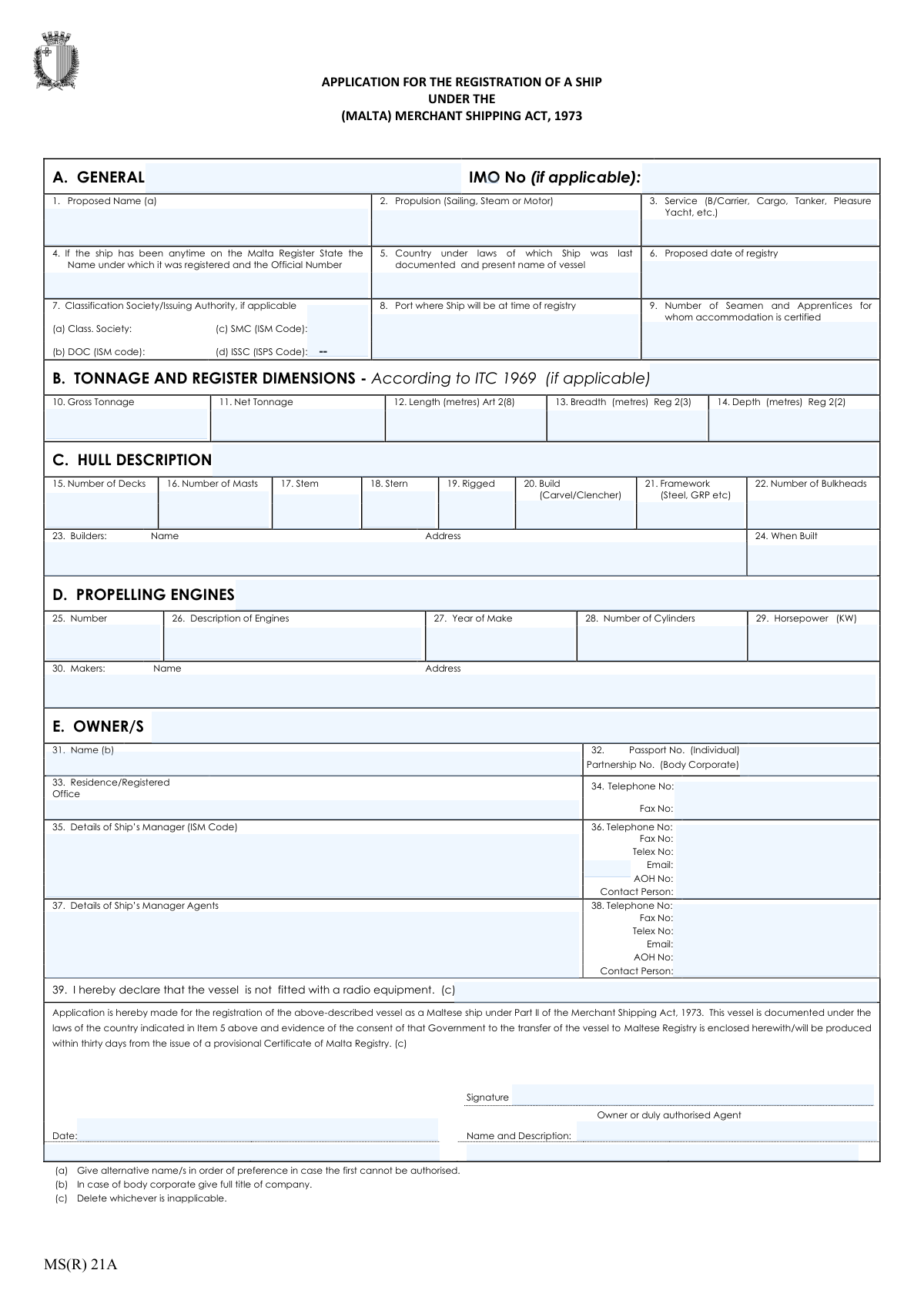
Yes! You can use AI to fill out MS(R) 21A, Application for the Registration of a Ship under the (Malta) Merchant Shipping Act, 1973
Form MS(R) 21A is the legal document required to apply for the registration of a vessel with the Malta Ship Registry. It collects detailed information about the ship, including its general characteristics, dimensions, ownership, and management, which is essential for establishing its legal status under the Maltese flag. Completing this multi-section form accurately is crucial for a successful registration process. Today, this form can be filled out quickly and accurately using AI-powered services like Instafill.ai, which can also convert non-fillable PDF versions into interactive fillable forms.
Our AI automatically handles information lookup, data retrieval, formatting, and form filling.
It takes less than a minute to fill out MS(R) 21A using our AI form filling.
Securely upload your data. Information is encrypted in transit and deleted immediately after the form is filled out.
Form specifications
| Form name: | MS(R) 21A, Application for the Registration of a Ship under the (Malta) Merchant Shipping Act, 1973 |
| Number of pages: | 1 |
| Filled form examples: | Form MS(R) 21A Examples |
| Language: | English |
Instafill Demo: How to fill out PDF forms in seconds with AI
How to Fill Out MS(R) 21A Online for Free in 2026
Are you looking to fill out a MS(R) 21A form online quickly and accurately? Instafill.ai offers the #1 AI-powered PDF filling software of 2026, allowing you to complete your MS(R) 21A form in just 37 seconds or less.
Follow these steps to fill out your MS(R) 21A form online using Instafill.ai:
- 1 Navigate to Instafill.ai and upload or select the MS(R) 21A form.
- 2 Use the AI assistant to automatically populate general ship details such as the proposed name, IMO number, propulsion, and service type.
- 3 Provide specific technical data in the prompted fields, including tonnage, register dimensions, and hull description.
- 4 Enter detailed information about the ship's propelling engines, including the number of engines, make, year, and horsepower.
- 5 Input the owner's and ship manager's details, including names, addresses, contact information, and identification numbers.
- 6 Review all the AI-populated information for accuracy, complete the final declaration, and make any necessary edits.
- 7 Electronically sign the application and download the completed MS(R) 21A form, ready for submission to the Maltese authorities.
Our AI-powered system ensures each field is filled out correctly, reducing errors and saving you time.
Why Choose Instafill.ai for Your Fillable MS(R) 21A Form?
Speed
Complete your MS(R) 21A in as little as 37 seconds.
Up-to-Date
Always use the latest 2026 MS(R) 21A form version.
Cost-effective
No need to hire expensive lawyers.
Accuracy
Our AI performs 10 compliance checks to ensure your form is error-free.
Security
Your personal information is protected with bank-level encryption.
Frequently Asked Questions About Form MS(R) 21A
This form is the official application used to register a ship under the Maltese flag, in accordance with the Merchant Shipping Act of 1973. It gathers essential details about the vessel, its ownership, and technical specifications for the Maltese maritime authorities.
The application must be completed and signed by the legal owner of the ship. Alternatively, a duly authorized agent acting on the owner's behalf can complete and submit the form.
You should provide alternative names in order of preference in case your first choice is already registered or not authorized by the registry. This helps prevent delays in the registration process.
You must state the country of last documentation and provide evidence of that government's consent to transfer the vessel to the Maltese Registry. This consent can be submitted with the application or within 30 days of receiving a provisional Certificate of Malta Registry.
The Gross Tonnage, Net Tonnage, Length, Breadth, and Depth figures should be taken directly from the ship's International Tonnage Certificate (ITC 1969), if applicable.
You must provide the full name of the owner, their residence or registered office address, and contact details. If the owner is an individual, provide their Passport Number; if it's a company, provide the corporate registration number.
In item 39, you must declare whether the vessel is fitted with radio equipment by deleting the part of the sentence that does not apply. This confirms the vessel's radio status for the registry.
The IMO (International Maritime Organization) Number is required only if one has been assigned to your ship. If your vessel does not have an IMO number, you may leave this field blank.
The Ship's Manager (Item 35) is the company responsible for the ship's operation and ISM Code compliance. The Ship's Manager Agents (Item 37) are the local representatives who may act on behalf of the manager in a specific region or port.
In field 29, you must enter the engine's total power output expressed in kilowatts (kW). This information can typically be found in the engine's technical documentation.
Yes, you can use services like Instafill.ai, which leverage AI to accurately auto-fill form fields from your saved data. This can help you complete the application faster and with fewer errors.
To fill out this form online, you can upload it to a platform like Instafill.ai. The service makes the document interactive, allowing you to type directly into the fields and save your progress digitally.
If you have a non-fillable or 'flat' PDF, you can use a service like Instafill.ai to convert it into an interactive, fillable form. Simply upload the document, and the platform will make the fields editable online.
Compliance MS(R) 21A
Validation Checks by Instafill.ai
1
Validates IMO Number Format and Check Digit
This check verifies that the IMO Number, if provided, follows the standard format of 'IMO' followed by seven digits. It should also validate the seventh digit, which is a check digit calculated from the preceding six. This is crucial for ensuring the vessel's unique and correct identification in global maritime databases. A submission with an invalidly formatted IMO number would be rejected or flagged for mandatory correction.
2
Ensures Proposed Date of Registry is Not in the Past
This validation confirms that the 'Proposed date of registry' is on or after the date of the application submission. A ship registration is a prospective action, so a date in the past is a logical impossibility and indicates a data entry error. This check prevents processing logically flawed applications. If the date is in the past, the system should return an error and require the user to enter a valid future date.
3
Verifies Engine Year is Consistent with Ship Build Year
This check compares the ship's build year ('When Built', Item 24) with the engine's manufacturing year ('Year of Make', Item 27). The engine's year should not be significantly older than the ship's build year, and neither year can be in the future. This logical cross-check helps identify potential data entry errors or unusual configurations that might require further scrutiny. A significant discrepancy would trigger a warning prompting the user to confirm the dates are correct.
4
Requires Completeness of Owner Identification
This validation ensures that the owner's full name (Item 31) and a corresponding identification number (either 'Passport No.' for an individual or 'Partnership No.' for a body corporate, Item 32) are both provided. Verifiable owner identity is a fundamental legal requirement for ship registration to establish clear ownership and accountability. An application missing either the name or an ID number is incomplete and must be rejected until the information is supplied.
5
Validates Engine Details Based on Propulsion Type
This rule checks for a logical dependency between the 'Propulsion' type (Item 2) and the completion of the 'Propelling Engines' section (Items 25-30). If propulsion is 'Motor' or 'Steam', then fields like 'Number of Engines' and 'Horsepower' must be filled with valid data. This prevents the submission of incomplete technical specifications for powered vessels. If the fields are empty for a powered vessel, the submission would be blocked.
6
Ensures Tonnage and Dimension Fields are Positive Numbers
This check validates that all fields in Section B, such as 'Gross Tonnage', 'Net Tonnage', 'Length', 'Breadth', and 'Depth', contain only positive numerical values. These physical characteristics of the vessel cannot be zero or negative. This validation is essential for preventing data entry errors and ensuring the technical data is physically plausible and usable for regulatory calculations. Any non-positive or non-numeric entry would result in a validation failure.
7
Verifies Completeness of Declaration, Signature, and Date
This validation confirms that the declaration section is fully completed, including the 'Signature', the 'Date' of signing, and the 'Name and Description' of the signatory. These elements are legally required to attest to the accuracy of the application and provide authorization for the registration. An application lacking a signature or date is legally invalid and would be immediately rejected as incomplete.
8
Validates Email Address Format for Manager and Agents
This check verifies that any email address provided for the Ship's Manager (Item 36) or Agents (Item 38) adheres to the standard '[email protected]' format. Correct email addresses are critical for all official communication regarding the application's status and ongoing vessel management. An invalid format would prevent essential communication, so the system should flag the error and require correction before submission.
9
Validates Conditional Requirement for Previous Malta Registration Details
This check enforces a conditional rule on Item 4. If the applicant provides any data in this field, it validates that both the previous 'Name' and 'Official Number' are present. This information is critical for linking the new application to the ship's historical record within the Malta Register. An incomplete entry in this section would trigger an error, asking the user to either complete both fields or clear them if entered by mistake.
10
Requires Completeness of Builder and Build Year Information
This validation ensures that both the builder's details ('Name' and 'Address', Item 23) and the ship's construction year ('When Built', Item 24) are provided. This information establishes the ship's origin and age, which are key factors in assessing its compliance with age-related regulations and its overall seaworthiness. An application missing this core provenance data would be considered incomplete and flagged for correction.
11
Ensures Proposed Ship Name is Provided
This is a mandatory field check to ensure the 'Proposed Name' (Item 1) is not empty. The name is the primary identifier for the vessel on the register, and an application cannot be initiated without it. While alternatives are requested, the primary proposed name is non-negotiable for processing. An application submitted without a proposed name would be rejected instantly as fundamentally incomplete.
12
Validates Service Type is Specified
This validation ensures the 'Service' field (Item 3) is filled out, specifying the ship's intended use (e.g., Cargo, Tanker, Pleasure Yacht). The service type is critical as it dictates which specific safety standards, manning levels, and operational regulations apply to the vessel. An application without a specified service type is ambiguous and cannot be correctly processed or classified, and would therefore be rejected.
13
Validates Numeric Format for Crew Accommodation
This check ensures that the 'Number of Seamen and Apprentices for whom accommodation is certified' (Item 9) is a non-negative integer. This number is a certified capacity and cannot be a fraction or a negative value. This validation maintains data integrity for safety and certification records. A non-integer or negative value would result in an error, requiring the user to input a valid whole number.
Common Mistakes in Completing MS(R) 21A
Field 29 explicitly requires engine power in kilowatts (kW), but applicants often enter the value in Brake Horsepower (BHP) or another common unit without conversion. This leads to incorrect technical data on the official registry, which can cause issues with certification, insurance, and port state control inspections. To avoid this, always use a standard conversion formula (1 HP ≈ 0.7457 kW) to calculate the correct kilowatt value before entry. AI-powered tools like Instafill.ai can automatically detect and convert units to match form requirements, preventing this error.
For corporate owners, applicants frequently enter a common trading name or an abbreviation instead of the full, official legal entity name as required by note (b) for field 31. This mistake can create significant legal and administrative delays, as the ownership details on the application must exactly match the company's registration documents. Always use the complete legal name, including suffixes like 'Ltd.', 'Inc.', or 'GmbH', as it appears on the certificate of incorporation. This ensures a smooth verification process.
The declaration in item 39 contains clauses with the instruction '(c) Delete whichever is inapplicable'. Applicants often forget to strike through the clause that does not apply, leaving the declaration ambiguous regarding the vessel's radio equipment or its transfer consent status. This ambiguity can halt the registration process until a clarification is provided. When filling out the form, carefully review each clause and physically cross out the one that is not true for your vessel. If using a digital tool, ensure it supports annotations or provides a clear way to indicate the correct choice.
Field 32 asks for a 'Passport No.' for an individual owner and a 'Partnership No.' for a body corporate. A common error is entering a personal passport number for a corporate application or a company registration number for an individual owner. This mismatch between owner type and ID number will cause the application to be rejected during verification. Double-check that you are entering the correct identifier in the corresponding field based on whether the owner is a person or a legal entity.
The form requests a proposed name in field 1, and note (a) explicitly asks for alternative names in order of preference. Many applicants only provide their first choice, overlooking the request for backups. If the primary name is already taken or not permissible, the absence of alternatives forces the registry to halt the process and contact the applicant, causing unnecessary delays. To avoid this, always research name availability and provide at least two alternative names.
Fields 12, 13, and 14 clearly specify that the ship's length, breadth, and depth must be provided in metres. However, applicants accustomed to imperial measurements often enter these dimensions in feet or feet and inches. This fundamental data entry error results in a grossly inaccurate vessel profile and immediate rejection of the application. Always ensure all measurements are converted to metres before filling out Section B. Smart form-filling tools can help by validating that the entered numbers are reasonable for the vessel type and flagging potential unit errors.
In the signature section, below the signature and date, the form asks for the 'Name and Description' of the owner or agent. Applicants often just print their name again, omitting the 'Description' part. This field is crucial for establishing the signatory's authority (e.g., 'Director', 'Authorised Agent', 'Owner'). Without this description, the legal validity of the signature may be questioned, potentially invalidating the application. Always include your job title or capacity to demonstrate you are authorized to sign on behalf of the owner.
Field 9 asks for the number of seamen for whom accommodation is 'certified', which refers to the official capacity stated on the ship's safety or accommodation certificate. A frequent mistake is to enter the current number of crew members on board or the planned crew size, which may differ from the certified maximum. This can lead to compliance discrepancies with maritime labor conventions. To prevent this, refer directly to the vessel's official certification documents to find the correct certified accommodation number.
Fields 23 (Builders) and 30 (Makers) require a full name and address. Applicants often provide an incomplete address, missing the city, postal code, or, most importantly, the country. For an international registry, a complete address is essential for proper identification and record-keeping. An incomplete address can slow down verification checks. Always provide the full, unabbreviated postal address for both the shipbuilder and the engine maker. Since this form is a non-fillable PDF, tools like Instafill.ai can convert it into an interactive format and use its database to help auto-complete addresses accurately.
The form distinctly asks for details of the 'Ship's Manager (ISM Code)' in field 35 and 'Ship's Manager Agents' in field 37. Applicants sometimes confuse these roles, providing the same information for both or only filling out one section. The ISM Manager is a specific legal entity responsible for the ship's safety management, while an agent may handle commercial or port operations. Failing to distinguish between them can lead to incorrect contact information being registered for critical safety and operational matters. Ensure you provide the correct details for each distinct role.
Saved over 80 hours a year
“I was never sure if my IRS forms like W-9 were filled correctly. Now, I can complete the forms accurately without any external help.”
Kevin Martin Green
Your data stays secure with advanced protection from Instafill and our subprocessors
Robust compliance program
Transparent business model
You’re not the product. You always know where your data is and what it is processed for.
ISO 27001, HIPAA, and GDPR
Our subprocesses adhere to multiple compliance standards, including but not limited to ISO 27001, HIPAA, and GDPR.
Security & privacy by design
We consider security and privacy from the initial design phase of any new service or functionality. It’s not an afterthought, it’s built-in, including support for two-factor authentication (2FA) to further protect your account.
Fill out MS(R) 21A with Instafill.ai
Worried about filling PDFs wrong? Instafill securely fills msr-21a-application-for-the-registration-of-a-ship-under-the-malta-merchant-shipping-act-1973 forms, ensuring each field is accurate.