Yes! You can use AI to fill out Food (Registration of Premises) (Jersey) Order 2001 — Schedule 1 (Article 4(1)) — Form of Application for Registration of Food Premises
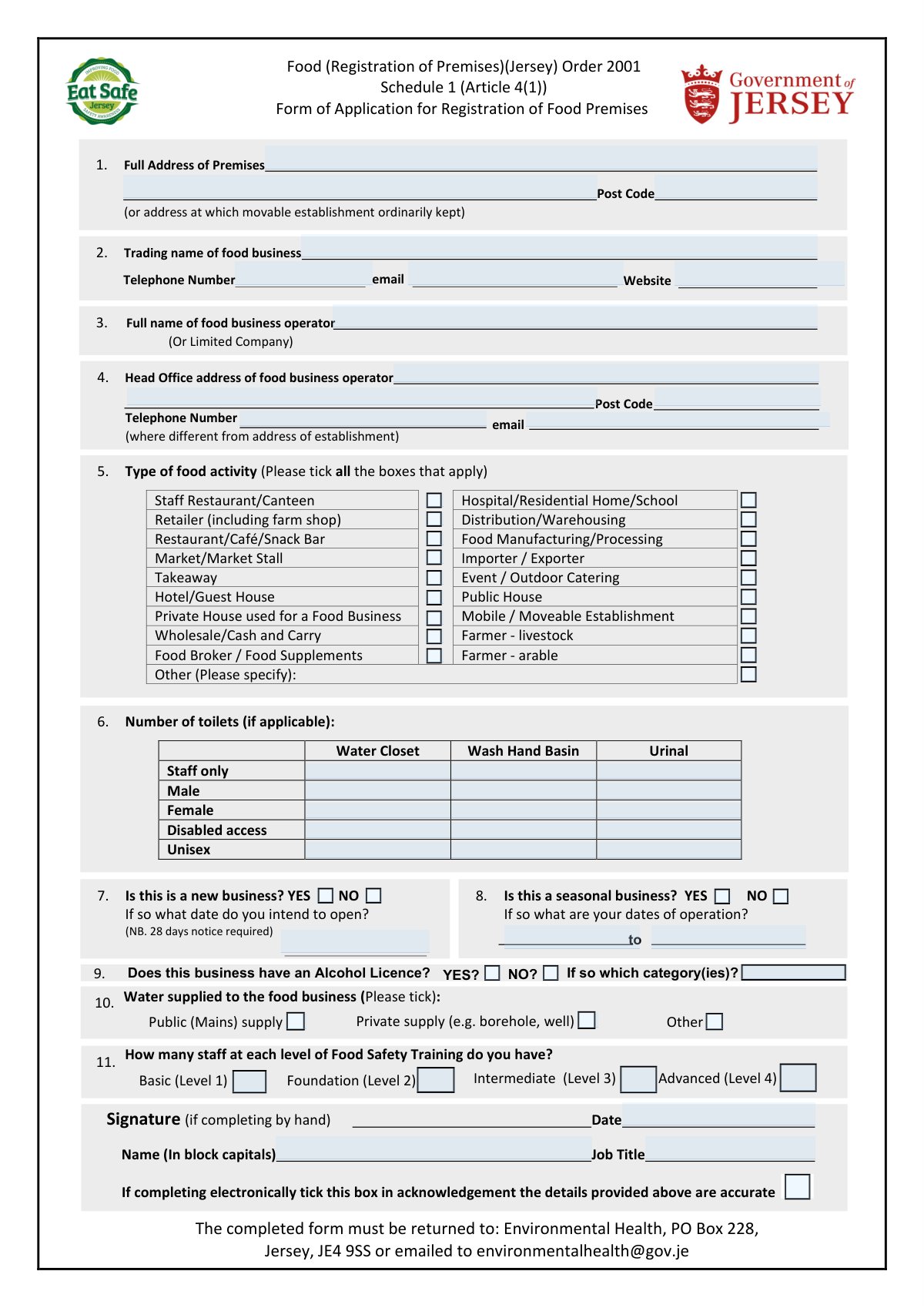
This is the official application form required under the Food (Registration of Premises) (Jersey) Order 2001 for registering a food business establishment with Jerseyâs Environmental Health authority. It records the premises location, operator details, type of food activities, water supply, sanitation facilities, and staffing/training levels. Registration helps regulators identify and inspect food businesses and ensure food hygiene and safety requirements are met. It is important because operating without proper registration (and without providing the required notice period for new businesses) can lead to compliance issues and enforcement action.
Our AI automatically handles information lookup, data retrieval, formatting, and form filling.
It takes less than a minute to fill out Jersey Food Premises Registration (Schedule 1) using our AI form filling.
Securely upload your data. Information is encrypted in transit and deleted immediately after the form is filled out.
Form specifications
| Form name: | Food (Registration of Premises) (Jersey) Order 2001 — Schedule 1 (Article 4(1)) — Form of Application for Registration of Food Premises |
| Number of pages: | 1 |
| Filled form examples: | Form Jersey Food Premises Registration (Schedule 1) Examples |
| Language: | English |
Instafill Demo: filling out a legal form in seconds
How to Fill Out Jersey Food Premises Registration (Schedule 1) Online for Free in 2026
Are you looking to fill out a JERSEY FOOD PREMISES REGISTRATION (SCHEDULE 1) form online quickly and accurately? Instafill.ai offers the #1 AI-powered PDF filling software of 2026, allowing you to complete your JERSEY FOOD PREMISES REGISTRATION (SCHEDULE 1) form in just 37 seconds or less.
Follow these steps to fill out your JERSEY FOOD PREMISES REGISTRATION (SCHEDULE 1) form online using Instafill.ai:
- 1 Enter the full address of the premises (or the address where a movable establishment is ordinarily kept), including postcode and contact details.
- 2 Provide the trading name of the food business and the full legal name of the food business operator (individual or limited company), plus head office address if different.
- 3 Select all applicable food activity types by ticking the relevant boxes and specify any “Other” activity.
- 4 Complete facilities and operations details: number/type of toilets (if applicable), whether the business is new (and intended opening date), and whether it is seasonal (with operating dates).
- 5 Indicate the water supply type (public mains, private supply such as borehole/well, or other) and provide any requested website information.
- 6 Answer licensing and competency questions: whether the business has an alcohol licence (and categories) and list staff counts by food safety training level (Levels 1–4).
- 7 Add the date, name (block capitals), job title, and provide an electronic acknowledgement or handwritten signature; then submit the completed form to Environmental Health by post or email as instructed.
Our AI-powered system ensures each field is filled out correctly, reducing errors and saving you time.
Why Choose Instafill.ai for Your Fillable Jersey Food Premises Registration (Schedule 1) Form?
Speed
Complete your Jersey Food Premises Registration (Schedule 1) in as little as 37 seconds.
Up-to-Date
Always use the latest 2026 Jersey Food Premises Registration (Schedule 1) form version.
Cost-effective
No need to hire expensive lawyers.
Accuracy
Our AI performs 10 compliance checks to ensure your form is error-free.
Security
Your personal information is protected with bank-level encryption.
Frequently Asked Questions About Form Jersey Food Premises Registration (Schedule 1)
This is an application to register food premises under the Food (Registration of Premises) (Jersey) Order 2001. It tells Environmental Health about your food business so they can register the premises and plan any necessary inspections.
Anyone operating a food business from premises in Jersey (including mobile or moveable establishments) should complete it. This includes businesses such as restaurants, takeaways, retailers, manufacturers, caterers, and home-based food businesses.
Yesâif a private house is used for a food business, you should tick âPrivate House used for a Food Businessâ and complete the form. Provide the home address as the premises address.
The form notes that 28 daysâ notice is required for new businesses. If you answer âYESâ to the new business question, include the intended opening date.
For a mobile/moveable establishment, provide the address where the unit is ordinarily kept (stored) when not trading. You should also tick âMobile / Moveable Establishmentâ under the type of food activity.
The premises address is where the food activity takes place (or where a mobile unit is kept). The head office address is for the food business operator if it is different from the premises address.
Enter the full legal name of the person responsible for the food business, or the limited company name if the business is operated by a company. This should match your official business details.
Tick all categories that apply to your business (for example, âRestaurant/CafĂ©/Snack Barâ and âTakeawayâ if you do both). If none fit well, tick âOtherâ and specify your activity.
If applicable, you should complete the section on the number of toilets and indicate the types available (e.g., water closet, wash hand basin, urinal) and who they are for (staff only, male/female/unisex/disabled access). If your setup does not include these facilities, complete it as best as applies to your premises.
Tick whether your water is from the public (mains) supply, a private supply (such as a borehole or well), or âOther.â Choose the option that matches the water used in your food operations.
Noâregistration of food premises is separate from alcohol licensing. If you do have an alcohol licence, answer âYESâ and list the category(ies) requested on the form.
Enter how many staff you have at each training level listed (Basic/Level 1, Foundation/Level 2, Intermediate/Level 3, Advanced/Level 4). If you have no staff at a level, enter 0.
If completing electronically, the form includes a tick-box to acknowledge the details provided are accurate. If completing by hand, you should sign in the signature area.
Return the completed form to Environmental Health, PO Box 228, Jersey, JE4 9SS, or email it to [email protected]. Keep a copy for your records.
You will need the full premises address (and postcode), trading name, contact details (telephone/email), the food business operatorâs name and head office address (if different), your food activity type(s), water supply type, staff training numbers, and (if applicable) toilet facilities, seasonal dates, and alcohol licence details.
Compliance Jersey Food Premises Registration (Schedule 1)
Validation Checks by Instafill.ai
1
Premises Full Address Completeness and Structure
Validates that the 'Full Address of Premises' is provided and contains sufficient components to uniquely identify the location (e.g., building name/number, street, town/parish). This is essential for inspection scheduling and legal identification of the registered premises. If the address is missing or too vague (e.g., only a town name), the submission should be rejected or returned for clarification.
2
Premises Postcode Format and Jersey Validity
Checks that the premises postcode is present and matches the expected Jersey postcode format (e.g., 'JE# #??' with appropriate spacing/case rules). A valid postcode supports correct jurisdiction routing and correspondence delivery. If the postcode is invalid or missing, the form should fail validation and prompt the applicant to correct it.
3
Movable Establishment Location Requirement
If the applicant indicates a 'Mobile / Moveable Establishment', validates that an address is provided for where the movable establishment is ordinarily kept (as the form requests). This ensures the authority has a fixed reference point for enforcement and contact. If mobile is selected but no ordinary-kept address is supplied, the submission should be flagged as incomplete.
4
Trading Name Presence and Character Validation
Ensures the 'Trading name of food business' is completed and does not contain invalid characters (e.g., only symbols) or excessive length beyond system limits. The trading name is used for public-facing records and inspection identification. If missing or malformed, the form should be rejected or require correction.
5
Business Operator Legal Name Required (Individual or Company)
Validates that 'Full name of food business operator (Or Limited Company)' is provided and appears to be a legal name (not initials only, not blank, not a trading name repeated). This is critical for legal accountability and enforcement actions. If absent or clearly not a legal name, the submission should fail validation.
6
Head Office Address Conditional Requirement
Checks that the 'Head Office address of food business operator' is completed when it is different from the establishment address, including a valid postcode. This supports correct service of notices and corporate correspondence. If the applicant indicates it differs (or provides partial head office details) but omits required address elements, the submission should be flagged for completion.
7
Telephone Number Format Validation (Premises and Head Office)
Validates that telephone numbers provided are in an acceptable format (allowing spaces, country code, and local formats) and contain a minimum number of digits. Reliable phone contact is important for inspection coordination and urgent food safety communications. If a phone number is present but invalid, the system should reject it or request correction; if phone is mandatory per business rules, missing numbers should also fail.
8
Email Address Format Validation (Premises and Head Office)
Checks that any provided email addresses conform to standard email syntax (e.g., local@domain) and do not contain obvious errors (spaces, missing '@', invalid domain). Email is used for official communication and submission confirmation. If an email is provided but invalid, validation should fail and require correction; if email is required by the channel (e.g., electronic submission), missing email should be flagged.
9
Food Activity Selection (At Least One Tick Required)
Ensures at least one 'Type of food activity' checkbox is selected to classify the business (e.g., retailer, manufacturer, catering). Activity type drives risk profiling, inspection frequency, and applicable regulatory requirements. If none are selected, the submission should be rejected as incomplete.
10
Other Food Activity Requires Specification
If 'Other (Please specify)' is selected, validates that a free-text description is provided and is meaningful (not blank or 'N/A'). This prevents unclassifiable registrations and ensures correct regulatory handling. If 'Other' is ticked without details, the form should fail validation.
11
Toilet Facilities Numeric and Applicability Validation
Validates that the 'Number of toilets' fields (Water Closet, Wash Hand Basin, Urinal) are non-negative integers when provided, and that the applicant does not enter text or decimals. Accurate sanitation information supports suitability assessment and inspection planning. If values are negative, non-numeric, or inconsistent with 'if applicable' rules, the submission should be flagged for correction.
12
New Business Logic and Intended Opening Date
If 'Is this a new business?' is marked YES, validates that an intended opening date is provided and is a valid date. This is important because the form notes a 28-day notice requirement and the authority may need to schedule pre-opening checks. If YES is selected without a date, or the date is invalid, the submission should fail validation.
13
28-Day Notice Check for New Businesses
When a new business opening date is provided, checks that the date is at least 28 days after the submission date (or flags it if it is sooner). This enforces the stated notice requirement and helps prevent late registrations. If the opening date violates the 28-day rule, the system should warn and/or block submission according to policy, requiring the applicant to contact the authority or adjust the date.
14
Seasonal Business Dates Required and Chronological Order
If 'Is this a seasonal business?' is marked YES, validates that dates of operation are provided and that the start date is on or before the end date (and both are valid dates). Seasonal operation dates affect inspection timing and registration accuracy. If dates are missing, invalid, or reversed, the submission should be rejected or returned for correction.
15
Water Supply Selection and 'Other' Detail Requirement
Ensures at least one water supply option is selected (Public/Mains, Private, Other), and if 'Other' is selected, requires a description of the source. Water source impacts food safety controls and may trigger additional requirements for private supplies. If no option is selected or 'Other' lacks details, the submission should fail validation.
16
Food Safety Training Staff Counts: Numeric and Consistency
Validates that staff counts for each training level (Basic/Level 1, Foundation/Level 2, Intermediate/Level 3, Advanced/Level 4) are non-negative integers and not left as non-numeric text. These figures support competency assessment and may influence compliance advice. If any provided value is invalid, the submission should be rejected; optionally, the system should also flag if all levels are blank/zero where staffing is implied by the business type.
Common Mistakes in Completing Jersey Food Premises Registration (Schedule 1)
Applicants often enter only a business name or partial location details and omit the full premises address, or they forget that mobile/moveable businesses must provide the address where the unit is ordinarily kept. This can delay registration because Environmental Health cannot correctly identify or inspect the premises. Always provide the full postal address (including unit number/building name where relevant) and, for mobile operations, the storage/base address as well.
Postcodes are frequently left blank or entered in the wrong field (premises vs head office), especially when the head office differs from the establishment. Incorrect postcodes can cause correspondence and inspection scheduling issues. Double-check that each postcode matches the correct address and is written in the standard format for Jersey.
People often put the trading name in the âfood business operatorâ field or fail to include the limited company name when applicable. This creates legal and administrative mismatches, especially if the operator is a registered company and the trading name is different. Enter the public-facing trading name in the trading name field, and the full legal name of the operator (person or limited company) in the operator field exactly as registered.
Applicants sometimes omit a telephone number or email, or they provide different contact details across the premises and head office sections without clarifying which is preferred. This can slow down follow-up questions, inspection arrangements, and confirmation of registration. Provide at least one reliable phone number and a monitored email address, and keep them consistent unless there is a clear reason to separate premises and head office contacts.
Many businesses operate in more than one category (e.g., manufacturing plus retail, or takeaway plus event catering) but applicants tick only the most obvious box. This can lead to an inaccurate risk profile and inappropriate inspection planning. Review the full list and tick every activity that applies, using âOtherâ to specify anything not clearly covered.
The toilets section is often left blank because applicants assume it is optional, or they provide a single number without indicating types (WC, wash hand basin, urinal) and access arrangements (staff only, male/female/unisex/disabled). Missing details can trigger follow-up queries and delay processing. Complete the section as fully as possible, and if toilets are not applicable, explicitly state âN/Aâ rather than leaving it empty.
Applicants sometimes tick YES/NO inconsistently or forget to provide the intended opening date when they indicate it is a new business. This matters because the form notes that 28 daysâ notice is required, and missing dates can create compliance issues. If it is a new business, tick YES and provide a clear opening date; if already operating, tick NO and ensure the rest of the form reflects current operations.
Seasonal operators often write general statements like âsummerâ or âpeak seasonâ instead of specific start and end dates. Vague dates make it difficult to plan inspections and confirm when the premises will be operating. Provide exact operating dates (or a clear recurring pattern, e.g., â1 Mayâ30 Sept annuallyâ) and update Environmental Health if the season changes.
Applicants sometimes tick âPublic (Mains)â by default even when using a private supply (borehole/well) or a mixed arrangement, or they tick âOtherâ without explaining what it is. Water source affects food safety controls and may require additional checks. Confirm the actual supply used for food operations and, if âPrivateâ or âOther,â describe the source clearly and ensure any required testing/controls are in place.
The training section is commonly misunderstood: people list course names, write âyes,â or leave it empty rather than providing the number of staff at each level (Level 1â4). Incomplete information can lead to follow-up questions and may suggest inadequate training coverage. Enter numeric counts for each level (including zero where applicable) and ensure the levels correspond to the staffâs current, valid training.
Applicants sometimes circle both YES and NO, add a question mark, or tick YES but fail to state which category(ies) apply. This creates uncertainty about whether alcohol is supplied and what regulatory controls may be relevant. Choose one clear answer and, if YES, list the licence category(ies) exactly as shown on the licence documentation.
Forms are often submitted without a signature (paper) or without completing the electronic acknowledgement, and the date/name/job title fields are sometimes omitted. This can invalidate the submission or require resubmission because the declaration of accuracy is incomplete. Always complete the date, print your name in block capitals, add your job title, and either sign (handwritten) or tick the electronic acknowledgement as instructed.
Saved over 80 hours a year
âI was never sure if my IRS forms like W-9 were filled correctly. Now, I can complete the forms accurately without any external help.â
Kevin Martin Green
Your data stays secure with advanced protection from Instafill and our subprocessors

Robust compliance program
Transparent business model
Youâre not the product. You always know where your data is and what it is processed for.
ISO 27001, HIPAA, and GDPR
Our subprocesses adhere to multiple compliance standards, including but not limited to ISO 27001, HIPAA, and GDPR.
Security & privacy by design
We consider security and privacy from the initial design phase of any new service or functionality. Itâs not an afterthought, itâs built-in, including support for two-factor authentication (2FA) to further protect your account.
Fill out Jersey Food Premises Registration (Schedule 1) with Instafill.ai
Worried about filling PDFs wrong? Instafill securely fills food-registration-of-premises-jersey-order-2001-sc forms, ensuring each field is accurate.



