Yes! You can use AI to fill out Form 2, Application for Licensure and First Registration, Licensed Clinical Social Worker
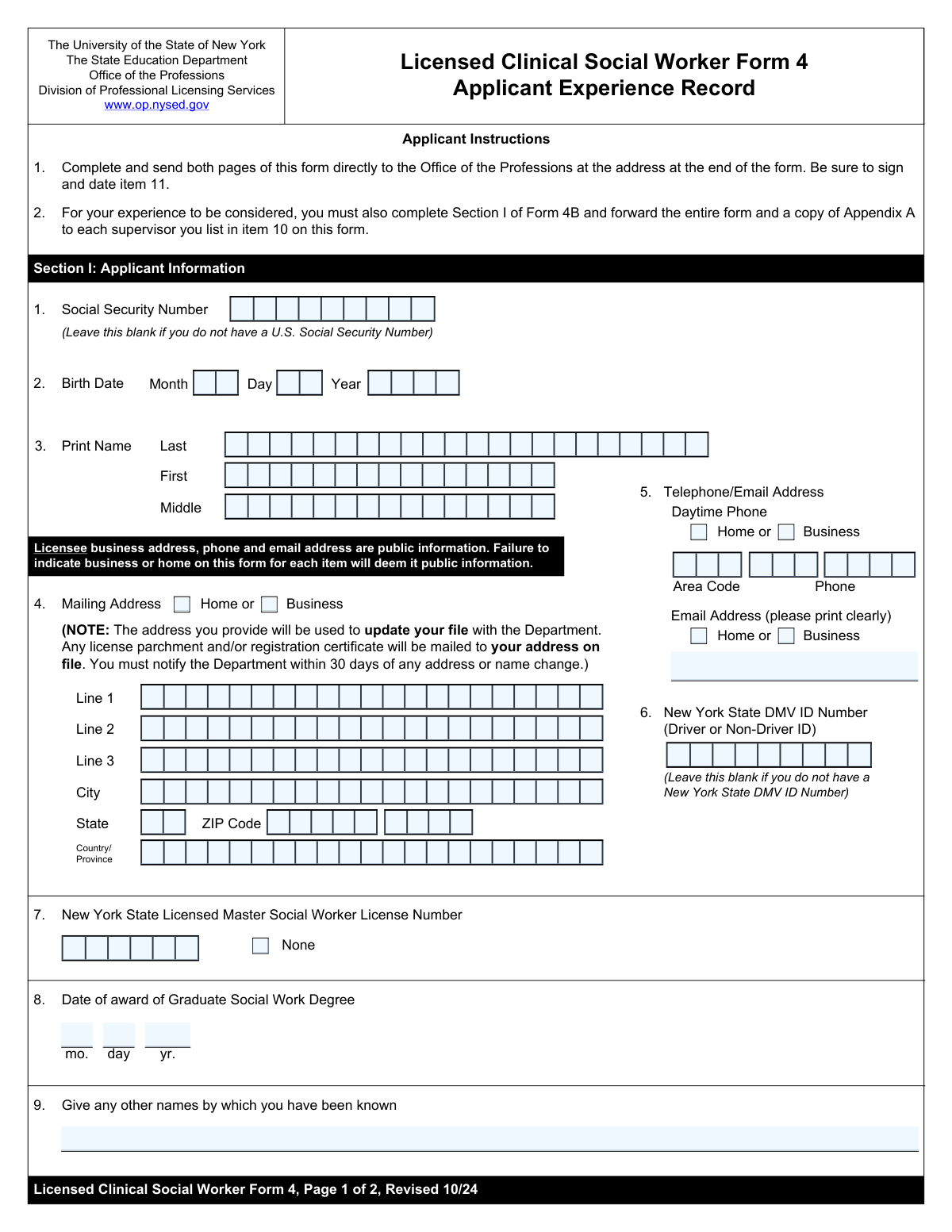
NYS Form 2 is the official Application for Licensure and First Registration for Licensed Clinical Social Workers submitted to the New York State Education Department. Applicants use this form to provide personal details, educational qualifications, and a comprehensive record of the supervised experience required for licensure. Today, this form can be filled out quickly and accurately using AI-powered services like Instafill.ai, which can also convert non-fillable PDF versions into interactive fillable forms.
Our AI automatically handles information lookup, data retrieval, formatting, and form filling.
It takes less than a minute to fill out NYS Form 2 using our AI form filling.
Securely upload your data. Information is encrypted in transit and deleted immediately after the form is filled out.
Form specifications
| Form name: | Form 2, Application for Licensure and First Registration, Licensed Clinical Social Worker |
| Number of fields: | 50 |
| Number of pages: | 2 |
| Language: | English |
| Categories: | clinical forms, IRS forms, registration forms, social work forms |
Instafill Demo: How to fill out PDF forms in seconds with AI
How to Fill Out NYS Form 2 Online for Free in 2026
Are you looking to fill out a NYS FORM 2 form online quickly and accurately? Instafill.ai offers the #1 AI-powered PDF filling software of 2026, allowing you to complete your NYS FORM 2 form in just 37 seconds or less.
Follow these steps to fill out your NYS FORM 2 form online using Instafill.ai:
- 1 Navigate to Instafill.ai and upload or select the NYS Form 2 for Licensed Clinical Social Workers.
- 2 Use the AI assistant to automatically populate your personal information, including your full name, date of birth, address, and contact details.
- 3 Enter your educational background, specifically the details of your graduate social work degree and the date it was awarded.
- 4 Provide your New York State DMV ID number and your existing Licensed Master Social Worker (LMSW) license number, if applicable.
- 5 Carefully document each period of supervised experience, entering the supervisor's name, setting address, and the start and end dates for each.
- 6 Review all the information pre-filled by the AI for accuracy, making any necessary edits to ensure all sections are complete.
- 7 Securely download, print, or share your completed application for submission as required by the NYS Office of the Professions.
Our AI-powered system ensures each field is filled out correctly, reducing errors and saving you time.
Why Choose Instafill.ai for Your Fillable NYS Form 2 Form?
Speed
Complete your NYS Form 2 in as little as 37 seconds.
Up-to-Date
Always use the latest 2026 NYS Form 2 form version.
Cost-effective
No need to hire expensive lawyers.
Accuracy
Our AI performs 10 compliance checks to ensure your form is error-free.
Security
Your personal information is protected with bank-level encryption.
Frequently Asked Questions About Form NYS Form 2
This form is used to apply for a professional social work license in New York State by documenting your personal information, education, and required supervised experience.
This form is for individuals who have completed a graduate social work degree and are applying for licensure, likely as a Licensed Clinical Social Worker (LCSW), which requires documenting supervised work experience.
Before you begin, have your Social Security Number, NYS DMV ID number, graduate degree award date, and detailed records of your supervised experience, including each supervisor's name, address, and the start and end dates of the experience.
Yes, a U.S. Social Security Number is a required field on this application.
If you do not currently hold a New York State Licensed Master Social Worker (LMSW) license, you should check the 'None' box provided in that section of the form.
The form includes separate sections to document experience under up to six different supervisors. You must fill out the details for each supervision period in its own dedicated section.
Your NYS DMV ID Number is the 9-digit number located on your New York State driver license, learner permit, or non-driver ID card.
In this section, you should list any previous legal names you have used, such as a maiden name or a name from before a legal name change, to ensure a complete background check.
No, the 4-digit ZIP+4 extension is optional. You are only required to enter the standard 5-digit ZIP Code for your mailing address.
You should enter the full street address of the agency, hospital, or practice where you completed the supervised work, not your supervisor's home address unless it was the official place of business.
Yes, services like Instafill.ai use AI to accurately auto-fill form fields with your saved information, which can save you time and help prevent errors.
Simply upload the form to the Instafill.ai platform. The AI will make the form fillable, and you can use your saved profile to instantly populate your personal information or fill it out manually online.
If your PDF is not interactive, you can use a service like Instafill.ai. It can convert flat, non-fillable PDFs into an interactive format that you can easily complete and sign on your computer or mobile device.
Compliance NYS Form 2
Validation Checks by Instafill.ai
1
Validates Social Security Number Format and Completeness
This check ensures the Social Security Number field is not empty and conforms to the standard 9-digit format, either as a continuous string of numbers (XXXXXXXXX) or with hyphens (XXX-XX-XXXX). The SSN is a critical unique identifier for official records and background checks. Failure to provide a valid SSN will prevent form submission.
2
Ensures Applicant Meets Minimum Age Requirement
This validation calculates the applicant's age using the provided Birth Date and verifies it is a plausible age for a professional, such as being over 18 years old. It prevents submissions with clear data entry errors (e.g., a future birth year) or from individuals who are not yet of legal age to be licensed. An invalid or future date will trigger an error, requiring correction.
3
Validates Exclusive Selection of Mailing Address Type
This check confirms that the applicant has selected exactly one of the 'Home' or 'Business' checkboxes for their mailing address. Selecting both or neither creates ambiguity for official correspondence. This rule is important for ensuring mail is sent to the correct, intended location, and failure to select one option would require the user to make a choice before proceeding.
4
Verifies 5-Digit ZIP Code Format
This validation confirms that the 'ZIP Code' field contains exactly 5 numeric digits. An incorrect or incomplete ZIP code can lead to failed mail delivery and significant delays in processing the application. If the format is incorrect, the user will be prompted to enter a valid 5-digit US ZIP Code.
5
Validates Conditional Entry of NYS LMSW License Number
This check enforces the logic between the 'NYS LMSW License Number' field and the 'None' checkbox. If the 'None' box is checked, the license number field must be empty. Conversely, if the 'None' box is unchecked, the license number field is required. This prevents contradictory information and ensures data integrity regarding the applicant's licensing history.
6
Confirms Graduate Degree Award Date is in the Past
This validation ensures that the 'Degree Award Date' is a valid calendar date that occurred before the current submission date. An applicant cannot have a degree that will be awarded in the future. This check prevents data entry errors and confirms that the educational prerequisite has been met at the time of application.
7
Ensures Experience End Date is After Start Date
For each provided supervisor experience entry, this validation confirms that the 'Experience End Date' is on or after the 'Experience Start Date'. An end date cannot precede a start date, as this is logically impossible. This check is critical for accurately calculating the duration of supervised experience and will flag any inconsistent entries for correction.
8
Validates Standard Email Address Format
This check verifies that the value entered in the 'Email Address' field conforms to a standard email format (e.g., [email protected]). This is essential for ensuring the applicant can receive important electronic communications and status updates. An invalid format would block submission and require the user to correct the entry.
9
Ensures Applicant First and Last Names are Provided
This validation verifies that both the 'First Name' and 'Last Name' fields are not empty. These fields are fundamental for identifying the applicant throughout the licensing process. Leaving them blank would result in an incomplete and unidentifiable record, so the form cannot be submitted without this information.
10
Validates Completeness of Daytime Phone Number
This check ensures that if any part of the daytime phone number is filled ('Area Code', 'Prefix', or 'Line Number'), then all three parts must be filled. A partial phone number is unusable for contact purposes. This validation ensures that if an applicant intends to provide a phone number, it is a complete and valid 10-digit number.
11
Validates Birth Date is a Real Calendar Date
This check ensures the combination of 'Birth Month', 'Birth Day', and 'Birth Year' forms a valid calendar date (e.g., it rejects entries like February 30). This is a fundamental data integrity check to prevent impossible dates from being entered due to typos. An invalid date would prevent submission and require correction.
12
Ensures Core Mailing Address Fields are Complete
This validation verifies that 'Mailing Address Line 1', 'City', 'State', and 'ZIP Code' are all filled out. These fields constitute the minimum required information for a deliverable address within the United States. Incomplete address information would lead to returned mail and significant delays, so submission is blocked until these fields are complete.
13
Verifies Logical Chronology of Experience Periods
This check compares the start and end dates across different supervisor experience blocks (e.g., First Supervisor, Second Supervisor). It ensures that the start date of a subsequent experience is not before the end date of a previous one, maintaining a logical timeline. This helps verify the continuity and sequence of the applicant's professional experience and flags potential data entry errors.
Common Mistakes in Completing NYS Form 2
Applicants often transpose digits or enter an incomplete Social Security Number. This error leads to an immediate failure in identity verification, causing significant processing delays or outright rejection of the application. To avoid this, carefully double-check the number against your official SSN card before submitting. AI-powered tools like Instafill.ai can help by validating the format to ensure all nine digits are present.
A common mistake is using a nickname or failing to enter the full legal name, including the middle name or initial, as it appears on official documents. This causes mismatches during cross-referencing with DMV or other government records, leading to verification failures. Always use your full legal name as shown on your driver's license or passport to ensure consistency across all documentation.
Applicants frequently fill out their mailing address but forget to check either the 'Home' or 'Business' box. This ambiguity forces the processing agent to guess where to send important correspondence, which can lead to lost mail and missed deadlines. Always review the form to ensure you have selected one of the checkboxes to classify your mailing address correctly.
Many people incorrectly place apartment, suite, or unit numbers on 'Mailing Address Line 1' instead of the designated 'Mailing Address Line 2'. This can cause automated address validation systems to fail and may result in returned mail. To prevent this, use Line 1 exclusively for the street number and name, and Line 2 for all secondary address information.
When a phone number is broken into separate fields for Area Code, Prefix, and Line Number, users often enter the full number in the first box or mix up the parts. This makes it impossible for the agency to contact the applicant for clarifications, potentially stalling the entire process. Carefully enter each segment of your phone number into its corresponding field to ensure you can be reached.
A frequent error occurs when an applicant enters their NYS LMSW License Number but also checks the 'None' box, creating a logical contradiction. This requires manual intervention and follow-up, delaying the application. To avoid this, either enter your license number and leave the box unchecked, or check the 'None' box and leave the number field blank.
Applicants sometimes only list the supervisor's name and forget to include the full address of the setting where the experience occurred. The licensing board cannot verify the supervised experience without a complete address, which is a critical requirement that can lead to rejection. Ensure you provide the supervisor's name and the full, accurate street address for each experience entry.
Entering supervised experience dates that overlap with another entry or using an incorrect date format is a common pitfall. This complicates the verification of required experience hours and can lead to the disqualification of that time. Meticulously review all start and end dates to ensure they are sequential, do not overlap, and follow the correct format.
Failing to list previous names, such as a maiden name or a former legal name, is a critical omission. Background checks and credential verifications are run using all known names, and missing information can cause these checks to fail or return incomplete results. This leads to significant delays, so be sure to list all names you have been known by professionally or legally.
A simple typo in an email address, like 'gamil.com' instead of 'gmail.com', is one of the most common and damaging mistakes. This error prevents you from receiving vital status updates, requests for information, and the final decision on your application. Always double-check your email address for accuracy before submitting. If the form is a non-fillable PDF, a tool like Instafill.ai can convert it to a fillable version, reducing the chance of manual typos.
Saved over 80 hours a year
“I was never sure if my IRS forms like W-9 were filled correctly. Now, I can complete the forms accurately without any external help.”
Kevin Martin Green
Your data stays secure with advanced protection from Instafill and our subprocessors

Robust compliance program
Transparent business model
You’re not the product. You always know where your data is and what it is processed for.
ISO 27001, HIPAA, and GDPR
Our subprocesses adhere to multiple compliance standards, including but not limited to ISO 27001, HIPAA, and GDPR.
Security & privacy by design
We consider security and privacy from the initial design phase of any new service or functionality. It’s not an afterthought, it’s built-in, including support for two-factor authentication (2FA) to further protect your account.
Fill out NYS Form 2 with Instafill.ai
Worried about filling PDFs wrong? Instafill securely fills form-2-application-for-licensure-and-first-registration-licensed-clinical-social-worker forms, ensuring each field is accurate.