Yes! You can use AI to fill out Applied Behavior Analysis Clinical Service Request Form
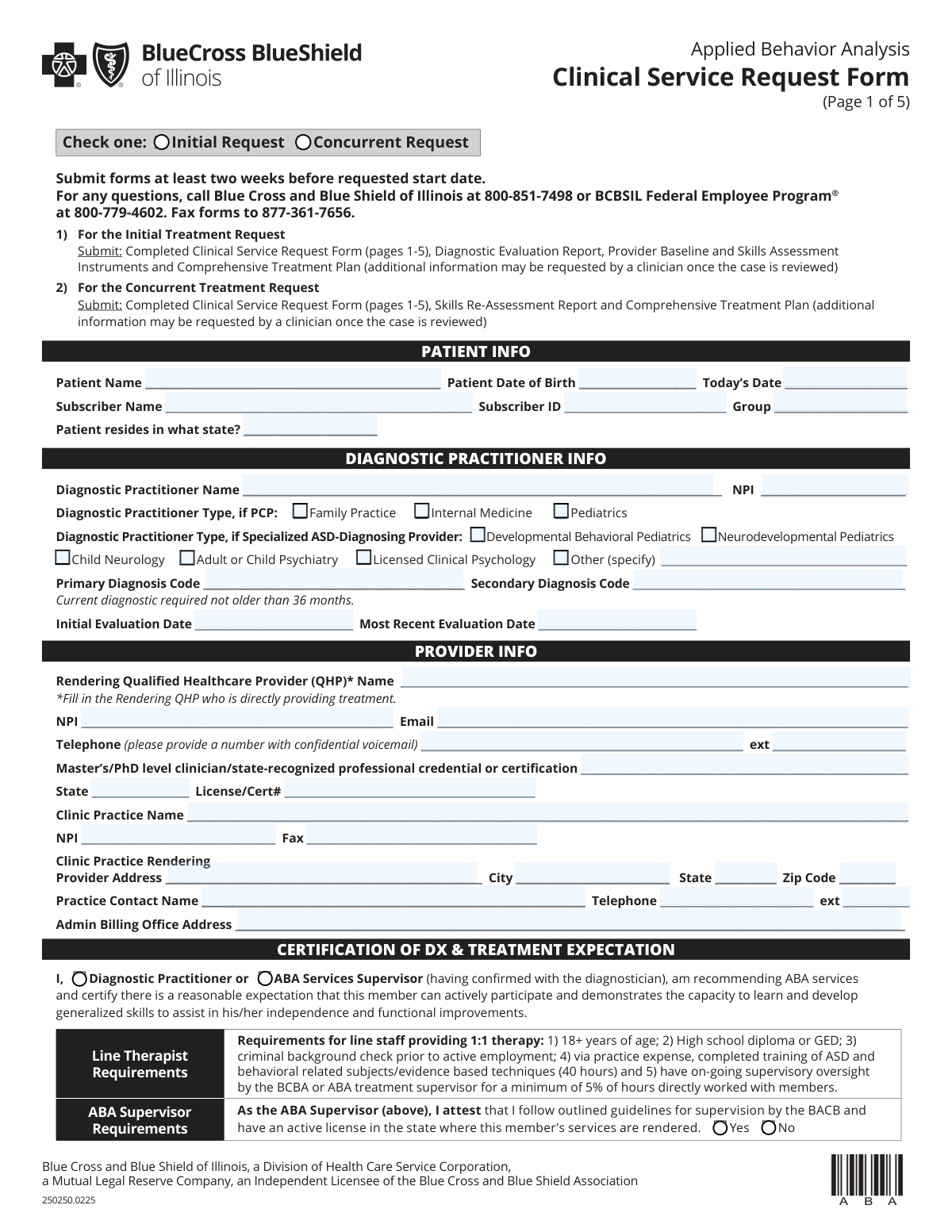
This form is a comprehensive document used by healthcare providers to request initial or concurrent authorization for Applied Behavior Analysis (ABA) services for patients covered by Blue Cross and Blue Shield of Illinois. It requires detailed information about the patient, diagnosis, treatment plan, provider qualifications, and service history to establish medical necessity for insurance coverage. Today, this form can be filled out quickly and accurately using AI-powered services like Instafill.ai, which can also convert non-fillable PDF versions into interactive fillable forms.
BCBSIL 250250.0225 is part of the
clinical forms and clinical service request forms categories on Instafill.
Our AI automatically handles information lookup, data retrieval, formatting, and form filling.
It takes less than a minute to fill out BCBSIL 250250.0225 using our AI form filling.
Securely upload your data. Information is encrypted in transit and deleted immediately after the form is filled out.
Form specifications
| Form name: | Applied Behavior Analysis Clinical Service Request Form |
| Number of fields: | 347 |
| Number of pages: | 5 |
| Language: | English |
More forms in Clinical forms
Instafill Demo: How to fill out PDF forms in seconds with AI
How to Fill Out BCBSIL 250250.0225 Online for Free in 2026
Are you looking to fill out a BCBSIL 250250.0225 form online quickly and accurately? Instafill.ai offers the #1 AI-powered PDF filling software of 2026, allowing you to complete your BCBSIL 250250.0225 form in just 37 seconds or less.
Follow these steps to fill out your BCBSIL 250250.0225 form online using Instafill.ai:
- 1 Navigate to Instafill.ai and upload or select the BCBSIL Applied Behavior Analysis Clinical Service Request Form.
- 2 Use the AI assistant to accurately populate patient and subscriber information, including names, date of birth, and insurance details.
- 3 Enter the required information for the diagnostic practitioner and the rendering qualified healthcare provider (QHP), such as NPI numbers, credentials, and clinic details.
- 4 Specify the treatment request, including the start date, service intensity, requested hours, and the units for each ABA procedure code.
- 5 Complete the sections on ABA treatment history, baseline assessment data, current maladaptive behaviors, and the member's skill acquisition goals.
- 6 Detail the parent involvement plan, the treatment fade/transition/discharge plan, and the member's weekly ABA and school schedules.
- 7 Review all sections for completeness and accuracy, have the rendering QHP electronically sign and date the certification, and then submit the form to BCBSIL as instructed.
Our AI-powered system ensures each field is filled out correctly, reducing errors and saving you time.
Why Choose Instafill.ai for Your Fillable BCBSIL 250250.0225 Form?
Speed
Complete your BCBSIL 250250.0225 in as little as 37 seconds.
Up-to-Date
Always use the latest 2026 BCBSIL 250250.0225 form version.
Cost-effective
No need to hire expensive lawyers.
Accuracy
Our AI performs 10 compliance checks to ensure your form is error-free.
Security
Your personal information is protected with bank-level encryption.
Frequently Asked Questions About Form BCBSIL 250250.0225
This form is used to request prior authorization for Applied Behavior Analysis (ABA) services from Blue Cross and Blue Shield of Illinois. It is required for both new (initial) and ongoing (concurrent) treatment requests to determine medical necessity.
The ABA provider, specifically the Rendering Qualified Healthcare Provider (QHP) or ABA Supervisor, is responsible for completing and submitting this form on behalf of the patient.
An 'Initial Request' is for a patient who is starting ABA services for the first time. A 'Concurrent Request' is for a patient who is already receiving ABA services and needs authorization to continue treatment.
For an Initial Request, you must submit the completed 5-page form, a Diagnostic Evaluation Report, Provider Baseline and Skills Assessment Instruments, and a Comprehensive Treatment Plan.
For a Concurrent Request, you must submit the completed 5-page form, a Skills Re-Assessment Report, and an updated Comprehensive Treatment Plan.
The form should be submitted at least two weeks before the requested start date of services to allow for processing time and prevent delays in treatment authorization.
You can submit the completed form and all required attachments by faxing them to 877-361-7656.
The form states that the current diagnostic evaluation must not be older than 36 months. Additionally, the skills assessment must have been completed within the last 30 days.
For any questions, you can call Blue Cross and Blue Shield of Illinois at 800-851-7498 or the BCBSIL Federal Employee Program® at 800-779-4602.
On page 2, in the 'Provider Treatment Request' section, you must enter the total requested hours per week and then break down the services by entering the number of 15-minute units for each specific ABA procedure code.
This section requires you to outline a plan for gradually reducing service hours, including the measurable criteria for doing so. You must also provide objective and measurable criteria for the patient's eventual discharge from services.
Yes, services like Instafill.ai use AI to auto-fill form fields accurately and save time. This can be particularly helpful for long, repetitive forms like this one.
You can upload the PDF of this form to Instafill.ai, and its AI will make the document interactive. It can then help you auto-fill patient, provider, and other recurring information to complete the form more efficiently.
If you have a non-fillable or 'flat' PDF, you can use a service like Instafill.ai. It can convert the document into an interactive, fillable form that you can easily complete on your computer.
Compliance BCBSIL 250250.0225
Validation Checks by Instafill.ai
1
Ensures a Single Request Type is Selected
This check verifies that the user has selected exactly one option between 'Initial Request' and 'Concurrent Request'. Selecting one is mandatory for routing the request correctly and determining which supporting documents are required. Failure to select one, or selecting both, will result in a form rejection and require the user to correct the submission.
2
Validates Recency of Diagnostic Evaluation
This validation confirms that the 'Most Recent Evaluation Date' is not older than 36 months from 'Today’s Date'. This is a policy requirement to ensure the diagnosis is current and still clinically valid for authorizing services. If the evaluation is outdated, the request will be denied pending a new diagnostic evaluation report.
3
Validates Recency of Clinical Assessment
This check ensures the 'Date Current Assessment Completed' is within the last 30 days of the form's submission date ('Today's Date'). This is crucial for establishing a current clinical baseline from which to measure progress. A form submitted with an outdated assessment will be returned with a request for a more recent one before the service request can be reviewed.
4
Verifies NPI Number Format and Structure
This check verifies that the 'Diagnostic Practitioner NPI', 'Rendering QHP NPI', and 'Clinic Practice NPI' fields each contain a valid 10-digit National Provider Identifier. Correct NPIs are essential for provider verification, network status checks, and claims processing. An invalid NPI will halt the authorization process until a valid number is provided.
5
Requires Explanation for Break in ABA Services
This check ensures that if the user answers 'No' to 'Continuous ABA services since start?', the 'Details of ABA Service Break' field is filled out. Understanding the reason and duration of any service gaps is important for clinical review to assess treatment consistency and potential impacts on progress. Failure to provide this explanation will result in a follow-up query and delay the authorization.
6
Verifies Chronological Order of Evaluation Dates
This validation confirms that the 'Most Recent Evaluation Date' is on or after the 'Initial Evaluation Date'. This ensures logical consistency in the patient's diagnostic history. A submission with illogical dates suggests a data entry error and will be flagged for correction before the review can proceed.
7
Validates Supervisor Attestation for Certifying Supervisors
This check verifies that if 'ABA Services Supervisor' is selected as the certifier, one of the 'Supervisor Attestation' options ('Yes' or 'No') must also be selected. This attestation is a legal and compliance requirement confirming the supervisor's credentials and adherence to standards. A missing attestation will make the certification section incomplete and prevent the form from being processed.
8
Cross-Validates Requested Hours with Scheduled Hours
This validation compares the 'Total Requested Hours Per Week' with the sum of all hours entered in the 'Member ABA Schedule' table. These two values should align to demonstrate a clear and planned service delivery schedule. A significant discrepancy will trigger a review for clarification, as it may indicate a planning error or an over/under-request of hours.
9
Verifies Consistency Between Requested Units and Total Hours
This check ensures that the sum of all requested 15-minute units across the ABA procedure codes is logically consistent with the 'Total Requested Hours Per Week'. For example, 40 requested hours should correspond to approximately 160 units (40 hours * 4 units/hour). This cross-reference helps prevent clerical errors and ensures the requested billing codes match the overall treatment plan intensity.
10
Ensures Consistent Patient Identification Across All Pages
This validation verifies that the 'Patient Name' and 'Patient Date of Birth' fields are filled out consistently on every page where they appear. Maintaining consistent patient identification is critical to ensure all pages of the request belong to the same individual and to prevent processing errors. Any mismatch will cause the form to be rejected for correction.
11
Validates Logical Progression in Treatment Fade Plan
This check ensures that in the 'Treatment Fade Plan' section, the 'Target treatment hours per week' is a lower value than the 'Current treatment hours per week'. A fade plan, by definition, involves a reduction in service intensity. An illogical entry where target hours are greater than or equal to current hours indicates an error and will require correction.
12
Checks for Previous Assessment Data on Concurrent Requests
This validation rule flags submissions where 'Concurrent Request' is selected but the 'Previous Test Date' and 'Previous Test Score' fields for the assessment instruments are empty. For a concurrent (ongoing) request, prior assessment data is expected to demonstrate progress over time. Missing previous scores will likely result in a request for additional information to justify continued services.
13
Mandates Primary Diagnosis Code for Service Authorization
This check confirms that the 'Primary Diagnosis Code' field is not empty and contains a valid ICD code. A valid, primary ASD-related diagnosis code is the fundamental basis for medical necessity and eligibility for ABA services. A missing or invalid primary diagnosis code is a critical error that will lead to immediate rejection of the service request.
14
Verifies Rendering QHP Signature and Certification Date
This validation confirms that the 'Rendering QHP Signature' and 'Certification Date' fields are completed. The provider's signature and date certify the accuracy of the submitted information and attest to the provider's qualifications. An unsigned or undated form is legally incomplete and cannot be processed for authorization.
Common Mistakes in Completing BCBSIL 250250.0225
Providers often enter the number of hours instead of the number of 15-minute units in the 'ABA Procedure Code Request' table. For example, they will enter '1' for one hour of service instead of the correct value of '4'. This mistake leads to a significant under-request of authorized service time, causing billing errors and requiring resubmission. To avoid this, always multiply the number of hours by four to determine the correct number of 15-minute units for each CPT code.
The 'Total Requested Hours Per Week' on page 2 frequently does not match the sum of hours calculated from the CPT code units or the hours detailed in the weekly schedule on page 4. This discrepancy occurs due to manual calculation errors and creates confusion for reviewers, delaying authorization. To prevent this, carefully double-check that all three values—total requested hours, CPT unit totals, and the schedule grid—are consistent. AI-powered tools like Instafill.ai can automatically perform these calculations to ensure accuracy.
A very common reason for immediate rejection is failing to include all required supporting documents listed on page 1. For an 'Initial Request', the Diagnostic Evaluation Report and Comprehensive Treatment Plan are mandatory, while a 'Concurrent Request' requires a Re-Assessment Report. Forgetting to attach these documents forces the insurance provider to send a deficiency notice, halting the review process and delaying the start of care. Always use the checklist on page 1 to verify all documents are attached before submission.
The form specifies that the 'Most Recent Evaluation Date' cannot be older than 36 months and the 'Current Assessment Completed' date must be within the last 30 days. Submitting a form with dates outside these windows will lead to an automatic denial for not meeting recency requirements. This happens when providers use old records without verifying the dates against the form's rules. Always confirm the dates of all supporting documents before filling out the form to ensure compliance.
Users often incorrectly enter the same provider's information for both the 'Diagnostic Practitioner' and the 'Rendering Qualified Healthcare Provider (QHP)'. These are distinct roles; one diagnoses the patient, and the other provides the ABA treatment. This error leads to verification failures and processing delays. To avoid this, carefully identify the correct individual and their NPI for each section, ensuring the diagnostician's details are separate from the treating provider's details.
Many fields on the form are conditional, requiring more information only if a 'Yes' box is checked (e.g., history of prior ABA services, presence of sleep/eating issues, coordination of care). A frequent mistake is checking 'Yes' but leaving the corresponding detail field blank. This incomplete information prevents the reviewer from fully assessing the case and requires them to request the missing data, delaying approval. To avoid this, treat each 'Yes' checkbox as a prompt to fill in the associated text box completely.
The 'Parent Training Goals' and 'Discharge Plan' sections specifically ask for measurable criteria, but are often filled with vague statements like 'Parent will participate more' or 'Discharge when ready.' This fails to meet the clinical justification requirements for the treatment plan, leading to requests for more specific information. Goals should be SMART (Specific, Measurable, Achievable, Relevant, Time-bound) to demonstrate a clear path for progress and discharge. For example, instead of 'improve skills,' write 'Patient will independently complete 3 of 5 morning routine tasks by [Date].'
Forgetting to sign and date the form on page 2 is a simple but critical error that completely invalidates the submission. Similarly, providers often miss checking the required certification boxes, such as the 'ABA Services Supervisor' attestation or the agreement to accept the determined units. An unsigned or uncertified form cannot be processed and will be returned, causing significant delays in service authorization. Using a tool like Instafill.ai can highlight required signature fields and checkboxes, ensuring the form is complete before submission, even if it's a non-fillable PDF that the tool converts.
Data entry errors in the 'Patient Info' section, such as using a nickname for the patient instead of their legal name, or transposing digits in the 'Subscriber ID', are very common. These inconsistencies cause a mismatch with the insurance company's records, leading to claim denials and authorization problems. To prevent this, meticulously copy all information directly from the patient's insurance card. AI-powered form-filling tools can help by saving and accurately auto-filling this information across multiple forms, reducing the risk of manual error.
The detailed schedule grid on page 4 is often left incomplete or contains conflicting information. Common mistakes include forgetting to check a location box (Home, Clinic, etc.) for each time slot, entering overlapping times for ABA and other therapies, or using inconsistent time formats (e.g., '2pm' vs '14:00'). An incomplete schedule makes it impossible to verify the requested service hours and locations. It is crucial to fill out every relevant part of the grid for each day services are requested, ensuring the total time matches the hours requested on page 2.
Saved over 80 hours a year
“I was never sure if my IRS forms like W-9 were filled correctly. Now, I can complete the forms accurately without any external help.”
Kevin Martin Green
Your data stays secure with advanced protection from Instafill and our subprocessors
Robust compliance program
Transparent business model
You’re not the product. You always know where your data is and what it is processed for.
ISO 27001, HIPAA, and GDPR
Our subprocesses adhere to multiple compliance standards, including but not limited to ISO 27001, HIPAA, and GDPR.
Security & privacy by design
We consider security and privacy from the initial design phase of any new service or functionality. It’s not an afterthought, it’s built-in, including support for two-factor authentication (2FA) to further protect your account.
Fill out BCBSIL 250250.0225 with Instafill.ai
Worried about filling PDFs wrong? Instafill securely fills applied-behavior-analysis-clinical-service-request-form forms, ensuring each field is accurate.