
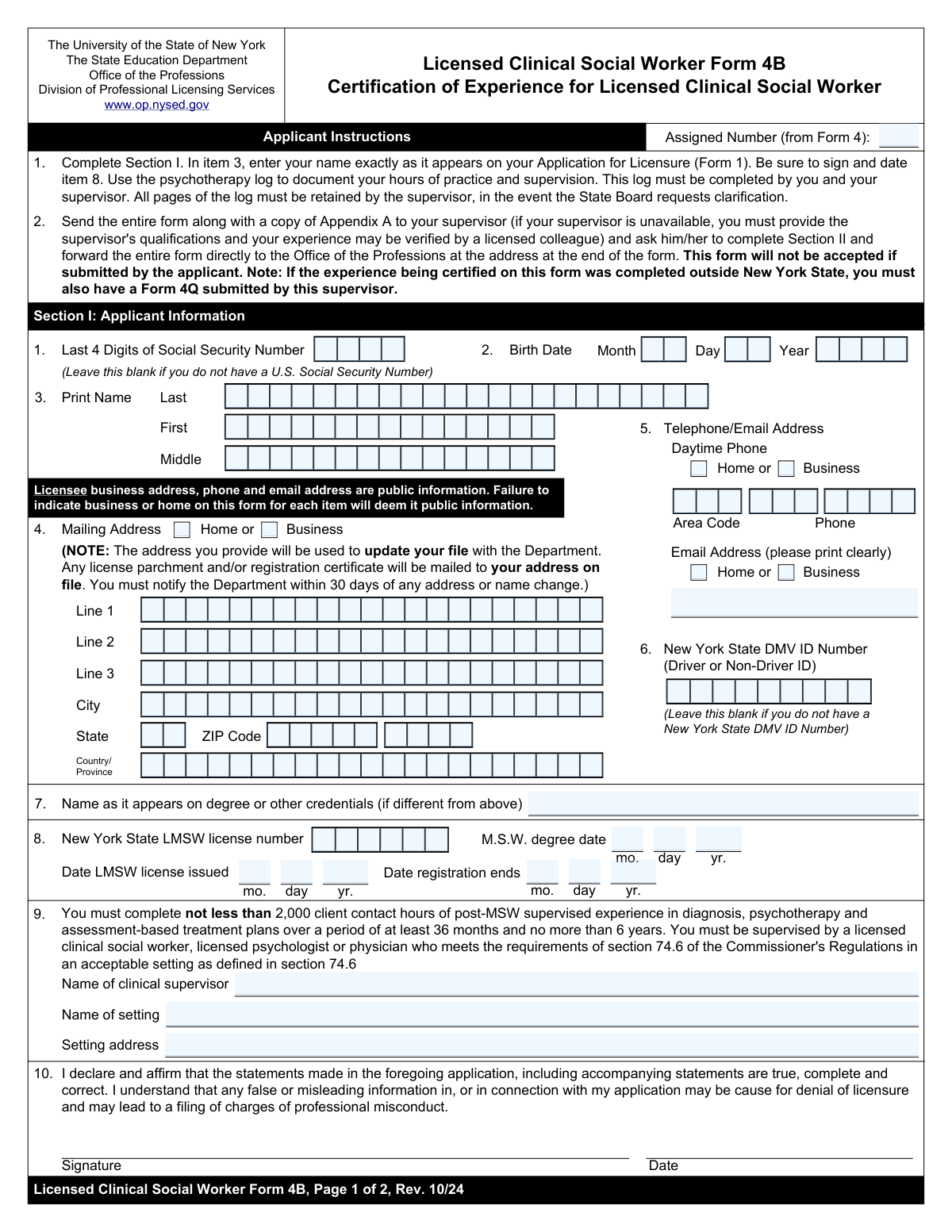
Yes! You can use AI to fill out Form 4B, Certification of Supervised Experience for Licensed Clinical Social Worker (LCSW)
Don't type 93 fields by hand. Tell our AI about yourself, or upload a document you already have, and it fills every field in seconds. You check it, then download, print or sign.
The AI does the filling. You just check it.
No typing into boxes, nothing to install.
What this form asks for
The AI fills all of it, from your answers or your documents.
The AI checks your answers before you download
12 checks built for this form, so a wrong date or a missing answer is caught before anyone else sees it.
This check ensures that the combination of Birth Date Month, Day, and Year forms a valid calendar date (e.g., not February 30). It also verifies that the resulting date is plausible for an applicant, meaning it is in the past and indicates the applicant is over a minimum age, such as 18. This prevents data entry errors and ensures the applicant meets basic age eligibility requirements for licensure.
This validation verifies that if a value is entered into the 'SSN Last 4 Digits' field, it consists of exactly four numeric digits. Since the field is optional, the check only runs when it is not blank. This is important for maintaining data integrity and ensuring compatibility with systems that expect a specific format for partial Social Security Numbers.
This check ensures that the user selects either 'Mailing Address - Home' or 'Mailing Address - Business', but not both. An address cannot be both a home and business address simultaneously in the context of this form's data structure. If both are selected, the form should prompt the user to choose only one, preventing ambiguous or conflicting data.
This validation confirms that 'Address Line 1', 'City', 'State', and 'ZIP Code' are all filled out. These fields are essential for a complete and deliverable mailing address, which is critical for official correspondence. Failure to provide this information would result in an incomplete application and prevent the processing agency from contacting the applicant by mail.
This check verifies that the value entered in the 'Email Address' field follows the standard format for an email address (e.g., '[email protected]'). This is crucial for ensuring that electronic communications, notifications, and confirmations can be successfully delivered to the applicant. An invalid email format would lead to communication failures and delays in the application process.
This validation ensures that the 'LMSW License Issued Date' is on or after the 'MSW Degree Date'. An individual must have earned their Master of Social Work degree before they can be issued a license. This check prevents logical impossibilities in the application data and flags potential data entry errors that could call the applicant's qualifications into question.
And 6 more checks
- Logical Date Order for Supervisor Period
- Conditional Requirement for LCSW License Details
- Conditional Requirement for 'Other' Employment Setting Description
- Complete Daytime Phone Number Entry
- Supervisor Record Retention Attestation
- Applicant Legal Name Completeness
Let AI fill out your Form 4B
No typing. Every field filled in seconds, checked, ready to sign.
How to Fill Out Form 4B Online for Free in 2026
What the AI walks you through.
- Navigate to Instafill.ai and upload your Form 4B, or select it from their library of official documents.
- The applicant provides their personal information, including name, address, date of birth, and any existing LMSW license details.
- The supervisor enters their professional credentials, such as their license type (LCSW, Psychologist, Physician), license number, and jurisdiction.
- The supervisor details the employment setting where the supervision took place and provides the start and end dates of the supervision period.
- The supervisor enters the total number of client contact hours and supervision hours completed by the applicant during the specified period.
- The supervisor completes the attestation section by printing their name, providing contact information, and signing the form to certify the accuracy of the information.
- Review all the information entered by the AI and make any necessary corrections before downloading, printing, and submitting the completed form as instructed by the NYSED.
Common Mistakes in Completing Form 4B
The ones the AI is built to catch.
Using a Non-Legal or Mismatched Name
Mis-transcribing the 'Assigned Number'
Forgetting to Attach Required Documentation
Inaccurate Calculation of Supervised Hours
Confusing Key Licensure and Degree Dates
Omitting Conditional Supervisor Credential Details
Providing an Incomplete or Vague Setting Address
Failing to Specify Address or Phone Type
Incorrectly Splitting Address or Phone Number Fields
Entering Typographical Errors in the Email Address
Frequently Asked Questions About Form 4B
Is it really free for 7 days?
Can I fill other forms too?
How do I cancel?
How does the AI fill out Form 4B?
What happens to my information?
How complex is Form 4B to fill out?
What is the purpose of this form?
Who is responsible for filling out this form?
What is the 'Assigned Number from Form 4' and where do I find it?
What if I don't have a U.S. Social Security Number or a New York State DMV ID?
My name on my degree is different from my current legal name. What should I do?
How do I fill out the 'Employment Setting Identification' section?
My supervisor is an LCSW. Do they also need to fill out the sections for a Licensed Psychologist or Physician?
What is the difference between 'Total Client Contact Hours' and 'Total Supervision Hours Provided'?
What if my supervised experience was completed outside of New York State?
How is this form submitted after it's completed?
Can I use an AI tool to help fill out this form?
The PDF version of this form I have is not fillable. How can I fill it out online?
What information should my supervisor have ready to complete their section?
Get your Form 4B filled out by AI
$0 today. Cancel before Nov 3 and you pay nothing.
Other forms like this one
social work forms: Form DCA BBS 37A-638, Associate Clinical Social Worker (ASW) Weekly Log of Experience Hours, Form SSA-3369-BK, Work History Report (Social Security Administration), Form 2, Application for Licensure and First Registration, Licensed Clinical Social Worker
certification forms: Form HS 200, Licensure & Certification Application, W-9, Request for Taxpayer Identification Number and Certification, Form WH-380-E, Certification of Health Care Provider, Form WH-385, Certification for Serious Injury or Illness, Form WH-380-F, Certification of Health Care Provider, Form WH-385-V, Certification for Serious Injury or Illness, Form 8802, Application for U.S. Residency Certification, Form I-905, Application for Authorization to Issue Certification for Health Care Workers, Form N-648, Medical Certification for Disability Exceptions, Form 01-339, Texas Sales and Use Tax Resale Certificate / Texas Sales and Use Tax Exemption Certification, Dakota County CDA New Admissions Informal Review Request Form (Housing Choice Voucher Program) and HUD Form 5382, Certification of Domestic Violence, Dating Violence, Sexual Assault, or Stalking, and Alternate Documentation, NJ Department of Labor & Workforce Development Form MW-562, Payroll Certification for Public Works Projects (Contractor and Subcontractor’s Weekly and Final Certification), ROTC Cadet Academic Plan / Degree and Credit Hour Worksheet (Student Identification, Term-by-Term Courses, GPA Summary, and Completion Certification), Certification for Special Assessment (Office of Building, Planning, & Code Compliance, City of Knox, Indiana), Outpatient Behavioral Health (BH) – ABA Treatment Request: Required Information for Precertification (GR-69017-4), Form W-9, Request for Taxpayer Identification Number and Certification, 401(k) Program Rollover Certification, WTIA 401(k) Plan Rollover Contribution Employee Certification, Trust Certification and Trustee Powers, Form GR-68831, Precertification Information Request Form
clinical forms: Application for Scope of Clinical Practice (SoCP) – Application Form SoCP Only (v1.00 06/2014), Applied Behavior Analysis (ABA) Initial Assessment Request and Clinical Service Request Form – Blue Cross and Blue Shield of Illinois (BCBSIL), Form DCA BBS 37A-638, Associate Clinical Social Worker (ASW) Weekly Log of Experience Hours, Medicaid Clinical Trial Attestation Form, Form 2, Application for Licensure and First Registration, Licensed Clinical Social Worker, Applied Behavior Analysis Clinical Service Request Form, Notice of Placement Change and Request for Clinical Placement Review
SOC forms: Form SOC 295, Application for In-Home Supportive Services, Form 4137, Social Security and Medicare Tax on Unreported Tip Income, Form 8919, Uncollected Social Security and Medicare Tax, Form SS-5-FS, Application for a Social Security Card, Form SSA-4-BK, Application for Social Security Benefits, California Department of Social Services (CDSS) Community Care Licensing Child Care Forms Packet (LIC 9150, LIC 282, LIC 627, LIC 700, LIC 995A, CDPH 286, LIC 9227), Form SSA-1042S, Social Security Benefit Statement, Application for Scope of Clinical Practice (SoCP) – Application Form SoCP Only (v1.00 06/2014), Missouri Department of Social Services, Family Support Division — Application for Supplemental Nutrition Assistance Program (SNAP) (MO 886-0460 / FS-1), Form SSA-3369-BK, Work History Report (Social Security Administration), California Department of Social Services (CDSS) Community Care Licensing Division — Administrative Organization (LIC 309), California/National Apartment Association Official Form B-15, Rental Application for Residents and Occupants (May 2015) with Application Agreement, National Apartment Association (NAA) Rental Application for Residents and Occupants (Virginia) and Supplemental Rental Application for Units Under Government Regulated Affordable Housing Programs, California Association of REALTORS® (C.A.R.) Form LR, Residential Lease or Month-to-Month Rental Agreement (Revised 12/19), Pacific Gastroenterology Associates Referral Form, Chicago Residential Lease for Apartments, Condominiums, Single Family Homes, and Townhomes (Chicago Association of REALTORS®) (V13.0 2026), Form 8919, Uncollected Social Security and Medicare Tax on Wages, Liantis / RSVZ – Aanvraagformulier voor vrijstelling van sociale bijdragen als zelfstandige (artikel 17 van het koninklijk besluit nr. 38 van 27 juli 1967), Form SSA-827 (06-2024), Authorization to Disclose Information to the Social Security Administration (SSA), Tesorería General de la Seguridad Social (TGSS) — Mandato / Orden de domiciliación de adeudos directos SEPA para el pago de cuotas de la Seguridad Social (TC 1/15-3, 06-2022)
Let AI fill out your Form 4B
Your trial starts once a card is added. You pay nothing before Nov 3.
Our AI already knows this form, all 93 fields of it. Skip the typing: tell it about yourself, or upload what you have, and it fills the whole form in seconds.
- AI fills every field on both pages, checkboxes included
- No typing into boxes: answer a few questions, or upload a document you already have, an old copy of this form, a photo of a document
- The AI checks the answers; you review and change anything before you download
- Download the finished PDF, print it, or sign it online
- Encrypted, and never used to train AI
Cancel before Nov 3 and you pay nothing.
A card is needed to start the trial. Cancel in two clicks from your account.
Terms · Privacy