
Yes! You can use AI to fill out Form DCA BBS 37A-638, Associate Clinical Social Worker (ASW) Weekly Log of Experience Hours
Don't type 97 fields by hand. Tell our AI about yourself, or upload a document you already have, and it fills every field in seconds. You check it, then download, print or sign.
The AI does the filling. You just check it.
No typing into boxes, nothing to install.
What this form asks for
The AI fills all of it, from your answers or your documents.
The AI checks your answers before you download
13 checks built for this form, so a wrong date or a missing answer is caught before anyone else sees it.
Ensures that both the 'Associate Last Name' and 'Associate First Name' fields are populated. These fields are essential for uniquely identifying the individual whose hours are being logged for licensure. Failure to provide a complete name can lead to the log being rejected, misfiled, or not credited to the correct person's record.
Verifies that the 'Supervisor Name' and 'Work Setting Name' fields are both filled out. The form instructions state a separate log is required for each supervisor and setting, making this information critical for context and verification. An incomplete log cannot be correctly attributed and may be considered invalid by the board.
Checks that the 'Year' field contains a valid, 4-digit number representing the calendar year of the experience. This is crucial for placing the logged hours within the correct time frame for licensure requirements. An invalid, non-numeric, or missing year makes the entire log's timeline ambiguous and could halt processing.
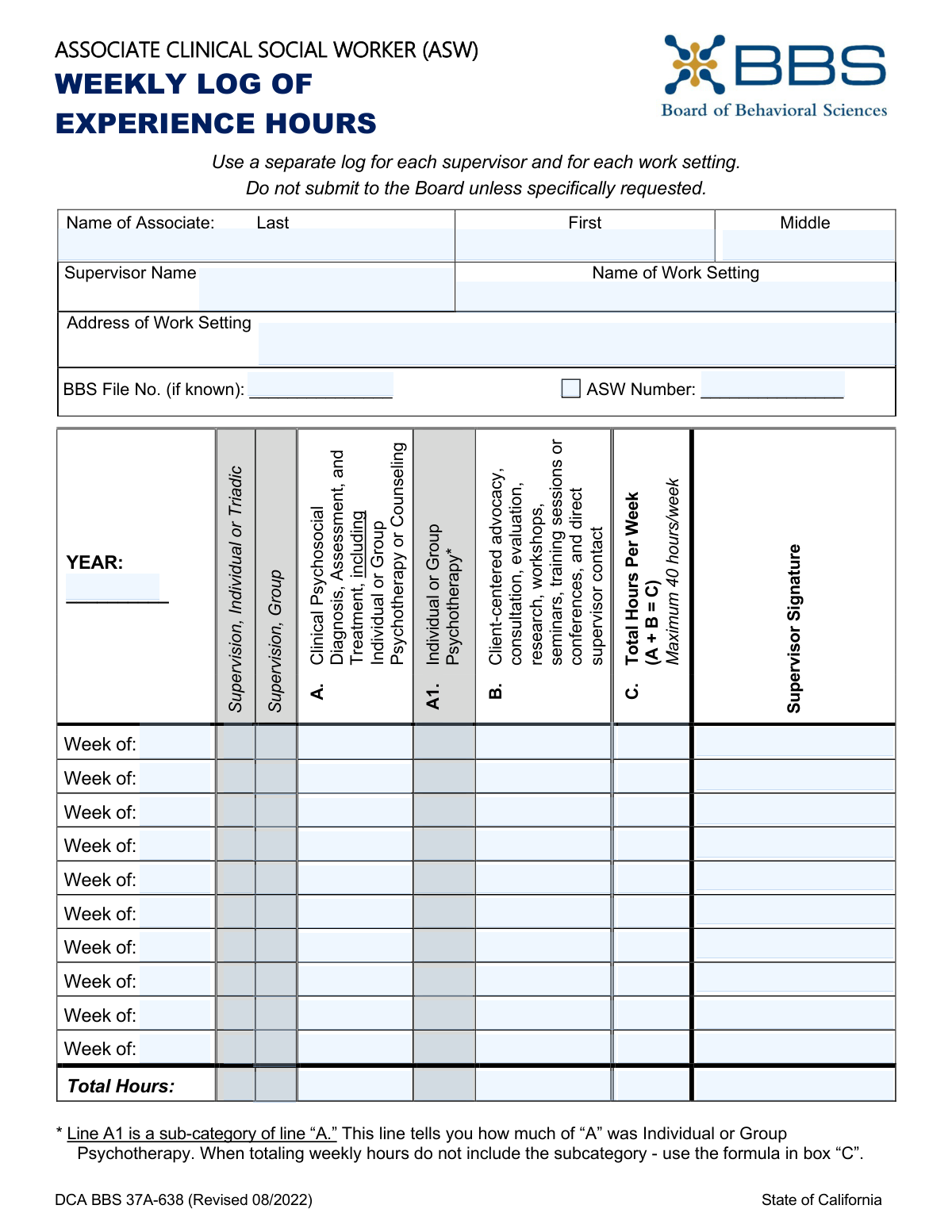
Validates for each weekly row that the value in 'Total Hours Per Week (C)' is the correct sum of 'Clinical Psychosocial Hours (A)' and 'Client-Centered Activities Hours (B)'. This check enforces the explicit formula (A + B = C) printed on the form. A mismatch indicates a calculation error, making the reported total for that week unreliable and subject to correction.
Ensures that for each week, the hours logged for 'Individual/Group Psychotherapy (A1)' are less than or equal to the hours in 'Clinical Psychosocial Diagnosis, Assessment, and Treatment (A)'. This is a critical logic check because A1 is a sub-category of A and cannot be larger than the total it is part of. A failure here points to a fundamental misreporting of hour categories that must be fixed.
Validates that the 'Total Hours Per Week (C)' for any given week does not exceed 40. This check enforces the explicit 'Maximum 40 hours/week' rule printed on the form. Submitting a log with more than 40 hours in a week could lead to the rejection of all hours for that specific week.
And 7 more checks
- Chronological Week Order
- Numeric Hour Values
- Columnar Totals Calculation
- Supervisor Signature Requirement for Logged Hours
- Supervision Hours Presence
- Identifier Presence (BBS or ASW Number)
- Work Setting Address Completeness
Let AI fill out your DCA BBS 37A-638
No typing. Every field filled in seconds, checked, ready to sign.
How to Fill Out DCA BBS 37A-638 Online for Free in 2026
What the AI walks you through.
- Navigate to Instafill.ai and upload or select the 'ASW Weekly Log of Experience Hours' (Form DCA BBS 37A-638).
- Use the AI assistant to input your personal information, including your name, BBS File Number, and ASW Number.
- Enter the details of your supervisor and the specific work setting, including its name and address.
- For each week, input the number of hours spent in each required category, such as individual supervision, group supervision, clinical psychosocial diagnosis, and client-centered advocacy.
- Allow the AI tool to automatically calculate the total hours for each week and the cumulative totals for the entire log period.
- Review all entered data for accuracy before having your supervisor sign off on each weekly entry.
- Securely download and save the completed log for your personal records, ready to be submitted to the Board of Behavioral Sciences upon request.
Common Mistakes in Completing DCA BBS 37A-638
The ones the AI is built to catch.
Incorrectly Calculating Total Weekly Hours
Exceeding the 40-Hour Weekly Maximum
Combining Multiple Supervisors or Settings on One Log
Logging More Psychotherapy (A1) than Clinical (A) Hours
Missing Weekly Supervisor Signatures
Misclassifying Experience Activities
Using Inconsistent or Incomplete Identifying Information
Illegible Handwriting on a Printed Form
Incorrectly Transcribing BBS or ASW Numbers
Using Inconsistent 'Week of' Dates
Frequently Asked Questions About DCA BBS 37A-638
Is it really free for 7 days?
Can I fill other forms too?
How do I cancel?
How does the AI fill out DCA BBS 37A-638?
What happens to my information?
How complex is DCA BBS 37A-638 to fill out?
What is the purpose of the ASW Weekly Log of Experience Hours form?
Do I need to submit this form to the Board of Behavioral Sciences (BBS) every week?
What if I have more than one supervisor or work at multiple locations?
How do I calculate the 'Total Hours Per Week' in column C?
What is the difference between the hours in line 'A' and line 'A1'?
What is the maximum number of hours I can log in a single week?
Does my supervisor need to sign this log every week?
I'm a new associate and don't have a BBS File Number yet. What should I enter?
What kind of activities count for Category B, 'Client-centered advocacy'?
Can I use an AI tool to help me fill out this form?
How can I fill out the ASW Weekly Log form online?
The PDF version of this form I have isn't fillable. What can I do?
Get your DCA BBS 37A-638 filled out by AI
$0 today. Cancel before Nov 1 and you pay nothing.
Other forms like this one
social work forms: Form SSA-3369-BK, Work History Report (Social Security Administration), Form 2, Application for Licensure and First Registration, Licensed Clinical Social Worker, Form 4B, Certification of Supervised Experience for Licensed Clinical Social Worker (LCSW)
clinical forms: Application for Scope of Clinical Practice (SoCP) – Application Form SoCP Only (v1.00 06/2014), Applied Behavior Analysis (ABA) Initial Assessment Request and Clinical Service Request Form – Blue Cross and Blue Shield of Illinois (BCBSIL), Medicaid Clinical Trial Attestation Form, Form 2, Application for Licensure and First Registration, Licensed Clinical Social Worker, Form 4B, Certification of Supervised Experience for Licensed Clinical Social Worker (LCSW), Applied Behavior Analysis Clinical Service Request Form, Notice of Placement Change and Request for Clinical Placement Review
SOC forms: Form SOC 295, Application for In-Home Supportive Services, Form 4137, Social Security and Medicare Tax on Unreported Tip Income, Form 8919, Uncollected Social Security and Medicare Tax, Form SS-5-FS, Application for a Social Security Card, Form SSA-4-BK, Application for Social Security Benefits, California Department of Social Services (CDSS) Community Care Licensing Child Care Forms Packet (LIC 9150, LIC 282, LIC 627, LIC 700, LIC 995A, CDPH 286, LIC 9227), Form SSA-1042S, Social Security Benefit Statement, Application for Scope of Clinical Practice (SoCP) – Application Form SoCP Only (v1.00 06/2014), Missouri Department of Social Services, Family Support Division — Application for Supplemental Nutrition Assistance Program (SNAP) (MO 886-0460 / FS-1), Form SSA-3369-BK, Work History Report (Social Security Administration), California Department of Social Services (CDSS) Community Care Licensing Division — Administrative Organization (LIC 309), California/National Apartment Association Official Form B-15, Rental Application for Residents and Occupants (May 2015) with Application Agreement, National Apartment Association (NAA) Rental Application for Residents and Occupants (Virginia) and Supplemental Rental Application for Units Under Government Regulated Affordable Housing Programs, California Association of REALTORS® (C.A.R.) Form LR, Residential Lease or Month-to-Month Rental Agreement (Revised 12/19), Pacific Gastroenterology Associates Referral Form, Chicago Residential Lease for Apartments, Condominiums, Single Family Homes, and Townhomes (Chicago Association of REALTORS®) (V13.0 2026), Form 8919, Uncollected Social Security and Medicare Tax on Wages, Liantis / RSVZ – Aanvraagformulier voor vrijstelling van sociale bijdragen als zelfstandige (artikel 17 van het koninklijk besluit nr. 38 van 27 juli 1967), Form SSA-827 (06-2024), Authorization to Disclose Information to the Social Security Administration (SSA), Tesorería General de la Seguridad Social (TGSS) — Mandato / Orden de domiciliación de adeudos directos SEPA para el pago de cuotas de la Seguridad Social (TC 1/15-3, 06-2022)
Let AI fill out your DCA BBS 37A-638
Your trial starts once a card is added. You pay nothing before Nov 1.
Our AI already knows this form, all 97 fields of it. Skip the typing: tell it about yourself, or upload what you have, and it fills the whole form in seconds.
- AI fills every field on the form, tables and checkboxes included
- No typing into boxes: answer a few questions, or upload a document you already have, an old copy of this form, a photo of a document
- The AI checks the answers; you review and change anything before you download
- Download the finished PDF, print it, or sign it online
- Encrypted, and never used to train AI
Cancel before Nov 1 and you pay nothing.
A card is needed to start the trial. Cancel in two clicks from your account.
Terms · Privacy