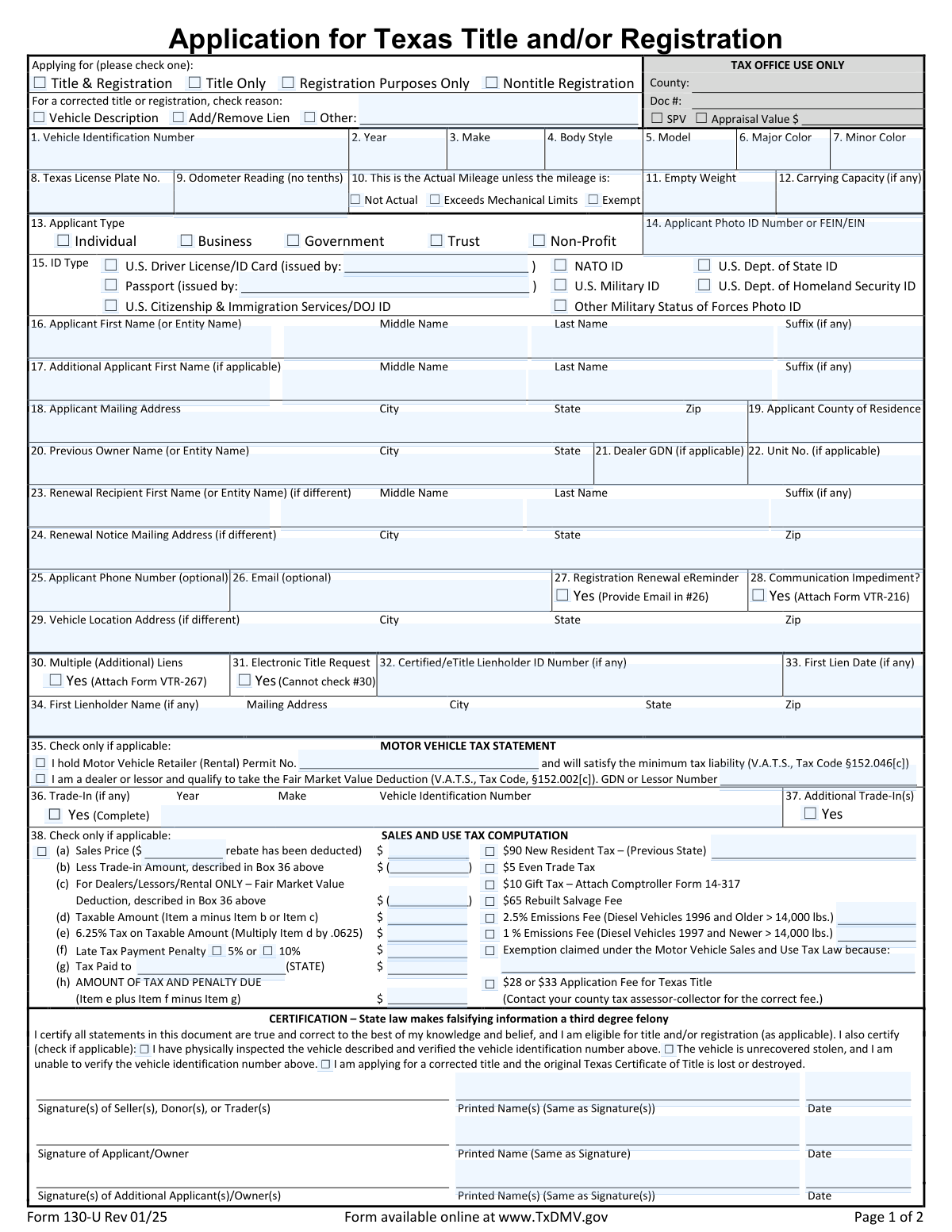
Yes! You can use AI to fill out Form 130-U, Application for Texas Title and/or Registration

Form 130-U, Application for Texas Title and/or Registration, is the primary document required by the TxDMV to establish legal ownership and permit operation of a vehicle on Texas roads. It is used for new vehicle purchases, transferring ownership, registering a vehicle from out-of-state, or correcting title information. Completing this form accurately is crucial for calculating taxes and fees and ensuring a clean title. Today, this form can be filled out quickly and accurately using AI-powered services like Instafill.ai, which can also convert non-fillable PDF versions into interactive fillable forms.
Our AI automatically handles information lookup, data retrieval, formatting, and form filling.
It takes less than a minute to fill out Form 130-U using our AI form filling.
Securely upload your data. Information is encrypted in transit and deleted immediately after the form is filled out.

Form specifications

Form name: Form 130-U, Application for Texas Title and/or Registration
Number of pages: 1
Language: English
main-image

Instafill Demo: How to fill out PDF forms in seconds with AI

How to Fill Out Form 130-U Online for Free in 2026

Are you looking to fill out a FORM 130-U form online quickly and accurately? Instafill.ai offers the #1 AI-powered PDF filling software of 2026, allowing you to complete your FORM 130-U form in just 37 seconds or less.
Follow these steps to fill out your FORM 130-U form online using Instafill.ai:
  1. 1 Navigate to Instafill.ai and upload your Form 130-U, or find it in the platform's template library.
  2. 2 Complete the 'Vehicle Description' section by providing the VIN, make, model, year, and odometer reading.
  3. 3 Enter the applicant's information, including full legal name, mailing address, and identification details.
  4. 4 If applicable, provide details for any lienholders in the 'Lien Information' section.
  5. 5 Fill out the 'Sales and Use Tax Computation' section to determine the total tax and fees due, including details of any trade-in or exemptions.
  6. 6 Review all sections for accuracy, then electronically sign and date the application as the applicant/owner.
  7. 7 Download the completed, signed Form 130-U to submit to your county tax assessor-collector's office with other required documents.

Our AI-powered system ensures each field is filled out correctly, reducing errors and saving you time.

Why Choose Instafill.ai for Your Fillable Form 130-U Form?

Speed

Complete your Form 130-U in as little as 37 seconds.

Up-to-Date

Always use the latest 2026 Form 130-U form version.

Cost-effective

No need to hire expensive lawyers.

Accuracy

Our AI performs 10 compliance checks to ensure your form is error-free.

Security

Your personal information is protected with bank-level encryption.

Frequently Asked Questions About Form Form 130-U

This is an application for a Texas Certificate of Title and/or vehicle registration. It is used when purchasing a vehicle, transferring ownership, moving to Texas with a vehicle, or correcting information on an existing title.

Any individual or entity who is applying for a new title, registering a vehicle for the first time in Texas, or needs to make a correction to their current Texas title or registration must complete this form.

You will need the Vehicle Identification Number (VIN), your photo ID information, the previous owner's name and address, and details about the sale, such as the sales price and any trade-in information for tax calculation.

Enter the full 17-character VIN exactly as it appears on your vehicle's title or dashboard plate. Use only uppercase letters and numbers, and do not include any spaces or hyphens.

If your vehicle has only one primary color, you should enter the word 'None' in the 'Minor Color' field.

As a new resident, you will likely pay the '$90 New Resident Tax' instead of the standard sales tax. Be sure to check this option in the 'Sales & Use Tax Computation' section and list your previous state of residence.

For a gifted vehicle, you should select the '$10 Gift Tax' option. You must also attach a completed Comptroller Form 14-317, Affidavit of Motor Vehicle Gift Transfer.

A lienholder is the bank or financial institution that financed your vehicle loan. You must complete the 'Lien Information' section if you have an active loan on the vehicle to ensure the lender's interest is officially recorded on the title.

You can still apply for a corrected title even if the original is lost. Simply check the box that states, 'I certify I am applying for a corrected title and the original Texas Certificate of Title is lost or destroyed'.

This means the odometer has 'rolled over' after reaching its maximum displayable mileage, which is common on older vehicles with five-digit odometers. You should check this box if the true mileage is the displayed reading plus 100,000 miles (or more).

By selecting 'Yes' for this option and providing your email, you are requesting to receive future registration renewal notices electronically via email instead of through traditional mail.

Yes, services like Instafill.ai use AI to help you accurately auto-fill form fields with your saved information, which saves time and reduces the chance of errors.

You can use a service like Instafill.ai to upload the PDF and fill it out on your computer. This allows you to type directly into the fields, save your data, and ensure all required sections are completed before printing.

If you have a non-fillable or 'flat' PDF, you can upload it to a service like Instafill.ai. Their technology can convert the document into an interactive, fillable form that you can easily complete online.

Compliance Form 130-U
Validation Checks by Instafill.ai

1
Validates Vehicle Identification Number (VIN) Format
This check ensures the 'Vehicle Identification Number (VIN)' field contains exactly 17 alphanumeric characters (A-Z, 0-9) with no spaces or hyphens. This is crucial for uniquely identifying a vehicle and preventing fraudulent or erroneous submissions. If the VIN is not 17 characters or contains invalid symbols, the form submission will be rejected with an error message prompting the user to enter the VIN exactly as it appears on the vehicle's documentation.
2
Requires Email Address for Registration Renewal eReminder
This validation checks that the 'Applicant Email Address' field is not empty and contains a validly formatted email if the user has checked the 'Yes I want a Registration Renewal eReminder' box. This is important to ensure the user's request for electronic reminders can be fulfilled. If the box is checked but the email field is empty or invalid, the system will display an error message requiring a valid email address to proceed.
3
Enforces 'Other Reason for Correction' Description
This check validates that the 'Other Reason for Correction' text field is filled out when the 'Other' checkbox under 'Correction Reason' is selected. This ensures that when a non-standard reason for correction is chosen, a specific explanation is provided for processing. Failure to provide a description when 'Other' is checked will result in a validation error, preventing form submission until the reason is described.
4
Validates Applicant Name Fields Based on Applicant Type
This validation ensures the applicant name fields are filled out correctly based on the selected 'Applicant Type'. If 'Individual' is chosen, the 'Applicant First Name' and 'Applicant Last Name' fields are required. If 'Business', 'Government', 'Trust', or 'Non-Profit' is selected, the 'Applicant First Name (or Entity Name)' field must be filled, and the Last/Middle/Suffix fields should be empty. This prevents data entry errors and ensures the legal name is captured correctly for the entity type.
5
Requires Issuing State for U.S. Driver License/ID Card
This validation rule ensures that if 'U.S. Driver License/ID Card' is selected as the 'ID Type', the 'Issuing State (Driver License/ID Card)' field must be completed. This is necessary to verify the provided identification document against the correct jurisdiction's records. If the ID type is selected but the issuing state is left blank, the user will be prompted to provide the state abbreviation or name before the form can be submitted.
6
Requires Justification for Tax Exemption Claim
This check verifies that the 'Sales and Use Tax Exemption Reason' field is completed if the 'Exemption claimed under the Motor Vehicle Sales and Use Tax Law' checkbox is ticked. It is a critical compliance check to ensure that all tax exemption claims are properly documented with a valid statutory reason. An error will be triggered if the box is checked without a corresponding reason, preventing the submission of an unsubstantiated tax exemption claim.
7
Validates Vehicle Model Year is a 4-Digit Number
This validation ensures that the 'Vehicle Model Year' field contains a four-digit number (YYYY format). This standardizes the data and prevents invalid entries like '98' or 'twenty-twenty'. Correctly formatted year data is essential for vehicle identification, tax calculation, and emissions compliance. Submissions with an invalid year format will be blocked until a valid four-digit year is entered.
8
Enforces Uppercase Format for Body Style
This validation checks that the value entered in the 'Body Style' field is in all uppercase letters, as specified by the form instructions. This rule promotes data consistency and ensures the entry matches standardized vehicle classification codes used by the DMV. If the entry contains lowercase letters or is otherwise improperly formatted, the system should either auto-correct it to uppercase or prompt the user to fix it.
9
Requires Previous State for New Resident Tax Calculation
This validation ensures that if the '$90 New Resident Tax' option is selected, the 'Previous State' field must be filled with a valid two-letter state abbreviation. This information is required to correctly process the new resident tax application and verify the applicant's status. If the tax option is chosen but the state is missing, the form will return an error, halting submission until the previous state of registration is provided.
10
Validates Trade-In Details are Provided when Claimed
This check is triggered when the 'Yes, there was a trade in to a dealer' box is checked. It verifies that the 'Trade-In Vehicle Year, Make & VIN' and 'Less Trade-In Amount' fields are completed. This is crucial for accurately calculating the taxable amount of the vehicle purchase by subtracting the trade-in value. If the trade-in is claimed but the details are missing, the submission will fail until the required information is provided.
11
Ensures Odometer Reading is a Whole Number
This validation confirms that the 'Odometer Reading (Whole Miles)' field contains only numeric digits and no commas, decimals, or other characters. This is important for maintaining accurate vehicle history records and preventing data entry errors. If the user enters non-numeric values or tenths of a mile, the system will display an error message instructing them to enter the mileage in whole numbers only.
12
Validates Format of Monetary Amount Fields
This check ensures that all fields representing dollar amounts, such as 'Sales Price After Rebate' or 'Taxable Amount', are entered in a valid numeric format with two decimal places (e.g., 12345.67). It prohibits the use of currency symbols ($) or commas, which could interfere with automated calculations. Proper formatting is essential for the accuracy of all tax and fee computations, and submissions with invalid formats will be rejected.
13
Requires Printed Name with Applicant Signature
This validation ensures that if the 'Signature of Applicant/Owner' is provided (often captured digitally or as an image), the 'Applicant/Owner Printed Name' field must also be filled out. This provides a legible version of the signer's name, which is legally necessary to confirm the identity of the person signing the document. The form would be considered incomplete and rejected if a signature is present without a corresponding printed name.
14
Lien Information Consistency Check
This validation ensures that if 'Add/Remove Lien' is checked as a correction reason, the 'First Lien Date' must be provided in MM/DD/YYYY format. This maintains data integrity for lien-related transactions and ensures all necessary information is captured when a lien status is being modified. A submission will fail if the lien correction is indicated but the corresponding date is missing or improperly formatted.

Common Mistakes in Completing Form 130-U

Incorrect or Incomplete Vehicle Identification Number (VIN)

Applicants often make typos or omit characters when entering the 17-character VIN, or they incorrectly include spaces or hyphens. This critical error prevents the correct identification of the vehicle and will lead to the immediate rejection of the application, causing significant processing delays. To avoid this, carefully proofread the VIN against the official title and the vehicle's VIN plate, ensuring all 17 uppercase characters are entered correctly. AI-powered tools like Instafill.ai can help prevent this by validating the VIN's length and format automatically.

Improperly Entering a Business or Entity Name

When the applicant is a business, trust, or other non-individual entity, filers often mistakenly spread the organization's name across the First, Middle, and Last Name fields. The form requires the full legal entity name to be entered only in the 'First Name (or Entity Name)' field. This error can cause the title to be issued incorrectly, creating legal and ownership problems that are difficult to fix. To prevent this, entities must enter their full name in the single designated entity field and leave the individual name fields blank.

Inaccurate Odometer Reading or Missing Status

Filers frequently enter the odometer reading with tenths of a mile or forget to check a required status box like 'Not Actual,' 'Exceeds Mechanical Limits,' or 'Exempt.' This happens when copying the full reading from the dashboard or misunderstanding mileage disclosure laws. An incorrect odometer declaration is a legal issue that can lead to penalties and rejection of the title application. Always enter whole miles only and be sure to check the appropriate status box if the mileage is not the true, actual mileage of the vehicle.

Errors in Sales & Use Tax Calculation

The sales tax section is complex, requiring calculations for state tax, potential emissions fees, and penalties, which is highly prone to mathematical errors. Applicants often miscalculate the taxable amount or apply incorrect fees, leading to an incorrect payment amount and application rejection. To avoid this, use a calculator and carefully follow the instructions for each line item. For complex forms that may only be available as flat PDFs, tools like Instafill.ai can convert them into fillable versions and automate calculations to ensure accuracy.

Missing Explanation for 'Other' Correction Reason

When an applicant checks the 'Other' box as the reason for a title correction, they often forget to provide the required written explanation in the corresponding text field. This omission leaves the processing agent with no information about the purpose of the correction, causing the application to be flagged as incomplete and returned. To avoid this, always provide a brief, clear description of the correction needed whenever you select the 'Other' option.

Incorrect Vehicle Color Entry

The form has specific rules for entering vehicle colors that are often missed, such as entering 'None' in the 'Minor Color' field for single-color vehicles instead of leaving it blank. People also use non-standard color names or abbreviations (e.g., 'SLV' for Silver). These inconsistencies can lead to an inaccurate vehicle record and may require a future correction. Always use standard, full color names and enter 'None' for the minor color if the vehicle has only one.

Confusing Applicant and Vehicle Address Fields

The form asks for up to three different addresses: the applicant's mailing address, the vehicle's physical location, and a renewal notice address. Applicants often fill in only their mailing address, even when the vehicle is kept elsewhere, or they mix up the fields. This can result in registration documents and renewal notices being sent to the wrong place, causing missed deadlines. Carefully read each address field's label and provide the correct information for each, leaving fields blank only if the address is the same as the primary mailing address.

Entering Vehicle Body Style in the Wrong Format

The instructions require the 'Body Style' to be entered in all uppercase letters (e.g., 'SEDAN,' 'SUV'), but many people enter it in title case or lowercase. This is a simple formatting error that can cause data entry inconsistencies in the DMV's system, potentially delaying the application while it is manually corrected. To prevent this, ensure the body style matches the title document and is entered entirely in uppercase as specified.

Forgetting to Attach Required Supplemental Forms

The form contains several checkboxes that indicate a supplemental form is attached, such as for a communication impediment (VTR-216) or a gift tax affidavit (14-317). Applicants frequently check the box but forget to include the actual required document with their submission. This results in an incomplete application package that cannot be processed until the missing form is provided, causing significant delays. If you check a box indicating an attachment, double-check that the corresponding form is completed and included with your submission.

Mismatched Printed Name and Signature

A common oversight is signing the form but either forgetting to print the name below the signature or printing a name that doesn't exactly match the legal name provided in the applicant section. This creates ambiguity about the signer's identity and can invalidate the certification, leading to rejection. Always print your full legal name clearly in the designated space exactly as it appears on your ID. AI-powered form fillers like Instafill.ai can help by pre-populating the printed name fields to match the applicant data, reducing the chance of this error.

Individual Applicants Incorrectly Completing Dealer Sections

Individual buyers often get confused and fill out sections intended only for licensed dealers or lessors, such as the 'Dealer GDN' or 'Fair Market Value Deduction' fields. This incorrect information can complicate the tax assessment and cause the application to be rejected for correction. Individual applicants should carefully read field labels and leave all sections explicitly marked for dealers, lessors, or rental permit holders completely blank.

Incorrectly Identifying Applicant Type and ID

Applicants sometimes select the wrong 'Applicant Type' (e.g., 'Individual' instead of 'Business') or provide an ID number that doesn't correspond to the ID type selected. For example, they might select 'U.S. Driver License' but enter a Passport number. This mismatch creates a verification failure, halting the application process. Ensure you correctly identify your applicant type and that the ID number you provide in the 'Applicant Photo ID Number' field matches the document type you selected.
Saved over 80 hours a year

“I was never sure if my IRS forms like W-9 were filled correctly. Now, I can complete the forms accurately without any external help.”

Kevin Martin Green

Your data stays secure with advanced protection from Instafill and our subprocessors

Robust compliance program

Transparent business model

You’re not the product. You always know where your data is and what it is processed for.

ISO 27001, HIPAA, and GDPR

Our subprocesses adhere to multiple compliance standards, including but not limited to ISO 27001, HIPAA, and GDPR.

Security & privacy by design

We consider security and privacy from the initial design phase of any new service or functionality. It’s not an afterthought, it’s built-in, including support for two-factor authentication (2FA) to further protect your account.

Fill out Form 130-U with Instafill.ai

Worried about filling PDFs wrong? Instafill securely fills form-130-u-application-for-texas-title-andor-registration forms, ensuring each field is accurate.