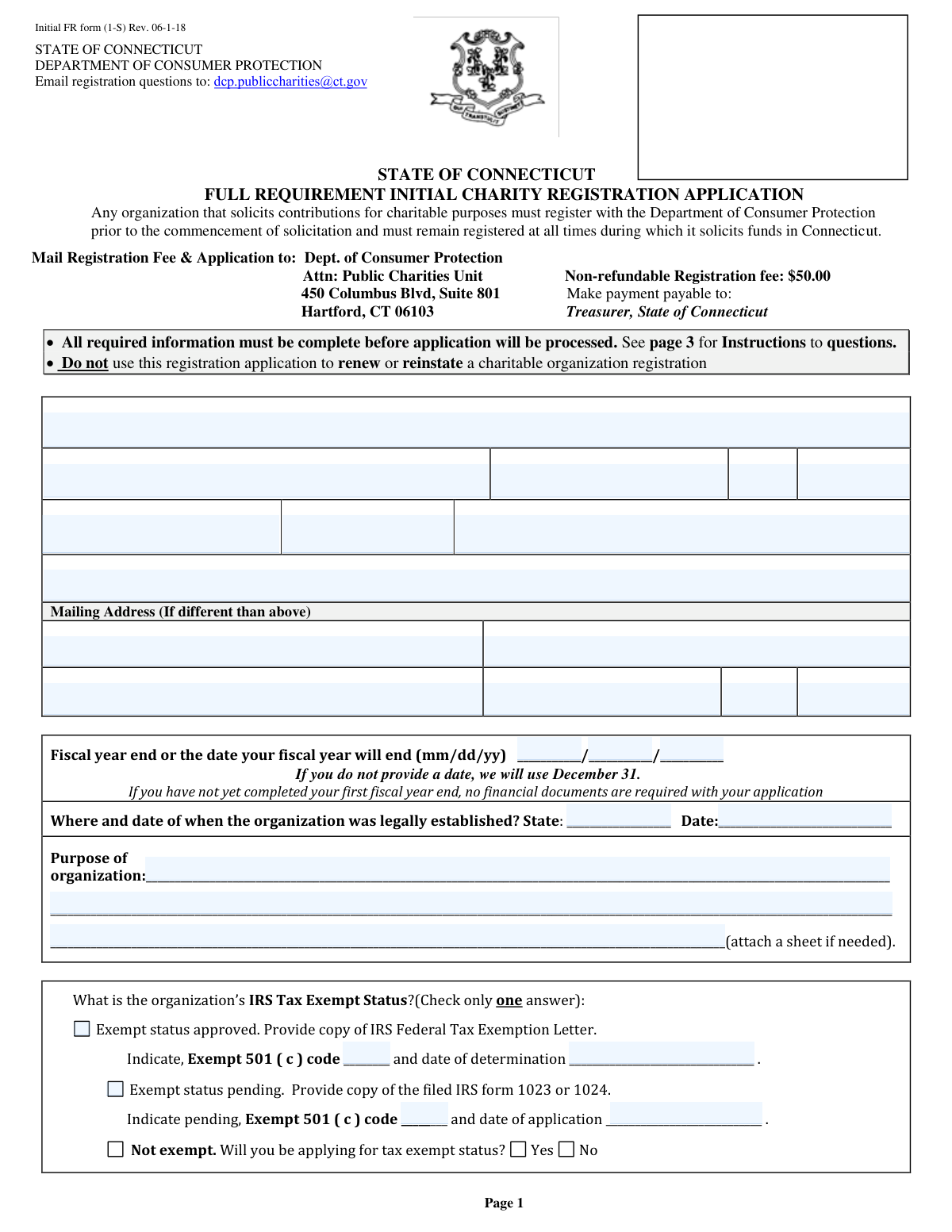
Yes! You can use AI to fill out Form 1-S, Full Requirement Initial Charity Registration Application

The Full Requirement Initial Charity Registration Application (Form 1-S) is a mandatory document for any organization planning to solicit charitable contributions in the State of Connecticut. Submitting this form to the Department of Consumer Protection ensures legal compliance and transparency before fundraising activities begin. Today, this form can be filled out quickly and accurately using AI-powered services like Instafill.ai, which can also convert non-fillable PDF versions into interactive fillable forms. This process is crucial for establishing the organization's legitimacy and authority to operate within the state.
Initial FR form (1-S) is part of the charity forms and registration forms categories on Instafill.
Our AI automatically handles information lookup, data retrieval, formatting, and form filling.
It takes less than a minute to fill out Initial FR form (1-S) using our AI form filling.
Securely upload your data. Information is encrypted in transit and deleted immediately after the form is filled out.

Form specifications

Form name: Form 1-S, Full Requirement Initial Charity Registration Application
Number of fields: 74
Number of pages: 2
Language: English
main-image

Instafill Demo: How to fill out PDF forms in seconds with AI

How to Fill Out Initial FR form (1-S) Online for Free in 2026

Are you looking to fill out a INITIAL FR FORM (1-S) form online quickly and accurately? Instafill.ai offers the #1 AI-powered PDF filling software of 2026, allowing you to complete your INITIAL FR FORM (1-S) form in just 37 seconds or less.
Follow these steps to fill out your INITIAL FR FORM (1-S) form online using Instafill.ai:
  1. 1 Navigate to Instafill.ai and upload or select the Connecticut Initial Charity Registration Application form.
  2. 2 In Section 1, provide the organization's full legal name, physical and mailing addresses, contact information, and Federal Employer Identification Number (FEIN).
  3. 3 Complete Section 2 by entering the organization's fiscal year-end date, state and date of legal establishment, and a clear description of its purpose.
  4. 4 In Section 3, specify the organization's IRS tax-exempt status by checking the appropriate box and providing required details like the 501(c) code and determination date.
  5. 5 Carefully answer all 'Yes/No' questions in Section 4 regarding the organization's solicitation history, prior registrations, and the legal background of its officers and directors.
  6. 6 Provide the name, address, and phone number of the organization's primary financial institution as required in question 22.
  7. 7 Review all entered information for accuracy, then have an authorized individual complete the certification section with their signature, printed name, and title to finalize the application.

Our AI-powered system ensures each field is filled out correctly, reducing errors and saving you time.

Why Choose Instafill.ai for Your Fillable Initial FR form (1-S) Form?

Speed

Complete your Initial FR form (1-S) in as little as 37 seconds.

Up-to-Date

Always use the latest 2026 Initial FR form (1-S) form version.

Cost-effective

No need to hire expensive lawyers.

Accuracy

Our AI performs 10 compliance checks to ensure your form is error-free.

Security

Your personal information is protected with bank-level encryption.

Frequently Asked Questions About Form Initial FR form (1-S)

This is the Full Requirement Initial Charity Registration Application. Any organization that solicits contributions for charitable purposes in Connecticut must complete this form to register with the Department of Consumer Protection before starting any solicitation.

Yes, there is a non-refundable registration fee of $50.00. The payment should be made payable to 'Treasurer, State of Connecticut' and mailed with your application.

You can mail the completed application and fee to the Dept. of Consumer Protection, Attn: Public Charities Unit, 450 Columbus Blvd, Suite 801, Hartford, CT 06103. The form also notes that you can apply online via the www.ct.gov/dcp website.

If your organization has not yet completed its first fiscal year, no financial documents like an IRS Form 990 are required with your initial application. The state will require them for future renewals after your first fiscal year is complete.

In Section 3, check the box for 'Exempt status pending' and provide a copy of your filed IRS Form 1023 or 1024. You must also indicate the pending 501(c) code and the date you applied to the IRS.

You must attach a copy of your IRS Federal Tax Exemption Letter if your status is approved, or your filed IRS Form 1023/1024 if it's pending. If you answer 'Yes' to any of the questions in Section 4 (items 10-21), you must also attach a separate sheet with a detailed explanation.

No, this form is strictly for an organization's initial registration. You cannot use this application to renew or reinstate a charitable organization registration.

You must disclose this by answering 'Yes' to question 14. You are also required to include a copy of your organization’s most recently filed IRS 990, 990 EZ, 990 N, or 990 PF for the year you solicited while unregistered.

If you do not provide a fiscal year-end date, the state will assign December 31 as your fiscal year end. This date is important because it determines your registration's expiration and renewal schedule.

No, this application is for full registration. If you believe your organization meets the criteria for an exemption, you must use the 'Claim of Exemption from Full Registration Application Form (CPC-54 New)' available on the department's website.

Yes, services like Instafill.ai use AI to help you accurately auto-fill form fields from your saved information, which can save you time and reduce errors.

With Instafill.ai, you can upload the form, and the AI will make it fillable online. You can then answer the questions, and the platform will populate the form for you to download, print, and sign.

If you have a non-fillable PDF, you can upload it to a service like Instafill.ai. The platform can convert flat, non-fillable PDFs into interactive forms that you can easily complete on your computer.

The form must be signed by an individual authorized to sign documents on behalf of the organization, such as an officer or director. By signing, this person certifies that all information provided is true and complete to the best of their knowledge.

Compliance Initial FR form (1-S)
Validation Checks by Instafill.ai

1
FEIN Format and Requirement Validation
This check verifies that the Federal Employer Identification Number (FEIN) is provided and follows the correct 9-digit format (e.g., XX-XXXXXXX). The FEIN is a unique identifier required by the state for tracking the organization and is mandatory per the form instructions. If the FEIN is missing, invalid, or improperly formatted, the application cannot be processed and will be flagged as incomplete.
2
Required Email Address Validation
This validation ensures that the organization's email address field is not empty and contains a validly formatted email address (e.g., [email protected]). The instructions explicitly state that the email address is required for notifying charities of approvals, deficiencies, and renewal status. A missing or invalid email will halt the application process until a valid one is provided, preventing crucial communication.
3
IRS Tax Exempt Status Consistency
This check validates the logical consistency of the IRS Tax Exempt Status section. It ensures that only one of the three main options (Approved, Pending, Not Exempt) is selected. Furthermore, if 'Approved' is checked, the 501(c) code and determination date must be present; if 'Pending' is checked, the pending code and application date must be present. This prevents contradictory or incomplete information, and failure will require the user to correct the selections and associated data.
4
Fiscal Year End Date Format and Validity
This check verifies that the 'Fiscal year end' date is a valid calendar date (e.g., 02/29 is only valid in a leap year). While the form defaults to December 31 if left blank, this validation ensures that if a user does enter a date, it is a real date. This is crucial for determining the registration's expiration date, and an invalid entry would prevent the system from calculating it correctly.
5
Conditional Attachment Check for 'Yes' Answers (Questions 10-21)
This validation flags any 'Yes' answers to questions 10 through 21 and verifies that a corresponding attachment or explanation has been uploaded or provided. These questions pertain to significant legal and compliance history, and the state requires detailed explanations for affirmative answers to assess the organization's eligibility. If a 'Yes' is selected without an explanation, the submission is considered incomplete and will be rejected pending the required documentation.
6
Conditional Requirement for Previous CT Registration Number
This validation checks that if the user answers 'Yes' to question 15 ('Has the organization ever registered as a charity in Connecticut?'), the corresponding registration number field is filled. This is important for linking to previous records, identifying lapsed registrations, and ensuring the organization is using the correct renewal or reinstatement process instead of this initial application. An omission would trigger an error asking for the number or to change the answer to 'No'.
7
Signatory Information Completeness
This check ensures that all fields related to the signatory in Section 23 are completed, including the printed name, title, full address, and daytime phone number. State law requires an authorized individual to certify the application, and this contact information is essential for any follow-up questions regarding the submission's authenticity or content. An incomplete signatory section will render the application invalid and legally non-binding.
8
Signatory Name Consistency Check
This validation compares the name entered in the certification sentence ('I, [Signatory Name] hereby certify...') with the name entered in the 'Print Name' field below the signature line. The names must match to ensure clarity and legal validity of the certification. A mismatch could indicate a clerical error or ambiguity about who is legally attesting to the application's contents, causing the application to be flagged for manual review or correction.
9
Physical Address Requirement
This validation confirms that the Physical Address fields (Street, City, State, Zip) in Section 1 are fully completed. The instructions specify that a physical location for the charity must be provided, even if a separate mailing address or P.O. Box is used. This is a legal requirement for establishing jurisdiction and ensuring the organization has a physical presence, and a missing address will result in an incomplete application.
10
State and ZIP Code Format Validation
This check ensures that all 'State' fields contain a valid two-letter US state abbreviation and that all 'ZIP Code' fields contain either a 5-digit or 9-digit (ZIP+4) numeric code. Correctly formatted address information is critical for mail delivery of official documents and for data integrity within the state's systems. An invalid format will trigger an error and require the user to correct the entry before submission.
11
Initial Application Exclusivity Check
This validation cross-references the organization's name and FEIN against the state's database of currently or recently registered charities. The form is explicitly for 'Initial' registrations, not renewals or reinstatements. If an existing registration is found, the system should block the submission and direct the user to the correct renewal or reinstatement process, preventing duplicate records and procedural errors.
12
Conditional IRS 990 Requirement for Prior Solicitation
This check verifies that if an applicant answers 'Yes' to question 14 (prior solicitation in CT), they have attached a copy of their most recently filed IRS 990 form. This is a compliance requirement to account for charitable activities conducted before official registration. Failure to provide the required financial document when indicating prior solicitation will result in a deficient application that cannot be approved.
13
Date of Legal Establishment Validity
This check ensures the 'Date of Legal Establishment' provided in Section 2 is a valid date that is not in the future. An organization cannot be legally established on a future date. This validation prevents simple data entry errors and ensures the historical accuracy of the organization's formation records, and an invalid or future date will cause the form to be rejected until a plausible past or present date is entered.
14
Completeness Check for Questions 10-21
This validation ensures that every question from 10 through 21 has been answered with either 'Yes' or 'No' (or 'Never applied' where applicable). The form instructions state 'Answer all questions, do not leave unanswered'. Leaving any of these questions blank results in an incomplete application and prevents a full compliance review, leading to rejection.

Common Mistakes in Completing Initial FR form (1-S)

Providing Incomplete or Incorrect IRS Tax-Exempt Status

Applicants often check a box in Section 3 but fail to provide the required supporting details, such as the 501(c) code, determination date, or the mandatory attachments like the IRS determination letter or filed Form 1023. This happens due to oversight or not having the documents readily available. An incomplete or improperly documented status section is a primary reason for application rejection, as it's critical for determining the charity's legal standing. To avoid this, gather all IRS documentation before starting the form, and use AI-powered form filling tools like Instafill.ai to get reminders for required attachments based on your checkbox selections.

Skipping Required 'Yes/No' Questions in Section 4

Applicants frequently leave questions 10-21 blank, assuming that a non-response is the same as 'No.' However, the instructions explicitly state to 'Answer all questions.' An application with blank answers in this section is considered incomplete and will be returned, causing significant delays. To prevent this, always select an answer for every question. Smart form-filling tools can validate that all required fields in a section are completed, preventing this common oversight.

Answering 'Yes' Without Providing a Required Explanation

When an applicant answers 'Yes' to any of the questions from 10 through 21, the form requires a detailed explanation attached on a separate sheet. A common mistake is to check 'Yes' but forget to include this mandatory attachment, rendering the answer incomplete. This will halt the review process until the supplemental information is provided. To prevent this, prepare any necessary explanations in advance and ensure they are clearly labeled and attached to the submission.

Using a DBA or Common Name Instead of the Full Legal Name

In Section 1, applicants sometimes enter their common brand name or 'Doing Business As' (DBA) name instead of the full legal name of the organization as registered with the state of incorporation and the IRS. This can lead to processing delays, mismatched records, and a registration certificate issued with the incorrect name. Always use the official legal name in the primary name field and list any DBAs in the separate field provided. Using an AI form filler like Instafill.ai can help by saving your organization's profile, ensuring the correct legal name is consistently and accurately applied.

Forgetting the Fee or Making Payment to the Wrong Payee

The application requires a non-refundable $50.00 registration fee made payable to 'Treasurer, State of Connecticut.' Applicants may forget to include the check or make it out to the 'Department of Consumer Protection' by mistake. Submitting the form without the correct payment will result in the application being rejected immediately. Always double-check that the payment is included and made out to the exact payee specified on the form before mailing.

Providing an Incomplete or Unsigned Certification

The signature section (Question 23) is often filled out incorrectly, with applicants forgetting to sign, date, or provide their printed name, title, and full contact details. An unsigned or incomplete certification invalidates the entire application. Since this form is a non-fillable PDF, tools like Instafill.ai can convert it into a fillable version, making it easier to type in clear, legible information for the signatory details before printing for a wet signature.

Omitting the Fiscal Year-End Date

Applicants sometimes leave the fiscal year-end date blank, not realizing the consequences. The form states that if no date is provided, the state will default to December 31st, which can create administrative problems for organizations on a different fiscal calendar by misaligning renewal deadlines. Always enter the correct fiscal year-end date in the required MM/DD/YY format. AI-powered tools can auto-format dates correctly and save this information in your organization's profile for future use.

Failing to Disclose All Names Used for Solicitation

Organizations that solicit funds under multiple names, such as program names or DBAs, often forget to list them in the designated field in Section 1. This is a compliance issue, as the state requires all names used for fundraising to be registered, and can lead to penalties if the organization is found to be soliciting under an unregistered name. Ensure you list every name, brand, or DBA that will be used to ask for contributions in Connecticut.

Using the Wrong Form for Renewal or Exemption

The form explicitly warns applicants not to use it for renewing a registration, reinstating a lapsed one, or claiming an exemption. People often grab the first form they find online, leading them to submit the wrong application, which wastes time and the non-refundable application fee. Always verify on the CT.gov/dcp website that you are using the correct form for your specific purpose (initial, renewal, or exemption).

Providing Vague or Incomplete Financial Institution Details

Question 22 asks for the name, address, and phone number of the organization's primary financial institution, but applicants frequently provide only the bank's name. This information is required for verification, and an incomplete entry can lead to follow-up requests and delays. Always provide the full details for the specific branch where the organization's primary accounts are held. AI form fillers can store this detailed information and populate it perfectly every time.
Saved over 80 hours a year

“I was never sure if my IRS forms like W-9 were filled correctly. Now, I can complete the forms accurately without any external help.”

Kevin Martin Green

Your data stays secure with advanced protection from Instafill and our subprocessors

Robust compliance program

Transparent business model

You’re not the product. You always know where your data is and what it is processed for.

ISO 27001, HIPAA, and GDPR

Our subprocesses adhere to multiple compliance standards, including but not limited to ISO 27001, HIPAA, and GDPR.

Security & privacy by design

We consider security and privacy from the initial design phase of any new service or functionality. It’s not an afterthought, it’s built-in, including support for two-factor authentication (2FA) to further protect your account.

Fill out Initial FR form (1-S) with Instafill.ai

Worried about filling PDFs wrong? Instafill securely fills form-1-s-full-requirement-initial-charity-registration-application forms, ensuring each field is accurate.