Yes! You can use AI to fill out Form IIGAREG, Institutional Account Registration Form
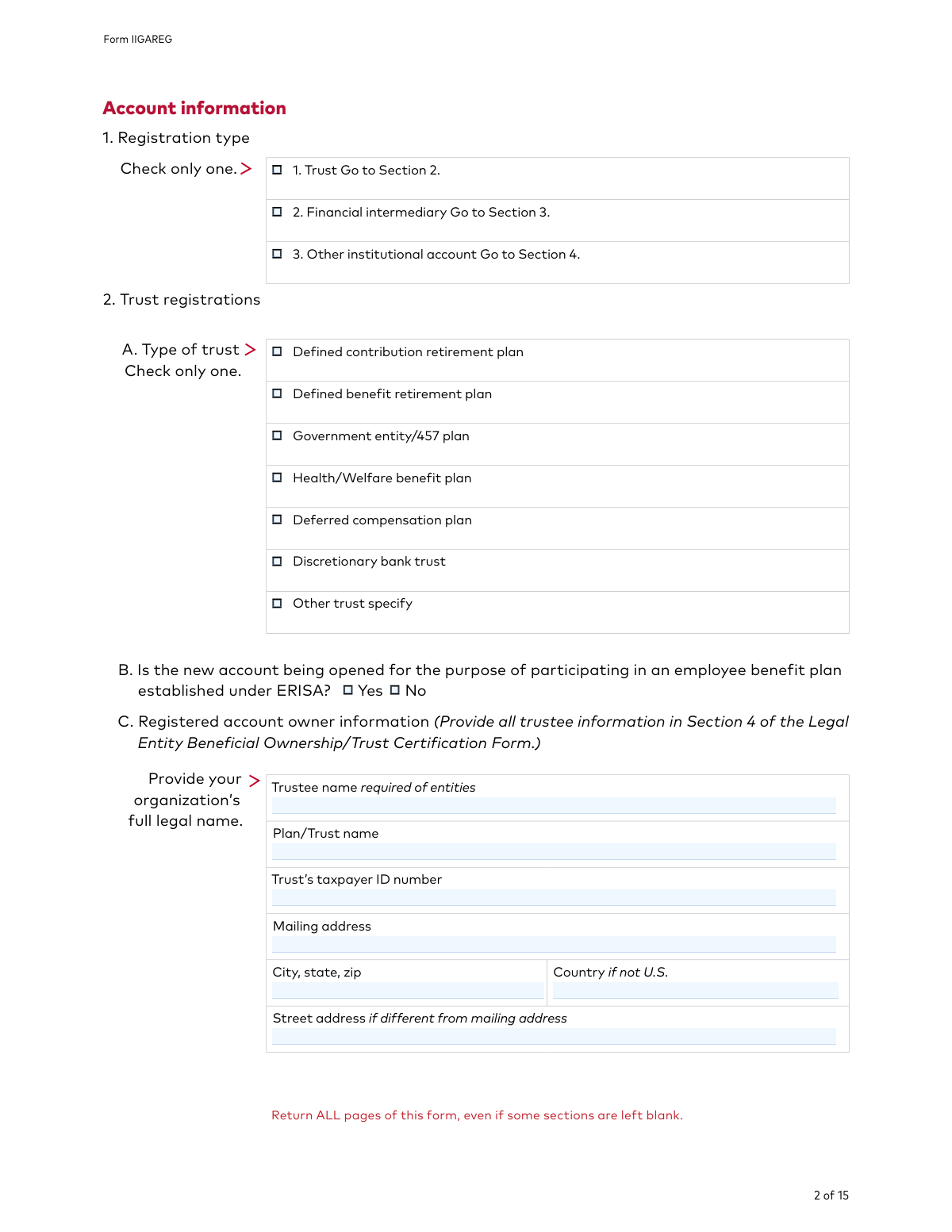
Form IIGAREG is a comprehensive document required by Vanguard for U.S. entities, such as trusts, corporations, and financial intermediaries, to establish a new institutional account. It gathers critical information about the organization's legal structure, tax identification, beneficial owners, and authorized signatories to comply with federal regulations for identity verification. Today, this form can be filled out quickly and accurately using AI-powered services like Instafill.ai, which can also convert non-fillable PDF versions into interactive fillable forms.
Our AI automatically handles information lookup, data retrieval, formatting, and form filling.
It takes less than a minute to fill out IIGAREG using our AI form filling.
Securely upload your data. Information is encrypted in transit and deleted immediately after the form is filled out.
Form specifications
| Form name: | Form IIGAREG, Institutional Account Registration Form |
| Number of pages: | 1 |
| Language: | English |
| Categories: | registration forms, account registration forms, institutional forms |
Instafill Demo: How to fill out PDF forms in seconds with AI
How to Fill Out IIGAREG Online for Free in 2026
Are you looking to fill out a IIGAREG form online quickly and accurately? Instafill.ai offers the #1 AI-powered PDF filling software of 2026, allowing you to complete your IIGAREG form in just 37 seconds or less.
Follow these steps to fill out your IIGAREG form online using Instafill.ai:
- 1 Navigate to Instafill.ai and upload the Vanguard Institutional Account Registration Form or select it from their template library.
- 2 Use the AI assistant to automatically fill in your entity's primary information, such as legal name, taxpayer ID number, and address, across all relevant sections.
- 3 Select your registration type (e.g., Trust, Financial Intermediary, Corporation) and complete the specific details required for that entity, including providing information on trustees or contacts.
- 4 Indicate your initial investment choices, cost basis method, and how you want dividends and capital gains to be handled.
- 5 Upload any required supporting documents, such as articles of incorporation or trust agreements, as specified in Section 6 of the form.
- 6 Review all the information populated by the AI for accuracy, then have all authorized signatories provide their digital signatures in the designated fields.
- 7 Download the completed and signed form package and submit it to Vanguard through one of the methods listed on the final page.
Our AI-powered system ensures each field is filled out correctly, reducing errors and saving you time.
Why Choose Instafill.ai for Your Fillable IIGAREG Form?
Speed
Complete your IIGAREG in as little as 37 seconds.
Up-to-Date
Always use the latest 2026 IIGAREG form version.
Cost-effective
No need to hire expensive lawyers.
Accuracy
Our AI performs 10 compliance checks to ensure your form is error-free.
Security
Your personal information is protected with bank-level encryption.
Frequently Asked Questions About Form IIGAREG
This form is used by U.S. entities, such as trusts, corporations, and financial intermediaries, to open a new institutional investment account with Vanguard.
This form is exclusively for U.S. entities. If you represent a non-U.S. entity, you must call Vanguard at 800-950-0053 for the correct forms and instructions.
You must include your entity's formation documents as specified in Section 6B, such as articles of incorporation or trust agreements. Additionally, you must complete the Vanguard Institutional Investor Organization Resolution Form or the Certificate of Authority for Retirement Plans.
Yes, the instructions state that you must return all pages of the form, even if some sections are intentionally left blank.
In Section 7, you must list the fund name, fund number, and the initial investment amount for each fund. You also need to indicate how the account will be funded, for example, by wire or NSCC.
Vanguard is required by federal law to obtain and verify your information. If the form is incomplete or missing documentation, Vanguard will not be able to open the account, which will cause delays.
The cost basis method determines how capital gains are calculated when you sell shares. This section is mandatory for certain entities (like S corporations and partnerships) and optional for others; you can choose from methods like FIFO, Average Cost, or MinTax.
You can submit the completed and signed form by fax or mail. The specific fax number and mailing addresses for USPS and couriers like FedEx/UPS are provided on the last page of the form.
This form does not establish online access. You must complete and submit the separate 'Institutional Website Access Authorization Form' available on the Vanguard website to manage your account online.
In Section 6D, you should enter the 'Exempt payee code' that corresponds to your entity type from the list provided. This ensures your account is set up correctly for tax reporting.
Yes, services like Instafill.ai use AI to accurately auto-fill form fields using your saved information, which can save time and help prevent errors.
If you have a non-fillable PDF, you can use a service like Instafill.ai to convert it into an interactive, fillable form. This allows you to type your answers directly into the fields before printing.
You can use a platform like Instafill.ai to complete this form online. Simply upload the PDF, and the tool will allow you to fill, sign, and download the completed document.
Compliance IIGAREG
Validation Checks by Instafill.ai
1
U.S. Entity and Tax Residency Verification
This check verifies that the entity's country of tax residency, as specified in Sections 2, 3, or 4, is the United States. The form explicitly states it is for U.S. entities only. This is critical for legal and tax compliance. If a non-U.S. country is entered, the submission should be flagged for manual review or rejected, directing the user to the appropriate non-U.S. entity process.
2
Taxpayer ID Number (TIN/EIN) Format Validation
Ensures that the 'Taxpayer ID number' provided in Sections 2, 3, or 4 adheres to the standard 9-digit Employer Identification Number (EIN) format (XX-XXXXXXX). Correct TINs are essential for tax reporting and account identification. A failure in this validation would prevent account opening and could lead to IRS penalties, so the form should not be processed until a valid number is provided.
3
Conditional Section Completion Based on Registration Type
Validates that based on the single selection made in Section 1 ('Registration type'), the corresponding detailed section (Section 2 for Trust, Section 3 for Financial Intermediary, or Section 4 for Other) is completed. This ensures data integrity and completeness for the chosen account type. If the wrong section is filled or the correct one is left blank, the form submission is considered incomplete and must be corrected.
4
Mandatory Specification for 'Other' Selections
Checks that if the 'Other' checkbox is selected in 'Type of trust' (Section 2A) or 'Type of institution' (Section 4A), the adjacent 'specify' text field is not empty. This information is crucial for correctly classifying the entity when it doesn't fit a standard category. A failed validation means the entity type is ambiguous, and the form should be returned for clarification.
5
Conditional NSCC Trading Information Requirement
Verifies that if the user answers 'Yes' to the NSCC trading question in Section 5A, then the 'Trading firm information' and 'Settling firm information' fields in Section 5B are mandatory and completed. This information is required to facilitate trades via the NSCC network. If this validation fails, the system cannot set up the trading link, and the submission should be rejected until the required NSCC details are provided.
6
Entity Tax Classification Sub-Selection
Ensures that if 'Corporation' or 'Limited liability company (LLC)' is selected as the entity type in Section 6B, a corresponding tax classification (e.g., 'C corporation', 'S corporation', 'Partnership') is also selected. This is a mandatory IRS requirement for tax reporting purposes. Failure to provide this classification will result in processing delays and potential tax compliance issues for the account.
7
Conditional Cost Basis Method Selection
This check confirms that if an entity type marked with an asterisk in Section 6B (such as S Corporation, Partnership, or LLC) is chosen, then a cost basis method must be selected in Section 11. This is a required tax election for these specific entity types. If the validation fails, the form is incomplete and cannot be processed, as the default method may not be appropriate or compliant for the entity.
8
Dividend Payment Method Logic
Validates that if any option to pay dividends or capital gains in cash is selected in Section 12, a corresponding 'payment method' (Wire, EBT, Networking, or Check) must also be chosen. This ensures that there are clear instructions for how to disburse funds. If a cash option is chosen without a method, the instruction is incomplete and the form must be corrected before processing.
9
Conditional Wire Instruction Completion
If 'Wire' is selected as the dividend payment method in Section 12, this validation ensures that all fields in Section 13 ('Wire instructions') are fully and correctly completed. Missing bank details would make it impossible to execute wire transfers, leading to failed payments. The submission must be rejected until the complete and accurate bank information is provided.
10
ABA Routing Number Validation
Performs a technical validation on the 'ABA number' in Section 13. The check ensures the number is exactly 9 digits and passes the ABA routing number checksum algorithm. This prevents transaction failures due to typos or invalid bank routing information. An invalid ABA number will cause all wire transfers to fail, so this check is critical for operational success.
11
Signature Block Completeness
Verifies that at least one signature block in Section 17 is fully completed with a signature, printed name, title, and date. The signature legally binds the entity to the terms and certifies the information provided. An incomplete or missing signature block invalidates the entire application, and it must be rejected until properly signed.
12
Valid Signature Date
Ensures the 'Date' field in the signature block (Section 17) is provided in a valid 'mm/dd/yyyy' format and is not a date in the future. The date establishes the legal timing of the certification. An invalid or future date can create legal and compliance ambiguities, so the form should be rejected until a valid, current or past date is entered.
13
Contact Information Format Validation
This check ensures that the 'Phone' and 'Email' fields provided for the daily/senior contact in Sections 2, 3, or 4 are in a valid format. The phone number should match a standard U.S. format, and the email must conform to the '[email protected]' structure. This is essential for ensuring Vanguard can communicate with the client regarding their account. Invalid contact information would halt communication and must be corrected.
14
Initial Investment Requirement
Validates that at least one investment line item is entered in Section 7 and that the 'Initial investment amount' is a positive numerical value. An account cannot be opened without an initial investment. If this section is blank or contains invalid amounts, the application is incomplete and cannot be processed.
Common Mistakes in Completing IIGAREG
Section 6B explicitly lists the documentation required for each entity type, such as Articles of Incorporation or specific trust pages. Applicants often overlook this section or fail to attach the correct documents, leading to significant processing delays or outright rejection of the application. To avoid this, carefully review Section 6B, gather all necessary documents before starting the form, and submit them as a complete package. This is a primary reason for application processing failure.
Section 17 requires the signature, printed name, title, and date from an authorized signatory. Common errors include missing a signature, forgetting to print the name or title, or having an individual sign who lacks the legal authority to do so for the entity. An incomplete signature section invalidates the entire application. Always ensure the person signing is legally authorized and that all fields in the signature block are filled out completely.
The form requires the entity's 'full legal name' in Sections 2, 3, and 4. Applicants frequently enter a 'Doing Business As' (DBA) name, an abbreviation, or an incomplete version of the legal name. This mismatch with official records and tax documents will cause verification to fail and the account opening to be halted. Always use the exact legal name as it appears on the entity's formation documents and tax records.
The instruction 'Return ALL pages of this form, even if some sections are left blank' is printed at the top of every page. Many applicants only submit the pages they have filled out, assuming the blank ones are unnecessary. This results in an incomplete submission, as compliance departments require the full document for their records, and the application will be sent back. Always submit the entire 15-page document.
Institutional accounts require an Employer Identification Number (EIN), not a personal Social Security Number (SSN). Applicants may accidentally enter an SSN, transpose digits in the EIN, or leave the field blank. An incorrect TIN will cause a failure in the mandatory identity verification process, preventing the account from being opened. AI-powered tools like Instafill.ai can help prevent this by validating the format of the TIN as it is entered.
The form has several fields that are required only if a specific option is checked elsewhere, such as the cost basis method in Section 11 for certain entity types. Applicants often miss these conditional requirements, leading to an incomplete application. For example, if an entity is marked with an asterisk in Section 6B, a cost basis election is mandatory. Carefully read all instructions related to your selections to ensure all dependent fields are completed.
In Section 6D, selecting the correct 'Exempt payee code' is crucial for proper tax reporting and avoiding unnecessary backup withholding. The codes are technical, and applicants often guess, select the wrong one, or leave it blank when their entity qualifies for an exemption. This mistake can lead to incorrect tax withholding by Vanguard and create accounting problems for the entity. If unsure, consult a tax professional before completing this section.
In Section 12, if an applicant chooses to have dividends paid in cash, they must also select a payment method (Wire, Check, etc.) and complete the corresponding section (e.g., Section 13 for wires). A common error is to select 'Pay dividends in cash' but fail to provide the necessary payment instructions, causing distributions to default to reinvestment or be held pending clarification. This delays access to funds and defeats the purpose of the selection.
The form states multiple times, including on the first page, that it is for 'U.S. entities only' and instructs non-U.S. entities to call for different instructions. Despite this, non-U.S. entities sometimes attempt to use this form, wasting time and effort as the application will be immediately rejected. Always confirm your entity's eligibility before filling out a regional-specific form.
The instructions on page 1 specify 'Print in capital letters and use black ink.' This is to ensure the form can be clearly read and accurately scanned into a digital system. Using lowercase letters, colored ink, or pencil can lead to data entry errors by the processing team or rejection by automated scanning systems. Since this form is a non-fillable PDF, using a tool like Instafill.ai can convert it to a fillable version, ensuring all entries are typed, legible, and correctly formatted.
This main application references several other forms for specific services, such as the 'Institutional Bank Transfer Form' for EBT, the 'Institutional Website Access Authorization Form' for online access, and the 'Vanguard Institutional Investor Organization Resolution Form'. Applicants often assume this single form covers everything, only to find out later that key account features are not active. To avoid this, make a list of all desired features and ensure you locate and complete all associated forms mentioned in the application.
Saved over 80 hours a year
“I was never sure if my IRS forms like W-9 were filled correctly. Now, I can complete the forms accurately without any external help.”
Kevin Martin Green
Your data stays secure with advanced protection from Instafill and our subprocessors

Robust compliance program
Transparent business model
You’re not the product. You always know where your data is and what it is processed for.
ISO 27001, HIPAA, and GDPR
Our subprocesses adhere to multiple compliance standards, including but not limited to ISO 27001, HIPAA, and GDPR.
Security & privacy by design
We consider security and privacy from the initial design phase of any new service or functionality. It’s not an afterthought, it’s built-in, including support for two-factor authentication (2FA) to further protect your account.
Fill out IIGAREG with Instafill.ai
Worried about filling PDFs wrong? Instafill securely fills form-iigareg-institutional-account-registration-form forms, ensuring each field is accurate.