Yes! You can use AI to fill out New York Vehicle Registration/Title Application
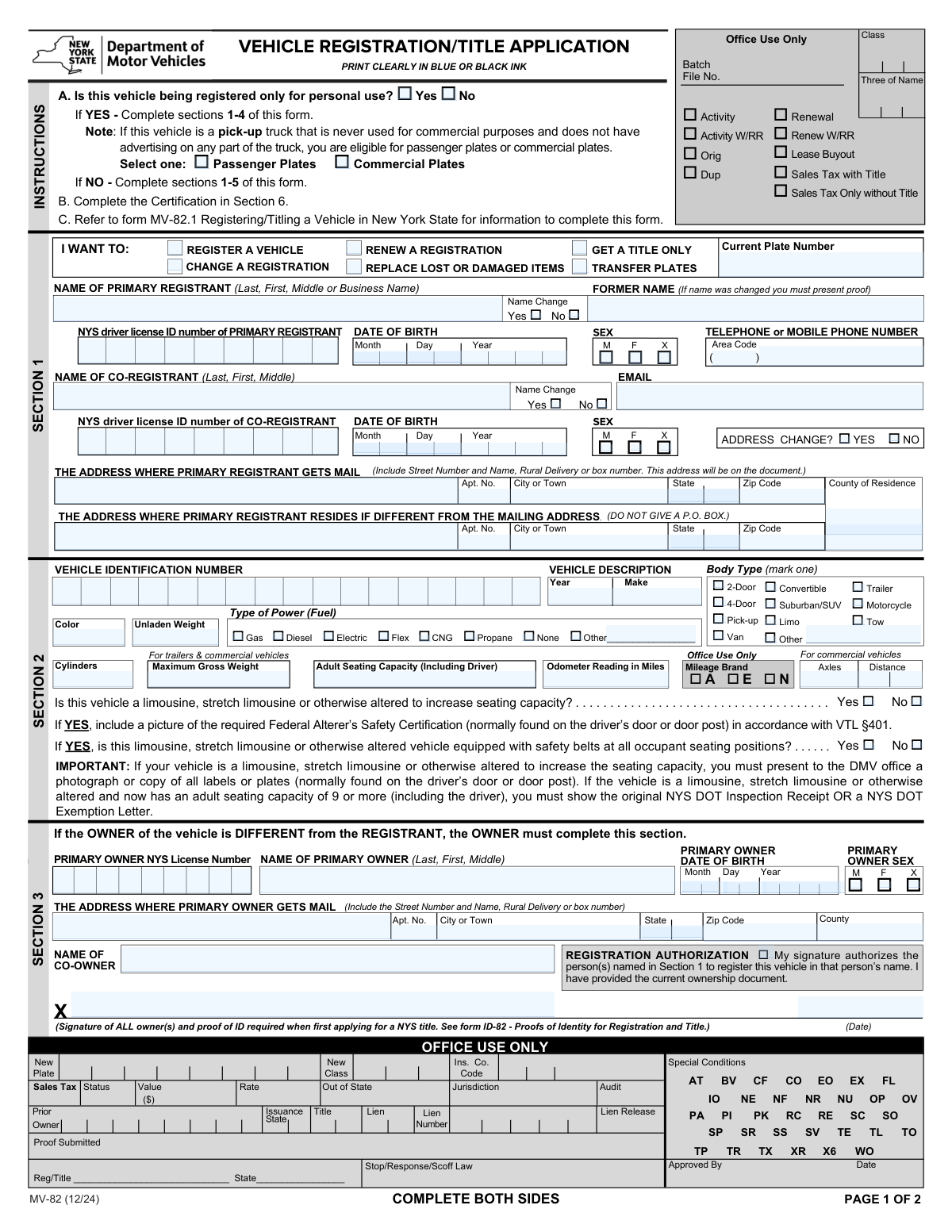
Form MV-82 is the official application used by the New York State Department of Motor Vehicles for a variety of vehicle-related transactions, including new registrations, title applications, registration renewals, and plate transfers. It captures essential information about the vehicle owner(s) and the vehicle itself to ensure proper documentation and legal operation on public roads. Today, this form can be filled out quickly and accurately using AI-powered services like Instafill.ai, which can also convert non-fillable PDF versions into interactive fillable forms.
MV-82 is part of the
New York forms, registration forms, title application forms, vehicle registration forms and vehicle title forms categories on Instafill.
Our AI automatically handles information lookup, data retrieval, formatting, and form filling.
It takes less than a minute to fill out MV-82 using our AI form filling.
Securely upload your data. Information is encrypted in transit and deleted immediately after the form is filled out.
Form specifications
| Form name: | New York Vehicle Registration/Title Application |
| Number of fields: | 214 |
| Number of pages: | 2 |
| Language: | English |
More forms in New York forms
Instafill Demo: How to fill out PDF forms in seconds with AI
How to Fill Out MV-82 Online for Free in 2026
Are you looking to fill out a MV-82 form online quickly and accurately? Instafill.ai offers the #1 AI-powered PDF filling software of 2026, allowing you to complete your MV-82 form in just 37 seconds or less.
Follow these steps to fill out your MV-82 form online using Instafill.ai:
- 1 Navigate to Instafill.ai and upload your MV-82 form or select it from their template library.
- 2 Select the type of transaction you wish to complete, such as registering a new vehicle, renewing a registration, or applying for a title only.
- 3 Provide the personal details for the primary registrant and any co-registrants, including full name, address, date of birth, and NYS Driver License/ID number.
- 4 Enter the vehicle's information, letting the AI assist in populating fields like VIN, year, make, model, body type, and color.
- 5 Specify the vehicle's intended use (personal or commercial), answer questions about modifications, and provide details on non-personal use if applicable.
- 6 Complete the insurance requirements section and provide owner information if different from the registrant.
- 7 Review all the information auto-filled by the AI for accuracy, then digitally sign and download your completed MV-82 form, ready for submission.
Our AI-powered system ensures each field is filled out correctly, reducing errors and saving you time.
Why Choose Instafill.ai for Your Fillable MV-82 Form?
Speed
Complete your MV-82 in as little as 37 seconds.
Up-to-Date
Always use the latest 2026 MV-82 form version.
Cost-effective
No need to hire expensive lawyers.
Accuracy
Our AI performs 10 compliance checks to ensure your form is error-free.
Security
Your personal information is protected with bank-level encryption.
Frequently Asked Questions About Form MV-82
This form is used for various vehicle-related transactions with the NYS DMV, including registering a new vehicle, renewing or changing a registration, transferring plates, and applying for a title only.
Any individual or business in New York State who needs to register a vehicle, obtain a title, renew a registration, or make changes to their existing vehicle records must complete this form.
The registrant is the person whose name is on the registration and is authorized to operate the vehicle. The owner is the person with legal title to the vehicle; while often the same person, this form has separate sections if they are different.
Select 'Passenger Plates' if the vehicle is for personal, non-business use. You must select 'Commercial Plates' if the vehicle is used for any business purpose, which may also require you to complete the 'Non-Personal Vehicle Use' section.
Yes, you can. In the 'I WANT TO' section, check the box for 'GET A TITLE ONLY' to apply for a vehicle title without obtaining a registration.
You will need your vehicle's 17-digit Vehicle Identification Number (VIN), year, make, color, body type, unladen weight, odometer reading, and power/fuel type.
Enter your mailing address in the 'Mailing Address' section. If your physical residence is different, check 'Yes' for 'Address Change?' and fill out the 'Residence Address (If different)' section with your home address.
You must check 'Yes' in the 'Vehicle Modifications' section and provide a brief description of the changes, such as a new color, added seats, or other alterations from the original manufacturer's specifications.
This section must be completed if the vehicle is not being registered for personal use only. You will need to specify its business purpose, such as for-hire transport, farm use, or as a tow truck.
You must indicate your insurance status. For vehicles not for hire, you need a valid NYS Insurance ID Card, while vehicles used for hire or under DOT operation have different requirements specified on the form.
Yes, the form includes fields for a 'Co-Registrant'. You will need to provide their full name, date of birth, and NYS Driver License or ID number.
Absolutely. Services like Instafill.ai use AI to accurately auto-fill form fields with your saved information, which saves time and helps prevent common errors.
Simply upload the form to the Instafill.ai platform. Its AI will identify all the fields, allowing you to use your digital profile to populate your personal, address, and vehicle information instantly.
You can use a service like Instafill.ai, which is designed to convert flat, non-fillable PDFs into interactive forms. This allows you to easily type your information into the fields before printing for submission.
Compliance MV-82
Validation Checks by Instafill.ai
1
VIN Format and Validity Check
This validation ensures the Vehicle Identification Number (VIN) is exactly 17 alphanumeric characters long and does not contain the letters I, O, or Q. It is crucial for uniquely identifying the vehicle and preventing fraudulent registrations. If the VIN is invalid, the application cannot be processed as the vehicle cannot be correctly identified in state and national databases.
2
Exclusive Transaction Type Selection
This check verifies that only one main transaction type (e.g., 'Register a Vehicle', 'Renew a Registration', 'Get a Title Only') is selected. Selecting multiple conflicting actions makes the applicant's intent unclear and prevents the system from processing the request correctly. The form should be rejected with an error message asking the user to select only one primary transaction.
3
Conditional Requirement for Plate Transfer
This validation ensures the 'Current Plate Number' field is filled out if and only if the 'TRANSFER PLATES' transaction is selected. This is necessary to identify which plates are being moved to the new registration. Failure to provide the plate number during a transfer request will halt the process, as the system won't know which registration record to update.
4
Conditional Requirement for Former Name
This check validates that the 'Former Name' field is populated only when the 'Name Change - Yes' box is checked for the corresponding registrant. This maintains data integrity by linking a name change to the previous name for identity verification purposes. If 'Name Change - Yes' is selected but 'Former Name' is empty, the submission should be flagged for missing information.
5
Registrant Age and Date of Birth Validation
This check verifies that the provided Date of Birth for the primary and any co-registrants is a valid calendar date and that the calculated age meets the minimum legal requirement for vehicle registration. This is critical for legal compliance and ensuring the registrant is eligible to enter into the contract of vehicle ownership. An invalid or underage DOB will result in immediate rejection of the application.
6
Personal vs. Commercial Use Consistency
This validation enforces a logical link between the vehicle's stated use and the detailed use description. If 'Is this vehicle being registered only for personal use?' is answered 'No', then the user must select a specific option from the 'Non-Personal Vehicle Use' section. This ensures commercial vehicles are properly classified for fee, tax, and insurance purposes.
7
Mandatory Description for "Other" Selections
This check ensures that if a user selects an 'Other' checkbox (e.g., for 'Body Type' or 'Power/Fuel Type'), the corresponding text field to describe that 'Other' value is not left empty. This is essential for collecting complete and accurate vehicle data that doesn't fit standard categories. A submission with a selected 'Other' option but no description will be considered incomplete.
8
Conditional Requirement for Residence Address
This validation ensures that the 'Residence Address' fields are only populated if the 'Address Change? Yes' box is checked. This prevents unnecessary data entry and potential confusion between mailing and residence addresses. If the 'Address Change? Yes' box is checked, the system should expect a new mailing address to be provided to update the DMV records correctly.
9
Conditional Limousine Safety Equipment Check
This check verifies that the questions regarding safety belts are only answered if the vehicle has been identified as a limousine or an altered vehicle. This is a critical safety and compliance check for specific vehicle types. Answering the primary limousine question with 'Yes' must trigger a mandatory response to the safety belt question, otherwise the application is incomplete.
10
Conditional Requirement for Taxi Details
This validation enforces the rule that if a vehicle is declared to 'Operate as a taxi', the 'TAXIS ONLY' section must be completed. This is crucial for ensuring the vehicle complies with specific regional regulations for taxis. Failing to complete the required taxi section will result in an incomplete application, as critical jurisdictional information is missing.
11
NYS Driver License/ID Number Format
This check validates that the 'NYS Driver License / ID Number' entered for the primary and co-registrant follows the standard 9-digit format used by the New York DMV. Correct formatting is essential for linking the vehicle registration to the correct individual's record in the DMV database. An incorrectly formatted ID number will cause a lookup failure and prevent processing.
12
Registration Authorization and Owner Information
This check verifies that if the 'Registration Authorization' box is checked, the 'Primary Owner Information' section is fully completed. This is a legal requirement to prove that the vehicle's legal owner is giving permission for another person (the registrant) to register the vehicle. Without complete owner details and authorization, the registration would be legally invalid and must be rejected.
13
Mandatory Modification Description
This validation ensures that if an applicant indicates the vehicle has been modified by checking 'Vehicle Modifications — Yes', they must provide details in the 'Modifications Description' field. This information is critical for determining the vehicle's classification, safety compliance, and proper valuation. An application indicating modifications without a description is incomplete.
14
Certification Signature and Date Presence
This validation confirms that the 'Primary Signature' and 'Signature Date' fields are not empty. The signature legally certifies that all information provided is true, and the date establishes when the certification was made. An unsigned or undated application is legally incomplete and cannot be accepted or processed by the DMV.
Common Mistakes in Completing MV-82
This form has separate sections for the 'Primary Registrant' and 'Primary Owner,' which often confuses applicants. The registrant is the person to whom the license plates are issued, while the owner holds the legal title to the vehicle. This mistake is common in cases of leased vehicles or when a parent owns a car that their child drives and registers. Incorrectly filling these sections can lead to issues with insurance, liability, and selling the vehicle, often resulting in application rejection. To avoid this, carefully identify who holds the title (owner) versus who will be on the registration (registrant) before filling out the form.
The 17-character VIN is the vehicle's unique identifier, and any error will cause an immediate rejection. Mistakes often happen by transposing numbers or misreading similar characters like 'O' and '0' or 'I' and '1'. This error halts the entire process as the system cannot match the vehicle to its records. Always double-check the VIN against both the official title document and the physical VIN plate on the vehicle's dashboard or driver's side door jamb. AI-powered tools like Instafill.ai can help by validating the VIN's format and checksum digit to catch errors instantly.
Applicants often struggle to correctly classify their vehicle's use, particularly the distinction between 'Personal Use' with passenger plates versus commercial plates. For example, a pickup truck used for personal errands but also occasionally for a side business may be incorrectly registered for personal use only. This can lead to incorrect fees, the wrong type of insurance coverage, and potential fines if caught using the vehicle improperly. Carefully review the definitions for passenger and commercial use before making a selection.
The form contains numerous conditional fields, such as providing a 'Former Name' only if 'Name Change - Yes' is checked, or filling the 'Residence Address' only if it's different from the mailing address. Applicants frequently check the 'Yes' box but then forget to provide the required follow-up information, or they fill in sections that should have been left blank. This results in an incomplete or confusing application that will be returned for correction. To prevent this, read each instruction carefully and complete all dependent fields as soon as you check a conditional box.
A common oversight is failing to complete a separate section that is required by a selection made earlier in the form. For instance, if an applicant checks the box for 'Operates as a taxi,' they are required to also complete the 'TAXIS ONLY' section further down the page. Missing this link between sections is a frequent cause for rejection. To avoid this, review the entire form after making selections for complex use cases to ensure all related parts are filled out.
Fields like 'Unladen Weight,' 'Maximum Gross Weight,' and 'Number of Axles' are critical for determining registration fees and compliance but are not common knowledge. Applicants may leave these fields blank or enter a guess, leading to processing delays and incorrect fee calculations. This information can typically be found on a sticker on the driver's side door jamb or in the vehicle's owner's manual. Leaving these fields blank will result in an incomplete application.
The form requires the full legal name (Last, First, Middle) for all individuals, but applicants often use nicknames, initials, or omit a middle name. Any discrepancy between the name on the application and the name on the supporting documents (like a driver's license or title) will cause an identity verification failure. This is one of the most common reasons for rejection. Always use your full, official name as it appears on your government-issued ID. AI form-fillers like Instafill.ai can help maintain consistency by auto-populating name fields correctly across the document.
When registering a vehicle with a co-registrant, it is essential to provide all of their required information, including their full name, date of birth, ID number, and signature. It is very common for the primary applicant to fill out their own information perfectly but miss one or two fields for the co-registrant. An application is considered incomplete if any required information for any listed individual is missing, which will delay the entire registration process until the form is corrected and resubmitted.
Several sections, such as 'Body Type,' 'Type of Power Fuel,' and 'Non-Personal Vehicle Use,' include an 'Other' checkbox. When an applicant selects 'Other,' they must provide a written description in the adjacent field. A frequent mistake is checking the 'Other' box but failing to write in the specific details. This leaves the DMV unable to properly classify the vehicle, causing the application to be flagged as incomplete and sent back for clarification.
The address section has specific logic that is often missed. Applicants might indicate 'Address Change? No' but then proceed to write a new address in the mailing address fields, creating a contradiction. Conversely, they may check 'Yes' for an address change but fail to fill out the 'Residence Address' section if it differs from the new mailing address. This confusion leads to processing delays or mail being sent to the wrong location. If the form is a non-fillable PDF, a tool like Instafill.ai can convert it into a smart, fillable version with clear instructions to guide you through these complex sections.
Saved over 80 hours a year
“I was never sure if my IRS forms like W-9 were filled correctly. Now, I can complete the forms accurately without any external help.”
Kevin Martin Green
Your data stays secure with advanced protection from Instafill and our subprocessors

Robust compliance program
Transparent business model
You’re not the product. You always know where your data is and what it is processed for.
ISO 27001, HIPAA, and GDPR
Our subprocesses adhere to multiple compliance standards, including but not limited to ISO 27001, HIPAA, and GDPR.
Security & privacy by design
We consider security and privacy from the initial design phase of any new service or functionality. It’s not an afterthought, it’s built-in, including support for two-factor authentication (2FA) to further protect your account.
Fill out MV-82 with Instafill.ai
Worried about filling PDFs wrong? Instafill securely fills new-york-vehicle-registrationtitle-application forms, ensuring each field is accurate.