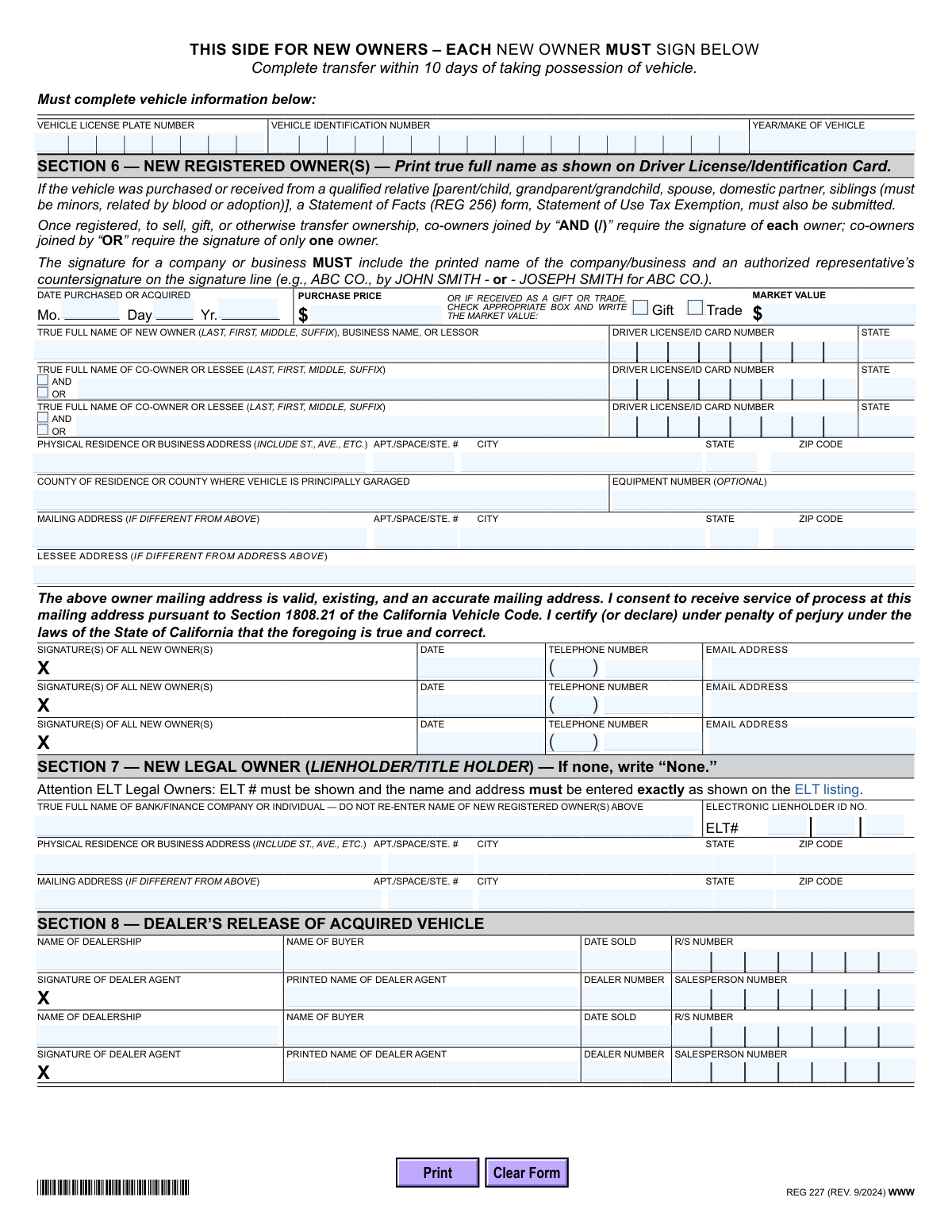
Yes! You can use AI to fill out Form REG 227, Application for Replacement or Transfer of Title
The California REG 227, Application for Replacement or Transfer of Title, is a Department of Motor Vehicles (DMV) form used by vehicle owners to request a duplicate Certificate of Title when the original is lost, stolen, mutilated, or was never received. It is also used to transfer ownership of a vehicle when the title is unavailable. Completing this form correctly is crucial for establishing legal ownership and maintaining accurate vehicle records. Today, this form can be filled out quickly and accurately using AI-powered services like Instafill.ai, which can also convert non-fillable PDF versions into interactive fillable forms.
Our AI automatically handles information lookup, data retrieval, formatting, and form filling.
It takes less than a minute to fill out REG 227 using our AI form filling.
Securely upload your data. Information is encrypted in transit and deleted immediately after the form is filled out.
Form specifications
| Form name: | Form REG 227, Application for Replacement or Transfer of Title |
| Number of pages: | 2 |
| Language: | English |
| Categories: | transfer forms |
Instafill Demo: How to fill out PDF forms in seconds with AI
How to Fill Out REG 227 Online for Free in 2026
Are you looking to fill out a REG 227 form online quickly and accurately? Instafill.ai offers the #1 AI-powered PDF filling software of 2026, allowing you to complete your REG 227 form in just 37 seconds or less.
Follow these steps to fill out your REG 227 form online using Instafill.ai:
- 1 Navigate to Instafill.ai and upload or select the California REG 227 form.
- 2 Indicate the purpose of the application by selecting either 'Replacement Title' or 'Transfer of Title with Replacement'.
- 3 Provide the vehicle's information (License Plate, VIN, Year/Make) and the current registered owner's details as they appear on DMV records.
- 4 Complete the 'Missing Title Statement' in Section 3, certifying the reason for the replacement and signing the perjury statement.
- 5 If transferring ownership, the seller must complete the release of interest in Section 4, and the new owner must provide their personal and purchase information in Section 6.
- 6 Review all the information auto-filled by the AI for accuracy, including owner details, addresses, and vehicle identifiers.
- 7 Print the completed form, obtain any necessary signatures and notarizations, and submit it to the California DMV as required.
Our AI-powered system ensures each field is filled out correctly, reducing errors and saving you time.
Why Choose Instafill.ai for Your Fillable REG 227 Form?
Speed
Complete your REG 227 in as little as 37 seconds.
Up-to-Date
Always use the latest 2026 REG 227 form version.
Cost-effective
No need to hire expensive lawyers.
Accuracy
Our AI performs 10 compliance checks to ensure your form is error-free.
Security
Your personal information is protected with bank-level encryption.
Frequently Asked Questions About Form REG 227
This form is used in California for two main purposes: to apply for a replacement Certificate of Title if the original is lost, stolen, or damaged, or to transfer a vehicle's ownership when the original title is missing.
A registered owner who needs a duplicate title must fill out this form. If a vehicle is being sold without a title, both the seller (current owner) and the buyer (new owner) must complete their designated sections.
Choose 'Replacement Title' if you are the current owner and simply need a new copy of your title. Select 'Transfer of Title with Replacement' if you are selling or gifting the vehicle and need to process the ownership change without the original title document.
As the seller, you must complete Sections 1 through 4. This provides your information, explains why the title is missing, and officially releases your ownership interest in the vehicle.
Yes, if there is a lienholder (legal owner) on record, they must complete and notarize Section 5 to release their interest. Note that this form cannot be used for vehicles with an Electronic Lien Title (ELT).
If co-owners are joined by 'AND' (or a '/' on DMV records), all owners must sign to transfer ownership. If they are joined by 'OR', the signature of only one of the owners is required.
If your address is different from what the DMV has on file, you must submit this application in person at a DMV office. You will need to bring your driver's license and proof of ownership, such as your registration card.
You will need the vehicle's license plate number, Vehicle Identification Number (VIN), and your driver license or ID card information. The new owner will also need to provide their purchase price or the vehicle's market value.
As the new owner, complete Section 6, check the 'Gift' box, and write the vehicle's current market value. You must also submit a Statement of Facts (REG 256) form to apply for a use tax exemption.
Yes, the form clearly states that the signature of the legal owner (lienholder) releasing their interest in Section 5 must be notarized. A notary public verifies the identity of the individual signing.
Yes, services like Instafill.ai use AI to help you accurately auto-fill form fields, which saves time and reduces the chance of errors. The AI guides you through the required information for each section.
Simply upload the REG 227 PDF to the Instafill.ai platform. The AI will make the form interactive, and you can answer simple questions to have your information automatically and accurately placed in the correct fields.
You can use a service like Instafill.ai, which is designed to convert flat, non-fillable PDFs into interactive forms. This allows you to easily type your information online instead of printing and filling it out by hand.
Compliance REG 227
Validation Checks by Instafill.ai
1
Exclusive Application Type Selection
This check ensures that the user has selected exactly one of the two primary application types: 'Replacement Title' or 'Transfer of Title with Replacement'. Selecting both or neither is an invalid state, as the required sections depend entirely on this initial choice. If validation fails, the user should be prompted to select one of the two options to proceed.
2
Vehicle Identification Number (VIN) Format
Validates that the 'Vehicle Identification Number' field contains a string of exactly 17 alphanumeric characters (letters and numbers), which is the standard format for modern VINs. This check prevents typos and ensures the correct vehicle is identified in DMV records. A failed validation would prevent submission and ask the user to correct the VIN.
3
Conditional Section Completion Based on Application Type
This validation enforces the form's core logic: if 'Replacement Title' is selected, Sections 1, 2, and 3 must be complete. If 'Transfer of Title with Replacement' is selected, Sections 1-4 (for the seller) and Sections 6-7 (for the new owner) must be complete. This prevents incomplete submissions based on the user's goal. Failure would trigger a message indicating which specific sections are missing.
4
Missing Title Reason Completeness
Verifies that in Section 3 ('Missing Title Statement'), at least one of the five checkboxes ('Lost', 'Stolen', 'Illegible/Mutilated', etc.) is selected. The form cannot be processed without a stated reason for the replacement title request. If no box is checked, the form is considered incomplete and the user must select a reason.
5
Purchase Value Logic in Section 6
This check ensures logical consistency between the purchase price and the gift/trade status for the new owner. If either the 'Gift' or 'Trade' box is checked, the 'Market Value' field must be populated. Conversely, if neither box is checked, the 'Purchase Price' field must be populated. This is critical for calculating use tax and transfer fees correctly.
6
Acquisition Date Validity
Validates that the 'Date Purchased or Acquired' in Section 6 is a valid calendar date and is not a date in the future. A future date is logically impossible for a past transaction and would be a data entry error. This check ensures the legal transfer date is accurate for record-keeping and penalty assessment if the transfer is late.
7
Co-Owner Conjunction Exclusivity
For each new co-owner added in Section 6, this check ensures that either the 'AND' or 'OR' checkbox is selected, but not both. This selection is legally significant as it determines whether all owners or just one must sign for future sales. An invalid selection would require the user to clarify the ownership structure.
8
New Legal Owner (Lienholder) Completeness
In Section 7, this validation checks that if a name is entered for the 'New Legal Owner', then the corresponding address fields are also filled out. If the field contains 'None', the address fields should be empty. This ensures that if a lien exists, the lienholder can be properly recorded and contacted.
9
ELT Number Dependency
This check verifies that if an 'Electronic Lienholder ID NO. (ELT#)' is entered in Section 7, then the 'True Full Name' and address of the new legal owner are also provided. The ELT system requires a corresponding entity to be on record. A missing name or address when an ELT# is present would result in a validation error.
10
Signature and Date Correlation
For every signature field on the form (Sections 3, 4, and 6), this validation ensures that the corresponding 'Date' field is also filled out. A signature is legally invalid without a date of signing. If a signature is present but the date is missing, the user will be prompted to enter the date they signed.
11
ZIP Code Format Validation
This check ensures that all ZIP Code fields across the form (Sections 1, 2, 6, 7) contain a valid 5-digit or 9-digit (ZIP+4) numeric format. Correctly formatted ZIP codes are essential for mail delivery and accurate address verification in the DMV database. An invalid format would prompt the user for correction.
12
Owner Release Signature Requirement
Validates that the number of signatures in Section 4 ('Registered Owner(s) Release of Ownership') matches the number of registered owners listed in Section 1, particularly if the ownership is joined by 'AND' (often shown as '/' on DMV records). This rule is critical to ensure all necessary parties have legally released their interest in the vehicle. A mismatch would halt the transfer process.
13
Vehicle Information Consistency
This check confirms that the 'Vehicle License Plate Number' and 'Vehicle Identification Number' entered at the top of the form (before Section 1) are identical to the ones entered on the 'NEW OWNERS' side (before Section 6). This redundancy check prevents data entry errors and ensures all parts of the application refer to the same vehicle. A mismatch would require the user to correct the information to be consistent.
14
Owner Name Match for Certification
Verifies that the 'Printed Name of Owner' in Section 3 (Missing Title Statement) matches one of the 'True Full Name' entries for the registered owners in Section 1. The person certifying the title is missing must be a legal owner of record. A mismatch would indicate an unauthorized person may be attempting to file the application.
Common Mistakes in Completing REG 227
In Section 4, if co-owners are joined by 'AND' (often shown as a '/' on the title), all registered owners must sign to release their interest. People often miss this, with only one owner signing, which invalidates the transfer. This leads to application rejection and significant delays. Always verify how co-owners are listed on the registration and ensure all required parties sign Section 4.
Applicants frequently enter their own name in Section 2, which is reserved for the 'Legal Owner of Record' (the lienholder, like a bank or finance company). This section should only be filled out if there is an outstanding loan on the vehicle. Entering the registered owner's name here will cause the application to be rejected, as it incorrectly implies the owner has a lien against themselves.
In Section 6, new owners must choose to be joined by 'AND' or 'OR'. This choice has significant legal consequences that are often misunderstood; 'AND' requires all owners to sign for future sales, while 'OR' allows any single owner to sign. Making the wrong choice can create future ownership disputes or difficulties when selling the vehicle. New co-owners should discuss and understand this choice before filling out the form.
Section 5, the 'Legal Owner of Record Release of Ownership', explicitly requires the lienholder's signature to be notarized. Lienholders or individuals releasing a lien often sign the form but forget to have it notarized, rendering the release invalid. The DMV will reject any form where this section is completed but lacks a proper notary seal and signature, halting the title transfer process.
The 17-character VIN is the vehicle's unique identifier, and even a single-digit error will cause the application to be rejected. This mistake often happens due to misreading the number from the vehicle or a document, or a simple typo during data entry. To avoid this, carefully double-check the VIN against the vehicle's registration card and the VIN plate on the vehicle itself before writing it on the form.
When a business is the registered owner (Section 4) or new owner (Section 6), the signature line requires a specific format: the printed company name followed by the authorized representative's signature. People often just have the representative sign their own name, omitting the company name. This fails to properly bind the company to the transaction and will result in the DMV rejecting the form.
The warning in Section 3 clearly states that if your address is different from what the DMV has on record, you must file the application in person. Many people miss this instruction and mail the form with their new address, leading to automatic rejection and processing delays. To avoid this, always visit a DMV office in person to submit this form if you have recently moved.
When a vehicle is received as a gift, applicants in Section 6 often mistakenly enter '$0' or leave the 'Market Value' field blank. The DMV requires the fair market value to be listed for use tax calculation purposes, even if no money was exchanged. Failing to provide an accurate market value can lead to processing delays while the DMV requests the correct information.
A prominent warning at the top of the form states it cannot be used to release a lien on a vehicle with an Electronic Lien Title (ELT). Lienholders unfamiliar with the process may attempt to use this form anyway, resulting in a rejected application. For ELT vehicles, the lien must be released electronically by the lienholder before a new title can be issued. AI-powered tools like Instafill.ai can help identify these restrictions and guide users to the correct procedure.
In Section 1, the registered owner's name must be printed exactly as it appears on the current title or registration, including any middle names, initials, or suffixes. Applicants may use a nickname, a shortened name, or forget a middle initial, creating a mismatch with DMV records. This discrepancy can cause the system to fail to find the vehicle record, leading to rejection. Using a tool like Instafill.ai, which can auto-populate information from official records, helps prevent these errors.
Saved over 80 hours a year
“I was never sure if my IRS forms like W-9 were filled correctly. Now, I can complete the forms accurately without any external help.”
Kevin Martin Green
Your data stays secure with advanced protection from Instafill and our subprocessors

Robust compliance program
Transparent business model
You’re not the product. You always know where your data is and what it is processed for.
ISO 27001, HIPAA, and GDPR
Our subprocesses adhere to multiple compliance standards, including but not limited to ISO 27001, HIPAA, and GDPR.
Security & privacy by design
We consider security and privacy from the initial design phase of any new service or functionality. It’s not an afterthought, it’s built-in, including support for two-factor authentication (2FA) to further protect your account.
Fill out REG 227 with Instafill.ai
Worried about filling PDFs wrong? Instafill securely fills form-reg-227-application-for-replacement-or-transfer-of-title forms, ensuring each field is accurate.