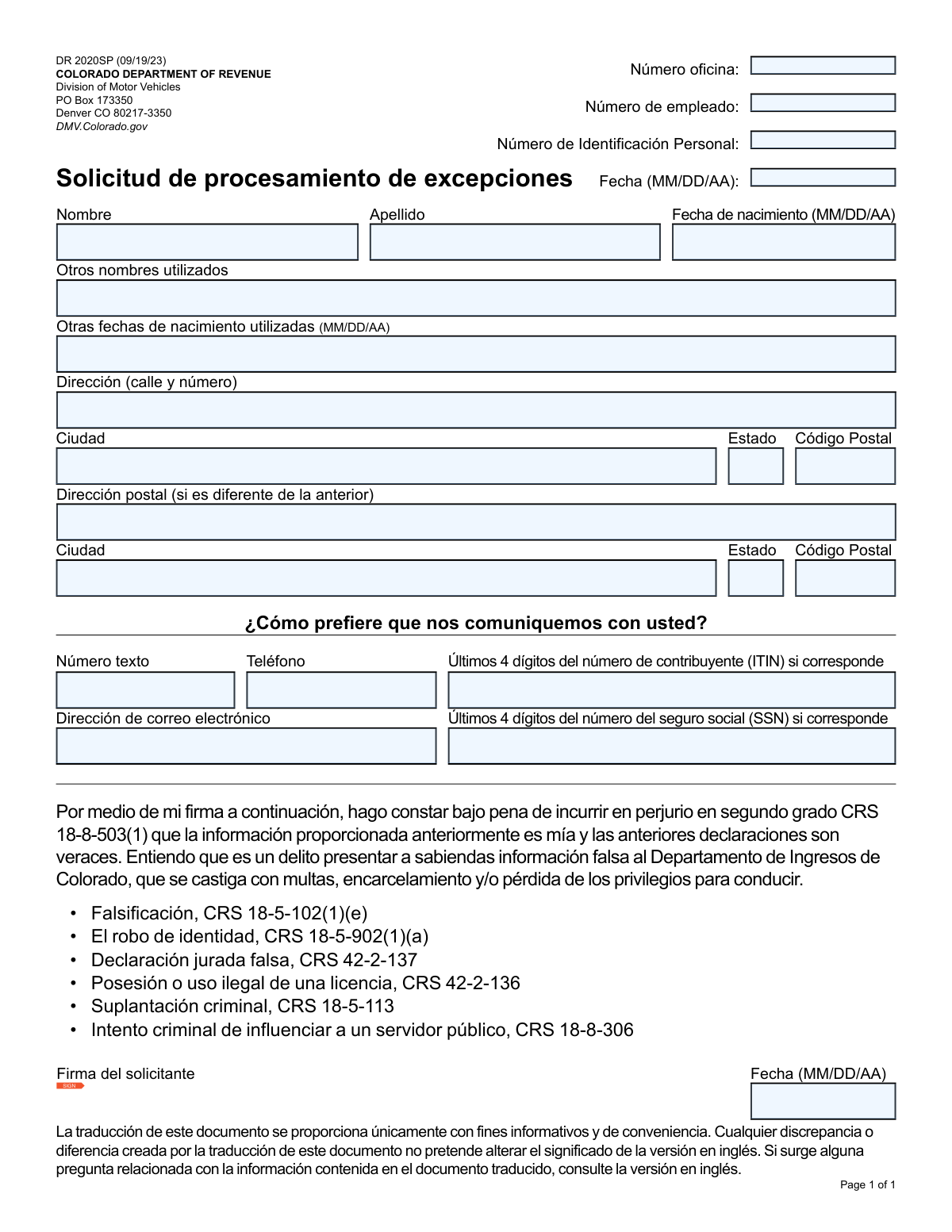
Yes! You can use AI to fill out Form DR 2020SP, Exception Processing Application

Form DR 2020SP, the Exception Processing Application, is submitted to the Colorado Division of Motor Vehicles to request special handling for issues related to an individual's driving record or identification documents. Applicants must provide personal details, address information, and taxpayer identification numbers to resolve discrepancies or unique situations. Today, this form can be filled out quickly and accurately using AI-powered services like Instafill.ai, which can also convert non-fillable PDF versions into interactive fillable forms.
Our AI automatically handles information lookup, data retrieval, formatting, and form filling.
It takes less than a minute to fill out DR 2020SP using our AI form filling.
Securely upload your data. Information is encrypted in transit and deleted immediately after the form is filled out.

Form specifications

Form name: Form DR 2020SP, Exception Processing Application
Number of pages: 1
Language: English
main-image

Instafill Demo: How to fill out PDF forms in seconds with AI

How to Fill Out DR 2020SP Online for Free in 2026

Are you looking to fill out a DR 2020SP form online quickly and accurately? Instafill.ai offers the #1 AI-powered PDF filling software of 2026, allowing you to complete your DR 2020SP form in just 37 seconds or less.
Follow these steps to fill out your DR 2020SP form online using Instafill.ai:
  1. 1 Navigate to Instafill.ai and upload or select the Colorado Form DR 2020SP.
  2. 2 Provide your personal information, including your full name, date of birth, and any other names or birth dates you have used.
  3. 3 Enter your current residential address and your mailing address if it is different.
  4. 4 Select your preferred method of communication (text, phone, or email) and provide the necessary contact information.
  5. 5 Input the last four digits of your Social Security Number (SSN) or Individual Taxpayer Identification Number (ITIN), if applicable.
  6. 6 Carefully review all the information auto-filled by the AI to ensure its accuracy and make any necessary corrections.
  7. 7 Electronically sign and date the application to certify that the provided information is true before submitting it to the Colorado DMV.

Our AI-powered system ensures each field is filled out correctly, reducing errors and saving you time.

Why Choose Instafill.ai for Your Fillable DR 2020SP Form?

Speed

Complete your DR 2020SP in as little as 37 seconds.

Up-to-Date

Always use the latest 2026 DR 2020SP form version.

Cost-effective

No need to hire expensive lawyers.

Accuracy

Our AI performs 10 compliance checks to ensure your form is error-free.

Security

Your personal information is protected with bank-level encryption.

Frequently Asked Questions About Form DR 2020SP

This form is used to ask the Colorado DMV to resolve complex issues or discrepancies in your driver record, such as multiple names or dates of birth being associated with your identity.

You should complete this form if the DMV has notified you of a data conflict in your record that prevents them from issuing or renewing a license or ID through standard procedures.

Providing any other names (like a maiden name) or dates of birth helps the DMV locate all associated records to merge them correctly and resolve the identity conflict.

The form asks for the last 4 digits of your SSN or ITIN 'if applicable.' If you do not have either number, you can leave these fields blank.

You only need to complete the postal address section if you want your mail sent to an address that is different from the residential address you listed at the top of the form.

You should mail the signed and completed form to the Colorado Division of Motor Vehicles at the address provided: PO Box 173350, Denver CO 80217-3350.

While the form doesn't specify, exception processing usually requires supporting documents to prove your identity. Contact the DMV directly to find out what specific documentation is needed for your case.

These fields are for official DMV use only and should be left blank. A DMV employee will fill in this information when they process your request.

By signing, you are certifying under penalty of perjury that all information provided is true and correct. Submitting false information is a crime that can lead to fines, imprisonment, and loss of driving privileges.

The form states that the Spanish translation is for convenience only. If there are any questions or discrepancies, the official English version of the document should be consulted.

Yes, services like Instafill.ai use AI to accurately auto-fill form fields from your saved information, which saves time and helps prevent errors.

To fill out the form online, upload the PDF to Instafill.ai. The platform's AI will populate the fields with your data, which you can then review, edit, and sign electronically before downloading.

You can use a service like Instafill.ai, which can convert flat, non-fillable PDFs into interactive forms that you can easily complete and sign on your computer.

Compliance DR 2020SP
Validation Checks by Instafill.ai

1
Ensures all date fields adhere to MM/DD/AA format
This validation checks that all date-related fields, including 'Date', 'Applicant Date of Birth', 'Other Date of Birth Used', and 'Signature Date', are entered in the specified MM/DD/AA format. This is crucial for consistent data parsing and storage, preventing errors in record-keeping and identity verification. If the format is incorrect, the user will be prompted to correct the entry before submission.
2
Validates the logical correctness of the Applicant's Date of Birth
This check ensures the 'Applicant Date of Birth' is a valid date that occurred in the past and is within a reasonable range (e.g., not more than 120 years ago). It prevents the entry of future dates or impossible birth dates, which is fundamental for establishing a valid identity record. A failure would require the applicant to enter a plausible date of birth.
3
Verifies the format of the last 4 digits of SSN/ITIN
This validation confirms that if a value is entered into the 'SSN Last 4 Digits' or 'ITIN Last 4 Digits' fields, it consists of exactly four numeric digits. This ensures data integrity for partial identification numbers, which are used for verification purposes. An invalid entry would trigger an error message requesting the user to input exactly four numbers.
4
Requires completion of primary applicant identification fields
This check verifies that the 'Applicant Name' (first name), 'Applicant Last Name', and 'Applicant Date of Birth' fields are all filled out. These fields are the minimum required information to identify an individual and process their request. If any of these fields are left blank, the form submission will be blocked until the required information is provided.
5
Validates the format of the applicant's email address
This check ensures that the text entered into the 'Email Address' field follows the standard '[email protected]' format. A valid email is essential if the applicant chooses this method for communication, ensuring they receive important notifications from the DMV. An invalid format would prevent submission and prompt the user to enter a correctly formatted email address.
6
Ensures the signature field is not empty
This validation verifies that the applicant has provided a signature in the 'Firme con su nombre legal' field. The signature is a legal attestation that the information provided is true and correct under penalty of perjury. A missing signature invalidates the application, so the form cannot be submitted until it is signed.
7
Validates the format of US Postal Codes
This check ensures that the 'Postal Code' and 'Postal Code (Postal Address)' fields contain a valid 5-digit or 9-digit (ZIP+4) US postal code. Correct postal codes are critical for accurate mail delivery and address verification. An invalid format will result in an error, requiring the user to enter a standard US ZIP code.
8
Ensures at least one communication method is provided
This validation checks that the applicant has filled out at least one of the communication fields: 'Text Number', 'Phone Number', or 'Email Address'. Since the form asks for a preferred communication method, providing at least one contact point is necessary for the DMV to follow up on the exception request. If all are blank, the user will be prompted to provide at least one method of contact.
9
Validates the Signature Date is not in the future
This check ensures the 'Signature Date' is not a future date. The signature date must be the current date or a date in the recent past to be considered valid for legal attestation. A future date would be a logical error, and the system would require the user to correct it before proceeding.
10
Conditional validation for Postal Address completeness
This rule checks that if any field in the 'Postal Address' section (Street, City, State, or Postal Code) is filled out, then all other fields in that section must also be completed. This prevents the submission of an incomplete mailing address, which would lead to communication failures. If the rule is violated, the user will be required to either complete the postal address or clear it entirely.
11
Validates the format of provided phone numbers
This check verifies that the 'Phone Number' and 'Text Number' fields are entered in a recognizable North American phone number format (e.g., 10 digits, with or without dashes, parentheses, or spaces). This ensures the numbers are usable for voice or text communication. An invalid format would trigger an error, prompting the user to re-enter a valid phone number.
12
Ensures 'Other Date of Birth Used' is different from primary DOB
This logical check compares the 'Other Date of Birth Used' against the 'Applicant Date of Birth'. It ensures that if an alternate DOB is provided, it is not identical to the primary one, preventing redundant or erroneous data entry. If the dates match, the system will flag it as a likely error and ask the user to verify the entry or provide a different date.
13
Validates State field against a list of official abbreviations or names
This check ensures the value entered in the 'State' and 'Postal State' fields is a valid US state name or a standard two-letter abbreviation. This is crucial for address validation and ensuring mailability. An entry that does not match the official list will be rejected, and the user will be asked to provide a valid state.

Common Mistakes in Completing DR 2020SP

Using an Incorrect Date Format

The form specifies the date format as MM/DD/AA (mes/día/año). Applicants, especially those accustomed to international formats, often write DD/MM/AA, which can cause significant confusion regarding the day and month. This error can lead to incorrect records for birth dates and signature dates, causing processing delays or rejections. To avoid this, carefully follow the specified format; AI-powered tools like Instafill.ai can automatically format dates correctly to prevent such errors.

Forgetting to Sign or Date the Application

Applicants often focus on filling out the informational fields and overlook the signature and date lines at the bottom. An unsigned or undated application is legally invalid and will be immediately rejected by the DMV. This oversight requires the applicant to resubmit the entire form, delaying the exception processing. Always perform a final review of the entire document, paying special attention to the signature block, before submitting.

Incorrectly Handling the Postal Address Section

The form includes a separate section for a postal address if it differs from the physical residential address. A common mistake is either leaving this section blank when mail should be sent to a P.O. Box, or redundantly filling it in with the same information as the residential address. This can result in important documents being lost or returned as undeliverable. Only complete the 'Dirección postal' section if your mailing address is genuinely different from your home address.

Providing Incomplete or Inconsistent Name Information

Applicants may fail to provide their full, legal name as it appears on official documents, or they may forget to list relevant previous names (e.g., maiden names) in the 'Otros nombres utilizados' field. This is especially critical for an 'exception processing' application, as the purpose is often to resolve record discrepancies. Incomplete name information can lead to a failure to locate existing records and rejection of the application. Ensure your full legal name is used and all prior names are listed.

Omitting Previously Used Dates of Birth

The field 'Otras fechas de nacimiento utilizadas' is unusual and highly specific to resolving record conflicts. Many applicants may overlook this field or hesitate to fill it out. Omitting this information when it exists can be seen as providing false information, leading to severe consequences including application denial and potential legal penalties. For an exception request to be processed correctly, it is crucial to honestly disclose any and all dates of birth previously associated with your identity in other records.

Entering Full SSN/ITIN Instead of Last 4 Digits

The form explicitly asks for only the last 4 digits of the SSN or ITIN for security and identity verification purposes. In haste, applicants sometimes enter the entire 9-digit number, which is both a security risk and a failure to follow instructions. This error may cause the form to be returned for correction. To prevent this, read the field label carefully and provide only the information requested. Form-filling tools like Instafill.ai can help by validating data entry against field requirements.

Filling in 'Office Use Only' Sections

The top of the form contains fields like 'Número oficina' (Office Number) and 'Número de empleado' (Employee Number) that are reserved for DMV staff. Applicants sometimes mistakenly fill in these sections, which can create confusion and slow down the internal routing and processing of the application. To avoid this, only complete the fields that are clearly part of the applicant information sections.

Submitting an Illegible Handwritten Form

If the applicant prints a non-fillable version of this PDF, they must complete it by hand. Poor or unclear handwriting can easily lead to data entry errors by DMV personnel, resulting in misspelled names, incorrect addresses, or wrong identification numbers in the system. To ensure accuracy, it is best to use a tool like Instafill.ai, which can convert a flat PDF into a cleanly typable, fillable form, eliminating any risk of illegibility.

Providing an Invalid Email or Phone Number

Simple typos in the email address or phone number fields are very common but have significant consequences. Since the form asks for a communication preference, an error here means the applicant will not receive critical status updates, requests for additional information, or the final decision. This can lead to the application being abandoned due to a lack of communication. Always double-check contact details for accuracy before submitting.

Misunderstanding the 'Personal Identification Number' Field

The field 'Número de Identificación Personal' is generic and can be confusing. Applicants might incorrectly enter their SSN/ITIN (which are requested elsewhere), a driver's license number from another state, or leave it blank. This ambiguity can lead to incomplete or incorrect data, hindering the DMV's ability to locate the correct record. If you have a Colorado-issued ID number, enter it here; otherwise, it may be best to leave it blank or seek clarification from the DMV.
Saved over 80 hours a year

“I was never sure if my IRS forms like W-9 were filled correctly. Now, I can complete the forms accurately without any external help.”

Kevin Martin Green

Your data stays secure with advanced protection from Instafill and our subprocessors

Robust compliance program

Transparent business model

You’re not the product. You always know where your data is and what it is processed for.

ISO 27001, HIPAA, and GDPR

Our subprocesses adhere to multiple compliance standards, including but not limited to ISO 27001, HIPAA, and GDPR.

Security & privacy by design

We consider security and privacy from the initial design phase of any new service or functionality. It’s not an afterthought, it’s built-in, including support for two-factor authentication (2FA) to further protect your account.

Fill out DR 2020SP with Instafill.ai

Worried about filling PDFs wrong? Instafill securely fills form-dr-2020sp-exception-processing-application forms, ensuring each field is accurate.