Yes! You can use AI to fill out Application for Duplicate Certificate of Title
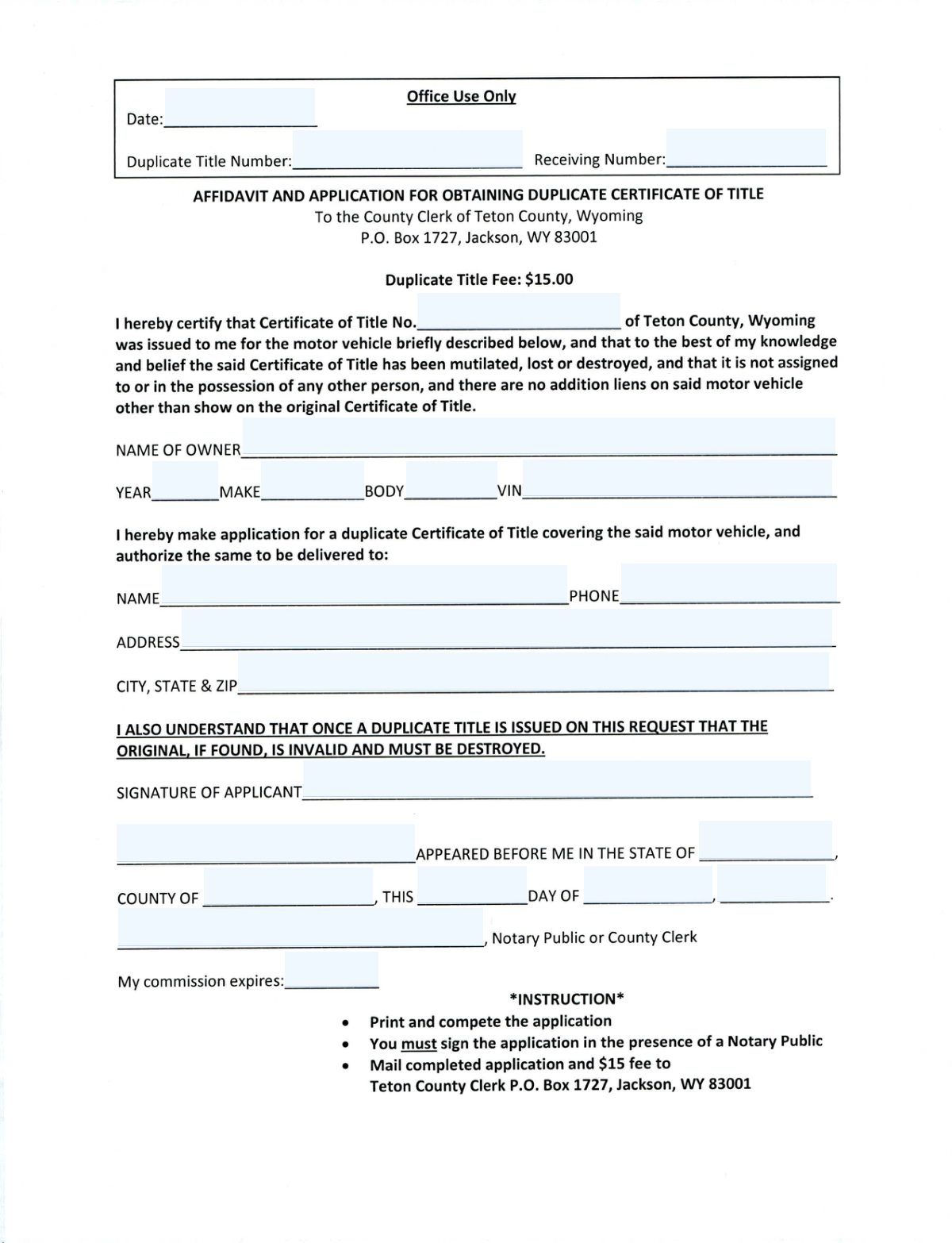
An Application for Duplicate Certificate of Title is a legal document submitted to a state's Department of Motor Vehicles (DMV) to request a replacement for an original vehicle title that has been lost, stolen, or destroyed. This form is crucial for proving ownership and is required for selling or transferring the vehicle. Today, this form can be filled out quickly and accurately using AI-powered services like Instafill.ai, which can also convert non-fillable PDF versions into interactive fillable forms.
Duplicate Title Application is part of the
title application forms category on Instafill.
Our AI automatically handles information lookup, data retrieval, formatting, and form filling.
It takes less than a minute to fill out Duplicate Title Application using our AI form filling.
Securely upload your data. Information is encrypted in transit and deleted immediately after the form is filled out.
Form specifications
| Form name: | Application for Duplicate Certificate of Title |
| Number of fields: | 25 |
| Number of pages: | 1 |
| Filled form examples: | Form Duplicate Title Application Examples |
| Language: | English |
More forms in Title application forms
Instafill Demo: How to fill out PDF forms in seconds with AI
How to Fill Out Duplicate Title Application Online for Free in 2026
Are you looking to fill out a DUPLICATE TITLE APPLICATION form online quickly and accurately? Instafill.ai offers the #1 AI-powered PDF filling software of 2026, allowing you to complete your DUPLICATE TITLE APPLICATION form in just 37 seconds or less.
Follow these steps to fill out your DUPLICATE TITLE APPLICATION form online using Instafill.ai:
- 1 Navigate to Instafill.ai and upload or select the Application for Duplicate Certificate of Title.
- 2 Use the AI assistant to accurately input key vehicle details, including the VIN, year, make, and body type.
- 3 Provide the full name of the vehicle owner and the original certificate of title number, if known.
- 4 Enter the complete mailing address and contact information for the delivery of the new duplicate title.
- 5 Review all entered information for accuracy before generating the final document.
- 6 Download the completed application, then sign it in the designated applicant signature field.
- 7 Take the signed form to a Notary Public for acknowledgment and final submission to the appropriate motor vehicle agency.
Our AI-powered system ensures each field is filled out correctly, reducing errors and saving you time.
Why Choose Instafill.ai for Your Fillable Duplicate Title Application Form?
Speed
Complete your Duplicate Title Application in as little as 37 seconds.
Up-to-Date
Always use the latest 2026 Duplicate Title Application form version.
Cost-effective
No need to hire expensive lawyers.
Accuracy
Our AI performs 10 compliance checks to ensure your form is error-free.
Security
Your personal information is protected with bank-level encryption.
Frequently Asked Questions About Form Duplicate Title Application
This form is an application to request a duplicate Certificate of Title for your vehicle when the original has been lost, stolen, or destroyed.
The registered owner of the vehicle must complete and sign this application to request a replacement title.
No, do not fill out the 'Office Use Only' section. This area is reserved for the titling agency's internal processing.
The VIN is usually on the driver's side dashboard (visible through the windshield), on the driver's side door jamb sticker, or on your vehicle registration and insurance documents.
If you don't know the original title number, providing the correct VIN is the most important step. The agency can typically locate your record using the VIN.
Notarization is required to verify your identity and confirm that you are the person authorized to request a duplicate title, which helps prevent fraud.
You must sign the form in front of a Notary Public. The notary will then complete the acknowledgment section with their details, signature, and official seal.
Yes, you can specify any mailing address in the 'Delivery/Mailing Information' section. Ensure the recipient's name and address are correct, as this is where the new title will be sent.
Processing times vary by state. After submitting the notarized form and any required fees, it can take several weeks to receive your duplicate title in the mail.
Yes, services like Instafill.ai use AI to accurately auto-fill form fields, which saves time and helps prevent common errors.
Simply upload the form to the Instafill.ai platform. The tool will make the fields interactive, allowing you to type your information, save it, and then print the completed form for notarization.
You can use a service like Instafill.ai, which can convert flat, non-fillable PDFs into interactive forms that you can easily complete on your computer.
Do not sign the form until you are in the physical presence of a Notary Public. The notary must witness your signature as part of the acknowledgment process.
Compliance Duplicate Title Application
Validation Checks by Instafill.ai
1
VIN Format and Checksum Validation
Validates the 17-character Vehicle Identification Number (VIN). This check ensures the VIN contains only valid alphanumeric characters (excluding I, O, and Q), is exactly 17 characters long, and passes the standard checksum calculation. An invalid VIN will lead to the rejection of the application as the vehicle cannot be uniquely identified.
2
Notary Commission Expiration Date Validity
Ensures the Notary's 'Commission Expiration Date' is in the future. The system checks that the provided date is a valid date format and is after the date of the application submission. A notarization with an expired commission is legally invalid, so this check is critical for the form's acceptance.
3
Applicant and Notarized Person Consistency
Verifies that the name of the 'Person Appearing Before Notary' matches the 'Owner Name'. This logical consistency check confirms that the person who owns the vehicle is the same person signing the application in front of the notary. A mismatch could indicate a fraudulent application and will require manual review or rejection.
4
Vehicle Year Plausibility Check
Validates that the 'Vehicle Year' is a plausible 4-digit year. The check ensures the year is within a reasonable range, for example, between 1900 and the current calendar year plus one, to account for new models. This prevents data entry errors like typos (e.g., '202' instead of '2022') or nonsensical values.
5
Prohibition of User Input in 'Office Use Only' Fields
Checks that all fields marked 'Office Use Only' are left blank by the applicant. This includes fields like 'Office Use Date' and 'Receiving Number'. Submitting a form with data in these fields can cause processing delays or errors, so the system should flag them for removal before submission.
6
Applicant Mandatory Fields Completeness
Ensures all mandatory fields for the applicant are filled out. This includes Owner Name, VIN, Vehicle Year/Make, complete Delivery/Mailing Information, and the Applicant Signature. An incomplete application cannot be processed, so this check prevents the submission of forms with missing critical information.
7
Notary Acknowledgment Date Integrity
Validates the date of notarization by combining the 'Day of Month', 'Month', and 'Year' fields. The check confirms that the combination forms a valid calendar date (e.g., not February 30) and that the date is not in the future. This ensures the integrity and timeliness of the notarization record.
8
Delivery Phone Number Format
Validates that the 'Delivery Phone Number' follows a standard 10-digit North American format. The check can accommodate various common formats like (XXX) XXX-XXXX, XXX-XXX-XXXX, or XXXXXXXXXX. This is important to ensure courier or postal services can contact the recipient if there are delivery issues.
9
Delivery ZIP Code Format
Verifies that the 'Delivery City, State, and ZIP' field contains a valid 5-digit or 9-digit (ZIP+4) postal code. This check is crucial for ensuring the duplicate title can be mailed successfully without being returned as undeliverable. It helps prevent simple typos that could derail the entire process.
10
Signature Presence Check
Confirms that the 'Applicant Signature' and 'Notary Public or County Clerk Signature' fields are not empty. For digital forms, this means a digital signature has been applied; for scanned forms, it means the signature area is not blank. Missing signatures are one of the most common reasons for immediate rejection of legal documents.
11
Original Title Number Presence
Ensures the 'Original Certificate of Title Number' field is not empty. This number is the primary reference for the document being replaced, and its absence makes it impossible for the processing office to locate the original record. The validation confirms that some value has been entered before submission.
12
Notary Location Validity
Validates that the 'State of Acknowledgment' and 'County of Acknowledgment' are a valid combination. The system can check the entered county against a list of known counties for the specified state. This helps catch typos and ensures the location of the notarization is accurately and legally recorded.
Common Mistakes in Completing Duplicate Title Application
Applicants sometimes fill out fields clearly marked 'Office Use Only' because they are rushing or trying to be thorough. This can interfere with the agency's internal processing workflow, causing confusion and delays as staff may need to correct the form or return it. To avoid this, carefully read the label for every field and leave any section designated for office or official use completely blank.
The 17-character VIN is long and complex, making it easy to transpose letters and numbers (like 'O' and '0' or 'I' and '1'). An incorrect VIN is a critical error that will cause the application to be immediately rejected, as it links the document to the wrong vehicle or a non-existent one. Always double or triple-check the VIN against the vehicle itself (on the dashboard or door jamb) and official documents; AI-powered tools like Instafill.ai can help by validating the VIN's format and checksum digit to catch typos.
Applicants may misremember, misread, or make a typographical error when entering the original Certificate of Title number. Without the correct reference number, the processing agency cannot locate the original vehicle record to issue a duplicate. This mistake guarantees the application will be rejected, forcing the applicant to find the correct number and restart the entire process.
The owner's name on the application must be the full legal name and match the name on the original title and government records exactly. Using a nickname, an abbreviated name, or a name that has legally changed without updating records will cause a data mismatch and lead to rejection. Always use your full legal name as it appears on your driver's license and the original vehicle registration.
An applicant may rush through the form and forget to sign it, or they may sign it before meeting with the notary. An unsigned application is legally invalid and will be rejected immediately. To prevent this, review the form one last time before submission, and only sign in the designated 'Applicant Signature' box when you are physically in the presence of the Notary Public.
A common misunderstanding is for the applicant to fill out the notary section, including the date, state, and county. This section is reserved exclusively for the licensed Notary Public to complete as a legal attestation. If the applicant writes in this section, it invalidates the notarization, and the entire form will be rejected, requiring a new form and another trip to the notary.
Mistakes like forgetting an apartment number, using a P.O. Box when a physical address is required, or entering the wrong ZIP code are frequent. An incorrect or incomplete address will result in the new title being returned as undeliverable or lost in the mail. This can create a significant security risk and requires starting the application process over, including paying any associated fees again.
When a form is filled out by hand, poor penmanship can make critical information like names, addresses, and the VIN impossible to read accurately. This leads to data entry errors by the processing clerk, resulting in a new title with incorrect information or outright rejection of the application. To avoid this, print clearly in block letters or use a tool like Instafill.ai, which can convert a flat PDF into a fillable form, allowing you to type for perfect legibility.
The purpose of notarization is for the notary to witness the act of signing. If the applicant signs the form beforehand, the notary cannot legally complete the acknowledgment, as they did not witness the signature. This will require a new, clean copy of the form to be signed in the notary's presence, wasting time and potentially money.
Applicants may enter incorrect information for the vehicle's year, make, or body type that does not match the official record associated with the VIN. For example, they might guess the body type ('SUV' vs. 'Wagon') or be off by a year on the model. These inconsistencies can flag the application for manual review, causing significant processing delays.
The 'Person Appearing Before Notary' field must contain the name of the individual who is signing the document and has proven their identity to the notary. If this name does not match the applicant's signature and the 'Owner Name' on the form, the notarization is invalid. This critical error can lead to rejection and may even raise flags for potential fraud.
Saved over 80 hours a year
“I was never sure if my IRS forms like W-9 were filled correctly. Now, I can complete the forms accurately without any external help.”
Kevin Martin Green
Your data stays secure with advanced protection from Instafill and our subprocessors

Robust compliance program
Transparent business model
You’re not the product. You always know where your data is and what it is processed for.
ISO 27001, HIPAA, and GDPR
Our subprocesses adhere to multiple compliance standards, including but not limited to ISO 27001, HIPAA, and GDPR.
Security & privacy by design
We consider security and privacy from the initial design phase of any new service or functionality. It’s not an afterthought, it’s built-in, including support for two-factor authentication (2FA) to further protect your account.
Fill out Duplicate Title Application with Instafill.ai
Worried about filling PDFs wrong? Instafill securely fills application-for-duplicate-certificate-of-title forms, ensuring each field is accurate.



