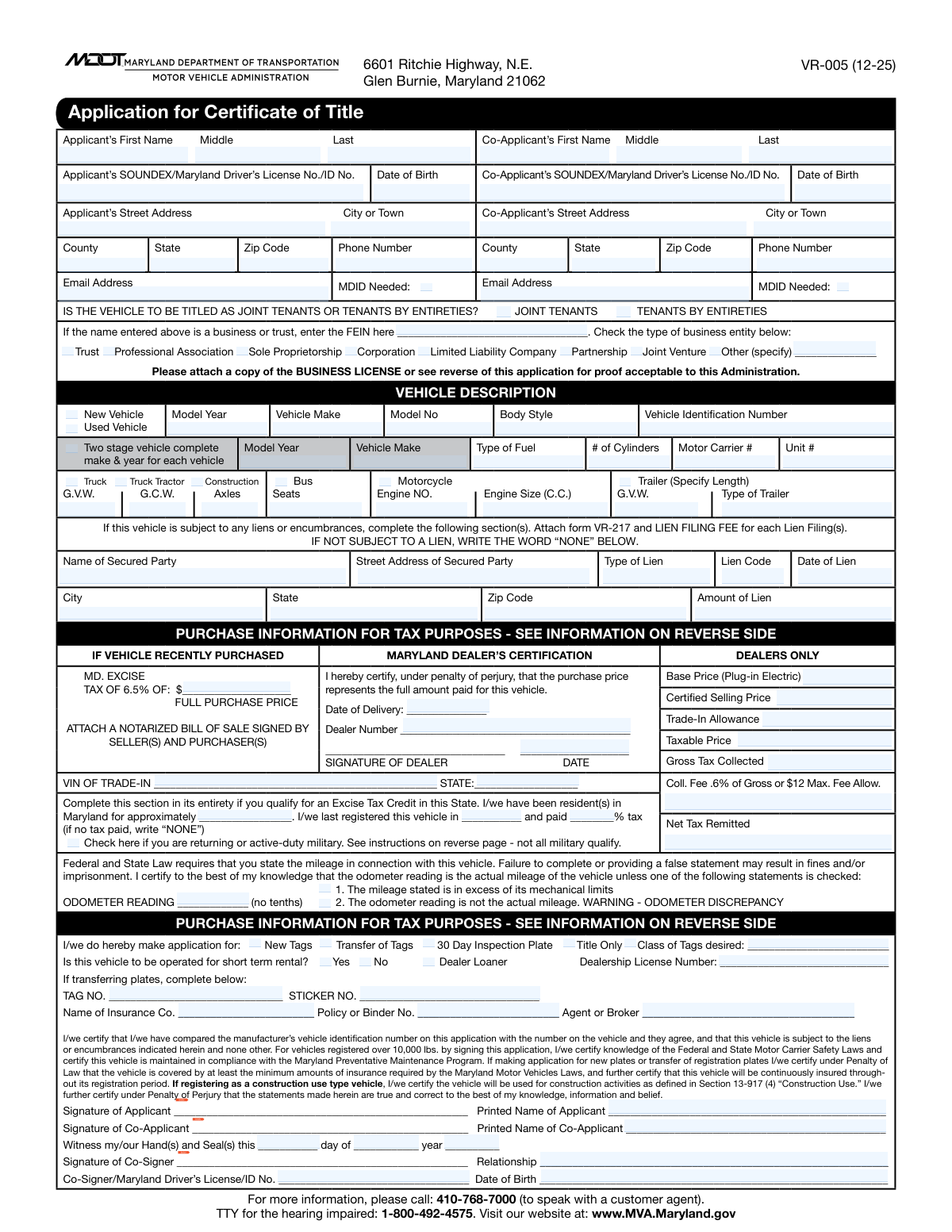
Yes! You can use AI to fill out Form VR-005, Application for Certificate of Title

Form VR-005, the Application for Certificate of Title, is a required document by the Maryland Motor Vehicle Administration (MVA) for vehicle owners to legally establish ownership. It collects essential details about the applicant(s), the vehicle, purchase information for tax purposes, and any existing liens. Completing this form accurately is crucial for titling and registering a vehicle in Maryland. Today, this form can be filled out quickly and accurately using AI-powered services like Instafill.ai, which can also convert non-fillable PDF versions into interactive fillable forms.
Our AI automatically handles information lookup, data retrieval, formatting, and form filling.
It takes less than a minute to fill out VR-005 using our AI form filling.
Securely upload your data. Information is encrypted in transit and deleted immediately after the form is filled out.

Form specifications

Form name: Form VR-005, Application for Certificate of Title
Number of pages: 1
Language: English
main-image

Instafill Demo: How to fill out PDF forms in seconds with AI

How to Fill Out VR-005 Online for Free in 2026

Are you looking to fill out a VR-005 form online quickly and accurately? Instafill.ai offers the #1 AI-powered PDF filling software of 2026, allowing you to complete your VR-005 form in just 37 seconds or less.
Follow these steps to fill out your VR-005 form online using Instafill.ai:
  1. 1 Navigate to Instafill.ai and upload or select the Maryland Form VR-005.
  2. 2 Provide your personal information, including name, address, and driver's license number. Add co-applicant details if applicable.
  3. 3 Enter the complete vehicle description, such as the VIN, make, model, year, and odometer reading.
  4. 4 Fill in the purchase information section, including the price, dealer details (if any), and trade-in information for tax calculation.
  5. 5 If the vehicle has a lien, input the secured party's name, address, and lien details.
  6. 6 Indicate your application purpose, such as applying for new tags, transferring existing tags, or requesting a title only.
  7. 7 Review all the AI-populated information for accuracy, e-sign the application, and download the completed form for submission to the MVA.

Our AI-powered system ensures each field is filled out correctly, reducing errors and saving you time.

Why Choose Instafill.ai for Your Fillable VR-005 Form?

Speed

Complete your VR-005 in as little as 37 seconds.

Up-to-Date

Always use the latest 2026 VR-005 form version.

Cost-effective

No need to hire expensive lawyers.

Accuracy

Our AI performs 10 compliance checks to ensure your form is error-free.

Security

Your personal information is protected with bank-level encryption.

Frequently Asked Questions About Form VR-005

The VR-005 form is the official Maryland MVA Application for Certificate of Title. It is used to get a new title for a vehicle you've acquired, and you can also use it to apply for new license plates, transfer existing plates, or request a temporary inspection plate.

Anyone who has purchased a new or used vehicle and needs to title it in the state of Maryland must complete this form. This includes new residents bringing a vehicle into the state and businesses or trusts acquiring a vehicle.

For a new vehicle, you need the Manufacturer's Certificate of Origin and a bill of sale. For a used vehicle, you need the existing title properly assigned to you, and a notarized bill of sale is often required if the vehicle is less than 7 years old.

Yes, most used vehicles being titled and registered in Maryland must pass an inspection at an authorized Maryland Safety Inspection Station. The inspection certificate must be submitted with your application unless you are requesting a temporary 30-day inspection plate.

In the lien section, you must enter the full name and address of your lender, the date of the lien, and the lien amount. If you do not have a loan on the vehicle, you must write the word 'NONE' in this section.

Both are forms of co-ownership with rights of survivorship, meaning the surviving owner automatically gets the vehicle if one owner passes away. 'Tenants by Entireties' is exclusively for married couples, while 'Joint Tenants' can be selected by any two or more individuals.

New residents may pay a modified excise tax. If you moved within the last 60 days, you may get credit for taxes paid in your previous state; otherwise, the tax is based on the vehicle's NADA 'clean retail value' or a flat fee for older vehicles.

Yes, certain active-duty service members stationed in Maryland and returning Maryland residents from the Uniformed Services may qualify for an excise tax exemption. You must provide your out-of-state title and official military orders or DD-214 to qualify.

If the vehicle is being titled to a business, you must provide the Federal Employer Identification Number (FEIN) and check the box for your business type. You also need to attach proof of the business's legal existence, such as articles of incorporation or a business license.

You must still enter the number shown on the odometer. Then, you must check the box that says 'The odometer reading is not the actual mileage. WARNING - ODOMETER DISCREPANCY' to legally disclose the issue.

You can submit the completed application and all required documents in person at a Maryland MVA branch. The form also provides a mailing address if you are paying by check or money order.

Yes, services like Instafill.ai use AI to help you accurately auto-fill form fields, which can save you time and reduce errors. This is especially helpful for complex forms with many sections.

Simply upload the VR-005 PDF to the Instafill.ai platform. The AI will identify the fields, and you can provide your information once to have it automatically and accurately placed throughout the document.

If you have a non-fillable or 'flat' PDF, you can use a service like Instafill.ai. It can convert the document into an interactive, fillable form online, so you can easily type your information before printing.

Compliance VR-005
Validation Checks by Instafill.ai

1
Validates Vehicle Identification Number (VIN) Format and Structure
This check ensures the Vehicle Identification Number (VIN) is exactly 17 characters long and contains only valid alphanumeric characters, excluding I, O, and Q. A valid VIN is critical for uniquely identifying the vehicle in state and national databases and preventing fraud. If the VIN is invalid, the application cannot be processed, and the user must re-enter the correct VIN from the vehicle's chassis or official ownership documents.
2
Ensures Complete Co-Applicant Information is Provided
If a 'Co-Applicant First Name' is entered, this validation ensures that the 'Co-Applicant Last Name', 'Date of Birth', and 'SOUNDEX/MD Driver's License No./ID No.' are also filled out. Incomplete co-applicant data prevents proper joint titling and registration, which can lead to legal ownership issues. Failure requires the user to either complete all required co-applicant fields or remove the co-applicant's name entirely.
3
Verifies Eligibility for 'Tenants by Entireties' Ownership
This check confirms that if 'Tenants by Entireties' is selected, both an applicant and a co-applicant are listed on the form. According to the form's instructions, this ownership type is reserved for spouses, which implies two owners. An application selecting this option without two applicants is legally invalid, and the user must either add a co-applicant or select a different ownership type like 'Joint Tenants'.
4
Validates Odometer Reading and Disclosure Consistency
This check ensures the 'Odometer Reading' is a positive integer and that the two associated checkboxes ('in excess of its mechanical limits' and 'not the actual mileage') are not selected simultaneously. Accurate odometer disclosure is a federal requirement to prevent fraud. Failure requires the user to correct the mileage entry or the checkbox selection to reflect the vehicle's actual condition.
5
Requires FEIN for Business or Trust Applicants
This validation ensures that if any business entity type (e.g., Corporation, LLC, Trust) is checked, the 'FEIN' field must be filled with a valid 9-digit Federal Employer Identification Number. The FEIN is essential for identifying the business entity for tax and legal purposes. If a business type is selected without a corresponding FEIN, the application will be rejected until the number is provided.
6
Ensures All Lienholder Details are Provided if a Lien Exists
If any information is entered in the lien section (e.g., 'Name of Secured Party'), this check verifies that all other required lien fields ('Street Address', 'City', 'State', 'Zip Code', 'Date of Lien') are also completed. Incomplete lien information prevents the security interest from being properly recorded on the title. The user must either provide all details or explicitly write 'NONE' if no lien exists.
7
Validates Mutually Exclusive Tag Application Choices
This check ensures that the applicant selects only one option from the set: 'New Tags', 'Transfer of Tags', '30 Day Inspection Plate', or 'Title Only'. These are mutually exclusive actions, and selecting more than one creates ambiguity in the application's intent. If multiple options are checked, the user will be prompted to select only the single, correct action they wish to perform.
8
Requires Trade-In Vehicle Details when Allowance is Claimed
This validation triggers if a value greater than zero is entered in the 'Trade-In Allowance' field. It then requires that the 'VIN of Trade-In' and 'Trade-In Vehicle State' fields are also completed. This information is necessary to verify the trade-in vehicle's status and correctly calculate the taxable price. Failure to provide these details will prevent the trade-in allowance from being applied.
9
Validates Applicant's Date of Birth Format and Minimum Age
This check verifies that the 'Applicant Date of Birth' and 'Co-Applicant Date of Birth' are in a valid date format (e.g., MM/DD/YYYY) and that the date indicates the individual is of legal age to own a vehicle. This prevents applications from minors who are not legally permitted to enter into such a contract. An invalid or future date, or an age below the legal threshold, will cause the validation to fail.
10
Validates Format of Maryland Driver's License/ID Number
This check validates that the 'SOUNDEX/Maryland Driver’s License No./ID No.' field follows the specific format for Maryland licenses (a letter followed by 12 digits). This ensures the applicant can be correctly identified within the MVA system. An incorrectly formatted number will prevent the system from linking the application to the correct individual, requiring the user to correct the entry.
11
Requires Specification for 'Other' Business Entity Type
If the 'Other (specify)' checkbox is selected in the business entity section, this validation ensures that the corresponding 'Other Business Type (specify)' text field is not empty. This prevents incomplete applications where the business type is ambiguous. The user must provide a description of the business entity or select one of the predefined types.
12
Ensures Insurance Information is Complete for Tag Applications
This check verifies that if the applicant is requesting 'New Tags' or 'Transfer of Tags', the 'Name of Insurance Co.' and 'Policy or Binder No.' fields are completed. Maryland law requires all registered vehicles to be insured, and this information is necessary for verification. An application for registration without proof of insurance is invalid and will be rejected until the required details are provided.
13
Requires Dealership License Number for Dealer Loaner Vehicles
This validation ensures that if the 'Dealer Loaner' checkbox is selected, the 'Dealership License Number' field must be filled out. This is necessary to associate the loaner vehicle with a specific, licensed dealership for regulatory and insurance purposes. An application for a dealer loaner without the license number is incomplete and will be rejected.
14
Validates Conditional Requirement for Tag Transfer Information
If the 'Transfer of Tags' checkbox is selected, this validation ensures that the 'Tag No.' and 'Sticker No.' fields are filled out. This information is essential for the MVA to process the transfer from the old vehicle to the new one correctly. Without these numbers, the transfer cannot be completed, and the user will be prompted to provide them.

Common Mistakes in Completing VR-005

Entering an Incorrect Vehicle Identification Number (VIN)

The 17-character VIN is prone to transcription errors, such as mistaking the letter 'O' for the number '0'. An incorrect VIN will cause the application to be rejected or, worse, a title to be issued for the wrong vehicle, leading to significant delays and legal complications. Always double-check the VIN on the vehicle's dashboard, door jamb, and ownership documents before writing it on the form. AI-powered tools like Instafill.ai can help prevent this by validating the VIN's structure and checksum digit automatically.

Leaving the Lienholder Section Blank

The form explicitly states, 'IF NOT SUBJECT TO A LIEN, WRITE THE WORD “NONE” BELOW.' Many applicants who own their vehicle outright simply leave this section empty. This ambiguity forces the MVA to return the form for clarification, delaying the titling process. To avoid rejection, you must clearly write 'NONE' in the 'Name of Secured Party' field if the vehicle has no outstanding loans.

Incorrectly Reporting the Odometer Reading

This is a legal declaration, and mistakes are common. Applicants may include tenths of a mile, forget to fill in the reading, or fail to check the 'not actual mileage' box when necessary. An incorrect or incomplete odometer statement is a legal violation that can result in fines and will cause the application to be rejected. Always record the whole number of miles and certify its accuracy as required.

Missing Required Signatures and Printed Names

It is very common for an applicant or co-applicant to forget to sign the form or print their name in the designated areas. An unsigned application is legally incomplete and will be immediately rejected, requiring you to resubmit the entire package. Always perform a final review of the form, specifically looking for all 'SIGN' prompts to ensure they have been completed by the correct parties.

Failing to Attach Necessary Supporting Documents

This application is invalid without the correct supporting paperwork, such as the original Certificate of Origin, a properly assigned title for a used car, a notarized bill of sale, or a safety inspection certificate. Forgetting even one required document will cause the MVA to reject the application, forcing you to gather the missing items and start over. Use the 'DOCUMENTS REQUIRED' section as a checklist before submission.

Providing Incomplete Purchase and Tax Information

The excise tax calculation is complex, and applicants often fail to provide the necessary information for an accurate assessment. A common error is forgetting to attach a notarized bill of sale for a used vehicle, which can result in tax being assessed on a higher book value instead of the actual purchase price. Carefully read the 'MARYLAND EXCISE TAX' section and provide all required documentation to avoid overpayment or rejection. If the form is a non-fillable PDF, a tool like Instafill.ai can convert it into an interactive version with clear fields to guide you.

Misunderstanding Joint Ownership Types

Applicants often check the wrong box for 'JOINT TENANTS' vs. 'TENANTS BY ENTIRETIES' or leave both blank. 'Tenants by Entireties' is a specific ownership type reserved for married couples, offering unique legal protections. Selecting the wrong option can have unintended legal and inheritance consequences. If you are unsure, review the form's instructions or seek advice before making a selection.

Entering a Name That Doesn't Match Legal Documents

Applicants sometimes use a nickname or an abbreviated name instead of the full legal name that appears on their driver's license and the vehicle's prior title. This name mismatch will cause the application to be flagged for an identity discrepancy and rejected. Always enter your full first, middle, and last name exactly as it is shown on your government-issued ID to ensure a smooth process.

Omitting or Providing Incomplete Insurance Details

When applying for new or transferred tags, providing proof of Maryland-compliant insurance is mandatory. Applicants often forget to fill in the insurance company name, policy number, or agent's name. Leaving this section blank will prevent the issuance of registration plates, even if the title application itself is approved. Before submitting, ensure your insurance card is handy and you accurately transcribe all required details.

Not Specifying the Application's Purpose

The form requires applicants to specify their goal by checking 'New Tags,' 'Transfer of Tags,' '30 Day Inspection Plate,' or 'Title Only.' People sometimes overlook this crucial section, leaving the MVA unsure of what service is being requested. This ambiguity halts the process, as the fees and required documents differ for each option. Always check the box that accurately reflects your needs to ensure the application is processed correctly.
Saved over 80 hours a year

“I was never sure if my IRS forms like W-9 were filled correctly. Now, I can complete the forms accurately without any external help.”

Kevin Martin Green

Your data stays secure with advanced protection from Instafill and our subprocessors

Robust compliance program

Transparent business model

You’re not the product. You always know where your data is and what it is processed for.

ISO 27001, HIPAA, and GDPR

Our subprocesses adhere to multiple compliance standards, including but not limited to ISO 27001, HIPAA, and GDPR.

Security & privacy by design

We consider security and privacy from the initial design phase of any new service or functionality. It’s not an afterthought, it’s built-in, including support for two-factor authentication (2FA) to further protect your account.

Fill out VR-005 with Instafill.ai

Worried about filling PDFs wrong? Instafill securely fills form-vr-005-application-for-certificate-of-title forms, ensuring each field is accurate.