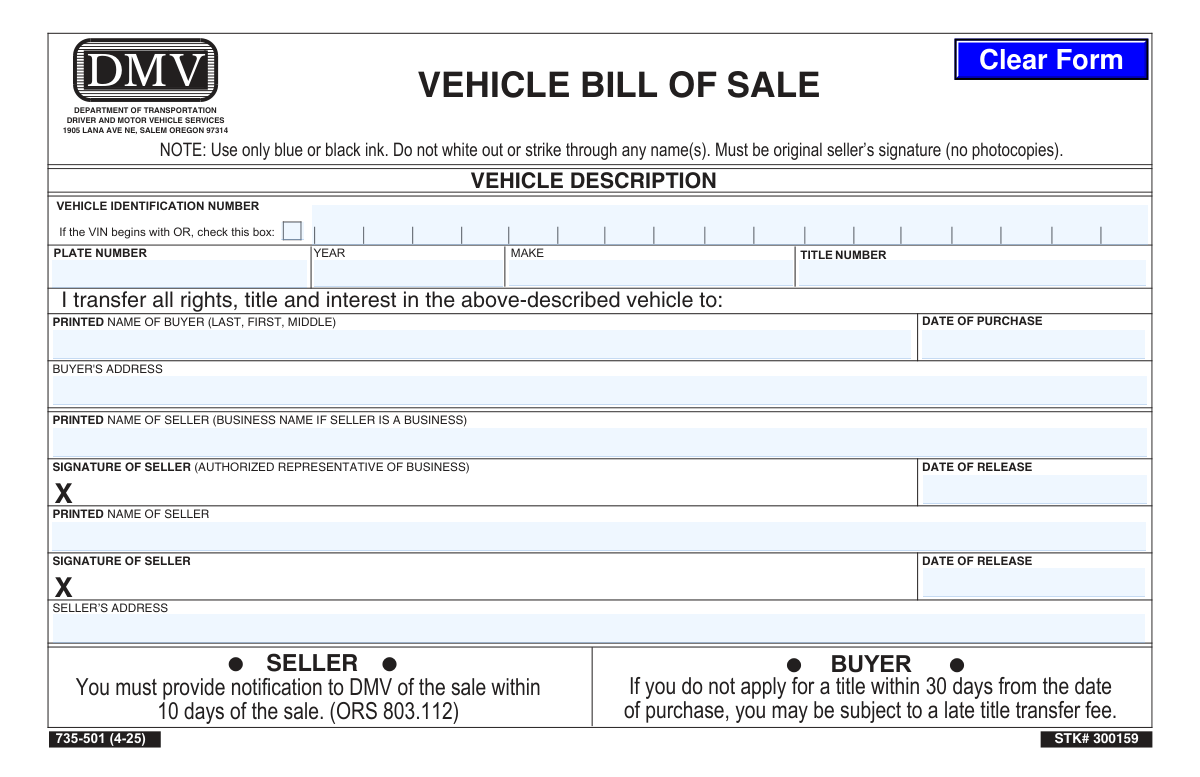
Yes! You can use AI to fill out Form 735-501, Vehicle Bill of Sale
Form 735-501 is the official Vehicle Bill of Sale for the state of Oregon, provided by the Driver and Motor Vehicle Services (DMV). It serves as a legal record of the transaction, detailing the vehicle information, buyer and seller details, and the date of purchase. This document is essential for the buyer to apply for a new title and for the seller to notify the DMV of the sale. Today, this form can be filled out quickly and accurately using AI-powered services like Instafill.ai, which can also convert non-fillable PDF versions into interactive fillable forms.
Our AI automatically handles information lookup, data retrieval, formatting, and form filling.
It takes less than a minute to fill out 735-501 using our AI form filling.
Securely upload your data. Information is encrypted in transit and deleted immediately after the form is filled out.
Form specifications
| Form name: | Form 735-501, Vehicle Bill of Sale |
| Number of pages: | 1 |
| Language: | English |
Instafill Demo: How to fill out PDF forms in seconds with AI
How to Fill Out 735-501 Online for Free in 2026
Are you looking to fill out a 735-501 form online quickly and accurately? Instafill.ai offers the #1 AI-powered PDF filling software of 2026, allowing you to complete your 735-501 form in just 37 seconds or less.
Follow these steps to fill out your 735-501 form online using Instafill.ai:
- 1 Navigate to Instafill.ai and upload or select the Oregon Vehicle Bill of Sale (Form 735-501).
- 2 Use the AI assistant to automatically populate vehicle details such as the Vehicle Identification Number (VIN), year, make, and plate number.
- 3 Enter the full printed name and address of the buyer.
- 4 Provide the seller's printed name (or business name) and address.
- 5 Input the date of purchase and the date of release for the vehicle.
- 6 Review all entered information for accuracy, then download the completed form.
- 7 The seller must sign the document (original signature required), and both parties should keep a copy for their records.
Our AI-powered system ensures each field is filled out correctly, reducing errors and saving you time.
Why Choose Instafill.ai for Your Fillable 735-501 Form?
Speed
Complete your 735-501 in as little as 37 seconds.
Up-to-Date
Always use the latest 2026 735-501 form version.
Cost-effective
No need to hire expensive lawyers.
Accuracy
Our AI performs 10 compliance checks to ensure your form is error-free.
Security
Your personal information is protected with bank-level encryption.
Frequently Asked Questions About Form 735-501
This form serves as a legal record to document the transfer of all rights, title, and interest in a vehicle from a seller to a buyer in the state of Oregon.
Both the buyer and the seller of a vehicle in a private sale must complete this form. The seller provides their details and signature, and the buyer's information is also recorded.
You are legally required to notify the Oregon DMV of the sale within 10 days from the date of the transaction. This form helps you document the sale for your records.
You must apply for a new title in your name within 30 days of the purchase date. If you fail to do so, you may be charged a late title transfer fee by the DMV.
You will need the full names and addresses of both the buyer and seller, the date of purchase, and the vehicle's VIN, year, make, title number, and current plate number.
If there are two sellers listed on the vehicle's title, both individuals must print and sign their names on the Bill of Sale to legally transfer ownership.
The form specifies that you should not use white-out or strike through any information. To ensure the document is valid, it is best to start over with a new, clean form if you make an error.
No, the form explicitly states that it must be the original seller's signature. Photocopies are not accepted by the Oregon DMV.
This box should be checked if the vehicle has been assigned a special identification number by the state of Oregon, which always begins with the letters 'OR'.
You must use only blue or black ink when filling out and signing the form. Other colors may cause the form to be rejected.
Yes, services like Instafill.ai use AI to help you accurately auto-fill form fields. This can save time and reduce the chance of errors before you print the document for signing.
Simply upload the PDF of the Vehicle Bill of Sale to the Instafill.ai platform. The AI will make the fields interactive, allowing you to type your information directly onto the form before printing.
You can use a tool like Instafill.ai, which can convert flat, non-fillable PDFs into interactive forms. This allows you to easily type in all the required information on your computer.
Compliance 735-501
Validation Checks by Instafill.ai
1
Validates Vehicle Identification Number (VIN) Format
This check ensures the VIN is exactly 17 characters long and contains only alphanumeric characters, excluding I, O, and Q, as per international standards. A valid VIN is critical for uniquely identifying the vehicle and preventing fraud or registration errors. An invalid VIN will prevent the title transfer from being processed and will require correction by the user.
2
Ensures Consistency Between VIN and 'OR' Checkbox
This validation verifies that if the VIN field begins with the letters 'OR', the corresponding checkbox for Oregon-assigned VINs is marked. Conversely, if the checkbox is marked, the VIN must start with 'OR'. This check ensures data integrity for vehicles with state-assigned identification numbers, which may have different processing rules, and prevents mismatches that would require manual intervention.
3
Validates Date of Purchase (DOP) Format and Plausibility
This check ensures the Date of Purchase is entered in a valid date format (e.g., MM/DD/YYYY) and is not a date in the future. The DOP is legally significant as it starts the 30-day countdown for the buyer to apply for a title without incurring a late fee. An invalid or future date will cause the form to be rejected for correction.
4
Logical Check Between Date of Purchase and Date of Release
This validation confirms that the Seller's Date of Release is on or after the Date of Purchase. It is logically and legally impossible for a seller to release ownership of a vehicle before it has been purchased. This check prevents common data entry errors that would invalidate the transaction's timeline and require resubmission of the form.
5
Ensures Buyer's Name and Address are Complete
This validation verifies that the 'PRINTED NAME OF BUYER' and 'BUYER'S ADDRESS' fields are not empty. This information is legally required to establish the new owner of the vehicle for title and registration purposes. Incomplete buyer details will result in the rejection of the bill of sale and an inability to transfer the title.
6
Ensures Seller's Name and Address are Complete
This check confirms that at least one 'PRINTED NAME OF SELLER' field and the 'SELLER’S ADDRESS' field are filled out. This information is necessary to legally document who is relinquishing ownership and to allow the DMV to process the seller's notification of sale. Missing seller information invalidates the sale document and prevents the ownership transfer.
7
Validates Vehicle Year Format and Logical Range
This check ensures the 'YEAR' field contains a four-digit number that falls within a plausible range (e.g., from 1900 to the current year plus one). Accurate vehicle year information is essential for correct registration, valuation, and emissions testing requirements. An illogical or incorrectly formatted year will halt processing until corrected.
8
Ensures Core Vehicle Descriptors are Provided
This validation verifies that the 'YEAR', 'MAKE', and 'VEHICLE IDENTIFICATION NUMBER' fields are all filled out. These three fields are the minimum required to uniquely and accurately identify the specific vehicle being sold. Missing any of this core information makes the bill of sale ambiguous and legally insufficient for a title transfer.
9
Validates Seller's Date of Release (DOR) Format
This check ensures the Seller's Date of Release is a valid date in a recognized format and is not a future date. This date is critical as it marks when the seller's liability for the vehicle ends and starts the 10-day period for them to notify the DMV of the sale. An incorrect date could lead to legal complications regarding tickets or accidents post-sale.
10
Ensures Printed Seller Name Accompanies Signature
This validation ensures that if a seller's signature is detected, the corresponding 'PRINTED NAME OF SELLER' field is also filled out. A signature is only legally valid when it is clear who the signatory is. An orphaned signature without a printed name would render that portion of the document invalid and require clarification.
11
Validates Oregon Title Number Format
This check verifies that if a 'TITLE NUMBER' is provided, it conforms to the expected format for Oregon titles (e.g., a specific number of digits or an alphanumeric pattern). While not always mandatory on a bill of sale, if present, it must be correct to avoid mismatches in the DMV database. An incorrectly formatted title number can cause significant delays when linking the sale to the vehicle's official record.
12
Validates Address Field Structure
This check analyzes both the buyer's and seller's address fields to ensure they contain essential components like a street, city, and state. A complete and valid address is legally required for official correspondence and to establish residency for registration purposes. An incomplete or unparseable address will cause the form to be rejected until the information is fully provided.
Common Mistakes in Completing 735-501
The 17-digit Vehicle Identification Number (VIN) is frequently mistyped, with characters like 'O' and '0' confused or digits transposed. An incorrect VIN is the most common reason for a title application to be rejected, causing significant delays and requiring a new, corrected bill of sale. To prevent this, carefully double-check the VIN on the vehicle's dashboard and the existing title document before writing. AI-powered tools like Instafill.ai can help validate the VIN's format and checksum to catch errors instantly.
The form explicitly states, 'Do not white out or strike through any name(s),' as any visible alteration can invalidate this legal document. People often make this mistake out of habit, leading to the DMV rejecting the form and requiring the parties to start over. If an error is made on a paper form, a new, clean form must be completed. Using a digital tool like Instafill.ai, which can convert this PDF into a fillable version, allows for easy corrections before printing the final, error-free document.
The buyer's 'Date of Purchase' and the seller's 'Date of Release' must be identical, as they represent the single moment the transaction occurred. A discrepancy between these dates can create confusion at the DMV and may impact the deadlines for the seller to report the sale (10 days) and the buyer to transfer the title (30 days). Both parties should agree on and enter the exact same date to ensure a smooth transfer.
The form provides two signature lines for sellers because vehicles are often co-owned. If the vehicle's title lists two owners (e.g., a married couple), both individuals must print and sign their names on the bill of sale. Overlooking the second required signature is a frequent error that will halt the title transfer until a correctly completed form with all original signatures is submitted.
The instructions demand an 'original seller’s signature (no photocopies)' in blue or black ink to serve as legal proof of the sale. Submitting a version with a scanned or photocopied signature will result in immediate rejection of the application by the DMV. The seller must physically sign the exact document that the buyer will submit to ensure its authenticity and legal standing.
The form requires names to be clearly printed in a specific format, such as 'LAST, FIRST, MIDDLE' for the buyer. Illegible handwriting or failing to follow the specified format can lead to typos on the new title, causing future identity verification problems. It is crucial to print all information clearly; using a digital form-filling tool ensures perfect legibility and correct formatting.
The title number is a unique document identifier used by the DMV to track the vehicle's chain of ownership. Sellers often leave this field blank if they don't have the physical title in front of them while completing the bill of sale. This omission can slow down the verification process, so the seller should always refer to the current title document to accurately provide this number.
A complete and accurate address is required for both the buyer and seller for official records. Common mistakes include forgetting an apartment number, ZIP code, or even the city, which can delay the processing of the title. An incorrect buyer address may also result in the new title being lost in the mail. AI form-filling tools like Instafill.ai can help prevent this by auto-completing and validating addresses for accuracy.
When a vehicle is sold by a business, the form requires the 'BUSINESS NAME' to be printed in the seller field, not the personal name of the salesperson. The employee then signs as the 'authorized representative.' Confusing these two roles is a common error that creates ambiguity in the legal transfer of ownership and can complicate liability records.
This checkbox is a specific requirement for vehicles in Oregon that have been assigned a special VIN by the state, often for assembled or reconstructed vehicles. While it doesn't apply to most cars, failing to check it when the VIN does begin with 'OR' will cause a processing error. Both parties should carefully inspect the VIN on the title document and check this box if applicable.
Saved over 80 hours a year
“I was never sure if my IRS forms like W-9 were filled correctly. Now, I can complete the forms accurately without any external help.”
Kevin Martin Green
Your data stays secure with advanced protection from Instafill and our subprocessors

Robust compliance program
Transparent business model
You’re not the product. You always know where your data is and what it is processed for.
ISO 27001, HIPAA, and GDPR
Our subprocesses adhere to multiple compliance standards, including but not limited to ISO 27001, HIPAA, and GDPR.
Security & privacy by design
We consider security and privacy from the initial design phase of any new service or functionality. It’s not an afterthought, it’s built-in, including support for two-factor authentication (2FA) to further protect your account.
Fill out 735-501 with Instafill.ai
Worried about filling PDFs wrong? Instafill securely fills form-735-501-vehicle-bill-of-sale forms, ensuring each field is accurate.