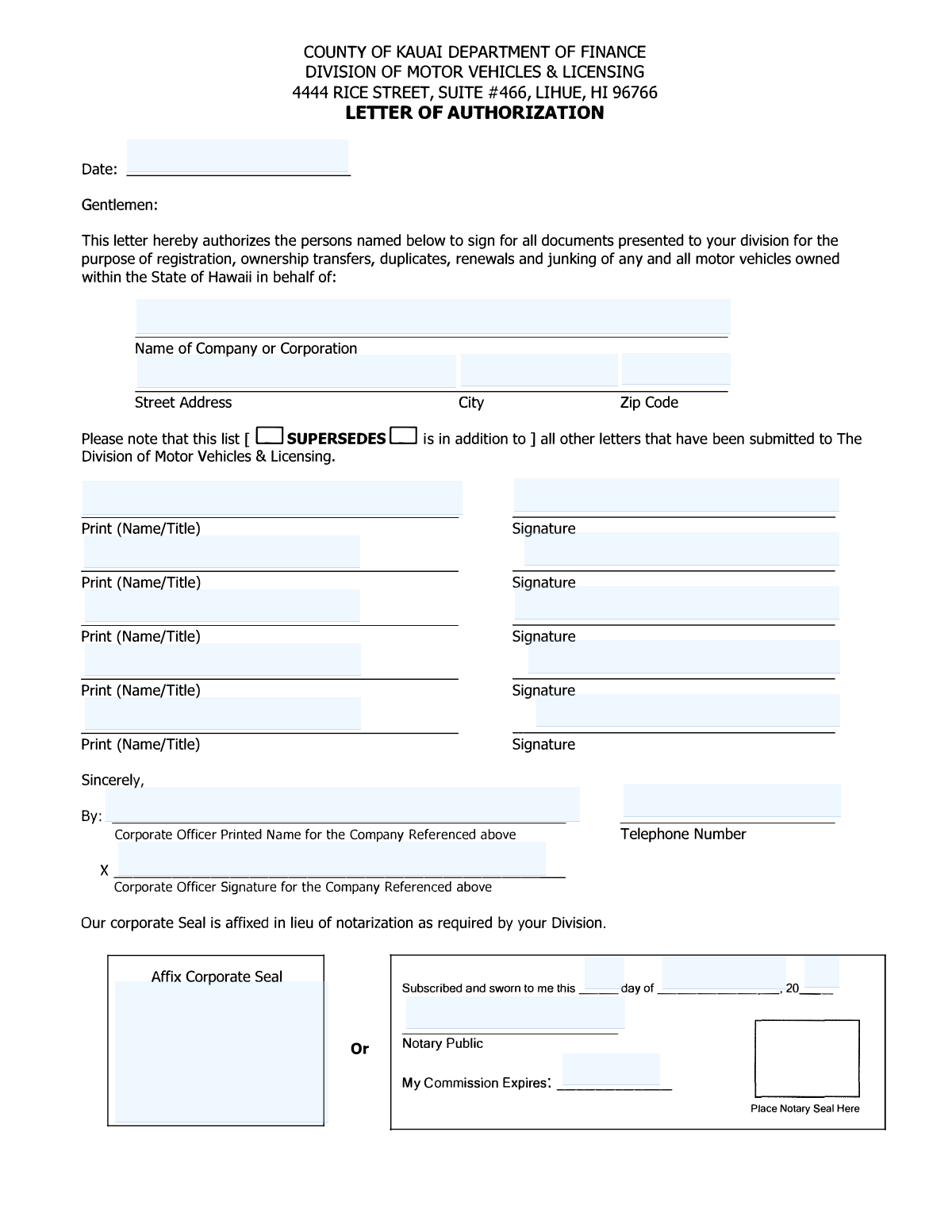
Yes! You can use AI to fill out Letter of Authorization - County of Kauai Department of Finance, Division of Motor Vehicles & Licensing

This Letter of Authorization (LOA) is a legal document used by a company or corporation to authorize specific individuals to conduct motor vehicle transactions on its behalf with the County of Kauai's Division of Motor Vehicles & Licensing. It specifies who can sign for registrations, ownership transfers, renewals, and other related documents, ensuring all actions are officially sanctioned by the company. Today, this form can be filled out quickly and accurately using AI-powered services like Instafill.ai, which can also convert non-fillable PDF versions into interactive fillable forms.
Our AI automatically handles information lookup, data retrieval, formatting, and form filling.
It takes less than a minute to fill out Kauai Letter of Authorization using our AI form filling.
Securely upload your data. Information is encrypted in transit and deleted immediately after the form is filled out.

Form specifications

Form name: Letter of Authorization - County of Kauai Department of Finance, Division of Motor Vehicles & Licensing
Number of pages: 1
Language: English
Categories: licensing forms, authorization forms
main-image

Instafill Demo: How to fill out PDF forms in seconds with AI

How to Fill Out Kauai Letter of Authorization Online for Free in 2026

Are you looking to fill out a KAUAI LETTER OF AUTHORIZATION form online quickly and accurately? Instafill.ai offers the #1 AI-powered PDF filling software of 2026, allowing you to complete your KAUAI LETTER OF AUTHORIZATION form in just 37 seconds or less.
Follow these steps to fill out your KAUAI LETTER OF AUTHORIZATION form online using Instafill.ai:
  1. 1 Navigate to Instafill.ai and upload or select the Kauai Letter of Authorization form.
  2. 2 Use the AI assistant to automatically fill in the date and your company's name and full address.
  3. 3 Specify whether this authorization supersedes or is in addition to a previous list.
  4. 4 Enter the full names and titles of all individuals you wish to authorize.
  5. 5 Provide the printed name, title, and telephone number of the signing corporate officer.
  6. 6 The corporate officer will then review the document and apply their legally binding e-signature.
  7. 7 Finalize the document by either having it notarized or affixing the corporate seal, as required by the division.

Our AI-powered system ensures each field is filled out correctly, reducing errors and saving you time.

Why Choose Instafill.ai for Your Fillable Kauai Letter of Authorization Form?

Speed

Complete your Kauai Letter of Authorization in as little as 37 seconds.

Up-to-Date

Always use the latest 2026 Kauai Letter of Authorization form version.

Cost-effective

No need to hire expensive lawyers.

Accuracy

Our AI performs 10 compliance checks to ensure your form is error-free.

Security

Your personal information is protected with bank-level encryption.

Frequently Asked Questions About Form Kauai Letter of Authorization

This form allows a company to authorize specific individuals to sign for and complete all motor vehicle transactions, such as registrations and title transfers, on the company's behalf with the Kauai Division of Motor Vehicles.

Any company or corporation that wants to delegate the responsibility of handling motor vehicle paperwork to its employees or other named agents must complete and submit this form.

Selecting 'supersedes' replaces any previous authorization list on file with this new one. Choosing 'is in addition to' keeps your old list and adds the new people from this form to it.

You cannot simply delete a name from an existing form. To remove someone, you must submit a completely new Letter of Authorization, mark it to 'supersede' the previous one, and list only the currently authorized individuals.

Yes, the form must either be notarized by a Notary Public or embossed with your company's official corporate seal. One of these two options is required for the form to be considered valid.

Yes, a letter on your company's official letterhead is acceptable if it contains all the same required information. A key advantage is that letters submitted on company letterhead do not need to be notarized.

No deletions or alterations are accepted on the form. If you make an error, you must start over with a new, clean form to ensure it is processed correctly.

Each individual being authorized to act on the company's behalf must provide a specimen signature. Additionally, a corporate officer of the company must sign to certify the authorization.

Submit the completed and signed form to the County of Kauai Department of Finance, Division of Motor Vehicles & Licensing at 4444 Rice Street, Suite #466, Lihue, HI 96766.

It is strongly recommended that you submit an updated authorization list anytime there are changes, such as when an authorized employee leaves the company or a new one is added.

Yes, services like Instafill.ai use AI to accurately auto-fill form fields with your company and personal information, which saves time and helps prevent errors.

Simply upload the Letter of Authorization PDF to the Instafill.ai platform. The AI will make the fields fillable, allowing you to quickly type your information, add signatures, and download the completed document for submission.

You can use a service like Instafill.ai, which can convert flat, non-fillable PDFs into interactive forms. This allows you to easily type your information directly onto the document online before printing.

Compliance Kauai Letter of Authorization
Validation Checks by Instafill.ai

1
Date Presence and Format
This check verifies that the 'Date' field is filled and conforms to a valid date format (e.g., MM/DD/YYYY). It is important for establishing when the authorization was granted. If the date is missing or invalid, the form cannot be processed as the effective date of the authorization is unknown.
2
Supersedes/Addition Exclusive Selection
Validates that exactly one of the two options, 'SUPERSEDES' or 'is in addition to', is selected. This choice is critical as it determines whether this letter replaces all previous authorizations or adds to them. Failure to select one and only one option makes the intent of the letter ambiguous and will result in rejection.
3
Company Name Completeness
Ensures the 'Name of Company or Corporation' field is not empty. The form is meaningless without identifying the company granting the authorization. A submission with a missing company name cannot be linked to any entity and will be immediately rejected.
4
Full Company Address Presence
This check confirms that the 'Street Address', 'City', and 'Zip Code' fields are all completed. A full, valid address is required for official records and communication. An incomplete address can lead to processing delays or rejection of the authorization letter.
5
Zip Code Format Validation
Verifies that the 'Zip Code' field contains a valid 5-digit numeric value. An incorrect zip code format can cause mail to be misdirected and indicates a potential data entry error for the entire address. The form will be flagged for correction if the zip code is not in the proper format.
6
Minimum Authorized Person Requirement
Checks that at least one authorized person is listed with both a printed name/title and a signature. The entire purpose of the form is to authorize individuals, so it is invalid if no one is named. A form with no authorized persons listed will be rejected for incompleteness.
7
Authorized Person Data Integrity
For each row provided for an authorized person, this validation ensures that if a name/title is entered, a corresponding signature is also present. An entry with a name but no signature is incomplete and does not constitute a valid authorization for that individual. The form may be returned to obtain the missing signature.
8
Corporate Officer Information Completeness
This check ensures that the Corporate Officer's printed name, signature, and telephone number are all provided. The corporate officer's signature legally binds the company to this authorization, and the contact number is essential for verification. Missing any of this information invalidates the entire document.
9
Contact Telephone Number Format
Validates that the 'Telephone Number' for the corporate officer follows a standard US phone number format (e.g., 10 digits, possibly with parentheses, spaces, or hyphens). This ensures the agency can successfully contact the company for verification if needed. An invalid format will trigger a warning or require correction.
10
Seal or Notarization Logical Requirement
Verifies that authentication is provided through EITHER an affixed corporate seal OR a completed notary section, as per the form's instructions. The form must have one of these two methods of validation to be legally binding. If neither is present, or if there's a conflict, the form will be rejected.
11
Notary Section Completeness
If notarization is the chosen method of validation, this check ensures all parts of the notary section are complete: the date of the act, the notary's signature, and the commission expiration date. An incomplete notary block invalidates the notarization. The form will be rejected and must be properly notarized and resubmitted.
12
Notary Commission Expiration Date Validity
This check validates that the 'My Commission Expires' date is a valid future date. This confirms the notary was authorized to perform the act at the time of signing. An expired commission date means the notarization is invalid, and the document will be rejected.
13
Signature Field Presence
Confirms that all required signature fields (for the Corporate Officer and any listed Authorized Persons) contain a signature. A missing signature represents an incomplete or un-consented action. The form cannot be processed without all required signatures.

Common Mistakes in Completing Kauai Letter of Authorization

Failing to Properly Notarize or Affix Corporate Seal

A frequent error is submitting the form without either the notary's signature and seal or the company's embossed corporate seal. The guidelines require one of these two options for authentication. Submitting a form without either will result in immediate rejection, delaying the authorization process. To avoid this, carefully complete one of the two sections at the bottom of the form, but not both, and ensure the original seal or stamp is applied.

Incorrectly Selecting 'Supersedes' or 'In Addition To'

Applicants often misunderstand or forget to check the box indicating if the new list of authorized persons 'supersedes' or is 'in addition to' previous lists. Choosing 'supersedes' revokes all prior authorizations, while 'in addition to' adds new names to the existing list. An incorrect choice can lead to unintended access or accidental revocation of authority for key personnel. Always confirm the intent of the update before making a selection.

Using an Unauthorized Signer as the 'Corporate Officer'

The form must be signed by a legally recognized corporate officer (e.g., President, CEO, Secretary). A common mistake is having an office manager or another non-officer sign, which invalidates the entire document. The Division of Motor Vehicles may verify the signer's authority against state business records. To prevent rejection, ensure the person signing holds an official corporate officer title within the company.

Omitting Titles or Signature Specimens for Authorized Persons

Each authorized individual's line item requires their printed name, title, and an original signature specimen. People often forget to include the person's job title or the person fails to sign in the designated space. This results in that specific individual not being granted authorization, even if the rest of the form is correct. Carefully review each entry to ensure all three components are present for every listed person.

Submitting an Illegible Handwritten Form

The instructions explicitly state the form must be 'printed or typed legibly.' Submitting a hastily handwritten form with illegible names or details is a common reason for rejection, as the agency cannot accurately enter the information into their system. To avoid this, type the information directly onto the document. If you only have a flat PDF, an AI tool like Instafill.ai can convert it into a fillable version to ensure clarity.

Making Manual Corrections or Deletions

The guidelines strictly prohibit any deletions or corrections on the form, stating 'No deletions will be accepted.' Using correction fluid, crossing out information, or writing over mistakes will void the document. This rule ensures the integrity of the authorization. If an error is made, you must start over with a clean form. Using a digital form filler can help prevent these types of data entry errors from the start.

Entering an Incorrect or Incomplete Company Name

Filers sometimes use a trade name (DBA) or an abbreviation instead of the full, legal name of the corporation. This creates a mismatch with official vehicle registration records, leading to processing delays or rejection. To avoid this, use the exact company name as it appears on your articles of incorporation or other official business registration documents. AI-powered tools like Instafill.ai can help by saving and accurately auto-filling correct legal entity names.

Submitting a Photocopy Instead of the Original Document

Because the form requires an 'original signature specimen' and an original notary or corporate seal, submitting a photocopy, scan, or fax is not acceptable. The agency needs the original document to verify the authenticity of the signatures and seals. Always submit the physically signed and sealed/notarized document via mail or in person to avoid having it rejected.

Forgetting the Corporate Officer's Contact Number

The form requests a telephone number for the corporate officer, which is often overlooked. This contact information is crucial for the agency to quickly resolve any questions or minor issues with the submission. Forgetting it can turn a simple query into a lengthy delay involving mailed correspondence. Always double-check that a valid contact number is provided before submitting.
Saved over 80 hours a year

“I was never sure if my IRS forms like W-9 were filled correctly. Now, I can complete the forms accurately without any external help.”

Kevin Martin Green

Your data stays secure with advanced protection from Instafill and our subprocessors

Robust compliance program

Transparent business model

You’re not the product. You always know where your data is and what it is processed for.

ISO 27001, HIPAA, and GDPR

Our subprocesses adhere to multiple compliance standards, including but not limited to ISO 27001, HIPAA, and GDPR.

Security & privacy by design

We consider security and privacy from the initial design phase of any new service or functionality. It’s not an afterthought, it’s built-in, including support for two-factor authentication (2FA) to further protect your account.

Fill out Kauai Letter of Authorization with Instafill.ai

Worried about filling PDFs wrong? Instafill securely fills letter-of-authorization-county-of-kauai-department-of-finance-division-of-motor-vehicles-licensing forms, ensuring each field is accurate.