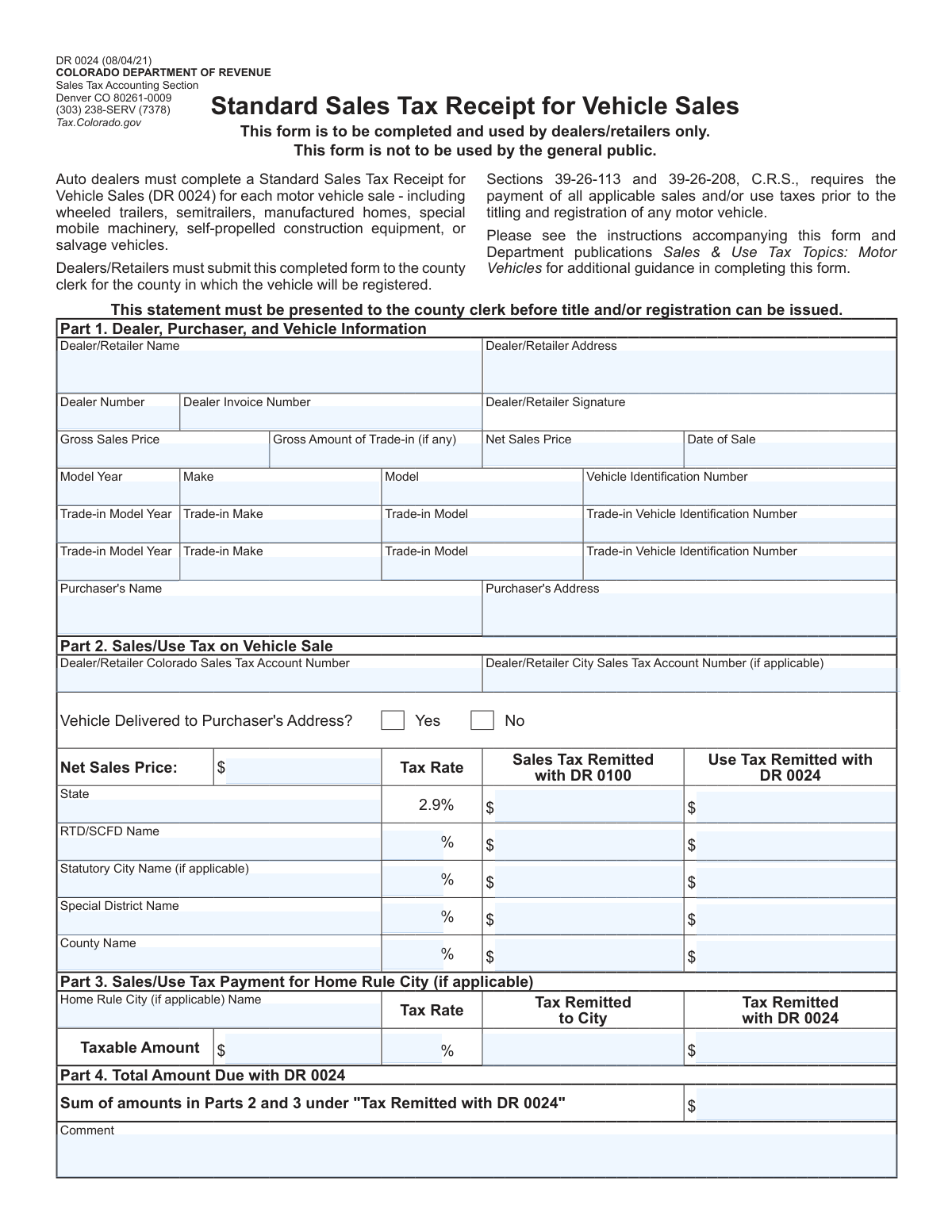
Yes! You can use AI to fill out Form DR 0024, Standard Sales Tax Receipt for Vehicle Sales
Form DR 0024, the Standard Sales Tax Receipt for Vehicle Sales, is a mandatory Colorado Department of Revenue form for auto dealers. It is used to document the sale of a motor vehicle and calculate the applicable state, county, and local sales or use taxes, which must be paid before the vehicle can be titled and registered. Today, this form can be filled out quickly and accurately using AI-powered services like Instafill.ai, which can also convert non-fillable PDF versions into interactive fillable forms.
Our AI automatically handles information lookup, data retrieval, formatting, and form filling.
It takes less than a minute to fill out DR 0024 using our AI form filling.
Securely upload your data. Information is encrypted in transit and deleted immediately after the form is filled out.
Form specifications
| Form name: | Form DR 0024, Standard Sales Tax Receipt for Vehicle Sales |
| Number of pages: | 1 |
| Language: | English |
| Categories: | sales tax forms, tax forms |
Instafill Demo: How to fill out PDF forms in seconds with AI
How to Fill Out DR 0024 Online for Free in 2026
Are you looking to fill out a DR 0024 form online quickly and accurately? Instafill.ai offers the #1 AI-powered PDF filling software of 2026, allowing you to complete your DR 0024 form in just 37 seconds or less.
Follow these steps to fill out your DR 0024 form online using Instafill.ai:
- 1 Navigate to Instafill.ai and upload or select Form DR 0024 from their library.
- 2 Provide the dealer, purchaser, and vehicle information in Part 1. The AI can assist by pre-filling known details.
- 3 Enter the transaction details, including gross sales price and any trade-in values, allowing the system to calculate the net sales price.
- 4 Complete Part 2 by entering the relevant tax rates. The AI can help calculate the correct sales and use tax amounts for the state, RTD/SCFD, county, and any special districts.
- 5 If applicable, fill out Part 3 with the tax details for any Home Rule City involved in the transaction.
- 6 Review all auto-filled and calculated fields for accuracy, then provide the dealer's signature.
- 7 Download the completed DR 0024, ready for submission to the county clerk.
Our AI-powered system ensures each field is filled out correctly, reducing errors and saving you time.
Why Choose Instafill.ai for Your Fillable DR 0024 Form?
Speed
Complete your DR 0024 in as little as 37 seconds.
Up-to-Date
Always use the latest 2026 DR 0024 form version.
Cost-effective
No need to hire expensive lawyers.
Accuracy
Our AI performs 10 compliance checks to ensure your form is error-free.
Security
Your personal information is protected with bank-level encryption.
Frequently Asked Questions About Form DR 0024
The DR 0024 form, or Standard Sales Tax Receipt for Vehicle Sales, is used by auto dealers to document the sales and use tax on a vehicle sale. It is required by the county clerk before a vehicle can be titled and registered in Colorado.
This form is to be completed and used by auto dealers and retailers only. It is not intended for use by the general public for private party vehicle sales.
Dealers must submit the completed form to the county clerk for the county in which the vehicle purchaser will register the vehicle.
A DR 0024 is required for each motor vehicle sale, which includes wheeled trailers, semitrailers, manufactured homes, special mobile machinery, self-propelled construction equipment, and salvage vehicles.
The 'Gross Sales Price' is the total price of the vehicle before any deductions. The 'Net Sales Price' is the amount after subtracting the 'Gross Amount of Trade-in', and this net figure is used to calculate the sales tax.
Sales tax collected at the dealership is typically remitted with the DR 0100 sales tax return. Use tax, which may be due based on the purchaser's address, is calculated and remitted with this DR 0024 form to the county.
You must enter the model year, make, model, and the full Vehicle Identification Number (VIN) for the vehicle being sold. The same information is required for up to two trade-in vehicles.
Without a completed DR 0024 form, the purchaser will not be able to complete the titling and registration process for their vehicle with the county clerk.
If the sale is subject to tax in a Home Rule City, you must enter the city name, taxable amount, tax rate, and specify the amount of tax remitted directly to the city versus the amount remitted with this DR 0024 form.
This amount is the sum of all tax amounts listed in the columns labeled 'Use Tax Remitted with DR 0024' in Part 2 and 'Tax Remitted with DR 0024' in Part 3.
Yes, services like Instafill.ai use AI to accurately auto-fill form fields from your records, which can save time and help prevent errors when completing multiple forms.
If you have a non-fillable or 'flat' PDF, you can use a service like Instafill.ai to convert it into an interactive, fillable form that you can easily complete on your computer.
You can use a platform like Instafill.ai to upload the DR 0024 form, fill it out interactively online, and then save or print the completed document for submission to the county clerk.
Compliance DR 0024
Validation Checks by Instafill.ai
1
Validates Vehicle Identification Number (VIN) Format
This check ensures that the Vehicle Identification Number (VIN) for the sold vehicle and any trade-in vehicles consists of exactly 17 alphanumeric characters. It also verifies that the letters I, O, and Q are not used, conforming to the international standard. An invalid VIN prevents proper vehicle identification and registration, so the form submission will be rejected until a valid VIN is provided.
2
Verifies Net Sales Price Calculation
This validation confirms that the 'Net Sales Price' is correctly calculated as the 'Gross Sales Price' minus the 'Gross Amount of Trade-in'. This is crucial for ensuring the tax base is accurate before any tax rates are applied. If the calculation is incorrect, the form will be flagged for manual review or rejected, as all subsequent tax calculations would be based on a faulty figure.
3
Ensures Date of Sale is Valid and Not in the Future
This check validates that the 'Date of Sale' is a real calendar date and is not a future date. The date of sale is a critical legal and financial data point that determines when the transaction occurred for tax purposes. A form with an invalid or future date will be rejected to prevent fraudulent or erroneous submissions.
4
Confirms Correct Summation of Total Amount Due
This validation ensures that the 'Total Amount Due with DR 0024' field is the precise sum of all amounts listed in the 'Use Tax Remitted with DR 0024' column in Part 2 and the 'Tax Remitted with DR 0024' field in Part 3. This total represents the final payment owed with the form, and an incorrect sum will lead to payment discrepancies. A mismatch will cause the form to fail validation, requiring the user to correct the calculation.
5
Validates Fixed State Tax Rate
This check verifies that the tax rate entered for the 'State' row in Part 2 is exactly 2.9%. Since this rate is set by state law and is pre-filled on the form, any deviation indicates a data entry error or form tampering. An incorrect rate would lead to miscalculation of state taxes, so the submission will be rejected if this value is altered.
6
Checks for Completeness of Trade-in Vehicle Details
This validation is triggered if the 'Gross Amount of Trade-in' is greater than zero. It ensures that the essential details for at least the first trade-in vehicle (Model Year, Make, Model, and VIN) are provided. This information is required for the county clerk to properly account for the trade-in vehicle, and missing details will result in an incomplete and rejected form.
7
Verifies Tax Calculation Logic for Each Jurisdiction
For each tax jurisdiction in Part 2, this check verifies that the tax amounts are calculated correctly based on the 'Net Sales Price' and the specified 'Tax Rate'. It confirms that ('Net Sales Price' * 'Tax Rate') is approximately equal to the sum of 'Sales Tax Remitted with DR 0100' and 'Use Tax Remitted with DR 0024'. This ensures the integrity of the tax assessment, and any discrepancies will cause the form to be flagged for correction.
8
Validates Model Year Format and Range
This check ensures that the 'Model Year' for the sold vehicle and any trade-in vehicles is a valid 4-digit number. It also verifies the year falls within a logical range, such as from 1900 to the current year plus one, to prevent nonsensical entries. An invalid year format or an out-of-range value will cause a validation error, as it is essential for correct vehicle identification.
9
Ensures Consistency of Net Sales Price Across Sections
This validation confirms that the 'Net Sales Price' value entered in Part 1 is identical to the 'Net Sales Price' value entered at the top of the tax calculation table in Part 2. These two fields must match as they represent the same taxable base amount for the transaction. A mismatch indicates a data entry error and will cause the submission to fail until the values are reconciled.
10
Checks for Mandatory Dealer Information
This validation ensures that the 'Dealer/Retailer Name', 'Dealer/Retailer Address', and 'Dealer Number' fields are not empty. This information is critical for identifying the seller and is required by the Colorado Department of Revenue and county clerks for processing. A submission lacking this fundamental information will be considered incomplete and rejected.
11
Validates Conditional Fields for Home Rule City Tax
This check ensures that if a 'Home Rule City Name' is entered in Part 3, then the associated 'Taxable Amount' and 'Tax Rate' fields are also filled out. This section is conditional, but providing a city name without the corresponding financial data makes the entry incomplete and unusable for tax assessment. The form will be rejected if the city name is present but the calculation data is missing.
12
Ensures Vehicle Delivery Question is Answered
This validation verifies that one of the two options ('Yes' or 'No') for the 'Vehicle Delivered to Purchaser's Address?' question has been selected. The delivery location is crucial as it determines which local and special district taxes apply to the sale. Failure to answer this mandatory question leaves the tax jurisdiction ambiguous and will result in the form being rejected.
13
Requires Dealer Colorado Sales Tax Account Number
This check ensures the 'Dealer/Retailer Colorado Sales Tax Account Number' field is filled. This number is a unique identifier for the dealer's tax account with the state and is essential for the Department of Revenue to correctly attribute the remitted taxes. A missing account number will prevent the form from being processed and will result in rejection.
Common Mistakes in Completing DR 0024
The 17-character Vehicle Identification Number (VIN) is long and complex, making it highly susceptible to typos during manual entry. An incorrect VIN is a critical error that will cause the form to be rejected by the county clerk, as it prevents proper vehicle identification for titling. This mistake halts the entire registration process until a corrected form is submitted, delaying the customer's ability to legally use their new vehicle.
Dealers sometimes make simple arithmetic errors when subtracting the 'Gross Amount of Trade-in' from the 'Gross Sales Price' to determine the 'Net Sales Price'. This single mistake is critical because the Net Sales Price is the basis for all tax calculations in Part 2. An incorrect value will cause every tax amount on the form to be wrong, leading to underpayment or overpayment and requiring a corrected form to be submitted.
Tax rates for counties, cities, and special districts change periodically, and dealers may accidentally use an old rate or misidentify the rate for the purchaser's specific location. This leads to incorrect tax calculations, payment discrepancies, and potential penalties from the Department of Revenue. Always verify current rates using the official Colorado Department of Revenue address-based lookup tool before filling out the form.
The form distinguishes between 'Sales Tax Remitted with DR 0100' and 'Use Tax Remitted with DR 0024,' which often confuses dealers. The correct column depends on where the sale is sourced versus where the vehicle is registered. Placing amounts in the wrong column leads to reporting errors and reconciliation problems with the dealer's periodic sales tax filings, potentially triggering an audit.
The purchaser's address may fall within multiple overlapping tax districts (e.g., RTD, SCFD, other special districts), and dealers often fail to identify all applicable jurisdictions. This results in an under-collection of tax, a shortfall the dealer may be liable for, and causes delays at the county clerk's office. Using an official address-based tax lookup tool is essential to ensure all relevant districts are included.
Colorado has both 'Statutory Cities,' whose taxes are reported in Part 2, and 'Home Rule Cities,' which have their own section in Part 3 and often collect their own taxes. Dealers frequently mistake one for the other, filling out the wrong section of the form. This error results in taxes being remitted to the wrong authority, causing significant processing delays and requiring extensive correction efforts.
The purchaser's address is the single most important piece of information for determining the correct local and district tax rates. Mistakes like a wrong ZIP code or a misspelled street name can cause the system to assign the wrong tax jurisdictions. This leads to incorrect tax calculations and can delay the purchaser's ability to title their vehicle. AI-powered form fillers like Instafill.ai can help prevent this by validating and standardizing addresses.
After correctly calculating individual tax amounts, a simple addition error when summing the 'Tax Remitted with DR 0024' column for Part 4 is a common final mistake. This results in an incorrect payment being sent with the form. The county clerk will reject the form due to the payment mismatch, halting the titling process until a corrected form and payment are provided.
Dealers sometimes forget to enter their official 'Dealer Number' or their 'Colorado Sales Tax Account Number' in Part 1 and Part 2. These numbers are essential for the Department of Revenue and county clerk to identify the seller and correctly process the tax remittance. Omitting this information will lead to immediate rejection of the form and require resubmission, delaying the sale's finalization.
The 'Dealer/Retailer Signature' in Part 1 is a legal attestation that the information provided is accurate, but it is a surprisingly common oversight to leave this field blank. An unsigned form is considered incomplete and invalid by the county clerk. It will be returned, stopping the titling and registration process until a properly signed copy is submitted.
The form requires the 'Net Sales Price' to be entered in Part 1 and again at the top of the tax calculation table in Part 2. A frequent data entry error is to mistype the value in one of the two locations, creating a discrepancy. This inconsistency makes it unclear which value was used for tax calculations, leading to rejection of the form for clarification.
When the form is filled out by hand, poor handwriting can make critical information like names, addresses, and numbers impossible for the county clerk to read accurately. This leads to data entry errors on their end, potentially causing incorrect tax assessments or registration details. If only a flat PDF is available, tools like Instafill.ai can convert it into a fillable format to ensure all entries are typed and legible.
Saved over 80 hours a year
“I was never sure if my IRS forms like W-9 were filled correctly. Now, I can complete the forms accurately without any external help.”
Kevin Martin Green
Your data stays secure with advanced protection from Instafill and our subprocessors

Robust compliance program
Transparent business model
You’re not the product. You always know where your data is and what it is processed for.
ISO 27001, HIPAA, and GDPR
Our subprocesses adhere to multiple compliance standards, including but not limited to ISO 27001, HIPAA, and GDPR.
Security & privacy by design
We consider security and privacy from the initial design phase of any new service or functionality. It’s not an afterthought, it’s built-in, including support for two-factor authentication (2FA) to further protect your account.
Fill out DR 0024 with Instafill.ai
Worried about filling PDFs wrong? Instafill securely fills form-dr-0024-standard-sales-tax-receipt-for-vehicle-sales forms, ensuring each field is accurate.