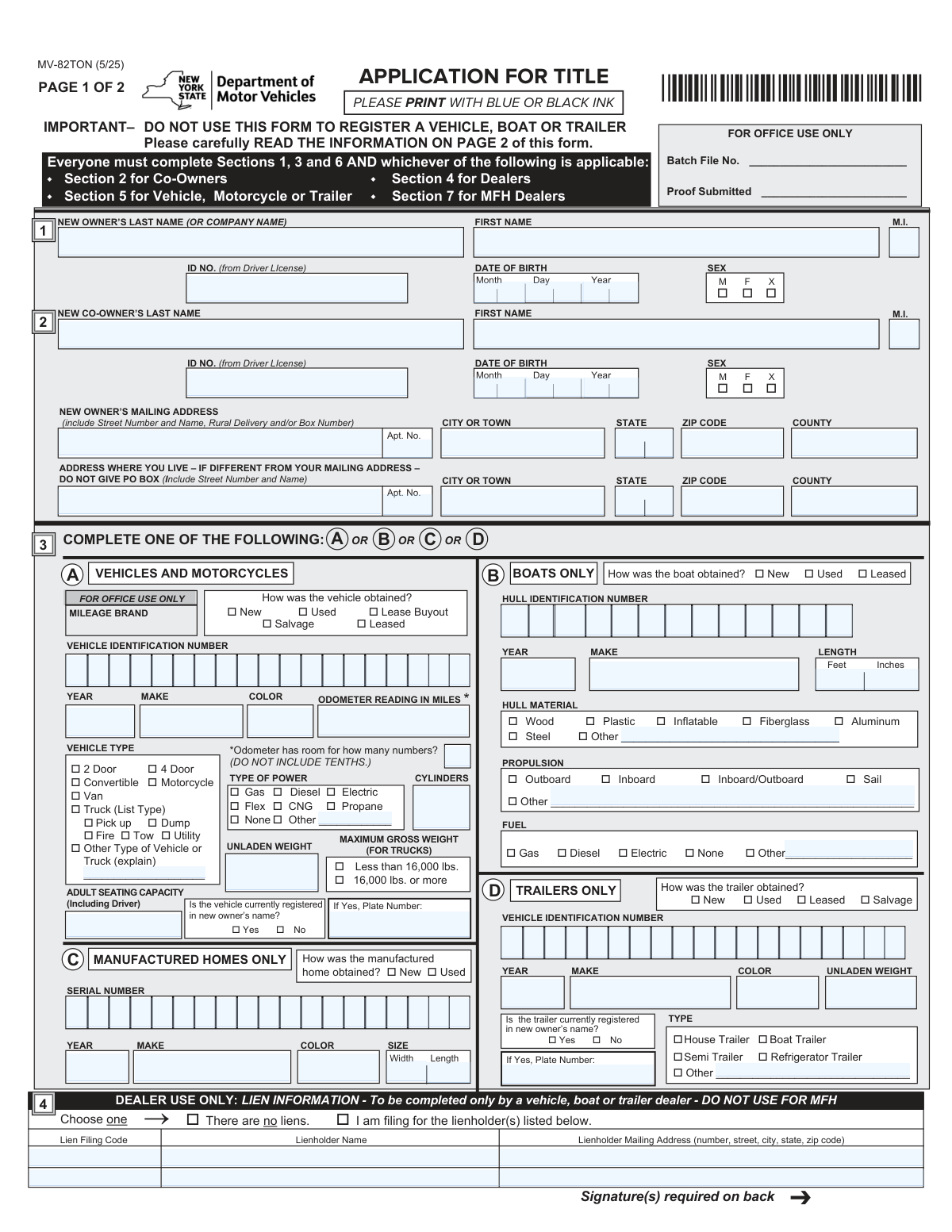
Yes! You can use AI to fill out Form MV-82TON, Application for Title

Form MV-82TON is the official New York State Department of Motor Vehicles (DMV) application used to obtain a Certificate of Title for a vehicle, boat, trailer, or manufactured home. This document serves as legal proof of ownership and is essential for selling, transferring, or registering the property. Today, this form can be filled out quickly and accurately using AI-powered services like Instafill.ai, which can also convert non-fillable PDF versions into interactive fillable forms.
Our AI automatically handles information lookup, data retrieval, formatting, and form filling.
It takes less than a minute to fill out MV-82TON using our AI form filling.
Securely upload your data. Information is encrypted in transit and deleted immediately after the form is filled out.

Form specifications

Form name: Form MV-82TON, Application for Title
Number of pages: 2
Language: English
main-image

Instafill Demo: How to fill out PDF forms in seconds with AI

How to Fill Out MV-82TON Online for Free in 2026

Are you looking to fill out a MV-82TON form online quickly and accurately? Instafill.ai offers the #1 AI-powered PDF filling software of 2026, allowing you to complete your MV-82TON form in just 37 seconds or less.
Follow these steps to fill out your MV-82TON form online using Instafill.ai:
  1. 1 Navigate to Instafill.ai and upload your MV-82TON form or select it from their template library.
  2. 2 Provide your personal information, including your full name, address, date of birth, and driver's license number. Add co-owner details if applicable.
  3. 3 Enter the specific details for the item you are titling, such as the Vehicle Identification Number (VIN) or Hull Identification Number (HIN), year, make, and model.
  4. 4 Complete the relevant section for your property type: vehicle, boat, trailer, or manufactured home, including details like color, weight, and how it was obtained.
  5. 5 If there is a loan on the property, provide the lienholder's information as required in the lien information section.
  6. 6 Review all the information auto-filled by the AI for accuracy, then complete the owner certification and damage disclosure sections.
  7. 7 Download the completed form, sign it, and submit it to the NYS DMV with the required proofs of ownership, fees, and other supporting documents.

Our AI-powered system ensures each field is filled out correctly, reducing errors and saving you time.

Why Choose Instafill.ai for Your Fillable MV-82TON Form?

Speed

Complete your MV-82TON in as little as 37 seconds.

Up-to-Date

Always use the latest 2026 MV-82TON form version.

Cost-effective

No need to hire expensive lawyers.

Accuracy

Our AI performs 10 compliance checks to ensure your form is error-free.

Security

Your personal information is protected with bank-level encryption.

Frequently Asked Questions About Form MV-82TON

The MV-82TON form is an Application for Title used to obtain a New York State Certificate of Title for a vehicle, motorcycle, boat, trailer, or manufactured home. It is important to note that this form is not used for vehicle registration.

Any new owner of a qualifying vehicle, boat, trailer, or manufactured home must complete this form to get a NYS Certificate of Title. This applies whether the item was purchased new, used, as a lease buyout, or acquired as salvage.

You must provide the completed MV-82TON form, proof of ownership (like a title or Manufacturer's Certificate of Origin), proof of your name and date of birth, and proof of sales tax payment. A dealer may also need to provide a Certificate of Sale (form MV-50).

Your mailing address is where the DMV will send your title certificate. If you live at a different physical address (for example, if you use a P.O. Box for mail), you must also complete the residence address section.

Certificates of Title are required for 1973 and newer vehicles, 1973 and newer trailers with an unladen weight of 1,000 lbs or more, and 1987 and newer boats that are at least 14 feet long. Specific rules also apply to manufactured homes.

This section requires you to state if the vehicle was ever damaged so badly that repair costs exceeded 75% of its retail value. If you check 'has been,' the title issued will be branded as 'Rebuilt Salvage: NY'.

A dealer can use Section 4 to file a lien, but owners cannot. The lender must submit a Notice of Lien (form MV-900) and a $5 fee directly to the DMV, which should be sent with your title application to ensure it's recorded promptly.

The title fee is $50 for a vehicle, motorcycle, trailer, or boat, and $125 for a manufactured home. The separate $5 lien filing fee must be paid by the dealer or lienholder, not the owner.

You can bring your application to any DMV office, or you can mail it to the Title Bureau in Albany. Note that applications for boats, manufactured homes, and salvage certificates must be mailed.

Yes, if there is a co-owner listed on the application, both the primary owner and the co-owner are required to sign the owner certification in Section 6.

Yes, services like Instafill.ai use AI to accurately auto-fill form fields, which can save you time and help prevent common errors. This ensures your application is completed correctly before you submit it.

You can use a service like Instafill.ai to complete the form digitally. Simply upload the MV-82TON PDF, and the platform will make it interactive, allowing you to type your information directly into the fields before printing the completed form for signature.

If you have a non-fillable or 'flat' PDF, you can use a tool like Instafill.ai to instantly convert it into an interactive, fillable form. This allows you to easily type your information instead of having to print and fill it out by hand.

Compliance MV-82TON
Validation Checks by Instafill.ai

1
Validates Vehicle Identification Number (VIN) Format
This check ensures the Vehicle Identification Number (VIN), Hull Identification Number (HIN), or Serial Number is entered in the correct format and length (e.g., 17 characters for modern vehicles). This number is the primary unique identifier for the asset. An invalid or missing identifier will prevent the system from locating the asset in national databases, leading to immediate application rejection.
2
Conditional Plate Number Requirement
This validation verifies that if the user selects 'Yes' for 'Is the vehicle currently registered in new owner’s name?', the corresponding 'Plate Number' field must be filled out. This information is crucial for linking the title application to an existing registration record within the DMV system. Failure to provide the plate number when required will delay processing until the correct registration can be manually identified.
3
Co-Owner Information and Signature Completeness
If a co-owner's last name is entered, this check ensures all other required co-owner fields (First Name, DOB, ID Number) and the co-owner's signature in Section 6 are also present. All legal owners must be fully identified and must certify the application. An application with incomplete co-owner details or a missing signature is legally deficient and will be rejected.
4
Lienholder Information Dependency
This check confirms that if the 'I am filing for the lienholder(s) listed below' option is selected, the 'Lienholder Name' and 'Lienholder Mailing Address' fields for the first lienholder are completed. This information is essential for correctly recording the lender's security interest on the Certificate of Title. If this information is missing, the lien cannot be recorded, and the application will be returned to the dealer for correction.
5
Ensures 'Other' Text Fields Are Filled When 'Other' Is Selected
For fields like 'Vehicle Type', 'Type of Power', and 'Hull Material', if the 'Other' option is checked, this validation ensures the corresponding text field providing a description is not empty. This prevents ambiguous data and ensures the asset is categorized correctly for records and fees. An application with 'Other' selected but no explanation will be considered incomplete and rejected.
6
Date of Birth Logical Validity
This check validates that the owner's and co-owner's Date of Birth is a valid, past date and suggests the owner is of legal age to own property (e.g., over 16). It prevents impossible dates like 'February 30' or future dates. An invalid or illogical date of birth will cause the application to be flagged for review or rejected, as legal ownership cannot be established.
7
Damage Disclosure Section Completeness
This validation ensures that for applications involving a vehicle, motorcycle, or trailer, one of the two options in the 'DAMAGE DISCLOSURE' section ('has been' or 'has not been' wrecked) is selected. This disclosure is a mandatory legal requirement for consumer protection and vehicle history reporting. Failure to complete this section will render the application incomplete and cause it to be rejected.
8
Asset Year Eligibility for Titling
Based on the form's instructions, this check verifies the asset's model year meets the state's titling requirements (e.g., 1973+ for vehicles, 1987+ for boats 14ft+). This prevents applications for assets that are legally ineligible for a Certificate of Title. An application for an ineligible year will be automatically rejected.
9
Mutually Exclusive Option Enforcement
This validation ensures that for radio button or checkbox groups where only one selection is logical (e.g., 'How was the vehicle obtained?', 'Maximum Gross Weight'), only one option is selected. Multiple conflicting selections create ambiguity and make the application impossible to process accurately. The form would be returned for clarification.
10
Asset-Specific Section Completion
This check verifies that the applicant has filled out the details for at least one of the primary asset sections: Vehicles, Boats, Trailers, or Manufactured Homes. The application must specify what is being titled. If none of these sections are completed, the application has no subject and will be rejected as fundamentally incomplete.
11
Truck-Specific Gross Weight Requirement
This validation ensures that if the 'Vehicle Type' is identified as a 'Truck' (including Pickup, Dump, etc.), the 'MAXIMUM GROSS WEIGHT' section is completed. This data is critical for determining correct registration fees, road use regulations, and potential commercial status. A truck application missing this information will be considered incomplete and returned.
12
Owner Signature and Date Presence
This is a critical check to confirm that the 'New Owner Sign Name in Full' and 'Date' fields in the Owner Certification section are completed. The owner's signature is a legal attestation to the accuracy of the provided information. An unsigned or undated application is legally invalid and will be immediately rejected without further processing.
13
Manufactured Home Dealer Certification Logic
This check validates that if the application is for a 'New' 'Manufactured Home', the 'MANUFACTURED HOME DEALER CERTIFICATION' in Section 7 is fully completed, including the dealer's signature and NYS Sales Tax Number. This certification serves as proof of sales tax clearance, which is required for new manufactured homes. Without it, the application will be rejected for lacking required tax documentation.
14
Address Consistency Check
This validation checks that if the 'ADDRESS WHERE YOU LIVE – IF DIFFERENT' section is filled out, the address provided is not identical to the 'NEW OWNER’S MAILING ADDRESS'. This rule enforces the intended use of the fields and prevents redundant data entry. While not a critical failure, it can flag the form for manual review to ensure the applicant understood the instructions.

Common Mistakes in Completing MV-82TON

Entering an Incorrect VIN, HIN, or Serial Number

Applicants often make transcription errors when entering the long Vehicle Identification Number (VIN), Hull Identification Number (HIN), or Serial Number due to their length and complexity. This is a critical error, as this number uniquely identifies the asset, and a mistake will lead to the application being rejected or an incorrect title being issued. To avoid this, always double-check the number character-by-character against the proof of ownership document; AI-powered tools like Instafill.ai can also help by accurately extracting this number from a photo of your documents.

Failing to Complete the Damage Disclosure Section

The Damage Disclosure section is mandatory for vehicles, motorcycles, and trailers but is frequently overlooked by applicants. Failing to check either the 'has been' or 'has not been' wrecked box results in an incomplete application and immediate rejection by the DMV. Applicants must carefully read the 75% retail value rule and certify the vehicle's damage history to avoid processing delays and ensure the title is correctly branded if necessary.

Missing a Required Co-Owner Signature

When a vehicle is being titled with a co-owner, both individuals must sign and date the certification in Section 6. It is common for the second signature to be forgotten, especially if the co-owner is not present when the form is filled out. The form explicitly states 'BOTH signatures are required,' and missing one will cause the application to be returned, delaying the entire titling process until a fully signed form is submitted.

Listing a P.O. Box as a Residence Address

The form clearly distinguishes between a mailing address and a physical residence address, for which it states 'DO NOT GIVE PO BOX'. Applicants sometimes mistakenly enter their P.O. Box in the 'Address Where You Live' section, which is explicitly forbidden and will cause the form to be rejected. You must provide a physical street address for your residence if it is different from your mailing address to ensure compliance.

Including Tenths of a Mile in the Odometer Reading

The form specifically instructs applicants to enter the odometer reading 'IN MILES' and notes 'DO NOT INCLUDE TENTHS.' Many people automatically write down the full number displayed on the odometer, including the final digit representing tenths, which leads to an incorrectly formatted entry. This can cause data entry issues and may require correction, so be sure to only enter the whole number of miles as requested.

Applicant Completing the 'Dealer Use Only' Lien Section

Section 4 for lien information is clearly marked 'DEALER USE ONLY,' yet owners sometimes attempt to fill it out themselves when they have a loan on the vehicle. This section is reserved for dealers filing a lien at the time of sale; lenders must use a separate process (Form MV-900). Incorrectly filling this section can complicate the lien recording process and delay the issuance of the title.

Providing an Incomplete Vehicle or Asset Description

When an asset's characteristic is not a standard checkbox option (e.g., 'Other Type of Vehicle,' 'Other' Hull Material), applicants must provide a written explanation. It is common for people to check 'Other' but forget to write in the specific type, leaving the description incomplete. This ambiguity requires clarification from the DMV, delaying the application until the missing information is supplied.

Mismatching Name with Legal Identification Documents

Applicants may use a nickname or an abbreviated version of their name instead of the full legal name shown on their driver's license or other proof of identity. Since the DMV must verify the owner's identity against submitted proofs, any discrepancy will cause the application to be flagged for rejection. Always enter your full first name, middle initial, and last name exactly as it appears on your legal ID documents.

Confusing the Title Application with Vehicle Registration

This form (MV-82TON) is solely for applying for a Certificate of Title, which proves ownership, not for registering the vehicle to legally operate it on public roads. The form explicitly states, 'DO NOT USE THIS FORM TO REGISTER A VEHICLE.' Applicants sometimes submit this form expecting to receive license plates, leading to confusion and delays in getting their vehicle legally on the road.

Illegible Handwriting or Using the Wrong Ink

This form is often printed and filled out by hand, leading to entries that are difficult for DMV staff to read. The instructions specify using blue or black ink, but people may use other colors or have unclear handwriting, causing data entry errors that can result in an incorrect title or rejection. If the form is a non-fillable PDF, tools like Instafill.ai can convert it into a fillable version, allowing you to type your answers for perfect clarity.
Saved over 80 hours a year

“I was never sure if my IRS forms like W-9 were filled correctly. Now, I can complete the forms accurately without any external help.”

Kevin Martin Green

Your data stays secure with advanced protection from Instafill and our subprocessors

Robust compliance program

Transparent business model

You’re not the product. You always know where your data is and what it is processed for.

ISO 27001, HIPAA, and GDPR

Our subprocesses adhere to multiple compliance standards, including but not limited to ISO 27001, HIPAA, and GDPR.

Security & privacy by design

We consider security and privacy from the initial design phase of any new service or functionality. It’s not an afterthought, it’s built-in, including support for two-factor authentication (2FA) to further protect your account.

Fill out MV-82TON with Instafill.ai

Worried about filling PDFs wrong? Instafill securely fills form-mv-82ton-application-for-title forms, ensuring each field is accurate.