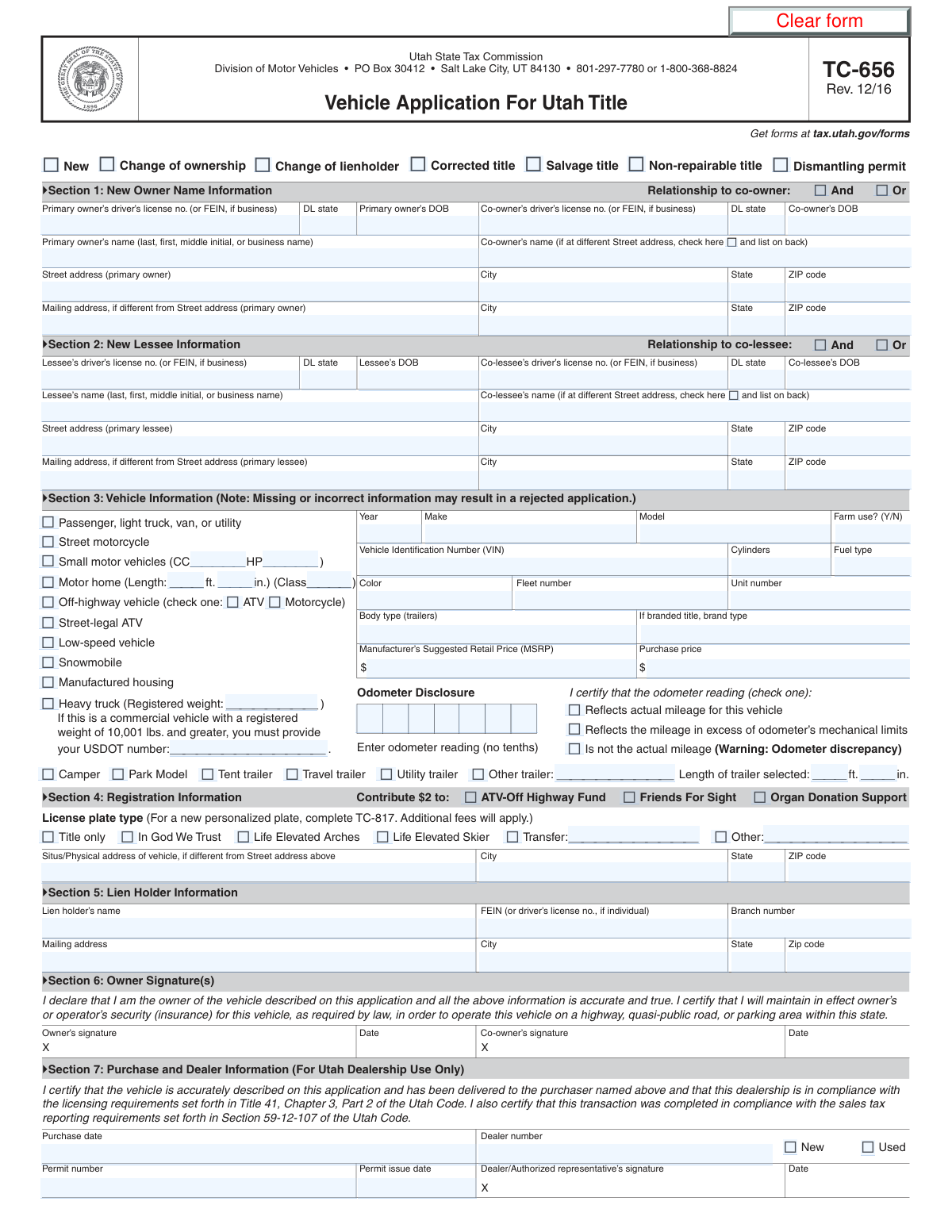
Yes! You can use AI to fill out Form TC-656, Utah Title Application
Form TC-656 is the application used in the state of Utah to request a title and/or registration for a vehicle, including cars, trucks, motorcycles, and trailers. This document is essential for establishing legal ownership, recording lienholder information, and legally operating a vehicle within the state. Completing all sections accurately, from owner details to vehicle specifications and odometer readings, is critical for the Utah Division of Motor Vehicles (DMV) to process the request. Today, this form can be filled out quickly and accurately using AI-powered services like Instafill.ai, which can also convert non-fillable PDF versions into interactive fillable forms.
TC-656 is part of the
title application forms category on Instafill.
Our AI automatically handles information lookup, data retrieval, formatting, and form filling.
It takes less than a minute to fill out TC-656 using our AI form filling.
Securely upload your data. Information is encrypted in transit and deleted immediately after the form is filled out.
Form specifications
| Form name: | Form TC-656, Utah Title Application |
| Number of fields: | 127 |
| Number of pages: | 1 |
| Language: | English |
Instafill Demo: How to fill out PDF forms in seconds with AI
How to Fill Out TC-656 Online for Free in 2026
Are you looking to fill out a TC-656 form online quickly and accurately? Instafill.ai offers the #1 AI-powered PDF filling software of 2026, allowing you to complete your TC-656 form in just 37 seconds or less.
Follow these steps to fill out your TC-656 form online using Instafill.ai:
- 1 Navigate to Instafill.ai and upload your Form TC-656, or select it from the platform's library of official documents.
- 2 Select the correct 'Application Type' at the top of the form, such as 'New', 'Change of ownership', or 'Salvage title'.
- 3 Enter the complete information for the primary owner, co-owner, or lessee, including full names, addresses, and driver's license numbers.
- 4 Provide detailed information about the vehicle, including its type, year, make, model, VIN, color, and fuel type.
- 5 Accurately record the odometer reading and check the appropriate certification box to declare if the mileage is actual, in excess of mechanical limits, or not actual.
- 6 Specify the desired license plate type, provide information for any lienholders, and complete the dealer purchase section if applicable.
- 7 Review all AI-populated fields for accuracy, make any necessary corrections, and then sign and date the application before submitting it to the Utah DMV.
Our AI-powered system ensures each field is filled out correctly, reducing errors and saving you time.
Why Choose Instafill.ai for Your Fillable TC-656 Form?
Speed
Complete your TC-656 in as little as 37 seconds.
Up-to-Date
Always use the latest 2026 TC-656 form version.
Cost-effective
No need to hire expensive lawyers.
Accuracy
Our AI performs 10 compliance checks to ensure your form is error-free.
Security
Your personal information is protected with bank-level encryption.
Frequently Asked Questions About Form TC-656
This form is an application for a vehicle title and registration. It is used for various transactions, including applying for a new title, changing ownership, updating lienholder information, or obtaining a salvage or corrected title.
Any individual or business buying a vehicle, changing ownership details, moving to the state with a vehicle, or needing to make official corrections to their vehicle's title must complete this form.
Choosing 'And' requires both owners to sign off on future transactions, like selling the vehicle. Selecting 'Or' allows either owner to act independently, meaning one person can sell or transfer the title without the other's signature.
FEIN stands for Federal Employer Identification Number. You should provide this number in place of a driver's license number if the vehicle is owned by a business, trust, or other organization rather than an individual.
No, you only need to complete the 'Mailing Address' fields if you receive mail at a location different from your primary residential address. If they are the same, you can leave this section blank.
Enter the vehicle's current mileage and check the box that accurately describes it. Choose 'actual mileage' if the reading is correct, 'in excess of odometer's mechanical limits' if it has rolled over, or 'is not the actual mileage' if you know the reading is incorrect.
A branded title indicates a vehicle has a history of significant damage, such as being salvaged or non-repairable. You only need to fill out the 'Brand Type' field if you are applying for a 'Salvage title', 'Non-repairable title', or 'Dismantling permit'.
You should have your driver's license, the vehicle's make, model, year, and VIN, the current odometer reading, and any lienholder or dealership purchase information. Having the previous title or registration can also be helpful.
For heavy trucks with a registered weight of 10,001 lbs or more, you must provide the vehicle's registered weight and its USDOT number in the designated fields.
Select 'Title only' if you are applying to get a title for the vehicle but do not need to register it or get license plates at this time. This is often used for vehicles that are not being driven on public roads.
If you are leasing the vehicle, you are the lessee and should complete the 'Lessee Information' section. The legal owner, which is typically the leasing company, should be listed in the 'Primary Owner Information' section.
Yes, services like Instafill.ai use AI to auto-fill form fields accurately and save time. This can help you complete complex forms more quickly and with fewer errors.
You can upload the form to the Instafill.ai website, where it will become an interactive document. You can then type your information directly into the fields, add signatures, and download the completed PDF.
If you have a non-fillable or 'flat' PDF, you can use a service like Instafill.ai. Their platform can convert it into an interactive, fillable form that you can easily complete on your computer or mobile device.
Compliance TC-656
Validation Checks by Instafill.ai
1
Exclusive Application Type Selection
This check ensures that only one checkbox from the 'Application Type' section (e.g., New, Change of ownership, Salvage title) is selected. It is logically impossible for an application to be for a new title and a salvage title at the same time. If multiple types are selected, the form submission should be rejected with an error asking the user to select only one application type.
2
VIN Format and Validity
This validation verifies that the Vehicle Identification Number (VIN) is exactly 17 characters long and contains only valid alphanumeric characters (excluding I, O, and Q). A valid VIN is critical for uniquely identifying a vehicle for legal and historical purposes. If the VIN is malformed, the system cannot process the application, and the user must correct the entry.
3
Co-owner Data Completeness
This check ensures that if the 'Co-owner's Name' field is filled, then the 'Co-owner's Driver's License Number or FEIN', 'Co-owner's DL State', and 'Co-owner's Date of Birth' fields are also completed. Incomplete co-owner information can lead to legal and registration issues. Failure to provide all required details for a listed co-owner will prevent form submission until the missing information is supplied.
4
Co-owner Relationship Prerequisite
This validation confirms that if a 'Relationship to Co-owner' ('And' or 'Or') is selected, the 'Co-owner's Name' field must not be empty. Defining a relationship is meaningless without a co-owner being identified. If this check fails, an error should prompt the user to either enter the co-owner's name or deselect the relationship status.
5
Date of Birth Logical Check
This check validates that the 'Primary Owner Date of Birth' and 'Co-owner's Date of Birth' are valid past dates and that the calculated age is within a legally acceptable range for vehicle ownership (e.g., 16 years or older). This prevents typographical errors and ensures the applicant is legally eligible to own a vehicle. An invalid or future date will trigger an error requiring correction.
6
Heavy Truck Conditional Fields
This validation ensures that if the 'Heavy truck' vehicle type is selected, the 'Registered Weight' and 'USDOT Number' fields are mandatory. These fields are required by regulation for commercial heavy trucks. If the vehicle is marked as a heavy truck but these details are missing, the submission will be blocked until the required information is provided.
7
Branded Title Justification
This check verifies that the 'Brand Type' field is filled if and only if the application type is 'Salvage title', 'Non-repairable title', or 'Dismantling permit'. This ensures that the specific reason for the brand is documented as required by law. An error will be shown if 'Brand Type' is filled without a corresponding application type, or if a branded application type is selected without a 'Brand Type' specified.
8
Exclusive Odometer Certification
This validation ensures that exactly one of the three odometer certification checkboxes ('Reflects actual mileage', 'Reflects the mileage in excess of odometer's mechanical limits', 'Is not the actual mileage') is selected. These options are mutually exclusive, and selecting more than one or none creates ambiguity. The form should not be submittable until the user makes a single, clear declaration about the odometer status.
9
Purchase Date and Permit Date Logic
This check validates that the 'Purchase Date' and 'Permit Issue Date' are not in the future. Furthermore, the 'Purchase Date' should be on or after the vehicle's model 'Year'. This prevents impossible dates from being entered and maintains a logical timeline for the vehicle's history, flagging potential data entry errors for correction.
10
State Abbreviation Format
This validation ensures that all fields for a state (e.g., 'Primary Owner DL State', 'State', 'Mailing State') contain a valid two-letter postal abbreviation. This is crucial for standardizing address information for mailings and record-keeping. Any entry that is not a recognized two-letter state code will be flagged as an error.
11
Conditional 'Other' Field Requirement
This check ensures that if a user selects an 'Other' checkbox (e.g., 'Other trailer' or 'Other License Plate Type'), the corresponding text field to specify the 'Other' type must be filled. This prevents submissions where a generic category is chosen without the necessary specific details. If the checkbox is ticked but the text field is empty, an error will prompt the user for the required information.
12
License Plate Transfer Details
This validation requires the 'Transfer License Plate Count' field to be filled with a number greater than zero if the 'Transfer' checkbox under 'License Plate Type' is selected. This ensures that when a user indicates they are transferring a plate, they also provide the required history for that plate. The form will be invalid if 'Transfer' is checked but the count is missing or zero.
13
Small Motor Vehicle Specification
This check ensures that if the 'Small motor vehicles' checkbox is selected, the 'Engine Displacement (CC)' and 'Horsepower (HP)' fields must be populated. These technical specifications are essential for the correct classification and registration of this specific vehicle type. The submission will be blocked if these mandatory details are missing for a small motor vehicle.
14
Owner vs. Lessee Data Exclusivity
This validation ensures that information for both the 'Primary Owner' section and the 'Lessee Information' section are not filled out simultaneously. A vehicle is either owned or leased, so providing details for both is a logical contradiction. If data is detected in both sections, the system should prompt the user to clear one section to proceed.
Common Mistakes in Completing TC-656
Applicants often misunderstand the legal difference between 'And' and 'Or' for co-ownership. Selecting 'And' requires both owners to sign for any future transactions (like selling the vehicle), while 'Or' allows either owner to act independently. This mistake can lead to significant legal complications and disputes when trying to sell or transfer the title later. To avoid this, carefully discuss and agree upon the ownership structure with the co-owner before filling out the form to ensure it reflects your legal intent.
After entering the odometer mileage, applicants must check one of three certification boxes: 'actual mileage,' 'in excess of mechanical limits,' or 'not the actual mileage.' Forgetting to make this selection is a very common error that invalidates the odometer disclosure statement, a federal requirement. This will cause immediate rejection of the application. To prevent this, always complete this section by carefully reading your purchase documents and selecting the appropriate certification box.
The 17-character VIN is the most critical identifier on the form, but typos are frequent, such as mistaking the letter 'O' for the number '0'. An incorrect VIN will result in a title for the wrong vehicle or an outright rejection, causing significant delays. Always double-check the VIN on the form against the VIN on the vehicle itself and on the bill of sale. AI-powered form fillers like Instafill.ai can help validate the VIN's format and character count to reduce errors.
If the vehicle is financed, applicants often forget to fill out the lienholder section completely or provide inaccurate details for the bank or credit union. This prevents the lien from being properly recorded on the title, which is a requirement of the lender and will cause the application to be rejected. To avoid this, have your loan agreement handy and carefully transcribe the lender's full name, address, and FEIN or driver's license number.
The form requires additional details for certain vehicle types, such as length for a motor home or trailer, or the USDOT number for a heavy truck. People often check the vehicle type box but forget to fill in these dependent fields. This omission results in an incomplete application that will be rejected, delaying the titling process. Always review the section for your chosen vehicle type to ensure all required specifications are provided.
The form begins with several checkboxes for the application's purpose (e.g., New, Change of ownership, Corrected title). Applicants in a hurry may check the wrong box, such as 'New' for a simple ownership transfer on a used vehicle. This mistake misdirects the entire application process, leading to rejection and requiring the applicant to start over. Carefully read the description for each application type and select the one that precisely matches your transaction.
Applicants sometimes enter a P.O. Box in the primary street address field, which is not allowed, or they forget to fill out the mailing address section when they don't receive mail at their physical residence. This can lead to important documents like the title and registration being sent to the wrong place and returned as undeliverable. Ensure your physical address is listed as the primary street address and use the mailing address section only if you receive mail elsewhere.
The form asks for a Driver's License Number for an individual or a Federal Employer Identification Number (FEIN) for a business. People sometimes enter a social security number by mistake or leave the field blank when the owner is a business. This leads to a failure in identity verification and application rejection. Always use the correct identifier: a valid driver's license number for a person or the 9-digit FEIN for a company.
The form includes 'Other' checkboxes for fields like trailer type and license plate type, which require the applicant to write in the specific details. A common mistake is to check the 'Other' box but leave the corresponding text field blank. This creates ambiguity and makes the application incomplete, leading to processing delays. If your choice isn't listed, always check 'Other' and then clearly write in the required information in the space provided.
This form has many fields that are only required if another box is checked, such as 'Brand Type' if applying for a 'Salvage title'. Applicants often miss these conditional requirements, leading to an incomplete submission. This causes delays as the processing agency must request the missing information. To avoid this, carefully review all sections related to your selections. Using a tool like Instafill.ai can help by automatically highlighting required fields based on your previous answers, even on flat PDFs it makes fillable.
Saved over 80 hours a year
“I was never sure if my IRS forms like W-9 were filled correctly. Now, I can complete the forms accurately without any external help.”
Kevin Martin Green
Your data stays secure with advanced protection from Instafill and our subprocessors

Robust compliance program
Transparent business model
You’re not the product. You always know where your data is and what it is processed for.
ISO 27001, HIPAA, and GDPR
Our subprocesses adhere to multiple compliance standards, including but not limited to ISO 27001, HIPAA, and GDPR.
Security & privacy by design
We consider security and privacy from the initial design phase of any new service or functionality. It’s not an afterthought, it’s built-in, including support for two-factor authentication (2FA) to further protect your account.
Fill out TC-656 with Instafill.ai
Worried about filling PDFs wrong? Instafill securely fills form-tc-656-utah-title-application forms, ensuring each field is accurate.