Yes! You can use AI to fill out Form MV2119, Replacement Title Application
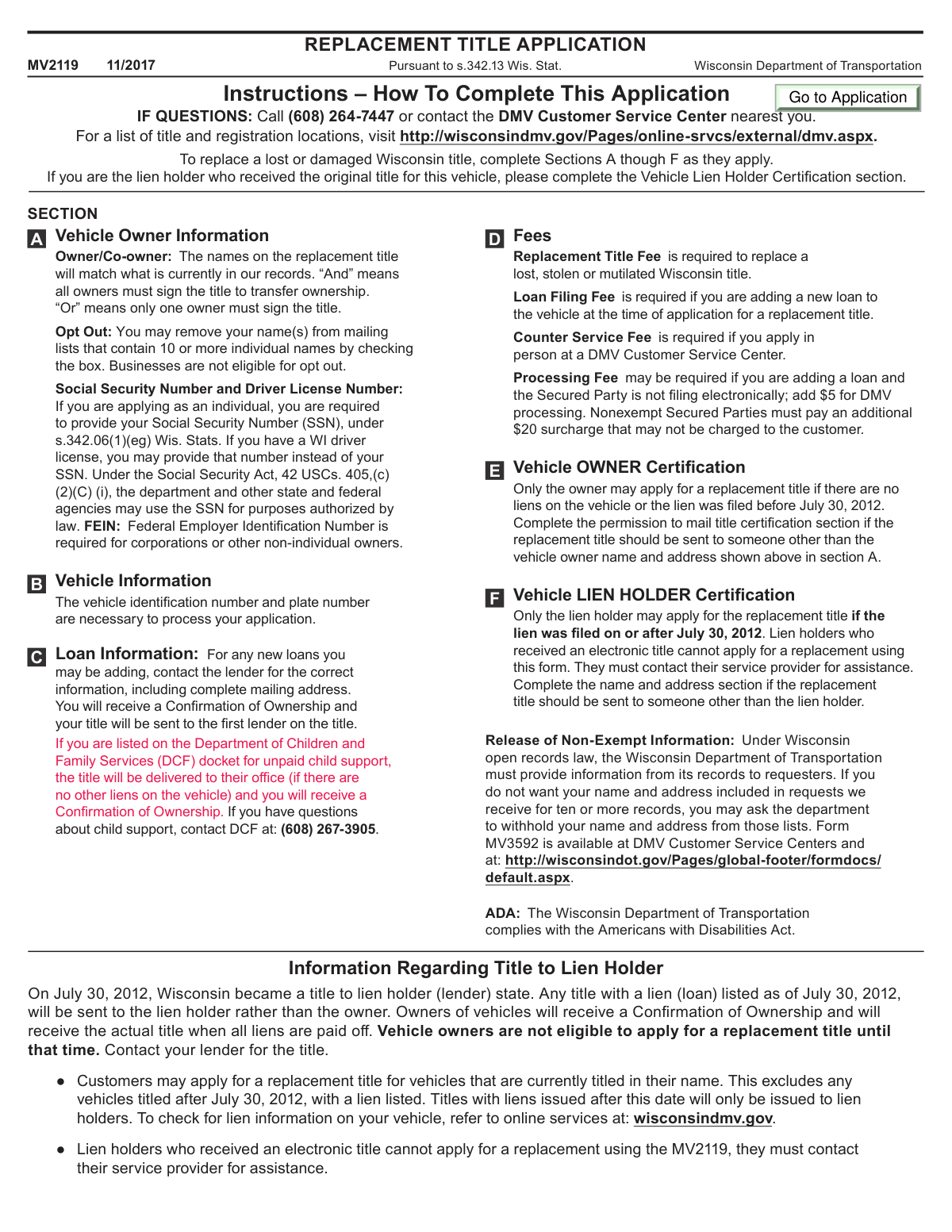
Form MV2119 is an official document from the Wisconsin Department of Transportation used by vehicle owners or lien holders to apply for a replacement for a lost, stolen, or damaged vehicle title. It is crucial for re-establishing legal proof of ownership, which is necessary for selling a vehicle or transferring ownership. Today, this form can be filled out quickly and accurately using AI-powered services like Instafill.ai, which can also convert non-fillable PDF versions into interactive fillable forms.
MV2119 is part of the
title application forms category on Instafill.
Our AI automatically handles information lookup, data retrieval, formatting, and form filling.
It takes less than a minute to fill out MV2119 using our AI form filling.
Securely upload your data. Information is encrypted in transit and deleted immediately after the form is filled out.
Form specifications
| Form name: | Form MV2119, Replacement Title Application |
| Number of fields: | 71 |
| Number of pages: | 2 |
| Filled form examples: | Form MV2119 Examples |
| Language: | English |
More forms in Title application forms
Instafill Demo: How to fill out PDF forms in seconds with AI
How to Fill Out MV2119 Online for Free in 2026
Are you looking to fill out a MV2119 form online quickly and accurately? Instafill.ai offers the #1 AI-powered PDF filling software of 2026, allowing you to complete your MV2119 form in just 37 seconds or less.
Follow these steps to fill out your MV2119 form online using Instafill.ai:
- 1 Navigate to Instafill.ai and upload your Form MV2119 or select it from their template library.
- 2 Use the AI assistant to accurately fill in Section A with vehicle owner and co-owner information, including names, addresses, and SSN or Driver License numbers.
- 3 Provide the complete vehicle details in Section B, such as the Vehicle Identification Number (VIN), year, make, and license plate number.
- 4 If you are adding a new loan, complete the lender's information in Section C.
- 5 Calculate the total fees in Section D, including the replacement title fee and any applicable loan filing or counter service fees.
- 6 Certify the application by having the vehicle owner sign Section E or the lien holder sign Section F, depending on the vehicle's lien status.
- 7 Review the entire form for accuracy, then download the completed document to print and mail with the required payment to the Wisconsin DOT.
Our AI-powered system ensures each field is filled out correctly, reducing errors and saving you time.
Why Choose Instafill.ai for Your Fillable MV2119 Form?
Speed
Complete your MV2119 in as little as 37 seconds.
Up-to-Date
Always use the latest 2026 MV2119 form version.
Cost-effective
No need to hire expensive lawyers.
Accuracy
Our AI performs 10 compliance checks to ensure your form is error-free.
Security
Your personal information is protected with bank-level encryption.
Frequently Asked Questions About Form MV2119
This form is used to apply for a replacement for a Wisconsin vehicle title that has been lost, stolen, or damaged. It is not intended for transferring vehicle ownership.
You can apply for a replacement title only if your vehicle has no outstanding loan (lien) or if the lien was filed before July 30, 2012. If your loan was established on or after that date, your lender holds the title and must be the one to apply for the replacement.
In Wisconsin, if your vehicle has a loan on it from July 30, 2012, or later, the law requires the title to be sent directly to the lien holder (your lender). You will receive the actual title from them once the loan is fully paid.
The standard fee for a replacement title is $20. There is an additional $10 fee if you are adding a new loan, and a $5 counter service fee if you apply in person at a DMV Customer Service Center.
In Section A, you must provide the owner's full name, address, and either a Social Security Number (SSN) or a Wisconsin Driver License number. If the vehicle is owned by a business, a Federal Employer Identification Number (FEIN) is required.
Mail the completed form and a check payable to 'Registration Fee Trust' to: WI Dept. of Transportation, PO Box 7949, Madison WI 53707-7949. You can also apply in person at a DMV Customer Service Center.
No, lien holders who have an electronic title cannot use the MV2119 form. They must contact their electronic title service provider for assistance with replacements.
Yes, you can. Section E (for owners) and Section F (for lien holders) include a 'Permission to Mail Title Certification' area where you can enter a different name and address for mailing the title.
Choosing 'OR' means that only one of the owners needs to sign the title to sell the vehicle in the future. Choosing 'AND' means that all listed owners must sign to transfer ownership.
Yes, services like Instafill.ai use AI to help you accurately auto-fill form fields, which saves time and reduces the chance of errors.
Simply upload the MV2119 form to the Instafill.ai platform. The AI will make the document interactive, allowing you to type your information directly into the fields before downloading the completed PDF for printing and submission.
You can use a service like Instafill.ai, which can convert flat, non-fillable PDFs into interactive forms. Just upload the document, and the tool will enable you to fill it out electronically.
Compliance MV2119
Validation Checks by Instafill.ai
1
Validates Vehicle Identification Number (VIN) Format and Length
This check ensures the Vehicle Identification Number (VIN) entered in Section B consists of exactly 17 alphanumeric characters. The 17-character VIN is a global standard essential for uniquely identifying a specific vehicle in state and national databases. If the VIN is shorter, longer, or contains invalid characters, the system cannot accurately locate the vehicle record, leading to immediate application rejection.
2
Ensures Mandatory Owner Identification is Provided
This validation verifies that for an individual owner, either a Social Security Number (SSN) or a Driver License Number is provided in Section A. If the owner is a business, a Federal Employer Identification Number (FEIN) must be present. This information is legally required for identity verification and to link the vehicle to the correct entity. An application missing one of these mandatory identifiers will be considered incomplete and rejected.
3
Verifies Applicant Eligibility Based on Lien Status and Date
This check cross-references the vehicle's record to determine if a lien exists and when it was filed. Per Wisconsin law effective July 30, 2012, only the lien holder may apply for a replacement title if the lien was filed on or after this date (requiring Section F completion). If there is no lien or it predates this date, the owner must apply (requiring Section E completion). This validation prevents the wrong party from applying, which would result in an automatic denial of the application.
4
Ensures Only One Certification Section (Owner or Lien Holder) is Signed
This validation confirms that either Section E (Vehicle OWNER Certification) or Section F (Vehicle LIEN HOLDER Certification) is completed and signed, but not both. The applicant is either the owner or the lien holder, and completing both sections creates a logical contradiction regarding the applicant's identity and authority. An application with both sections signed will be flagged for manual review or rejected due to ambiguity.
5
Validates Accuracy of Total Fee Calculation
This check verifies that the 'Fee Total' in Section D correctly sums all applicable fees. It confirms the base $20 Replacement Title Fee is included, adds the $10 Loan Filing Fee if Section C is filled out, and includes the Counter Service Fee if applicable. This ensures the applicant submits the correct payment, preventing processing delays or rejections due to incorrect or insufficient funds.
6
Checks for Complete Information When Adding a New Lien
If Section C (Loan Information) is used to add a new lien, this check ensures all required fields are completed, including the lender's full name, complete mailing address, and Secured Party Number. Incomplete lender information will prevent the new lien from being properly recorded on the vehicle's title. This failure could lead to significant legal and financial complications for both the vehicle owner and the lending institution.
7
Validates Signature Date Format and Plausibility
This check ensures that the date provided next to the signature in Section E or F is in a valid MM/DD/YYYY format and represents a real, non-future date. A missing, improperly formatted, or future date can invalidate the legal certification of the application. This validation is important for maintaining the integrity of the sworn statement, and failure will result in the application being returned for correction.
8
Excludes Applications from Lien Holders with Electronic Titles
This validation checks against DMV records to confirm that the applicant is not a lien holder who received an electronic title for the vehicle. The form instructions explicitly state that such lien holders cannot use the MV2119 form and must use their service provider. This check prevents ineligible applications from entering the processing queue, saving time for both the applicant and the DMV.
9
Requires 'AND' or 'OR' Selection for Co-owned Vehicles
If a co-owner's name is entered in Section A, this check ensures that either the 'AND' or 'OR' checkbox is selected. This designation is legally critical as it defines whether one ('OR') or both ('AND') owners must sign to transfer ownership in the future. An application with a co-owner listed but missing this designation is incomplete and will be rejected pending correction.
10
Validates 'Opt Out' Eligibility for Individuals Only
This check verifies that the 'Opt Out' checkbox in Section A is only selected if the owner is an individual (identified by SSN or Driver License #). The form instructions state that businesses (identified by FEIN) are not eligible for this privacy option. This validation enforces the rule and ensures data privacy laws regarding open records requests are applied correctly.
11
Confirms Presence of Required Signature
This validation verifies that the appropriate signature field in either Section E (Owner) or Section F (Lien Holder) has been signed. A signature legally certifies that the information provided is true and correct, making it a non-negotiable requirement for the application. An unsigned application is legally invalid and will be immediately rejected without further processing.
12
Ensures Vehicle Location Municipality Type is Specified
In Section B, this check validates that one of the 'City,' 'Village,' or 'Town' checkboxes is selected in addition to the name of the municipality where the vehicle is kept. This information is used for various administrative purposes, potentially including tax allocation. An incomplete location specification will cause the application to be flagged as incomplete and returned for clarification.
Common Mistakes in Completing MV2119
The most common error is failing to determine who is eligible to apply. Per Wisconsin law, if a lien was filed on or after July 30, 2012, only the lien holder can apply for a replacement title. Owners often apply incorrectly, leading to automatic rejection and significant delays. Before filling out the form, use the Wisconsin DMV website to check your vehicle's lien information to confirm who must submit the application.
Manually typing the 17-character VIN in Section B is highly prone to error, such as transposing digits or confusing similar characters like 'O' and '0' or 'I' and '1'. An incorrect VIN will cause the system to fail to find the vehicle record, resulting in the application being returned. To avoid this, carefully double-check the VIN against your registration documents. AI-powered tools like Instafill.ai can help prevent this by validating the VIN's format and checksum digit during entry.
Applicants frequently miscalculate the total fees due in Section D by either omitting a required fee or adding an unnecessary one. For example, people often forget to include the $10 Loan Filing Fee when adding a new lien or the $5 Counter Service Fee when applying in person. An incorrect payment amount will cause the application to be sent back, delaying the process until the correct payment is received.
Forgetting to sign the application in Section E or F is a simple but frequent mistake that invalidates the entire form. Furthermore, if the vehicle is co-owned with an 'AND' designation, both owners must sign, and failing to secure the second signature will lead to rejection. Always review the form for all required signatures before mailing, and confirm your vehicle's co-owner status to ensure the correct parties sign.
Applicants sometimes mistakenly use this form (MV2119) when they are actually selling a vehicle and need to transfer the title to a new owner. This form is strictly for replacing a lost, stolen, or damaged title for the current owner. Using the wrong form results in an automatic rejection, as transferring ownership requires the specific 'Title/License Plate Application' (MV1).
In Section A, applicants often leave the Social Security Number, Driver License Number, or FEIN field blank due to oversight or privacy concerns. However, Wisconsin law requires one of these identifiers for individual and business applicants to verify identity. An application without this mandatory information is considered incomplete and will not be processed.
People often incorrectly fill out Section C, 'Loan Information,' for a loan that is already on the title. This section is exclusively for adding a *new* lien to the vehicle at the time of the replacement application. This mistake can cause confusion, lead to an unnecessary $10 fee, and potentially create incorrect records for your vehicle title.
The instructions clearly state that lien holders who have an electronic title cannot use this paper form (MV2119) to request a replacement. Despite this, applications are often submitted incorrectly by lending institutions unfamiliar with the rule. This results in a rejected application, and the lien holder must instead contact their electronic title service provider, wasting time and resources.
When mailing the application, many people make the check payable to a generic name like 'Wisconsin DMV' instead of the required 'Registration Fee Trust'. This specific instruction is located in the 'Mail the application' box but is often overlooked. An incorrectly written check can be rejected by the processing department, causing the entire application to be returned for correction.
If the replacement title needs to be sent to an address different from the owner's address in Section A (e.g., to a dealership or a family member), the applicant must complete the 'Permission to Mail Title Certification' section. Applicants often overlook this section, and as a result, the title is sent to the owner's primary address by default. This can cause significant delays if the owner is not there to receive it or needs it delivered elsewhere.
Since this form is often a non-fillable PDF, people must print and fill it out by hand, which can lead to illegible handwriting. Using non-black or blue ink, or leaving fields like 'Vehicle is kept in County' incomplete, can cause the application to be rejected. To avoid this, write clearly and review every field for completeness. Using a tool like Instafill.ai can convert the form into a fillable version, ensuring all entries are typed, legible, and properly formatted.
Saved over 80 hours a year
“I was never sure if my IRS forms like W-9 were filled correctly. Now, I can complete the forms accurately without any external help.”
Kevin Martin Green
Your data stays secure with advanced protection from Instafill and our subprocessors
Robust compliance program
Transparent business model
You’re not the product. You always know where your data is and what it is processed for.
ISO 27001, HIPAA, and GDPR
Our subprocesses adhere to multiple compliance standards, including but not limited to ISO 27001, HIPAA, and GDPR.
Security & privacy by design
We consider security and privacy from the initial design phase of any new service or functionality. It’s not an afterthought, it’s built-in, including support for two-factor authentication (2FA) to further protect your account.
Fill out MV2119 with Instafill.ai
Worried about filling PDFs wrong? Instafill securely fills form-mv2119-replacement-title-application forms, ensuring each field is accurate.