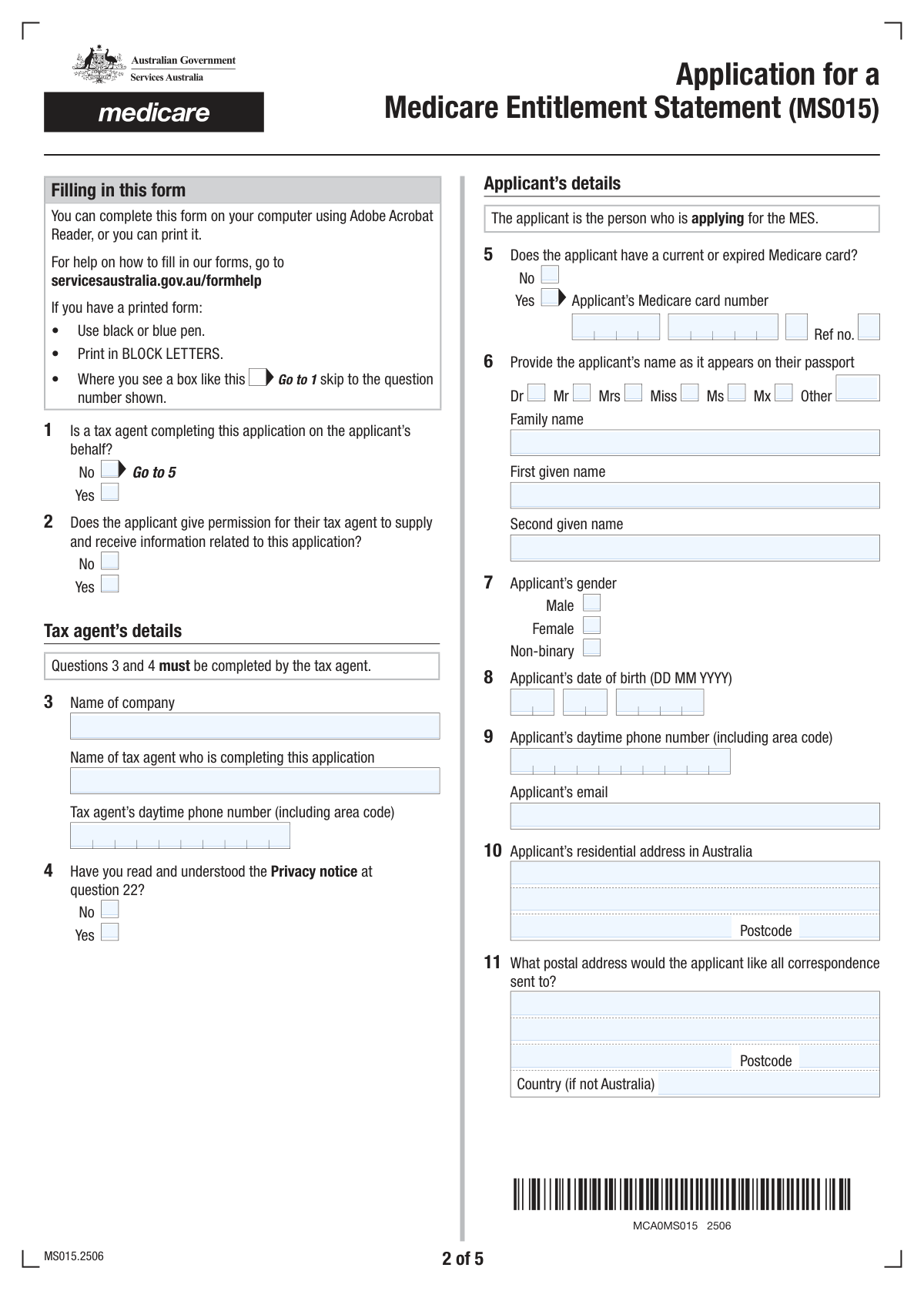
Yes! You can use AI to fill out Application for a Medicare Entitlement Statement (MS015)

Form MS015, the Application for a Medicare Entitlement Statement, is a document used by individuals in Australia who are not eligible for Medicare benefits. This statement is required by the Australian Taxation Office (ATO) to claim an exemption from paying the Medicare levy for a specific financial year. It's crucial for temporary residents, certain visa holders, and others who don't qualify for Australia's public healthcare system but need to prove it for tax purposes. Today, this form can be filled out quickly and accurately using AI-powered services like Instafill.ai, which can also convert non-fillable PDF versions into interactive fillable forms.
MS015 is part of the Medicare application forms and title application forms categories on Instafill.
Our AI automatically handles information lookup, data retrieval, formatting, and form filling.
It takes less than a minute to fill out MS015 using our AI form filling.
Securely upload your data. Information is encrypted in transit and deleted immediately after the form is filled out.

Form specifications

Form name: Application for a Medicare Entitlement Statement (MS015)
Number of fields: 123
Number of pages: 5
Language: English
main-image

Instafill Demo: How to fill out PDF forms in seconds with AI

How to Fill Out MS015 Online for Free in 2026

Are you looking to fill out a MS015 form online quickly and accurately? Instafill.ai offers the #1 AI-powered PDF filling software of 2026, allowing you to complete your MS015 form in just 37 seconds or less.
Follow these steps to fill out your MS015 form online using Instafill.ai:
  1. 1 Navigate to Instafill.ai and upload or select the 'Application for a Medicare Entitlement Statement (MS015)' form.
  2. 2 Use the AI assistant to automatically fill in your personal details, including your name as it appears on your passport, date of birth, and contact information.
  3. 3 Provide your Medicare card number if you have or have had one, and specify your residential and postal addresses.
  4. 4 Answer the questions regarding your eligibility, including your country of residence before Australia, visa status, and details of any permanent residency applications.
  5. 5 Specify the financial year you are applying for and indicate if you are leaving Australia permanently before the end of the current financial year.
  6. 6 Securely upload digital copies of required supporting documents, such as your passport photo page, visa grant letters, or proof of health insurance as indicated in the checklist.
  7. 7 Review all the information pre-filled by the AI for accuracy, complete the declaration, and download the finalized form for submission via post or email as instructed.

Our AI-powered system ensures each field is filled out correctly, reducing errors and saving you time.

Why Choose Instafill.ai for Your Fillable MS015 Form?

Speed

Complete your MS015 in as little as 37 seconds.

Up-to-Date

Always use the latest 2026 MS015 form version.

Cost-effective

No need to hire expensive lawyers.

Accuracy

Our AI performs 10 compliance checks to ensure your form is error-free.

Security

Your personal information is protected with bank-level encryption.

Frequently Asked Questions About Form MS015

This form is used to apply for a Medicare Entitlement Statement (MES), which proves you were not eligible for Medicare for all or part of a financial year. You need this statement to claim an exemption from paying the Medicare levy in your tax return.

You should apply if you were not eligible for Medicare and want to claim a Medicare levy exemption. This typically applies to temporary visa holders, Australian citizens living overseas for over 5 years, or permanent residents who have lived outside Australia for an extended period.

Yes, applying online is faster and easier through your myGov account, which also allows you to track your application's progress. This paper form should only be used if you cannot apply online or if you are a tax agent.

You must provide a copy of your passport's photo page. You may also need to include your visa, letters from the Department of Home Affairs about your permanent residency status, or proof of foreign health insurance, depending on your circumstances.

You should apply for a statement for the previous financial year anytime from 1 July. If you are leaving Australia permanently, you can apply for the current financial year up to 4 weeks before your departure.

Yes, you must apply for a new statement for each financial year you wish to claim the Medicare levy exemption. Eligibility is not automatic and must be re-assessed annually.

You must provide the date you lodged your application and include a copy of the acknowledgement letter from the Department of Home Affairs. You also need to declare the application's current status (e.g., ongoing, approved, refused) and provide supporting documents.

You can mail the form and supporting documents to the Services Australia GPO Box address listed on the form. Tax agents have the additional option of submitting the application via a specific email address.

Services Australia will assess your application and will contact you if more information is needed. If your application is approved, your statement will be sent to the postal address you provided.

No, you must complete a separate application form for each financial year. Ensure you are using the correct form for the relevant year.

Yes, services like Instafill.ai use AI to help you accurately auto-fill form fields, which can save time and reduce errors. This is particularly helpful for ensuring all required information is entered correctly.

Simply upload the MS015 PDF to the Instafill.ai platform. The service will make the form interactive, allowing you to type your information directly into the fields online and complete it quickly.

If you have a non-fillable or 'flat' PDF, you can use a service like Instafill.ai. It can convert the static document into an interactive, fillable form that you can complete on your computer or mobile device.

Yes, a tax agent can complete and submit this application on your behalf. They must fill in their details on the form and confirm you have given them permission to act for you.

Compliance MS015
Validation Checks by Instafill.ai

1
Conditional Tax Agent Fields Requirement
This validation ensures that if a user indicates a tax agent is completing the form (Question 1 is 'Yes'), then the subsequent tax agent details (Questions 2, 3, and 4) are mandatory. This is crucial for ensuring that if an agent is involved, their details and permissions are properly recorded for contact and legal purposes. If validation fails, the user is prompted to complete the required tax agent information before proceeding.
2
Medicare Card Number Format and Presence
Checks that if the applicant answers 'Yes' to having a Medicare card (Question 5), the Medicare card number and individual reference number fields are filled. It also validates that the card number follows the correct format (e.g., 10 digits) and the reference number is a single digit. This prevents data entry errors and ensures the correct individual's record can be located. Failure will result in an error message asking for a valid number.
3
Applicant Date of Birth Validity
Validates that the applicant's date of birth (Question 8) is a complete and logical date (e.g., not 31 February). It also ensures the date is in the past and not a future date. This check is fundamental for identity verification and eligibility calculations. An invalid or future date would block the submission and require the user to correct the entry.
4
Applicant Email Address Format
This check verifies that the email address provided in Question 9 follows the standard '[email protected]' format. This is important for ensuring that communication regarding the application, including the final statement or requests for more information, can be successfully delivered to the applicant. An invalid format will trigger an error, prompting the user to enter a correctly formatted email address.
5
Financial Year Period Consistency
Ensures the financial year entered in Question 19 is logical, specifically that the 'to' year is exactly one year after the 'from' year (e.g., 1 July 2022 to 30 June 2023). This prevents illogical date ranges from being submitted. If the years do not form a valid single financial year, the form will show an error and require correction.
6
Past Financial Year Application Rule
This validation checks that the financial year in Question 19 is a previous year, as per the form's instructions. An exception is allowed if the applicant indicates they are leaving Australia permanently (Question 20 is 'Yes'). This rule enforces the primary use case of the form and prevents premature applications. A submission for a future or current year (without the departure exception) would be flagged for review or rejected.
7
Conditional Departure Date Requirement
Verifies that if an applicant answers 'Yes' to leaving Australia permanently before the end of the financial year (Question 20), the 'Expected departure date' field is mandatory and contains a valid date. This date is critical for processing an application for the current financial year. If the date is missing, the submission will be blocked until the date is provided.
8
Permanent Residency Outcome Date Logic
This check ensures a logical chronological order for permanent residency application dates. It validates that the date of an outcome (Approved, Withdrawn, or Refused in Question 17C) is on or after the date the application was lodged (Question 17A). This prevents impossible scenarios and maintains data integrity. A failed check would require the user to review and correct the dates.
9
Conditional Permanent Residency Appeal Status
Ensures that if an applicant's permanent residency application was 'Refused' (selected in Question 17C), the follow-up question about lodging an appeal (Question 17D) must be answered. This is a critical piece of information for determining Medicare eligibility status. The form will prevent submission until this mandatory conditional question is answered.
10
Declaration Date Presence and Validity
This validation confirms that the declaration date in Question 24 is not empty and is a valid, non-future date. A dated signature is a legal requirement for a declaration, confirming when the information was attested to be correct. An application without a valid date would be considered incomplete and rejected.
11
Mandatory Applicant Name Fields
This check ensures that the 'Family name' and 'First given name' fields in Question 6 are not left blank. These fields are the primary identifiers for the applicant and are essential for processing the application and issuing the statement correctly. If these fields are empty, the form cannot be submitted.
12
Checklist and Documentation Answer Consistency
This validation cross-references answers with the checklist in Question 21. For example, if the user answers 'Yes' to Question 15 (holding foreign health insurance), the system checks if the corresponding box in the checklist is ticked. This serves as a 'soft' validation to remind the user to attach required documents, reducing the number of incomplete applications that are submitted. A mismatch would trigger a warning message.

Common Mistakes in Completing MS015

Applying for the Wrong Financial Year

Applicants often enter the current financial year in question 19, but the form is intended for a previous financial year unless you are permanently leaving Australia. This mistake occurs from not reading the instructions carefully and leads to application rejection, requiring a resubmission after the correct financial year ends. To avoid this, verify the financial year you are claiming for and ensure it has already concluded before you apply.

Submitting an Incomplete Document Set

The application requires specific documents like a passport copy, visa details, and letters from the Department of Home Affairs. Applicants frequently forget to attach all required documents or provide illegible copies, which halts the application process until the correct information is supplied. To prevent this, use the checklist in question 21 to gather all necessary paperwork before submission and ensure all copies are clear and complete.

Providing Incomplete or Inaccurate PR Application Information

Question 17 asks for detailed information about permanent residency applications, including dates and outcomes. People often provide incorrect dates, forget to mention all applications, or fail to attach the required acknowledgement or decision letters. These inaccuracies cause significant processing delays as Services Australia must verify the information. Always cross-reference the dates and statuses with your official Home Affairs correspondence before filling out this section.

Entering a Name That Doesn't Match the Passport

In question 6, applicants sometimes use a common or shortened name instead of their full legal name as it appears on their passport. This creates an identity verification failure, as the name on the form must exactly match the provided passport copy, causing the application to be delayed or returned. Always transcribe your name precisely from your passport, including all given and family names.

Misunderstanding Medicare Eligibility Criteria

Some individuals apply for the statement without realizing they were eligible for Medicare for the entire financial year, even if they didn't have a physical card. This can happen to certain temporary visa holders or those who have applied for permanent residency, and an application from an eligible person will be denied. Before applying, carefully review the eligibility criteria on the first page of the form to confirm you were not entitled to Medicare benefits for the period you are claiming.

Submitting an Unsigned or Undated Declaration

The declaration in question 23 and the date in question 24 are mandatory for the form to be legally valid, but are often overlooked. An incomplete declaration renders the entire application invalid and it will be returned unprocessed, forcing you to start over. To avoid this, make it a final step to review page 5, check the declaration box, and enter the current date in the specified DD MM YYYY format.

Providing an Incorrect or Incomplete Mailing Address

Applicants may incorrectly fill out the postal address in question 11 or provide an incomplete address, especially if it differs from their residential one. If the postal address is wrong, the Medicare Entitlement Statement will be sent to the wrong location or returned as undeliverable, causing significant delays. Double-check that the address in question 11 is the complete and correct address where you wish to receive mail.

Using Incorrect Date Formats

The form consistently requires the DD MM YYYY format for all dates, such as date of birth (Q8) and PR application dates (Q17). Many applicants default to other formats like MM/DD/YYYY or use two-digit years, which can cause data entry errors and processing confusion. AI-powered form filling tools like Instafill.ai can help prevent these errors by automatically validating and formatting dates correctly as you fill out the form.

Neglecting to Provide Evidence for PR Application Status

When an applicant indicates their permanent residency application was lodged, approved, withdrawn, or refused (Question 17), they must provide a corresponding letter from the Department of Home Affairs as proof. A common oversight is to tick the box for the status but fail to attach the required evidence. Without this documentation, the claim cannot be verified, and the application will be put on hold.

Choosing the Slower Paper Form Over Faster Online Options

The form's first page explicitly states that applying online via myGov is 'faster and easier' and provides additional benefits like progress tracking. Many applicants who are eligible for the online method still opt for the paper form out of habit, leading to longer processing times. Before filling out this PDF, check if you can use the online MES dashboard through myGov for a more efficient experience. If you must use the PDF and it is non-fillable, tools like Instafill.ai can convert it into a fillable version to simplify data entry.
Saved over 80 hours a year

“I was never sure if my IRS forms like W-9 were filled correctly. Now, I can complete the forms accurately without any external help.”

Kevin Martin Green

Your data stays secure with advanced protection from Instafill and our subprocessors

Robust compliance program

Transparent business model

You’re not the product. You always know where your data is and what it is processed for.

ISO 27001, HIPAA, and GDPR

Our subprocesses adhere to multiple compliance standards, including but not limited to ISO 27001, HIPAA, and GDPR.

Security & privacy by design

We consider security and privacy from the initial design phase of any new service or functionality. It’s not an afterthought, it’s built-in, including support for two-factor authentication (2FA) to further protect your account.

Fill out MS015 with Instafill.ai

Worried about filling PDFs wrong? Instafill securely fills application-for-a-medicare-entitlement-statement-ms015 forms, ensuring each field is accurate.

Related forms by category

Medicare application forms CMS-855I, Medicare Enrollment Application for Physicians and Non-Physician Practitioners, Form CMS-855O, Medicare Enrollment Application, Form CMS-40B, Application for Enrollment in Medicare Part B, Medicare Enrolment Application (Australia) – Enrol in Medicare, Re-enrol/Extend Eligibility, Enrol a Newborn, and Register for My Health Record, Form CMS-855R, Medicare Enrollment Application - Reassignment of Medicare Benefits, CMS-855R, Medicare Enrollment Application: Reassignment of Medicare Benefits, CMS-855R, Medicare Enrollment Application: Reassignment of Medicare Benefits, Form CMS-855O, Medicare Enrollment Application for Eligible Ordering, Certifying and Prescribing Physicians and Other Eligible Professionals, Medicare Enrollment Application for Durable Medical Equipment, Prosthetics, Orthotics, and Supplies (DMEPOS) Suppliers, CMS-855S, Form CMS-855I, Medicare Enrollment Application for Physicians and Non-Physician Practitioners, Form CMS-855I, Medicare Enrollment Application for Physicians and Non-Physician Practitioners, Form CMS-855I, Medicare Enrollment Application for Physicians and Non-Physician Practitioners, CMS-855B, Medicare Enrollment Application for Clinics/Group Practices and Other Suppliers, Medicare Enrollment Application, Clinics/Group Practices and Certain Other Suppliers, CMS-855B, CMS-855A, Medicare Enrollment Application for Institutional Providers, Form CMS-855A, Medicare Enrollment Application for Institutional Providers, Medicare Enrollment Application for Durable Medical Equipment, Prosthetics, Orthotics, and Supplies (DMEPOS) Suppliers, Form CMS-855S, Medicare Enrollment Application - Enrollment for Eligible Ordering/Certifying Physicians and Other Eligible Professionals, Form CMS-855O, Medicare Enrollment Application - Medicare Diabetes Prevention Program (MDPP) Suppliers, Form CMS-20134, Form CMS-855I, Medicare Enrollment Application for Physicians and Non-Physician Practitioners · + 4 more →
title application forms Form MV-82TON, Application for Title, Form REG 343, Application for Title, Form REG 227, Application for Replacement or Transfer of Title, Form REG 343, Application for Title or Registration, Form 130-U, Application for Texas Title and/or Registration, Form REG 343, Application for Title or Registration, Form REG 227, Application for Replacement or Transfer of Title, Form VR-005, Application for Certificate of Title, Form REG 343, Application for Title or Registration, Form MV-82, Vehicle Registration/Title Application, New York Vehicle Registration/Title Application, Universal Title Application (Form OS/SS-UTA), Application for Duplicate Certificate of Title, Form 130-U, Application for Texas Title and/or Registration, Form MV2119, Replacement Title Application, Form TC-656, Utah Title Application