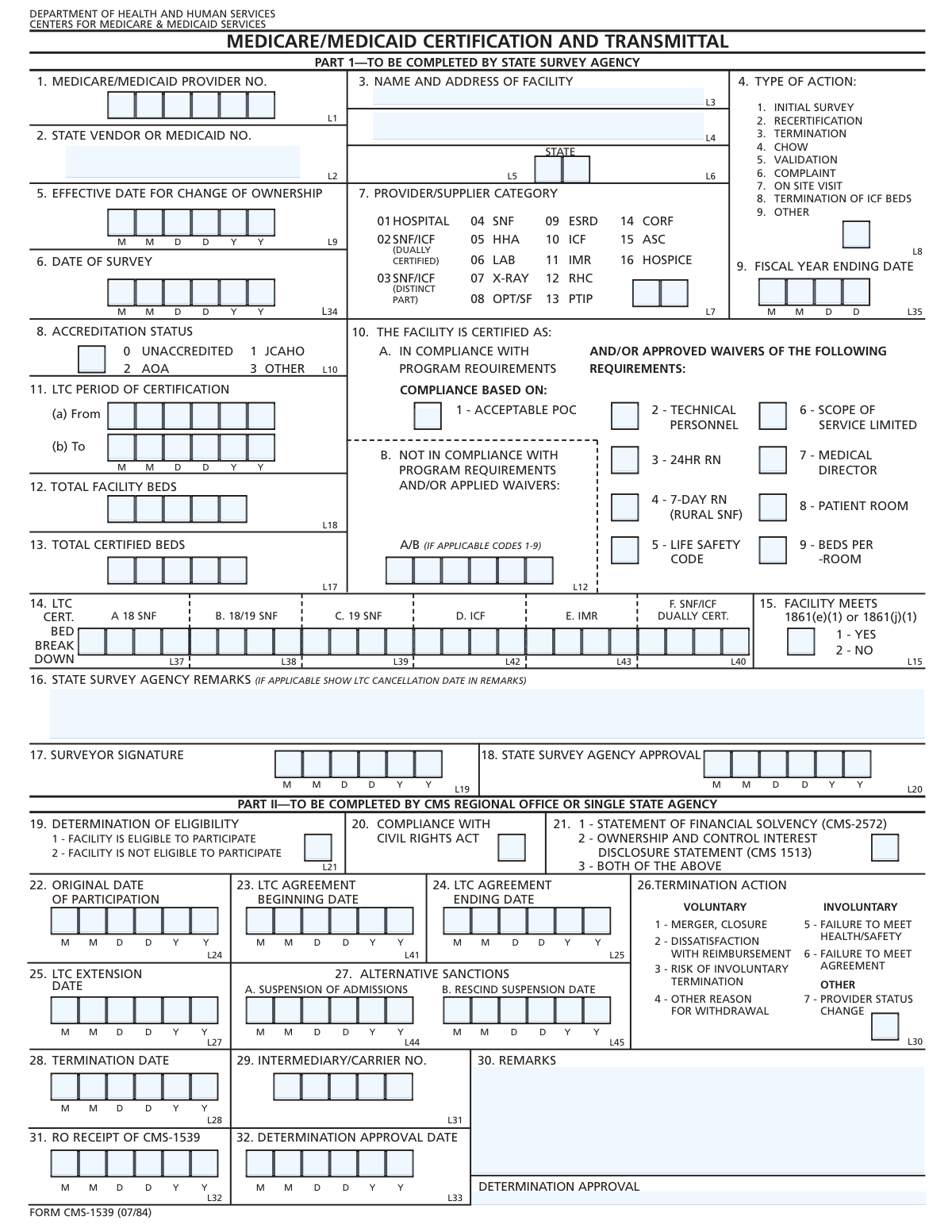
Yes! You can use AI to fill out Form CMS-1539, Long-Term Care Facility Application for Medicare and Medicaid

Form CMS-1539 is the official application used by Long-Term Care (LTC) facilities to seek certification for participation in the Medicare and Medicaid programs. It serves as a comprehensive record of a facility's details, including ownership, bed capacity, survey results, and compliance with federal health and safety standards, which is reviewed by state survey agencies and CMS. Completing this form accurately is a critical step for any LTC facility to become eligible for reimbursement from these government healthcare programs. Today, this form can be filled out quickly and accurately using AI-powered services like Instafill.ai, which can also convert non-fillable PDF versions into interactive fillable forms.
Our AI automatically handles information lookup, data retrieval, formatting, and form filling.
It takes less than a minute to fill out CMS-1539 using our AI form filling.
Securely upload your data. Information is encrypted in transit and deleted immediately after the form is filled out.

Form specifications

Form name: Form CMS-1539, Long-Term Care Facility Application for Medicare and Medicaid
Number of fields: 51
Number of pages: 2
Language: English
Categories: CAR forms, CMS forms, Medicaid forms, Medicare forms, L.A. Care forms
main-image

Instafill Demo: How to fill out PDF forms in seconds with AI

How to Fill Out CMS-1539 Online for Free in 2026

Are you looking to fill out a CMS-1539 form online quickly and accurately? Instafill.ai offers the #1 AI-powered PDF filling software of 2026, allowing you to complete your CMS-1539 form in just 37 seconds or less.
Follow these steps to fill out your CMS-1539 form online using Instafill.ai:
  1. 1 Navigate to Instafill.ai and upload your CMS-1539 form, or select it from their library of templates.
  2. 2 Enter the facility's legal name, address, and Medicare/Medicaid provider number in the designated fields.
  3. 3 Specify the type of action being requested (e.g., initial certification, change of ownership) and provide the date of the most recent survey.
  4. 4 Input the facility's bed counts, including the total number of beds and a detailed breakdown of all certified beds by type (SNF, ICF, etc.).
  5. 5 Complete the sections on facility compliance, indicating the status for requirements like the Life Safety Code, staffing, and noting any applied waivers.
  6. 6 Fill in the determination sections as completed by the State Survey Agency, including eligibility status, agreement dates, and any remarks.
  7. 7 Use Instafill.ai's AI-powered review to check for errors or omissions, then securely sign and submit the completed form to the appropriate state agency or regional office.

Our AI-powered system ensures each field is filled out correctly, reducing errors and saving you time.

Why Choose Instafill.ai for Your Fillable CMS-1539 Form?

Speed

Complete your CMS-1539 in as little as 37 seconds.

Up-to-Date

Always use the latest 2026 CMS-1539 form version.

Cost-effective

No need to hire expensive lawyers.

Accuracy

Our AI performs 10 compliance checks to ensure your form is error-free.

Security

Your personal information is protected with bank-level encryption.

Frequently Asked Questions About Form CMS-1539

This form is used to document a healthcare facility's certification status and eligibility to participate in the Medicare and/or Medicaid programs, based on a state survey.

State survey agencies typically complete this form to report their findings and recommendations to the appropriate regional office after conducting a facility survey.

'Total Facility Beds' refers to the overall number of beds in the facility, while 'Total Certified Beds' is the specific number of beds approved for Medicare/Medicaid patients.

You only need to fill in the 'Effective Date for Change of Ownership' if the 'Type of Action Code' is '4', which indicates a Change of Ownership (CHOW).

In this section, you must provide a detailed count of certified beds broken down by type, such as 18 SNF, 19 SNF, ICF, and dually certified SNF/ICF beds.

If you determine the facility is not eligible, you must provide the 'LTC Agreement Ending Date' and specify the reason for the termination.

The 'Original Date of Participation' should only be entered if the 'Determination of Eligibility' is '1 - FACILITY IS ELIGIBLE TO PARTICIPATE'.

These fields are used to indicate specific areas where a facility has failed to meet program requirements, such as those for a 24-hour RN, Life Safety Code, or patient rooms.

Use the 'Remarks' field to provide any additional comments or important details about the survey, the facility's status, or the determination that isn't captured in other fields.

This is the unique identification number assigned to the healthcare facility for billing and identification within the Medicare and/or Medicaid programs.

Yes, AI-powered services like Instafill.ai can help you complete this form by accurately auto-filling fields, which saves time and helps prevent errors.

To fill this form online, upload it to Instafill.ai. The platform will make the document interactive, allowing you to easily enter information into the required fields.

If you have a non-fillable PDF, you can use a tool like Instafill.ai to convert it into an interactive, fillable form that you can complete and sign electronically.

Compliance CMS-1539
Validation Checks by Instafill.ai

1
Total Certified Beds vs. Total Facility Beds Consistency
This check ensures that the value entered for 'Total Certified Beds' is less than or equal to the value for 'Total Facility Beds'. The number of beds certified for a program cannot exceed the total physical beds available in the facility. A failure indicates a data entry error that could lead to incorrect capacity reporting and compliance issues.
2
Certified Bed Breakdown Summation
This validation verifies that the sum of all bed types in the 'LTC Certified Bed Breakdown' section (18 SNF, 18/19 SNF, 19 SNF, ICF, IMR, SNF/ICF Dually Certified) equals the 'Total Certified Beds'. This ensures the detailed breakdown accurately reflects the total certified count. Discrepancies can cause significant reporting errors for certification and reimbursement purposes.
3
Conditional Requirement for 'Effective Date for Change of Ownership'
This check ensures the 'Effective Date for Change of Ownership' field is filled out if and only if the 'Type of Action Code' is '4. CHOW'. This date is critical for tracking ownership changes but is irrelevant for other action types. This validation prevents incomplete submissions for ownership changes and extraneous data for other actions.
4
Conditional Logic for Eligibility-Based Dates
This validation verifies that fields like 'Original Date of Participation' and 'LTC Agreement Beginning Date' are provided only when 'Determination of Eligibility' is '1 - FACILITY IS ELIGIBLE TO PARTICIPATE'. Conversely, it checks that 'LTC Agreement Ending Date' is provided only when eligibility is '2 - FACILITY IS NOT ELIGIBLE TO PARTICIPATE'. This enforces logical data entry based on the facility's eligibility status, ensuring participation dates are only captured for eligible facilities.
5
Chronological Order of Survey and Approval Dates
This check confirms that the key administrative dates are in a logical sequence: 'Date of Survey' must be on or before 'Surveyor Signature Date', which must be on or before 'State Survey Agency Approval Date', which must be on or before 'Determination Approval Date'. This sequence reflects the real-world workflow of a survey and approval process. An illogical order suggests a data entry error or a procedural anomaly that needs investigation.
6
Valid State Abbreviation Format
This validation checks that the 'State' field contains a valid two-letter U.S. state or territory abbreviation. This is crucial for correct addressing, geographical reporting, and linking the facility to the correct state-level agencies. An invalid entry would cause address validation to fail and could misclassify the facility's location.
7
LTC Certification Period Validity
This check validates that the 'Certification Period From' date is before the 'Certification Period To' date. A certification period cannot end before it begins. This check prevents logical impossibilities in the data that would invalidate the certification term and affect compliance tracking.
8
Medicare/Medicaid Provider Number Format and Presence
This check verifies that the 'Medicare/Medicaid Provider No' is present and conforms to the expected format (e.g., a specific number of digits or alphanumeric pattern). This number is the primary unique identifier for the facility within the Medicare/Medicaid systems. An incorrect or missing number would prevent the form from being correctly associated with the facility's record, halting any processing.
9
Suspension and Rescind Date Logic
This validation checks that if the 'Rescind Suspension Date' is provided, it must be on or after the 'Suspension of Admissions Date'. A suspension cannot be rescinded before it has begun. This validation maintains the logical integrity of sanction-related dates and ensures accurate tracking of punitive measures.
10
Valid Code for 'Facility Meets Requirements'
This check validates that the 'Facility Meets 1861(e)(1) or 1861(j)(1) Requirements' field contains either '1' for Yes or '2' for No. Using any other value would make the facility's compliance status ambiguous. This check enforces the use of predefined codes to ensure data consistency and clear reporting on federal requirements.
11
Original Participation Date Cannot Be in the Future
This validation ensures that the 'Original Date of Participation' is not a future date. A facility's participation in a program must have started on or before the current date. A future date is a logical error that would misrepresent the facility's history and status.
12
Conditional Requirement for 'Provider Status Change Reason'
This check ensures the 'Provider Status Change Reason' field is completed if the 'Determination of Eligibility' is '2 - FACILITY IS NOT ELIGIBLE TO PARTICIPATE'. This provides necessary context for why a facility is not eligible, which is critical for record-keeping and potential appeals. Failure to provide a reason results in an incomplete record for an adverse determination.
13
Required Facility Name and Address
This validation ensures the 'Facility Name', 'Street Address', and 'State' fields are not left blank. The facility's full legal name and physical location are critical identifiers for legal, financial, and regulatory purposes. A missing name or address would make the entire form submission ambiguous and unprocessable.
14
Fiscal Year End Date Conditional Requirement
This check ensures the 'Fiscal Year Ending Month and Day' field is completed if and only when the 'Type of Action Code' is '9. OTHER'. This specific action type may require fiscal information that others do not. This rule prevents unnecessary data collection and ensures required data for 'OTHER' actions is captured.

Common Mistakes in Completing CMS-1539

Ignoring Conditional Field Logic

Users often fill out fields that are not applicable to their specific situation, such as entering an 'LTC Agreement Beginning Date' when the 'Determination of Eligibility' code is not '1 - FACILITY IS ELIGIBLE TO PARTICIPATE'. This happens when filers overlook the 'Fill only if...' instructions associated with many fields. These errors create confusing and contradictory data, leading to processing delays and rejection. To avoid this, carefully read the conditions for each field before entering data; AI-powered tools like Instafill.ai can automatically show or hide conditional fields based on your previous answers.

Using Text Instead of Required Codes

Many fields, like 'Facility Meets 1861(e)(1) Requirements' or 'Accreditation Status Code', require a specific numeric code instead of a text description. For example, a user might write 'Yes' instead of entering the required code '1'. This mistake occurs from not reading the field instructions carefully and results in data entry failure and automatic rejection by processing systems. Always check the field description for the exact codes required and avoid descriptive words.

Inconsistent or Incorrect Date Formatting

The form contains numerous date fields, and users frequently enter them in inconsistent formats (e.g., MM-DD-YY vs. MM/DD/YYYY) or make typographical errors. This can cause significant issues in establishing accurate timelines for certification, surveys, and agreements. To prevent this, use a consistent MM/DD/YYYY format for all dates and double-check each entry for accuracy. Using a form-filling tool can help by standardizing date formats automatically.

Mismatch in Bed Count Totals

A frequent error is when the sum of the individual bed types in the 'LTC Certified Bed Breakdown' section does not equal the number entered in 'Total Certified Beds'. Similarly, users may list more 'Total Certified Beds' than 'Total Facility Beds'. These logical inconsistencies happen due to manual calculation errors and will cause the form to be flagged for review and correction. Carefully sum all breakdown fields to ensure they match the total, and verify that certified beds do not exceed total beds.

Omitting the Primary Provider Number

Forgetting to enter the 'Medicare/Medicaid Provider No' is a critical omission. This number is the primary identifier used to link the form to the correct facility in the system. This mistake often happens due to oversight but can completely halt the processing of the form, as the submission cannot be correctly filed without it. Always ensure this crucial identifier is entered accurately at the top of the form.

Entering a DBA Instead of the Legal Facility Name

The 'Facility Name' field specifically requests the 'full legal name,' but applicants often enter the 'Doing Business As' (DBA) or common name instead. This discrepancy can cause mismatches with official records, leading to validation failures and potential legal or compliance issues. To avoid this, consult official registration documents to find the exact legal name of the entity and enter it precisely as it appears there.

Incorrectly Filling 'Type of Action' Dependent Fields

Users often misunderstand the link between the 'Type of Action Code' and other fields. For instance, they might fill in the 'Fiscal Year Ending Month and Day' even when the action code is not '9. OTHER', or neglect to enter the 'Effective Date for Change of Ownership' when the code is '4. CHOW'. This leads to incomplete or irrelevant information, requiring clarification and delaying the action. Always verify which fields are required based on the selected 'Type of Action Code'.

Failing to Provide Explanations in Remarks

When indicating non-compliance, termination, or other special circumstances, users often forget to provide a detailed explanation in the 'Remarks' or 'State Survey Agency Remarks' fields. These fields are essential for providing context that the codes alone cannot convey. Leaving them blank can lead to follow-up inquiries or incorrect assumptions by the reviewing agency. Always add clear, concise notes to explain any complex situations or flagged issues.

Confusing Eligibility and Termination Dates

The form has specific date fields for different eligibility outcomes, such as 'LTC Agreement Beginning Date' for eligible facilities and 'LTC Agreement Ending Date' for non-eligible ones. Users can easily get these confused and enter a date in the wrong field. This error directly impacts the facility's official participation status and timeline. It is crucial to read the condition tied to each date field and only fill in the one that corresponds to the 'Determination of Eligibility' code.

Incomplete or Incorrectly Formatted Address

Errors in the facility address, such as omitting the street, city, or ZIP code, are common. Specifically, for the 'State' field, users might write out the full name instead of the required two-letter abbreviation. Incomplete or improperly formatted addresses can delay mail and cause failures when cross-referencing databases. Ensure the full, accurate address is provided and that the state is entered as its standard two-letter code. If the form is a non-fillable PDF, a tool like Instafill.ai can convert it to a fillable version to help structure data correctly.
Saved over 80 hours a year

“I was never sure if my IRS forms like W-9 were filled correctly. Now, I can complete the forms accurately without any external help.”

Kevin Martin Green

Your data stays secure with advanced protection from Instafill and our subprocessors

Robust compliance program

Transparent business model

You’re not the product. You always know where your data is and what it is processed for.

ISO 27001, HIPAA, and GDPR

Our subprocesses adhere to multiple compliance standards, including but not limited to ISO 27001, HIPAA, and GDPR.

Security & privacy by design

We consider security and privacy from the initial design phase of any new service or functionality. It’s not an afterthought, it’s built-in, including support for two-factor authentication (2FA) to further protect your account.

Fill out CMS-1539 with Instafill.ai

Worried about filling PDFs wrong? Instafill securely fills form-cms-1539-long-term-care-facility-application-for-medicare-and-medicaid forms, ensuring each field is accurate.