Yes! You can use AI to fill out Application to copy or transfer from one Medicare card to another
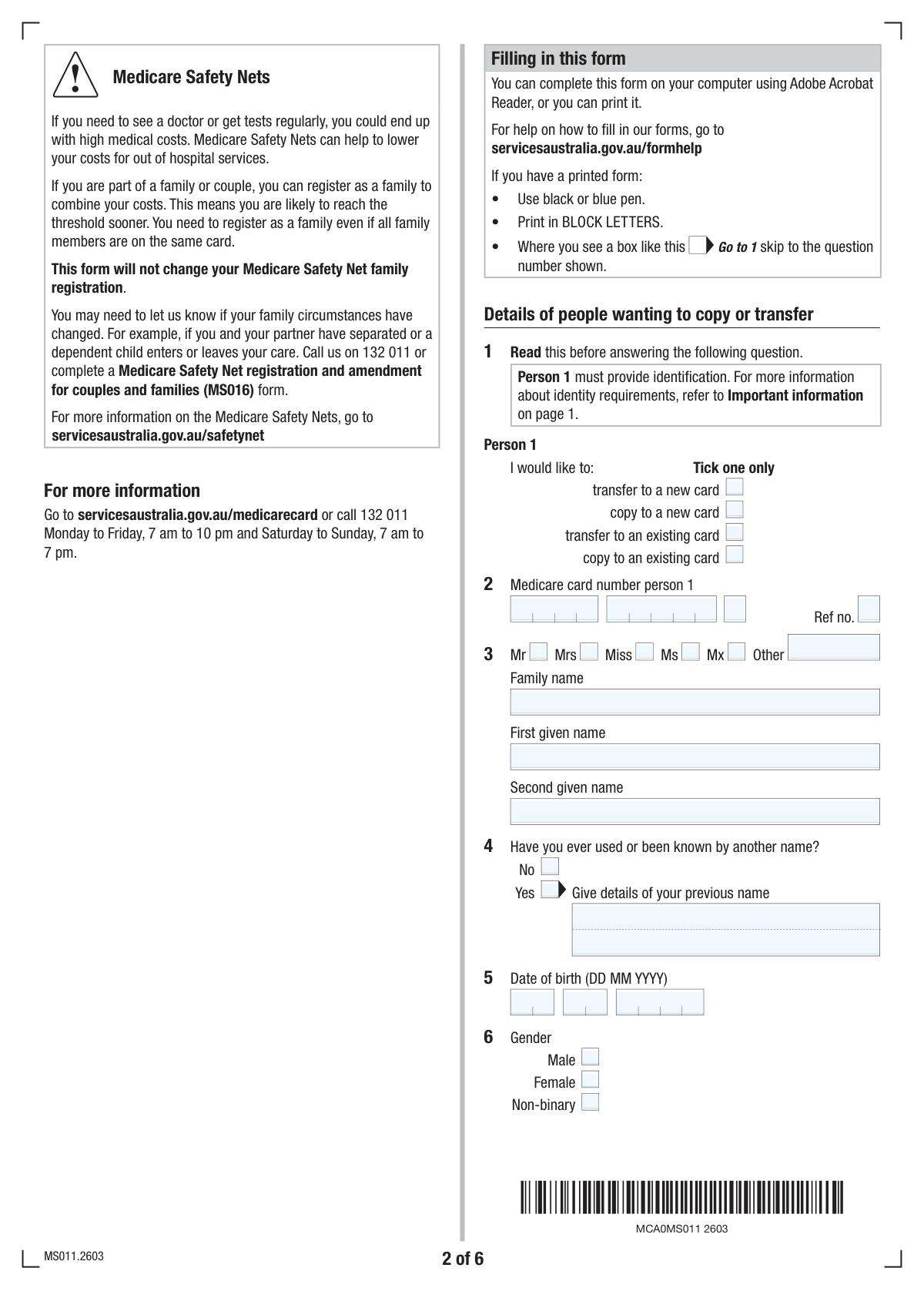
The Application to copy or transfer from one Medicare card to another (Form MS011) is used to add, remove, or move individuals between different Medicare cards, often due to changes in family circumstances. This ensures everyone maintains correct and current access to Medicare services. Today, this form can be filled out quickly and accurately using AI-powered services like Instafill.ai, which can also convert non-fillable PDF versions into interactive fillable forms.
MS011 is part of the
CAR forms, Medicare application forms, Medicare forms, L.A. Care forms and transfer forms categories on Instafill.
Our AI automatically handles information lookup, data retrieval, formatting, and form filling.
It takes less than a minute to fill out MS011 using our AI form filling.
Securely upload your data. Information is encrypted in transit and deleted immediately after the form is filled out.
Form specifications
| Form name: | Application to copy or transfer from one Medicare card to another |
| Number of fields: | 183 |
| Number of pages: | 6 |
| Filled form examples: | Form MS011 Examples |
| Language: | English |
More forms in CAR forms
Instafill Demo: How to fill out PDF forms in seconds with AI
How to Fill Out MS011 Online for Free in 2026
Are you looking to fill out a MS011 form online quickly and accurately? Instafill.ai offers the #1 AI-powered PDF filling software of 2026, allowing you to complete your MS011 form in just 37 seconds or less.
Follow these steps to fill out your MS011 form online using Instafill.ai:
- 1 Navigate to Instafill.ai and upload your Application to copy or transfer from one Medicare card to another (MS011).
- 2 Specify the requested action for Person 1 (e.g., copy to a new card) and provide their personal details.
- 3 If other people are on the card, indicate whether they also need to be copied or transferred and provide their details.
- 4 If transferring or copying to an existing card, enter the details of that target Medicare card.
- 5 Complete the declaration section for all relevant persons, providing consent and the date.
- 6 Review the entire form to ensure the AI has accurately populated all names, Medicare numbers, and personal details.
- 7 Download your completed MS011 form, ready for submission to Services Australia.
Our AI-powered system ensures each field is filled out correctly, reducing errors and saving you time.
Why Choose Instafill.ai for Your Fillable MS011 Form?
Speed
Complete your MS011 in as little as 37 seconds.
Up-to-Date
Always use the latest 2026 MS011 form version.
Cost-effective
No need to hire expensive lawyers.
Accuracy
Our AI performs 10 compliance checks to ensure your form is error-free.
Security
Your personal information is protected with bank-level encryption.
Frequently Asked Questions About Form MS011
This form is used to manage your Medicare card details. You can use it to transfer your information to a new or existing card, or get a copy of your details on a new or existing card, including adding other people.
'Transfer' moves your Medicare details from your old card to a new one, effectively replacing it. 'Copy' adds your details to an additional card, such as a new card for your family or adding you to someone else's existing card.
To add someone, they should fill out their details and select the 'copy to an existing card' option. You will need to provide the details of the existing card they are being added to.
You will need personal details for each person, including full name, date of birth, and current Medicare card number if applicable. You may also need bank account details for setting up benefit payments.
Yes, the form is designed to handle requests for multiple people. You will need to complete the relevant sections for each person who needs to be copied or transferred.
The form includes a section to declare if you have been known by a previous name. Simply check 'Yes' and provide the full previous name(s) in the space provided.
Requesting a duplicate card means you will receive a second card with the same details and card number. This is useful if you need an extra copy for yourself or a family member on the same card.
Processing times can vary, but you can typically expect to receive your new Medicare card in the mail within 3 to 4 weeks after your form has been successfully processed.
Your bank details are required to set up electronic payments for any Medicare benefits you claim. This ensures you receive your rebates directly into your nominated bank account.
If your title is not Mr, Mrs, Miss, Ms, or Mx, you can specify it in the 'Other title' field. For example, you can write Dr, Prof, or another preferred title.
Yes, services like Instafill.ai use AI to accurately auto-fill form fields, which can save you time and help reduce errors. This is especially useful for complex forms with repetitive information.
You can use Instafill.ai to complete this form digitally. Simply upload the form, and the service will make it fillable online, allowing you to type in your information and download the completed document.
If you have a non-fillable PDF, you can use a service like Instafill.ai to convert it into an interactive, fillable form. This allows you to easily type your answers directly into the fields before printing or submitting.
Compliance MS011
Validation Checks by Instafill.ai
1
At Least One Requested Action for Person 1
This check ensures that at least one of the four action checkboxes ('transfer to a new card', 'copy to a new card', 'transfer to an existing card', 'copy to an existing card') is selected for Person 1. This is a mandatory choice that defines the primary purpose of the form submission. If no action is selected, the form cannot be processed, and the user should be prompted to choose an option.
2
Conditional Requirement for Person 1 Medicare Number
Validates that the 'Medicare card number' and 'Medicare card reference number' fields for Person 1 are filled only if the user selects 'transfer to an existing card' or 'copy to an existing card'. This prevents unnecessary data entry and ensures data integrity. If the fields are filled without the proper prerequisite action selected, an error should be shown, and if the action is selected, these fields become mandatory.
3
Mutually Exclusive Title Selection
This check ensures a user selects only one title option for Person 1. A user cannot select a pre-defined title checkbox (e.g., 'Mr', 'Mrs', 'Ms') and also provide a custom value in the 'Other title (specify)' field. This prevents contradictory data. If both are selected, the system should prompt the user to choose only one.
4
Previous Name Consistency Check
This validation enforces conditional logic for the 'Previous name' field. If the user checks 'Yes' to having a previous name, the 'Previous name' text field must be populated. Conversely, if 'No' is checked, the 'Previous name' field must be empty. This ensures completeness and prevents orphaned data.
5
Valid and Plausible Date of Birth
This check verifies that the day, month, and year entered for a person's date of birth form a valid calendar date (e.g., not April 31). It also ensures the date is in the past and falls within a reasonable range, for example, the person must be less than 120 years old. This prevents typographical errors and ensures the entered date is logically possible for a living person.
6
Mutually Exclusive Gender Selection
Ensures that for any given person, only one of the gender checkboxes ('Male', 'Female', 'Non-binary') can be selected. This is a fundamental data integrity rule to prevent ambiguous or conflicting information in the person's record. If more than one option is selected, the user should be prompted to correct their selection.
7
Valid Email Address Format
This validation checks that the value entered into the 'Contact email address' field conforms to the standard email format (e.g., '[email protected]'). It looks for the presence of an '@' symbol and a domain. This is crucial for ensuring that communication sent to the provided address will be deliverable.
8
Australian Postcode Format
Verifies that the 'Postcode' field contains a valid 4-digit numeric value, consistent with the Australian postal system. This check is essential for ensuring mail can be successfully delivered to the provided postal address. Submissions with non-numeric or incorrectly formatted postcodes should be rejected.
9
Conditional Requirement for Person 2 Details
This validation ensures that all fields related to 'Person 2' (name, DOB, transfer options, etc.) are only enabled and can be filled if the user selects 'Yes' for the question 'Does a second person need to copy or transfer?'. If 'No' is selected, these fields should be disabled or hidden to prevent accidental data entry and simplify the user's workflow.
10
Exclusive Action Selection for Person 2
If Person 2 details are being provided, this check enforces that exactly one of the six 'Person 2 - transfer/copy options' is selected, as instructed by '(tick one only)'. This prevents ambiguity about the requested action for the second person. The form should not be submittable until a single, valid choice is made.
11
Required Declaration for Person 2
This check validates that if details for Person 2 are entered, the 'I have read, understood, and agree' declaration checkbox for Person 2 must be ticked. Furthermore, the associated 'Declaration date' must be filled with a valid date. This is a critical legal and consent requirement for processing the second person's information.
12
Valid Declaration Date
This validation ensures that any 'Declaration date' entered on the form is a valid calendar date that is not in the future. The date should be on or before the current submission date. This is important for creating an accurate and legally sound record of when consent was provided.
13
Indigenous Descent Selection Logic
This check enforces the rules for the Aboriginal or Torres Strait Islander descent checkboxes. The 'No' option must be mutually exclusive with the 'Yes – Aboriginal Australian' and 'Yes – Torres Strait Islander Australian' options. A user cannot indicate both 'No' and 'Yes'. This prevents contradictory responses and ensures data accuracy.
14
Mandatory Name Fields for Person 1
Ensures that the 'Family name (surname)' and 'First given name' fields for Person 1 are not empty. These fields are fundamental for identifying the primary applicant and are essential for any record-keeping system. The form cannot be processed without this core information, so submission should be blocked if they are blank.
Common Mistakes in Completing MS011
Applicants often misunderstand the difference between 'transfer' and 'copy'. 'Transfer' moves a person's record to a different card, potentially deactivating their spot on the old one, while 'copy' adds their record to an additional card without removing them from the original. This confusion can lead to unintended consequences, such as a person being removed from a family card when they only wanted to be added to a new one. To avoid this, carefully read the description for each option and choose 'transfer' for moving and 'copy' for adding.
The form requires the Medicare card number to be split into three groups, plus a separate reference number. People frequently mistype digits, transpose numbers between the groups, or confuse the main 10-digit card number with the single-digit reference number next to their name. An incorrect number prevents the system from locating the correct record, causing the application to be delayed or rejected. Always double-check the numbers against the physical card before submitting.
The form uses questions like 'Does a second person need to copy or transfer?' to guide the user. A common mistake is to answer 'Yes' but then fail to complete the required sections for 'Person 2', or to answer 'No' but attempt to add a second person's details elsewhere. This results in an incomplete application where the request for the additional person is either ignored or the entire form is rejected. To prevent this, follow the form's flow precisely; if you add a person, complete all their corresponding fields.
Applicants sometimes enter a preferred nickname or an abbreviated name instead of their full legal name as it appears on official documents. Another frequent error is failing to declare a previous name (e.g., a maiden name) when the 'Yes' box is checked. These discrepancies cause identity verification to fail, as the name on the form cannot be matched with government records, leading to rejection. Always use your full, legal name and provide all previous names when prompted.
The date of birth is required in a specific DD/MM/YYYY format, with each part in a separate field. Common errors include swapping the day and month (American vs. international format) or omitting the leading zero for single-digit days or months (e.g., entering '4' instead of '04'). These formatting errors can lead to data entry mistakes and processing delays. Using an AI-powered form filler like Instafill.ai can help by automatically formatting dates correctly based on the field requirements.
Forgetting to include a unit/apartment number, or entering the postcode in the suburb field, are frequent address-related mistakes. An incomplete or incorrect address means the new Medicare card cannot be delivered and will be returned, causing significant delays and potential security risks. To avoid this, carefully enter your full postal address, double-checking that every component, including unit number, street, suburb, and postcode, is in the correct field.
The question about Aboriginal or Torres Strait Islander descent can be confusing, with multiple checkboxes and instructions to tick both if applicable. People may be unsure how to respond if they identify with both groups and might only check one box, or leave it blank out of uncertainty. This leads to the collection of inaccurate demographic data. The correct way is to tick all boxes that apply to your identity as instructed on the form.
When adding or modifying details for multiple people, each individual (if over 15) must provide their consent via the declaration section. A primary applicant often fills out the entire form but forgets to obtain the signature and date from the second or third person. An application without the required consent from all parties is legally incomplete and will be rejected immediately. Ensure every person named on the form completes their own declaration section.
Many fields, such as the Medicare card number for 'Person 1', are only required if a specific action like 'transfer to an existing card' is selected. Applicants often miss these conditional instructions and either leave required fields blank or fill in fields they should have skipped. This creates an incomplete or invalid submission. Smart tools like Instafill.ai can help by automatically showing or hiding relevant fields based on your previous answers, ensuring you only fill what's necessary.
Often, government forms are only available as flat, non-fillable PDF files, forcing users to print them, fill them out by hand, and then scan them. This manual process is prone to all the previously mentioned errors, such as illegible handwriting, formatting mistakes, and missed sections. This leads to a high rate of rejection and processing delays. To avoid this, you can use a service like Instafill.ai, which can convert any non-fillable PDF into an interactive, fillable form, reducing errors and improving efficiency.
Saved over 80 hours a year
“I was never sure if my IRS forms like W-9 were filled correctly. Now, I can complete the forms accurately without any external help.”
Kevin Martin Green
Your data stays secure with advanced protection from Instafill and our subprocessors

Robust compliance program
Transparent business model
You’re not the product. You always know where your data is and what it is processed for.
ISO 27001, HIPAA, and GDPR
Our subprocesses adhere to multiple compliance standards, including but not limited to ISO 27001, HIPAA, and GDPR.
Security & privacy by design
We consider security and privacy from the initial design phase of any new service or functionality. It’s not an afterthought, it’s built-in, including support for two-factor authentication (2FA) to further protect your account.
Fill out MS011 with Instafill.ai
Worried about filling PDFs wrong? Instafill securely fills application-to-copy-or-transfer-from-one-medicare-card-to-another forms, ensuring each field is accurate.



