Yes! You can use AI to fill out Anthem Blue Cross Long-Term Care — Authorization Request Form
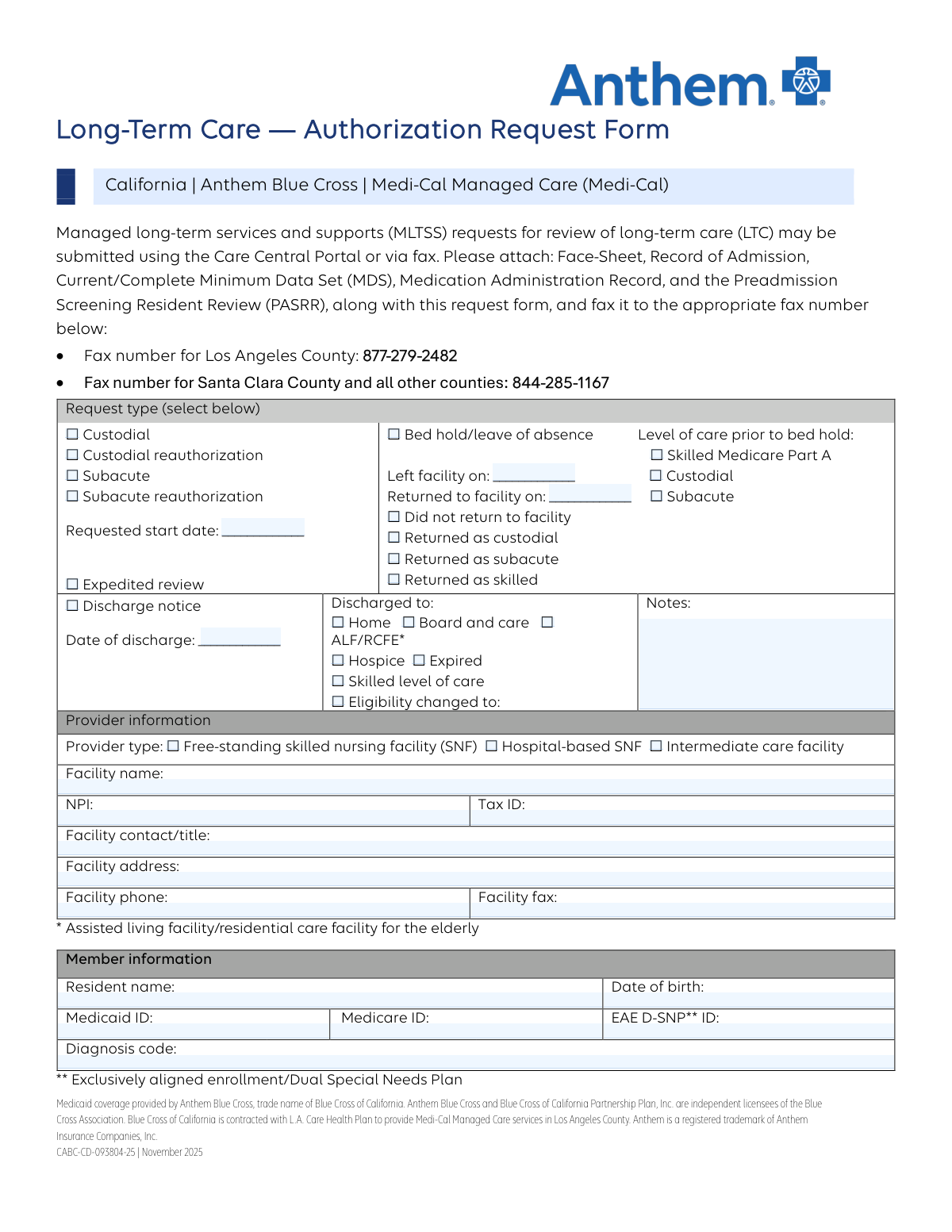
This form, CABC-CD-093804-25, is an authorization request submitted by healthcare providers to Anthem Blue Cross for managed long-term services and supports (MLTSS) for patients under Medi-Cal in California. It is used to request initial authorization or reauthorization for custodial and subacute care, as well as to manage bed holds and provide discharge notices. Today, this form can be filled out quickly and accurately using AI-powered services like Instafill.ai, which can also convert non-fillable PDF versions into interactive fillable forms.
Our AI automatically handles information lookup, data retrieval, formatting, and form filling.
It takes less than a minute to fill out CABC-CD-093804-25 using our AI form filling.
Securely upload your data. Information is encrypted in transit and deleted immediately after the form is filled out.
Form specifications
| Form name: | Anthem Blue Cross Long-Term Care — Authorization Request Form |
| Number of pages: | 1 |
| Language: | English |
| Categories: | CAR forms, authorization forms, L.A. Care forms |
Instafill Demo: How to fill out PDF forms in seconds with AI
How to Fill Out CABC-CD-093804-25 Online for Free in 2026
Are you looking to fill out a CABC-CD-093804-25 form online quickly and accurately? Instafill.ai offers the #1 AI-powered PDF filling software of 2026, allowing you to complete your CABC-CD-093804-25 form in just 37 seconds or less.
Follow these steps to fill out your CABC-CD-093804-25 form online using Instafill.ai:
- 1 Navigate to Instafill.ai and upload or select the Long-Term Care Authorization Request Form.
- 2 Select the appropriate request type, such as Custodial, Subacute, Bed Hold, or Discharge Notice.
- 3 Use the AI assistant to accurately fill in the 'Provider Information' section, including the facility name, NPI, Tax ID, and contact details.
- 4 Complete the 'Member Information' section with the resident's name, date of birth, and relevant Medicaid or Medicare ID numbers.
- 5 Provide specific dates and details corresponding to the request type, such as the requested start date, bed hold dates, or discharge information.
- 6 Review all the information auto-populated by the AI for accuracy, making any necessary edits before finalizing.
- 7 Download the completed form and gather all required attachments (e.g., MDS, PASRR) to fax to the designated Anthem Blue Cross number.
Our AI-powered system ensures each field is filled out correctly, reducing errors and saving you time.
Why Choose Instafill.ai for Your Fillable CABC-CD-093804-25 Form?
Speed
Complete your CABC-CD-093804-25 in as little as 37 seconds.
Up-to-Date
Always use the latest 2026 CABC-CD-093804-25 form version.
Cost-effective
No need to hire expensive lawyers.
Accuracy
Our AI performs 10 compliance checks to ensure your form is error-free.
Security
Your personal information is protected with bank-level encryption.
Frequently Asked Questions About Form CABC-CD-093804-25
This form is used by long-term care facilities to request authorization from Anthem Blue Cross for Medi-Cal members' services, such as custodial or subacute care, or to provide updates like a bed hold or discharge notice.
Healthcare providers at long-term care facilities, such as Skilled Nursing Facilities (SNFs) or Intermediate Care Facilities, are responsible for completing and submitting this form on behalf of the resident.
You must attach the patient's Face-Sheet, Record of Admission, current Minimum Data Set (MDS), Medication Administration Record (MAR), and the Preadmission Screening Resident Review (PASRR).
You can submit the form and attachments via the Care Central Portal or by fax. Use fax number 877-279-2482 for Los Angeles County and 844-285-1167 for Santa Clara County and all other counties.
Custodial care is for non-medical, personal needs like assistance with daily living activities. Subacute care is for patients who require a higher level of medical care and monitoring but do not need to be in a hospital.
Use this section when a resident temporarily leaves the facility, for example, for a hospital stay, and you need to hold their bed for their return. You must document the leave and return dates and their prior level of care.
To request a faster review for an urgent case, simply check the 'Expedited review' box on the form. This is intended for situations where a standard delay could seriously jeopardize the member's health.
When submitting a discharge notice, you must provide the date of discharge and specify where the patient was discharged to, such as their home, a board and care facility, or hospice.
These identification numbers are typically found on the member's insurance card or in their eligibility verification documents provided by Anthem Blue Cross or L.A. Care Health Plan.
An initial request is for a new service that has not been previously approved. A reauthorization is a request to continue coverage for an existing, previously approved service that is nearing its expiration date.
Yes, services like Instafill.ai use AI to accurately auto-fill form fields from your existing records, which can save significant time and help reduce data entry errors.
Simply upload the form to the Instafill.ai platform. The AI will make the form fillable and you can connect your data source to auto-populate the provider and member information instantly.
If you have a non-fillable or 'flat' PDF, you can upload it to a service like Instafill.ai. It will convert the document into an interactive, fillable form that you can complete and submit electronically.
Compliance CABC-CD-093804-25
Validation Checks by Instafill.ai
1
Exclusive Request Type Selection
This check ensures that only one of the main request type checkboxes is selected (e.g., Custodial, Subacute reauthorization, Bed hold, Discharge notice). Submitting a form with multiple conflicting request types creates ambiguity and processing errors. If more than one option is selected, the form submission should be rejected with an error message prompting the user to select a single primary purpose for the request.
2
NPI Format Validation
This validation verifies that the National Provider Identifier (NPI) is exactly 10 digits long and contains only numbers. The NPI is a unique identifier essential for billing and regulatory compliance, and an incorrect format will lead to claim rejection. If the entry is not a 10-digit number, the system should prevent submission and highlight the field for correction.
3
Tax ID Format Validation
This check ensures the provider's Tax ID is a 9-digit number, as required by the IRS. This number is critical for financial and identification purposes. An invalid format can cause significant delays in payment and processing. The system should reject any entry that does not consist of exactly nine digits.
4
Valid and Past Date of Birth
This validation confirms that the 'Date of Birth' field contains a complete and valid date that is in the past. This is crucial for correctly identifying the member and verifying eligibility for age-related services. A future or invalid date would indicate a data entry error, so the submission should be blocked until a logical date is provided.
5
Bed Hold Section Completeness
If the 'Bed hold/leave of absence' checkbox is selected, this validation ensures that the 'Date Left Facility' field and at least one 'Level of care prior to bed hold' option are also filled. These fields are essential for determining the correct billing and authorization period for the leave. A failure to provide this information would result in an incomplete request, and the user should be prompted to fill the required dependent fields.
6
Logical Date Sequence for Bed Hold
This check verifies that if the 'Date Returned to Facility' is entered, it must be on or after the 'Date Left Facility'. A return date that precedes the departure date is a logical impossibility and indicates a clear data entry mistake. This validation prevents incorrect service period calculations, and an error should be displayed if the dates are out of sequence.
7
Mutually Exclusive Return Status
This validation ensures that if the 'Did not return to facility' checkbox is selected, none of the 'Returned as...' options (custodial, subacute, skilled) can be selected. These two sets of options represent mutually exclusive outcomes of a leave of absence. Allowing both to be selected would create a logical conflict, so the system should enforce the selection of only one outcome.
8
Discharge Notice Section Completeness
If the 'Discharge notice' checkbox is selected, this validation requires that the 'Date of discharge' and at least one 'Discharged to' destination checkbox are also filled. This information is mandatory for closing out an authorization and ensuring continuity of care or proper record-keeping. The form should not be submittable without this information if it is being used as a discharge notice.
9
Required Provider Information
This check ensures that critical provider identification fields, specifically 'Facility Name', 'NPI', and 'Facility Address', are not left blank. This information is fundamental for identifying the requesting entity and processing the authorization. A submission lacking this core data is unusable and should be rejected with a message indicating which fields are required.
10
Required Member Information
This validation verifies that essential member identification fields, including 'Resident Name', 'Date of Birth', and 'Medicaid ID', are completed. Correctly identifying the member is the primary purpose of the form, and missing data would make processing impossible. The system must block submission until these mandatory fields are filled.
11
Facility Phone Number Format
This check validates that the 'Facility Phone' field contains a 10-digit number, conforming to a standard US phone number format. A valid phone number is necessary for communication regarding the authorization request. The system should flag entries that do not meet the 10-digit format to ensure contact information is accurate and usable.
12
Requested Start Date for New Authorizations
This validation ensures that the 'Requested start date' is provided if the request is for a new authorization (i.e., 'Custodial' or 'Subacute' is checked). The start date defines the beginning of the service period being requested and is essential for processing. The submission should be blocked if a new authorization is requested without a corresponding start date.
13
Exclusive Provider Type Selection
This check ensures that only one of the 'Provider type' checkboxes (Free-standing SNF, Hospital-based SNF, Intermediate care facility) is selected. The provider type can affect reimbursement rates and applicable regulations, so a single, unambiguous selection is required. If zero or more than one option is selected, the form should be considered invalid.
14
Diagnosis Code Format Plausibility
This validation checks that the 'Diagnosis Code' field contains a value that follows the basic structure of an ICD code (e.g., starts with a letter, contains numbers, may have a decimal). While not a full validation against all possible codes, it prevents simple typos like entering a name or random text. This ensures the data is in the correct format for medical review and processing.
Common Mistakes in Completing CABC-CD-093804-25
The form specifies two different fax numbers: one for Los Angeles County and another for all other counties. Submitting the form to the wrong fax number will cause significant processing delays or result in the request being lost entirely, as it will not reach the correct review team. Always double-check the patient's county of service and match it to the corresponding fax number listed at the top of the form before sending.
The instructions explicitly state that the Face-Sheet, Record of Admission, current MDS, Medication Administration Record, and PASRR must be attached. Failing to include any of these documents will result in an incomplete submission. This will trigger a rejection or a request for additional information, delaying the authorization and potentially impacting care continuity and payment.
Mistyping or transposing digits in the Medicaid ID, Medicare ID, or EAE D-SNP ID is a frequent error. An incorrect ID number prevents the system from matching the request to the correct member, leading to an automatic rejection or denial. Carefully verify each digit of the member's identification numbers against their official card or facility face sheet to ensure accuracy. AI-powered tools like Instafill.ai can help prevent this by validating number formats during data entry.
The form contains sections like 'Bed hold/leave of absence' and 'Discharge notice' that require further details if selected. A common mistake is checking the main box (e.g., 'Bed hold') but failing to fill in the associated mandatory fields like 'Left facility on' date or 'Level of care prior to bed hold'. This ambiguity forces the reviewer to pend the request and seek clarification, delaying the outcome.
Users may select multiple, conflicting request types (e.g., both 'Custodial' and 'Subacute') or choose a 'reauthorization' for a new admission. This indicates a misunderstanding of the care levels and request process, requiring the payer to contact the facility for clarification. Ensure only one, accurate request type is selected that matches the clinical documentation provided.
Leaving the 'Facility contact/title' field blank is a critical oversight. If the reviewer has any questions about the request, they will not know who to contact directly, leading to generic calls to the facility's main line and significant delays in resolving issues. Always provide the name and title of the staff member responsible for the authorization request to facilitate quick communication.
Entering an incorrect National Provider Identifier (NPI) or Tax ID, or entering them in the wrong fields, will cause provider verification to fail. This can lead to claim processing errors and payment delays. These numbers must be entered exactly as registered. Using a form-filling tool like Instafill.ai can help by storing and accurately populating these standard facility details, reducing the risk of manual entry errors.
Since this form is often printed and faxed, illegible handwriting can render critical data like names, dates, and ID numbers unreadable. This can lead to data entry errors by the payer, rejection of the form, or delays while they request a clearer copy. To avoid this, it is best to fill out the form electronically. If the form is a non-fillable PDF, a tool like Instafill.ai can convert it into a fillable version, ensuring all entries are typed and perfectly legible.
Forgetting to enter the 'Requested start date' is a simple but common mistake that leaves the authorization period ambiguous. Without a clear start date, the payer cannot process the request for the correct service period, which will halt the authorization process until the information is provided. Always specify the exact start date for which the long-term care services are being requested.
When submitting a 'Discharge notice', it is crucial to also indicate the date of discharge and the patient's destination (e.g., Home, Hospice, Skilled level of care). Omitting this information creates an incomplete record of the member's care transition. This can cause issues with care coordination and future eligibility, so all relevant fields in the discharge section must be completed.
Saved over 80 hours a year
“I was never sure if my IRS forms like W-9 were filled correctly. Now, I can complete the forms accurately without any external help.”
Kevin Martin Green
Your data stays secure with advanced protection from Instafill and our subprocessors

Robust compliance program
Transparent business model
You’re not the product. You always know where your data is and what it is processed for.
ISO 27001, HIPAA, and GDPR
Our subprocesses adhere to multiple compliance standards, including but not limited to ISO 27001, HIPAA, and GDPR.
Security & privacy by design
We consider security and privacy from the initial design phase of any new service or functionality. It’s not an afterthought, it’s built-in, including support for two-factor authentication (2FA) to further protect your account.
Fill out CABC-CD-093804-25 with Instafill.ai
Worried about filling PDFs wrong? Instafill securely fills anthem-blue-cross-long-term-care-authorization-request-form forms, ensuring each field is accurate.