Yes! You can use AI to fill out Arkansas Medicaid Provider Application Packet (DMS-652)
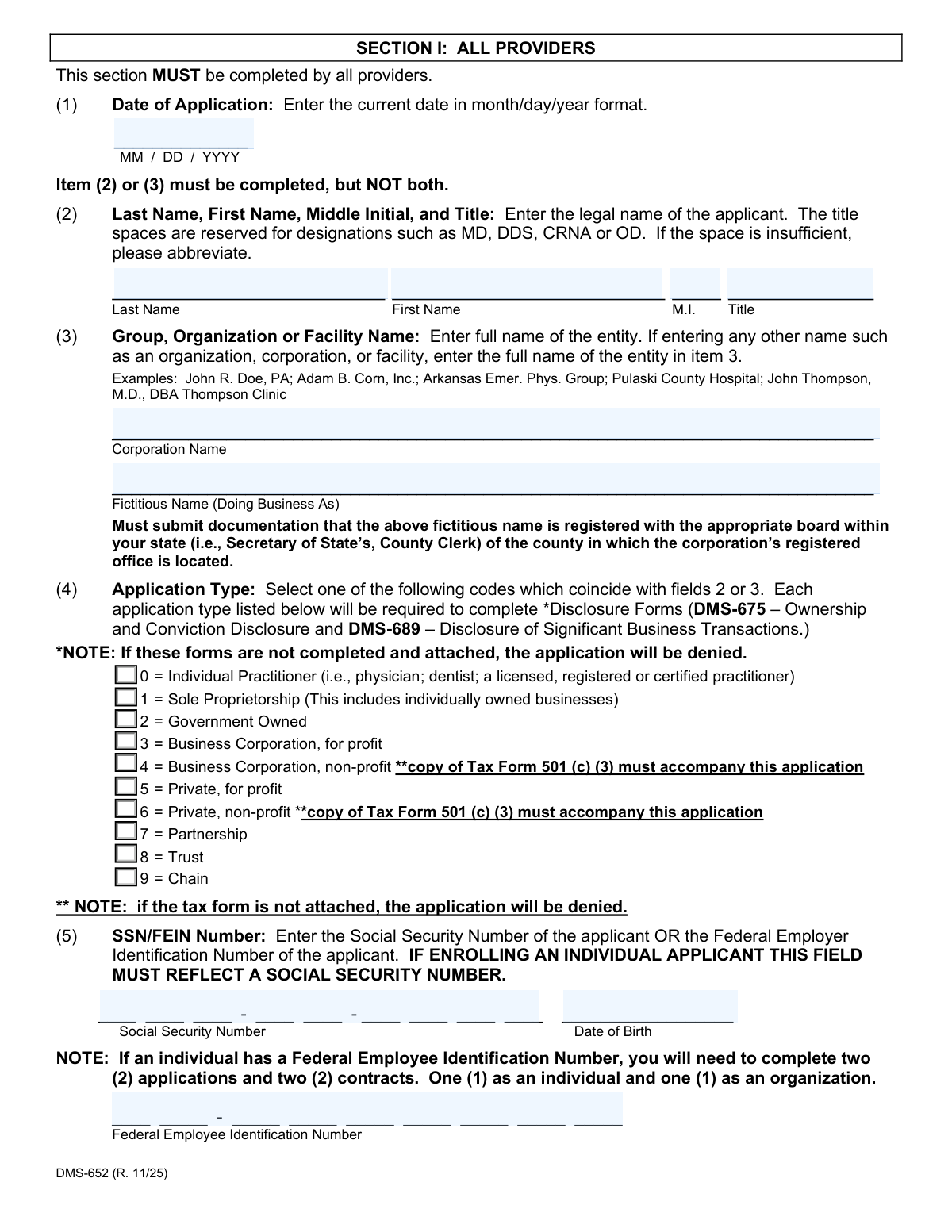
The Arkansas Medicaid Provider Application Packet (DMS-652) is an official multi-section form issued by the Arkansas Division of Medical Services that healthcare providers must complete to enroll in, renew, or update their participation in the Arkansas Medicaid Program. The packet includes the core provider application, Electronic Funds Transfer authorization, Primary Care Physician Managed Care Agreement, EPSDT participation agreement, IRS Form W-9, Ownership and Conviction Disclosure (DMS-675), Disclosure of Significant Business Transactions (DMS-689), and a provider contract — all required under Federal and State regulations governing the Medical Assistance Program. Accurate and complete disclosure of all requested information is mandatory, as failure to comply may result in denial or termination of a provider agreement. Today, providers can fill out this complex packet quickly and accurately using AI-powered services like Instafill.ai, which can also convert non-fillable PDF versions into interactive fillable forms.
DMS-652 is part of the
healthcare provider forms, Medicaid forms, Arkansas Medicaid forms and provider enrollment forms categories on Instafill.
Rather not fill this in by hand? Instafill is an online form filler that completes PDF forms automatically — upload the blank form, answer a few questions, and the AI fills every field.
Form specifications
| Form name: | Arkansas Medicaid Provider Application Packet (DMS-652) |
| Number of pages: | 1 |
| Language: | English |
Our AI automatically handles information lookup, data retrieval, formatting, and form filling.
It takes less than a minute to fill out DMS-652 using our AI form filling.
Securely upload your data. Information is encrypted in transit and deleted immediately after the form is filled out.
Instafill Demo: How to fill out PDF forms in seconds with AI
How to Fill Out DMS-652 Online for Free in 2026
Are you looking to fill out a DMS-652 form online quickly and accurately? Instafill.ai offers the #1 AI-powered PDF filling software of 2026, allowing you to complete your DMS-652 form in just 37 seconds or less.
Follow these steps to fill out your DMS-652 form online using Instafill.ai:
- 1 Navigate to Instafill.ai and upload the Arkansas Medicaid Provider Application Packet (DMS-652) PDF, or select it from the available form library to begin filling it out online.
- 2 Complete Section I (All Providers) by entering the application date, provider name or organization name, application type, SSN or FEIN, National Provider Identification (NPI) number, taxonomy code, service location address, billing address, email, county code, provider category, certification details, DEA number, and license information.
- 3 Complete the applicable specialty sections: Section II if you are a facility (special facility program type and total beds), Section III if you are a pharmacist or registered respiratory therapist (listing staff names, SSNs, license numbers, and vaccine administration status), and Section IV if you are affiliating with a provider group (group name, Medicaid ID, effective/expiration dates, and provider signature).
- 4 Fill out the Authorization for Electronic Funds Transfer (EFT) form by providing your Medicaid provider name and ID, bank ABA transit number, bank account number, bank name, account type, and authorized signature, and attach a voided check or bank letter as required.
- 5 Complete the Primary Care Physician (PCP) Managed Care Agreement (DMS-2608) and EPSDT Agreement (DMS-831) if your specialty qualifies, entering your provider name, managed care 24-hour number, maximum caseload, payment Medicaid ID, county service selections, and required signatures.
- 6 Fill out the IRS Form W-9, Ownership and Conviction Disclosure (DMS-675), and Disclosure of Significant Business Transactions (DMS-689) by providing taxpayer identification information, ownership and control interest details, managing employee information, criminal conviction disclosures, and significant business transaction data.
- 7 Review and sign the Provider Contract (DMS-653) and, if applicable, the Data Sharing Agreement (DMS-652-A), then save the completed packet and upload it to the Arkansas Medicaid provider portal at https://portal.mmis.arkansas.gov/armedicaid/provider, or mail it to the Medicaid Provider Enrollment Unit if a paper submission has been approved.
Our AI-powered system ensures each field is filled out correctly, reducing errors and saving you time.
Why Choose Instafill.ai for Your Fillable DMS-652 Form?
Speed
Complete your DMS-652 in as little as 37 seconds.
Up-to-Date
Always use the latest 2026 DMS-652 form version.
Cost-effective
No need to hire expensive lawyers.
Accuracy
Our AI performs 10 compliance checks to ensure your form is error-free.
Security
Your personal information is protected with bank-level encryption.
Frequently Asked Questions About DMS-652
The DMS-652 is the official application packet required for any healthcare provider who wants to enroll in or renew a provider agreement with the Arkansas Medicaid (Medical Assistance) Program. This includes individual practitioners, facilities, pharmacies, group practices, and other healthcare entities seeking to bill and receive payment for Medicaid-covered services.
All applicants must submit their application electronically through the Arkansas Medicaid provider portal at https://portal.mmis.arkansas.gov/armedicaid/provider. Paper applications are only accepted in rare cases where the provider has exhausted all options to enroll online and received state approval — except for Skilled Nursing Facilities, which are exempt and may continue to submit on paper to the Medicaid Provider Enrollment Unit at P.O. Box 8105, Little Rock, AR 72203-8105.
Section I must be completed by ALL providers. Section II is for Facilities only. Section III is for Pharmacists and Registered Respiratory Therapists only. Section IV is for Provider Group Affiliations. Additionally, all providers must complete the Electronic Fund Transfer (EFT) form, W-9 Tax Form, the Provider Contract, the Ownership and Conviction Disclosure (DMS-675), and the Disclosure of Significant Business Transactions (DMS-689).
Required attachments vary by provider type but may include: a current copy of your certification, DEA certificate (required for pharmacies and dental surgeons), state license, CLIA certificate (if applicable), IRS Form 501(c)(3) for non-profit corporations, documentation of any fictitious/DBA name registered with the appropriate state board, and a voided check or bank letter for EFT enrollment. Missing required documents will result in denial of the application.
EFT (direct deposit) is required for all enrolling facilities and individual providers not eligible for Section IV group linkage. To set it up, complete the Authorization for Electronic Funds Transfer form and attach either a voided check or a bank letter that includes the account holder's name, bank account number (ABA), and routing number. The name on the voided check or bank letter must match the enrolling provider's name on the application.
The DMS-675 is a mandatory disclosure form required by federal regulations (42 C.F.R. §455, Subpart B) for all Medicaid providers. It requires disclosure of all individuals or entities with a 5% or more ownership or control interest in the provider entity, managing employees, and any criminal convictions or exclusions related to Medicare, Medicaid, or CHIP programs. Failure to complete and attach this form will result in denial of the application.
The DMS-689 requires providers to disclose ownership of any subcontractor with whom they've had business transactions exceeding $25,000 in the last 12 months, and any significant business transactions with wholly owned suppliers or subcontractors in the last 5 years. A 'significant business transaction' is defined as any transaction exceeding $25,000 or 5% of the provider's total operating expenses in a fiscal year. This form is required for all providers and must be attached to the application.
The PCP Participation Agreement (DMS-2608) is required only if your specialty is General Practitioner, Internal Medicine, Family Practitioner, Pediatrician, Obstetrician, Gynecologist, or Certified Nurse-Midwife. As a PCP, you must also complete the EPSDT Agreement (DMS-831), indicate your managed care 24-hour contact number, maximum caseload (up to 2,500 beneficiaries), and select the Arkansas counties where you will provide primary care services (up to 20 counties).
Individual applicants must enter their Social Security Number (SSN). Organizations, corporations, or other entities should enter their Federal Employer Identification Number (FEIN). If an individual provider has both an SSN and a FEIN, they must complete two separate applications and two contracts — one as an individual (using the SSN) and one as an organization (using the FEIN).
To access the digital signature field, you must download the form and open it using the Adobe Acrobat Reader desktop application — not through a browser window. Open the downloaded file in Acrobat Reader, enter all required information, apply your digital signature, save the file, and then upload it to the provider portal. Forms viewed within a browser may not display the digital signature field.
Yes — services like Instafill.ai use AI to accurately auto-fill form fields, saving you significant time and reducing errors. Instafill.ai can help you complete the many sections of this complex packet, including provider details, EFT information, disclosure forms, and the W-9. If you have a flat, non-fillable PDF version of this form, Instafill.ai can also convert it into an interactive fillable form so you can complete it digitally.
To fill out the Arkansas Medicaid Provider Application Packet online, visit Instafill.ai and upload your PDF. The AI will guide you through each field — from Section I provider details and NPI numbers to the EFT authorization, disclosure forms, and contract signature fields. Once completed, you can save the filled form and upload it directly to the Arkansas Medicaid provider portal.
Submitting inaccurate, incomplete, or false information may result in refusal to enter into, renew, or continue a provider agreement with the Arkansas Medicaid Program. Additionally, falsification of information may be prosecuted under applicable Federal and State laws, and could result in civil or criminal penalties including fines and/or imprisonment.
After enrollment, you should use the provider portal's 'Submit and Update Request' feature to make changes to your information. Alternatively, you can complete the fillable PDF form, save it, and upload it to the portal. Paper requests for tasks that can be completed through the self-service portal option will be returned to the provider without processing.
The IRS Form W-9 (Request for Taxpayer Identification Number and Certification) is required by the Arkansas Department of Finance and Administration and the Department of Human Services for all vendors doing business with DHS. It ensures your correct taxpayer identification number is on file for accurate 1099 reporting. If you bill under a clinic name and IRS number, both the clinic and each individual provider must enroll separately and complete their own W-9.
Compliance DMS-652
Validation Checks by Instafill.ai
1
Mutually Exclusive Applicant Name Fields (Items 2 and 3)
Validates that exactly one of Item 2 (Individual Name: Last Name, First Name, Middle Initial, Title) or Item 3 (Group/Organization/Facility Name) is completed, but not both. The form explicitly states 'Item (2) or (3) must be completed, but NOT both.' If both fields are populated or neither is populated, the application cannot be processed correctly, as the applicant type and identity cannot be determined, leading to denial or return of the application.
2
Application Type Consistency with Applicant Name Field
Validates that the Application Type selected in Item 4 is logically consistent with which name field was completed in Items 2 or 3. For example, if Item 2 (individual name) is completed, the Application Type should be 0 (Individual Practitioner) or 1 (Sole Proprietorship), whereas if Item 3 (organization name) is completed, the type should reflect a corporate or group entity (codes 2–9). A mismatch between the name field used and the application type code selected will result in processing errors and potential denial.
3
SSN vs. FEIN Requirement Based on Applicant Type
Validates that individual applicants (those completing Item 2) provide a Social Security Number (SSN) in the format XXX-XX-XXXX in the SSN field, while organizational applicants (those completing Item 3) provide a Federal Employer Identification Number (FEIN) in the format XX-XXXXXXX. The form explicitly states that if enrolling an individual applicant, the SSN field must reflect a Social Security Number. Failure to provide the correct identifier type for the applicant category will result in tax reporting errors and application denial.
4
Date Format Compliance (MM/DD/YYYY)
Validates that all date fields throughout the application — including Date of Application (Item 1), Certification End Date (Item 13), DEA End Date (Item 16), License End Date (Item 18), Section IV Effective and Expiration Dates, and all signature dates — are entered in the required MM/DD/YYYY format. The form explicitly states all dates, except where otherwise specified, must use this format. Incorrectly formatted dates (e.g., YYYY-MM-DD or MM/DD/YY) can cause processing failures, incorrect expiration tracking, and delays in enrollment.
5
Certification Code and Certification Number Cross-Field Dependency
Validates that when a Certification Code is entered in Item 11 (codes 0–4), corresponding entries must also be made in Item 12 (Certification Number) and Item 13 (Certification End Date). The form states that if an entry is made in Item 11, entries must be made in Items 12 and 13 unless the entry is code 5 (Non-applicable). Additionally, a current copy of the certification must accompany the application. Missing or incomplete certification details will result in application denial.
6
Non-Profit Application Type Requires 501(c)(3) Documentation
Validates that applicants selecting Application Type 4 (Business Corporation, non-profit) or Type 6 (Private, non-profit) in Item 4 have attached a copy of IRS Tax Form 501(c)(3) to the application. The form explicitly notes that if the tax form is not attached, the application will be denied. This check ensures the non-profit status is substantiated with the required federal tax documentation before enrollment is approved.
7
Service Location Address Must Be a Physical Address
Validates that the Service Location address entered in Item 7A is a physical street address and not a P.O. Box. The form explicitly states this field is mandatory and must be a physical location. A P.O. Box is only permissible in the Billing Street Address (Item 8). Providing a P.O. Box as the service location address would misrepresent where services are rendered and could result in application rejection or incorrect county code assignment.
8
Nine-Digit ZIP+4 Code Format for Addresses
Validates that ZIP codes entered for both the Service Location (Item 7C) and Billing Address (Item 8) are complete nine-digit ZIP+4 codes in the format XXXXX-XXXX, as required by the form instructions. Standard five-digit ZIP codes are insufficient per the form's requirements. Incomplete ZIP codes can cause mailing failures for Remittance Statements, Medicaid checks, and other correspondence sent to the provider.
9
DEA Number Required for Pharmacies and Dental Surgeons
Validates that providers identifying as Pharmacies or Dental Surgeons have completed Item 15 (DEA Number) and Item 16 (DEA End Date), and have attached a current copy of the DEA certificate. The form explicitly states that pharmacies must submit this information to be enrolled and that it is required for Dental Surgeons as well. Failure to provide the DEA number and supporting documentation for these provider types will result in incomplete enrollment and inability to bill for controlled substance-related services.
10
Provider Group Affiliation Effective Date Within 12-Month Limit
Validates that the Effective Date entered in Section IV (Group Affiliation) — representing the date Medicaid services were rendered under the Group ID — is no more than 12 months prior to the date of the enrollment application. The form states that services rendered more than one year prior to enrollment cannot be accepted as the effective date. An effective date outside this window must be flagged and rejected, as it would allow retroactive billing beyond the permissible period.
11
Contract Provider Name Matches Application Name (Items 2 or 3)
Validates that the provider name entered on the Contract (DMS-653) is identical to the name listed in either Item 2 or Item 3 of the main application (DMS-652). The contract instructions explicitly state that if these two names do not match, the enrollment will be denied and the enrollment packet will be returned. This check prevents identity mismatches between the legal agreement and the enrollment record, which could create billing and liability issues.
12
EFT Bank Account Verification Documentation Requirement
Validates that the Electronic Funds Transfer (EFT) authorization form is accompanied by either a voided check or a bank letter containing the account holder's name, bank account number (ABA), and routing number. The form states that the name on the voided check or bank letter must match the enrolling provider's name on the application, and that temporary checks are not accepted. Missing or mismatched EFT documentation will prevent direct deposit setup and delay or block Medicaid payments to the provider.
13
PCP Managed Care Caseload Maximum of 2,500 Beneficiaries
Validates that the maximum number of Medicaid beneficiaries entered on the PCP Participation Agreement (DMS-2608) does not exceed 2,500. The form explicitly states the maximum caseload is 2,500 beneficiaries. Any value entered above this threshold must be flagged as invalid, as it exceeds program capacity limits and could result in inadequate care for enrolled beneficiaries and non-compliance with managed care program standards.
14
PCP County Selection Maximum of 20 Counties Without Justification Letter
Validates that a Primary Care Provider (PCP) selects no more than 20 counties in the PCP Participation Agreement (DMS-2608) unless a written statement letter explaining the need for additional counties is included. If more than 20 counties are selected without an accompanying justification letter, the application is incomplete and DHS cannot review and approve the expanded service area. This check ensures geographic service commitments are realistic and properly documented.
15
Ownership Disclosure Percentage of Interest Threshold (5% or More)
Validates that all individuals and entities with a direct or indirect ownership or control interest of 5% or more in the disclosing entity are listed on the Ownership and Conviction Disclosure form (DMS-675), including their full name, complete Social Security Number or Tax ID, date of birth, physical address, and percentage of interest. As required by 42 C.F.R. §455 Subpart B, failure to fully disclose all qualifying ownership interests — including indirect interests calculated by multiplying ownership percentages at each level — may result in refusal to enter into or termination of the provider agreement.
16
W-9 Taxpayer Identification Number Matches Applicant Name
Validates that the Taxpayer Identification Number (TIN) entered on the W-9 form — either an SSN or EIN — matches the name entered on Line 1 of the W-9, and that both are consistent with the applicant's name and identifier provided in Items 2/3 and Item 5 of the main provider application (DMS-652). A mismatch between the TIN and the name on the W-9 can trigger IRS backup withholding at 24% and result in incorrect 1099 tax reporting, creating financial and compliance issues for both the provider and the Medicaid program.
Common Mistakes in Completing DMS-652
Applicants frequently fill in both the individual name fields (Item 2) and the group/organization name fields (Item 3), not realizing the form explicitly states that only one of these should be completed. This causes a conflict in the application type and can result in processing delays or denial. Carefully read the instruction 'Item (2) or (3) must be completed, but NOT both' and determine whether you are enrolling as an individual practitioner or as a group/organization before filling out the form. AI-powered tools like Instafill.ai can help enforce this mutual exclusivity automatically.
Individual applicants sometimes enter their Federal Employer Identification Number (FEIN) in the Social Security Number field, or vice versa. The form explicitly states that if enrolling as an individual applicant, the SSN field MUST reflect a Social Security Number. Using a FEIN instead will cause the application to be rejected. Additionally, if an individual has both an SSN and a FEIN, two separate applications and two contracts are required — one as an individual and one as an organization. Always double-check which identifier is required for your enrollment type before submitting.
A very common and critical mistake is failing to attach the Ownership and Conviction Disclosure (DMS-675) and the Disclosure of Significant Business Transactions (DMS-689) to the application. The form explicitly warns that if these documents are not completed and attached, the application will be denied outright. Many applicants overlook these supplemental forms, especially first-time enrollees unfamiliar with Medicaid requirements. Always ensure both disclosure forms are fully completed and physically attached to the application packet before submission.
Applicants selecting Application Type 4 (Business Corporation, non-profit) or Type 6 (Private, non-profit) frequently forget to include a copy of their IRS Tax Form 501(c)(3) with the application. The form clearly states that if this tax form is not attached, the application will be denied. This mistake often happens because applicants assume their non-profit status is already on record or will be verified separately. Always attach a current copy of the 501(c)(3) determination letter when selecting these application types.
The form requires all dates to be entered in MM/DD/YYYY format, yet applicants frequently enter dates in other formats such as YYYY-MM-DD, MM/DD/YY, or written out (e.g., 'January 5, 2024'). This applies to the Date of Application, Certification End Date, DEA End Date, License End Date, and other date fields. Incorrect date formats can cause processing errors or delays. Always use the two-digit month, two-digit day, and four-digit year format as specified. Tools like Instafill.ai can automatically format dates correctly to prevent this error.
Field 7A (Service Location Address) requires a physical address and is mandatory — a P.O. Box is not acceptable for this field. Applicants sometimes enter a P.O. Box or omit the suite number, which can cause the application to be flagged or returned. The billing address (Field 8) is the only location where a P.O. Box is permitted. Ensure the service location reflects a real, physical street address including suite or unit numbers where applicable, and reserve P.O. Box entries for the billing address section only.
The form specifically requires the complete nine-digit ZIP+4 code (e.g., 72201-1234) for both the service location and billing address, yet many applicants enter only the standard five-digit ZIP code. This incomplete entry can cause mail delivery issues for Remittance Statements and Medicaid checks, and may delay processing. Look up the full ZIP+4 code for your address using the USPS website before completing the form. Instafill.ai can automatically validate and complete ZIP+4 codes to prevent this common oversight.
The Contract (DMS-653) explicitly instructs that the provider name on the front page of the contract must be identical to the name listed in Item 2 or Item 3 of the application. Applicants frequently use abbreviations, alternate business names, or slightly different spellings on the contract versus the application, which results in the enrollment being denied and the entire packet being returned. Copy the name exactly as written on the application — including punctuation, abbreviations, and spacing — when completing the contract.
The Electronic Funds Transfer (EFT) authorization form requires either a voided check or a bank letter that includes the account holder's name, bank account number (ABA), and routing number. Many applicants submit the EFT form without this supporting documentation, which will cause the EFT enrollment to be rejected. Additionally, temporary checks are not accepted, and the name on the voided check or bank letter must exactly match the enrolling provider's name on the application. Prepare this documentation in advance and attach it to the EFT form before submission.
Applicants sometimes enter certification numbers, DEA numbers, or license numbers that are expired or about to expire, and fail to attach a current copy of the corresponding certificate or license. The form requires a current copy of each applicable credential to accompany the application. Submitting expired credentials will result in denial or delays. Verify that all credentials are current before applying, and attach legible, up-to-date copies of each required document. Note that the end dates for these credentials must also be entered accurately in MM/DD/YYYY format.
When completing Section IV (Provider Group Affiliations), applicants frequently enter an effective date that is more than 12 months prior to the enrollment application date. The form explicitly states that the effective date for group affiliation must be within 12 months of the enrollment application, and services rendered more than one year prior to enrollment cannot be accepted. Entering an out-of-range effective date will result in rejection of the affiliation. Always verify that the effective date reflects when Medicaid services were first rendered under the group ID within the allowable 12-month window.
In Field 8B, applicants frequently enter a personal email address (e.g., [email protected]) rather than a generic, shared practice or clinic email address. The form specifically advises using a generic email that multiple staff members can access, because individual email addresses become outdated when employees leave. Using a personal email risks missing critical Medicaid updates, official notices, and rule-making notifications. Additionally, applicants often forget to configure their email provider to accept bulk emails from 'gainwelltechnologies.com,' which can result in important communications being blocked or filtered as spam.
Saved over 80 hours a year
“I was never sure if my IRS forms like W-9 were filled correctly. Now, I can complete the forms accurately without any external help.”
Kevin Martin Green
Your data stays secure with advanced protection from Instafill and our subprocessors




Robust compliance program
Transparent business model
You’re not the product. You always know where your data is and what it is processed for.
ISO 27001, HIPAA, and GDPR
Our subprocesses adhere to multiple compliance standards, including but not limited to ISO 27001, HIPAA, and GDPR.
Security & privacy by design
We consider security and privacy from the initial design phase of any new service or functionality. It’s not an afterthought, it’s built-in, including support for two-factor authentication (2FA) to further protect your account.
Fill out DMS-652 with Instafill.ai
Worried about filling PDFs wrong? Instafill securely fills arkansas-medicaid-provider-application-packet-dms-652 forms, ensuring each field is accurate.
