Yes! You can use AI to fill out Utah Medicaid Doula Provider Attestation

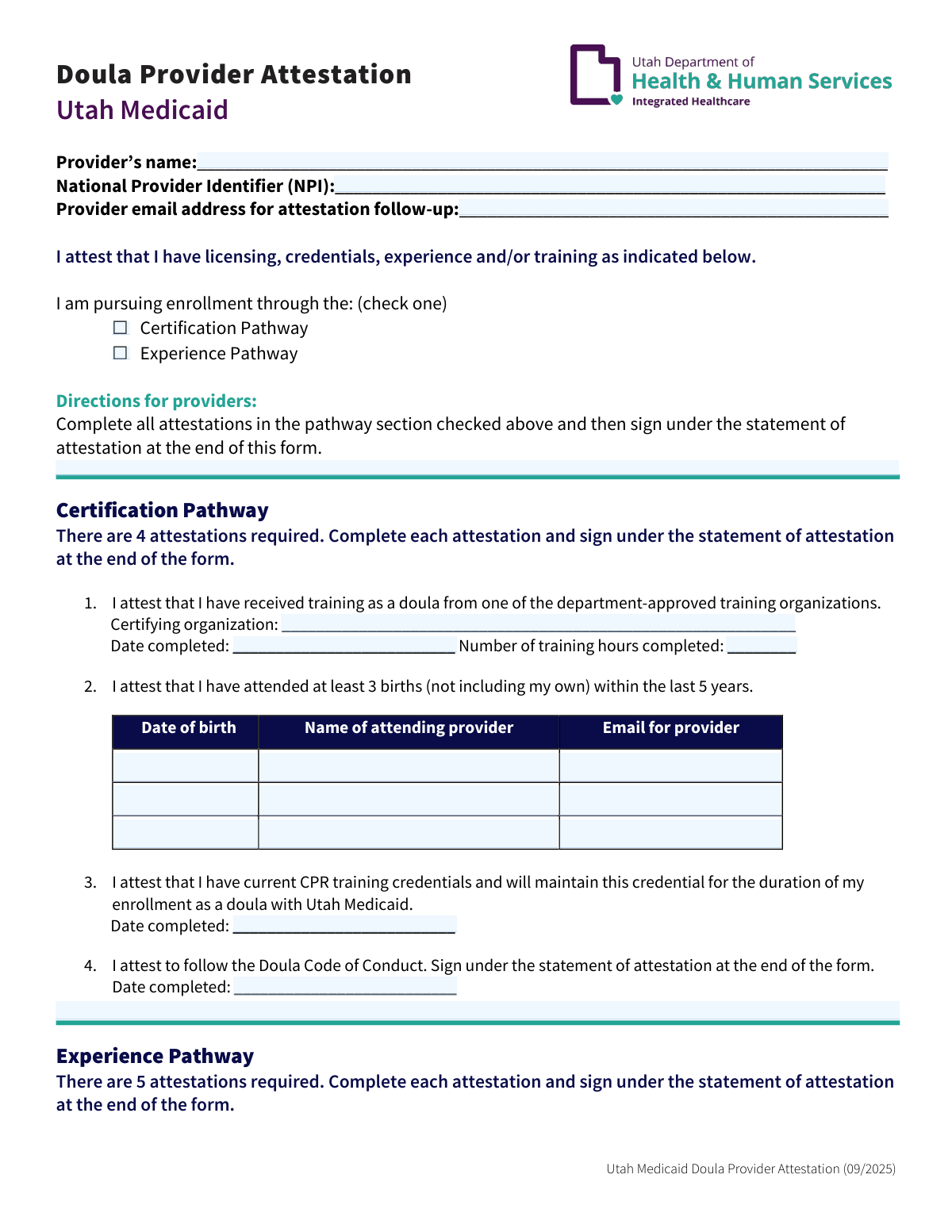
This form is an attestation for doulas seeking to enroll as providers with Utah Medicaid. Applicants must declare their qualifications through either a 'Certification Pathway' or an 'Experience Pathway,' providing details on training, births attended, and professional conduct. Today, this form can be filled out quickly and accurately using AI-powered services like Instafill.ai, which can also convert non-fillable PDF versions into interactive fillable forms.
Our AI automatically handles information lookup, data retrieval, formatting, and form filling.
It takes less than a minute to fill out Utah Doula Provider Attestation using our AI form filling.
Securely upload your data. Information is encrypted in transit and deleted immediately after the form is filled out.

Form specifications

Form name: Utah Medicaid Doula Provider Attestation
Number of pages: 3
Language: English
Categories: Medicaid forms
main-image

Instafill Demo: How to fill out PDF forms in seconds with AI

How to Fill Out Utah Doula Provider Attestation Online for Free in 2026

Are you looking to fill out a UTAH DOULA PROVIDER ATTESTATION form online quickly and accurately? Instafill.ai offers the #1 AI-powered PDF filling software of 2026, allowing you to complete your UTAH DOULA PROVIDER ATTESTATION form in just 37 seconds or less.
Follow these steps to fill out your UTAH DOULA PROVIDER ATTESTATION form online using Instafill.ai:
  1. 1 Navigate to Instafill.ai and upload or select the Utah Medicaid Doula Provider Attestation form.
  2. 2 Use the AI assistant to automatically fill in your provider name, National Provider Identifier (NPI), and email address.
  3. 3 Select your enrollment pathway by checking either the 'Certification Pathway' or 'Experience Pathway' box.
  4. 4 Complete the required attestations for your chosen pathway, providing details such as training organization, birth attendance records, and letters of recommendation.
  5. 5 If using the Experience Pathway, initial all listed areas of knowledge and competency.
  6. 6 Carefully review all the information entered by the AI for accuracy and completeness.
  7. 7 Electronically sign and date the 'Statement of attestation' to finalize and submit your application.

Our AI-powered system ensures each field is filled out correctly, reducing errors and saving you time.

Why Choose Instafill.ai for Your Fillable Utah Doula Provider Attestation Form?

Speed

Complete your Utah Doula Provider Attestation in as little as 37 seconds.

Up-to-Date

Always use the latest 2026 Utah Doula Provider Attestation form version.

Cost-effective

No need to hire expensive lawyers.

Accuracy

Our AI performs 10 compliance checks to ensure your form is error-free.

Security

Your personal information is protected with bank-level encryption.

Frequently Asked Questions About Form Utah Doula Provider Attestation

This form is used by doulas to formally declare, or attest, that they meet the required training, experience, and professional standards to enroll as a service provider with Utah Medicaid.

Any doula who wants to become an enrolled provider with Utah Medicaid must complete and submit this form as part of their application process.

The Certification Pathway is for doulas certified by a department-approved organization, while the Experience Pathway is for those qualifying through extensive birth attendance history and letters of recommendation. You only need to complete the section for the single pathway you are using to apply.

You will need your full name, National Provider Identifier (NPI), email, CPR training details, and information about the births you have attended. If using the Experience Pathway, you will also need information from your letters of recommendation.

Utah Medicaid provides a list of approved doula training organizations. You must ensure your certification is from an organization on that specific list to qualify for this pathway.

These letters must come from professionals like a nurse, nurse practitioner, midwife, or obstetrician who were part of the medical team at a birth you attended.

This form is an attestation, meaning you are affirming you have these documents. While you don't attach them to this specific form, you must be able to provide them upon request from Utah Medicaid.

By signing, you are making a legal affirmation that all the information provided is true and complete. Misrepresenting information can result in the denial of your application or removal from the program.

This attestation form should be submitted as part of your complete provider enrollment packet. Follow the submission instructions provided by Utah Medicaid for new provider applications.

If you have a flat, non-fillable PDF, you can use a service like Instafill.ai to make it interactive. The tool converts the document so you can easily type your information into the fields online.

Yes, AI-powered services like Instafill.ai can help you complete this form faster and more accurately. The AI can auto-fill recurring information like your name, NPI, and contact details from a saved profile.

To use Instafill.ai, you just upload the Doula Provider Attestation PDF to the platform. The service will automatically identify all the form fields, allowing you to type in your information or use the auto-fill feature to complete it.

This date typically represents the form's version or expiration date. You should always ensure you are using the most current version of the form available from Utah Medicaid for your application.

Compliance Utah Doula Provider Attestation
Validation Checks by Instafill.ai

1
Exclusive Enrollment Pathway Selection
This check ensures that the provider has selected exactly one enrollment pathway, either 'Certification Pathway' or 'Experience Pathway'. Selecting both or neither is an invalid state. This is critical for determining which set of attestation requirements applies, and failure to select one pathway prevents the form from being processed correctly.
2
National Provider Identifier (NPI) Format
Validates that the National Provider Identifier (NPI) is a 10-digit number. The NPI is a unique identification number for covered health care providers, and an incorrect format can lead to processing errors and failure to link the attestation to the correct provider in Medicaid systems. If the NPI is not a 10-digit number, the submission will be rejected.
3
Provider Email Address Format
Verifies that the 'Provider email address for attestation follow-up' field contains a string in a valid email format (e.g., [email protected]). This is essential for ensuring Utah Medicaid can communicate with the provider regarding their application status, request additional information, or send notifications. An invalid email format will result in a validation error, as communication is key to the enrollment process.
4
Certification Pathway - Birth Count and Recency
If the 'Certification Pathway' is selected, this check verifies that at least three attended birth records are provided and that each 'Date of birth' is within the last five years from the submission date. This rule confirms the provider meets the minimum recent experience requirement for this pathway. If fewer than three births are listed or any are older than five years, the submission will be flagged as incomplete for this pathway.
5
Experience Pathway - Birth Count and Recency
If the 'Experience Pathway' is selected, this check validates two conditions: that at least 10 attended birth records are provided, and that at least five of those births occurred within the last two years. This is a crucial check to ensure the provider meets the higher experience threshold for this specific pathway. Failure to meet both the total count and the recency requirement will result in the rejection of the application under this pathway.
6
Experience Pathway - Competency Attestation Completeness
For providers on the 'Experience Pathway', this validation ensures that all 12 knowledge and competency areas have been initialed or checked. This attests to the provider's broad skill set, which is a requirement for this pathway. An incomplete list of initials indicates the provider may not meet the full scope of practice and will cause the form submission to fail.
7
Experience Pathway - Recommendation Details Completeness
This check verifies that if the 'Experience Pathway' is chosen, all fields for the four required letters of recommendation (two from a birth team, two from clients) are filled out, including names and dates. Incomplete information for any of the four letters makes it impossible to verify the recommendations. The form will be considered incomplete if any of these required details are missing.
8
Conditional Section Completion
This is a logical check that ensures the provider has filled out all required fields for their chosen pathway ONLY. For example, if 'Certification Pathway' is checked, the system verifies that the training organization, hours, and 3 birth records are complete, while ignoring the 'Experience Pathway' section. This prevents confusion and ensures the attestation is complete and relevant to the selected enrollment method.
9
CPR Training Date Validity
This validation confirms that the 'Date completed' for CPR training is present and represents a valid, non-future date. Current CPR certification is a mandatory requirement for both pathways. An empty or future date would indicate the provider does not meet this critical safety credential, leading to a failed submission until a valid completion date is provided.
10
Historical Date Validation
This check applies to all date fields on the form except the final signature date (e.g., training completion, dates of birth attended, CPR completion). It ensures that all entered dates are valid and occur in the past. Entering a future date for a past event is a logical error and would invalidate the attestation, so the form will be rejected if any historical date is in the future.
11
Final Attestation Date and Signature
Verifies that the 'Provider’s signature' and final 'Date' fields in the 'Statement of attestation' section are not empty. The signature and date are legally required to affirm the accuracy of the information provided. A missing signature or date invalidates the entire attestation, and the form cannot be accepted.
12
Logical Date Ordering
Ensures the final 'Date' of attestation in the signature block is on or after all other dates listed on the form, such as training completion dates or dates of birth attended. A provider cannot attest to completing an action on a date before the action occurred. This logical inconsistency check is important for the integrity of the attestation and will cause a validation failure if the signature date precedes any event date.
13
Training Hours Format
For the Certification Pathway, this check validates that the 'Number of training hours completed' is a positive integer. This field quantifies the extent of the provider's training, and it must be a valid number. Submitting text or a negative number would be an error and would require correction before the form can be processed.
14
Attended Births Data Integrity
For every attended birth record entered under either pathway, this check ensures that all three associated fields (Date of birth, Name of attending provider, Email for provider) are completed. A partial record is unusable for verification purposes. This ensures that each piece of evidence submitted for experience is complete and actionable for auditors.

Common Mistakes in Completing Utah Doula Provider Attestation

Failing to Select an Enrollment Pathway

Applicants often forget to check a box for either the 'Certification Pathway' or 'Experience Pathway,' or they mistakenly check both. This is a fundamental error that prevents the reviewer from knowing which criteria to apply, leading to processing delays or immediate rejection. To avoid this, carefully choose the single pathway that applies to you and check only that box before proceeding.

Completing Both Pathway Sections

A frequent error is filling out the attestation details for both the Certification and Experience pathways instead of just the one selected. The instructions clearly state to complete only the section for the checked pathway. Submitting both creates confusion and may cause the application to be returned for correction, delaying your enrollment.

Misinterpreting the Experience Pathway Birth Requirement

The Experience Pathway requires attesting to 'at least 10 births... and at least 5 of those births have been in the past 2 years.' Applicants often list 10 total births but fail to meet the recency requirement of having 5 within the last 24 months. This specific failure to meet both conditions will result in the application being denied.

Providing Incomplete Birth Attestation Details

When listing attended births, applicants frequently omit the attending provider's name or email address. This information is critical for Utah Medicaid to verify your experience, and its absence will halt the review process. Before filling out the form, ensure you have collected the complete and correct contact information for each required reference.

Missing Initials on the Competency Checklist

For the Experience Pathway, applicants must initial every single competency area to attest to their knowledge. It is very common to accidentally skip one or more lines in this checklist. An application with any missing initials is considered incomplete and will be sent back, so carefully review and initial all 12 items.

Incorrect Sourcing for Letters of Recommendation

The Experience Pathway requires a specific mix of recommendations: two from clinical birth team members and two from previous clients. Applicants sometimes fail to meet this exact mix, for example by providing four letters from clients. This does not satisfy the requirement and will lead to rejection, so it is crucial to secure the correct types of letters and list the recommenders accurately.

Forgetting the Final Signature or Date

The final 'Statement of Attestation' is often left unsigned or undated, especially when an applicant is rushing. An unsigned form is legally invalid and cannot be processed, causing a significant and completely avoidable delay. Always perform a final check to ensure you have signed and dated the form in the designated spaces.

Entering an Invalid NPI or Email Address

Simple typos in the National Provider Identifier (NPI) or provider email address are common but critical errors. An incorrect NPI prevents Medicaid from identifying you in their system, while a wrong email means you will miss important follow-up communications about your application. AI-powered form-filling tools like Instafill.ai can help prevent these mistakes by validating data formats as you enter them.

Using an Expired CPR Certification Date

Both pathways require attestation of a 'current' CPR training credential. Applicants sometimes enter the completion date of a certification that has since expired. This will make the attestation invalid and lead to rejection, so you must ensure your CPR certification is active at the time of submission and will be maintained.

Submitting an Illegible Handwritten Form

This form is often provided as a non-fillable PDF, leading applicants to fill it out by hand. This can result in illegible handwriting, smudges, or errors that are difficult to correct, which may cause processing mistakes or rejection. To ensure clarity, you can use a service like Instafill.ai to convert the flat PDF into a clean, fillable version that you can type directly into.
Saved over 80 hours a year

“I was never sure if my IRS forms like W-9 were filled correctly. Now, I can complete the forms accurately without any external help.”

Kevin Martin Green

Your data stays secure with advanced protection from Instafill and our subprocessors

Robust compliance program

Transparent business model

You’re not the product. You always know where your data is and what it is processed for.

ISO 27001, HIPAA, and GDPR

Our subprocesses adhere to multiple compliance standards, including but not limited to ISO 27001, HIPAA, and GDPR.

Security & privacy by design

We consider security and privacy from the initial design phase of any new service or functionality. It’s not an afterthought, it’s built-in, including support for two-factor authentication (2FA) to further protect your account.

Fill out Utah Doula Provider Attestation with Instafill.ai

Worried about filling PDFs wrong? Instafill securely fills utah-medicaid-doula-provider-attestation forms, ensuring each field is accurate.