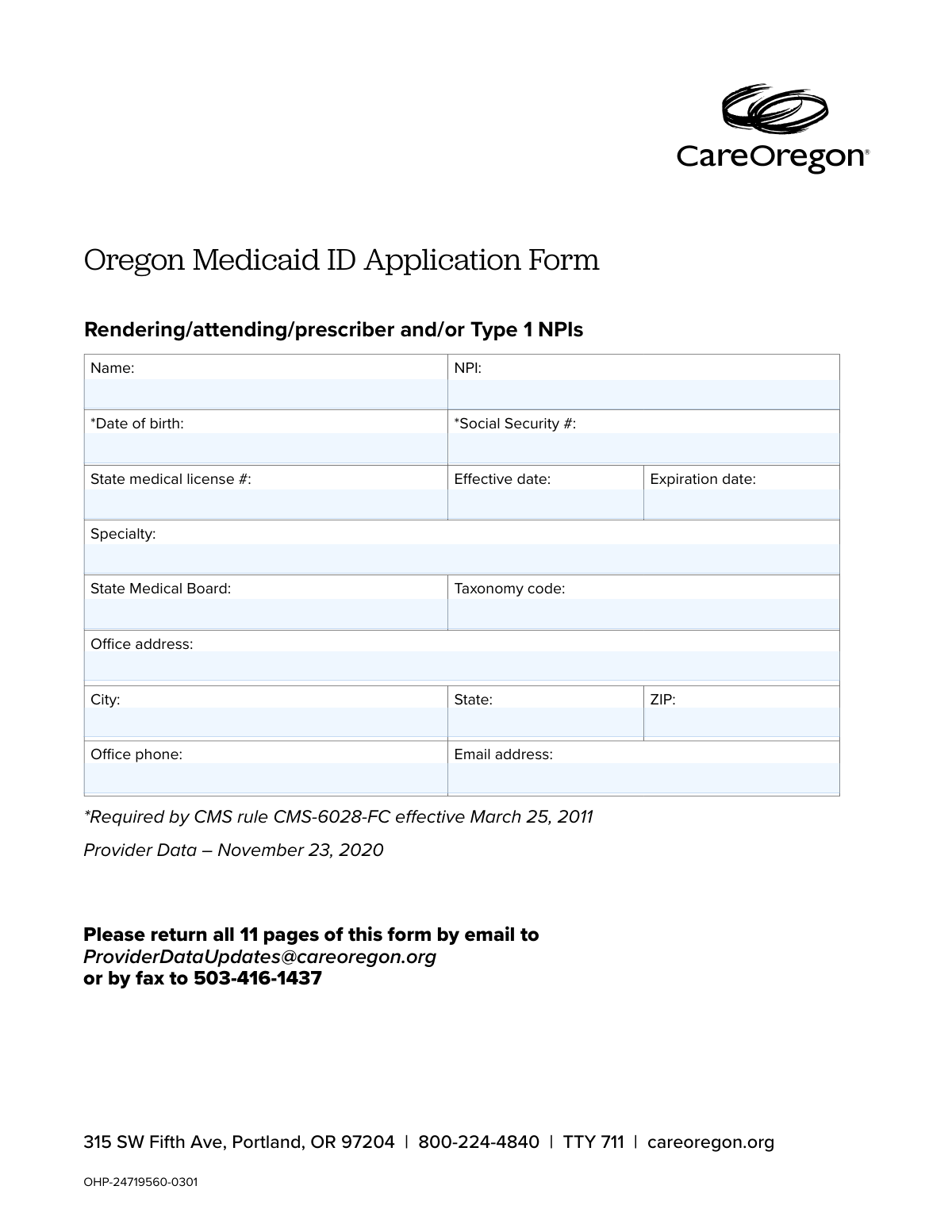
Yes! You can use AI to fill out Provider Enrollment Agreement (OHA 3975), Oregon Medicaid ID Application Form

Form OHA 3975 is the official Provider Enrollment Agreement for healthcare professionals wishing to participate in the Oregon Health Plan (OHP), Oregon's Medicaid program. This legal document outlines the rights, responsibilities, and terms of participation, ensuring providers comply with state and federal regulations for billing, recordkeeping, and patient care. Today, this form can be filled out quickly and accurately using AI-powered services like Instafill.ai, which can also convert non-fillable PDF versions into interactive fillable forms.
Our AI automatically handles information lookup, data retrieval, formatting, and form filling.
It takes less than a minute to fill out OHA 3975 using our AI form filling.
Securely upload your data. Information is encrypted in transit and deleted immediately after the form is filled out.

Form specifications

Form name: Provider Enrollment Agreement (OHA 3975), Oregon Medicaid ID Application Form
Number of pages: 1
Language: English
Categories: Medicaid forms, enrollment forms, enrollment application forms
main-image

Instafill Demo: How to fill out PDF forms in seconds with AI

How to Fill Out OHA 3975 Online for Free in 2026

Are you looking to fill out a OHA 3975 form online quickly and accurately? Instafill.ai offers the #1 AI-powered PDF filling software of 2026, allowing you to complete your OHA 3975 form in just 37 seconds or less.
Follow these steps to fill out your OHA 3975 form online using Instafill.ai:
  1. 1 Navigate to Instafill.ai and upload or select the Oregon Provider Enrollment Agreement (OHA 3975).
  2. 2 Use the AI assistant to automatically populate your professional information, including your name, NPI, medical license number, and office contact details.
  3. 3 Carefully review all pre-filled data for accuracy, especially critical details like your Social Security Number, license effective/expiration dates, and taxonomy code.
  4. 4 Read through the agreement's terms and conditions, covering aspects like services, recordkeeping, billing, and compliance.
  5. 5 Electronically sign and date the form in the designated provider signature section.
  6. 6 Verify that all 11 pages of the form are complete before proceeding.
  7. 7 Download the final document and submit it to the Provider Enrollment unit via the email or fax number listed on the form.

Our AI-powered system ensures each field is filled out correctly, reducing errors and saving you time.

Why Choose Instafill.ai for Your Fillable OHA 3975 Form?

Speed

Complete your OHA 3975 in as little as 37 seconds.

Up-to-Date

Always use the latest 2026 OHA 3975 form version.

Cost-effective

No need to hire expensive lawyers.

Accuracy

Our AI performs 10 compliance checks to ensure your form is error-free.

Security

Your personal information is protected with bank-level encryption.

Frequently Asked Questions About Form OHA 3975

This form is a Provider Enrollment Agreement required by the Oregon Health Authority (OHA) to enroll healthcare providers into the Oregon Medicaid Program, also known as the Oregon Health Plan (OHP).

All providers, including individuals and organizations, who wish to deliver health services to OHP members must complete this form. This includes providers who bill for services as well as those who only order, refer, or prescribe.

You will need to provide your personal and professional details, including your name, National Provider Identifier (NPI), date of birth, Social Security Number, medical license information, specialty, and office contact details.

This information is required by the Centers for Medicare & Medicaid Services (CMS) rule CMS-6028-FC, effective March 25, 2011, for provider screening and identity verification purposes.

You must return all 11 pages of the completed and signed form by email to [email protected] or by fax to 503-416-1437.

Yes, along with this signed agreement, you must also submit a completed Enrollment Application. Organizations and billing providers must also submit a Medicaid Provider Disclosure Statement.

You are required to notify the Oregon Health Authority (OHA) in writing of any changes to your provider information, such as address or licensure, within 30 days of the change.

Yes, the agreement states that all providers who order, refer, or prescribe services or goods for OHP members must enroll, even if they are considered non-payable or non-billing providers.

The agreement remains in effect for no more than five years from the effective date, after which you will likely need to complete a revalidation process.

The provider or an authorized official of the organization must sign and date the form. This signature certifies that the information provided is accurate and that you agree to abide by the terms and conditions.

The form does not specify a standard processing time. Your agreement becomes effective on the date it is approved by OHA, and an OHP provider number must be issued before you can submit claims.

Yes, services like Instafill.ai use AI to accurately auto-fill form fields, which can save you time and help prevent common errors.

You can use a service like Instafill.ai to upload the PDF. It will make the document interactive so you can easily fill out the fields, sign, and download the completed form from any device.

If your PDF is a flat, non-fillable file, tools like Instafill.ai can convert it into an interactive, fillable form that you can complete and sign electronically.

Compliance OHA 3975
Validation Checks by Instafill.ai

1
NPI Format and Luhn Check
This validation ensures the National Provider Identifier (NPI) is a 10-digit number. It also performs a Luhn algorithm check to verify the checksum digit, which helps catch common data entry errors. An invalid NPI format will prevent proper identification and claim processing, so this check is critical for linking the provider to the national registry. Failure will result in a rejection of the field, requiring the user to re-enter a valid NPI.
2
Social Security Number Format
This check verifies that the Social Security Number (SSN) is entered in the standard XXX-XX-XXXX format. Since the SSN is required by CMS for identity verification and background checks, ensuring its correct format is the first step in processing it correctly. If the format is incorrect, the form submission will be blocked until the user corrects the entry to match the required structure.
3
Date of Birth Validity and Age Check
This validation confirms that the Date of Birth is a real calendar date and that the calculated age is reasonable for a medical professional (e.g., over 18 years old). This prevents nonsensical entries and ensures the applicant meets the basic age requirement to hold a professional license. An invalid date or an age outside the plausible range will trigger an error, prompting the user for correction.
4
Medical License Expiration Date
This check ensures the state medical license 'Expiration date' is a future date. Enrolling a provider with an expired or soon-to-be-expired license poses a significant compliance risk and could lead to unauthorized practice. If the license is already expired, the application cannot proceed and the provider must renew their license before applying.
5
License Date Logical Consistency
This validation verifies that the 'Expiration date' of the medical license occurs after its 'Effective date'. This logical check prevents data entry errors where the dates might be accidentally transposed or entered incorrectly. An illogical date range would invalidate the license information, so the system will flag this as an error requiring correction.
6
Email Address Format Validation
This check ensures the provided email address follows the standard '[email protected]' format. A valid email is essential for all official communications, including application status updates, revalidation notices, and other important information from OHA. If the format is invalid, the user will be prompted to enter a correctly formatted email address to ensure they can be contacted.
7
Office Phone Number Format
This validation verifies that the 'Office phone' field contains a valid 10-digit US phone number, allowing for common formats like (XXX) XXX-XXXX or XXX-XXX-XXXX. A correct phone number is crucial for direct communication with the provider's office. The system will reject entries that do not conform to a recognizable phone number structure.
8
ZIP Code and State Consistency
This check validates that the 'ZIP' code is in a valid 5-digit or 9-digit format and that it corresponds to the 'State' entered in the address. This ensures the accuracy of the provider's physical office location, which is used for directories, site visits, and mailings. A mismatch between the ZIP code and state will result in an error, requiring the user to verify and correct the address information.
9
Required Field Completeness
This validation ensures that all mandatory fields, such as 'Name', 'NPI', 'Date of birth', and 'Social Security #', are not left blank. Incomplete applications cannot be processed and create administrative delays. The system will prevent submission and highlight all missing required fields until they are filled out by the applicant.
10
Taxonomy Code Structure
This check verifies that the 'Taxonomy code' is a 10-character alphanumeric string, which is the standard format for these codes. Taxonomy codes are used to classify the provider's specialty for billing and reporting purposes. An incorrectly formatted code will be rejected, as it would cause failures in downstream processing and claim adjudication.
11
Signature Date Presence and Validity
This validation confirms that the signature 'Date' field is filled out and that the date is not in the future. The signature date legally attests to the accuracy of the information on that day and marks the effective date of the agreement under certain circumstances. A missing or future date would invalidate the signature, so the form will require a valid, present or past date.
12
Provider Name and NPI Cross-Reference
This is an external validation that cross-references the provider's 'Name' and 'NPI' against the national NPPES (National Plan and Provider Enumeration System) database. This check is vital to confirm the identity of the provider and prevent fraud. A mismatch between the entered name and the name associated with the NPI in the national registry will flag the application for manual review or rejection.
13
Signature and Printed Name Co-occurrence
This check ensures that if a signature is provided in the 'Signature of Provider or authorized official' field, the corresponding 'Print name of Provider or authorized official' field is also completed. The printed name is necessary to legibly identify the signer. If one field is filled without the other, the form will prompt the user to complete the pair to ensure the signature is legally attributable.
14
Specialty and Taxonomy Code Correlation
This validation checks if the provided 'Taxonomy code' is a valid and recognized code for the 'Specialty' the provider has listed. This ensures consistency and accuracy in how the provider is classified within the Medicaid system. If the taxonomy code does not align with the specialty, it could lead to incorrect claim processing or provider directory listings, so the system will flag the discrepancy for correction.

Common Mistakes in Completing OHA 3975

Submitting an Incomplete Page Count

Applicants often assume only the pages with data fields and a signature are required, discarding the lengthy legal agreement pages. However, the instructions on the first page explicitly state to return 'all 11 pages of this form'. Submitting a partial packet will cause the application to be deemed incomplete and rejected, forcing a full resubmission and delaying the enrollment process.

Using a Nickname Instead of a Full Legal Name

Providers may habitually enter a common nickname or abbreviated name (e.g., 'Dr. Mike Smith' instead of 'Michael J. Smith'). This creates a mismatch with official records like the state medical license and NPI registry, which will cause the application to fail verification and be rejected. Always use the full legal name as it appears on all professional and government documents to ensure consistency. AI-powered tools like Instafill.ai can help prevent this by populating fields from a verified data source.

Mismatched NPI and Taxonomy Code

This error occurs when an applicant enters a taxonomy code that does not correspond to the specialty associated with their National Provider Identifier (NPI). This can happen from a simple typo or confusion if a provider has multiple specialties. Because these numbers are cross-referenced for verification, a mismatch will immediately flag the application for rejection, requiring correction and resubmission.

Incomplete or Mismatched Signature Section

The signature page requires a printed name, a signature, and a title (if applicable), and all must be consistent. Mistakes include an authorized official forgetting to add their title, or the printed name not matching the legal name of the person signing. An incomplete or invalid signature invalidates the entire legal agreement, leading to immediate rejection of the application.

Using an Incorrect NPI Type

The form specifies it is for individual providers with Type 1 NPIs, but administrative staff may mistakenly enter the organization's Type 2 NPI. This is a critical error as the enrollment and verification process is entirely different for individuals versus organizations. Using the wrong NPI type will cause an immediate validation failure and rejection of the application.

Omitting Required Personal Information

Due to privacy concerns, applicants sometimes hesitate to provide their Social Security Number (SSN) and Date of Birth, leaving these fields blank. The form explicitly notes these are required by a CMS rule for identity verification and background checks. An application missing this information is considered incomplete and will be automatically rejected without further review.

Incorrect or Ambiguous License Dates

Applicants may hastily enter the license issue date instead of the effective date, or use an ambiguous date format like MM/DD/YY which can be misinterpreted. Incorrect or unclear dates for the medical license's effective and expiration period will cause validation failures when the state licensing board is checked. To avoid delays, carefully transcribe the exact dates from the license and use a clear YYYY-MM-DD format.

Illegible Handwriting or Poor Scan Quality

Since this form may be printed, filled by hand, and then scanned, illegible handwriting is a common problem, especially for long strings of numbers like a license or Social Security Number. Similarly, a low-resolution or blurry scan can render the information unreadable by the processing staff. This will result in an automatic rejection, so it is best to type directly into the PDF; if the PDF is not fillable, tools like Instafill.ai can convert it into an interactive, fillable version to ensure clarity.

Using an Incorrect Submission Method

The first page of the form provides very specific submission instructions: email to [email protected] or fax. Applicants sometimes see the physical address in the letterhead and assume they can mail the form, which can cause it to be lost or severely delayed in reaching the correct department. Failure to use the designated submission channels will, at best, significantly delay processing.

Not Reading the Provider Enrollment Agreement

Faced with a dense, 10-page legal document, many providers skip directly to the signature page without reading the terms they are agreeing to. By signing, the provider becomes legally bound to all terms, including compliance audits, recordkeeping requirements, and potential sanctions for non-compliance. Ignorance of these terms is not a valid defense and can lead to serious financial and professional repercussions down the line.
Saved over 80 hours a year

“I was never sure if my IRS forms like W-9 were filled correctly. Now, I can complete the forms accurately without any external help.”

Kevin Martin Green

Your data stays secure with advanced protection from Instafill and our subprocessors

Robust compliance program

Transparent business model

You’re not the product. You always know where your data is and what it is processed for.

ISO 27001, HIPAA, and GDPR

Our subprocesses adhere to multiple compliance standards, including but not limited to ISO 27001, HIPAA, and GDPR.

Security & privacy by design

We consider security and privacy from the initial design phase of any new service or functionality. It’s not an afterthought, it’s built-in, including support for two-factor authentication (2FA) to further protect your account.

Fill out OHA 3975 with Instafill.ai

Worried about filling PDFs wrong? Instafill securely fills provider-enrollment-agreement-oha-3975-oregon-medicaid-id-application-form forms, ensuring each field is accurate.