Yes! You can use AI to fill out Medical Baseline Allowance Application (Used for Medical Baseline Enrollment and Re-Certification)
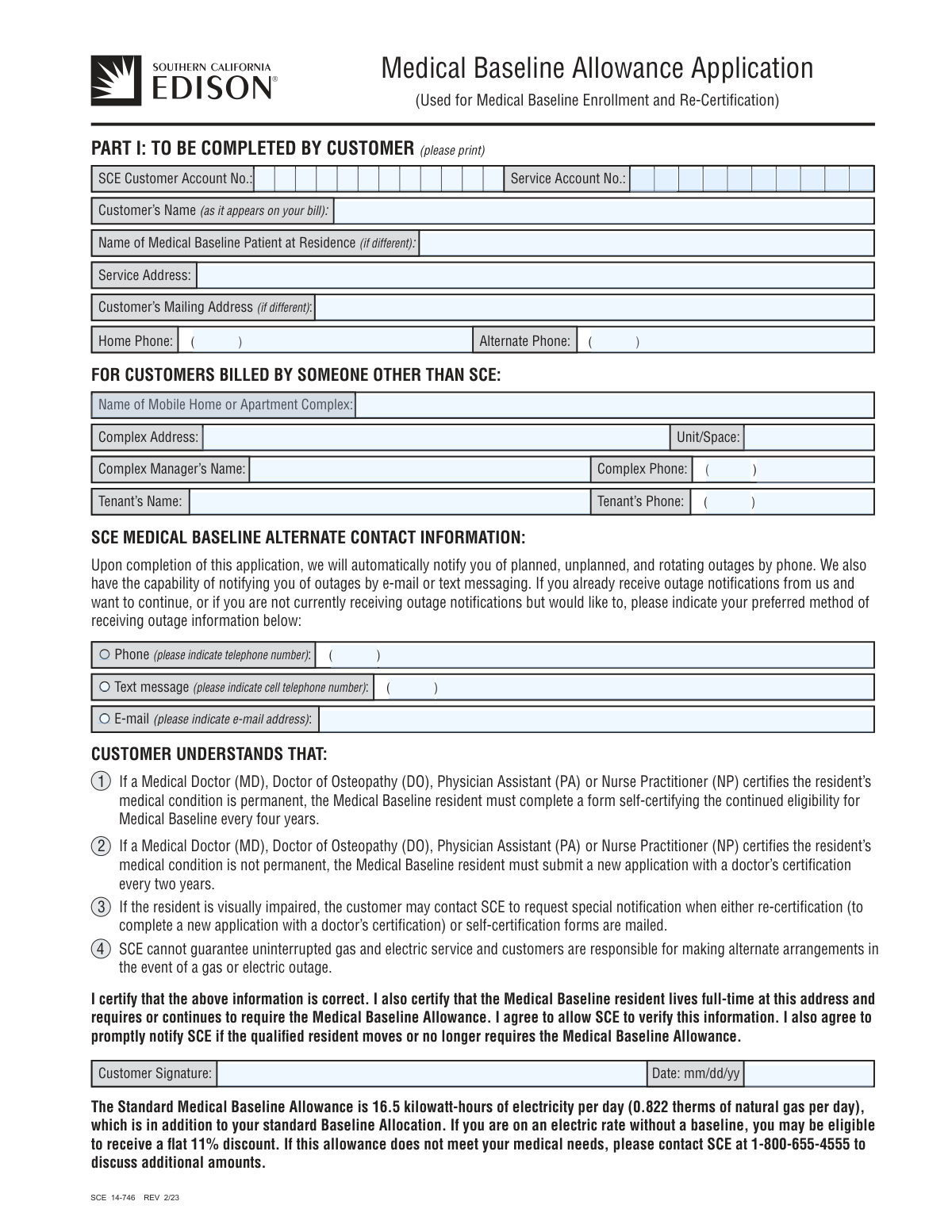
This form, SCE 14-746, is used by Southern California Edison customers to apply for or re-certify their eligibility for the Medical Baseline program. The program provides an additional quantity of electricity and/or natural gas at a lower rate for households where a resident has a qualifying medical condition or relies on life-support equipment. Today, this form can be filled out quickly and accurately using AI-powered services like Instafill.ai, which can also convert non-fillable PDF versions into interactive fillable forms.
Our AI automatically handles information lookup, data retrieval, formatting, and form filling.
It takes less than a minute to fill out SCE 14-746 using our AI form filling.
Securely upload your data. Information is encrypted in transit and deleted immediately after the form is filled out.
Form specifications
| Form name: | Medical Baseline Allowance Application (Used for Medical Baseline Enrollment and Re-Certification) |
| Number of pages: | 2 |
| Language: | English |
| Categories: | medical forms, VA medical forms, Medi-Cal forms, enrollment forms, enrollment application forms, certification forms |
Instafill Demo: How to fill out PDF forms in seconds with AI
How to Fill Out SCE 14-746 Online for Free in 2026
Are you looking to fill out a SCE 14-746 form online quickly and accurately? Instafill.ai offers the #1 AI-powered PDF filling software of 2026, allowing you to complete your SCE 14-746 form in just 37 seconds or less.
Follow these steps to fill out your SCE 14-746 form online using Instafill.ai:
- 1 Navigate to Instafill.ai and upload or select the SCE 14-746 Medical Baseline Allowance Application.
- 2 Use the AI assistant to fill out Part 1 with your SCE customer account information, service address, and contact details.
- 3 If you are a tenant or live in a multi-unit complex, provide the requested information for your landlord or complex manager.
- 4 Indicate your preferred method for receiving outage notifications from SCE, such as by phone, text message, or email.
- 5 Review the customer certification, then electronically sign and date the application in Part 1.
- 6 Securely share the partially completed form with your licensed medical provider (MD, DO, PA, or NP) for them to complete and sign Part 2, certifying the medical need.
- 7 Once both parts are complete, download the final document and mail it to the Southern California Edison Medical Baseline Department at the address provided on the form.
Our AI-powered system ensures each field is filled out correctly, reducing errors and saving you time.
Why Choose Instafill.ai for Your Fillable SCE 14-746 Form?
Speed
Complete your SCE 14-746 in as little as 37 seconds.
Up-to-Date
Always use the latest 2026 SCE 14-746 form version.
Cost-effective
No need to hire expensive lawyers.
Accuracy
Our AI performs 10 compliance checks to ensure your form is error-free.
Security
Your personal information is protected with bank-level encryption.
Frequently Asked Questions About Form SCE 14-746
This form is used to apply for or re-certify for the Medical Baseline program, which provides an additional quantity of electricity or natural gas at a lower rate for residential customers with qualifying medical needs.
The form must be completed by the SCE customer (Part 1) and a licensed Medical Doctor (MD), Doctor of Osteopathy (DO), Physician Assistant (PA), or Nurse Practitioner (NP) who can certify the patient's medical needs (Part 2).
The standard allowance provides an additional 16.5 kilowatt-hours of electricity per day or 0.822 therms of natural gas per day at a lower rate. Some rate plans may receive a flat 11% discount instead.
Both your Customer Account Number and Service Account Number are printed on your Southern California Edison (SCE) bill. You must enter them on the form exactly as they appear on your statement.
If the medical condition is certified as permanent, you must self-certify every four years. If the condition is not permanent, you must submit a new application with a doctor's certification every two years.
No, SCE cannot guarantee uninterrupted service. Customers on this program are still responsible for making their own alternate arrangements, like having a backup power source, in the event of an outage.
You can still apply. The form has a dedicated section for customers billed by someone other than SCE, where you can provide details about your complex, manager, and landlord.
Electrically-operated medical devices required in the patient's home qualify. Additionally, standard allowances are available if extra heating or cooling is medically necessary to sustain the patient's life, but not for devices used only for therapy.
Mail the fully completed and signed application to the Southern California Edison Company, Medical Baseline Department, P.O. Box 9527, Azusa, CA 91702-9954.
Yes, services like Instafill.ai use AI to accurately auto-fill form fields with your saved information, which can save time and help reduce errors on your application.
You can use a service like Instafill.ai to fill the form online. Simply upload the PDF, and the platform's AI will help you auto-fill your information before you download the completed document for printing and submission.
If you have a non-fillable PDF, you can use a tool like Instafill.ai. It can convert flat PDFs into interactive, fillable forms that you can easily complete on your computer.
You will automatically be notified of outages by phone, but the application allows you to also select notification by e-mail or text message as your preferred method.
Compliance SCE 14-746
Validation Checks by Instafill.ai
1
Completeness of Core Customer Information
Verifies that essential customer details in Part 1, including 'Customer’s Name', 'SCE Customer Account No.', 'Service Address', 'Customer Signature', and 'Signature Date', are all filled out. Missing any of this core information makes it impossible to identify the account or validate the customer's consent. The application would be considered incomplete and returned to the customer for correction.
2
Completeness of Medical Professional Certification
Ensures all required fields in Part 2 are completed by the medical professional, including their name, state license number, signature, and the date of signature. This section provides the medical justification for the allowance. An incomplete certification invalidates the medical claim, leading to the application's rejection.
3
Patient Name Consistency Across Form
This check validates that if the 'Name of Medical Baseline Patient at Residence (if different)' field is filled in Part 1, it matches the patient's first and last name entered in Part 2. This consistency is crucial to ensure the application is for the correct individual throughout both sections. A mismatch would require clarification and delay the approval process.
4
Patient and Customer Name Identity Logic
This check validates that if the 'Name of Medical Baseline Patient at Residence (if different)' field in Part 1 is left blank, the patient's name entered in Part 2 matches the 'Customer's Name' from Part 1. This logic correctly assumes the account holder is the patient unless specified otherwise. A mismatch would indicate a data entry error and require clarification before the application can be processed.
5
Conditional Requirement for Medical Device Details
This check validates that if the medical professional indicates 'Yes' for 'Requires use of electrically-operated medical devices', at least one device name is specified in the subsequent fields. Without a device listed, the 'Yes' certification is unsubstantiated. Failure to provide device details will result in the application being flagged for clarification or rejection.
6
Exclusive Selection for Duration of Medical Need
Validates that for the duration of need in Part 2, either the 'Permanently' checkbox is selected OR the 'No. of Years' checkbox is selected and a corresponding number is entered, but not both. This prevents ambiguity regarding the re-certification schedule. An invalid, dual, or empty selection would require clarification and delay processing.
7
Valid and Plausible Signature Dates
This check ensures that both the customer's signature date and the medical professional's signature date are provided in a valid format (e.g., MM/DD/YY) and are not future dates. Valid dates are crucial for establishing the timeline of the application and determining eligibility periods. An invalid or future date would cause the form to be rejected for correction.
8
Logical Chronology of Signatures
Verifies that the medical professional's signature date in Part 2 is on or before the customer's signature date in Part 1. This chronological order reflects the typical workflow where medical need is certified before the customer submits the application. A customer signature dated significantly before the medical certification could indicate a procedural error and may require verification.
9
SCE Account Number Format Validation
Checks that the 'SCE Customer Account No.' and 'Service Account No.' adhere to the expected format, such as being a specific length and containing only numeric characters. The form layout for the Service Account Number suggests a 10-digit format. Incorrect account numbers are a primary reason for processing failure, as the application cannot be linked to the correct utility account.
10
Conditional Provision of Outage Notification Details
This check confirms that if a customer selects a preferred method for outage notifications (Text, E-mail, or Phone), they must also provide the corresponding contact information. For example, checking 'Text message' requires a cell phone number to be entered. Without the associated detail, the preference cannot be honored, and the system should flag this as an incomplete entry.
11
Valid E-mail Address Format
If the customer opts to receive notifications by e-mail, this check verifies that the provided e-mail address follows a standard format (e.g., [email protected]). An invalid email format would result in bounced notifications, defeating the purpose of this critical communication channel. The system should reject malformed email addresses to ensure the customer can correct them.
12
Mutually Exclusive Selections in Certification Questions
This check ensures that for each pair of 'Yes' and 'No' checkboxes in Part 2 (e.g., 'Requires heating', 'Hospice Care', 'Life-Support'), exactly one option is selected. Selecting both or neither option creates ambiguity and makes the certification invalid. The form must be returned for correction if a clear choice is not made for each question.
13
Dependent Field Completion for Tenant/Complex
Verifies that secondary contact details for tenants or apartment complexes are only provided if the primary identifier is also present. For instance, 'Tenant's Phone' should only be filled if 'Tenant's Name' is also filled. This prevents orphaned data and ensures contact information is complete and actionable, avoiding confusion during processing or outreach.
14
Standard Phone Number Structure
This validation ensures that all phone number entries are properly structured, consisting of a 3-digit area code and a 7-digit local number. This is essential for ensuring the utility can successfully contact the customer or other parties when needed, especially for outage notifications. Incomplete or malformed numbers will fail validation and must be corrected.
Common Mistakes in Completing SCE 14-746
This happens when an applicant misreads or mistypes the SCE Customer Account Number or Service Account Number from their bill. Because these numbers are the primary identifiers for the account, any error will cause the application to be rejected or significantly delayed as it cannot be matched to the correct service location. To avoid this, carefully double-check both account numbers against a recent SCE bill before submitting.
Applicants often enter their own name or the patient's name in the 'Customer's Name' field, even if the utility account is under a different name (e.g., a spouse or landlord). This mismatch leads to an automatic failure during the verification process, causing the application to be denied. Always ensure the name entered in the 'Customer’s Name' field is written exactly as it appears on the Southern California Edison bill.
The customer fills out their portion (Part 1) but fails to have Part 2 completed and signed by a qualified medical professional before submitting the form. An application without the required medical certification is incomplete and will be immediately rejected, delaying access to the allowance. It is the customer's responsibility to get this section filled out by an MD, DO, PA, or NP and to review it for completeness before mailing.
Even when Part 2 is filled out, the medical professional may forget to sign, date, or provide their state license number. These details are mandatory for SCE to verify the practitioner's credentials and validate the medical need. An application missing any of this information is considered invalid and will be returned, requiring the applicant to go back to their doctor's office.
An applicant might enter their P.O. Box or a different mailing address in the 'Service Address' field. The Medical Baseline benefit is tied to the physical location receiving power, so an incorrect service address will cause the application to fail verification. The 'Service Address' must be the physical address of the residence, while the 'Mailing Address' field should only be used if it's different.
The customer completes all the fields but forgets to sign and date the certification in Part 1. An unsigned application is not legally valid and cannot be processed, forcing a resubmission and causing delays. Always perform a final review to ensure the signature and date fields are completed before sending the form.
The form states that an allowance for heating or cooling is only granted if it is 'medically necessary to sustain the patient’s life or prevent deterioration,' not for general comfort. A doctor might check 'Yes' without understanding this strict requirement, which can lead to denial or requests for more information. The medical need for temperature regulation must be directly tied to life-sustainment.
In Part 2, the medical professional may write a generic term like 'breathing machine' or 'medical equipment' instead of the specific device name (e.g., 'Oxygen Concentrator,' 'Ventilator,' 'CPAP'). This ambiguity requires SCE to follow up for clarification, which significantly delays the approval process. Ensure the doctor lists the precise name of each medical device used in the patient's home.
Customers who are billed directly by SCE sometimes mistakenly fill out the section intended for tenants in sub-metered properties (e.g., mobile home parks, some apartments). This creates confusion and adds unnecessary information to the application. This section should only be completed if a landlord or property manager, not SCE, is responsible for billing the resident for their electricity usage.
A user may check a box to receive outage notifications via 'Text message' or 'E-mail' but then forget to write their phone number or email address in the adjacent field. This makes it impossible for SCE to act on the preference, and the notification will not be set up. To avoid this, double-check that you have provided the complete contact information next to any notification method you select.
Since this form is a non-fillable PDF, users often print and complete it by hand, which can result in illegible entries for critical data like account numbers, names, and addresses. Poor handwriting is a common source of data entry errors that lead to rejection. Using an AI-powered tool like Instafill.ai can convert the PDF into a fillable format, allowing you to type your answers clearly and ensure accuracy before printing for signatures.
Saved over 80 hours a year
“I was never sure if my IRS forms like W-9 were filled correctly. Now, I can complete the forms accurately without any external help.”
Kevin Martin Green
Your data stays secure with advanced protection from Instafill and our subprocessors

Robust compliance program
Transparent business model
You’re not the product. You always know where your data is and what it is processed for.
ISO 27001, HIPAA, and GDPR
Our subprocesses adhere to multiple compliance standards, including but not limited to ISO 27001, HIPAA, and GDPR.
Security & privacy by design
We consider security and privacy from the initial design phase of any new service or functionality. It’s not an afterthought, it’s built-in, including support for two-factor authentication (2FA) to further protect your account.
Fill out SCE 14-746 with Instafill.ai
Worried about filling PDFs wrong? Instafill securely fills medical-baseline-allowance-application-used-for-medical-baseline-enrollment-and-re-certification forms, ensuring each field is accurate.