Yes! You can use AI to fill out Provider Group/Facility Application (RA-02)

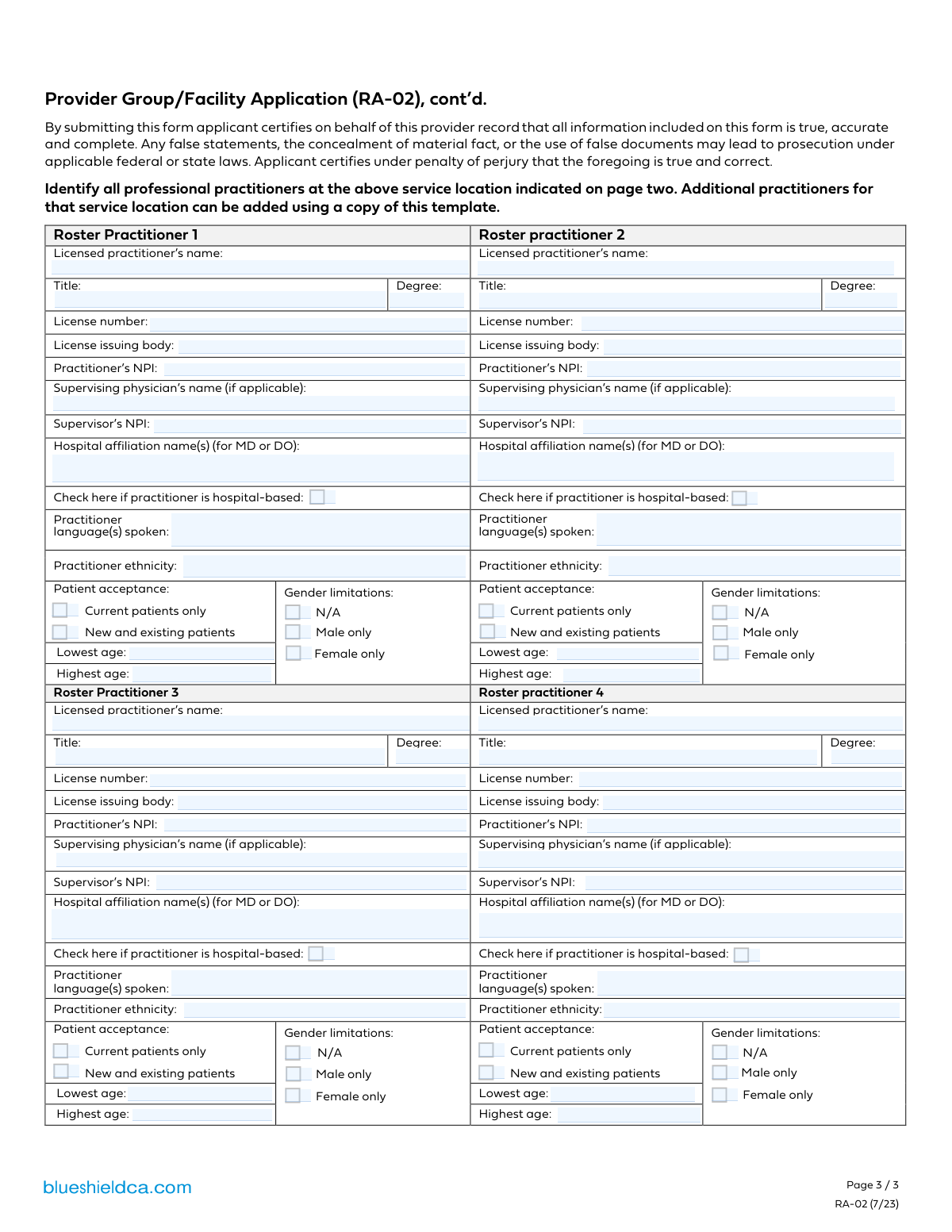
The RA-02 Provider Group/Facility Application is a form required by Blue Shield of California for medical groups and facilities seeking to become part of their provider network. It gathers essential details about the organization and a comprehensive roster of its professional practitioners, including their licensing, NPI numbers, specializations, and patient acceptance policies. Today, this form can be filled out quickly and accurately using AI-powered services like Instafill.ai, which can also convert non-fillable PDF versions into interactive fillable forms.
Our AI automatically handles information lookup, data retrieval, formatting, and form filling.
It takes less than a minute to fill out RA-02 using our AI form filling.
Securely upload your data. Information is encrypted in transit and deleted immediately after the form is filled out.

Form specifications

Form name: Provider Group/Facility Application (RA-02)
Number of pages: 1
Language: English
main-image

Instafill Demo: How to fill out PDF forms in seconds with AI

How to Fill Out RA-02 Online for Free in 2026

Are you looking to fill out a RA-02 form online quickly and accurately? Instafill.ai offers the #1 AI-powered PDF filling software of 2026, allowing you to complete your RA-02 form in just 37 seconds or less.
Follow these steps to fill out your RA-02 form online using Instafill.ai:
  1. 1 Navigate to Instafill.ai and upload or select the Provider Group/Facility Application (RA-02).
  2. 2 Provide the primary information for the provider group or facility, such as name, address, and contact details.
  3. 3 Proceed to the practitioner roster section to add individual healthcare professionals associated with the facility.
  4. 4 For each practitioner, enter their full name, title, license number, NPI, and any supervising physician details if applicable.
  5. 5 Specify patient acceptance criteria for each provider, including age ranges, gender limitations, and whether they are accepting new patients.
  6. 6 Review all entered information for accuracy and completeness before proceeding to the certification section.
  7. 7 Certify the application by providing the necessary signature, confirming that all information is true and correct, then submit the form as required.

Our AI-powered system ensures each field is filled out correctly, reducing errors and saving you time.

Why Choose Instafill.ai for Your Fillable RA-02 Form?

Speed

Complete your RA-02 in as little as 37 seconds.

Up-to-Date

Always use the latest 2026 RA-02 form version.

Cost-effective

No need to hire expensive lawyers.

Accuracy

Our AI performs 10 compliance checks to ensure your form is error-free.

Security

Your personal information is protected with bank-level encryption.

Frequently Asked Questions About Form RA-02

This form is part of the Blue Shield of California Provider Group/Facility Application. It is used to list, or 'roster,' all the individual licensed practitioners who will be providing services at a specific location under the group's contract.

An authorized representative of the provider group or facility must complete and certify this form. By submitting it, they are attesting to the accuracy of all the practitioner information provided.

The form indicates that you can make a copy of this page to add more practitioners. You should complete as many copies of this roster page as needed to list every practitioner at the service location.

The NPI is a unique 10-digit identification number for healthcare providers. Each practitioner should have their own NPI, which can also be verified through the public NPI Registry online.

These fields are required only if the practitioner, such as a Nurse Practitioner or Physician Assistant, works under the legal supervision of a physician. If the practitioner practices independently, you can leave these fields blank.

Check this box if the practitioner primarily provides services within a hospital setting, such as a hospitalist, anesthesiologist, or emergency room doctor. This helps classify the provider's main practice environment.

Use the 'Patient acceptance' checkboxes to indicate if they see new or only existing patients, the 'Gender limitations' options for any restrictions, and the 'Lowest age' and 'Highest age' fields for the accepted patient age range.

This information is collected for demographic purposes and to help create a more useful and diverse provider directory for members. It allows patients to find providers who may share their language or cultural background.

For practitioners with an MD or DO degree, you must list the name(s) of the hospital(s) where they have admitting privileges or are professionally affiliated. This section is only applicable to MDs and DOs.

The form includes a certification that all information is true and accurate. Submitting false statements or concealing facts can lead to prosecution under state or federal law and may result in the denial of your application.

Yes, you can use AI-powered services like Instafill.ai to help complete this form. These tools can auto-fill practitioner details accurately, saving you time and reducing the risk of manual data entry errors.

You can use a platform like Instafill.ai to upload the PDF and fill it out electronically. The service allows you to type directly into the form fields, save your progress, and easily manage multiple practitioner entries.

If you have a non-fillable or 'flat' PDF, services like Instafill.ai can convert it into an interactive, fillable form. This makes it easy to type in all the required practitioner information without needing to print and handwrite.

Compliance RA-02
Validation Checks by Instafill.ai

1
Validates NPI Format
This check ensures that any entered National Provider Identifier (NPI) for a practitioner or supervisor is a 10-digit number. The NPI is a unique, government-issued identifier, and an incorrect format can lead to credentialing failures and claim rejections. If the NPI is not a 10-digit number, the form submission will be rejected, requiring the user to correct the entry.
2
Ensures Supervisor NPI is Provided with Supervisor Name
This validation verifies that if a 'Supervising physician's name' is entered for a practitioner, the corresponding 'Supervisor's NPI' is also provided. This is crucial for proper credentialing and network management, which require both pieces of information for verification. A failure to provide the NPI when a name is present will result in an error, prompting the user to complete the required information.
3
Validates Patient Age Range Consistency
This check ensures that the value entered for 'Highest age' is greater than or equal to the value for 'Lowest age'. An illogical age range (e.g., lowest age 65, highest age 18) would lead to incorrect patient directory information and referral problems. If the highest age is less than the lowest age, the system will return an error and require the user to correct the age range before submission.
4
Verifies Completeness of Practitioner Roster Entry
This check ensures that if a 'Licensed practitioner’s name' is entered for a roster slot, then all other mandatory fields for that practitioner (such as License Number, NPI, Patient Acceptance, and Age Range) are also completed. Incomplete records cannot be processed for credentialing and lead to back-and-forth communication. The form will be rejected if a practitioner entry is started but not fully completed.
5
Enforces Mutually Exclusive Patient Acceptance Status
This validation ensures that for each practitioner, only one of the 'Patient acceptance' options ('Current patients only' or 'New and existing patients') is selected. Selecting both is a logical contradiction that makes the practitioner's status unclear for directories and referral systems. If both options are checked, the user will be prompted to choose only one.
6
Enforces Mutually Exclusive Gender Limitation Choice
This check verifies that for each practitioner, only one gender limitation option ('N/A', 'Male only', or 'Female only') is selected. It is logically impossible for a practitioner to have no limitations (N/A) and also be limited to a specific gender. A submission with multiple selections for this category will be flagged as an error, requiring the user to make a single, valid choice.
7
Validates Hospital Affiliation Requirement for MD/DO
This rule checks that the 'Hospital affiliation name(s)' field is only completed for practitioners whose degree is listed as 'MD' or 'DO'. This requirement is explicitly stated on the form and ensures data accuracy for physician-specific credentialing processes. Submitting affiliations for other practitioner types could cause confusion and processing errors, so the form will flag this as an issue if the condition is not met.
8
Ensures Patient Age is a Valid Number
This validation confirms that the 'Lowest age' and 'Highest age' fields contain only non-negative whole numbers. Entering text, decimals, or negative numbers would be invalid data for a patient's age and would corrupt provider directory information. The system should reject any non-numeric or negative values and prompt the user for a valid age in years.
9
Requires Practitioner License Number
This validation confirms that the 'License number' field is not empty for any practitioner added to the roster. The license number is a critical piece of information for primary source verification during the credentialing process. Without it, the provider cannot be verified or added to the network, so the form submission will fail if this field is blank for an active entry.
10
Requires License Issuing Body
This check ensures that the 'License issuing body' field is completed if a 'License number' has been provided. Knowing which board or agency issued the license is essential for verification and credentialing. A submission with a license number but no issuing body is incomplete and will be rejected, preventing processing delays.
11
Validates Supervisor NPI Dependency on Supervisor Name
This rule ensures that the 'Supervisor's NPI' field is not filled if the 'Supervising physician's name' field is empty. An NPI without a corresponding name is incomplete data and cannot be properly verified. This check prevents orphaned data points and ensures data integrity for supervisory relationships.
12
Requires Practitioner Degree Information
This validation ensures the 'Degree' field is completed for every practitioner on the roster. The degree (e.g., MD, DO, NP) is fundamental to understanding the practitioner's qualifications, scope of practice, and whether certain other rules apply. An application with a missing degree is incomplete and will be rejected until the information is provided.

Common Mistakes in Completing RA-02

Omitting the Supervisor's NPI When a Name is Provided

Applicants often enter the supervising physician's name but forget to include the corresponding Supervisor's NPI. The form's instructions explicitly state that the NPI is required if a supervisor's name is listed, and this omission creates an incomplete record that delays credentialing. To avoid this, always enter both the supervisor's name and their NPI together. AI-powered tools like Instafill.ai can help prevent this by using conditional logic to flag the missing NPI field when a supervisor's name is entered.

Using an Informal Name Instead of the Full Legal Name

Practitioners or office staff may enter a nickname or an abbreviated version of the practitioner's name instead of the full legal name as it appears on their license. This creates a mismatch during verification, leading to processing delays or rejections. Always use the full, official name to ensure a smooth application process. Since this form is a non-fillable PDF, a tool like Instafill.ai can convert it into a fillable version and pre-populate fields with verified data from a provider's profile, ensuring accuracy.

Confusing 'Title' and 'Degree' Fields

The form distinctly asks for both a 'Title' (e.g., 'Physician Assistant') and a 'Degree' (e.g., 'PA-C'), but users often enter the same information in both fields or mix them up. This leads to incorrect listings in provider directories and confusion during credentialing. To prevent this, enter the professional role in the 'Title' field and the credential abbreviation in the 'Degree' field. Using a smart form-filler like Instafill.ai can help by mapping the correct data to the appropriate field from a central provider profile.

Providing an Incorrect or Incomplete National Provider Identifier (NPI)

Simple data entry errors, such as transposing digits or entering a group NPI instead of the individual practitioner's NPI, are frequent. An incorrect NPI will cause an immediate failure in data validation and can halt the entire application. To avoid this, double-check the 10-digit number against the official NPI registry. Advanced tools like Instafill.ai can automatically validate the NPI's format and check it against a database to ensure its accuracy before submission.

Selecting Conflicting Options for Patient Acceptance

Applicants sometimes mistakenly check both 'Current patients only' and 'New and existing patients' for the same practitioner. This creates ambiguity and requires clarification, delaying updates to the provider's directory profile. To avoid this, carefully select only one option that accurately reflects the practitioner's status. AI-powered form fillers like Instafill.ai can enforce rules to ensure only one checkbox in a mutually exclusive group can be selected.

Entering an Illogical Patient Age Range

An applicant might accidentally enter a 'Highest age' that is lower than the 'Lowest age' or leave one of the fields blank, creating an invalid parameter for the provider directory. This can lead to incorrect patient referrals and frustration. Ensure the age range is logical and complete. Form-filling automation tools like Instafill.ai can implement validation rules to flag such logical errors before the form is submitted.

Omitting Hospital Affiliations for MDs/DOs

The form specifies that hospital affiliations should be listed for practitioners with MD or DO degrees, but this field is often left blank. This missing information is critical for credentialing and can result in an incomplete provider profile and processing delays. Always list all current hospital affiliations for any practitioner with an MD or DO degree. Smart tools like Instafill.ai can use conditional logic to remind the user to fill this field if the practitioner's degree is entered as 'MD' or 'DO'.

Vaguely or Incorrectly Identifying the License Issuing Body

Instead of providing the specific name of the licensing board (e.g., 'Medical Board of California'), applicants often write a generic term like 'California.' This ambiguity slows down the verification process. To avoid this, copy the full, official name of the licensing authority directly from the license. Since this form is a flat PDF, a tool like Instafill.ai can convert it to a fillable format and auto-populate this field with the correct, standardized board name from a saved provider profile.

Failing to List a Supervising Physician for Applicable Practitioners

For practitioners like Nurse Practitioners (NPs) or Physician Assistants (PAs), regulations often require a supervising physician, yet applicants frequently forget to fill out these fields. This omission is a critical compliance issue that will halt the application. Always confirm supervision requirements for the practitioner's license type and provide the necessary details. AI tools like Instafill.ai can be configured to prompt for supervisor details based on the practitioner's title or degree, preventing this oversight.

Listing Multiple Languages Without Correct Separation

The instructions ask users to separate multiple languages with commas, but people often use spaces, semicolons, or list them in a single block of text. This creates data parsing errors, leading to incomplete or unreadable language information in the provider directory. To ensure accuracy, always use a comma to separate each distinct language spoken. AI-powered form fillers like Instafill.ai can automatically format lists correctly, ensuring data integrity.
Saved over 80 hours a year

“I was never sure if my IRS forms like W-9 were filled correctly. Now, I can complete the forms accurately without any external help.”

Kevin Martin Green

Your data stays secure with advanced protection from Instafill and our subprocessors

Robust compliance program

Transparent business model

You’re not the product. You always know where your data is and what it is processed for.

ISO 27001, HIPAA, and GDPR

Our subprocesses adhere to multiple compliance standards, including but not limited to ISO 27001, HIPAA, and GDPR.

Security & privacy by design

We consider security and privacy from the initial design phase of any new service or functionality. It’s not an afterthought, it’s built-in, including support for two-factor authentication (2FA) to further protect your account.

Fill out RA-02 with Instafill.ai

Worried about filling PDFs wrong? Instafill securely fills provider-groupfacility-application-ra-02 forms, ensuring each field is accurate.