Yes! You can use AI to fill out Universal Title Application (Form OS/SS-UTA)

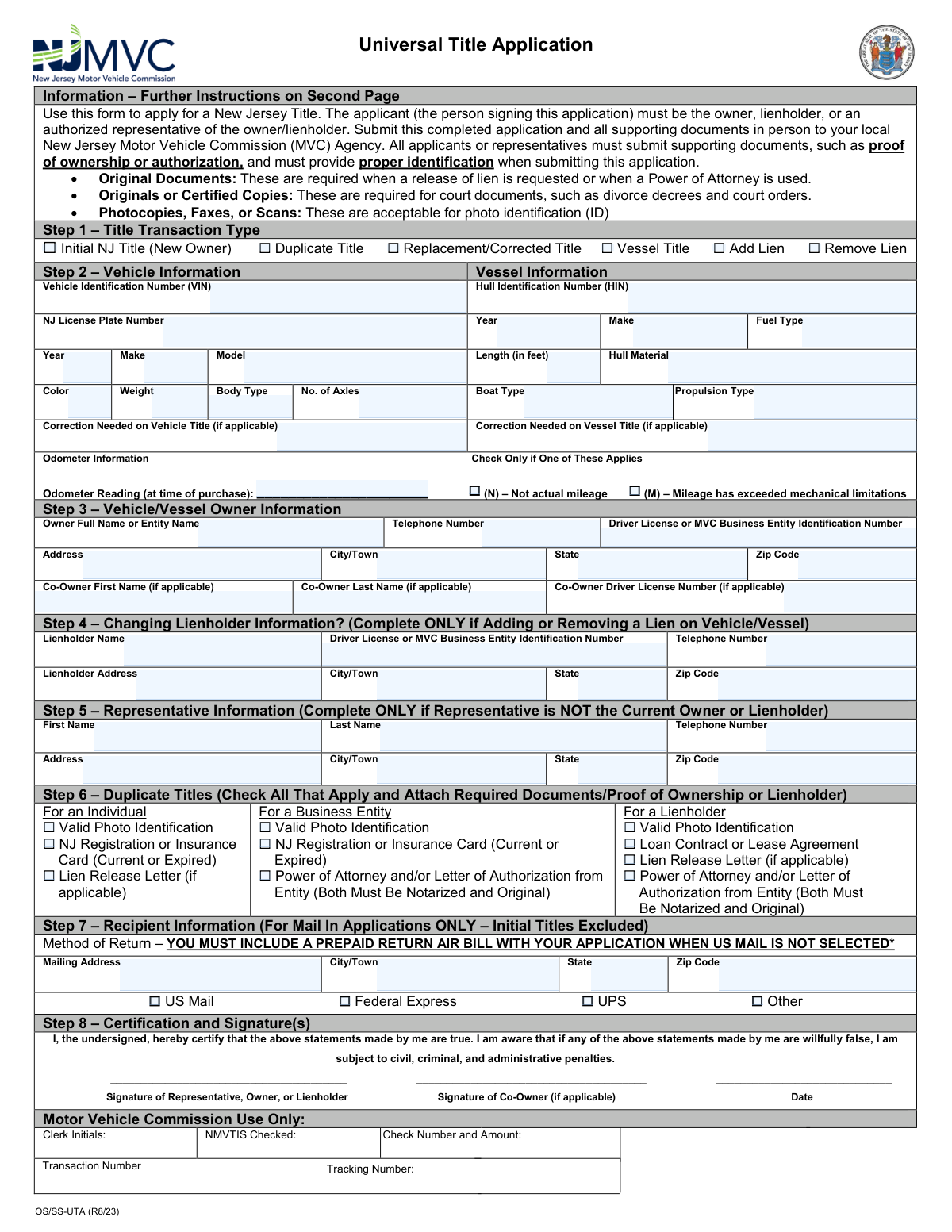
Form OS/SS-UTA, the Universal Title Application, is a document required by the New Jersey Motor Vehicle Commission (MVC) for various title-related transactions. It is used to apply for an initial title, request a duplicate or corrected title, or add/remove a lien on a vehicle or vessel, ensuring legal ownership is properly recorded. Today, this form can be filled out quickly and accurately using AI-powered services like Instafill.ai, which can also convert non-fillable PDF versions into interactive fillable forms.
OS/SS-UTA is part of the title application forms category on Instafill.
Our AI automatically handles information lookup, data retrieval, formatting, and form filling.
It takes less than a minute to fill out OS/SS-UTA using our AI form filling.
Securely upload your data. Information is encrypted in transit and deleted immediately after the form is filled out.

Form specifications

Form name: Universal Title Application (Form OS/SS-UTA)
Number of fields: 70
Number of pages: 1
Filled form examples: Form OS/SS-UTA Examples
Language: English
main-image

Instafill Demo: How to fill out PDF forms in seconds with AI

How to Fill Out OS/SS-UTA Online for Free in 2026

Are you looking to fill out a OS/SS-UTA form online quickly and accurately? Instafill.ai offers the #1 AI-powered PDF filling software of 2026, allowing you to complete your OS/SS-UTA form in just 37 seconds or less.
Follow these steps to fill out your OS/SS-UTA form online using Instafill.ai:
  1. 1 Navigate to Instafill.ai and upload or select the Universal Title Application (Form OS/SS-UTA).
  2. 2 Select the appropriate title transaction type, such as 'Initial NJ Title', 'Duplicate Title', or 'Add Lien'.
  3. 3 Provide the required vehicle or vessel information, including the VIN/HIN, make, model, year, and odometer reading.
  4. 4 Enter the full name, address, and driver's license number for the owner and any co-owners.
  5. 5 If applicable, complete the sections for lienholder information or for a representative acting on the owner's behalf.
  6. 6 Review all the information auto-populated by the AI to ensure it is correct and matches your supporting documents.
  7. 7 Certify the application with your signature, then download the completed form for submission to the NJ MVC as instructed.

Our AI-powered system ensures each field is filled out correctly, reducing errors and saving you time.

Why Choose Instafill.ai for Your Fillable OS/SS-UTA Form?

Speed

Complete your OS/SS-UTA in as little as 37 seconds.

Up-to-Date

Always use the latest 2026 OS/SS-UTA form version.

Cost-effective

No need to hire expensive lawyers.

Accuracy

Our AI performs 10 compliance checks to ensure your form is error-free.

Security

Your personal information is protected with bank-level encryption.

Frequently Asked Questions About Form OS/SS-UTA

This form is used to apply for various New Jersey title transactions for vehicles and vessels, such as getting a new title for a new owner, requesting a duplicate or corrected title, or adding and removing a lien.

The application must be completed by the owner, lienholder, or an authorized representative of the owner/lienholder. The person submitting the form must provide proper identification.

You must submit the completed application and all supporting documents in person at a local New Jersey Motor Vehicle Commission (MVC) Agency. Mail-in is only an option for certain transactions, but not for initial titles.

The fee for a New Jersey title is $60. If you are adding a lien to the title, there is an additional $25 fee.

You need to complete this form, selecting "Duplicate Title" in Step 1. You must also provide proof of ownership and valid photo identification as detailed in Step 6 of the form.

To remove a lien, you must submit this application, your original title, and an original, signed lien release letter from your lender. This is considered a "Replacement/Corrected Title" transaction.

You will need to provide proper identification, proof of ownership (like the old title or registration), and any other documents required for your specific transaction, such as a lien release or Power of Attorney.

Applications submitted in person are typically processed the same day. If you are eligible to mail your application, it may take up to 10 weeks to process, plus mailing time.

Yes, a representative can submit the form on your behalf, but they must complete Step 5 and provide an original, signed Letter of Authorization. If they need to sign documents for you, they must have an original, signed, and notarized Power of Attorney.

To correct an error, select "Replacement/Corrected Title" in Step 1 and describe the correction needed in Step 2. You must surrender your current, incorrect title along with the application to receive a new one.

Yes, services like Instafill.ai use AI to accurately auto-fill form fields, which can save you time and help prevent errors. This is especially useful for repetitive information like your name and address.

Simply upload the Universal Title Application PDF to the Instafill.ai platform. The AI will identify the fields, allowing you to fill them out digitally before printing the completed form for submission.

You can use a service like Instafill.ai, which can convert flat, non-fillable PDFs into interactive, fillable forms. This allows you to type your information directly onto the form for a clean and legible result.

No, applications for an initial New Jersey title must be processed in person at an MVC agency. Mail-in applications are not accepted for this specific transaction type.

Compliance OS/SS-UTA
Validation Checks by Instafill.ai

1
Transaction Type Selection Logic
This validation ensures that at least one checkbox is selected in Step 1 to define the transaction type. It also verifies that if 'Add Lien' or 'Remove Lien' is selected, another primary transaction type (e.g., Initial, Duplicate, Corrected) is also chosen, as these are supplementary actions. A failure would prevent submission, prompting the user to specify the exact nature of their application.
2
VIN Format Validation
This check validates that the Vehicle Identification Number (VIN) entered in Step 2 consists of exactly 17 alphanumeric characters. It also confirms the entry does not contain the letters I, O, or Q, which are not used in standard VINs. This is critical for accurately identifying the vehicle in national databases; an invalid VIN will cause the application to be rejected.
3
HIN Format Validation
This check validates that the Hull Identification Number (HIN) for a vessel is exactly 12 characters long, as per federal regulations. The HIN is the unique identifier for a vessel, and its accuracy is paramount for ownership records and law enforcement. An incorrect format will block the submission until a valid 12-character HIN is provided.
4
Conditional Lienholder Information
This validation ensures that the Lienholder Information in Step 4 is only completed if the 'Add Lien' or 'Remove Lien' transaction type is selected in Step 1. If those boxes are not checked, Step 4 should be disabled or hidden. Conversely, if 'Add Lien' is checked, the fields in Step 4 become mandatory to ensure the lien can be properly recorded.
5
Mail-In Application Restriction
This check enforces the rule that 'Initial NJ Title' applications cannot be mailed in. If 'Initial NJ Title' is selected in Step 1, the 'Recipient Information' section (Step 7) must be disabled and cannot be filled out. This prevents users from submitting initial applications by mail, which are required to be processed in person, thus avoiding processing delays and rejections.
6
Odometer Reading and Flags Logic
This validation ensures the Odometer Reading is a numeric value. It also checks that the two associated checkboxes, '(N) – Not actual mileage' and '(M) – Mileage has exceeded mechanical limitations', are mutually exclusive. This is a federal requirement for title transfers, and incorrect or illogical odometer data can lead to legal penalties and rejection of the title application.
7
Co-Owner Information Consistency
This check verifies that if a 'Co-Owner First Name' is entered in Step 3, the 'Co-Owner Last Name' and 'Co-Owner Driver License Number' fields also become mandatory. This ensures that a complete and identifiable record is created for any listed co-owner. Incomplete co-owner information would result in an error, preventing the submission until all required fields for that individual are provided.
8
Vehicle vs. Vessel Data Exclusivity
This validation ensures that the applicant provides information for either a vehicle or a vessel in Step 2, but not both. If the user enters a VIN, the vessel-specific fields (HIN, Length, Hull Material, etc.) should be disabled. This prevents ambiguous or conflicting data submissions, ensuring the MVC receives information for a single, clearly defined asset.
9
Correction Field Dependency
This check ensures the 'Correction Needed on Vehicle/Vessel Title' text field is only enabled and required if the 'Replacement/Corrected Title' transaction type is selected in Step 1. This forces the user to specify the exact correction needed when applying for a corrected title, which is essential for the MVC to process the request accurately. If another transaction type is chosen, this field should be disabled.
10
Signature and Co-Owner Signature Requirement
This validation confirms that the primary signature field in Step 8 is completed. Furthermore, if a co-owner is listed in Step 3, the system verifies that the 'Signature of Co-Owner' field is also completed. Missing signatures invalidate the application's certification, so the form cannot be submitted until all required signatures are present.
11
Vessel Length Minimum Requirement
This validation checks that the 'Length (in feet)' provided for a vessel in Step 2 is a numeric value of 12 or greater. The form instructions state that vessels shorter than 12 feet are not titled in New Jersey. This check prevents owners of smaller boats from incorrectly applying for a title, saving them and the MVC processing time.
12
Duplicate Title Documentation Check
If 'Duplicate Title' is selected in Step 1, this validation ensures that at least one of the required document checkboxes in Step 6 is checked. The system would require a selection under the appropriate applicant type (Individual, Business, or Lienholder) to confirm the applicant acknowledges the necessary supporting documents. This serves as a pre-submission checklist to reduce the chance of an incomplete application being submitted.
13
Phone Number Format
This check validates that all telephone number fields across the form (Owner, Lienholder, Representative) adhere to a standard 10-digit format (e.g., XXX-XXX-XXXX). This ensures data consistency and provides the MVC with a reliable means of contact if questions or issues arise with the application. An invalid format would trigger an error message prompting the user for correction.
14
Zip Code Format
This validation ensures that all Zip Code fields (Owner, Lienholder, Representative, Mailing Address) contain a valid 5-digit or 9-digit (ZIP+4) numeric format. Correct zip codes are essential for address verification and for the successful mailing of the new title document. An invalid format would prevent submission until corrected, ensuring mailability and data accuracy.

Common Mistakes in Completing OS/SS-UTA

Incorrect Title Transaction Type Selection

Applicants often confuse the different title transactions, such as selecting 'Duplicate Title' (for a lost title) when they need a 'Replacement/Corrected Title' (for a damaged or incorrect title). This mistake occurs due to misinterpreting the specific definitions provided in the instructions. Choosing the wrong type leads to application rejection and requires the applicant to restart the process, causing significant delays.

Vehicle/Hull Identification Number (VIN/HIN) Transcription Error

A single incorrect digit or letter in the 17-character VIN or HIN is a frequent and critical error. This happens due to manual data entry mistakes and can result in the title being issued for the wrong vehicle or being rejected outright. To prevent this, double-check the number against the vehicle and ownership documents. AI-powered form filling tools like Instafill.ai can help by validating the VIN format and checksum digit to catch errors instantly.

Incomplete or Incorrect Odometer Disclosure

Federal law requires accurate odometer reporting, but applicants often forget to enter the mileage or fail to check the appropriate box if the mileage is 'Not actual' or has 'Exceeded mechanical limitations'. This oversight can lead to legal penalties, including fines and imprisonment, and complicates future sales of the vehicle. Always fill in the exact mileage at the time of purchase and carefully review whether the 'N' or 'M' box applies to your situation.

Mailing an Application That Requires In-Person Submission

The instructions explicitly state that 'Initial NJ Title' applications must be processed in person, yet applicants sometimes mail them in with other forms. This leads to automatic rejection and a long delay, as the application and documents must be returned. Always read the instructions for each transaction type; Step 1 and Step 7 clearly outline which transactions are ineligible for mail-in processing.

Failure to Provide Required Lien Removal Documentation

When removing a lien, applicants frequently submit the application without the required 'original, signed lien release on the lienholder’s letterhead'. People may assume a standard 'paid in full' statement is sufficient, but the MVC has very specific requirements. This mistake halts the process until the correct original document is provided, delaying the issuance of a clear title.

Missing Co-Owner Information or Signature

If a vehicle is jointly owned, both owners must be properly listed, and the co-owner's signature is required in Step 8. It's a common mistake to overlook the co-owner fields or forget the second signature, especially on a complex form. An incomplete application will be returned, requiring all parties to sign again. Ensure all owner information is complete and all required signatures are present before submission.

Improper Use of Signature Fields by Representatives

Representatives filling out the form on behalf of an owner often sign in the owner's signature block or sign without the proper authority. The instructions state a representative may not sign without an original, signed, and notarized Power of Attorney (POA). An incorrect signature invalidates the application and can lead to rejection. The representative must only fill out Step 5 and ensure the owner signs in Step 8, unless a valid POA is attached.

Forgetting the Prepaid Return Air Bill for Courier Service

In Step 7, applicants who select FedEx or UPS for the return of their documents often forget to include a prepaid return shipping label with their application. The MVC will not pay for courier shipping, so this oversight results in documents being returned via standard US Mail, negating the benefit of faster service and potentially delaying receipt. If you select a private courier, you must include a corresponding prepaid label.

Submitting an Application with an Invalid Signature

The form explicitly requires original signatures in blue or black ink only, but applicants may use another color, a photocopy, or a digital signature. Any signature that is not a 'wet' original in the specified ink color will cause the application to be rejected. To avoid this, always sign the final printed form by hand using a blue or black ink pen. Since this form is a non-fillable PDF, tools like Instafill.ai can convert it to a fillable version, but you must still print it for a valid physical signature.

Missing Supporting Documents for a Duplicate Title Request

When applying for a duplicate title in Step 6, individuals and businesses often fail to attach all the required proofs of ownership and identification. The form clearly lists the necessary documents, such as a valid photo ID, registration/insurance card, or a notarized Letter of Authorization for businesses. Missing even one of these items will result in the application being denied, forcing the applicant to resubmit with the correct documentation.
Saved over 80 hours a year

“I was never sure if my IRS forms like W-9 were filled correctly. Now, I can complete the forms accurately without any external help.”

Kevin Martin Green

Your data stays secure with advanced protection from Instafill and our subprocessors

Robust compliance program

Transparent business model

You’re not the product. You always know where your data is and what it is processed for.

ISO 27001, HIPAA, and GDPR

Our subprocesses adhere to multiple compliance standards, including but not limited to ISO 27001, HIPAA, and GDPR.

Security & privacy by design

We consider security and privacy from the initial design phase of any new service or functionality. It’s not an afterthought, it’s built-in, including support for two-factor authentication (2FA) to further protect your account.

Fill out OS/SS-UTA with Instafill.ai

Worried about filling PDFs wrong? Instafill securely fills universal-title-application-form-osss-uta forms, ensuring each field is accurate.