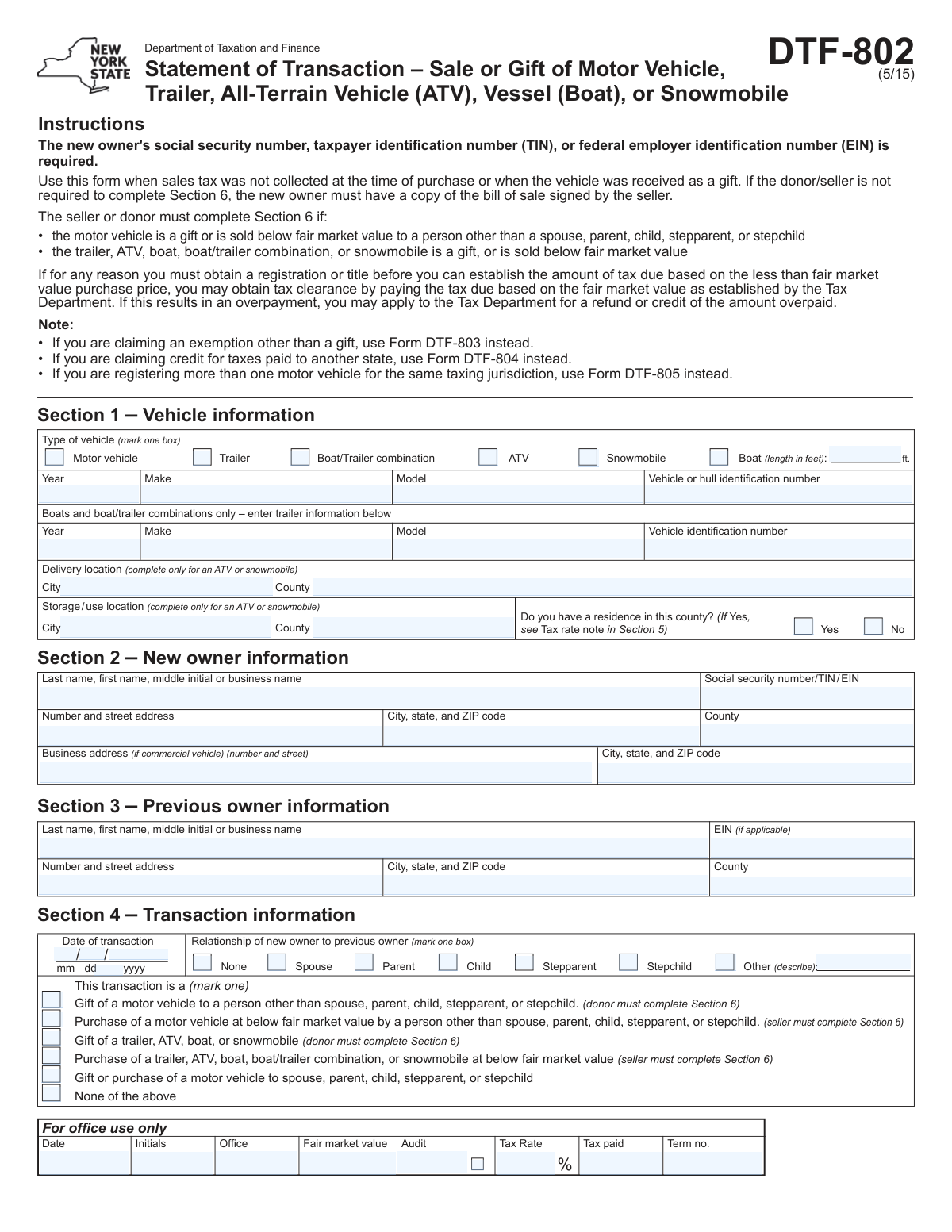
Yes! You can use AI to fill out Form DTF-802, Statement of Transaction – Sale or Gift of Motor Vehicle, Trailer, All-Terrain Vehicle (ATV), Vessel (Boat), or Snowmobile

Form DTF-802, Statement of Transaction, is used in New York State to document the sale or gift of a motor vehicle, trailer, ATV, boat, or snowmobile, particularly when sales tax was not collected at the time of purchase or the vehicle was transferred below fair market value. It provides the necessary details for the Department of Taxation and Finance to assess the correct amount of sales tax due. Today, this form can be filled out quickly and accurately using AI-powered services like Instafill.ai, which can also convert non-fillable PDF versions into interactive fillable forms.
DTF-802 is part of the motor vehicle forms, NJ state forms, PA state forms and state ID forms categories on Instafill.
Our AI automatically handles information lookup, data retrieval, formatting, and form filling.
It takes less than a minute to fill out DTF-802 using our AI form filling.
Securely upload your data. Information is encrypted in transit and deleted immediately after the form is filled out.

Form specifications

Form name: Form DTF-802, Statement of Transaction – Sale or Gift of Motor Vehicle, Trailer, All-Terrain Vehicle (ATV), Vessel (Boat), or Snowmobile
Number of fields: 109
Number of pages: 2
Language: English
main-image

Instafill Demo: How to fill out PDF forms in seconds with AI

How to Fill Out DTF-802 Online for Free in 2026

Are you looking to fill out a DTF-802 form online quickly and accurately? Instafill.ai offers the #1 AI-powered PDF filling software of 2026, allowing you to complete your DTF-802 form in just 37 seconds or less.
Follow these steps to fill out your DTF-802 form online using Instafill.ai:
  1. 1 Navigate to Instafill.ai and upload or select Form DTF-802.
  2. 2 Use the AI assistant to automatically populate Section 1 with the vehicle, trailer, ATV, or boat information, including year, make, model, and VIN.
  3. 3 Provide the new owner's information in Section 2 and the previous owner's details in Section 3.
  4. 4 Complete Section 4 by specifying the transaction date, relationship between parties, and the nature of the transaction (e.g., gift, purchase below fair market value).
  5. 5 Fill out Section 5 with the purchase price details to allow the system to help calculate the sales tax due.
  6. 6 If required (for gifts or below-market-value sales), have the seller or donor complete the affidavit in Section 6.
  7. 7 Review all auto-filled information for accuracy, then the purchaser and seller/donor can digitally sign and finalize the document for submission.

Our AI-powered system ensures each field is filled out correctly, reducing errors and saving you time.

Why Choose Instafill.ai for Your Fillable DTF-802 Form?

Speed

Complete your DTF-802 in as little as 37 seconds.

Up-to-Date

Always use the latest 2026 DTF-802 form version.

Cost-effective

No need to hire expensive lawyers.

Accuracy

Our AI performs 10 compliance checks to ensure your form is error-free.

Security

Your personal information is protected with bank-level encryption.

Frequently Asked Questions About Form DTF-802

This form is used to report the sale or gift of a vehicle, boat, ATV, or snowmobile and to calculate the sales tax due when it wasn't collected by the seller, such as in a private transaction.

The new owner of the vehicle must fill out this form. In certain situations, such as a gift or a sale below fair market value, the seller or donor must also complete and sign Section 6.

No, a purchase or gift of a motor vehicle between immediate family members (spouse, parent, child, stepparent, or stepchild) is exempt from sales tax. You must still complete the form to document the transaction, but the tax due will be zero.

Yes, for any gift of a trailer, ATV, boat, or snowmobile, the donor must complete Section 6 of the form. This section is an affidavit certifying the details of the transaction.

The seller must complete Section 6 if a motor vehicle is sold below fair market value to a non-immediate family member, or if a trailer, ATV, boat, or snowmobile is sold below fair market value to anyone.

You will need the vehicle's details (year, make, model, VIN), personal information for both the new and previous owners, including the new owner's Social Security Number, and transaction details like the date and purchase price.

For most vehicles, use the tax rate of the new owner's county of residence. For ATVs or snowmobiles, you must use the higher rate between the county where you took delivery and the county where it will be stored or used.

The purchase price is the total value exchanged, which includes cash payments, any debt you assumed, and the value of any property or services you traded as part of the deal.

You submit this form along with your other registration paperwork to the Department of Motor Vehicles (DMV). The DMV will collect any sales tax due when you register the vehicle.

Yes, you must have a copy of the bill of sale signed by the seller if the seller is not required to complete Section 6. It serves as proof of the transaction.

Yes, services like Instafill.ai use AI to help you accurately auto-fill form fields. This can save time, reduce errors, and make the process smoother.

You can use a service like Instafill.ai to upload the PDF and fill it out electronically. The platform makes the form interactive, guiding you through each section before you print it for submission.

You can use a tool like Instafill.ai, which can convert flat, non-fillable PDFs into interactive forms. Simply upload the document, and the tool will make it possible to type your information directly into the fields.

Use this form (DTF-802) for standard sales or gift transactions. Use Form DTF-803, 'Claim for Sales and Use Tax Exemption,' if you are claiming a specific exemption other than a gift to an immediate family member.

Compliance DTF-802
Validation Checks by Instafill.ai

1
Conditional Requirement for Section 6
Verifies that Section 6 is completed by the seller/donor if specific conditions are met in Section 4 or 5. This includes transactions marked as a gift to a non-relative, a sale below fair market value, or if line 5 is marked 'Yes'. This check is critical for tax fraud prevention and ensures that the declared value in non-standard transactions is properly justified and certified by the seller/donor. Failure to complete Section 6 when required will result in form rejection.
2
New Owner Identification Number Requirement and Format
Ensures the 'Social security number/TIN/EIN' field in Section 2 is not empty and conforms to a valid 9-digit format (XXX-XX-XXXX or XXXXXXXXX for SSN, XX-XXXXXXX for EIN). The form instructions explicitly state this number is required for processing. This validation is essential for correctly identifying the taxpayer and linking the transaction to the correct tax account. Submissions without a validly formatted ID number cannot be processed.
3
Vehicle Identification Number (VIN/HIN) Format
Validates that the 'Vehicle or hull identification number' in Section 1 follows the standard 17-character alphanumeric format for a VIN or the standard 12-character format for a HIN. This is crucial for preventing fraud and ensuring the correct vehicle is being registered and taxed. An invalid VIN/HIN could indicate a data entry error or a fraudulent transaction, leading to rejection of the form.
4
Purchase Price Calculation (Section 5, Line 1d)
Confirms that the value entered in 'Line 1d - Purchase price' is the exact sum of the values from lines 1a, 1b, and 1c. This ensures the total purchase price is calculated correctly from its components (cash, assumed debt, and trade-in value). An incorrect total would lead to an inaccurate tax assessment, so the form should be flagged for correction if the sum does not match.
5
Sales Tax Due Calculation (Section 5, Line 4)
Verifies that the amount in 'Line 4 - Sales tax due' is the correct product of 'Line 1d - Purchase price' multiplied by 'Line 3 - Tax rate'. This automated check prevents mathematical errors in calculating the tax liability. If the calculated amount does not match the entered amount, the form should be flagged for review, as it could result in an underpayment or overpayment of tax.
6
Family Transaction Tax Exemption Logic
Checks that if 'Yes' is selected on 'Line 2 - Was this transaction... from your spouse, parent, child, stepparent, or stepchild?', then the value on 'Line 4 - Sales tax due' is zero. The form states that in this scenario, no tax is due. This validation enforces the tax exemption rule for immediate family members and prevents incorrect tax charges. If tax is entered, the form should be rejected or flagged for correction.
7
Consistency between Relationship and Transaction Type
Validates that the selected 'Relationship of new owner to previous owner' in Section 4 is consistent with the 'Transaction is a' selection. For example, if 'Spouse' is selected as the relationship, the user cannot select 'Gift of a motor vehicle to a person other than spouse...'. This check prevents contradictory information on the form, which could complicate tax assessment and processing. An inconsistency should trigger an error requiring the user to correct one of the fields.
8
Vehicle-Specific Conditional Field Completion
Ensures that fields specific to a vehicle type are filled out when that vehicle type is selected. For example, if 'Boat' is selected, 'Boat length' must be provided; if 'ATV' or 'Snowmobile' is selected, 'Delivery location' and 'Storage/use location' must be completed. This ensures all necessary data for specific vehicle types is captured for regulatory and tax purposes. Missing this information would render the submission incomplete.
9
Explanation Requirement for Section 6 (Line 9)
Validates that 'Line 9 - Explanation' is filled out if the user answered 'Yes' to any part of 'Line 7' (non-cash considerations) or 'Line 8' (business-related transaction). This explanation is required to provide context for below-market or non-standard sales, which is critical for auditors to assess the transaction's legitimacy. A missing explanation when required would make the affidavit incomplete and should block submission.
10
Boat Purchase Price Cap Adherence
Checks if the vehicle type is 'Boat' or 'Boat/Trailer combination' and, if so, validates that the value entered on 'Line 1d - Purchase price' does not exceed $230,000. The form instructions explicitly state to cap the taxable amount at $230,000 for boats. This rule prevents over-taxation on high-value boat sales and ensures compliance with the specific tax law. An entry exceeding this amount should be flagged or automatically capped.
11
Transaction Date Validity
Ensures the 'Date of transaction' in Section 4 is a valid, correctly formatted date (MM/DD/YYYY) and is not a date in the future. This is fundamental for establishing the correct tax period and ensuring the transaction is recorded accurately. An invalid or future date would cause processing errors and could be an indicator of fraud, requiring the user to correct the entry before submission.
12
Completeness of Owner and Vehicle Information
Verifies that all required fields in Section 1 (Vehicle information), Section 2 (New owner information), and Section 3 (Previous owner information) are completed. This includes names, addresses, and all vehicle details (Year, Make, Model, VIN). This basic completeness check ensures the core data required to identify the parties and the asset involved in the transaction is present. An incomplete form cannot be legally processed.

Common Mistakes in Completing DTF-802

Failing to Have Section 6 Completed When Required

This mistake occurs when a vehicle is gifted or sold below fair market value to a non-immediate family member, and Section 6 is left blank. The form explicitly states that the seller or donor must complete this affidavit under these conditions. Submitting the form without this section completed will lead to its rejection, delaying the vehicle's title and registration process until a properly completed form is provided.

Using an Incorrect Sales Tax Rate

Applicants often enter a wrong tax rate due to the form's complex rules, which vary based on the new owner's residence, business location, or even the vehicle's delivery/storage location for ATVs and snowmobiles. Using an incorrect rate results in either an underpayment, which can lead to penalties and interest, or an overpayment, which requires a separate process to apply for a refund. To avoid this, applicants must carefully consult the tax rate note in Section 5 and verify the current rate for the specific locality.

Inaccurately Calculating the Total Purchase Price

A frequent error is entering only the cash payment (line 1a) as the total purchase price, while ignoring other forms of consideration. The form requires the total price (line 1d) to include the value of assumed debt (1b) and any property or services traded (1c). This omission leads to an incorrect tax calculation and under-reporting the transaction's true value, which can be considered tax evasion and result in audits or penalties.

Misclassifying the Transaction as a 'Gift'

Users often incorrectly mark a transaction as a 'gift' when a small amount of money or other consideration changes hands, such as a $100 sale to a friend. A true gift involves no consideration whatsoever; any exchange of value makes it a purchase, even if it's below fair market value. This misclassification leads to filling out the wrong sections of the form and can cause legal issues if the transaction is deemed a sale disguised as a gift to evade tax.

Improperly Claiming a Family Member Tax Exemption

The tax exemption for transactions between family members is strictly limited to a spouse, parent, child, stepparent, or stepchild. A common mistake is to claim this exemption for other relatives like siblings, cousins, or grandparents, resulting in an incorrect claim of zero tax due. This will cause the form to be rejected and may require the applicant to pay the owed tax plus penalties for the incorrect filing.

Submitting the Form Without the Required Seller/Donor Signature

When Section 6 is required, it must be signed by the seller or donor, not the new owner. New owners often submit the form without obtaining this crucial signature, assuming their own signature is sufficient. An unsigned or improperly signed affidavit in Section 6 makes the form legally incomplete and will be immediately rejected by the tax department, halting the registration process.

Entering an Incorrect or Incomplete Vehicle Identification Number (VIN)

The Vehicle or Hull Identification Number (VIN/HIN) is a unique 17-character code that is prone to transcription errors, such as mixing up the letter 'O' and the number '0'. An incorrect VIN will cause a mismatch with official records, leading to a failed registration, title errors, and significant processing delays. It is critical to double-check the VIN against the vehicle title and the vehicle itself before submission.

Omitting Information for Specific Vehicle Types

This form covers multiple vehicle types, with fields that are only required for certain ones, such as 'Boat length' or the 'Delivery location' for an ATV or snowmobile. Applicants often overlook these conditional fields when they are relevant to their transaction. This incomplete information will cause the application to be flagged and delayed until the missing data is provided.

Misinterpreting Location Rules for ATV/Snowmobile Tax

For ATVs and snowmobiles, the tax rate is determined by the higher rate between the new owner's delivery location and the storage/use location. People often misunderstand this rule, providing only one location or using the lower tax rate, leading to an incorrect tax calculation. This can result in underpayment and subsequent collection actions by the tax department.

Providing Incomplete or Inconsistent Party Information

Basic data entry errors in the new owner (Section 2) or previous owner (Section 3) information are common, including misspelled names, incomplete addresses, or missing SSN/TIN/EINs. Any inconsistency between the information on this form and other official documents (like a driver's license or bill of sale) can cause processing delays or rejection. Using an AI-powered tool like Instafill.ai can help prevent these errors by auto-filling information consistently and validating formats. For non-fillable PDFs, Instafill.ai can also convert the form into an interactive, fillable version to streamline the process.
Saved over 80 hours a year

“I was never sure if my IRS forms like W-9 were filled correctly. Now, I can complete the forms accurately without any external help.”

Kevin Martin Green

Your data stays secure with advanced protection from Instafill and our subprocessors

Robust compliance program

Transparent business model

You’re not the product. You always know where your data is and what it is processed for.

ISO 27001, HIPAA, and GDPR

Our subprocesses adhere to multiple compliance standards, including but not limited to ISO 27001, HIPAA, and GDPR.

Security & privacy by design

We consider security and privacy from the initial design phase of any new service or functionality. It’s not an afterthought, it’s built-in, including support for two-factor authentication (2FA) to further protect your account.

Fill out DTF-802 with Instafill.ai

Worried about filling PDFs wrong? Instafill securely fills form-dtf-802-statement-of-transaction-sale-or-gift-of-motor-vehicle-trailer-all-terrain-vehicle-atv-vessel-boat-or forms, ensuring each field is accurate.