Yes! You can use AI to fill out California Department of Motor Vehicles (DMV) Form REG 135, Bill of Sale
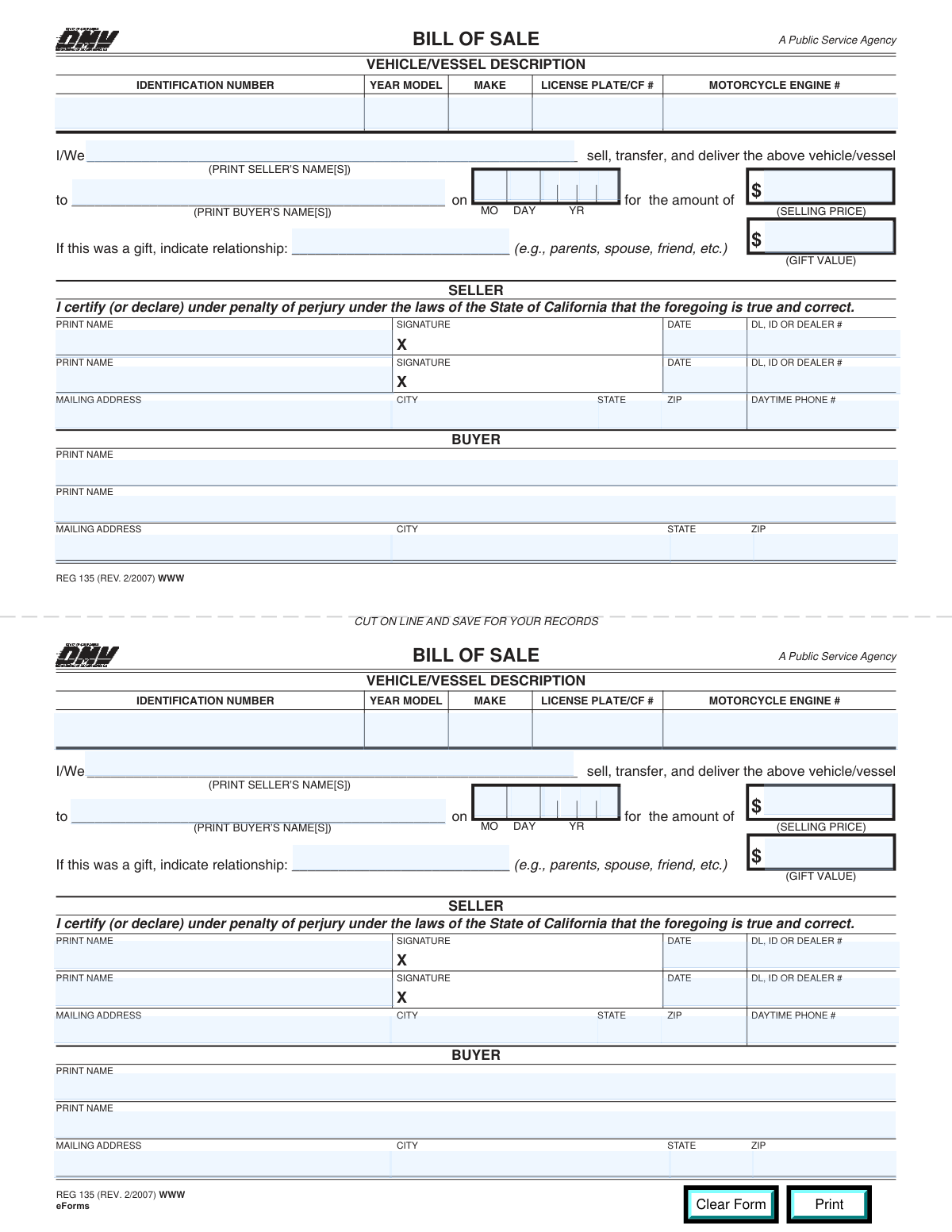
California DMV Form REG 135, Bill of Sale, is an official document used to record the transfer of ownership of a vehicle or vessel from a seller to a buyer, including key identifying information (VIN/hull ID, year, make, plate/CF#) and the transaction terms (sale price or gift value/relationship). It helps provide proof of the transaction for registration, title, and tax-related purposes and can be kept for both parties’ records. The form includes seller certification under penalty of perjury and signature blocks to support the accuracy of the information provided. Today, this form can be filled out quickly and accurately using AI-powered services like Instafill.ai, which can also convert non-fillable PDF versions into interactive fillable forms.
Our AI automatically handles information lookup, data retrieval, formatting, and form filling.
It takes less than a minute to fill out REG 135 using our AI form filling.
Securely upload your data. Information is encrypted in transit and deleted immediately after the form is filled out.
Form specifications
| Form name: | California Department of Motor Vehicles (DMV) Form REG 135, Bill of Sale |
| Number of pages: | 1 |
| Filled form examples: | Form REG 135 Examples |
| Language: | English |
Instafill Demo: filling out a legal form in seconds
How to Fill Out REG 135 Online for Free in 2026
Are you looking to fill out a REG 135 form online quickly and accurately? Instafill.ai offers the #1 AI-powered PDF filling software of 2026, allowing you to complete your REG 135 form in just 37 seconds or less.
Follow these steps to fill out your REG 135 form online using Instafill.ai:
- 1 Go to Instafill.ai and upload the REG 135 (Bill of Sale) PDF or select it from the form library.
- 2 Let the AI detect and map the fields, then confirm the form type (California DMV REG 135) and the number of sellers/buyers.
- 3 Enter the vehicle/vessel description details: identification number (VIN/hull ID), year model, make, license plate/CF number, and motorcycle engine number (if applicable).
- 4 Fill in the sale/transfer section: seller name(s), buyer name(s), sale date (month/day/year), and either the selling price or (if a gift) the relationship and gift value.
- 5 Complete seller information fields: printed name(s), DL/ID or dealer number(s), mailing address, city, state, ZIP code, and daytime phone number.
- 6 Review all entries for accuracy against the title/registration, then apply e-signatures (if supported) or prepare the form for wet signatures and dating.
- 7 Download the completed form, print if needed, and save copies for both buyer and seller records.
Our AI-powered system ensures each field is filled out correctly, reducing errors and saving you time.
Why Choose Instafill.ai for Your Fillable REG 135 Form?
Speed
Complete your REG 135 in as little as 37 seconds.
Up-to-Date
Always use the latest 2026 REG 135 form version.
Cost-effective
No need to hire expensive lawyers.
Accuracy
Our AI performs 10 compliance checks to ensure your form is error-free.
Security
Your personal information is protected with bank-level encryption.
Frequently Asked Questions About Form REG 135
REG 135 is a California DMV Bill of Sale used to document the sale, transfer, or gift of a vehicle or vessel. It records key details like the VIN/hull ID, buyer and seller information, date of transfer, and price or gift value.
Typically, the seller completes and signs it, and the buyer’s information is included on the form. It’s commonly used when transferring ownership and keeping a written record of the transaction.
It may be requested to support the transfer, especially if the title paperwork is incomplete or additional proof of the transaction is needed. Even when not strictly required, it’s a good record for both buyer and seller.
You’ll need the vehicle/vessel identification number (VIN or hull ID), year, make, license plate or CF number, buyer and seller names and addresses, the sale date, and the selling price or gift value. If it’s a motorcycle, you may also need the engine number (if applicable).
Use the VIN/hull ID exactly as shown on the title, registration, or certificate. Copy it carefully to avoid delays or mismatches with DMV records.
Enter the current license plate number for a vehicle or the CF (Certificate of Number) for a vessel, exactly as shown on the registration. If you’re unsure, check the most recent registration card.
Only fill it out if it applies to your transaction and you have a motorcycle engine number to report. If it’s not a motorcycle or not applicable, leave that field blank.
Enter each digit separately in the corresponding boxes (e.g., August is 0 then 8; the 7th is 0 then 7; 2026 is 2 then 6 for the two-digit year). Use the date the vehicle/vessel was actually sold or transferred.
If it was a sale, enter the total amount paid in the Selling Price field. If it was a gift, leave Selling Price blank or zero, then enter the relationship and the Gift Value.
Write how the recipient is related to the giver (for example: parent, spouse, child, friend). This should reflect the real relationship at the time of the transfer.
Yes—if two sellers are involved (for example, co-owners), each seller should print their name, sign, and date the form, and provide their DL/ID or dealer number. This helps confirm all listed sellers agree to the transfer.
This is the driver’s license number, state ID number, or dealer number for the seller(s). Each seller listed should provide their own number in the corresponding seller section.
This form is generally kept as proof of the transaction and may be submitted or presented to the California DMV if requested as part of a transfer/registration process. Follow the DMV’s instructions for your specific transaction or include it with your ownership transfer paperwork if needed.
Yes—AI tools can help reduce errors and save time by auto-filling fields from the information you provide. Services like Instafill.ai can map your details into the correct REG 135 fields and help you review everything before signing.
Upload the REG 135 PDF to Instafill.ai, enter or import your buyer/seller and vehicle details, and let the AI auto-fill the form fields. Then review the completed form, download it, and print/sign where required.
If the PDF isn’t fillable, Instafill.ai can convert a flat, non-fillable PDF into an interactive fillable form. After conversion, you can auto-fill the fields and export a clean, typed version for printing and signatures.
Compliance REG 135
Validation Checks by Instafill.ai
1
VIN/Hull ID presence and allowed character set validation
Validates that the Identification Number (VIN/Hull ID) is provided and contains only permitted characters for the asset type. For VINs, reject illegal characters (I, O, Q) and enforce uppercase alphanumeric formatting to reduce transcription errors. This is critical because the identification number uniquely ties the bill of sale to the correct vehicle/vessel; if it fails, the submission should be rejected and the user prompted to re-enter the value exactly as shown on title/registration.
2
VIN length/structure check (17-character VIN) with vessel exception handling
Checks that a vehicle VIN is exactly 17 characters and not shorter/longer, while allowing a different length/pattern when the user indicates a vessel hull ID (if your system captures that context). This prevents invalid identifiers that cannot be matched by DMV systems or downstream validation services. If the length/structure does not match the expected pattern for the selected asset type, block submission and request correction.
3
Model year format and plausible range validation
Ensures Year Model is a 4-digit year and falls within a plausible range (e.g., 1900 through next calendar year) and is not in the far future. This reduces data entry mistakes such as missing digits or transposed numbers. If invalid, the form should not submit and should display an error indicating the required 4-digit year and acceptable range.
4
Make field completeness and character validation
Validates that Make is not blank and contains reasonable characters (letters, numbers, spaces, hyphens) without excessive punctuation or purely numeric values. The make is used for identification and matching to registration/title records; malformed values can cause processing delays. If it fails, require the user to enter a recognizable manufacturer/brand name.
5
License Plate / CF Number format validation
Checks that License Plate/CF# is present and matches expected formatting rules (alphanumeric, length constraints, no invalid symbols), with optional branching for CA vessel CF numbers if applicable. This helps ensure the plate/CF number can be used to cross-reference registration records. If the value contains invalid characters or is outside length limits, reject and prompt for the exact value shown on registration.
6
Motorcycle engine number conditional requirement and format check
Validates that Motorcycle Engine Number is either blank (when not applicable) or, if provided, meets basic serial-number formatting rules (alphanumeric, reasonable length, no prohibited symbols). This prevents accidental entry of unrelated numbers (e.g., VIN repeated) or unusable engine identifiers. If the field is populated but fails format checks, require correction; if your workflow indicates the asset is a motorcycle and the field is required, block submission when missing.
7
Seller name(s) required and consistent across sections
Ensures Seller’s Name in the sale statement is present and matches the Seller 1/Seller 2 printed names captured in the signature section (allowing minor whitespace/case differences). This consistency is important because the bill of sale must clearly identify the transferring party and align with signatures. If names are missing or inconsistent, flag the submission and require the user to reconcile the seller names before acceptance.
8
Buyer name(s) required and consistent across sections
Ensures Buyer’s Name in the sale statement is present and matches the Buyer Printed Name (Primary) and optional Co-buyer name fields (again allowing minor formatting differences). This prevents ambiguity about who is receiving the vehicle/vessel and reduces title/registration processing issues. If missing or inconsistent, block submission and request corrected buyer identification.
9
Sale date digit fields completeness and valid calendar date check
Validates that all sale date digit fields (MM/DD/YY) are provided and combine into a valid calendar date (e.g., month 01-12, day valid for the month, leap-year handling if you expand to a full year). This prevents impossible dates caused by digit-by-digit entry errors. If invalid or incomplete, reject submission and prompt the user to re-enter the date.
10
Sale date reasonableness and sequencing vs. signature dates
Checks that the sale date is not unreasonably far in the future and is logically consistent with seller signature dates (e.g., signatures should be on or after the sale date, or within an allowed tolerance if your policy permits). This helps detect data entry mistakes and reduces disputes about transaction timing. If the sale date conflicts with signature dates, flag for correction or require confirmation depending on business rules.
11
Selling price currency format and non-negative validation
Ensures Selling Price is a valid currency amount (numeric, optional two decimals), not negative, and within a reasonable maximum threshold to catch obvious typos (e.g., extra zeros). Accurate price is important for tax/fee calculations and auditability. If invalid, block submission and require a corrected numeric amount.
12
Gift vs. sale mutual exclusivity and required fields enforcement
Validates the rule stated on the form: Gift Relationship and Gift Value must be filled only when Selling Price is blank or zero, and conversely must be blank when a positive Selling Price is provided. This prevents contradictory declarations (both sale and gift) that can affect tax treatment and processing. If both are populated or neither path is complete, reject submission and instruct the user to complete either the sale or gift section correctly.
13
Gift relationship required when gift value is provided (and vice versa)
When the transaction is a gift (selling price blank/zero), checks that both Gift Relationship and Gift Value are provided together and that relationship is not just whitespace or a placeholder. This ensures the gift declaration is complete and interpretable for downstream processing. If one is missing, block submission and prompt the user to provide the missing gift detail.
14
Seller address completeness and USPS-style ZIP validation
Validates that Seller Mailing Address, City, State, and ZIP are all present, and that ZIP is either 5 digits or ZIP+4 (##### or #####-####), preserving leading zeros. Complete address data is needed for notices, recordkeeping, and potential dispute resolution. If any component is missing or ZIP format is invalid, reject submission and request correction.
15
Buyer address completeness and state/ZIP format validation
Validates that Buyer Mailing Address, City, State, and ZIP are all present and that State is a valid US state/territory (2-letter abbreviation or approved full name) with a properly formatted ZIP. This reduces returned mail and ensures the buyer can be properly recorded for registration/title purposes. If invalid or incomplete, block submission and require corrected address information.
16
Seller daytime phone number format validation
Ensures Seller Daytime Phone is present and matches an acceptable phone format (e.g., 10 digits with optional separators, allowing country code if your system supports it) and is not an obviously invalid sequence (e.g., all zeros). A valid contact number is important for resolving processing questions quickly. If the phone number fails validation, reject submission or mark as incomplete per policy and prompt for a valid daytime number including area code.
Common Mistakes in Completing REG 135
People often transpose characters (e.g., 0 vs O, 1 vs I), omit a digit, or copy the wrong identifier from an insurance card instead of the title/registration. An incorrect VIN/hull ID can cause the DMV to reject the bill of sale or delay title transfer because the vehicle/vessel can’t be matched to the record. Always copy the identification number directly from the title/registration and double-check character-by-character. AI-powered form filling tools like Instafill.ai can help by validating length/format and reducing transcription errors.
This form covers both vehicles and vessels, so filers sometimes enter a boat CF# in the license plate field incorrectly, or they leave the field blank because they’re unsure which applies. Using the wrong identifier can create confusion during processing and may trigger follow-up requests for clarification. Confirm whether the item is a vehicle (license plate) or vessel (CF#) and enter the exact current number shown on registration. Instafill.ai can prompt the correct identifier type and format it consistently.
A common mistake is entering the year the vehicle was bought or first registered rather than the model year shown on the title/registration. This mismatch can slow down DMV processing and create discrepancies in the buyer’s new registration record. Use the model year from the title/registration (e.g., “2018”), not the sale year. Instafill.ai can cross-check the year against other vehicle details you provide to catch inconsistencies.
Filers sometimes write the model (e.g., “Civic”) instead of the make (e.g., “Honda”), or use informal abbreviations that don’t match DMV records. This can lead to record mismatches and additional verification steps. Enter the manufacturer/brand exactly as it appears on the title/registration. Instafill.ai can standardize common makes and reduce mismatched naming.
Because the field is labeled for motorcycles, people sometimes enter an engine number for cars/boats, or they skip it for motorcycles even when it’s available on the engine/title. Incorrect or missing engine information can complicate verification for motorcycle transfers. Only complete this field if the transaction involves a motorcycle and you can confirm the engine serial number from the engine or title. Instafill.ai can help by conditionally prompting this field only when “motorcycle” applies.
This form uses separate boxes for each digit of month/day/year, and people often write a full date in one area, swap month/day, or enter a four-digit year instead of two digits. An invalid or ambiguous sale date can cause processing delays and disputes about the effective transfer date. Enter two digits for month, two for day, and two for year (e.g., 08/07/26) in the correct boxes. Instafill.ai can format dates automatically into the required digit-by-digit fields.
Many filers enter a selling price and also fill gift value/relationship “just in case,” or they mark it as a gift but forget the relationship and gift value. This creates contradictory information that can trigger DMV questions and may affect tax/fee calculations. If it’s a sale, enter only the selling price; if it’s a gift, leave selling price blank or zero and complete gift relationship and gift value. Instafill.ai can enforce the rule that gift fields should only be completed when selling price is blank/zero.
People often use nicknames, initials, or omit a co-owner/co-buyer, especially when the title has multiple owners. Name mismatches can cause the transfer to be rejected or require additional documentation to prove identity/ownership. Print full legal names exactly as they appear on the title and IDs, and include all sellers/buyers when applicable. Instafill.ai can reuse verified identity data consistently across all name fields to prevent mismatches.
When there are two sellers, it’s common for one person to sign but forget to date, or to omit the DL/ID/dealer number, especially because the form repeats sections and can be confusing. Missing signature elements can invalidate the bill of sale or delay acceptance. Ensure each seller prints their name, signs, dates, and provides the correct DL/ID or dealer number in the corresponding line. Instafill.ai can flag incomplete signature blocks before you finalize the form.
Filers frequently forget apartment/unit numbers, omit leading zeros in ZIP codes, write a full state name where an abbreviation is expected, or leave out the phone area code. Incomplete contact information can prevent follow-up communication and may slow processing if the DMV needs clarification. Enter a complete mailing address, include the correct state and full ZIP, and provide a daytime phone number with area code. Instafill.ai can auto-format addresses/phone numbers and validate ZIP/state consistency.
Because the form content appears duplicated and includes “CUT ON LINE AND SAVE FOR YOUR RECORDS,” people sometimes complete only one portion incorrectly, cut the wrong area, or fail to retain a copy. This can leave the buyer or seller without proof of the transaction if disputes arise. Complete the intended bill of sale section carefully, then keep a legible copy for both parties before cutting or submitting. If the form is a flat non-fillable PDF, Instafill.ai can convert it into a fillable version and help ensure both copies are completed consistently.
Saved over 80 hours a year
“I was never sure if my IRS forms like W-9 were filled correctly. Now, I can complete the forms accurately without any external help.”
Kevin Martin Green
Your data stays secure with advanced protection from Instafill and our subprocessors

Robust compliance program
Transparent business model
You’re not the product. You always know where your data is and what it is processed for.
ISO 27001, HIPAA, and GDPR
Our subprocesses adhere to multiple compliance standards, including but not limited to ISO 27001, HIPAA, and GDPR.
Security & privacy by design
We consider security and privacy from the initial design phase of any new service or functionality. It’s not an afterthought, it’s built-in, including support for two-factor authentication (2FA) to further protect your account.
Fill out REG 135 with Instafill.ai
Worried about filling PDFs wrong? Instafill securely fills california-department-of-motor-vehicles-dmv-form-reg-135-bill-of-sale forms, ensuring each field is accurate.



