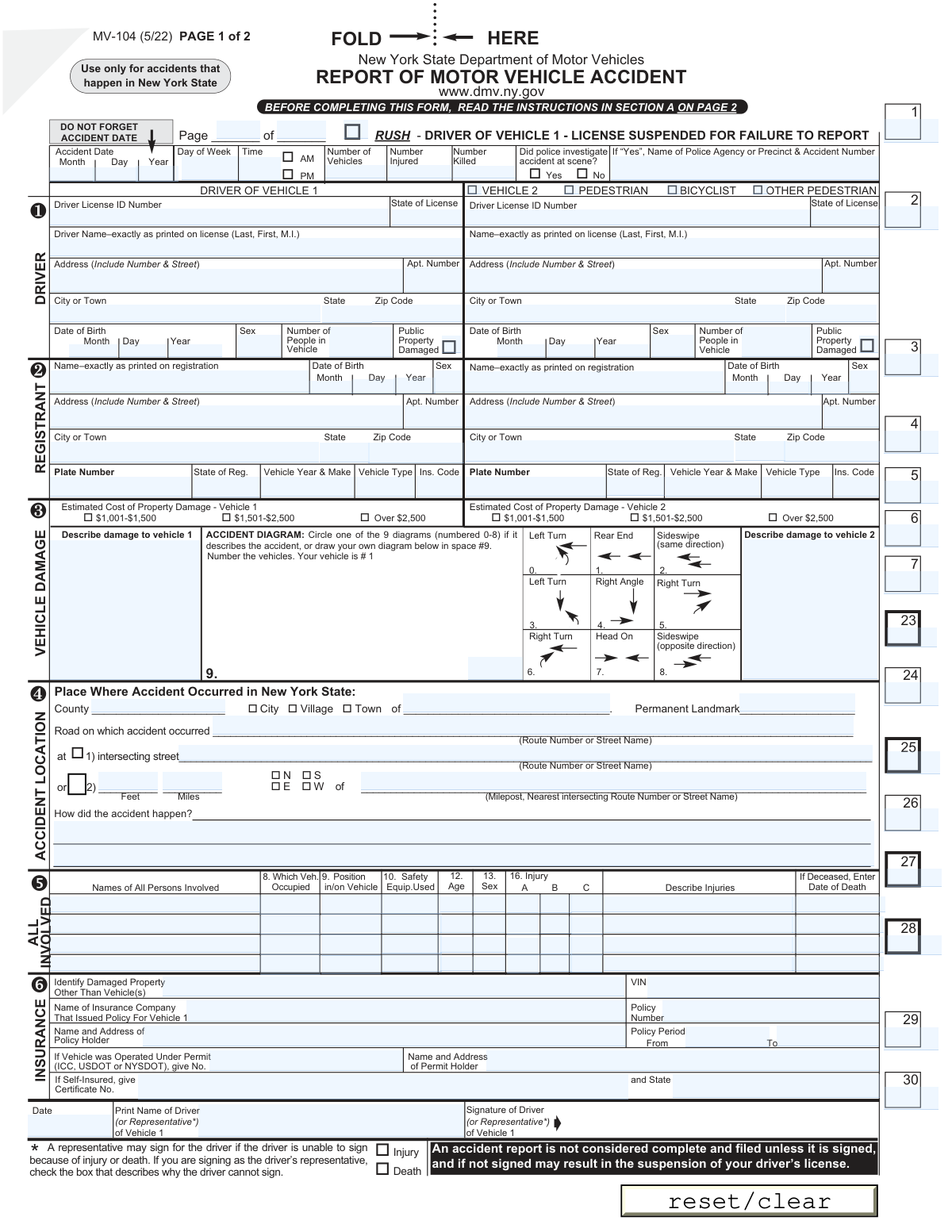
Yes! You can use AI to fill out Form MV-104, Report of Motor Vehicle Accident
Form MV-104 is the official document used by the New York State Department of Motor Vehicles to report any motor vehicle accident that results in a fatality, personal injury, or property damage exceeding $1,000 for any single person. Filing this report within 10 days of the accident is a legal requirement to avoid penalties such as license suspension. Today, this form can be filled out quickly and accurately using AI-powered services like Instafill.ai, which can also convert non-fillable PDF versions into interactive fillable forms.
MV-104 is part of the
motor vehicle forms category on Instafill.
Our AI automatically handles information lookup, data retrieval, formatting, and form filling.
It takes less than a minute to fill out MV-104 using our AI form filling.
Securely upload your data. Information is encrypted in transit and deleted immediately after the form is filled out.
Form specifications
| Form name: | Form MV-104, Report of Motor Vehicle Accident |
| Number of fields: | 180 |
| Number of pages: | 1 |
| Language: | English |
More forms in Motor vehicle forms
Instafill Demo: How to fill out PDF forms in seconds with AI
How to Fill Out MV-104 Online for Free in 2026
Are you looking to fill out a MV-104 form online quickly and accurately? Instafill.ai offers the #1 AI-powered PDF filling software of 2026, allowing you to complete your MV-104 form in just 37 seconds or less.
Follow these steps to fill out your MV-104 form online using Instafill.ai:
- 1 Navigate to Instafill.ai and upload your copy of Form MV-104, or select it from their template library.
- 2 Provide the basic accident details, including the date, time, location, and whether police investigated the scene.
- 3 Enter the information for all drivers and vehicles involved, such as names, addresses, license details, registration, and insurance policy information.
- 4 List all individuals involved in the accident, including passengers, pedestrians, and bicyclists, and detail their position, safety equipment used, and any injuries sustained.
- 5 Describe the damage to all vehicles and other property, provide a written narrative of how the accident occurred, and select or draw an accident diagram.
- 6 Review all the information automatically populated by the AI for accuracy, make any necessary corrections, and then electronically sign and date the form to complete the process.
Our AI-powered system ensures each field is filled out correctly, reducing errors and saving you time.
Why Choose Instafill.ai for Your Fillable MV-104 Form?
Speed
Complete your MV-104 in as little as 37 seconds.
Up-to-Date
Always use the latest 2026 MV-104 form version.
Cost-effective
No need to hire expensive lawyers.
Accuracy
Our AI performs 10 compliance checks to ensure your form is error-free.
Security
Your personal information is protected with bank-level encryption.
Frequently Asked Questions About Form MV-104
You must file this report within 10 days of any accident in New York State that results in a fatality, personal injury, or damage over $1,000 to the property of any one person.
Failure to file within 10 days is a misdemeanor, and the DMV may suspend your driver's license and/or vehicle registration until the report is filed.
You will need your driver's license, vehicle registration, and insurance policy information for your vehicle. It is also helpful to have the same information for any other drivers, vehicles, or individuals involved in the accident.
If you do not know an answer to a specific question, the form instructs you to enter an 'X' or a dash ('-') in that field. You should still complete the rest of the form as accurately as possible.
For accidents with more than two vehicles, you must fill out additional MV-104 forms. Use a new form for the third vehicle, placing its information in the space for 'VEHICLE 1' and labeling it as vehicle #3.
Enter your information in the 'VEHICLE 1' section. Use the 'VEHICLE 2' section for the other person and check the 'PEDESTRIAN' or 'BICYCLIST' box at the top of that column.
These boxes must be filled with numeric codes found in Section B on page 2. These codes are used to classify details about the accident, such as weather, road conditions, and vehicle actions.
The original, signed report must be sent to the Crash Records Center, 6 Empire State Plaza, PO Box 2925, Albany, NY 12220-0925.
If the driver is unable to sign due to injury or death, a representative may sign on their behalf. The representative must check the box indicating the reason the driver cannot sign.
Yes, services like Instafill.ai use AI to auto-fill form fields accurately and save time. This can help you complete complex reports like the MV-104 more efficiently and with fewer errors.
You can use a service like Instafill.ai to complete the form digitally. Simply upload the PDF to their platform, and it will become an interactive form you can fill out on your computer.
If you have a non-fillable or 'flat' PDF, tools like Instafill.ai can convert it into an interactive, fillable form. This allows you to type your information directly into the fields online.
These codes classify injury severity. 'A' is for severe injuries like broken limbs, 'B' is for visible but non-severe injuries like minor cuts, and 'C' is for complaints of pain with no visible injury, such as whiplash.
You should circle one of the 9 pre-printed diagrams if it accurately describes the accident. If none of them apply, you must draw your own diagram in the space provided, numbering the vehicles involved.
Compliance MV-104
Validation Checks by Instafill.ai
1
Accident Date is Valid and Not in the Future
This check ensures that the 'Accident Date' (Month, Day, Year) is a real calendar date and that it does not occur after the submission date. It prevents impossible data, such as an accident reported before it happened. If the date is invalid or in the future, the form submission will be rejected, and the user will be prompted to correct the date.
2
Police Investigation Details Conditional Requirement
This validation verifies that if the 'Did police investigate accident at scene?' box is checked 'Yes', then the 'Police Agency or Precinct & Accident Number' field must be filled out. This is important for cross-referencing official police reports and ensuring complete data capture. A failure would trigger a warning asking the user to provide the police agency and report number or change the investigation status to 'No'.
3
Driver Age Verification
This check calculates the driver's age using their 'Date of Birth' and the 'Accident Date' to confirm they are of a legal driving age (e.g., 16 years or older in NYS). This is a critical check to flag data entry errors or potentially unlicensed drivers. If the driver is underage, the system should flag the entry for review or reject it.
4
Insurance Policy Active on Accident Date
This validation confirms that the 'Accident Date' falls within the 'Policy Period From' and 'To' dates for Vehicle 1's insurance. This is crucial for verifying that the vehicle was legally insured at the time of the incident. If the accident date is outside the policy period, the submission should be flagged as potentially uninsured, which has legal consequences.
5
Vehicle Identification Number (VIN) Format
This check validates that the 'VIN' for Vehicle 1 consists of exactly 17 alphanumeric characters, as per the international standard. A correct VIN is essential for uniquely identifying the vehicle for registration, insurance, and recall purposes. An invalid format would prevent submission and require the user to re-enter the VIN correctly.
6
Mandatory Signature for Vehicle 1 Driver/Representative
This validation ensures that the 'Signature of Driver (or Representative*) of Vehicle 1' field is not empty. The form instructions explicitly state that an unsigned report is incomplete and may result in license suspension. Failure to provide a signature would block the form from being filed and display an error message highlighting the requirement.
7
Representative Signature Justification
This check is triggered if the name in 'Print Name of Driver (or Representative*)' does not match the 'Driver Name' for Vehicle 1. It verifies that one of the reason checkboxes ('Injury' or 'Death') is selected to justify why a representative is signing. This ensures the signature's legitimacy and prevents unauthorized submissions.
8
Day of Week Matches Accident Date
This validation cross-references the 'Accident Date' with the 'Day of Week' field to ensure they correspond correctly (e.g., if the date is 10/27/2023, the day must be FRIDAY). This serves as a data integrity check to catch simple data entry mistakes. A mismatch would prompt the user to review and correct either the date or the day of the week.
9
Margin Code Validity Check
This check verifies that the numeric codes entered into the margin boxes (e.g., 'Direction of Travel', 'Traffic Control', 'Weather') are valid codes found in the corresponding tables in Section B. This is essential for the accuracy of the accident data used for statistical analysis by the DMV. An invalid code would result in an error, requiring the user to select a valid option from the provided lists.
10
Injury Description Requirement
This validation ensures that if any injury checkbox ('A', 'B', or 'C') is checked for a person in the 'All Persons Involved' grid, the corresponding 'Describe Injuries' field for that person is not empty. This provides necessary context for the reported injury, which is vital for insurance and medical records. If an injury is checked but not described, the user will be prompted to provide a description.
11
Conditional Fields for Vehicle 2 vs. Pedestrian/Bicyclist
This check enforces logical data entry for the second party. If the 'VEHICLE 2' box is checked, vehicle-specific fields like 'Plate Number' and 'Vehicle Year & Make' must be filled. Conversely, if 'PEDESTRIAN' or 'BICYCLIST' is checked, these vehicle-specific fields must be empty, while pedestrian-specific fields may be required. This prevents inconsistent or irrelevant data from being submitted.
12
Total Persons Involved Consistency
This validation compares the total number of individuals listed in the 'Names of All Persons Involved' grid against the sum of the 'Number of People in Vehicle' fields for all reported vehicles. This ensures that all occupants are accounted for in the detailed injury section. A discrepancy would trigger a warning to the user to review and reconcile the counts.
13
Damage Estimate Exclusivity
This check ensures that for each vehicle, only one of the 'Estimated Cost of Property Damage' checkboxes can be selected (e.g., for Vehicle 1, you cannot check both '$1,001-$1,500' and 'Over $2,500'). This prevents contradictory data entry for damage estimates. If more than one box is checked for a single vehicle, an error will be shown.
14
Reporting Threshold Verification
This validation checks if the conditions for mandatory reporting are met, specifically if the total property damage for any one person exceeds $1,000 or if there is an injury or fatality. It checks the 'Number Injured', 'Number Killed', and the 'Estimated Cost of Property Damage' fields. If none of these conditions are met, the system could inform the user that a report may not be legally required.
Common Mistakes in Completing MV-104
This form requires filers to look up numeric codes for weather, road conditions, traffic controls, and vehicle actions in Section B and enter them into small, numbered boxes on page 1. Many people overlook this or find it confusing, leaving the boxes blank. An incomplete report without these codes will be rejected, potentially leading to a license suspension for failure to file a complete report. To avoid this, carefully cross-reference Section B for every numbered box and ensure the correct code is entered.
The section 'How did the accident happen?' and the accident diagram are often filled out with insufficient or subjective detail. People may write a confusing story or fail to draw a clear diagram with vehicles properly numbered. This ambiguity can complicate insurance claims and liability assessments. To prevent this, provide a concise, chronological, and factual account of the events, and use the diagram space to clearly illustrate vehicle positions and movements at the time of impact.
Filers often provide incomplete insurance details, such as omitting the specific policy number or the 3-digit 'Ins. Code' required by the NYS DMV. This often happens when the insurance card is not readily available. Submitting a report without complete and accurate insurance information is a serious error that can lead to the rejection of the form and penalties for driving without proof of financial responsibility. Always have your most current insurance ID card handy when filling out the form to copy the information exactly.
An unsigned or undated report is considered invalid and will not be accepted as filed. In the stress of completing the detailed form, it is very common for the driver of Vehicle 1 (or their representative) to forget the final signature and date at the bottom of page 1. This oversight results in the DMV sending a 'Failure to Report' notice, which can lead to a driver's license suspension. Always double-check the bottom of page 1 before mailing.
The form has separate sections for the 'Driver' and the 'Registrant' (registered owner), which can be confusing if they are not the same person, or tedious if they are. People may incorrectly enter driver information in the registrant section or leave the registrant section blank if they are also the driver. This leads to an incomplete report because the DMV needs to verify information for both the operator and the legal owner of the vehicle. Ensure both sections are filled out completely and accurately, even if it means repeating information.
The form requires checking a box to estimate damage costs, with a key threshold being $1,000 for any one person's property. People often guess this amount, potentially underestimating the damage and failing to file a legally required report, which is a misdemeanor. Conversely, a significant overestimation might cause unnecessary complications. To avoid this, if the damage appears to be near the threshold, it is safest to get a preliminary estimate or to file the report to be compliant with the law.
The 'Place Where Accident Occurred' section is complex, offering multiple ways to describe the location. Users often provide vague information, like 'Main Street,' without a cross-street or landmark, or they incorrectly fill out the distance/direction fields. An imprecise location makes the report difficult for authorities to process and can cause issues if the report is needed for legal proceedings. Be as specific as possible, using full street names, route numbers, and a clear intersecting street or landmark.
The instructions state to enter an 'X' for unknown information or a dash '-' if a question does not apply. Many filers simply leave fields blank, which the DMV may interpret as an incomplete form rather than a 'not applicable' or 'unknown' answer. This can cause the report to be rejected and returned for correction, delaying the process. To ensure acceptance, go through every field and enter a dash or 'X' as instructed if you don't have the specific information.
The form repeatedly instructs to enter names and addresses 'exactly as printed on license' or 'exactly as printed on registration.' A common mistake is using a nickname, a current address that isn't on the license yet, or abbreviating names. These discrepancies cause data mismatches in the DMV's system, leading to processing delays or rejection of the form. Always have your driver's license and vehicle registration in front of you and transcribe the information precisely as it appears.
The form's layout is optimized for a two-vehicle accident, but people struggle when a pedestrian, bicyclist, or a third vehicle is involved. They may fail to check the correct box ('PEDESTRIAN', 'BICYCLIST') or try to cram information for a third vehicle into the margins instead of using a separate MV-104 form as instructed. This creates a confusing and inaccurate record. For any non-standard accident, it is critical to read Section A on page 2 for instructions on how to correctly report all involved parties.
Saved over 80 hours a year
“I was never sure if my IRS forms like W-9 were filled correctly. Now, I can complete the forms accurately without any external help.”
Kevin Martin Green
Your data stays secure with advanced protection from Instafill and our subprocessors

Robust compliance program
Transparent business model
You’re not the product. You always know where your data is and what it is processed for.
ISO 27001, HIPAA, and GDPR
Our subprocesses adhere to multiple compliance standards, including but not limited to ISO 27001, HIPAA, and GDPR.
Security & privacy by design
We consider security and privacy from the initial design phase of any new service or functionality. It’s not an afterthought, it’s built-in, including support for two-factor authentication (2FA) to further protect your account.
Fill out MV-104 with Instafill.ai
Worried about filling PDFs wrong? Instafill securely fills form-mv-104-report-of-motor-vehicle-accident forms, ensuring each field is accurate.