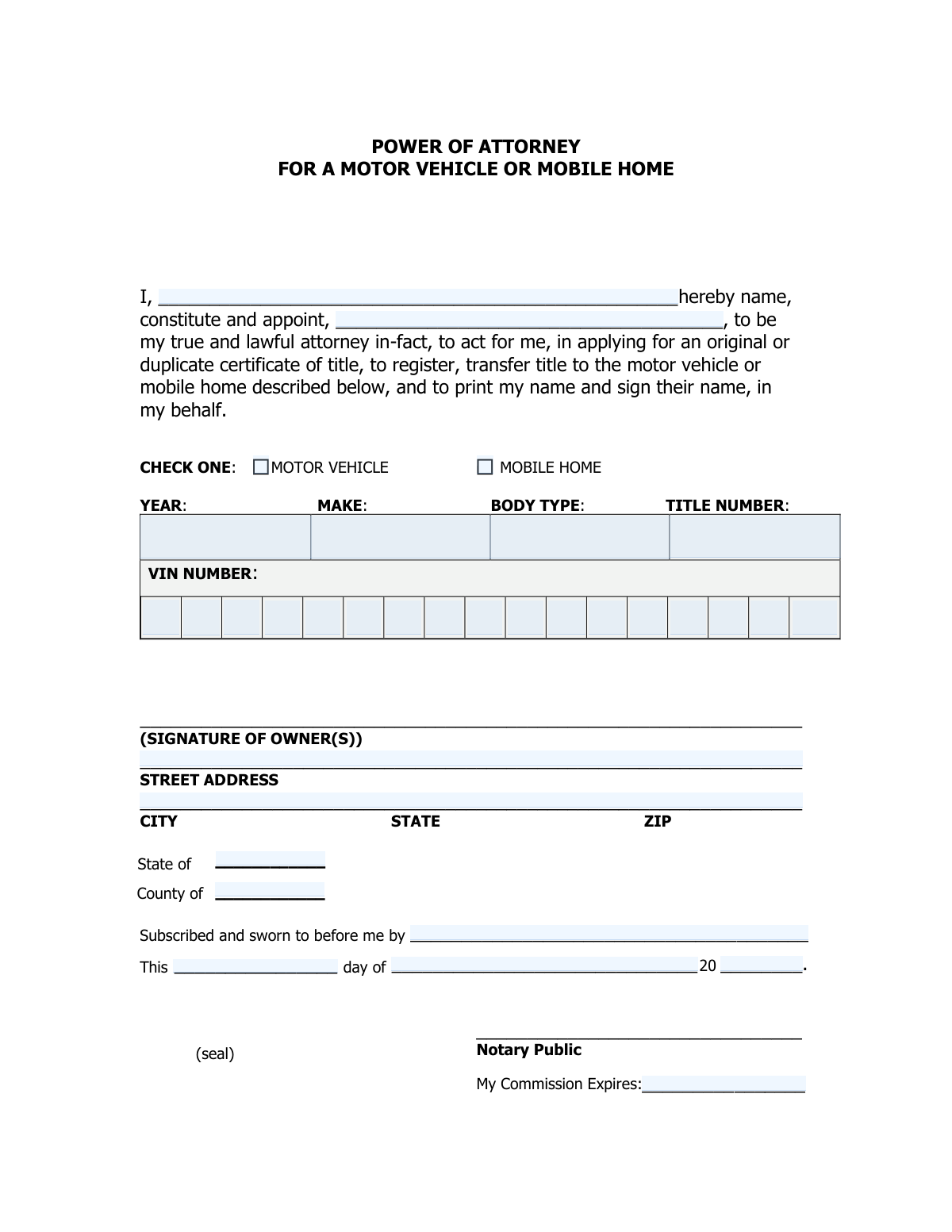
Yes! You can use AI to fill out Power of Attorney for a Motor Vehicle, Mobile Home, or Vessel

A Power of Attorney for a Motor Vehicle is a legal document that allows a vehicle owner (the principal) to appoint an agent (the attorney-in-fact) to manage affairs related to their vehicle. This is crucial for handling tasks like transferring a title, registering the vehicle, or applying for a duplicate title when the owner is unavailable. Today, this form can be filled out quickly and accurately using AI-powered services like Instafill.ai, which can also convert non-fillable PDF versions into interactive fillable forms.
Vehicle Power of Attorney is part of the motor vehicle forms and power of attorney forms categories on Instafill.
Our AI automatically handles information lookup, data retrieval, formatting, and form filling.
It takes less than a minute to fill out Vehicle Power of Attorney using our AI form filling.
Securely upload your data. Information is encrypted in transit and deleted immediately after the form is filled out.

Form specifications

Form name: Power of Attorney for a Motor Vehicle, Mobile Home, or Vessel
Number of fields: 34
Number of pages: 1
Filled form examples: Form Vehicle Power of Attorney Examples
Language: English
main-image

Instafill Demo: How to fill out PDF forms in seconds with AI

How to Fill Out Vehicle Power of Attorney Online for Free in 2026

Are you looking to fill out a VEHICLE POWER OF ATTORNEY form online quickly and accurately? Instafill.ai offers the #1 AI-powered PDF filling software of 2026, allowing you to complete your VEHICLE POWER OF ATTORNEY form in just 37 seconds or less.
Follow these steps to fill out your VEHICLE POWER OF ATTORNEY form online using Instafill.ai:
  1. 1 Navigate to Instafill.ai and upload your Vehicle Power of Attorney form or select it from the template library.
  2. 2 Enter the full legal name of the principal (owner) and the person being appointed as the attorney-in-fact (agent).
  3. 3 Specify the vehicle type (motor vehicle or mobile home) and provide all required details, including the year, make, body type, title number, and the complete Vehicle Identification Number (VIN).
  4. 4 The principal (owner) must provide their signature and current street address on the designated lines.
  5. 5 Review all the information populated by the AI to ensure it is accurate and complete before finalizing the document.
  6. 6 Take the completed form to a licensed Notary Public to have the principal's signature officially witnessed and notarized.
  7. 7 Download, print, and submit the fully executed and notarized form to the relevant motor vehicle agency or other required parties.

Our AI-powered system ensures each field is filled out correctly, reducing errors and saving you time.

Why Choose Instafill.ai for Your Fillable Vehicle Power of Attorney Form?

Speed

Complete your Vehicle Power of Attorney in as little as 37 seconds.

Up-to-Date

Always use the latest 2026 Vehicle Power of Attorney form version.

Cost-effective

No need to hire expensive lawyers.

Accuracy

Our AI performs 10 compliance checks to ensure your form is error-free.

Security

Your personal information is protected with bank-level encryption.

Frequently Asked Questions About Form Vehicle Power of Attorney

This form is a Power of Attorney that allows a vehicle or mobile home owner (the Principal) to authorize another person (the Attorney-in-Fact) to handle transactions, like transferring a title, on their behalf.

The 'Principal' is the legal owner of the motor vehicle or mobile home. The 'Attorney-in-Fact' is the trusted person you are appointing to act for you.

No, this form is specific to one vehicle or mobile home. You must complete a separate Power of Attorney form for each asset you wish to assign.

The VIN is located on the driver's side dashboard or door jamb and is also listed on your vehicle's title and registration. The Title Number is printed on the Certificate of Title for the vehicle or mobile home.

Yes, the form is designed with individual boxes for each character of the 17-digit VIN to ensure accuracy. Please enter the VIN carefully, one character per box.

Yes, there is a dedicated section for a notary. You must sign the form in the presence of a Notary Public, who will then complete the notary section to validate the document.

The Notary Public will fill out the 'Notary Venue' (State and County), the date, and all other details in the notarization block. You should not write in this section.

You will need your full legal name, the full legal name of your appointed Attorney-in-Fact, and the vehicle's year, make, body type, title number, and full 17-character VIN.

Yes, services like Instafill.ai use AI to auto-fill form fields accurately and save time. This can help reduce errors and speed up the process of completing the form.

Upload the form to the Instafill.ai platform. The AI will identify all the fields, allowing you to click and fill them in or use the auto-fill feature to populate your information instantly.

You can use a service like Instafill.ai, which can convert flat, non-fillable PDFs into interactive, fillable forms. This allows you to type your information directly into the fields online.

No, based on the form fields, only the Principal (owner) is required to sign the document. This signature must be done in the presence of a notary.

Compliance Vehicle Power of Attorney
Validation Checks by Instafill.ai

1
Principal and Attorney-in-Fact Distinction
Ensures the 'Principal (Owner) Full Name' and 'Attorney-in-Fact Full Name' are not identical. A person cannot grant power of attorney to themselves, so these names must be different for the document to be logically and legally valid. If the names match, the submission should be rejected for correction.
2
Vehicle Type Selection Requirement
Validates that at least one of the checkboxes, 'Motor Vehicle' or 'Mobile Home', is selected. This selection is fundamental to the form's purpose, defining the type of property the power of attorney applies to. If neither is checked, the form is incomplete and cannot be processed.
3
Conditional Requirement for Vehicle Details
This check ensures that if either 'Motor Vehicle' or 'Mobile Home' is checked, then the 'Year', 'Make', 'Body Type', and 'Title Number' fields are all filled. These details are essential for uniquely identifying the property in question. A failure to provide these details when a vehicle type is selected makes the power of attorney ambiguous and unenforceable.
4
VIN Completeness Check
Verifies that if a vehicle type is selected, all 17 individual VIN character fields are filled, resulting in a complete 17-character VIN. A complete VIN is required for legal identification of a modern vehicle by state motor vehicle agencies. An incomplete VIN will lead to processing failure.
5
VIN Character Validation
This check concatenates the 17 VIN character fields and validates the resulting string. It ensures the full VIN contains only valid alphanumeric characters and does not contain the letters I, O, or Q, which are not used in standard VINs. This helps catch common transcription errors before submission.
6
VIN Check Digit Calculation
Performs a calculation on the 17-character VIN to validate the 9th character, which is a standardized check digit. This is a powerful validation that confirms the authenticity and accuracy of the entire VIN, significantly reducing the risk of fraud or error. A mismatch indicates a typo or an invalid VIN.
7
Vehicle Year Format and Range
Validates that the 'Vehicle/Mobile Home Year' is a 4-digit number. It also checks that the year is within a reasonable range, for example, not in the future and not before a plausible manufacturing year like 1900. This prevents data entry errors and ensures the vehicle's specified year is plausible.
8
Owner Signature Presence
Checks for the presence of a value or digital signature in the 'Owner Signature' field. The owner's signature is the primary indicator of their consent and intent to grant the power of attorney. Without a signature, the document is void and has no legal effect.
9
Notary Person Appearing Match
This validation compares the 'Person Appearing Before Notary' field with the 'Principal (Owner) Full Name' field. These names should match, as the owner is the one who must sign and swear before the notary to grant the power of attorney. A mismatch could indicate fraud or a critical error in the document's execution.
10
Notarization Date Validity
Ensures the 'Notarization Day', 'Notarization Month', and 'Notarization Year' combine to form a valid calendar date. The check also confirms that the date is not in the future. This is critical for establishing the legal execution date of the document.
11
Notary Commission Expiration Logic
Validates that the 'Notary Commission Expiration Date' is a valid date that occurs after the 'Notarization Date'. A notary cannot legally perform their duties with an expired commission. This check is crucial for ensuring the notarization itself is legally sound.
12
Notary Venue Completeness
Verifies that both the 'State (Notary Venue)' and 'County (Notary Venue)' fields are filled out. The venue is a required component of the notarial certificate, establishing the jurisdiction where the notarial act took place. Incomplete venue information can invalidate the notarization.
13
Principal Name Completeness
Checks that the 'Principal (Owner) Full Name' field is not empty and contains at least a first and last name. This is a mandatory field as it identifies the person granting the power of attorney. A failure means the form is legally invalid as the grantor is unknown.
14
Attorney-in-Fact Name Completeness
Verifies that the 'Attorney-in-Fact Full Name' field is populated and contains at least a first and last name. This is a required field to legally identify the appointed agent. Without this information, the power of attorney cannot be executed.

Common Mistakes in Completing Vehicle Power of Attorney

VIN Transcription and Transposition Errors

Users frequently make mistakes when manually entering the 17-digit Vehicle Identification Number (VIN), especially with the one-character-per-box format. Common errors include transposing adjacent characters, misreading similar characters (like 'O' for '0' or 'I' for '1'), or skipping a box entirely. An incorrect VIN will cause the form to be rejected by the processing agency, leading to significant delays. To avoid this, carefully double-check the VIN against the vehicle's title and registration; AI-powered tools like Instafill.ai can help by validating the VIN format and checksum digit automatically.

Using Nicknames or Initials Instead of Full Legal Names

For a legal document like a Power of Attorney, both the Principal (owner) and the Attorney-in-Fact must be identified by their full legal names as they appear on government-issued ID. People often mistakenly use nicknames, abbreviations, or just initials, which can render the document invalid. This mistake can lead to the document being rejected by DMVs or other legal bodies. Always use the complete and official name and verify it against a driver's license or passport.

Incomplete or Mismatched Vehicle Details

The fields for Year, Make, Body Type, and Title Number must be filled out completely and must perfectly match the information on the vehicle's Certificate of Title. Applicants often guess, leave fields blank, or use information from memory, leading to discrepancies. Any mismatch will result in the rejection of the application, requiring the form to be corrected and resubmitted. Always have the official title document in front of you when filling out this section.

Prematurely Filling Out the Notary Section

The owner granting power of attorney often mistakenly fills out the notary sections, such as the State/County venue, the notarization date, or the name of the person appearing. These fields must be completed by the Notary Public at the time of signing. Filling them in beforehand can invalidate the notarization, forcing you to start the process over with a new form. Leave the entire notary block blank for the notary to complete.

Forgetting to Check the Vehicle Type Box

A simple but critical error is failing to check either the 'Motor Vehicle' or 'Mobile Home' box at the top of the vehicle details section. This checkbox is what legally links the Power of Attorney to the specific asset type. Forgetting to check it can make the entire document ambiguous or invalid for its intended purpose, as it's unclear what property the power is being granted for. Always ensure one of these boxes is checked before proceeding.

Conditional Field Mismatch

This form has conditional logic: if you check 'Motor Vehicle' or 'Mobile Home', you must fill out the corresponding details and VIN. A common mistake is checking the box but then neglecting to provide the required information in the subsequent fields. This leaves the form incomplete and guarantees its rejection. To prevent this, treat the checkbox and the detail fields as a single, mandatory unit.

Confusing the Principal and Attorney-in-Fact

In the stress of filling out legal paperwork, individuals sometimes get confused and reverse the roles, putting the appointee's name in the 'Principal (Owner)' field and their own name in the 'Attorney-in-Fact' field. This fundamentally invalidates the document, as it would grant power in the wrong direction. The Principal is the owner granting the power; the Attorney-in-Fact is the person receiving the power to act on the owner's behalf.

Providing an Incomplete or Incorrect Owner Address

The owner's address field is often filled out hastily, leading to missing apartment or suite numbers, incorrect street names, or wrong zip codes. An incomplete address can cause issues with identity verification and may lead to important correspondence being returned as undeliverable. Always provide your full, current residential street address as it appears on your utility bills or driver's license.

Illegible Signature or Printing Name Instead of Signing

The signature field requires a legally binding, handwritten signature, not a printed name. Users sometimes print their name out of habit or provide a signature that is so rushed it becomes illegible, which can be questioned or rejected. The signature should be a clear, cursive representation of your name that reasonably matches the one on your government ID. If the form is a non-fillable PDF, tools like Instafill.ai can convert it into a fillable version where you can place a digital signature correctly.

Entering Incorrect Title Number

The Title Number is a unique identifier for the vehicle's legal ownership document and is just as critical as the VIN. People may confuse it with a license plate number, registration number, or simply misread it from the title document. Entering the wrong Title Number creates a mismatch that will cause the transaction to fail at the DMV. You must carefully locate the 'Certificate of Title Number' on the title document and transcribe it exactly as it appears.
Saved over 80 hours a year

“I was never sure if my IRS forms like W-9 were filled correctly. Now, I can complete the forms accurately without any external help.”

Kevin Martin Green

Your data stays secure with advanced protection from Instafill and our subprocessors

Robust compliance program

Transparent business model

You’re not the product. You always know where your data is and what it is processed for.

ISO 27001, HIPAA, and GDPR

Our subprocesses adhere to multiple compliance standards, including but not limited to ISO 27001, HIPAA, and GDPR.

Security & privacy by design

We consider security and privacy from the initial design phase of any new service or functionality. It’s not an afterthought, it’s built-in, including support for two-factor authentication (2FA) to further protect your account.

Fill out Vehicle Power of Attorney with Instafill.ai

Worried about filling PDFs wrong? Instafill securely fills power-of-attorney-for-a-motor-vehicle-mobile-home-or-vessel forms, ensuring each field is accurate.