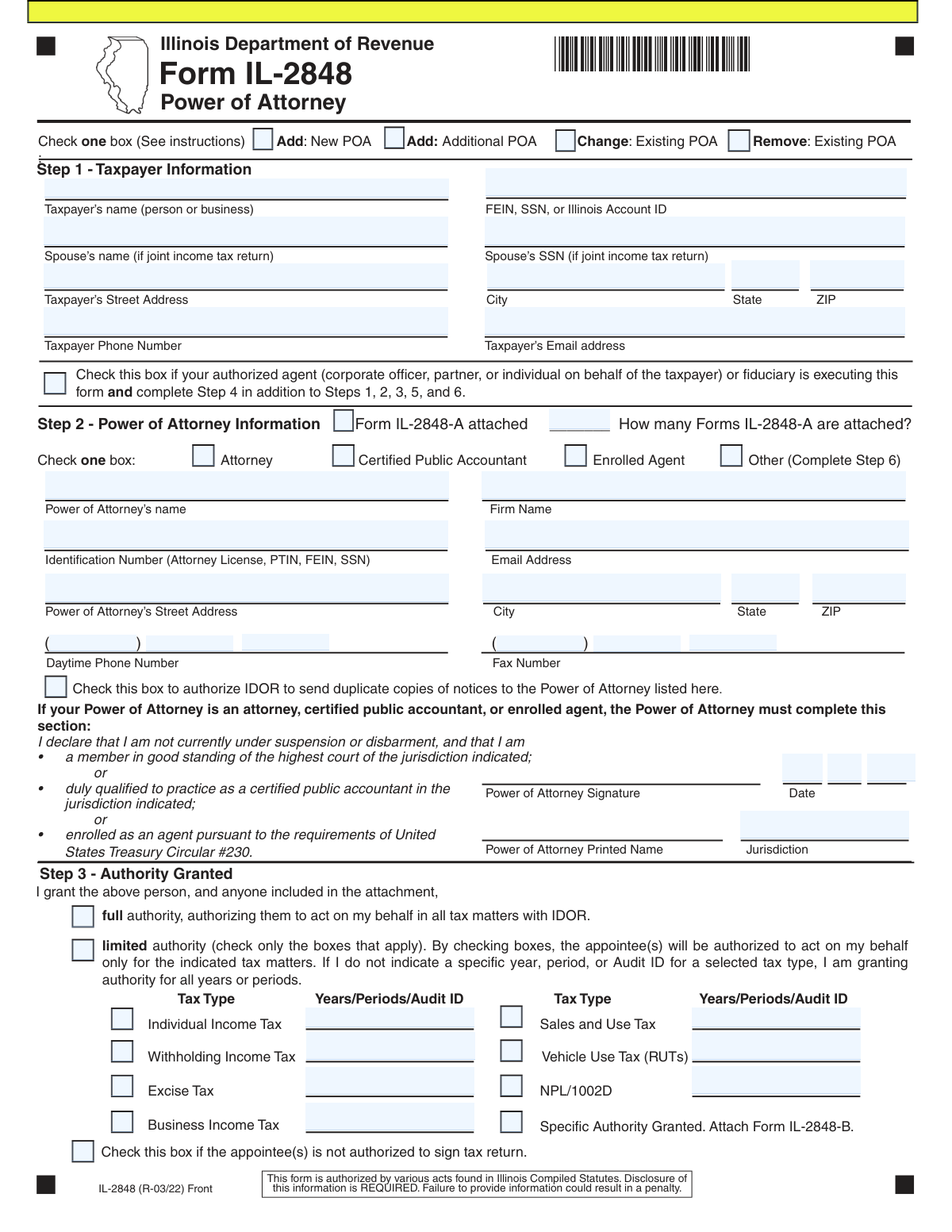
Yes! You can use AI to fill out Form IL-2848, Power of Attorney
Form IL-2848, Power of Attorney, is a legal document used by Illinois taxpayers to appoint a representative, such as an attorney or CPA, to act on their behalf in matters before the Illinois Department of Revenue (IDOR). This authorization allows the designated individual to receive confidential information and perform actions like responding to notices or representing the taxpayer during an audit. Today, this form can be filled out quickly and accurately using AI-powered services like Instafill.ai, which can also convert non-fillable PDF versions into interactive fillable forms.
IL-2848 is part of the
power of attorney forms category on Instafill.
Our AI automatically handles information lookup, data retrieval, formatting, and form filling.
It takes less than a minute to fill out IL-2848 using our AI form filling.
Securely upload your data. Information is encrypted in transit and deleted immediately after the form is filled out.
Form specifications
| Form name: | Form IL-2848, Power of Attorney |
| Number of fields: | 93 |
| Number of pages: | 2 |
| Language: | English |
More forms in Power of attorney forms
Instafill Demo: How to fill out PDF forms in seconds with AI
How to Fill Out IL-2848 Online for Free in 2026
Are you looking to fill out a IL-2848 form online quickly and accurately? Instafill.ai offers the #1 AI-powered PDF filling software of 2026, allowing you to complete your IL-2848 form in just 37 seconds or less.
Follow these steps to fill out your IL-2848 form online using Instafill.ai:
- 1 Navigate to Instafill.ai and upload or select the Illinois Form IL-2848.
- 2 Use the AI assistant to accurately fill in the taxpayer's information in Step 1, including name, address, and identification number (SSN, FEIN, or Illinois Account ID).
- 3 Provide the details for your chosen representative (Power of Attorney) in Step 2, including their name, contact information, and professional credentials.
- 4 In Step 3, clearly define the authority you are granting by selecting either full authority or specifying limited authority for particular tax types and periods.
- 5 Review all the information, then electronically sign the form in Step 5. The AI tool will guide you through the signature process, including any required witness or notary steps (Step 6) if applicable.
- 6 Download the completed and signed Form IL-2848 for your records and for submission to the Illinois Department of Revenue.
Our AI-powered system ensures each field is filled out correctly, reducing errors and saving you time.
Why Choose Instafill.ai for Your Fillable IL-2848 Form?
Speed
Complete your IL-2848 in as little as 37 seconds.
Up-to-Date
Always use the latest 2026 IL-2848 form version.
Cost-effective
No need to hire expensive lawyers.
Accuracy
Our AI performs 10 compliance checks to ensure your form is error-free.
Security
Your personal information is protected with bank-level encryption.
Frequently Asked Questions About Form IL-2848
Form IL-2848, Power of Attorney, is used to authorize an individual, such as a CPA or attorney, to represent you or your business before the Illinois Department of Revenue (IDOR) for tax-related matters.
Any individual or business taxpayer who wants to grant a representative the authority to receive confidential tax information and act on their behalf with the IDOR should file this form.
Granting 'full authority' allows your representative to act on your behalf for all tax matters with the IDOR. Selecting 'limited authority' restricts their power to only the specific tax types and periods you indicate on the form.
You will need your full name, address, and taxpayer identification number (SSN or FEIN), as well as the name, contact information, and identification number of the representative you are appointing.
Yes, if you are authorizing a power of attorney for a joint income tax return, your spouse's information must be included in Step 1 and both of you must sign the form in Step 5.
If your representative is not one of these professionals, you must check the 'Other' box in Step 2, and your signature in Step 5 must be witnessed by two people or a notary public in Step 6.
At the top of the form, check the appropriate box to indicate if you are adding a new or additional POA, changing an existing one, or removing (revoking) a POA that is currently on file.
To have duplicate copies of notices sent to your representative, you must check the designated box in Step 2 under the Power of Attorney's information.
Generally, no. To grant your representative the specific authority to sign your tax returns, you must check the 'Specific Authority Granted' box in Step 3 and attach Form IL-2848-B.
Submission instructions are typically found on the IDOR website or with the form's official instructions. You can often submit it online via a MyTax Illinois account or mail it to the specified address.
Yes, services like Instafill.ai use AI to accurately auto-fill form fields with your saved information, which saves time and helps prevent common errors.
You can use a service like Instafill.ai to upload the PDF. The platform makes the form interactive and fillable, allowing you to type your information directly into the fields and sign electronically.
If you have a non-fillable PDF, you can use a tool like Instafill.ai to convert it into an interactive, fillable form that you can easily complete on your computer.
List the primary representative in Step 2 of Form IL-2848. For each additional representative, you must complete and attach a separate Form IL-2848-A.
Compliance IL-2848
Validation Checks by Instafill.ai
1
Exclusive Filing Action Selection
This validation ensures that exactly one of the four filing action checkboxes at the top of the form (Add: New POA, Add: Additional POA, Change: Existing POA, Remove: Existing POA) is selected. This is critical for the Department of Revenue to understand the taxpayer's intent and process the request correctly. If zero or more than one box is checked, the submission is ambiguous and will be rejected, requiring the user to correct and resubmit the form.
2
Taxpayer Identification Number Format
This check verifies that the 'FEIN, SSN, or Illinois Account ID' in Step 1 is entered in the correct format: nine digits for an SSN (XXX-XX-XXXX) or FEIN (XX-XXXXXXX), or a valid format for an Illinois Account ID. Correct formatting is essential for matching the form to the correct taxpayer account in the database. A formatting error will prevent the system from identifying the taxpayer, causing the form to be rejected.
3
Conditional Step 4 Completion for Authorized Agents
This validation checks that if the box in Step 1 labeled 'your authorized agent... is executing this form' is checked, then all required fields in Step 4 (Name, Title, Address, etc.) must be completed. This is necessary to legally identify the individual signing on behalf of the taxpayer. Failure to complete Step 4 when this box is checked will render the signature in Step 5 invalid and cause the form to be rejected for incompleteness.
4
Exclusive Representative Type Selection
This check ensures that exactly one professional designation box (Attorney, Certified Public Accountant, Enrolled Agent, or Other) is selected in Step 2. This designation determines the qualification requirements for the representative and whether a witness or notary is needed. Selecting none or multiple options creates ambiguity and will result in the form being considered incomplete and invalid.
5
Conditional Jurisdiction Requirement for Professionals
This validation verifies that the 'Jurisdiction' field in Step 2 is filled out if the representative is designated as an 'Attorney', 'Certified Public Accountant', or 'Enrolled Agent'. This information is required to confirm the representative's professional standing. If one of these boxes is checked but the jurisdiction is missing, the representative's qualifications cannot be verified, and the form will be rejected.
6
Conditional Step 6 Witness/Notary Requirement
This check ensures that Step 6 is completed if the 'Other' box is checked in Step 2 for the representative's designation. Per the form's instructions, a non-credentialed representative's appointment requires the taxpayer's signature to be validated by either two witnesses or a notary. If 'Other' is checked and Step 6 is blank, the Power of Attorney is not legally binding and will be rejected.
7
Conditional Attachment Count for IL-2848-A
This validation confirms that if the 'Form IL-2848-A attached' box is checked in Step 2, the corresponding field for the number of attached forms contains a positive integer (e.g., 1, 2, 3). This ensures accurate document tracking and processing of all intended representatives. If the box is checked but the count is zero or blank, it creates a discrepancy that will halt processing until clarified.
8
Exclusive Authority Scope Selection
This validation ensures that in Step 3, the taxpayer selects either 'full authority' or 'limited authority,' but not both. The scope of authority is a fundamental component of the Power of Attorney, and selecting both creates a logical contradiction. An ambiguous selection will cause the form to be rejected, as the representative's authorized actions would be unclear.
9
Conditional Limited Authority Specification
This check verifies that if 'limited authority' is selected in Step 3, at least one tax type checkbox (e.g., 'Individual Income Tax') is also selected. Granting limited authority is meaningless without specifying which tax matters the authority applies to. If 'limited authority' is checked but no tax types are specified, the form is considered incomplete and will be returned for correction.
10
Joint Filer Signature Requirement
This validation ensures that if a 'Spouse’s name' is entered in Step 1, then the 'Spouse’s Signature' and 'Date' fields in Step 5 are also completed. For a Power of Attorney to be valid for a joint tax return, both taxpayers must provide their signature. Missing a required spouse's signature will invalidate the POA for any joint tax matters.
11
Signature Date Validity
This check validates that all date fields associated with signatures (in Steps 2, 5, and 6) contain a valid calendar date that is not in the future. The signature date is a critical legal element that establishes when the document was executed. An invalid or future date would render the document legally questionable and lead to its rejection.
12
Email Address Format Validation
This check ensures that all email address fields on the form (for the taxpayer, power of attorney, and authorized agent) adhere to a standard format (e.g., [email protected]). This is important for ensuring that electronic correspondence from the Department of Revenue can be successfully delivered. An invalid email format could lead to missed communications and will trigger a validation error.
13
SSN/FEIN Consistency with Taxpayer Type
This validation performs a logical check to ensure the taxpayer ID type in Step 1 matches the taxpayer entity. For example, if a 'Spouse’s name' is provided (indicating an individual joint return), the primary taxpayer ID should be an SSN, not an FEIN. A mismatch suggests a data entry error that could lead to processing the POA against the wrong account type, so the form would be flagged for review or rejection.
14
Years/Periods Field Logic for Limited Authority
This check ensures that the 'Years/Periods/Audit ID' text fields in Step 3 are only populated if the 'limited authority' option is selected. Entering years or periods under 'full authority' is redundant and can create confusion. This validation prevents contradictory data entry and ensures the form's data is clean and logical, rejecting submissions with data in these fields when 'full authority' is chosen.
Common Mistakes in Completing IL-2848
Filers often check the wrong box at the top of the form, such as selecting 'Add: New POA' when they intend to 'Change: Existing POA'. This mistake happens due to misunderstanding the distinction between adding a representative to an existing authorization versus creating a new one from scratch. This can lead to the Illinois Department of Revenue (IDOR) processing the request incorrectly, such as revoking a POA you meant to amend or creating duplicate, conflicting authorizations.
Users frequently enter the taxpayer identification number (SSN, FEIN, or Illinois Account ID) in an incorrect format or use the wrong type of ID for the entity, such as an SSN for a business. The form's instructions can be confusing regarding the use of hyphens, increasing the likelihood of error. An incorrect ID prevents the IDOR from matching the form to the taxpayer's account, resulting in immediate rejection and significant processing delays.
When a Power of Attorney covers matters related to a joint income tax return, both spouses must sign the form in Step 5. A common oversight is for only one spouse to sign, believing their signature is sufficient. This renders the POA invalid for any joint tax matters, and the IDOR will reject the form or limit its scope, preventing the representative from acting on behalf of both taxpayers.
A filer may check the 'limited authority' box in Step 3 but then forget to check the specific tax types or enter the corresponding years, periods, or Audit IDs. According to the form, failing to specify a year or period for a selected tax type grants authority for all years, which may be broader than intended. This can lead to unintended information disclosure or an invalid form if no tax types are selected at all.
If the chosen representative is not an Attorney, CPA, or Enrolled Agent, the 'Other' box in Step 2 must be checked, which then requires the taxpayer's signature to be witnessed or notarized in Step 6. Filers often miss this dependency, submitting a legally incomplete form. The IDOR will reject the form, and the appointment remains invalid until a properly executed version is submitted.
Taxpayers sometimes enter a nickname, an abbreviated name, or a 'Doing Business As' (DBA) name instead of the full, legal name of the individual or business entity. This happens when filers are not referencing official documents. This mismatch between the name and the Taxpayer ID will cause the IDOR's automated systems to fail, leading to processing delays or outright rejection of the form.
When a corporate officer, partner, or fiduciary signs on behalf of the taxpayer, they often sign in Step 5 but forget to check the corresponding 'authorized agent' box in Step 1 and fill out their own details in Step 4. This omission creates ambiguity about the signer's authority to execute the document. The IDOR will likely reject the form because the signature in Step 5 does not belong to the taxpayer listed in Step 1 and is not properly documented.
In Step 3, a filer might create a direct contradiction by checking both the box that states the 'appointee(s) is not authorized to sign tax return' and the box for 'Specific Authority Granted (Attach Form IL-2848-B),' which is used to grant signing authority. This confusion makes it impossible for the IDOR to determine the taxpayer's intent. The form will be returned for clarification, delaying the appointment of the representative.
Filers may leave critical fields in Step 2 blank, such as the representative's identification number (e.g., Attorney License, PTIN) or the 'Jurisdiction' for licensed professionals. This information is required for the IDOR to verify the representative's credentials and good standing. Omitting these details can lead to the rejection of the form, as the representative's eligibility to practice before the IDOR cannot be confirmed.
The form requires the street address, city, state, and ZIP code to be entered into separate, dedicated fields. A frequent mistake is to enter the entire address onto the single 'Street Address' line, which can cause data entry errors on the receiving end. This can lead to critical notices and correspondence from the IDOR being mailed to an incorrect or undeliverable address. AI-powered form filling tools like Instafill.ai can prevent this by automatically parsing and placing each address component into the correct field.
Saved over 80 hours a year
“I was never sure if my IRS forms like W-9 were filled correctly. Now, I can complete the forms accurately without any external help.”
Kevin Martin Green
Your data stays secure with advanced protection from Instafill and our subprocessors

Robust compliance program
Transparent business model
You’re not the product. You always know where your data is and what it is processed for.
ISO 27001, HIPAA, and GDPR
Our subprocesses adhere to multiple compliance standards, including but not limited to ISO 27001, HIPAA, and GDPR.
Security & privacy by design
We consider security and privacy from the initial design phase of any new service or functionality. It’s not an afterthought, it’s built-in, including support for two-factor authentication (2FA) to further protect your account.
Fill out IL-2848 with Instafill.ai
Worried about filling PDFs wrong? Instafill securely fills form-il-2848-power-of-attorney forms, ensuring each field is accurate.