Yes! You can use AI to fill out Customs (Import/Export) Power of Attorney
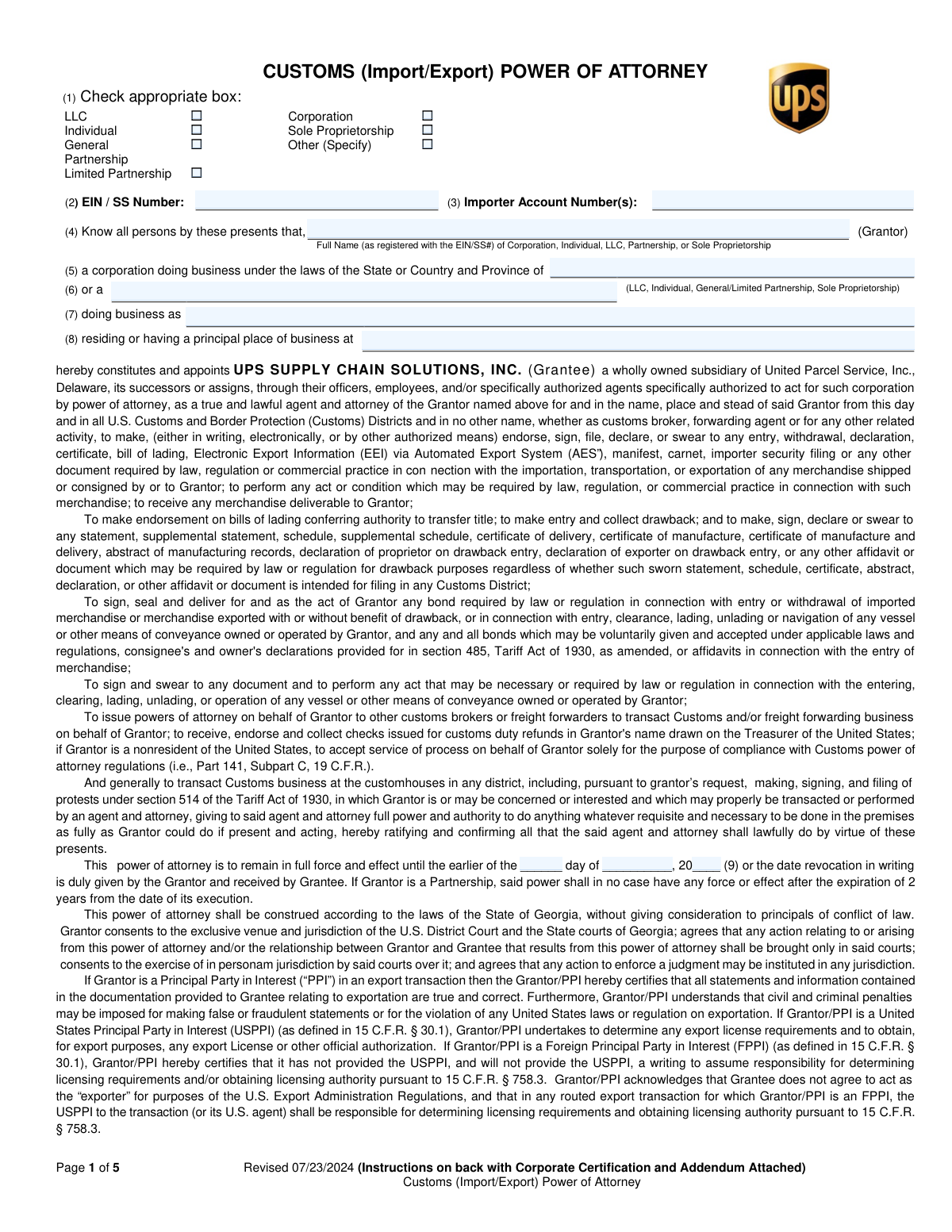
The Customs (Import/Export) Power of Attorney is a legal document that authorizes UPS Supply Chain Solutions, Inc. to act on behalf of an individual or company (the Grantor) in all matters related to U.S. Customs and Border Protection. This is essential for managing the importation and exportation of goods, allowing the broker to file entries, declarations, and other required documents. Today, this form can be filled out quickly and accurately using AI-powered services like Instafill.ai, which can also convert non-fillable PDF versions into interactive fillable forms.
UPS Customs Power of Attorney is part of the
customs forms, export forms and power of attorney forms categories on Instafill.
Our AI automatically handles information lookup, data retrieval, formatting, and form filling.
It takes less than a minute to fill out UPS Customs Power of Attorney using our AI form filling.
Securely upload your data. Information is encrypted in transit and deleted immediately after the form is filled out.
Form specifications
| Form name: | Customs (Import/Export) Power of Attorney |
| Number of fields: | 62 |
| Number of pages: | 5 |
| Language: | English |
Instafill Demo: How to fill out PDF forms in seconds with AI
How to Fill Out UPS Customs Power of Attorney Online for Free in 2026
Are you looking to fill out a UPS CUSTOMS POWER OF ATTORNEY form online quickly and accurately? Instafill.ai offers the #1 AI-powered PDF filling software of 2026, allowing you to complete your UPS CUSTOMS POWER OF ATTORNEY form in just 37 seconds or less.
Follow these steps to fill out your UPS CUSTOMS POWER OF ATTORNEY form online using Instafill.ai:
- 1 Navigate to Instafill.ai and upload the Customs (Import/Export) Power of Attorney form.
- 2 Select the Grantor's entity type (e.g., Corporation, LLC, Individual) and provide the corresponding identification numbers like EIN or SSN.
- 3 Enter the full legal name of the Grantor, principal business address, and state/country of operation as prompted by the AI assistant.
- 4 Specify the duration of the power of attorney or leave it blank for it to remain in effect indefinitely.
- 5 Provide the signature, printed name, title, and contact information of the authorized individual signing on behalf of the Grantor.
- 6 If applicable, complete the Corporate Certification or Partnership Addendum section to verify the signatory's authority.
- 7 Review all the information for accuracy before downloading or printing the completed Power of Attorney.
Our AI-powered system ensures each field is filled out correctly, reducing errors and saving you time.
Why Choose Instafill.ai for Your Fillable UPS Customs Power of Attorney Form?
Speed
Complete your UPS Customs Power of Attorney in as little as 37 seconds.
Up-to-Date
Always use the latest 2026 UPS Customs Power of Attorney form version.
Cost-effective
No need to hire expensive lawyers.
Accuracy
Our AI performs 10 compliance checks to ensure your form is error-free.
Security
Your personal information is protected with bank-level encryption.
Frequently Asked Questions About Form UPS Customs Power of Attorney
This form authorizes UPS Supply Chain Solutions, Inc. to act as your agent for customs-related activities. This allows them to file import/export declarations, entries, and other necessary documents on your company's behalf.
The 'Grantor' is you or your company, the one importing or exporting goods. You need to complete this form if you want to appoint UPS Supply Chain Solutions to handle your customs brokerage and freight forwarding.
You will need your business's full legal name, principal address, and your Employer Identification Number (EIN) or Social Security Number (SSN). Depending on your business type, you may also need a list of partners or a copy of your partnership agreement.
The form must be signed by a duly authorized person, such as a President, CEO, CFO, Vice President, Treasurer, or Secretary. If another employee signs, the 'Corporate Certification' section must also be completed by an officer to attest to the signatory's authority.
The Corporate Certification is a declaration by a corporate officer that the person signing the Power of Attorney has the authority to do so. It is required for U.S. corporations if the signatory is not a primary officer and for nearly all foreign (non-resident) corporations.
Yes, if you are a General or Limited Partnership, you must complete the Addendum to list all general partners with authority to bind the firm. Limited Partnerships must also provide a copy of the limited partnership agreement.
You can leave the expiration date blank for the Power of Attorney to remain in effect indefinitely until you revoke it in writing. Note that for partnerships, the power of attorney is automatically limited to a maximum of two years.
If you are a non-resident Grantor without an EIN or SSN, you should enter your Customs-assigned number if you have one. If you don't know this number or don't have one, you can leave the field blank.
This statement clarifies that you, the importer, are ultimately liable for all customs duties and taxes, even if you pay the broker. It also informs you of your right to pay U.S. Customs and Border Protection directly with a separate check.
Your Importer Account Number is issued by UPS Supply Chain Solutions, Inc. If you have one, you should enter it; otherwise, you can provide your UPS domestic shipper number or leave the field blank if it is unknown.
Yes, AI-powered services like Instafill.ai can help you fill out this form quickly and accurately. These tools use AI to identify form fields and can auto-fill your information, saving time and reducing the risk of errors.
To fill this form using Instafill.ai, you can upload the PDF to their platform. The AI will make the document interactive, allowing you to easily enter your information and have it populated correctly in all the required fields.
If you have a non-fillable or 'flat' PDF, you can use a service like Instafill.ai. Their technology can convert the non-fillable PDF into an interactive, fillable form online, making it easy to complete and sign digitally.
Compliance UPS Customs Power of Attorney
Validation Checks by Instafill.ai
1
Exclusive Entity Type Selection
This check verifies that exactly one entity type checkbox (e.g., LLC, Corporation, Individual) is selected in section (1). Selecting zero or multiple types creates ambiguity about the grantor's legal structure, which is critical for determining signing authority and other legal requirements. If this validation fails, the form submission should be rejected with an error prompting the user to select a single, appropriate entity type.
2
EIN/SSN Format and Requirement
Validates that the number provided in field (2) is a required field and conforms to the standard 9-digit format for a U.S. Employer Identification Number (XX-XXXXXXX) or Social Security Number (XXX-XX-XXXX). This number is the primary identifier for the grantor with government agencies like U.S. Customs. A missing or malformed number will prevent customs clearance and lead to processing delays, so failure requires immediate correction.
3
Grantor Name and EIN/SSN Consistency
Ensures the 'Grantor Full Name' in field (4) is provided and is the complete legal name as registered with the corresponding EIN/SSN in field (2). Abbreviated or incorrect names can cause mismatches in customs systems, leading to entry rejections or compliance issues. This check is crucial for verifying the identity of the principal party in the transaction.
4
Conditional Entity-Specific Fields
This validation enforces conditional logic based on the entity type selected in (1). If 'Corporation' is checked, field (5) for state/country of incorporation must be filled. If any other entity type is chosen, field (6) specifying that entity type must be filled. Failure to complete the correct subsequent fields results in an incomplete legal description of the grantor.
5
Power of Attorney Expiration Date Logic
This check validates the optional expiration date in section (9). If a date is entered, it must be a valid future date that is at least 30 business days after the 'Date Signed' (12). Furthermore, if the entity is a 'General Partnership' or 'Limited Partnership', this check ensures the expiration date is not more than 2 years from the date of execution. An invalid date could lead to the premature or unintended termination or continuation of the power of attorney.
6
Signatory Information Completeness
Verifies that the signatory's typed name (10), capacity/title (11), and the signature date (12) are all present. These fields are essential for establishing the identity and authority of the person signing on behalf of the grantor. Missing information invalidates the legal standing of the document, and the submission must be halted until all fields are completed.
7
Contact Information Format Validation
Checks that the 'Email Address' (13) and 'Phone Number' (14) are provided and adhere to standard formats (e.g., [email protected] for email, and a valid numeric sequence for phone). This information is vital for communication regarding customs matters or issues with the POA. If validation fails, the user is prompted to enter valid contact details to prevent future communication breakdowns.
8
Corporate Certification Requirement Trigger
This rule determines if the 'Corporate Certification' section is required. It is triggered if the grantor is a U.S. Corporation and the signatory's title in field (11) is not one of the exempt officer titles (President, CEO, CFO, etc.), or if the grantor is any non-resident foreign entity (except an individual). Failure to provide a required certification renders the POA invalid under customs regulations, as the signatory's authority is unproven.
9
Partnership Addendum and Documentation Requirement
This check verifies that if the entity type is 'General Partnership' or 'Limited Partnership', the corresponding Addendum section is completed with the names of all general partners. For Limited Partnerships, it also flags the requirement to attach a copy of the limited partnership agreement. This is mandated by 19 CFR 141.39 to prove the signatory has the authority to bind the partnership.
10
Principal Business Address Completeness
Ensures that the grantor's principal place of business address in field (8) is fully completed, including street, city, state/province, and country. This address is a key piece of identification for the grantor and may be used for official correspondence or verification. An incomplete address can cause processing delays or rejection of the POA.
11
Corporate Certification Officer Title Validation
If the Corporate Certification is completed, this check validates that the title of the certifying officer is one of the authorized positions listed (President, Treasurer, Vice President, Corporate Secretary, CEO, CFO, CIO, or COO). Using an unauthorized title for certification invalidates the attestation of the signatory's authority. The form must be rejected if the title does not match the approved list.
12
Consistency between POA Signatory and Certification Details
This validation cross-references the name and title of the person who signed the Power of Attorney (section 10) with the details provided for the signatory in the Corporate Certification section. The names and titles must match exactly to ensure the certification is attesting to the authority of the correct individual. A mismatch indicates a critical error that invalidates the certification.
13
Signature Date Validity
Validates that the 'Date' in field (12) is a plausible, non-future date. This date establishes the execution date of the legal document and is the basis for calculating expiration periods. A future date or an obviously incorrect date (e.g., in the wrong century) would make the document's effective start date ambiguous and must be corrected.
Common Mistakes in Completing UPS Customs Power of Attorney
This mistake occurs when filers enter their 'Doing Business As' (DBA) name in field (4) instead of the full legal entity name registered with the EIN or SSN. This leads to a mismatch with official records, causing the Power of Attorney (POA) to be rejected by customs brokers or U.S. Customs. To avoid this, always enter the exact legal name as it appears on your tax or business registration documents in field (4), and use field (7) specifically for any DBA names.
A common critical error is having an unauthorized individual sign the POA in field (10), or failing to provide required proof of their authority. For corporations, if the signatory is not a listed officer (e.g., President, CEO, CFO), a completed Corporate Certification is mandatory. This oversight invalidates the entire document, leading to significant delays in customs clearance. Carefully review the instructions in 'STEP FOUR' to confirm who is authorized to sign for your specific entity type and attach all necessary certifications.
Filers often misunderstand when to complete the Corporate Certification. They may either fail to complete it when a non-officer signs the POA for a corporation, or when a foreign entity (that is not an individual) is the grantor, both of which are required scenarios. Conversely, some fill it out unnecessarily. This leads to processing delays due to incomplete or incorrect paperwork. Ensure this section is completed only when required and is signed by a valid certifying officer as listed on the form (President, CEO, CFO, etc.).
Partnerships have unique requirements that are frequently missed. General Partnerships must attach an addendum listing all general partners, while Limited Partnerships must provide both the addendum and a complete copy of the limited partnership agreement. Failure to include these specific, mandatory documents will result in an immediate rejection of the POA. Always read the fine print for your entity type and gather all required supplemental documents before submission.
The legal name of the Grantor in field (4) must be the exact name associated with the EIN or SSN provided in field (2). Discrepancies, even minor ones like omitting 'Inc.' or 'LLC', can cause validation failures and rejection. This happens due to carelessness or using an abbreviated name. To prevent this, cross-reference the name and number with your official IRS documentation before filling out the form. AI-powered form filling tools like Instafill.ai can help prevent this by validating data against existing records.
Checking the wrong box in field (1) (e.g., selecting 'Corporation' for an 'LLC') is a foundational error that causes a cascade of mistakes throughout the form. This choice dictates which fields are required and what supplemental documentation is necessary, such as the Corporate Certification or Partnership Addendum. This mistake often stems from a misunderstanding of legal business structures. Always confirm your company's official legal structure before starting the form to ensure all subsequent steps are correct.
Filers often feel compelled to fill in the expiration date in field (9), sometimes setting a date that is too soon and causing the POA to lapse unexpectedly, disrupting shipments. The instructions clarify that leaving it blank makes the POA indefinite, which is often the desired outcome. Furthermore, filers may not notice the rule that a Partnership POA is automatically limited to 2 years, regardless of the date entered. To avoid issues, leave the date blank for an indefinite POA unless a specific end date is truly required, and be aware of entity-specific duration limits.
This error occurs when the Grantor's name, signatory's name, or signatory's title is written differently on the main POA page versus the Corporate Certification or Partnership Addendum. For example, the signatory might be listed as 'VP of Operations' on page 2 but 'Vice President' on page 3. Such inconsistencies create legal ambiguity and can invalidate the document. Ensure all names and titles are spelled and formatted identically in every section where they appear.
In field (8), filers sometimes provide a P.O. Box or an incomplete address, omitting details like the suite number, city, or country. A POA requires a complete physical principal place of business address for legal and identification purposes. An incomplete or incorrect address can lead to rejection or delays while the broker attempts to verify the information. Always provide the full, complete street address of your corporate headquarters or principal place of business.
This form is often distributed as a non-fillable PDF, leading to handwritten submissions that are illegible, incomplete, or contain formatting errors like writing outside the designated space. People may also miss crucial instructions located on the final pages because they only print the pages that need to be filled. This results in a high rate of rejection. Using a tool like Instafill.ai can convert the non-fillable PDF into an interactive, fillable form, guiding you through the fields and ensuring all information is legible and correctly placed, preventing many of the common errors.
Saved over 80 hours a year
“I was never sure if my IRS forms like W-9 were filled correctly. Now, I can complete the forms accurately without any external help.”
Kevin Martin Green
Your data stays secure with advanced protection from Instafill and our subprocessors

Robust compliance program
Transparent business model
You’re not the product. You always know where your data is and what it is processed for.
ISO 27001, HIPAA, and GDPR
Our subprocesses adhere to multiple compliance standards, including but not limited to ISO 27001, HIPAA, and GDPR.
Security & privacy by design
We consider security and privacy from the initial design phase of any new service or functionality. It’s not an afterthought, it’s built-in, including support for two-factor authentication (2FA) to further protect your account.
Fill out UPS Customs Power of Attorney with Instafill.ai
Worried about filling PDFs wrong? Instafill securely fills customs-importexport-power-of-attorney forms, ensuring each field is accurate.