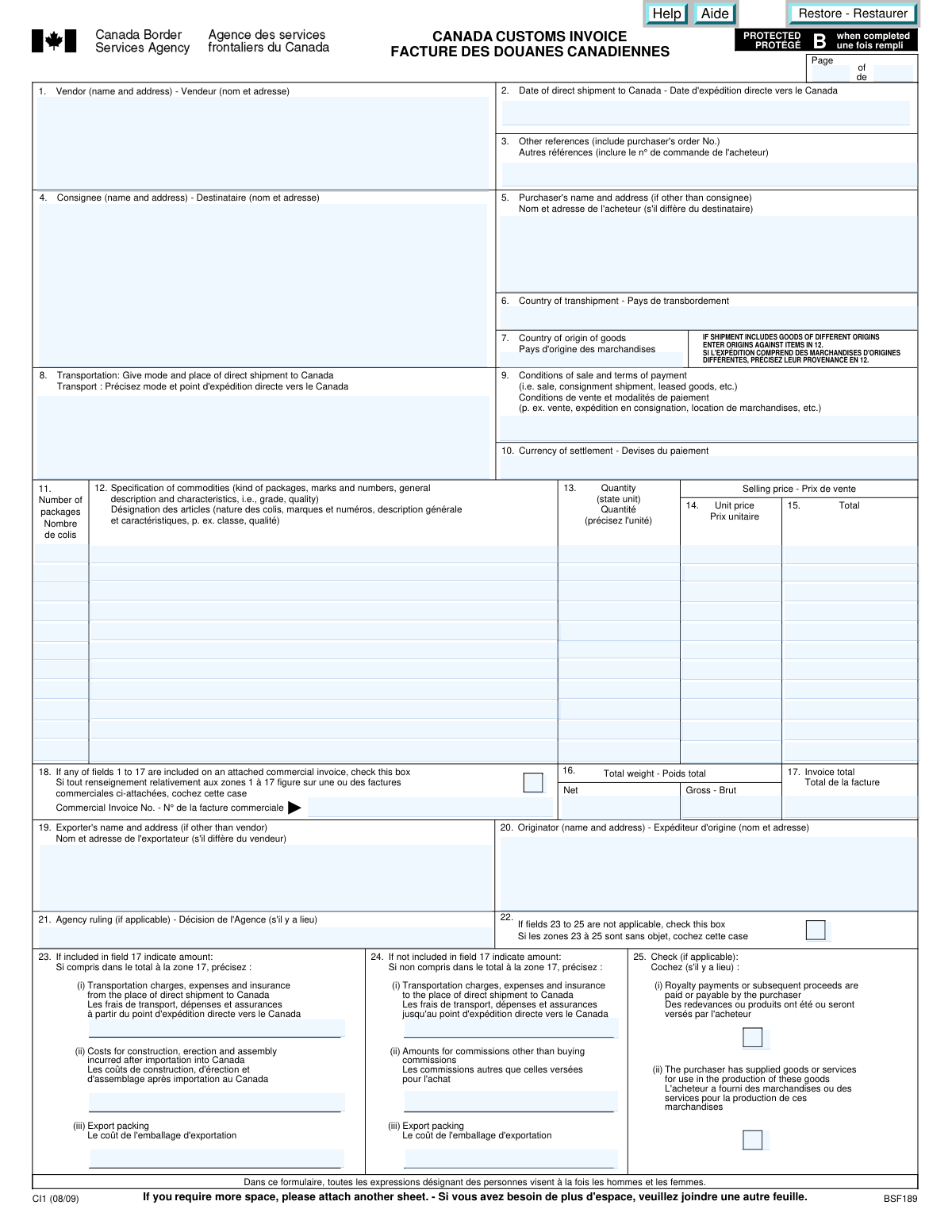
Yes! You can use AI to fill out Form BSF189, Canada Customs Invoice / Facture des douanes canadiennes
The Canada Customs Invoice (BSF189) is a document required by the Canada Border Services Agency (CBSA) for most commercial shipments entering Canada. It provides detailed information about the shipment, including the vendor, purchaser, country of origin, and a full description and valuation of the goods, which is used to assess duties and taxes. Today, this form can be filled out quickly and accurately using AI-powered services like Instafill.ai, which can also convert non-fillable PDF versions into interactive fillable forms.
BSF189 is part of the
customs forms category on Instafill.
Our AI automatically handles information lookup, data retrieval, formatting, and form filling.
It takes less than a minute to fill out BSF189 using our AI form filling.
Securely upload your data. Information is encrypted in transit and deleted immediately after the form is filled out.
Form specifications
| Form name: | Form BSF189, Canada Customs Invoice / Facture des douanes canadiennes |
| Number of fields: | 87 |
| Number of pages: | 1 |
| Language: | English |
More forms in Customs forms
Instafill Demo: How to fill out PDF forms in seconds with AI
How to Fill Out BSF189 Online for Free in 2026
Are you looking to fill out a BSF189 form online quickly and accurately? Instafill.ai offers the #1 AI-powered PDF filling software of 2026, allowing you to complete your BSF189 form in just 37 seconds or less.
Follow these steps to fill out your BSF189 form online using Instafill.ai:
- 1 Navigate to Instafill.ai and upload or select the Canada Customs Invoice (BSF189) form.
- 2 Use the AI assistant to input key party information, including the Vendor (seller), Consignee (recipient), and Purchaser details.
- 3 Enter the shipment details, such as the date of direct shipment, country of origin, and mode of transportation.
- 4 Specify the conditions of sale, terms of payment, and the currency of settlement for the transaction.
- 5 List each commodity being shipped, providing a detailed description, quantity, unit price, and total value for each item in the appropriate fields.
- 6 Provide the total weight (net and gross), the total number of packages, and the final invoice total.
- 7 Complete the remaining sections for any additional costs, exporter information, and agency rulings, then review all entered data for accuracy before finalizing the document.
Our AI-powered system ensures each field is filled out correctly, reducing errors and saving you time.
Why Choose Instafill.ai for Your Fillable BSF189 Form?
Speed
Complete your BSF189 in as little as 37 seconds.
Up-to-Date
Always use the latest 2026 BSF189 form version.
Cost-effective
No need to hire expensive lawyers.
Accuracy
Our AI performs 10 compliance checks to ensure your form is error-free.
Security
Your personal information is protected with bank-level encryption.
Frequently Asked Questions About Form BSF189
This form provides the Canada Border Services Agency (CBSA) with detailed information about goods being imported into Canada. It is used to assess the correct duties and taxes on commercial shipments.
The vendor, exporter, or their agent must complete the Canada Customs Invoice for commercial goods valued over a certain threshold being shipped to Canada.
The Vendor is the seller of the goods. The Consignee is the party in Canada receiving the shipment. The Purchaser is the party buying the goods, which may be different from the consignee.
As noted on the form, if your shipment includes goods of different origins, you must specify the country of origin for each item in the commodity description section (Field 12).
If an attached commercial invoice includes all the details for fields 1 to 17, you can simply check the box in Field 18. You must still ensure the commercial invoice is included with your shipment's paperwork.
Net weight is the weight of the products alone, without any packaging. Gross weight is the total weight of the shipment, including the products, packaging, pallets, and any other shipping materials.
In Field 23, declare any costs (like transport or insurance) that are already included in the invoice total (Field 17). In Field 24, declare any of these costs that are not included in the invoice total.
This is any country the goods passed through after leaving the country of origin and before arriving in Canada. If the shipment was sent directly, you can leave this field blank or write 'None'.
The Exporter is the party shipping the goods, if different from the vendor. The Originator is the original manufacturer or producer of the goods.
You must provide a detailed description of each item, including package type, marks, and characteristics like grade or quality. This information is crucial for customs to correctly classify the goods.
Yes, services like Instafill.ai use AI to accurately auto-fill form fields from your existing data, which can save significant time and help prevent errors.
You can use a service like Instafill.ai to upload the BSF189 form and fill it out interactively online. The platform allows you to easily enter, save, and manage your information digitally.
Tools like Instafill.ai can convert flat, non-fillable PDFs into interactive, fillable forms. This allows you to type your information directly into the fields instead of printing and writing by hand.
Compliance BSF189
Validation Checks by Instafill.ai
1
Validates Shipment Date Format and Logic
This check ensures the 'Date of direct shipment to Canada' (Field 2) is in the specified YYYY/MM/DD format. It also verifies that the date is a valid calendar date and is not set in the future. This is crucial for customs processing, duty calculation, and establishing the timeline of the import, and a failure would require the user to correct the date before submission.
2
Verifies Commodity Line Item Calculation
For each commodity line item, this validation multiplies the 'Quantity' (Field 13) by the 'Unit price' (Field 14) and confirms the result matches the 'Total' (Field 15). This check is essential for ensuring the mathematical accuracy of the declaration. If a calculation is incorrect, it could lead to incorrect duty assessments and payment discrepancies, so the user would be prompted to correct the values.
3
Ensures Invoice Total Matches Sum of Line Items
This validation sums the 'Total' column (Field 15) for all listed commodities and compares it to the 'Invoice total' (Field 17). This is a critical cross-check to ensure the overall declared value of the shipment is accurate. A mismatch indicates a calculation error that could cause customs delays or financial penalties, and would block submission until corrected.
4
Checks for Mandatory Field Completeness
This check verifies that essential fields such as Vendor (1), Date of shipment (2), Consignee (4), Country of origin (7), and Invoice total (17) are not empty. These fields are fundamental for identifying the parties, goods, and value of the transaction for customs clearance. An incomplete form would be rejected, requiring the user to provide the missing information.
5
Confirms Consignee Address is in Canada
This check validates that the address provided for the 'Consignee' (Field 4) is a Canadian address, likely by checking for a valid Canadian province and postal code format. Since this is a Canada Customs Invoice, the final recipient of the goods must be located in Canada. An invalid or non-Canadian address would be flagged as a likely error requiring correction.
6
Validates Currency of Settlement Code
This validation ensures that the 'Currency of settlement' (Field 10) is a valid, standard three-letter currency code (e.g., USD, CAD, EUR) as per the ISO 4217 standard. Using a standardized code prevents ambiguity in financial transactions and ensures correct value assessment by customs authorities. An unrecognized code would trigger an error, prompting the user to select from a list of valid currencies.
7
Verifies Gross vs. Net Weight Consistency
This check ensures that the 'Gross - Brut' weight is greater than or equal to the 'Net' weight in Field 16. The gross weight includes all packaging and must logically be at least the same as the net weight of the goods themselves. An illogical entry where net weight exceeds gross weight would be flagged as an error, requiring review and correction by the user.
8
Enforces Conditional Commercial Invoice Number
This validation checks that if the box in Field 18 is checked (indicating details are on an attached invoice), then the 'Commercial Invoice No.' (Field 19) must be filled out. This provides a necessary reference for customs officials to locate the corresponding document. Failure to provide the number when the box is checked would result in an incomplete declaration and block submission.
9
Validates Field 22 Checkbox Logic
This check verifies that if the box in Field 22 is checked ('If fields 23 to 25 are not applicable'), then the corresponding cost fields (23, 24, and 25) must be empty. This ensures logical consistency and prevents contradictory information from being submitted. If the box is checked and data is present in those fields, the user would be alerted to resolve the conflict.
10
Validates Country of Origin Entry
This validation checks that the 'Country of origin of goods' (Field 7) is a valid country name or a recognized two-letter ISO country code. This information is critical for determining tariffs, import quotas, and other trade regulations. An unrecognized country name or code would be flagged to prevent processing errors and ensure compliance.
11
Validates Page Numbering Logic
This check ensures that the 'Page X of Y' fields are logical, verifying that the current page number is a positive integer and the total page number is greater than or equal to the current page number. This is important for multi-page submissions to ensure no pages are missing. An illogical entry like 'Page 2 of 1' would be flagged as an error.
12
Ensures Purchaser Differs from Consignee
The form states to fill 'Purchaser's name and address' (Field 5) only 'if other than consignee'. This check would warn the user if the data entered in Field 5 is identical to the data in Field 4 ('Consignee'), suggesting they leave Field 5 blank. This helps maintain data cleanliness and adherence to the form's instructions, preventing redundant information.
Common Mistakes in Completing BSF189
Filers often mistakenly list the country of export in Field 7 instead of the country where the goods were manufactured. For shipments with mixed origins, they also forget to specify the origin for each line item in Field 12 as instructed. This critical error leads to incorrect duty and tax calculations, clearance delays, and potential penalties for non-compliance.
Using generic descriptions like 'parts' or 'apparel' in Field 12 is a common mistake that guarantees customs delays. Customs agencies require specific details to correctly classify goods and apply tariffs, such as '24 pairs of women's mink gloves, black'. Ambiguous descriptions force a manual inspection of the shipment, which can also result in re-classification at a higher duty rate.
Simple arithmetic mistakes are frequently made when calculating line totals in Field 15 (Quantity x Unit Price) or when summing those lines to get the final Invoice Total in Field 17. These valuation errors are a red flag for customs, leading to incorrect duty payments, audits, and potential fines. AI-powered form-filling tools like Instafill.ai can prevent these issues by performing and verifying calculations automatically.
In Field 13, the form explicitly asks filers to 'state unit', but many people only enter a number (e.g., '24' instead of '24 pairs'). This lack of clarity creates ambiguity about whether the unit price applies to a single item, a pair, or a case, forcing customs to halt clearance to seek clarification. Always specify the exact unit of measure to avoid valuation disputes and delays.
Filers often incorrectly assume the Vendor (Field 1), Consignee (Field 4), and Purchaser (Field 5) are the same and leave fields blank when they are different entities. This is common in drop-shipping or multi-party transactions and can severely complicate customs clearance and ownership verification. Carefully identify and provide the full, correct name and address for each distinct party involved in the shipment.
Fields 23-25, which cover costs like transportation, commissions, and royalties, are frequently filled out incorrectly or ignored completely. Omitting costs that should be added to the customs value (like certain freight charges or royalty payments) is a serious compliance violation that can lead to significant penalties if discovered in an audit. It is crucial to understand which costs are included in your invoice total and declare any additional amounts as required.
A frequent error is a mismatch between the currency of settlement declared in Field 10 (e.g., USD) and the currency used for the monetary values in the invoice details. This forces customs brokers to make assumptions or seek clarification, causing delays and potential errors in duty calculation. Ensure the three-letter currency code is correct and consistently applied to all financial figures on the form.
The form requires the 'Date of direct shipment' (Field 2) in YYYY/MM/DD format, but users accustomed to other conventions like MM/DD/YYYY often enter it incorrectly. This can cause rejections in automated customs systems and create confusion about the shipment timeline. Since this form is often a non-fillable PDF, tools like Instafill.ai can not only convert it to a fillable version but also help prevent such errors by validating and formatting data correctly.
When a separate commercial invoice is attached, filers often forget to check the box in Field 18 and write in the corresponding invoice number. This leads customs officials to believe information is missing from the customs invoice itself, causing them to halt the clearance process. Always check this box and provide the invoice number to signal that the detailed information is available on an attached document.
In Field 16, filers sometimes reverse the net weight (weight of the goods alone) and gross weight (weight of goods plus all packaging), or they omit the weights entirely. This information is used by customs for risk assessment and verification purposes. Incorrect or missing weight information can lead to shipment inspections and delays.
Saved over 80 hours a year
“I was never sure if my IRS forms like W-9 were filled correctly. Now, I can complete the forms accurately without any external help.”
Kevin Martin Green
Your data stays secure with advanced protection from Instafill and our subprocessors

Robust compliance program
Transparent business model
You’re not the product. You always know where your data is and what it is processed for.
ISO 27001, HIPAA, and GDPR
Our subprocesses adhere to multiple compliance standards, including but not limited to ISO 27001, HIPAA, and GDPR.
Security & privacy by design
We consider security and privacy from the initial design phase of any new service or functionality. It’s not an afterthought, it’s built-in, including support for two-factor authentication (2FA) to further protect your account.
Fill out BSF189 with Instafill.ai
Worried about filling PDFs wrong? Instafill securely fills form-bsf189-canada-customs-invoice-facture-des-douanes-canadiennes forms, ensuring each field is accurate.