Yes! You can use AI to fill out Texas Statutory Durable Power of Attorney
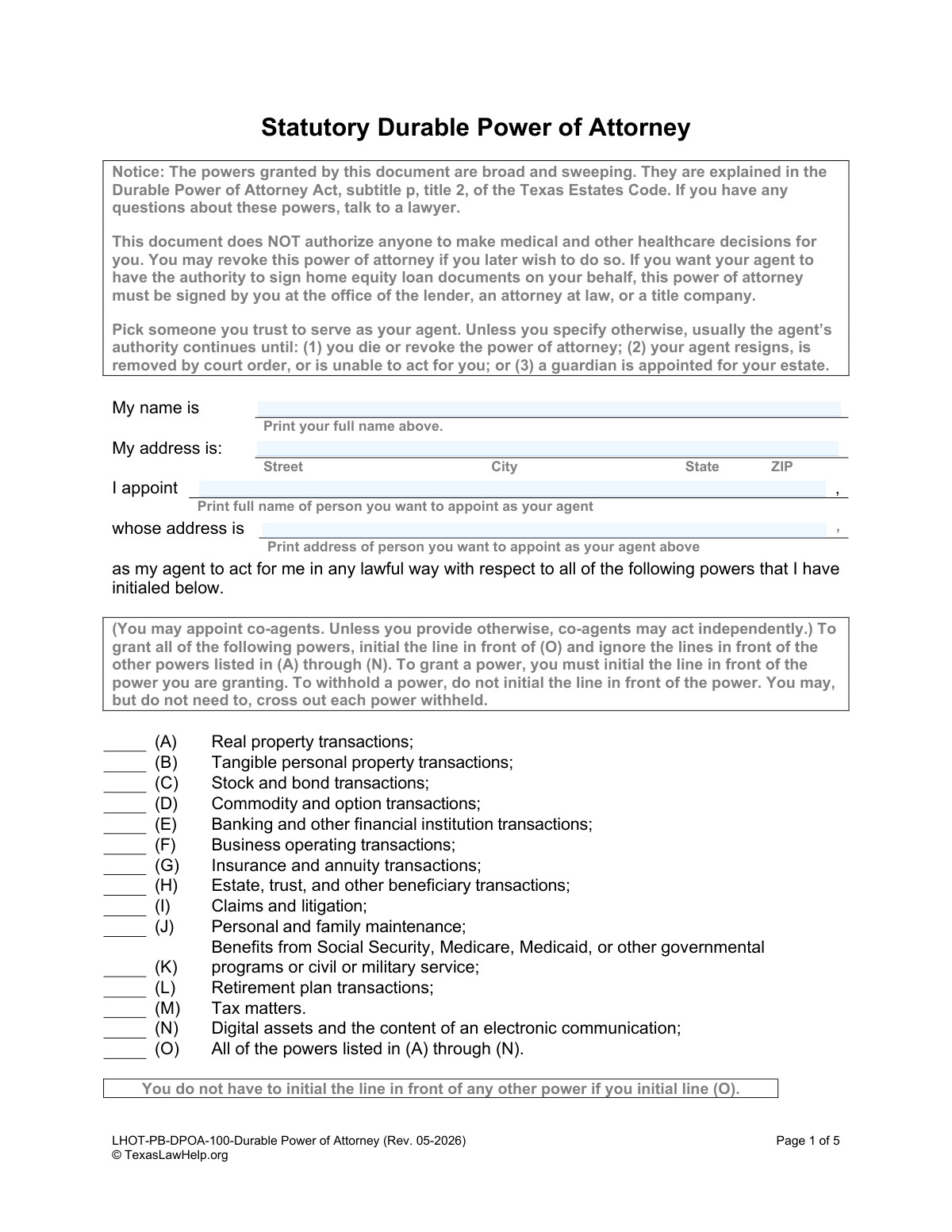
A Texas Statutory Durable Power of Attorney is a crucial legal instrument that allows you to designate an 'agent' to make financial decisions for you if you become unable to do so yourself. This document grants broad powers over property, banking, and other transactions, and it's vital to choose a trustworthy agent and clearly define their authority. It's important because it ensures your financial matters are handled according to your wishes without requiring court intervention. Today, this form can be filled out quickly and accurately using AI-powered services like Instafill.ai, which can also convert non-fillable PDF versions into interactive fillable forms.
LHOT-PB-DPOA-100 is part of the
estate planning forms and power of attorney forms categories on Instafill.
Our AI automatically handles information lookup, data retrieval, formatting, and form filling.
It takes less than a minute to fill out LHOT-PB-DPOA-100 using our AI form filling.
Securely upload your data. Information is encrypted in transit and deleted immediately after the form is filled out.
Form specifications
| Form name: | Texas Statutory Durable Power of Attorney |
| Number of fields: | 47 |
| Number of pages: | 1 |
| Language: | English |
Instafill Demo: How to fill out PDF forms in seconds with AI
How to Fill Out LHOT-PB-DPOA-100 Online for Free in 2026
Are you looking to fill out a LHOT-PB-DPOA-100 form online quickly and accurately? Instafill.ai offers the #1 AI-powered PDF filling software of 2026, allowing you to complete your LHOT-PB-DPOA-100 form in just 37 seconds or less.
Follow these steps to fill out your LHOT-PB-DPOA-100 form online using Instafill.ai:
- 1 Navigate to Instafill.ai and upload the Texas Statutory Durable Power of Attorney form or select it from the template library.
- 2 Enter your full name and address as the 'Principal' in the designated fields.
- 3 Appoint your agent by providing their full name and address. If appointing co-agents, enter their information as well.
- 4 Review the list of powers (A through N) and initial the specific authorities you wish to grant your agent, or initial line (O) to grant all listed powers.
- 5 Complete the 'Special Instructions' section to specify agent compensation, co-agent rules, and gift-giving authority by initialing the appropriate lines.
- 6 Designate when the power of attorney becomes effective, name any successor agents, and then use the platform's tools to securely e-sign the document.
- 7 Download the completed form and have it acknowledged before a Notary Public as required by Texas law to make it legally valid.
Our AI-powered system ensures each field is filled out correctly, reducing errors and saving you time.
Why Choose Instafill.ai for Your Fillable LHOT-PB-DPOA-100 Form?
Speed
Complete your LHOT-PB-DPOA-100 in as little as 37 seconds.
Up-to-Date
Always use the latest 2026 LHOT-PB-DPOA-100 form version.
Cost-effective
No need to hire expensive lawyers.
Accuracy
Our AI performs 10 compliance checks to ensure your form is error-free.
Security
Your personal information is protected with bank-level encryption.
Frequently Asked Questions About Form LHOT-PB-DPOA-100
This is a legal document in Texas that allows you (the principal) to appoint a trusted person (an agent) to manage your financial affairs. It is 'durable,' meaning it remains in effect even if you become incapacitated, unless you specify otherwise.
No, this document is strictly for financial matters. It does not authorize anyone to make medical or other healthcare decisions on your behalf; a separate Medical Power of Attorney is required for that.
The 'principal' is you—the person granting the power. The 'agent' is the person you appoint to act for you in financial matters.
You must initial the line next to each specific power (A-N) you wish to grant. To grant all listed powers, you only need to initial the line for item (O).
Yes, you can appoint co-agents. You must then use the 'Special Instructions' section to specify if they can act independently or if they must act together.
You can choose for it to be effective immediately upon signing or only upon your certified disability or incapacity. You must cross out the alternative you do not want; if you make no choice, it defaults to being effective immediately.
A successor agent is a backup person who can step in if your primary agent dies, resigns, or is otherwise unable to act. It is highly recommended to name at least one successor to ensure continuity.
Yes, for the document to be legally valid, your signature as the principal must be acknowledged before a Notary Public.
You should provide copies to your agent, any successor agents, and your financial institutions (like your bank). Keep the original document in a safe but accessible place.
You decide this in the 'Special Instructions' section. You can choose for your agent to receive reasonable compensation or to only be reimbursed for expenses they incur on your behalf.
Yes, services like Instafill.ai use AI to accurately auto-fill form fields, which saves time and helps prevent errors. However, you should always review the completed form carefully before signing.
You can use a service like Instafill.ai to upload the PDF and fill it out digitally. The platform lets you type directly into the fields, making it easy to complete before you print it for the required signatures and notarization.
If you have a non-fillable or 'flat' PDF, tools like Instafill.ai can convert it into an interactive, fillable form. This allows you to easily type your information into the correct fields online.
Compliance LHOT-PB-DPOA-100
Validation Checks by Instafill.ai
1
Ensures Principal's Full Name is Provided
This check verifies that the 'Principal.Name.Full' field is not empty. The principal is the individual granting the power, so their identity is fundamental to the document's validity. Failure to provide this name renders the entire power of attorney legally meaningless and the form must be rejected.
2
Validates Principal's Full Address
This check verifies that the 'Principal.Address.Full' field contains a complete and parsable address, including street, city, state, and ZIP code. A valid address is required for proper identification of the principal and for legal correspondence. An incomplete or invalid address could lead to challenges in verifying the principal's identity or executing the document.
3
Ensures Primary Agent's Full Name is Provided
This check confirms that the 'DPOAAgent.Name.Full' field is filled out. The agent is the person being granted authority, and their identity must be clearly and unambiguously stated. Without a named agent, the document fails its primary purpose and cannot be processed.
4
Verifies Agent is Not the Same as Principal
This check ensures that the individual named as the agent is not the same person as the principal. An individual cannot legally grant power of attorney to themselves. This is a fundamental logical error that would invalidate the document, requiring immediate correction.
5
Confirms at Least One Power is Granted
This check validates that the principal has initialed at least one of the power options from (A) through (N), or the all-encompassing option (O). A power of attorney document that grants no powers is ineffective and serves no purpose. The submission would be rejected for lacking a core component.
6
Ensures 'All Powers' Grant is Exclusive
This check verifies that if option (O) 'All of the powers' is initialed, none of the individual powers (A) through (N) are also initialed. Initialing both creates ambiguity and contradicts the form's instructions. Such a conflict would require clarification from the principal to ensure their intent is correctly captured.
7
Validates Agent Compensation Instructions for Exclusivity
This check ensures that at most one of the two special instructions for agent compensation has been initialed. Initialing both options (one granting compensation, the other denying it) creates a direct contradiction. The form must be returned for correction to clarify the principal's intent regarding agent payment.
8
Ensures Co-Agent Instructions are Not Contradictory
This validation ensures that if co-agents are appointed, a maximum of one instruction regarding their authority (act independently, jointly, or by majority) is initialed. Selecting multiple options would create conflicting rules for how the agents must operate. This ambiguity must be resolved before the document can be considered valid.
9
Prevents Contradictory Effective Date Selections
This check verifies that both alternatives for the document's effective date, (A) 'effective immediately' and (B) 'effective upon disability', have not been crossed out. Crossing out both options removes the clause that determines when the power of attorney begins, creating critical uncertainty. The document would be flagged for correction to establish a clear effective condition.
10
Ensures Successor Agent Has a Corresponding Address
This check confirms that if a name is entered for a successor agent (e.g., 'DPOAAltAgent.Name.Full'), a corresponding address (e.g., 'DPOAAltAgent.Address.Full') is also provided. The address is essential for locating and contacting the successor agent if the primary agent cannot serve. A missing address makes the successor appointment impractical and requires correction.
11
Verifies All Named Parties are Unique Individuals
This logical check compares the names of the principal, primary agent, and all successor agents to ensure they are all different people. Appointing an individual to be their own successor or appointing the principal as an agent is a logical impossibility that would invalidate those specific appointments. This ensures a clear and workable line of succession.
12
Matches Principal's Printed Name to Initial Entry
This validation compares the principal's name entered at the top of the form ('Principal.Name.Full') with the principal's printed name provided near the signature line. These names must match exactly to ensure the person signing the document is the same person identified as the principal. A mismatch could indicate a mistake or potential fraud, requiring review and correction.
13
Validates Notarization Date is Logical
This check ensures the acknowledgement date in the notary section is a valid, properly formatted date that is not in the future. The notarization confirms the signing event, which cannot have occurred on a future date. An invalid or future date would invalidate the notarization and, consequently, the legal standing of the document.
14
Confirms Notary Acknowledged the Correct Person
This check verifies that the name of the person acknowledged by the notary public matches the principal's name ('Principal.Name.Full'). This is a critical step to confirm that the principal is the one who actually appeared before the notary to sign the document. A discrepancy would invalidate the notarization and require the document to be re-signed and re-notarized.
Common Mistakes in Completing LHOT-PB-DPOA-100
The form requires the user to cross out the option that does not apply for the effective date, which is an unusual action that is easily missed. People often circle their choice, initial it, or leave both options untouched, causing the document to default to being effective immediately. This can grant the agent power before the principal intends. To avoid this, you must carefully read and follow the instruction to physically cross out the single alternative you do not want.
A power of attorney is invalid unless properly notarized, which requires the principal to sign it in the physical presence of the notary. A frequent mistake is signing the document beforehand and then taking it to be notarized, which invalidates the signature and the entire document. This renders the form useless when it is eventually needed. Always wait to sign the form until you are with the notary public who can witness your signature.
Users often get confused when selecting powers, sometimes initialing both option (O) for 'All of the powers' and individual powers (A-N), creating ambiguity. Conversely, a user might forget to initial any powers at all, which fails to grant any authority to the agent. To prevent this, carefully decide which powers to grant and initial only those specific lines, or initial only line (O) if you intend to grant all of them.
Many people focus only on their primary agent and leave the successor agent section completely blank. This is a critical oversight, as there will be no one to legally step in if the primary agent is unable or unwilling to act. This situation can force a family into a costly and lengthy court process to appoint a guardian. Always name at least one, and preferably two, trusted successor agents to ensure continuity of management.
People often provide incomplete information, such as using a nickname instead of a full legal name or omitting a full street address, city, state, and ZIP code. This happens due to haste or not having the information available. Financial institutions and other third parties may reject the document if the names and addresses are not complete and accurate, causing critical delays. AI-powered tools like Instafill.ai can help prevent this by validating address formats and ensuring all required fields are complete.
The form allows for appointing co-agents but requires a separate initialed instruction on whether they can act independently or must act jointly. People often name two agents but forget to initial one of the 'Special Instructions Applicable to Co-Agents' options. This causes the form to default to allowing agents to act independently, which may not be the principal's intent and could lead to conflicting decisions or actions.
The sections for agent compensation and the power to make gifts are easily missed because they are not part of the main list of powers and require a separate initial. If no selection is made for compensation, the agent is entitled to 'reasonable compensation' by default, which may not be what the principal wants. Forgetting to initial the gift clause can hinder important estate planning strategies, as the agent will have no authority to make gifts on the principal's behalf.
In the free-text 'Special Instructions' section, individuals may write directives that are legally vague or directly contradict the powers they initialed elsewhere on the form. For instance, a user might write 'My agent cannot sell my home' after having initialed '(A) Real property transactions.' Such contradictions can lead to legal challenges and render parts of the document unenforceable. It is best to keep instructions simple and clear or consult an attorney for complex provisions.
It may seem obvious, but a surprising number of people complete the entire multi-page document and then forget to provide their signature on page 3. This simple oversight completely invalidates the power of attorney. An unsigned form has no legal effect and will be rejected by any third party. Since this form is a non-fillable PDF, tools like Instafill.ai can convert it into a fillable version with clearly marked signature fields to help prevent such mistakes.
Saved over 80 hours a year
“I was never sure if my IRS forms like W-9 were filled correctly. Now, I can complete the forms accurately without any external help.”
Kevin Martin Green
Your data stays secure with advanced protection from Instafill and our subprocessors

Robust compliance program
Transparent business model
You’re not the product. You always know where your data is and what it is processed for.
ISO 27001, HIPAA, and GDPR
Our subprocesses adhere to multiple compliance standards, including but not limited to ISO 27001, HIPAA, and GDPR.
Security & privacy by design
We consider security and privacy from the initial design phase of any new service or functionality. It’s not an afterthought, it’s built-in, including support for two-factor authentication (2FA) to further protect your account.
Fill out LHOT-PB-DPOA-100 with Instafill.ai
Worried about filling PDFs wrong? Instafill securely fills texas-statutory-durable-power-of-attorney forms, ensuring each field is accurate.